PIVTR-D, full manual
PIVTR-D
A field manual for incident responders.
Incident running now?Start here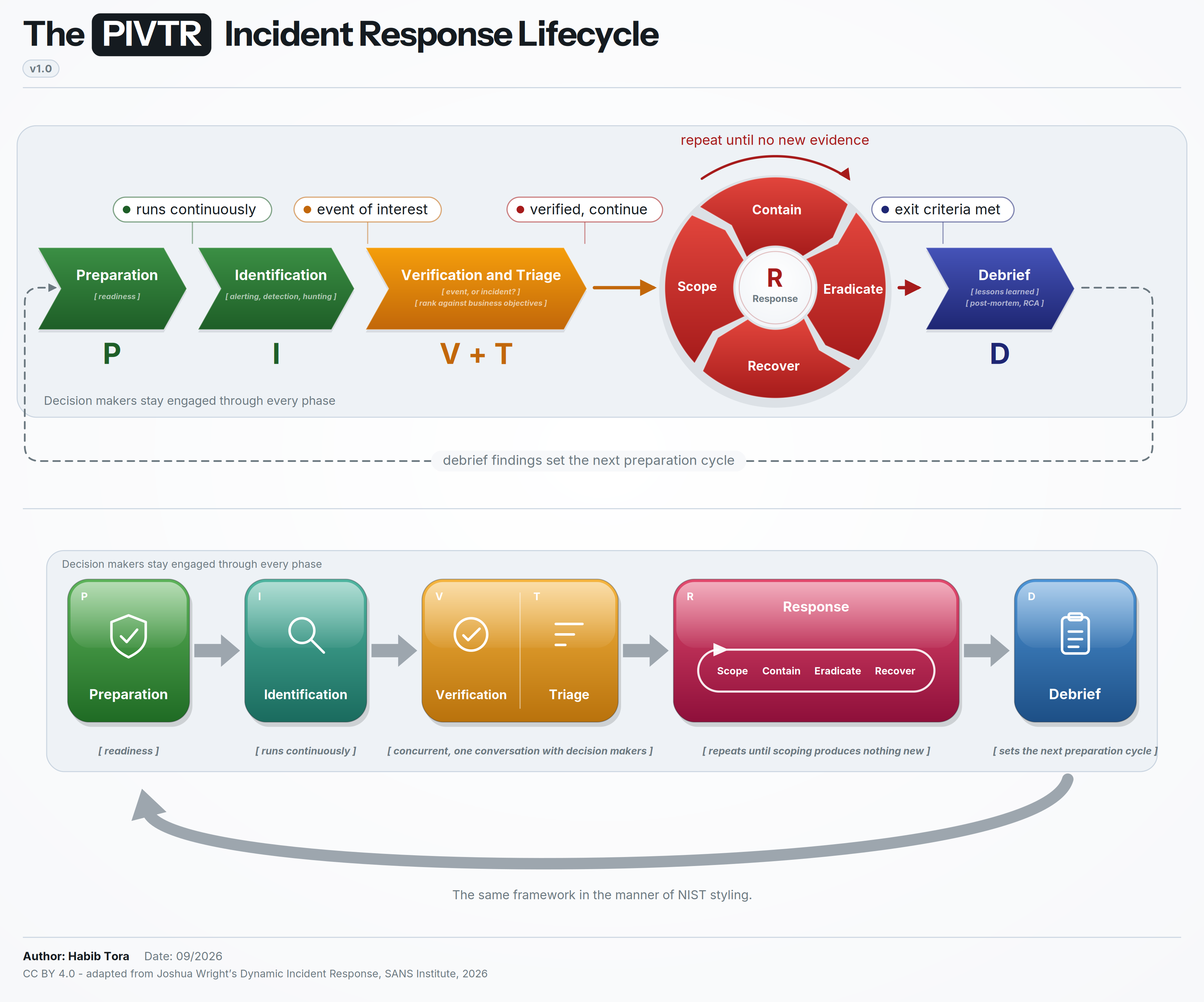
The model and most of the checklists are taken straight from Joshua Wright's updated incident response book and condensed into a short field guide for incident responders. It covers the lifecycle, the decisions that go with it, and the records the after-action review will need.
Find the phase you are in and go to its playbook. Each one says what starts the phase, what finishes it, what record it leaves behind, and what to check along the way. Decide these before the incident lists the decisions that should already have been made, so look there before improvising one at speed. The lifecycle orients anyone who walks onto the bridge halfway through.
Three sets of pages add to the phase playbooks. Scenarios cover what happened, in 13 kinds of incident from ransomware to denial of service. Sectors cover who you are: the reporting clocks, terms and roles of eight sectors: federal civilian agencies, defense, healthcare, financial services, energy and water utilities, transportation, state and local government, and education. Cloud playbooks give the commands for 22 incident types on AWS, Azure, Google Cloud and Oracle Cloud. The 19 record templates, evidence collection and metrics round it out.
PIVTR-D covers what responders do. The companion guide, Incident Command, covers who decides, how the response is organized, and how it runs past the first night.
The source book is free to read and download at dynamicincidentresponse.com, and SANS has its own page for it at sans.org/engage/dynamic-incident-response.
Incident running now
Pick the line that describes you.
The first hour
Items 1 to 4 fall to whoever found the incident. From item 5 the Incident Commander owns the list, which may still be the same person. Log every action with the time in Coordinated Universal Time (UTC) from item 1 onward.
| # | Item | Owner | Done when |
|---|---|---|---|
| 1 | Record what you saw, where and when, in your activity log. | Finder | The observation and its time are written down. |
| 2 | Decide whether this is an incident, using Verification and triage, and open the T1 incident record with an identifier. | Finder | The decision is in T1 with the evidence references, a name and a time. |
| 3 | If it is an incident, open the matching scenario page. Where one applies, open the sector page for your organization, which lists the reporting clocks. | Finder | CLASSIFICATION and SECTOR RULES are filled in T1. |
| 4 | Name an Incident Commander. Until someone else takes over by briefing, it is you. | Finder | The Incident Commander's name is in T1 and announced to the responders. |
| 5 | Move the response to an out-of-band channel if email, chat or identity could be in the attacker's hands. | Incident Commander | Every responder has joined the out-of-band channel. |
| 6 | Check the four triggers in When containment cannot wait: active destruction, exfiltration, safety or critical systems, and a regulatory clock. If one applies, take its approved action now. | Incident Commander | Each trigger is marked yes or no in T1. |
| 7 | Preserve volatile evidence in order: memory, then running processes and network connections, then logs that could rotate or be deleted. The Incident Commander decides for each host whether to collect before or after isolating, as set out in Evidence collection. | Operations | Each item is in the evidence register with a hash and a custodian. |
| 8 | Delay changes the attacker would notice, such as reimaging, bulk password resets and blocking their infrastructure, until a containment posture is chosen. A containment trigger that applies now overrides this. | Incident Commander | The posture is recorded in T3. |
| 9 | Rate the risk level and look up what it triggers in Risk levels. | Incident Commander | The level and the rationale are in T1. |
| 10 | Tell counsel if personal data, regulators, law enforcement, extortion or insurance may be involved. Counsel decides when the insurer and any regulator are told, using the notification deadlines, T13 for the insurer and law enforcement, and T17 for each regulator. | Incident Commander | Counsel has acknowledged, or T1 says why they were not called. |
| 11 | Send the T2 triage brief to the decision makers within the reporting deadline for the risk level, with the time of the next update. | Incident Commander | T2 is sent and the next update time is in the log. |
| 12 | If staff will notice the incident, send the T12 staff notice, and set when each audience gets a T11 status update. | Incident Commander | T12 is sent or the log says why not, and the next T11 time for each audience is in the log. |
With the first hour done, start the scope step of the response loop. If the incident will run past one shift, the Incident Commander grows the organization using Sizing the response.
Quick reference
Every phase on one page.
Each card shows when a phase starts, the work it covers, when it is done, and the record it leaves behind. Scope, contain, eradicate and recover repeat until scoping produces nothing new. Tap a card to open its playbook.
- Starts when
- No incident running. This is the default state
- Core work
- Policy, authority, playbooks, backups, tooling, exercises, hunting
- Done when
- Never closes. Every debrief reopens it with named owners
- Leaves behind
- Authority matrix, playbooks, asset and contact lists
- Starts when
- Telemetry and reports flowing. Runs continuously
- Core work
- Operate detections, work alerts, hunt on a cadence
- Done when
- An event of interest raised with evidence references attached
- Leaves behind
- Alert or hunt finding with evidence references
- Starts when
- An event of interest with evidence references
- Core work
- Confirm it requires a response, rank it against organizational objectives
- Done when
- Continue, stop, or defer, with a name and a time against it
- Leaves behind
- Incident record, triage brief
- Starts when
- Verified incident with at least one indicator
- Core work
- Derive indicators, enterprise hunt, progressive sweep, attack timeline
- Done when
- Systems, accounts, and data enumerated, with visibility gaps named
- Leaves behind
- Scope findings, attack timeline
- Starts when
- Scope clear enough to act, posture chosen, authority in hand
- Core work
- Stop attacker activity, preserve evidence by volatility
- Done when
- Network, process, and log channels all show attacker activity stopped
- Leaves behind
- Containment decision record
- Starts when
- Evidence collected and preserved
- Core work
- Short-form investigation, remove persistence, rotate credentials, patch
- Done when
- Rerunning the enumeration that found the problem comes back clean
- Leaves behind
- Root cause, eradication log
- Starts when
- Eradication verified
- Core work
- Verification checks, validation testing, owner sign-off, restoration
- Done when
- Systems in production under enhanced monitoring, owner sign-off on file
- Leaves behind
- Pre-restoration sign-off, owner acceptance
- Starts when
- Loop exited, technical closure and risk acceptance both signed
- Core work
- Close temporary assets, consolidate records, metrics, after-action review
- Done when
- Improvement plan issued with named owners and milestone dates
- Leaves behind
- Incident report, metrics, improvement register
Templates to have open
- T1. Incident record, opened at verification
- T2. Triage brief to decision makers
- T3. Containment decision record
- T4. Loop iteration log
- T5. Technical closure
- T6. Residual risk acceptance
- T7. Pre-restoration sign-off
- T8. System owner acceptance
- T9. After-action review agenda, 90 minutes
- T10. Executive debrief, one page
- T11. Stakeholder status update
- T12. Internal notice to staff
- T13. Law enforcement and insurer contact
- T14. Improvement register
- T15. Incident report
- T16. Notice to affected individuals or customers
- T17. Regulator notification worksheet
- T18. Interim statement and media inquiry log
- T19. Vendor evidence and preservation request
Settle authority to isolate, acceptance of residual risk, notification clocks and evidence handling in advance, using Decide these before the incident. Command, roles, the planning cycle and shift handover are in the companion Incident Command guide.
The lifecycle
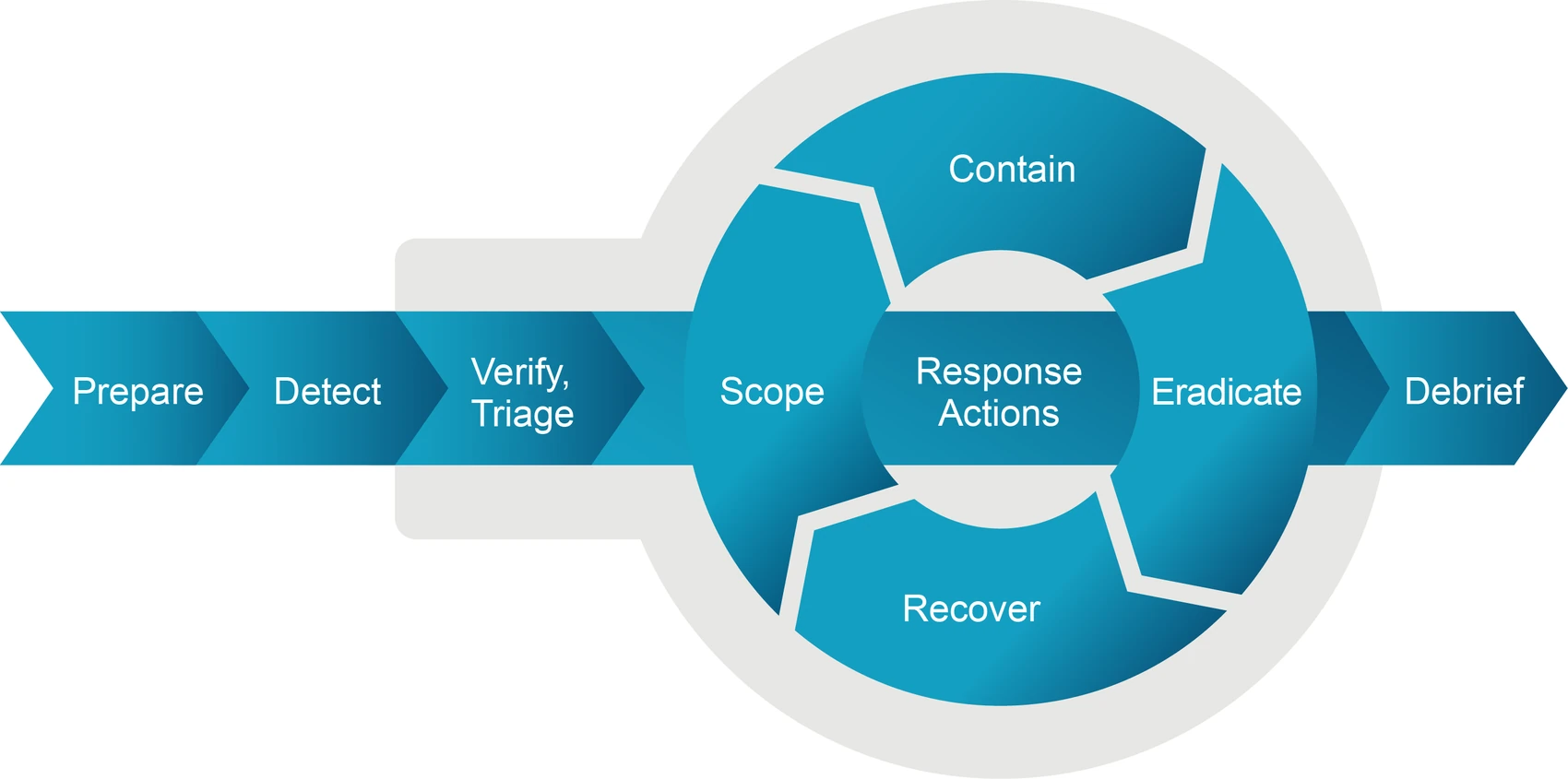
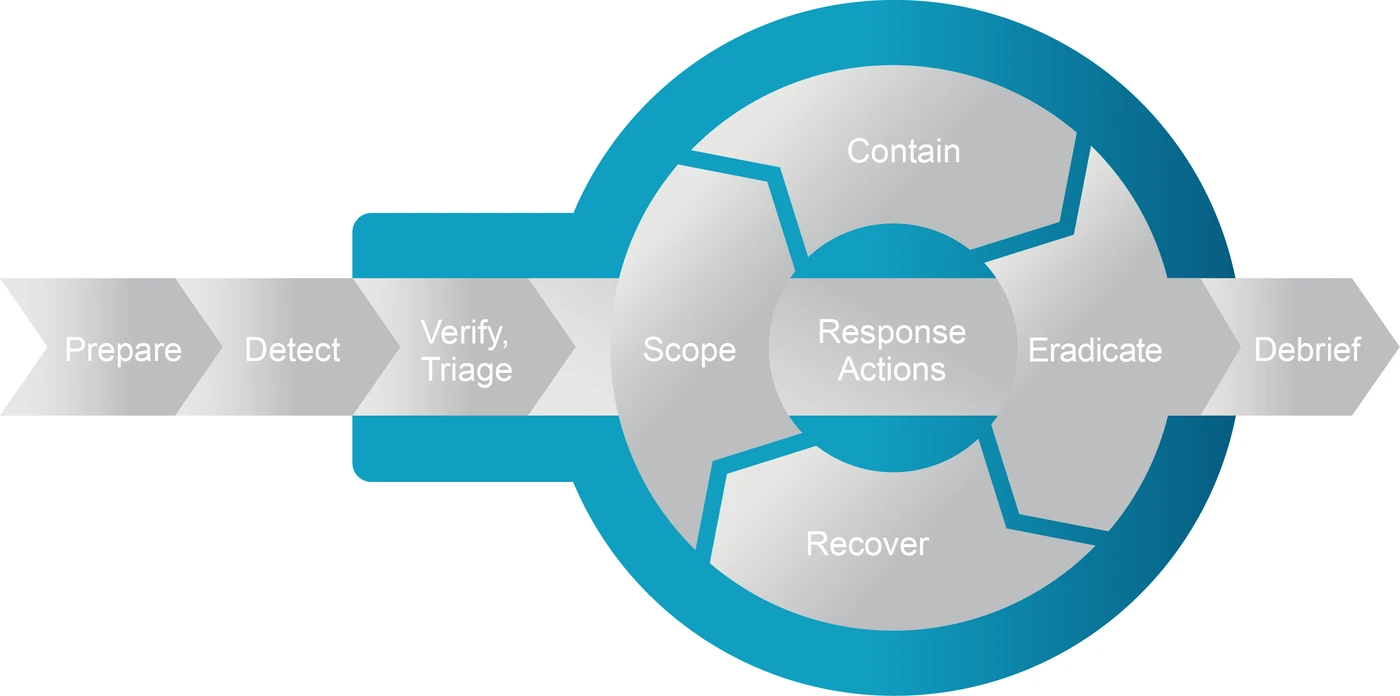
Read it left to right. Scope, contain, eradicate and recover repeat until scoping stops turning up new evidence. Decision makers sit behind the whole sequence, because every gate needs them.
Why the loop is there
Figure 23 draws four activities as steps: isolate and gather evidence under contain, analyze and remove persistence under eradicate, each running once and in order.
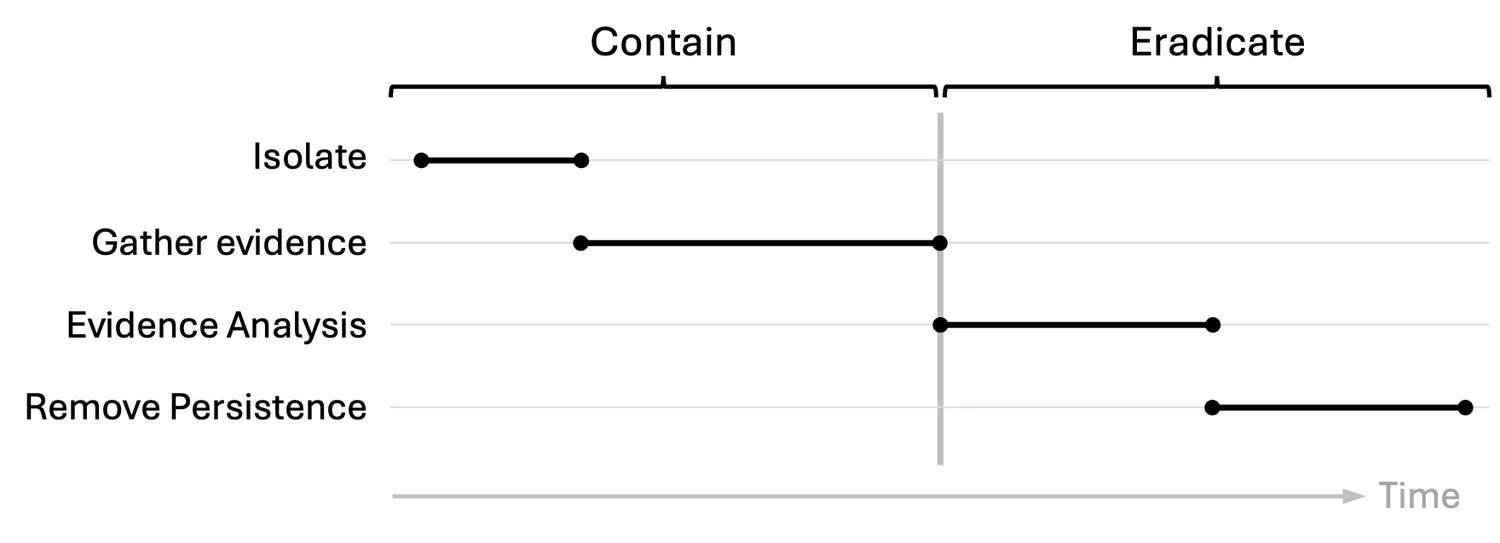
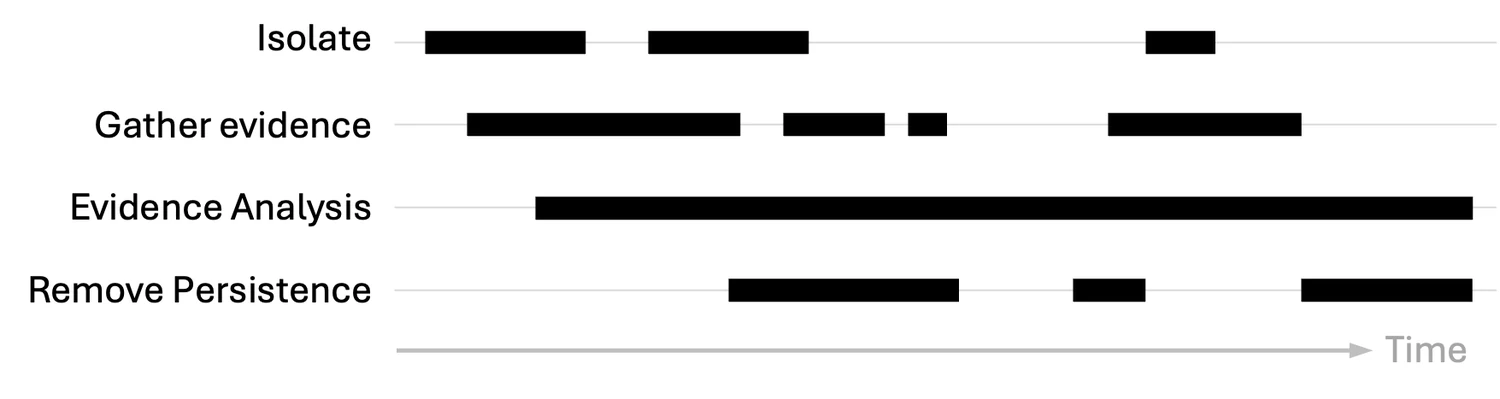
Figure 24 draws the same four as they run in a real incident. Isolation happens three times, evidence gathering starts and stops four times, and analysis runs underneath from early on. Plan for the second picture, because status reporting built on the first contradicts itself once the activities repeat.
Where the model came from
PICERL is the six-step incident handling cycle from SANS: preparation, identification, containment, eradication, recovery, lessons learned. PIVTR-D keeps all six.
PICERL leaves verification, triage and scope implicit. They happen in every incident whether or not a model names them. PIVTR-D names them so each gets a gate and an owner, which makes them harder to skip under pressure.
Scope, contain, eradicate and recover share the R because they repeat. Giving each its own letter would imply they run once each, in order, and Figure 24 shows they repeat.
| Letter | Phase | What it covers | In PICERL |
|---|---|---|---|
| P | Preparation | Readiness, authority, tooling, exercises, hunting | Preparation |
| I | Identification | Alerting, detection and hunting, all running continuously | Identification |
| V | Verification | Establish that the event is an incident requiring a response | Named here. Left implicit. |
| T | Triage | Prioritize the incident against organizational objectives | Named here. Left implicit. |
| R | Response | Scope, contain, eradicate and recover, repeating until scoping produces nothing new | Containment, Eradication, Recovery, plus scope named here |
| D | Debrief | Close the incident and convert it into changes | Lessons Learned |
Verification and triage run together because both need the same conversation with decision makers. The hyphen marks where the incident ends and the closeout begins, and it stops the letters from being read as a word.
Start, work, finish, record
| Activity | Starts when | Core work | Done when | Record produced |
|---|---|---|---|---|
| P. Preparation | No incident running. This is the default state | Policy, authority, playbooks, backups, tooling, exercises, hunting | Never closes. Every debrief reopens it with named owners | Authority matrix, playbooks, asset and contact lists |
| I. Identification | Telemetry and reports flowing. Runs continuously | Operate detections, work alerts, hunt on a cadence | An event of interest raised with evidence references attached | Alert or hunt finding with evidence references |
| V, T. Verification and triage | An event of interest with evidence references | Confirm it requires a response, rank it against organizational objectives | Continue, stop, or defer, with a name and a time against it | Incident record, triage brief |
| R. Response (scope) | Verified incident with at least one indicator | Derive indicators, enterprise hunt, progressive sweep, attack timeline | Systems, accounts, and data enumerated, with visibility gaps named | Scope findings, attack timeline |
| R. Response (contain) | Scope clear enough to act, posture chosen, authority in hand | Stop attacker activity, preserve evidence by volatility | Network, process, and log channels all show attacker activity stopped | Containment decision record |
| R. Response (eradicate) | Evidence collected and preserved | Short-form investigation, remove persistence, rotate credentials, patch | Rerunning the enumeration that found the problem comes back clean | Root cause, eradication log |
| R. Response (recover) | Eradication verified | Verification checks, validation testing, owner sign-off, restoration | Systems in production under enhanced monitoring, owner sign-off on file | Pre-restoration sign-off, owner acceptance |
| D. Debrief | Loop exited, technical closure and risk acceptance both signed | Close temporary assets, consolidate records, metrics, after-action review | Improvement plan issued with named owners and milestone dates | Incident report, metrics, improvement register |
Decide these before the incident
Settle these in advance and refer to them during the response. Working out who can authorize taking production offline while the file shares are encrypting costs minutes that containment needs.
Who authorizes what
Adapted from Table 8, pp. 97 to 98. The isolation, shutdown and ransom rows are mine. The role names and containment tiers are placeholders. Replace them with yours before anyone relies on this. The roles are described in The organization.
| Decision | Authority | Delegate | Record required |
|---|---|---|---|
| Declare an incident | Anyone on duty; the Incident Commander confirms or changes it within 15 minutes | Senior analyst on duty | Incident record (T1) with declaration time and rationale |
| Isolate an endpoint | SOC or IR analyst | None needed | Containment decision record (T3) |
| Isolate a server or service | Service owner with Incident Commander | Incident Commander alone if the owner is unreachable inside the response window | Containment decision record (T3) with impact assessment |
| Shut down production, or anything touching regulated services | Named executive | CISO after hours, ratified next business day | Containment decision record (T3) plus executive approval |
| Expand scope to other business units | Incident Commander, CISO notified | None | Scope expansion entry with the trigger |
| Exit the loop, technical closure | Incident Commander on eradication validation | Senior analyst with written approval | Signed technical closure record (T5) |
| Accept residual risk | CISO or named risk owner | Board-level executive for significant incidents | Signed risk acceptance naming the risks (T6) |
| Notify a regulator | Legal counsel with the CISO | General counsel | Decision log with timeline and regulator named (T17) |
| Speak to media or the public | Public Information Officer (Communications Lead) with legal sign-off | CEO for material incidents | Approved statement under version control (T18) |
| Pay a ransom | Written position agreed in advance, then named executive with counsel | None | Decision log naming counsel and carrier consulted |
When containment cannot wait
Table 17, p. 227. Map each trigger to an approved action during preparation.
| Trigger | Indicators | Approved action |
|---|---|---|
| Active destruction | Encryption spreading across shares, event logs wiped, database tables dropped | Isolate immediately |
| Exfiltration | Large transfers to cloud storage, bulk queries against personal data, archives sent to external sites | Contain urgently to cap exposure |
| Safety or critical systems | ICS, medical devices, payment processing, other safety-critical infrastructure | Act immediately to prevent operational disruption or physical harm |
| Regulatory clock | Data or services under HIPAA, PCI DSS, GDPR, NIS2, DORA, CRA, or a local equivalent | Contain rapidly to limit affected records |
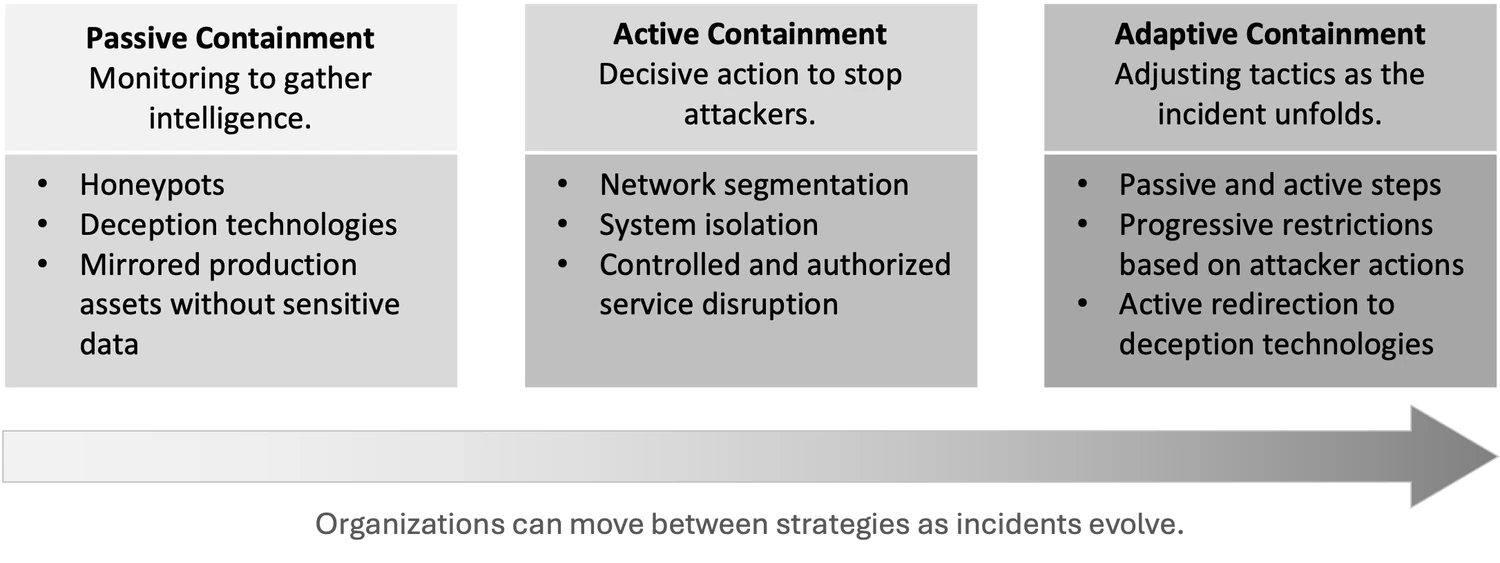
Which containment posture
Table 16, p. 223. The chapter's step-by-step reference adds a fourth posture, deceptive containment, which uses honeypots or decoy systems.
| Situation | Posture |
|---|---|
| Destruction or ransomware underway | Active, required |
| Regulated data with a compliance clock | Active, required |
| Safety-critical or high-availability system at risk | Active, required |
| Attacker shows awareness of defenders | Active, strongly favored |
| Short dwell time, limited monitoring maturity | Active, strongly favored |
| Extended dwell time, mature monitoring | Adaptive, strongly favored |
| Unknown scope, uncertain sophistication | Adaptive, preferred |
| Commodity malware on a low-value asset | Passive, possible |
| Controlled deception environment | Passive, possible |
Risk levels and what they trigger
Levels from p. 171. The trigger column is mine, and the thresholds should be yours.
| Level | Meaning | What it triggers |
|---|---|---|
| Low | Minor anomaly, minimal impact | Analyst handles it, logged, first report within 2 days |
| Medium | Worth investigating, operations unaffected | Incident Commander informed, first report within 4 hours, then daily updates |
| High | Confirmed incident affecting operations or data integrity | Team activated, the on-call Incident Commander takes command, decision makers briefed within 2 hours, then hourly executive updates until mitigated, then every 4 hours |
| Critical | Major incident requiring executive escalation and immediate containment | Containment authority granted, counsel engaged, first executive report within 1 hour, then every 30 minutes until mitigated, then every 2 hours |
Severity, reporting deadlines and incident type
The companion guide, Incident Command, sizes the organization by NIMS complexity type. This table links the two.
Every incident gets two ratings. Severity measures impact, and sets how fast and how high the incident is reported. Complexity type measures how hard the incident is to manage, and sets how large the organization is. A single stolen laptop full of patient records can be high severity and Type 5, and a noisy but harmless worm across three data centers can be low severity and Type 3.
| PIVTR-D risk level | Severity | First report | Full report | Usual starting type |
|---|---|---|---|---|
| Low | SEV 4 | Within 2 days | Within 5 business days | 5 |
| Medium | SEV 3 | Within 4 hours | Within 72 hours | 5 or 4 |
| High | SEV 2 | Within 2 hours | Within 48 hours | 4 or 3 |
| Critical | SEV 1 | Within 1 hour | Within 24 hours | 3, 2 or 1 |
The reporting deadlines are Wright's sample SLA, Table 5, p. 84. The severity labels and starting types are placeholders. Replace them with your own and publish the result once, in writing.
Choosing the type
Start at Type 5 and move up to the highest row that is true. Re-check at every operational period, because the type can go down as well as up.
| If this is true | The type is at least |
|---|---|
| One or two people can close it within the first operational period | 5 |
| It needs several people or teams, but should close within one operational period | 4 |
| It will run past one operational period | 3 |
| A supervisor would have more than seven people reporting | 3 |
| It needs people or tools beyond what the organization has, such as an outside response firm | 2 |
| It disrupts critical infrastructure or needs coordination with government at a national level | 1 |
Rows follow the NIMS complexity type descriptions in FEMA's IS-200 course.
Notification deadlines
The sector pages list the full obligations, triggers and report contents for federal agencies, defense contractors, healthcare, financial services, energy and water utilities, transportation, state and local government, and education. This table is the summary.
A starter list of common notification deadlines, checked in October and November 2026. Rules change and each depends on facts only counsel can weigh, so counsel confirms which apply before anyone relies on this. Record who decides that each clock has started, because that decision is what starts it.
| Regime | Who tells whom | Deadline | Clock starts | Then |
|---|---|---|---|---|
| Banking agencies' incident notification rule (12 CFR Part 53, 225 Subpart N, 304 Subpart C) | Bank or bank holding company to its primary federal regulator: OCC, Federal Reserve or FDIC | As soon as possible, and within 36 hours | The bank determines that a notification incident occurred | Bank service providers tell each affected bank as soon as possible after determining that an incident has materially disrupted or degraded, or is reasonably likely to, covered services for 4 hours or more |
| NCUA, 12 CFR 748.1(c) | Federally insured credit union to NCUA | As soon as possible, and within 72 hours | Reasonably believing a reportable cyber incident occurred, or notice of one from a third party | No sensitive PII or indicators of compromise in the first report |
| SEC Form 8-K, Item 1.05 | US public company to the SEC | 4 business days | The company determines the incident is material, which it must do without unreasonable delay after discovery | An amended 8-K within 4 business days after information missing from the first filing is determined or becomes available |
| SEC Regulation S-P | Broker-dealer, funding portal, investment company, SEC-registered investment adviser or transfer agent to each individual whose sensitive customer information was, or is reasonably likely to have been, accessed or used without authorization | As soon as practicable, and within 30 days | Becoming aware that unauthorized access to or use of customer information occurred or is reasonably likely to have occurred | Service providers must tell the firm within 72 hours. Compliance dates were December 3, 2025 for larger entities and June 3, 2026 for smaller ones |
| GDPR, Articles 33 and 34 | Controller to the supervisory authority, and to data subjects when the risk to them is high | 72 hours to the authority, where feasible. Without undue delay to data subjects | Becoming aware of the breach | Information can follow in phases. A late notice gives the reasons for the delay |
| NIS2, Article 23 | Essential or important entity to its CSIRT or competent authority | 24-hour early warning, 72-hour notification | Becoming aware of a significant incident | Final report 1 month after the notification |
| DORA, Article 19, and Delegated Regulation (EU) 2025/301 | EU financial entity to its competent authority | 4 hours after classifying the incident as major, and within 24 hours of becoming aware | Classification as a major ICT-related incident | Intermediate report within 72 hours of the initial notification, final report within 1 month of the latest intermediate report |
| Cyber Resilience Act, Article 14 | Manufacturer of a product with digital elements, through ENISA's single reporting platform, to its coordinating CSIRT and ENISA | 24-hour early warning, 72-hour notification | Becoming aware of an actively exploited vulnerability or a severe incident. Applies from September 11, 2026 | Final report 14 days after a corrective or mitigating measure is available for a vulnerability, or 1 month after the notification for an incident |
| NYDFS Part 500.17 | Covered entity to the Superintendent | 72 hours. 24 hours after any extortion payment | Determining that a cybersecurity incident occurred at the covered entity, an affiliate or a third-party service provider | Written explanation of an extortion payment within 30 days: why it was necessary, the alternatives considered and the diligence performed |
| HIPAA Breach Notification Rule | Covered entity to individuals, HHS and, for more than 500 residents of a state or jurisdiction, the media | Without unreasonable delay, and within 60 calendar days | Discovery of the breach | Breaches of 500 or more go to HHS at the same time as the individual notices. Breaches of fewer than 500 go to HHS within 60 days after the end of the calendar year of discovery. Business associates tell the covered entity within the same 60-day limit |
| FTC Health Breach Notification Rule, 16 CFR 318 | Vendor of personal health records or related entity not covered by HIPAA to individuals, the FTC and, for 500 or more residents of one state, the media | Without unreasonable delay, and within 60 calendar days | Discovery of a breach of security, which includes an unauthorized disclosure | The FTC at the same time as individuals for 500 or more; within 60 days after the end of the calendar year for fewer |
| DFARS 252.204-7012 | Defense contractor to DoD, through dibnet.dod.mil | 72 hours | Discovery of the incident | Keep images and packet captures at least 90 days after the report |
| CISA Federal Incident Notification Guidelines and OMB M-25-04 | Federal civilian agency to CISA, and for a major incident to CISA, OMB, its Inspector General and Congress | 1 hour to CISA. 1 hour to CISA and OMB after a major incident determination. 7 days to Congress and the Inspector General | Identification by the agency's top-level SOC, CSIRT or IT department. For Congress, a reasonable basis to conclude a major incident occurred | Updates as facts arrive. A breach that is a major incident needs a report to Congress within 30 days of discovery |
| NISPOM, 32 CFR 117.8(f) | Cleared defense contractor to DCSA | Immediately | A cyber incident on a classified information system DCSA approved | Report the technique, a malware sample if isolated, and DoD program information potentially compromised |
| FCC CPNI breach rule, 47 CFR 64.2011 | Telecommunications carrier to the Secret Service and FBI, through the FCC's central reporting facility | As soon as practicable, and within 7 business days | Reasonably determining that a breach of customer proprietary network information (CPNI) occurred | Customers after the law enforcement notice, once 7 full business days have passed unless an exception applies. The 2024 amendments add the FCC, a 30-day customer deadline and a harm-based exception. The eCFR text, current to October 23, 2026, does not include them and links to them as a pending amendment, and this page found no FCC notice of an effective date. On July 31, 2026, the Sixth Circuit granted rehearing en banc and vacated the August 2025 panel decision that upheld them. The full court heard argument on October 21, 2026, and no en banc opinion had been published by November 10, 2026 |
| TSA security directives | Freight rail, passenger rail, transit and pipeline owners and operators to CISA | Rail and transit: as soon as practicable, and within 72 hours. Pipeline: as soon as practicable, and within 24 hours | Identifying a reportable cybersecurity incident | TSA states the 72-hour rail and transit rule in its September 1, 2026 notice; the 24-hour pipeline rule dates from Pipeline-2021-01B. TSA reissues the directives each year. Confirm against the current version on the TSA security directives page |
| CIRCIA | Covered critical infrastructure entity to CISA | 72 hours, and 24 hours after a ransom payment | Reasonably believing a covered incident occurred | Not in force until CISA publishes the final rule. CISA sent it to OMB for review on October 1, 2026, and this page found no publication by November 2, 2026. Reporting starts only after the final rule takes effect. Check CISA for its status |
| NERC CIP-008-6, Requirement R4 | Electric Responsible Entity with high or medium impact BES Cyber Systems to the E-ISAC and CISA | 1 hour for a Reportable Cyber Security Incident. By the end of the next calendar day for an attempt to compromise | The entity determines, under its own process, that the incident is reportable or was an attempt to compromise | Updates within 7 calendar days of each new or changed attribute: functional impact, attack vector, level of intrusion. CIP-008-7.1, approved by FERC Order No. 919 on March 19, 2026, takes effect July 1, 2028, or earlier for an entity that adopts it early |
| Form DOE-417, Electric Emergency Incident and Disturbance Report | Balancing authorities, reliability coordinators, electric utilities and some generating entities to DOE | 1 hour for criteria 1 to 9, including a Reportable Cyber Security Incident or a cyber event that interrupts electrical system operations. 6 hours for criteria 10 to 13 | The incident | Final report within 72 hours of the incident. An attempted compromise (criterion 14) is due by the end of the next calendar day after determination. Shared with E-ISAC and CISA through line W, the form can satisfy CIP-008 |
| NRC, 10 CFR 73.77 | Nuclear power plant licensee to the NRC Headquarters Operations Center by telephone | 1 hour after discovery of a cyber attack that adversely impacted safety, security or emergency preparedness functions. 4 hours if it could have. 8 hours for signs of pre-attack planning | Discovery of the cyber attack, or receipt of the information | Record in the corrective action program within 24 hours. Written follow-up on NRC Form 366 within 60 days of the telephone notice for the 1-hour and most 4-hour events |
| Coast Guard MTS cyber rule (33 CFR 101.620(b), 101.650(g)) | Owner or operator of an MTSA vessel, facility or outer continental shelf facility to the National Response Center (NRC) | Without delay | A reportable cyber incident: one that leads, or could reasonably lead, to substantial loss of confidentiality, integrity or availability of a covered system, or to a transportation security incident | In force since July 16, 2025. The duty applies to entities that have not reported to the Coast Guard under 33 CFR 6.16-1 or are not subject to it. Under 33 CFR 6.16-1, evidence of an actual or threatened cyber incident at any vessel, harbor, port or waterfront facility goes immediately to the FBI, CISA and the Captain of the Port. NVIC 02-24 Change 1 says an NRC report reaches the Captain of the Port and the FBI, and CISA needs its own report |
| New York General Municipal Law Article 19-c | Municipal corporation, including a school district or BOCES, or public authority to the Division of Homeland Security and Emergency Services (DHSES) | 72 hours. 24 hours after a ransom payment | Reasonably believing that a cybersecurity incident occurred (995-b). For the 24-hour notice, the ransom payment (995-c) | Written explanation within 30 days of a ransom payment (995-c): why payment was necessary, the amount, how it was paid, alternatives considered, and diligence on alternatives and on compliance with state and federal rules, including OFAC's. Reports are exempt from FOIL under General Municipal Law 995-b(3) |
| FBI CJIS Security Policy v6.1, IR-6 | Staff to the agency's incident response capability. The agency reports incident information to its incident handlers, to the CJIS Systems Officer, SIB Chief or Interface Agency Official, and to the FBI CJIS ISO | 1 hour | Discovery of a suspected incident affecting criminal justice information | IR-6 in v6.1 (June 25, 2026) says "immediately but not to exceed one (1) hour after discovery". Local agencies follow their CJIS Systems Agency's form |
| IRS Publication 1075 | Agency receiving federal tax information to TIGTA and the IRS Office of Safeguards | Immediately, and within 24 hours | Identifying a possible issue involving FTI | Do not wait for an internal investigation. Tell Safeguards before notifying taxpayers and share media releases first. A 2026 draft revision is pending |
| Federal Student Aid breach report (SAIG enrollment agreement, GENERAL-24-46) | Title IV institution, through its Destination Point Administrator or GLBA Qualified Individual, to Federal Student Aid on the Cybersecurity Breach Intake Form | 24 hours | The incident is known or identified | Other SAIG organizations, such as servicers, email support@fps.ed.gov. The form asks whether the breach is suspected or known |
| FTC Safeguards Rule, 16 CFR 314.4(j) | Financial institution under FTC jurisdiction to the FTC, on its online form | As soon as possible, and within 30 days | Discovery of unauthorized acquisition of unencrypted customer information of 500 or more consumers | Unauthorized access is presumed acquisition without reliable evidence otherwise. A law enforcement request can delay FTC public disclosure up to 30 days, then up to 60 more. Title IV institutions agree in their Program Participation Agreement to follow the Safeguards Rule |
| US state breach laws | Organization to affected residents, and often the state attorney general | Varies. California, Colorado, Florida and Washington set 30 days | Discovery of the breach, in most states | Attorney general thresholds vary, often at 500 residents |
| Cyber insurance policy | Insured to the carrier | The policy's notice clause | Usually discovery | Panel vendors may be required. Read the policy before an incident |
Sources checked November 2026 for the energy, maritime, state and local government and education rows: FERC letter order approving CIP-008-6 (84 FR, June 26, 2019); FERC Order No. 919 for the July 1, 2028 date; Form DOE-417 and instructions (OMB 1901-0288); eCFR 10 CFR 73.77; Coast Guard final rule, 90 FR 6298 (January 17, 2025) and NVIC 02-24 Change 1; New York DHSES reporting page and General Municipal Law 995-b and 995-c; FBI CJIS Security Policy v6.1 (June 25, 2026), control IR-6, at le.fbi.gov, and California DOJ bulletin 2026-ISRS-001; IRS reporting page for Publication 1075; FSA GENERAL-24-46 and the SAIG agreement form (OMB 1845-0002); 16 CFR 314.4(j) (FR Doc. 2023-24412). Also checked November 2026: eCFR 47 CFR 64.2011, current to October 23, 2026, and the Sixth Circuit docket for Ohio Telecom Ass'n v. FCC, No. 24-3133, on CourtListener, which records the en banc argument on October 21, 2026. Sources checked October 2026: DFARS 252.204-7012 (May 2024) at acquisition.gov; eCFR 32 CFR 117.8; CISA Federal Incident Notification Guidelines; California Civil Code 1798.82(a)(2), Colorado's attorney general data protection page, Florida Statutes 501.171 and Washington RCW 19.255.010; eCFR 12 CFR Part 53, 12 CFR 748.1, 17 CFR 248.30, 45 CFR Part 164 Subpart D and 16 CFR Part 318; the SEC's Regulation S-P compliance guide and Item 1.05 compliance guide; GDPR Article 33; NIS2 Article 23; Delegated Regulation (EU) 2025/301, Article 5; ENISA, The CRA Single Reporting Platform is launched, September 11, 2026; 23 NYCRR 500.17; OMB M-25-04; 47 CFR 64.2011 (October 1, 2025 edition) and 89 FR 9968; the Sixth Circuit's en banc order in Ohio Telecom Ass'n v. FCC, July 31, 2026, which Public Citizen reports vacated the panel decision; the current 47 CFR 64.2011 text at LII; TSA's September 1, 2026 notice and January 17, 2025 ratification of the pipeline directives; CISA's CIRCIA page, and Covington's report of the OMB submission (October 8, 2026), and Paubox, Cyber incident reporting rule reaches final White House review (October 14, 2026).
Phase playbooks
Each phase has its own page, and every page runs in the same order. The gates say when the phase starts, when it is done, and the record it leaves behind. The checklists come next, then the decisions and records, then Watch out. Background, reference tables and worked examples follow.
Every checklist has a copy button that turns it into a Markdown task list for a ticket, with the owner beside each item.
Owners in the playbooks are the positions from the companion Incident Command guide. In a small incident one person has several of them, and the Incident Commander takes any position nobody else has. Owners in the preparation playbook are program roles. Replace them with names.
Where a scenario page matches the incident, work it beside the playbook. Where a sector page matches the organization, add its reporting clocks.
Preparation
Most of the team's hours belong here. Preparation is hardest to fund when it works, because nothing has gone wrong.
Make the case with measurements: time to detect, how fast the last drill contained, what the last tabletop exposed. The owners below are program roles. Replace them with names.
Organization
| # | Item | Owner |
|---|---|---|
| 1 | Write the policy that sets the mission, the priorities and when management is called in | CISO |
| 2 | Write the organization's position on paying a ransom and on communicating with attackers | CISO |
| 3 | Fill in and sign the authority matrix, including the containment tiers | CISO |
| 4 | Set recovery time objectives (RTO) and recovery point objectives (RPO) for each critical system | IT operations |
| 5 | Write the evidence retention and chain of custody procedures | IR lead |
| 6 | List the critical assets and set risk tolerance thresholds for all four risk levels | Risk management |
| 7 | Document the classification matrix and review it every year | IR lead |
| 8 | Set up primary and backup communication channels, secure them and test them | IR lead |
| 9 | Build the contact list: internal teams, law enforcement, regulators, insurer, retainer providers and cloud security contacts. Review it every quarter. | IR lead |
| 10 | Set reporting deadlines and distribution lists for each audience, using the templates | IR lead |
| 11 | Set notification triggers, the approval workflow and named spokespersons | Communications |
| 12 | Document the regulatory notification requirements for every applicable regime, starting from Notification deadlines | Legal |
| 13 | Publish security.txt as RFC 9116 describes, and route what it attracts to a named team | Security operations |
| 14 | Select and configure the incident tracking platform, and train the team on it | IR lead |
| 15 | Read the cyber insurance policy as a team, and store it offline with the carrier contacts, claims number and policy number | Legal |
| 16 | Negotiate your preferred responders onto the carrier's approved panel | Legal |
| 17 | Identify independent counsel, separate from the carrier's breach coach | Legal |
| 18 | Run awareness training with clear reporting channels and simulated phishing | Security awareness |
Team
| # | Item | Owner |
|---|---|---|
| 19 | Train the team on technical skills and on the skills that get skipped: documentation, decisions under pressure, negotiation | IR lead |
| 20 | Make backups immutable or air-gapped, with separate authentication and integrity monitoring | IT operations |
| 21 | Test restores against the RTO and RPO | IT operations |
| 22 | Agree who is responsible, accountable, consulted and informed (RACI) with IT operations, the security operations center (SOC), help desk, legal, HR, communications and business units | IR lead |
| 23 | Write playbooks for the incident types most likely to reach you, and update each one after every use | IR lead |
| 24 | Build and test forensic workstations, including cloud workstations where the estate is mostly cloud | IR lead |
| 25 | Provision evidence storage with enough capacity, test the collection tools and pack the jump bag | IR lead |
| 26 | Keep break-glass accounts in a vault or on hardware tokens, alert on their use, and test them | IT operations |
| 27 | Pre-authorize access where possible, and document the vendor and cloud support procedures | IR lead |
| 28 | Schedule exercises: monthly tabletop, quarterly technical drill, annual full-scale. A ready-to-run tabletop is in Incident Command. | IR lead |
Prevention and detection
| # | Item | Owner |
|---|---|---|
| 29 | Collect threat intelligence from commercial, Information Sharing and Analysis Center (ISAC), government and open sources, and turn it into detections using STIX 2.1 (Structured Threat Information Expression) | Threat intelligence |
| 30 | Patch by risk, with defined timelines and exception handling for systems that cannot be patched | Vulnerability management |
| 31 | Keep a software inventory with versions, software bill of materials (SBOM) data and end-of-life dates, and find shadow IT through billing reviews | IT operations |
| 32 | Apply hardening baselines from Center for Internet Security (CIS) Benchmarks or Defense Information Systems Agency Security Technical Implementation Guides (DISA STIGs), automate them in code, and monitor drift as a compromise indicator | IT operations |
| 33 | Deploy endpoint detection and response (EDR) on servers, workstations and cloud instances, tune it, and enable isolation and collection | Security operations |
| 34 | Add telemetry where EDR coverage is thin, and validate it with adversary simulation | Detection engineering |
| 35 | Monitor the network at egress and at segment boundaries, for north-south and east-west traffic | Security operations |
| 36 | Map detection rules to MITRE ATT&CK techniques, test them by simulation, track coverage and retire stale rules | Detection engineering |
| 37 | Run a hunting program with a hypothesis catalog, target data sources, a cadence per hypothesis, an audit table of runs, and findings promoted into rules | Threat hunting |
| 38 | Keep an asset inventory covering hardware, software, data, cloud and third-party connections, with offline copies | IT operations |
| 39 | Reconcile attack surface monitoring against the internal inventory | Vulnerability management |
| 40 | Prioritize remediation on Common Vulnerability Scoring System (CVSS) severity together with Exploit Prediction Scoring System (EPSS) probability, asset criticality, exposure and active exploitation intelligence | Vulnerability management |
Decisions and records
- Decide authority to isolate, containment tiers, risk levels, notification clocks and evidence handling in Decide these before the incident.
- Keep the signed authority matrix, the critical asset list and the contact list where responders can reach them offline.
- Add the preparation each scenario page lists for its incident type, such as offline backups for ransomware and HR agreements for insider cases.
- Count a capability only if people use it. An intelligence feed nobody queries, a console nobody opens, and a playbook last edited by someone who has left will not help when the incident starts.
Identification
Identification covers alerting, detection and hunting. It never stops. For a single event it ends when someone raises the event with evidence references and hands it to verification.
Reports also arrive from outside the organization. Log them, check who sent them, and check the claim before you share anything.
Incidents reported from outside
Intake
| # | Item | Owner |
|---|---|---|
| 1 | Log the report on arrival: time, channel, the reporter's contact details, and the original message with headers or the caller's exact words | Operations |
| 2 | Check the reporter's identity and authority before you share anything with them | Liaison |
| 3 | Limit the first reply to receipt, a reference number, and who will follow up by when | Liaison |
| 4 | For law enforcement, leak-site and customer reports, tell the Legal advisor before the call back | Legal advisor |
| 5 | Keep files and samples the reporter sends as received, hash them and enter them in the evidence register | Intelligence/Investigations |
| 6 | Check the claim against internal telemetry for the systems and times given | Intelligence/Investigations |
| 7 | Carry the report into T1 at verification, with REPORTED and REPORT SOURCE filled in | Operations |
First-call questions
| # | Item | Owner |
|---|---|---|
| 1 | Ask who they are, their organization, and how to reach them | Liaison |
| 2 | Ask what they observed: systems, addresses, accounts, data samples, with times and time zone | Liaison |
| 3 | Ask how they came to see it: their own logs, a seized server, a leak site, a customer complaint | Liaison |
| 4 | Ask whether it is ongoing, and whether other organizations are affected | Liaison |
| 5 | Ask what they want from you, and any limits, such as delaying public disclosure or keeping indicators confidential | Liaison |
| 6 | Ask whether they will share indicators or samples, how, and under which Traffic Light Protocol (TLP) label | Liaison |
| 7 | Ask whom else they have told | Liaison |
A caller who says they are law enforcement
| # | Item | Owner |
|---|---|---|
| 1 | Take the caller's name, agency, office, badge or employee number and case number, and end the call politely | Liaison |
| 2 | Look up the office's main number yourself, from the agency's official website or the contact list built in preparation. For the FBI, use the field office list on fbi.gov. | Liaison |
| 3 | Call that number and ask for the named person | Liaison |
| 4 | Share information once the switchboard confirms them, with the Legal advisor on the line | Legal advisor |
| 5 | Record the contact in T13 | Liaison |
First check by source
| Source | Arrives as | First check |
|---|---|---|
| Law enforcement | A call, email or visit saying your systems or data came up in an investigation | Verify the caller (above). The Legal advisor joins the call back. |
| Partners and customers | Invoices or payment changes from your domain they did not expect, or your credentials or keys used against them | Mail and sign-in logs for the accounts named; the business email compromise and supply chain scenarios |
| Security researchers and bug reports | Email to the security.txt contact, a bug bounty submission, a support ticket | Reproduce in test, and search logs for anyone else who used the flaw |
| Leak sites and threat intelligence | Your name on a leak site, credentials in stealer logs, data offered for sale | Match samples against internal systems. Counsel decides before anyone downloads claimed data. |
| Vendor advisories | A vendor bulletin or a CISA Known Exploited Vulnerabilities entry naming a product you run | Where you run it, which version, whether it faces the internet; then hunt for the published indicators (edge device scenario) |
Outside reports are common. Mandiant's M-Trends 2026 reports that organizations first detected the intrusion themselves in 52% of its 2025 investigations, up from 43% in 2024, so in nearly half the first word came from outside. NIST SP 800-61 Revision 3 asks for mechanisms that let third parties report possible incidents, and says those reports should be carefully monitored and taken seriously.
This section is an addition to the book. Sources checked October 2026: M-Trends 2026 (Mandiant, March 23, 2026); NIST SP 800-61r3, RS.MA-02; CISA Known Exploited Vulnerabilities Catalog.
Decisions and records
- Decide whether to raise the event to verification. Raise it with the evidence references attached.
- Counsel decides before anyone downloads data an attacker claims to have taken.
- Record each evidence reference in the evidence register. Verification opens T1 from the alert, hunt finding or report.
- Treat any caller's request for money, credentials, remote access or urgent data as fraud until the call back confirms who they are.
- A single baseline averaged across business units defines normal too broadly for anomalies to surface. Scope baselines per business unit or per function.
- Hunt from a catalog, with a hypothesis, a named data source, and a cadence. Findings from unstructured hunting are hard to repeat and harder to defend.
Detection methods
Alerting is what reaches you, detection is the engineered logic behind it, and hunting finds whatever neither one caught. Alerting and detection fire only when their logic matches, so activity outside that logic keeps its dwell time until a hunt finds it.
Layer the methods, and map detection logic to MITRE ATT&CK so the rules keep working when attackers change their tools. Final classification stays with an analyst, because no model knows about the migration that started on Monday.
| Method | Strong on | Weak on |
|---|---|---|
| Signature | Known malware and patterns at machine speed, few false positives | New variants, zero days, and any attacker who has read the signature |
| Behavioral | Mass encryption, off-hours access, living off the land, insider misuse | Depends on a tuned baseline. One company-wide baseline hides anomalies. |
| Machine learning | Subtle patterns, triage and prioritization | No organizational context, so the final call stays with a person |
| Hybrid | Layered coverage that keeps working when attackers change tools | Cost and complexity of operating several platforms together |
Spend hunting hours above the automation line, on the artifacts an adversary cannot cheaply swap out. Adversaries change hashes and IP addresses cheaply, and automation already covers them at machine speed.
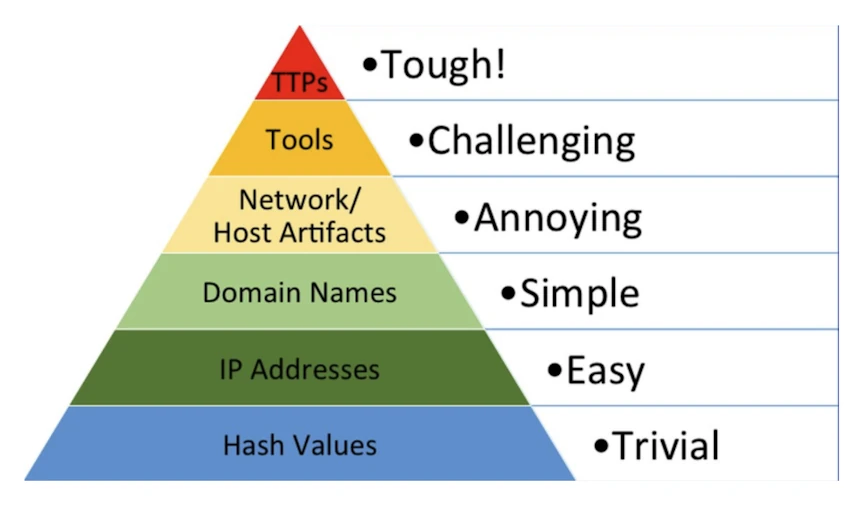
| Layer | Cost to change | Who chases it |
|---|---|---|
| Tactics, techniques and procedures (TTPs) | Tough | Analysts. Methods the adversary cannot abandon. |
| Tools | Challenging | Analysts, with detections built on tool behavior |
| Network and host artifacts | Annoying | Analysts, on beaconing, process chains, lateral movement |
| Domain names | Simple | Automation, with analysts pivoting from the hits |
| IP addresses | Easy | Automation |
| Hash values | Trivial | Automation. High confidence, short shelf life. |
Verification and triage
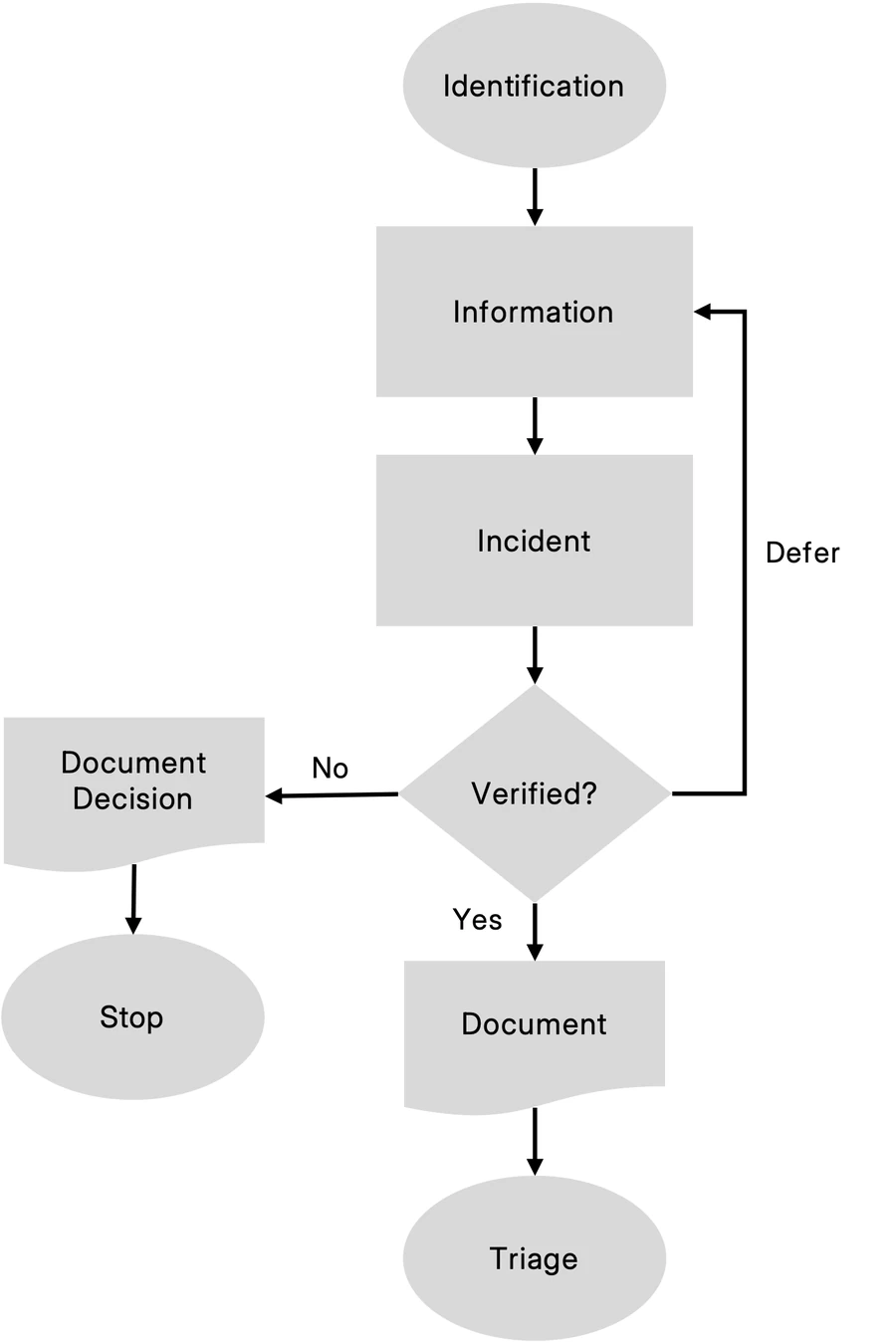
Verification establishes that the event is an incident and that it requires a response. Triage ranks it against organizational objectives, so the team works the most important incident first.
Verify before engaging the wider team. A declared incident pulls people off other work and slows the systems under investigation, and that cost is worth paying only for real incidents. The lifecycle explains why the two run together.
Verify and triage
| # | Item | Owner |
|---|---|---|
| 1 | Open the incident record with identifier, title, handler, summary, classification by scenario, and evidence references | Operations |
| 2 | Enrich the indicators with threat intelligence before rating the risk | Intelligence/Investigations |
| 3 | Rate the initial risk on the four-level scale | Incident Commander |
| 4 | Run the verification tests that apply, then record the decision with rationale, name and time | Incident Commander |
| 5 | Deliver the triage brief, naming the single authorization required | Incident Commander |
| 6 | Agree the resource allocation against everything else the team could be doing | Incident Commander |
The introduction, this checklist, the outcomes table, the caution and Figure 58 are adapted from the book. Verification tests, Questions for the reporter, Triage factors, Ranking concurrent incidents and Worked examples are additions to the book.
Verification tests
Run each test that applies before recording continue, stop or defer. When a containment trigger applies, take its approved action first.
| Test | How | Settles |
|---|---|---|
| A second, independent source | Data from another sensor: authentication or flow logs behind an endpoint detection and response (EDR) alert, mail gateway or proxy logs behind a user report. Two rules on the same log are one source. | Whether it happened |
| Planned activity | Change tickets, deployments, the administrator on call, scheduled penetration tests, vendor maintenance. Confirm with the person named, on a number you already have. | Whether someone authorized it |
| The reporter | The questions below, asked while memory is fresh. For a report from outside the organization, the first-call questions in Identification. | What came before and after |
Questions for the reporter
| # | Item | Owner |
|---|---|---|
| 1 | Ask what they saw, where and when, in their own words, and keep the original message or a screenshot | Operations |
| 2 | Ask what they did next: clicked, typed a password, approved a multifactor authentication (MFA) prompt, opened a file, forwarded it | Operations |
| 3 | Ask whether anyone else received or saw the same thing, and whether it is still happening | Operations |
| 4 | Ask how to reach them over the next day, and whom else they told | Operations |
Decisions and records
| Outcome | Use when | Then |
|---|---|---|
| Continue | Real, and it warrants a response | Escalate, engage the team and decision makers, triage |
| Stop | Not real | Close it and document why, for the next analyst who sees the same thing |
| Defer | Available information cannot settle it | Request more from the reporter or other sources, then decide again by the DEFER REVIEW BY time in T1 |
- Look up what the risk level triggers in Risk levels, and mark each of the four containment triggers yes or no.
- Record the decision, RISK RATIONALE and CONTAINMENT TRIGGERS in T1. Send T2 to the decision makers within the reporting deadline for the level.
- When several verified incidents compete for the same people, rank them by the ranking rule.
- Documentation written after the fact is unreliable, and exact commands and timestamps are the first things to go. Open the record at verification and add to it as the response proceeds.
Triage factors
NIST SP 800-61 Revision 2 (2012) prioritized incidents on three factors: functional impact, information impact and recoverability. Revision 3 (April 2025) superseded it.
Revision 3 asks for a preliminary review that verifies an incident occurred and estimates severity and urgency (RS.MA-02). It then asks for prioritization by scope, likely impact, time-critical nature and resource availability (RS.MA-03). Its six example risk evaluation factors keep functional impact and recoverability, name data impact where Revision 2 had information impact, and add three more. Record the deciding ones in RISK RATIONALE.
| Factor | Establish | Raises the level when |
|---|---|---|
| Asset criticality | Whether it is on the critical asset list | Tier 0 identity, safety or revenue systems are involved |
| Functional impact | Which business functions are degraded | Customers or operations feel it, or it is growing |
| Data impact | Which data was read, changed or taken | Regulated, personal or restricted data is involved |
| Stage of observed activity | How far the attack has progressed | Privilege escalation, lateral movement, exfiltration or impact |
| Threat actor characterization | Commodity malware or a human operator | Hands-on-keyboard activity, or an actor known for extortion or destruction |
| Recoverability | Whether the team can restore it within the recovery time objective | Outside help is needed, or the data is unrecoverable |
Time-critical nature means the containment triggers in T1.
NIST SP 800-61r3, RS.MA-02, RS.MA-03 and the RS.MA considerations; SP 800-61r2, section 3.2.6. Checked October 2026.
Ranking concurrent incidents
When verified incidents compete for the same people, the Incident Commander ranks them by this rule. Record the rank in each T1, report it in the next T2, and re-rank each operational period.
| Rank | Work first |
|---|---|
| 1 | The higher risk level |
| 2 | At the same level, the one with a containment trigger marked yes |
| 3 | The earlier deadline: a regulatory clock, a contract notice term or an extortion countdown |
| 4 | The one still growing |
| 5 | The later stage of activity |
Every incident keeps a named handler. Two at High or Critical get separate Incident Commanders.
Worked examples
T1 entries at the end of verification.
One user clicked a phishing link
The mail gateway shows the message in 40 mailboxes and the proxy shows one click. The user says she typed her password. A sign-in to her account from a hosting provider failed at MFA 12 minutes later.
| T1 field | Entry |
|---|---|
| REPORT SOURCE | user |
| CLASSIFICATION | other: credential phishing |
| INITIAL RISK | medium (SEV 3) |
| RISK RATIONALE | Password stolen and tried; MFA blocked the sign-in; one account |
| VERIFY DECISION | continue: reset, revoke sessions, check MFA methods and mail rules, purge all 40 copies |
| CONTAINMENT TRIGGERS | no to all four |
Had the proxy blocked the page first, the decision would be continue at low (SEV 4), and the analyst would purge all 40 copies.
An EDR alert on a domain controller
At 03:12 EDR on a domain controller flags a process running as a domain administrator reading memory of the Local Security Authority Subsystem Service (LSASS). The server's security log shows that account signing in from a host outside the admin workstation list. No change ticket covers it, and the administrator on call, reached on the roster number, did no overnight work.
| T1 field | Entry |
|---|---|
| REPORT SOURCE | alert |
| CLASSIFICATION | other (Active Directory; open ransomware if encryption or mass changes follow) |
| INITIAL RISK | critical (SEV 1) |
| RISK RATIONALE | Tier 0; credential theft by a human operator; the whole domain in reach |
| VERIFY DECISION | continue |
| CONTAINMENT TRIGGERS | no to all four; rechecked at the first briefing |
| COUNSEL NOTIFIED | on-call counsel, 03:35 |
Had an approved red team test covered the server, confirmed with its lead on a known number, the decision would be stop, citing the test.
A leak-site post naming the organization
At 10:05 a threat intelligence provider reports the organization on a ransomware leak site, with a five-day countdown and a folder listing. No folder name matches a share in the file server inventory, and no alert in 90 days involves the file servers. Two vendors store finance data.
| T1 field | Entry |
|---|---|
| REPORT SOURCE | vendor (threat intelligence) |
| CLASSIFICATION | ransomware, claimed |
| INITIAL RISK | high (SEV 2) |
| RISK RATIONALE | A public claim runs on the attacker's schedule, true or false; finance data would start clocks |
| VERIFY DECISION | defer: nothing internal confirms or rules out theft |
| DEFER REVIEW BY | same day, 16:00 local time |
| CONTAINMENT TRIGGERS | exfiltration unknown; the other three no |
| COUNSEL NOTIFIED | 10:30 |
Before the review, get the full listing (counsel decides before anyone downloads claimed data), ask both vendors, search egress from finance systems, and ready a T18 interim statement. Any match means continue.
A researcher email through security.txt
A researcher writes to the security.txt address. Changing the order number in a portal URL returns other customers' orders, and she attaches two. The application team reproduces it in test. Portal logs, kept 90 days, show her requests alone.
| T1 field | Entry |
|---|---|
| REPORT SOURCE | researcher |
| CLASSIFICATION | other: application flaw exposing customer data |
| INITIAL RISK | high (SEV 2) |
| RISK RATIONALE | Personal data open to any signed-in customer; logs show the researcher alone |
| VERIFY DECISION | continue: block the order lookup until the authorization fix ships |
| CONTAINMENT TRIGGERS | regulatory clock yes, for the Legal advisor to assess; the other three no |
| COUNSEL NOTIFIED | on-call counsel, within the first hour |
Thank her the same day, ask her to delete the two records, and give a fix date. Sequential access from other addresses would make it critical (SEV 1), with exfiltration yes.
Response: scope
Scope finds every system, account and dataset in the incident, and its potential impact on the organization. Start from what identification and verification produced. Work out the attacker's tactics, techniques and procedures (TTPs), derive indicators from them, and use those indicators to find every system in scope.
Scope before cleaning anything. Cleaning only the systems you already know about leaves the attacker the rest, and the incident reopens when they use them.
Scope
| # | Item | Owner |
|---|---|---|
| 1 | List every indicator from detection and verification, and make each one searchable | Intelligence/Investigations |
| 2 | Hunt for the indicators across the security information and event management (SIEM) platform, endpoint detection and response (EDR) and any threat hunting platform | Operations |
| 3 | Sweep in order: critical assets, then lateral expansion, then the environmental sweep (table below) | Operations |
| 4 | Identify the initial compromise and patient zero | Intelligence/Investigations |
| 5 | Map lateral movement through authentication logs and file access patterns | Intelligence/Investigations |
| 6 | Date the deployment of each persistence mechanism | Intelligence/Investigations |
| 7 | Establish when sensitive data was accessed or exfiltrated | Intelligence/Investigations |
| 8 | Document visibility gaps: unmanaged systems, thin logging, Internet of Things (IoT) devices, industrial devices | Planning |
| 9 | For controllers and similar equipment with no central logging, use network flow data as the primary source | Intelligence/Investigations |
| 10 | Check for anti-forensics: log deletion, timestomping, obfuscation, living off the land | Intelligence/Investigations |
| 11 | For cloud and hybrid estates, cover cloud audit logs and container runtime security | Operations |
Sweep stages
| Sweep stage | Targets | Sources |
|---|---|---|
| Critical assets first | Domain controllers, file servers, databases, anything that stores sensitive data, regardless of where the first indicator appeared | SIEM, EDR, authenticated scans |
| Lateral expansion | Same segment, systems authenticated to by compromised accounts, systems sharing administrative credentials | Authentication logs, EDR, network flow |
| Environmental sweep | Everything remaining. Days or weeks at scale. | EDR, inventory tools, scripted checks, compromise assessment tooling |
Decisions and records
- Expanding scope to another business unit follows who authorizes what.
- Log each pass in T4. Scope owns the attack timeline. Eradication annotates it, and the debrief finalizes it.
- Move the compromise start key time in T1 earlier whenever scoping finds older evidence, as Metrics defines it.
- The scenario page for the incident type lists the log sources and questions that matter most. Evidence collection covers what to preserve as scope grows.
- In operational technology (OT) the visibility gap is the normal condition. Controllers do not log centrally, agents cannot be installed, and maintenance windows can be months away. Plan on network flow as the primary evidence source, and write that into the response plan before it is needed.
Response: contain
Containment stops the attacker and preserves the evidence. Cut the specific paths the attacker is using. A compromised web server isolated from internal systems while it keeps serving the internet is contained, and the site stays up.
Collect volatile evidence before an action destroys it, following Evidence collection. The scenario page for the incident type lists the containment steps that differ, and the cloud playbooks give the provider commands.
Identity containment
| # | Item | Owner |
|---|---|---|
| 1 | Reset passwords at the primary identity provider, privileged accounts first | Operations |
| 2 | Rotate service account credentials, application programming interface (API) keys and programmatic tokens | Operations |
| 3 | Coordinate resets for accounts synced between on-premises and cloud directories | Operations |
| 4 | Revoke active sessions and authentication tokens at the identity provider (commands below) | Operations |
| 5 | Force-disconnect virtual private network (VPN), Remote Desktop Protocol (RDP) and Secure Shell (SSH) sessions | Operations |
| 6 | Where the application supports it, increment the session token version to invalidate browser sessions | Operations |
| 7 | Invalidate OAuth refresh tokens and offline access tokens | Operations |
| 8 | Where applications accept stateless JSON Web Tokens (JWTs), deny-list the attacker's tokens | Operations |
| 9 | Watch authentication logs for token endpoint requests that show cached credential use | Intelligence/Investigations |
| 10 | Apply conditional access: location, device compliance, risk-based blocking, phishing-resistant multifactor authentication (MFA) | Operations |
| 11 | Disable the account at the identity provider to block new sign-ins to every single sign-on (SSO) application. Item 4 revokes the existing sessions. | Operations |
| 12 | Find applications with local accounts outside the identity provider, and revoke those accounts separately | Operations |
| 13 | Revoke the OAuth-connected applications the compromised account authorized | Operations |
| 14 | Disable automation rules, webhooks, continuous integration and delivery (CI/CD) deployment keys, and browser extensions with broad permissions | Operations |
By identity provider
Revoking sessions stops refresh, but access tokens already issued keep working until they expire. Entra ID access tokens last 60 to 90 minutes by default.
Applications that support Continuous Access Evaluation (CAE) get tokens lasting up to 28 hours. They reject those tokens in near real time after a revocation, though Microsoft says propagation can take up to 15 minutes. Every other application accepts the old token until it expires. Expect up to 90 minutes of residual access and watch the sign-in logs for it.
| Provider | Revoke sessions | Block new sign-ins | Also |
|---|---|---|---|
| Entra ID | Choose Revoke sessions on the user in the admin center, or run: Revoke-MgUserSignInSession -UserId <upn> | For a synced account, also disable it in on-premises Active Directory, or the next sync re-enables it. Disable it in Entra ID: Update-MgUser -UserId <upn> -AccountEnabled:$false | Remove registered authentication methods and devices the attacker added |
| Okta | Choose Clear User Sessions in the Admin Console, or call: DELETE /api/v1/users/<user-id>/sessions?oauthTokens=true | Suspend or deactivate the user | Sessions inside downstream applications survive. End them in each application. |
| Google Workspace | Reset sign-in cookies on the user in the Admin console, or call the Directory API method users.signOut | Suspend the user | Revoke OAuth tokens and app passwords separately |
| AWS IAM | Choose Revoke active sessions on the role. IAM attaches the AWSRevokeOlderSessions policy, which denies credentials issued before that moment. | Remove the console password, then deactivate each access key: aws iam update-access-key --user-name <user> --access-key-id <key-id> --status Inactive | Temporary credentials stay valid until expiry unless the role's sessions are revoked |
Provider documentation, checked October 2026. Microsoft: identity platform access tokens and Continuous Access Evaluation, and Graph PowerShell Revoke-MgUserSignInSession. Okta: User Sessions API. Google: Admin SDK Directory API users.signOut. AWS: revoking IAM role temporary credentials, and the CLI update-access-key reference. Cloud-specific scope and eradication are in the cloud scenario, and provider commands are in the cloud playbooks.
Evidence to preserve
| # | Item | Owner |
|---|---|---|
| 15 | Capture memory first, with WinPMEM or Linpmem (commands) | Operations |
| 16 | Image the systems that contain unique evidence, such as patient zero and hosts running custom tooling | Intelligence/Investigations |
| 17 | Forward logs off the host as soon as the compromise is found, so they cannot be deleted | Operations |
Validate before calling it contained
| # | Item | Owner |
|---|---|---|
| 18 | Network: firewall, proxy and Domain Name System (DNS) logs show no command and control (C2) traffic resuming, no new connection patterns and no protocol tunneling | Intelligence/Investigations |
| 19 | Process: no respawned malware, no new persistence, no executables in unusual paths | Intelligence/Investigations |
| 20 | Logs: no bursts of failed authentication, no privilege escalation, no unusual file access | Intelligence/Investigations |
Decisions and records
- Choose the posture in Which containment posture, and get the authority named in who authorizes what.
- If a trigger in When containment cannot wait applies, take its approved action now.
- Fill in one T3 per action: layer, trigger, posture, authority, business impact, rollback procedure and the three validation checks.
- Human-operated ransomware groups have accelerated encryption after detecting defensive action, and watchdog processes respawn malware or trigger destructive payloads. Before killing processes on a system you do not yet understand, prefer quiet, coordinated containment unless an immediate trigger applies.
- Sequential isolation signals the response and gives the adversary time to escalate. Execute simultaneously across the network, endpoint, identity and application teams, with one plan for the operational period. See the planning cycle.
- Write and test the rollback procedure before changing firewall rules or network topology.
Containment layers
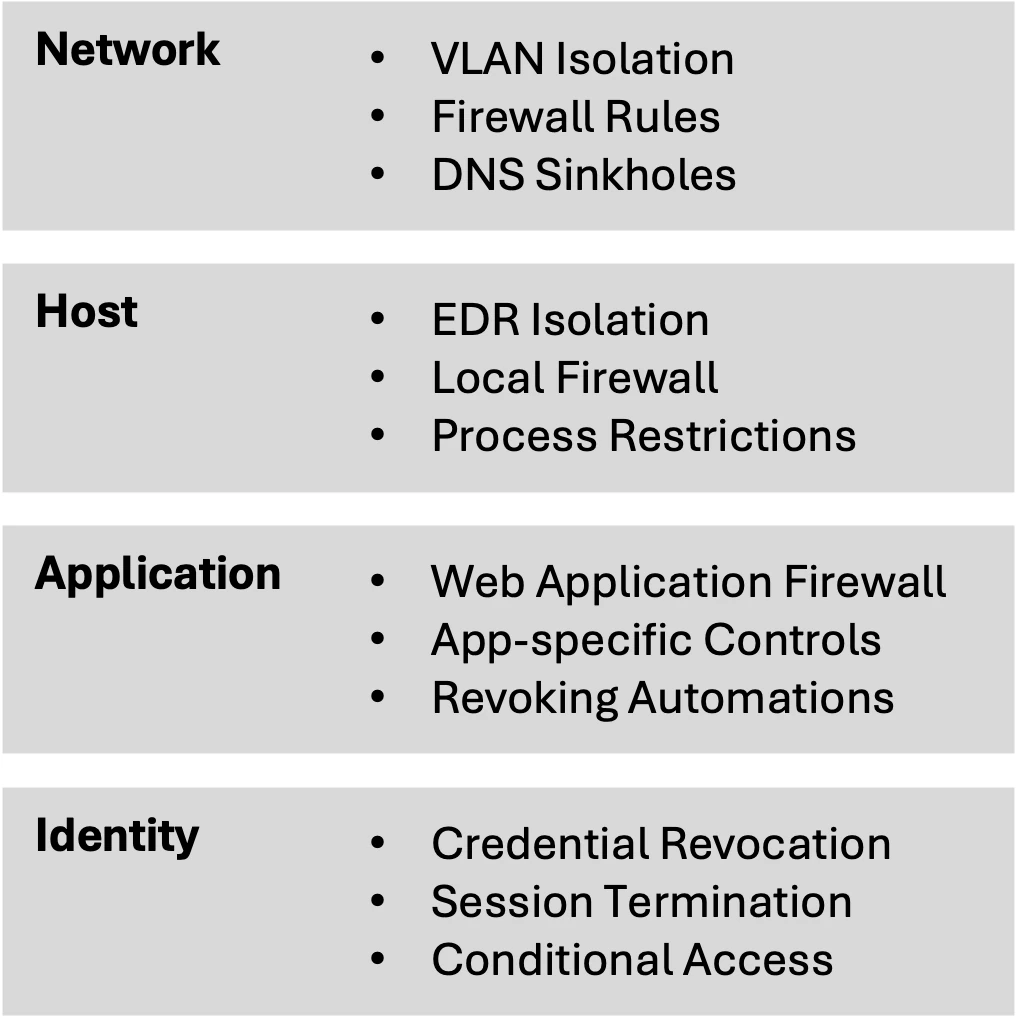
| Layer | Use it for |
|---|---|
| Network | Broad, fast control over many systems at once |
| Host | Precision on a known-compromised endpoint |
| Application | Attacker tooling that network controls do not see |
| Identity | Software as a service (SaaS) and cloud paths, where it is frequently the only layer that reaches |
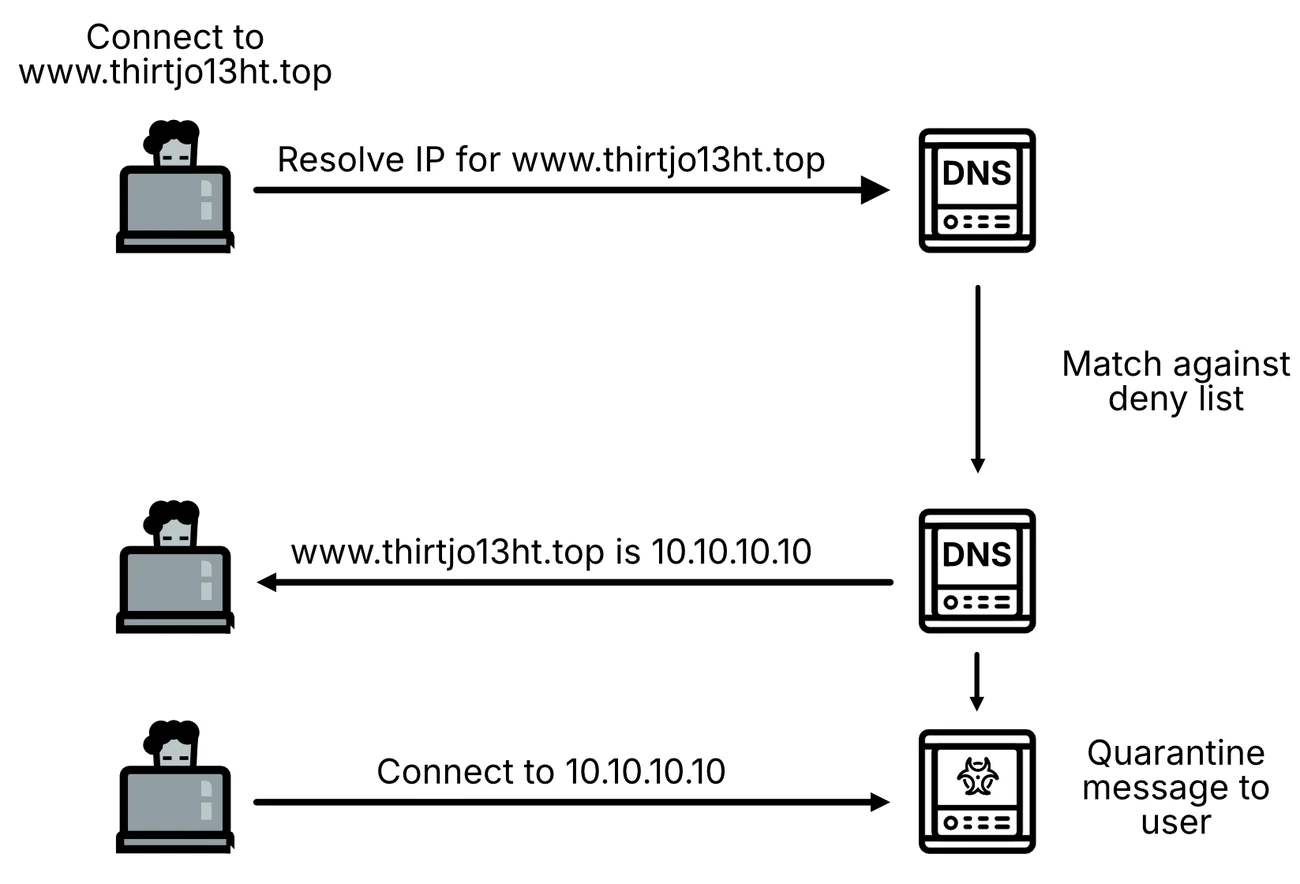
WannaCry and the kill-switch domain
Reporting by WIRED, TechCrunch, the Associated Press, Reuters and The Seattle Times, and sinkhole data published by Kryptos Logic.
WannaCry, May 12, 2017. The worm was spreading across Europe and the National Health Service (NHS) was turning patients away. Marcus Hutchins, working for Kryptos Logic from England, found an unregistered domain inside a WannaCry sample and bought it on Namecheap for $10.69. He intended to sinkhole the traffic and count infected hosts.
The malware checked whether it could reach that domain before encrypting anything, and halted when it could. Darien Huss of Proofpoint reverse-engineered the check and confirmed the behavior. Spread of that variant stopped the same afternoon. It was a public sinkhole, the same idea as Figure 79 at internet scale.
The sinkhole contained the outbreak without eradicating it. Variants with different kill-switch domains appeared within days, and unpatched hosts were still reaching the sinkhole years later. WannaCry halted Honda's Sayama plant and infected Victoria's road safety cameras in June 2017, and Boeing reported an infection in March 2018. Use the time a sinkhole buys to patch.
Response: eradicate
Eradication removes what the attacker left and closes the way they came in. Keep collecting and registering evidence as you go, following Evidence collection, because removed artifacts cannot be collected later.
Act on the short-form investigation: what the attacker did, how they got in, where else they might be, and what has to go so they cannot come back the same way. The scenario page for the incident type lists the persistence to hunt for.
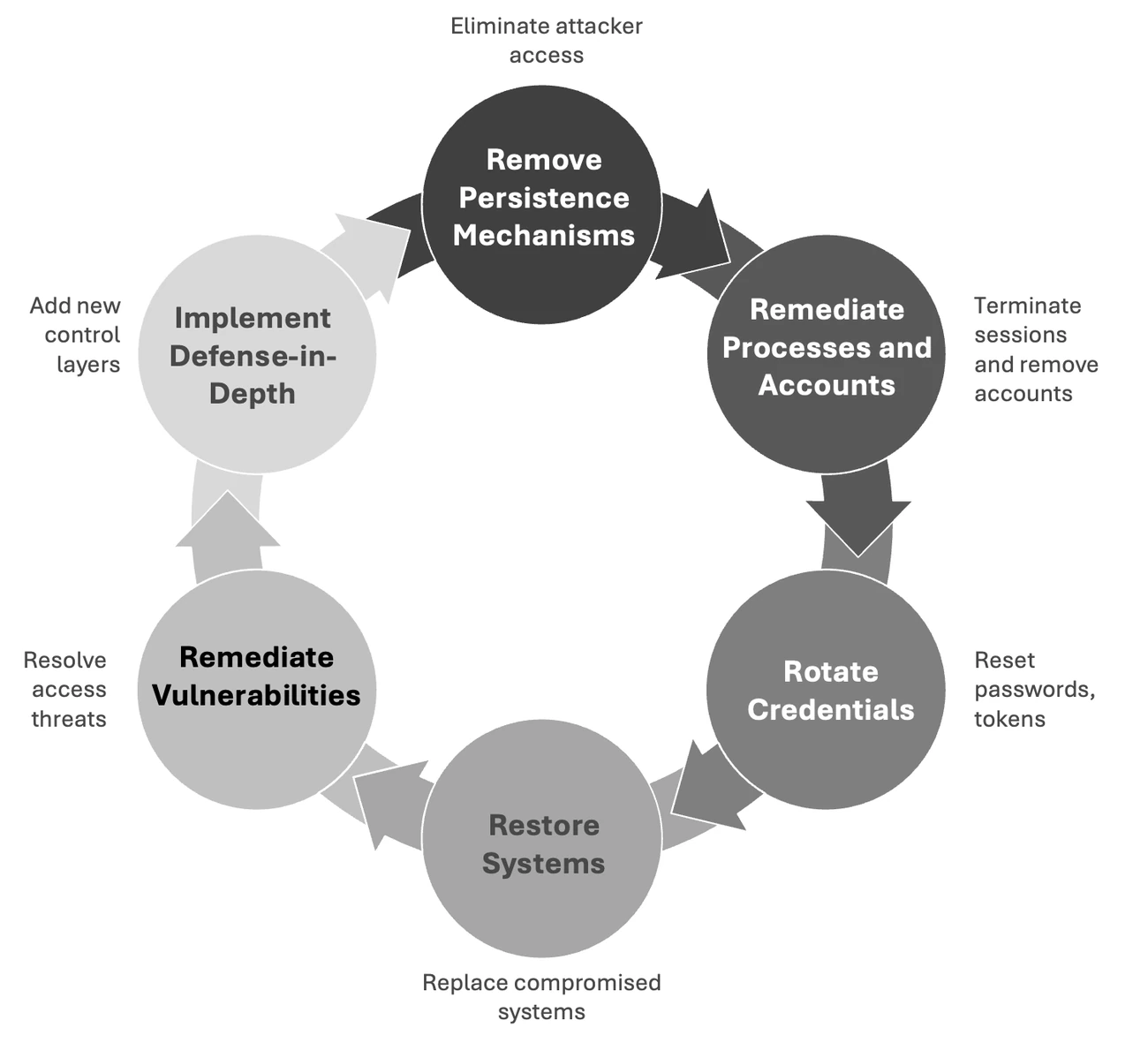
Removal, in order
| # | Item | Owner |
|---|---|---|
| 1 | Remove persistence. First inventory every mechanism with its type, system, file or registry path, and associated process. Document each one before deleting it. | Operations |
| 2 | Remediate processes and accounts. Terminate attacker sessions and remove the accounts they created. | Operations |
| 3 | Rotate credentials. Rotate everything stolen, including KRBTGT and trust passwords, in the reset waves. | Operations |
| 4 | Restore systems. Rebuild where targeted cleanup cannot produce enough confidence (restore or rebuild). | Operations |
| 5 | Remediate vulnerabilities. Fix the entry point, and anything else exploited during lateral movement. | Operations |
| 6 | Add defense in depth. Add control layers against a repeat. | Operations |
Also
| # | Item | Owner |
|---|---|---|
| 7 | Complete the root cause analysis, and remove the cause along with its symptoms | Intelligence/Investigations |
| 8 | Remove watchdog processes before the components they protect | Operations |
| 9 | Verify removal by rerunning the original enumeration technique | Intelligence/Investigations |
| 10 | Feed new indicators found during eradication back into scoping | Planning |
Credential reset waves
Structure from Table 31, p. 369. The windows come from the book's worked example and need replacing with yours.
| Wave | Scope | Window in the example |
|---|---|---|
| 1 | KRBTGT, reset twice, then Tier 0 accounts | Friday 11 PM to Saturday 3 AM, scheduled maintenance |
| 2 | Tier 1 accounts and critical service accounts | Saturday 6 AM to noon, reduced trading hours |
| 3 | Tier 2 accounts and remaining service accounts | Saturday 2 PM to Sunday 6 PM |
Decisions and records
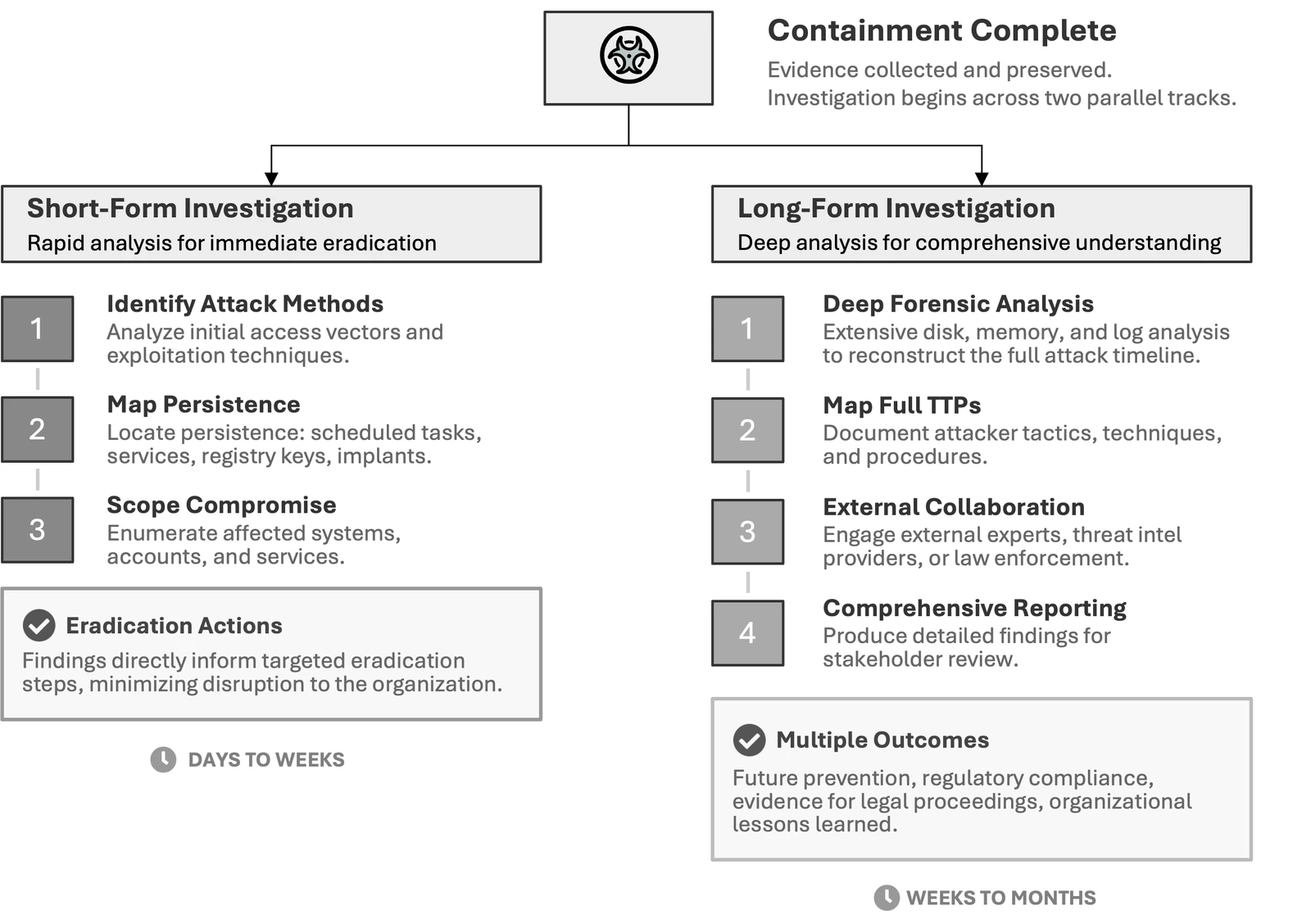
- Agree the scope of the short-form and long-form tracks with decision makers, in writing (Figure 92).
- Book the reset windows with the system owners. A production outage needs the approval named in who authorizes what.
- Keep the eradication log: each artifact, where it was, who removed it and when. Record the root cause, and carry the verification method, analyst and date into T5.
- The double KRBTGT reset depends on the interval between resets. Reset once, confirm replication across all domain controllers, then wait longer than the maximum ticket lifetime, 10 hours by default, so legitimate tickets issued under the old key expire.
- The second reset removes the old key, which invalidates any golden ticket forged with it. The example allows 10 hours, which puts the second reset on Saturday morning, after the wave 1 window closes.
- Track every service account with its dependent applications and owner, and have the application team test the credential update in staging before the window.
- Keep emergency access available. Issue short-validity temporary accounts to on-call staff whose credentials are being reset.
KRBTGT reset interval: Microsoft Learn, AD forest recovery guide, Perform the initial recovery; CISA Eviction Strategies Tool, CM0050. Checked October 2026.
Two investigation tracks
Contained systems cost money every hour they stay down, and reading disk and memory properly takes days or weeks. So the investigation runs on two tracks at once.
Short-form work answers enough to act on. Its output is rough by design, and the source book's tech editor calls it a dirty kebab. Long-form work carries on for the full tactics, techniques and procedures (TTPs), regulatory reporting, and anything that ends up in front of a court.
Response: recover
Work the checks in order before anything returns to production. The indicator scan comes last, because scanning a half-patched box does not reflect the build that ships.
Then restore in dependency order, pilot first, and watch what returns. Isolated systems and images stay in the evidence register until the Legal advisor releases them.
Pre-restoration verification
| # | Item | Owner |
|---|---|---|
| 1 | Root cause remediated. The vulnerability is patched, credentials rotated, or misconfiguration corrected, matched to the root cause analysis. | Operations |
| 2 | Patching current. Operating system, firmware and application updates missed while offline are installed. | Operations |
| 3 | Persistence removed. Every identified mechanism is confirmed gone. | Operations |
| 4 | Backup validated. For restores, the backup predates initial compromise according to the incident timeline. | Operations |
| 5 | Rebuild verified. For rebuilds, the build used trusted sources and clean installation media. | Operations |
| 6 | Controls live. Endpoint detection and response (EDR) is installed and reporting, the host firewall configured, and logging enabled. | Operations |
| 7 | Indicator scan, last. Every indicator from scoping and eradication is checked against the final build. | Operations |
Then the rest
| # | Item | Owner |
|---|---|---|
| 8 | Test the system against a written test plan | Operations |
| 9 | Record system owner acceptance in T8: what was tested, by whom, limitations accepted, formal sign-off | Planning |
| 10 | Configure enhanced monitoring before go-live: advanced audit policies, PowerShell script block logging on Windows, auditd rules on Linux, and logs confirmed flowing to the security information and event management (SIEM) platform | Operations |
| 11 | Enable the detection rules written during contain and eradicate on the restored system | Intelligence/Investigations |
| 12 | Coordinate production restoration across teams | Operations |
| 13 | Remove or keep each containment measure by a decision recorded in T3 | Incident Commander |
| 14 | Capture recovery metrics for the debrief, from the key times | Planning |
The introduction and the two checklists above are adapted from the book. Every section below is an addition to the book.
Pilot return
| # | Item | Owner |
|---|---|---|
| 1 | Name the pilot: one site, team or application instance whose failure the business can absorb | Operations |
| 2 | Write the success criteria first: functions tested, error rates, no indicator hits | Planning |
| 3 | Run the pilot through one full business cycle, with the workaround still running | Operations |
| 4 | Decide full return with the system owner, and record the decision | Incident Commander |
Re-enabling suspended accounts
| # | Item | Owner |
|---|---|---|
| 1 | List every account suspended during containment from T3, and record each re-enable with its approver | Planning |
| 2 | Reset the password after the last rotation and after any directory restore | Operations |
| 3 | Check multifactor authentication (MFA) methods, devices, OAuth grants and mailbox rules, and remove what the attacker added | Operations |
| 4 | Confirm the person face to face or by a call to the number in the HR record | Operations |
| 5 | Enable a service account once every dependent application has the new credential | Operations |
Tell users service is back
| # | Item | Owner |
|---|---|---|
| 1 | Send T11 as each service returns. Say what is restored, what is still degraded, what users do now (sign in again, register MFA again, stop the workaround by a stated time), and the next update time. | Public Information Officer |
| 2 | Make claims about the attacker's access or the data only on evidence, and have counsel clear them before anything leaves the organization | Legal advisor |
Decisions and records
- Agree the restore order with leadership first. In Incident Command the executive group sets the restore order for business systems, and the ransomware scenario applies it to an encrypted estate.
- Choose restore or rebuild for each system, and record the choice and the reason in T7.
- Accept any data loss from a restore in T6, signed by the risk owner named in who authorizes what.
- Set the length of enhanced monitoring, and record its end in T5.
- A restore returns every secret as it stood on the backup date, including the passwords the incident already reset. Rotate again after each restore, using the table below.
- A restored system that stops reporting may have been tampered with. Treat the silence as an alert and check before calling it a fault.
Restore order
| Order | Restore | Before the next step |
|---|---|---|
| 1 | Identity: domain controllers, the identity provider, privileged and break-glass accounts | Secrets rotated again (below), replication healthy, Group Policy checked against a baseline |
| 2 | Core network services: Domain Name System (DNS), Dynamic Host Configuration Protocol (DHCP), time, routing, firewalls, remote access | Name resolution and time correct from every segment |
| 3 | The rest of Tier 0: certificate services, backup, virtualization management, deployment tools | EDR and log forwarding reporting |
| 4 | Line-of-business applications, in the priority order set in preparation | Pilot passed, owner acceptance in T8 |
Where DNS runs on the domain controllers, it comes back in step 1. Bring EDR and log collection up before step 1, so each restored system reports from its first boot.
Restore or rebuild
Rebuild where time allows. Record the choice and reason for each system in T7.
| Condition | Choose |
|---|---|
| Tier 0 access was compromised | Rebuild the Tier 0 servers, and review directory objects, Group Policy and trusts, which a rebuilt domain controller replicates unchanged |
| No backup predates compromise start with confidence | Rebuild |
| Firmware, boot or hypervisor persistence suspected | Rebuild on replaced or reflashed hardware |
| System defined in code or a golden image | Rebuild |
| Data nobody can recreate | Rebuild, then restore the data alone from the latest backup taken before the attacker changed it, scanned for the incident's indicators |
| Backup predates compromise start, is verified untampered and restores cleanly in isolation, and a rebuild would miss the recovery time objective | Restore. State the data loss in T7 and accept the risk in T6, signed by the risk owner named in who authorizes what. |
Credential hazards in restored backups
Microsoft's forest recovery guide lists every update to existing objects since the backup as lost, and the incident's resets are such updates.
| Secret | After an Active Directory restore |
|---|---|
| User and administrator passwords | Old values return. Reset every account in scope again, in the eradicate reset waves. |
| Computer accounts | Old machine passwords return. Reset the restored domain controller's twice, as Microsoft's procedure does, and member servers in scope once. |
| KRBTGT | Old keys return, usually the ones the attacker stole, and golden tickets forged with them work again. Reset it twice, further apart than the maximum ticket lifetime, 10 hours by default. |
| Trusts | Old trust passwords return. After a breach, reset each on the trusting side and set the same one on the trusted side. |
| Group managed service accounts | After a writable domain controller's database was compromised, Microsoft advises a new Key Distribution Service (KDS) root key and recreated accounts, depending on the compromise. |
| Secrets on restored servers | Local administrator passwords, service credentials, application programming interface (API) keys, Secure Shell (SSH) and certificate keys return. Rotate each one again. |
Microsoft Learn, AD forest recovery guide: choosing a backup, initial recovery, KRBTGT and trusts; recovering from a Golden gMSA attack. Initial recovery, trusts and Golden gMSA checked October 2026; choosing a backup and KRBTGT checked September 2026.
Enhanced monitoring
Start before the first restored system takes traffic. Run it for 30 days. Run it for 90 days after a SEV 1 or SEV 2, or where the attacker had privileged access, and for the dwell time where that is longer. Set the end date at closure, as the Incident Command retained monitoring list does.
| Watch | Alert on |
|---|---|
| The incident | Its indicators, and the rules written during contain and eradicate |
| Identity | Sign-ins by accounts in scope, use of a rotated credential, new MFA methods, privileged group changes |
| Persistence | New services, scheduled tasks, run keys, Group Policy objects, cron jobs and systemd units |
| Egress | New destinations, file-sharing and remote access services |
| Telemetry health | A restored system that stops reporting. Treat the silence as an alert. |
Exit criteria
| # | Item | Owner |
|---|---|---|
| 1 | No hit on an incident indicator or rule for the full period | Intelligence/Investigations |
| 2 | Telemetry from every restored system unbroken for the full period | Operations |
| 3 | Incident rules moved into the standard rule set, each with an owner | Intelligence/Investigations |
| 4 | Clean-since date and planned length entered in T5, and the exit recorded in T1 with name and time | Incident Commander |
What reopens the loop
Each starts a new pass, logged in T4. After closure, it reopens the incident under the same ID (T6).
| Event | First move |
|---|---|
| A hit on an incident indicator or rule | Scope from the hit |
| Use of a rotated credential | Treat it as still in the attacker's hands, find the source, reset again |
| New persistence on a restored system, such as the attacker's Group Policy task in the Incident Command worked example | Isolate the system and rescope |
| A restored system goes silent | Check for tampering before calling it a fault |
| New facts from the investigation, a partner or law enforcement | Rescope |
Running the response loop
Put the same question to every new fact: does this change scope, containment, eradication or recovery? If it does, the team is on another pass.
Say so on the bridge, because silence reads as progress and stakeholders start planning the all-clear. Each scenario page lists what the loop adds for that incident type.
Start another pass
| Trigger | Looks like | Next move |
|---|---|---|
| New indicators | A PowerShell script in a registry key, traffic to an unknown command and control (C2) server | Back to scoping with the new indicator |
| Scope expansion | A known compromised service account also active in a regulated system | Another scoping pass, with new stakeholders and new obligations |
| Incomplete eradication | A system that looked clean shows reinfection | Hunt the missed persistence or the unidentified access vector |
| Analysis revelations | Memory forensics finds a second malware family | Rescope, then revisit containment and eradication |
| Business change | A new obligation or a shift in priorities | Re-triage and reset the plan with decision makers |
Before exiting
| # | Item | Owner |
|---|---|---|
| 1 | Scoping produces no new indicators | Intelligence/Investigations |
| 2 | Monitoring shows no attacker activity | Intelligence/Investigations |
| 3 | Eradication verification confirms removal | Operations |
| 4 | Restored systems operate normally | Operations |
| 5 | Operational objectives are met and residual risk is acceptable | Incident Commander |
| 6 | Cost and benefit no longer favor active response | Incident Commander |
| 7 | Regulatory conditions for closure are satisfied | Legal advisor |
| 8 | Ongoing monitoring is decided and has an owner | Incident Commander |
| 9 | Technical closure is signed and residual risk accepted, both with names and times | Incident Commander |
Decisions and records
- Name the person who authorizes the exit, from who authorizes what. An attributed written decision stands if the incident is reopened or reviewed, and people commit more carefully when their name is on it.
- Log every pass in T4: the trigger, and the changes to scope, containment, eradication and recovery.
- At exit, sign T5 and T6.
- Rotate people and schedule rest. Fatigue accumulates across iterations, so track hours worked in the incident record.
- Documentation has to survive shift handover, or incoming analysts repeat work or skip it. Use the shift handover checklist in Incident Command.
Why it loops
A straight line through contain, eradicate and recover misses whatever becomes visible only after the evidence has been read, as Figures 67 and 68 show.
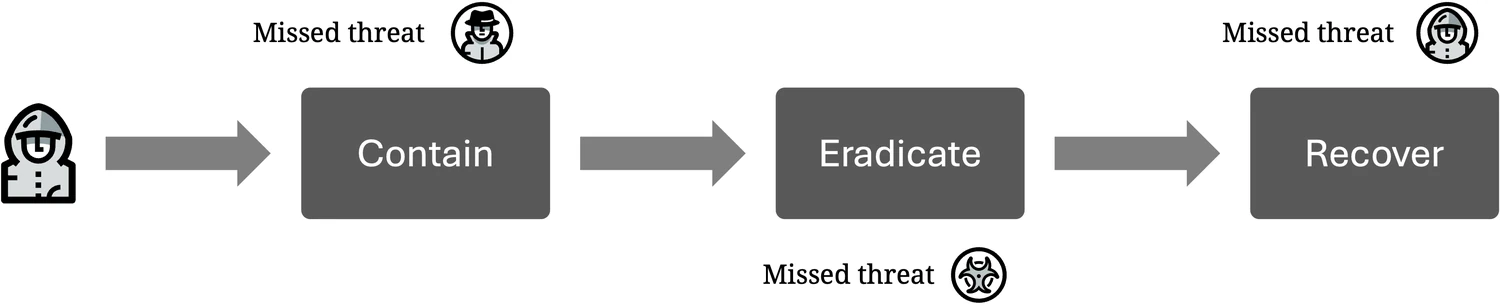
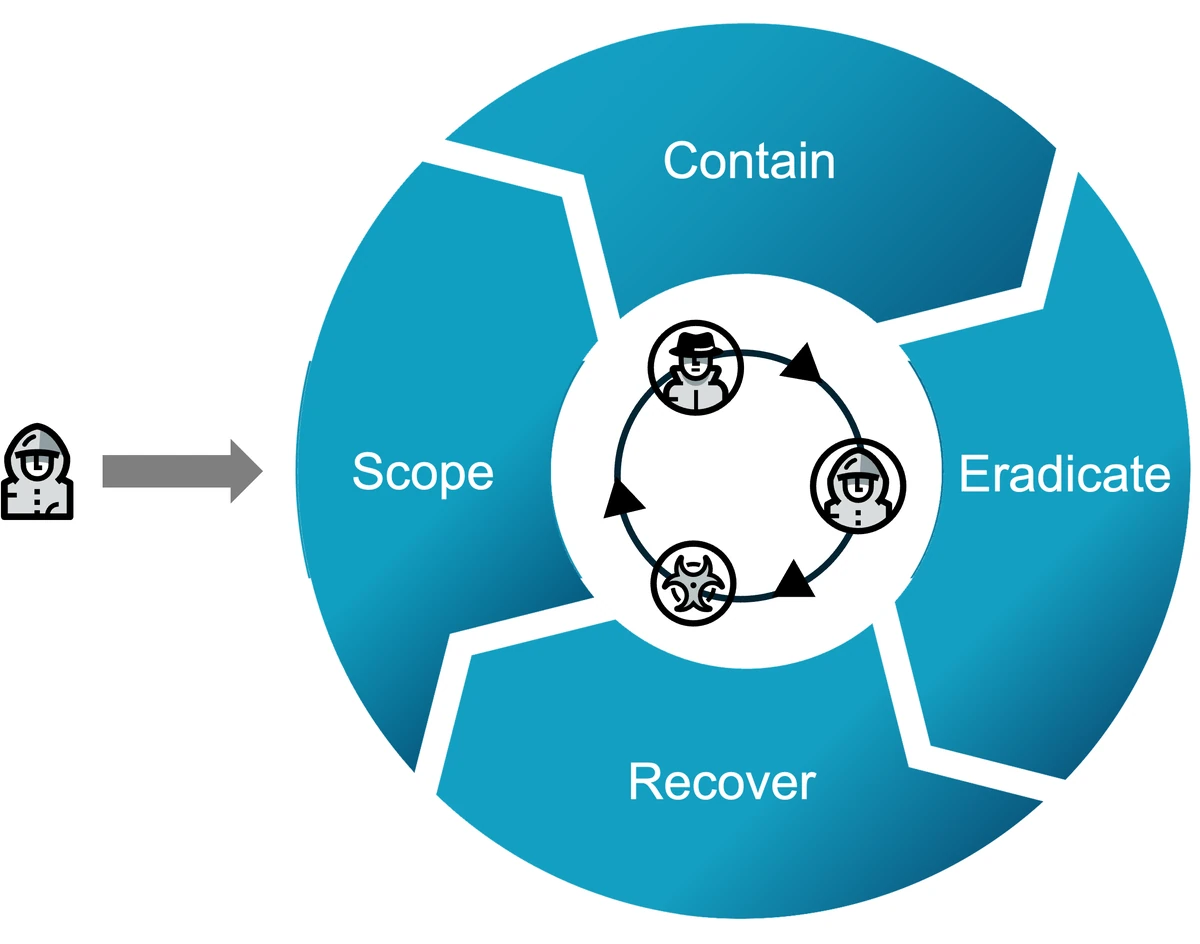
Debrief
Other traditions call this phase lessons learned, the postmortem, or root cause analysis.
Closing the incident and turning it into changes are one activity. The chance to fund improvements is greatest right after closure, so arrive with the improvement plan already costed, with an owner and a date on every line.
Close
| # | Item | Owner |
|---|---|---|
| 1 | Set the debrief scope and the documentation requirements | Incident Commander |
| 2 | Keep, modify or decommission each temporary asset: isolated systems, forensic images, temporary accounts, extra monitoring. The demobilization check-out covers people and access. | Operations |
| 3 | Consolidate tickets, chat, shared documents and personal notes into one authoritative record | Planning |
| 4 | Calculate the metrics in the standard format, from the T1 key times | Planning |
| 5 | Close out every regulator and individual notice: file follow-up and final reports from T17, and send and log T16 notices | Legal advisor |
| 6 | Tell the insurer, law enforcement, partners and customers the incident is closed, and update claim and case numbers in T13 | Liaison |
| 7 | Set retention for each item in the evidence register. Keep or release each legal hold in writing, including preservation requests sent to vendors in T19. | Legal advisor |
Learn
| # | Item | Owner |
|---|---|---|
| 8 | Run the after-action review within one to two weeks of closure, using T9 | Incident Commander |
| 9 | Invite every team that took part | Planning |
| 10 | Prepare the timeline and findings summary before the meeting | Planning |
| 11 | Set blameless ground rules: discuss controls, procedures and resources, and handle individual performance separately | Incident Commander |
| 12 | Run the detection gap review on the attack timeline, and send each gap back to Identification as a rule or hunt | Intelligence/Investigations |
| 13 | Find contributing causes with a named method, such as five whys or a causal factors chart | Planning |
| 14 | Where an incident report is required, develop it in T15 | Planning |
| 15 | Present the findings and the funding request to stakeholders, using T10 | Incident Commander |
| 16 | Issue the improvement register in T14, with owners and milestone dates | Incident Commander |
| 17 | Reopen the Preparation checklist, the scenario page for the incident type and Decide these before the incident against the findings | Planning |
Follow up
| # | Item | Owner |
|---|---|---|
| 18 | Day 30: confirm every T14 line has started and its owner has accepted it, and raise overdue lines to the CISO | Incident Commander |
| 19 | Day 60: have someone other than the owner check each line marked done, then mark it verified | Incident Commander |
| 20 | Day 90: re-date open lines with a reason or accept them as risk in T6, add the closure rate to the program metrics, and hand the register to the program owner | CISO |
Decisions and records
- Decide what happens to each temporary asset, and record each legal hold kept or released on the Legal advisor's written decision.
- Fill in T9 for the review, T10 for executives, T14 for the improvement register and T15 where a report is required.
- Take every duration from the T1 key times, as Metrics defines them.
- Release a legal hold only on the Legal advisor's written decision, after confirming that every insurance claim, regulator inquiry and law enforcement request that could need the evidence is closed.
Detection gap review
This section and the next are additions to the book. The example rows come from the fictional FRIDAY RENAME incident in the Incident Command worked example.
Walk the attack timeline one step at a time. For each step, name the rule or signal that should have fired, whether it fired, and how long the alert waited for a person. Each miss becomes a T14 line. Record a slow response to an alert that did fire as a finding about the queue, the routing or the staffing.
| Step | Should have fired | Fired | T14 line |
|---|---|---|---|
| Tue 21:14, virtual private network (VPN) sign-in with a contractor's password and no second factor | VPN sign-in without multifactor authentication (MFA) | No rule | MFA on every VPN account, and an alert on any sign-in without it |
| Thu 23:05 to Fri 01:40, 41 GB copied to an outside storage service | Egress volume to a file-sharing service | No rule | Alert on upload volume by destination category |
| Fri 01:52, domain admin sign-in from an unmanaged host | Privileged sign-in from a host outside the admin workstation list | No rule | Alert on it, then block it |
| Fri 02:10, mass file renames | Endpoint detection and response (EDR) ransomware behavior | Yes, verified at 02:14 | None |
Contributing causes
The root cause is the condition that let the attacker in. Contributing causes are the conditions that let the incident start, spread or last. Name the method in T15, and give each cause a T14 line.
| Method | Use for | How |
|---|---|---|
| Five whys | One chain of events | Ask why the last event happened, answer with a fact from the timeline, and repeat until the answer is a condition the organization controls |
| Causal factors chart | Several conditions that combined | Lay the timeline events left to right, list under each event the conditions that allowed it, and mark each condition that appears under more than one event |
Five whys on the FRIDAY RENAME entry point: the contractor's password worked on the VPN because the account had no second factor. It had none because contractor accounts were requested by email to the service desk, outside the onboarding workflow that enrolls MFA. The condition to fix is the missing contractor path in the access request workflow.
Scenarios
The phase playbooks apply to every incident. Some kinds of incident add work at each step, and these pages list only the additions. Work the matching page next to the playbook for the step you are on.
The sector pages add the reporting clocks and terms of regulated organizations, and combine with any scenario. The kit builder puts a scenario, a sector and a cloud provider on one sheet.
| Scenario | Use it when | What it adds |
|---|---|---|
| Ransomware | Files are encrypted, a ransom note appears, or data theft is threatened | Exfiltration hunting, backup and hypervisor protection, restore order, the payment decision |
| Business email compromise | A mailbox is used to redirect payments or impersonate staff | Mailbox rules, OAuth grants, recovering the money with finance and the bank |
| Cloud | An attacker has cloud credentials, roles or tokens | Control-plane logs and their retention, the multi-cloud containment table, identity and access management (IAM) persistence. Provider commands are in the cloud playbooks |
| Insider threat | A current or former employee or contractor is the suspect | HR and counsel before any investigation, covert or overt handling, evidence fit for litigation |
| Supply chain | The compromise came through a supplier's software, hardware or service | Scoping by product and version, supplier coordination, customer notices |
| Operational technology | Industrial control systems or a physical process could be affected | Safety first, engineering sign-off before containment, manual operations, controller logic checks |
| Restricted data | Data under a residency, contract or government commitment was read or copied outside its boundary | Reading the commitment first, key usage logs, showing where the data did not go, notice to the parties the commitment names |
| SaaS and OAuth abuse | A connected app, integration token or consented OAuth app is used to pull data from a SaaS platform | Revoking tokens and connected apps, platform event logs, the vendor behind the integration, notifying data owners |
| Edge device exploitation | A VPN, firewall or remote access gateway is exploited, often before a patch exists | Vendor integrity checks, treating the appliance as untrusted, rotating every secret it stored, hunting from its internal address |
| Identity provider and help desk | An attacker resets multifactor authentication (MFA) through the help desk, registers a new factor, or takes an identity provider administrator | Help desk call records, factor and device enumeration, federation trust changes, tenant-wide session revocation |
| AI applications and agents | An AI application or agent leaks data, misuses its tools or credentials, or acts on poisoned content | Prompt and tool-call logs, revoking agent credentials, a kill switch, retrieval content review |
| Distributed denial of service | A flood takes an internet-facing service down, or a note threatens one unless the organization pays | Provider engagement and diversion, locking the origin, rate limits and WAF rules, extortion notes, outage reporting |
| Customer account takeover | Attackers take over customer accounts on your own product or website at scale, through credential stuffing, relayed MFA, SIM swap, stolen sessions or account recovery | Telling an attack from normal failed logins, bot and leaked credential defenses, session revocation, payout freezes, fraud and chargebacks, customer notice |
The ransomware, business email compromise, cloud, insider, supply chain and operational technology pages are built from Chapters 12, 13 and 17 to 19 of the book, and each cites the pages it draws on. The other five are additions to the book.
Ransomware
An attacker has encrypted systems, stolen data, or both, and demands payment. Protect the backups and the identity systems first, because operators destroy recovery before the note appears.
- Isolate hosts with active encryption at once and log the trigger in T3.Operations
- Confirm immutable, offline and snapshot backups are out of reach of production credentials and networks.Operations
- Open T1 and classify the incident: encryption only, theft with encryption, or extortion with no encrypted files.Planning
- Retrieve the ransom and attacker-communication policy and confirm decision authority.Incident Commander
- Call the insurer before hiring forensics, outside counsel or remediation.Finance/Admin
- Tell staff to report ransom notes internally and never photograph or post them.Public Information Officer
Then work the page: Scope, Contain, Eradicate, Recover, Extortion and payment decisions.
What is different
Ransomware is extortion. Encryption is one lever, and some groups extort with stolen data alone. Operators hit backups, hypervisors and lights-out management first, so recovery is often damaged before the ransom note appears.
Classify early: encryption only, theft with encryption (long dwell, large egress, staging), or extortion with no encrypted files. Apparent ransomware can be a wiper with no recovery path.
Chapter 17, pp. 525, 526, 539.
| Lever | What the attacker does | Lead |
|---|---|---|
| Encryption | Disrupts operations and demands payment for decryption keys | Operations |
| Data theft | Exfiltrates sensitive data, with or without encryption, and threatens exposure | Intelligence/Investigations, Legal advisor |
| Data leaks | Publishes data on leak sites or sends it to customers, partners or regulators | Public Information Officer, Legal advisor |
| Distributed denial of service (DDoS) | Floods public-facing services and threatens a longer outage | Operations, Liaison |
| Harassment | Calls, emails or posts to executives, employees, customers or regulators | Public Information Officer, Liaison |
Adapted from Table 50, Ransomware Extortion Strategies. Chapter 17, p. 528.
Scope
Operators take whatever is reachable, so scope the whole estate on top of the generic scope playbook. Dwell time bounds the exfiltration window and the trustworthy restore points. When the trail ends at a valid VPN login, record initial access as undetermined; credentials are often stolen off-network months earlier.
Chapter 17, pp. 524, 540 to 542.
| Technique | What to look for |
|---|---|
| Archival artifacts | WinRAR history at NTUSER.DAT\Software\WinRAR\ArcHistory; 7-Zip history at NTUSER.DAT\Software\7-Zip\; password-protected archives split into 1 to 2 GB segments |
| Staging locations | C:\Users\Public, C:\Perflogs, %TEMP%, hidden shares and publicly accessible folders |
| Exfiltration tools | WinRAR, 7-Zip, FileZilla, WinSCP, rclone, the Mega sync client, Dropbox, cURL, Wget, FTP |
| Deleted artifacts | $UsnJrnl entries and file system timelines showing archives created and then deleted |
| Network and behavior | Egress spikes to hosting or file-sharing services; archivers run by unexpected accounts; new cloud storage connections |
Adapted from Table 53, Exfiltration Hunting Techniques. Chapter 17, pp. 543 to 544.
| # | Item | Owner |
|---|---|---|
| 1 | Count every Windows, Linux, macOS and ESXi host and every virtualization platform | Planning |
| 2 | Check backup servers, storage and hypervisor consoles for deleted jobs, encrypted repositories and attacker logins | Operations |
| 3 | List every system each compromised account authenticated to, encrypted or not | Intelligence/Investigations |
| 4 | Map each touched file server, database and repository to its data classes | Intelligence/Investigations |
| 5 | Run the staging and exfiltration hunt across every row of the table above | Intelligence/Investigations |
| 6 | Record the initial access date and dwell time in T4 | Planning |
| 7 | Rate exfiltration confidence as high, medium, low or unknown, and pass the rating to the Legal advisor | Intelligence/Investigations |
Chapter 17, pp. 541, 542, 551.
Contain
Encryption spreading across file shares is an immediate trigger. Isolate without waiting for scope. Otherwise move quietly and all at once, on top of the generic contain playbook.
Human-operated groups have accelerated encryption after spotting defenders. Cutting part of their access mid-negotiation can prompt encryption or a higher demand.
They deploy everywhere through domain controllers, identity providers, remote monitoring and management (RMM) platforms, virtualization consoles and backup servers. Domain admin that reaches backups can destroy them.
Chapter 12, pp. 221, 223, 227. Chapter 17, pp. 533 to 535.
| # | Item | Owner |
|---|---|---|
| 1 | Isolate hosts with active encryption at once, and log the trigger in T3 | Operations |
| 2 | Confirm immutable, offline and snapshot copies are out of reach of production credentials and networks | Operations |
| 3 | Rotate backup, hypervisor and lights-out admin credentials, and move them off the production identity provider | Operations |
| 4 | Test the break-glass accounts, then reset domain admin and other tier-0 accounts in one window | Operations |
| 5 | Inventory RMM tools such as ScreenConnect, AnyDesk and TeamViewer, and block unapproved instances | Operations |
| 6 | Turn on alerts for unexpected vssadmin, wbadmin and bcdedit execution | Intelligence/Investigations |
| 7 | Tell staff to report ransom notes internally and never photograph or post them | Public Information Officer |
Chapter 17, pp. 524, 532, 534, 535, 538.
Eradicate
Run two tracks on top of the generic eradicate playbook: remove every foothold, and finish the data-access assessment.
Check for a free decryptor before committing to restore or payment. No More Ransom, backed by Europol, covers over 150 families. Kaspersky, Avast, Emsisoft and Bitdefender publish others.
Law enforcement may have unreleased keys. Most current families have no exploitable flaw, so keep restore and rebuild moving in parallel.
Chapter 17, pp. 542, 544 to 546.
| # | Item | Owner |
|---|---|---|
| 1 | Identify the family from the note, extension and sample, for example with ID Ransomware | Intelligence/Investigations |
| 2 | Check decryptor sources for the exact variant and version | Intelligence/Investigations |
| 3 | Copy the encrypted files before any decryption attempt | Operations |
| 4 | Test the decryptor on sample files on a dedicated system, and measure the time and resources it takes | Operations |
| 5 | Remove backdoors, scheduled tasks, registry changes, rogue accounts and attacker RMM tools | Operations |
| 6 | Review authentication, file access, share and database records to confirm the data reached | Intelligence/Investigations |
| 7 | Payload hashes change per victim, so build detections on the observed tactics, techniques and procedures (TTPs) | Intelligence/Investigations |
Chapter 17, pp. 531, 537, 542, 545, 546, 548.
Recover
Recovery is the longest phase. Ireland's Health Service Executive (HSE) obtained a decryptor after the 2021 Conti attack and still took about four months to restore critical services. Layer this on the generic recover playbook.
Rebuild domain controllers after a domain admin compromise, because persistence hides in Active Directory objects, Group Policy and trusts. An access broker may have been inside for months before encryption.
Decryption leaves attacker tools in place. Paying raises the risk of repeat attack.
Chapter 17, pp. 545 to 548.
| # | Item | Owner |
|---|---|---|
| 1 | Agree the restore order with leadership: identity, DNS and network, then business-critical systems | Planning |
| 2 | Verify backup servers, storage and control planes are untampered before use | Operations |
| 3 | Choose restore points dated before initial access, and state the resulting data loss to system owners in T7 | Planning |
| 4 | Test each restore on an isolated system before production | Operations |
| 5 | If domain admin was compromised or backup integrity is uncertain, rebuild the domain controllers | Operations |
| 6 | Validate or rebuild decrypted systems before they return to production | Operations |
| 7 | After go-live, monitor privileged logons and the incident's command-and-control (C2) patterns | Intelligence/Investigations |
Chapter 17, pp. 546 to 548.
Extortion and payment decisions
Payment and attacker contact are policy, set during preparation. Facts for the decision:
- In leaked LockBit data, affiliates decrypted sample files before discussing payment, and fewer than 10% of 208 negotiations ended in payment (p. 528).
- Kadokawa paid about $2.98 million in 2024 and BlackSuit leaked anyway (pp. 557 to 558). Blackbaud paid about $250,000 for an unverifiable deletion; penalties later exceeded $59 million (p. 556).
- Anyone with the note's victim identifier can enter the negotiation portal. Conti published JVCKenwood's data after negotiation screenshots reached the press (pp. 537 to 538).
- Call the insurer before hiring forensics, outside counsel or remediation, or those costs may be denied. Never reveal coverage limits to the attacker (p. 549; Chapter 7, p. 91).
- Sanctions call for counsel experienced in ransomware (p. 553). The Office of Foreign Assets Control (OFAC) advisory of September 21, 2021 says payments to sanctioned persons can violate US sanctions without the payer's knowledge, and treats prompt law enforcement reporting as mitigating.
Chapter 7, p. 74. Chapter 17, pp. 528, 537 to 538, 549, 553, 556 to 558. The OFAC point is an addition to the book, from the OFAC Updated Advisory on Potential Sanctions Risks for Facilitating Ransomware Payments (September 21, 2021), checked October 2026.
| # | Item | Owner |
|---|---|---|
| 1 | Retrieve the ransom and attacker-communication policy, and confirm decision authority in who authorizes what | Incident Commander |
| 2 | Notify the insurance carrier, and record its pre-approval and vendor requirements in T13 | Finance/Admin |
| 3 | Assess sanctions exposure with counsel before any payment decision | Legal advisor |
| 4 | Engage law enforcement, and record any disclosure limits it requests | Liaison |
| 5 | Before sharing a ransom note, redact the victim ID, chat URL and file paths | Intelligence/Investigations |
| 6 | Run leak-site and social media monitoring, and approve interim statements in T18 | Public Information Officer |
Chapter 17, pp. 530, 538, 549.
- Scoping only the encrypted hosts misses persistence and exfiltration, and the attacker returns during recovery (p. 540).
- A restore point from shortly before encryption can still carry the attacker. Date it from initial access (p. 547).
- Notification deadlines run regardless of recovery status. Track them from day one against notification deadlines (p. 549).
- Stolen data can resurface years later whether or not anyone paid. Keep templates and counsel ready after closure (p. 557).
Business email compromise
An attacker uses a mailbox, or a cloned voice or face, to redirect payments or impersonate staff. Stop the money first. Call the bank and pause changed payments in the first hour, then remove the attacker's mail footholds.
- Pause pending payments to recently changed bank details until a call to a number already on file confirms them.Finance/Admin
- Call the originating bank and request a recall for each fraudulent payment.Finance/Admin
- Export every inbox rule, forwarding setting and OAuth grant as evidence before deleting any of them.Operations
- Reset the password and revoke all sessions and refresh tokens in one change.Operations
- File the complaint at ic3.gov and log it in T13.Liaison
- Export the Entra sign-in logs and the unified audit log for each affected account.Intelligence/Investigations
Then work the page: Scope, Contain, Recover the money, Victim by proxy, Deepfake voice and video.
Business email compromise runs on legitimate credentials and built-in mail features: forwarding rules, OAuth grants, mailbox delegation, legacy protocols, and token reuse. There is usually no malware on a server to isolate, and the most useful evidence lives in the identity and email platforms.
The loss is usually money, so finance and the bank join the response in the first hour. The credentials often came from an infostealer, keylogger, or cookie grabber on the user's own device, so the endpoint is still in scope.
This page adds to the phase playbooks for scope, contain, eradicate and recover.
Chapter 12, p. 259. Chapter 13, p. 309.
What is different
Each of these survives a password reset and needs its own removal. Enumerate them on every affected account.
Chapter 13, pp. 309 to 313.
| Attacker foothold | What it does | Microsoft 365 check |
|---|---|---|
| Inbox rules | Forward mail externally, delete replies from fraud targets and security alerts, move messages to folders the user never opens | Read ForwardTo, ForwardAsAttachmentTo, RedirectTo, DeleteMessage and MoveToFolder: Get-InboxRule -Mailbox <upn> -IncludeHidden |
| Mailbox forwarding | Copies every message to an outside address | Get-Mailbox <upn> | fl ForwardingAddress,ForwardingSmtpAddress,DeliverToMailboxAndForward |
| Transport (mail flow) rules | Redirect messages tenant-wide, block security notices, let attacker domains bypass filtering. Needs admin access. | Get-TransportRule |
| OAuth consent grants | Read, send, and manage mail through the API with no password | Get-MgOauth2PermissionGrant -All for delegated grants, and Get-MgServicePrincipalAppRoleAssignment on each suspect service principal for application permissions. The book's Get-AzureADPSPermissions.ps1 (p. 311) needs the AzureAD PowerShell module, which Microsoft has retired. Flag Mail.ReadWrite, Mail.Send, MailboxSettings.ReadWrite, offline_access granted in the compromise window. |
| Mailbox delegation | Full Access or Send As on other mailboxes | Get-MailboxPermission, Get-RecipientPermission |
| Sessions and refresh tokens | Keep the attacker signed in after the reset | Revoke at the identity provider |
Scope
Chapter 12, p. 259. Chapter 13, pp. 309 to 314.
| # | Item | Owner |
|---|---|---|
| 1 | Export the Entra sign-in logs for each affected account, and check them for impossible travel, new IP addresses, and one IP address used against several accounts | Intelligence/Investigations |
| 2 | Search the unified audit log for inbox rule, mailbox forwarding, delegation and application consent changes in the compromise window | Intelligence/Investigations |
| 3 | Enumerate every foothold in the table above on every affected account, and review transport rules where the attacker had admin access | Operations |
| 4 | Pull the messages sent from the compromised account in the window, and list every external recipient | Intelligence/Investigations |
| 5 | Review endpoint detection and response (EDR) data on the user's devices for infostealers, keyloggers and session cookie theft | Intelligence/Investigations |
| 6 | List wire transfers, invoice payments and vendor bank-detail changes in the window with finance and accounting | Finance/Admin |
Attackers often read mail for weeks and strike at payment runs or quarter end. Set the transaction window from the first attacker sign-in, and move it back if the logs show earlier access.
Contain
Run the identity containment checklist, then add these. Export every rule and grant as evidence before deleting it.
Chapter 12, pp. 251 to 252, 259. Chapter 13, pp. 311 to 313, 345.
| # | Item | Owner |
|---|---|---|
| 1 | Reset the password and revoke all sessions and refresh tokens in one change | Operations |
| 2 | Export malicious inbox rules, mailbox forwarding and transport rules, then remove them | Operations |
| 3 | Check OAuth grants and delegated mailbox permissions against the authorized application inventory, and revoke the unauthorized ones | Operations |
| 4 | Block the attacker's locations, noncompliant devices and legacy authentication with conditional access | Operations |
| 5 | Add a mail flow rule that quarantines outbound mail from the compromised account while the investigation runs | Operations |
| 6 | Block lookalike domains of the organization and its suppliers at the mail gateway | Operations |
Recover the money
Recovery rates drop sharply after the first 72 hours as attackers move funds through layered transfers. A formal request to freeze or reverse a wire often needs legal authority the organization does not have, so bring in the bank and law enforcement promptly. Start this in parallel with containment.
Chapter 13, p. 315.
| # | Item | Owner |
|---|---|---|
| 1 | Call the originating bank and request a recall for each fraudulent payment, with amount, date, receiving bank and account number | Finance/Admin |
| 2 | File a complaint with the FBI Internet Crime Complaint Center at ic3.gov, with the receiving account details, and log it in T13 | Liaison |
| 3 | Pause pending payments to recently changed bank details until a call to a number already on file confirms them | Finance/Admin |
| 4 | Tell every counterparty that received a fraudulent invoice or payment-change message from the compromised account, by phone and then in writing | Liaison |
| 5 | Assess the data the attacker could read in the mailbox against notification deadlines | Legal advisor |
| 6 | Notify the cyber insurer within the policy's reporting period | Finance/Admin |
Victim by proxy
In a common variant the supplier's mailbox is compromised. The attacker joins a real payment thread, the organization pays a fraudulent account, and nobody notices until the supplier chases the unpaid invoice.
The organization's own logs show no compromise. Work with the message, the accounts payable records, and what the supplier shares.
Chapter 13, pp. 314 to 315.
| Check | What points to fraud |
|---|---|
| Headers and sending domain | Lookalike domain substitution, or a Reply-To that differs from the From address |
| WHOIS registration date | Lookalike domain registered days or weeks before the first suspicious message. Check for a lookalike of your own domain too. |
| Information flow | The sender only replays details you already sent, and adds no new invoice numbers or confirmations |
If the messages came from the supplier's real mail server, they pass SPF and DKIM and match legitimate mail. That consistency is evidence the compromise sits on the supplier's side. Put it in writing to the supplier's security team, and start the bank recall without waiting for them to agree.
Deepfake voice and video
The payment request can arrive on a call or a video meeting with a cloned voice or face. In mid-January 2024 an employee in Arup's Hong Kong office received a message that appeared to come from the company's UK-based chief financial officer (CFO). On a video conference with digital recreations of the CFO and other colleagues, he was told to make 15 transfers totaling HK$200 million (about US$25.6 million) to five bank accounts.
The fraud came to light when he checked with head office. A Hong Kong police senior superintendent said he believed the fraudster had downloaded videos in advance and used AI to add fake voices. In May 2024 Arup confirmed that fake voices and images were used and that none of its internal systems were compromised.
FBI public service announcements describe the same methods. The February 2022 announcement covers a still picture of the CEO with no audio or deepfake audio on a virtual meeting platform. The December 2024 announcement covers real-time video chats with purported company executives.
The May 2025 announcement covers AI-generated voice messages claiming to come from senior US officials. The FBI advises hanging up and calling back a number you look up yourself. The December 19, 2025 announcement reports the same campaign continuing, with AI voice cloning.
The July 20, 2026 announcement warns of scammers posing as IC3 who promise to recover lost money. IC3 never charges a fee to recover funds. Type www.ic3.gov into the browser to file.
This section is an addition to the book. Sources checked October 2026: South China Morning Post and Global News on the Hong Kong police briefing; Arup's statement as reported by Dezeen; FBI IC3 announcements I-021622-PSA, I-120324-PSA, I-051525-PSA, I-121925-PSA and I-072026-PSA. Sources checked September 2026: The Register.
Mail and identity logs may show nothing when the request came by voice or video. Treat a familiar voice or face as unverified until the callback confirms it. If the meeting invitation or a follow-up email came from an internal mailbox, run the scope checklist above as well.
| # | Item | Owner |
|---|---|---|
| 1 | Pause the payment, and confirm the request by calling the number in the vendor master file or HR record. Never use a number, link or meeting invitation from the request. | Finance/Admin |
| 2 | Require a second person to approve payments and bank-detail changes, or a code word agreed in advance and kept out of email and chat | Finance/Admin |
| 3 | Preserve the meeting recording, voicemail audio and chat messages, with the device they arrived on | Intelligence/Investigations |
| 4 | Export the meeting platform records: invitation, organizer account, and each participant's display name, join time and guest or external status | Intelligence/Investigations |
| 5 | Pull call logs from the phone system and mobile accounts for the calling numbers and times | Intelligence/Investigations |
| 6 | Write down the employee's account the same day: who appeared, what they asked, and which numbers and accounts they gave | Intelligence/Investigations |
| 7 | Start the bank recall and IC3 complaint at once, as in Recover the money | Finance/Admin |
| 8 | Tell the impersonated executives, and warn finance staff with T12 Internal notice to staff | Liaison |
- A password reset leaves OAuth grants, delegation, forwarding rules, and refresh tokens working. The attacker keeps reading mail until each one is removed.
- Treating BEC as cloud-only leaves the infostealer on the user's laptop, and the attacker signs back in with the next password.
- Deleting a rule before exporting it destroys the record of what the attacker forwarded and to whom.
- Every hour spent waiting on the supplier or on internal approvals comes out of the 72-hour recovery window.
Cloud
An attacker has cloud credentials, roles or session tokens and works through the provider's APIs. Protect the evidence first. Export logs near their retention limit and snapshot compromised volumes, then contain the identities.
- List the compromised identities by type: users, access keys, service accounts, roles.Intelligence/Investigations
- Check retention for each log source and export logs near their limit to the security information and event management (SIEM) system.Operations
- Co-opt cloud administrators into Operations and record their scope and channel in T3.Incident Commander
- Snapshot volumes and tag them with the case number before any isolation or shutdown.Operations
- Contain the compromised identities and revoke their active sessions.Operations
- Treat every region and every federated environment as in scope until cleared.Planning
What is different
A cloud attacker works through identities and APIs. One stolen key, role, or session token can reach data across the whole environment and plant persistence with API calls that endpoint tools never see.
The evidence is in provider logs that the customer must enable and retain. Data plane logs are off by default, and a log that was never enabled cannot be reconstructed.
Chapter 18, pp. 560 to 587, and Chapter 12, pp. 253 to 255.
Scope
Start with the compromised identities: users, access keys, service accounts, and in AWS, roles. Then work out what each one can do, what it touched, and which connected environments it reaches.
Use the generic scope playbook for everything else. Event names and commands for each provider are in the cloud playbooks.
Chapter 18, pp. 569 to 572.
| Provider | Control plane and identity logs | Default retention | Data plane logs to enable |
|---|---|---|---|
| AWS | CloudTrail management events | 90 days in CloudTrail Event history | CloudTrail data events or S3 server access logs, VPC flow logs, CloudWatch Logs for Lambda |
| Azure | Azure Activity Log; Entra ID sign-in and audit logs | Activity Log 90 days; Entra ID 30 days with a premium license, 7 days on the free tier | Storage resource logs through diagnostic settings, VNet flow logs |
| GCP | Cloud Audit Logs, Admin Activity | Admin Activity 400 days; Data Access 30 days | Data Access audit logs (off by default for most services), VPC Flow Logs |
| Oracle Cloud | Audit service, including identity domain events | 365 days | Object Storage read and write service logs, VCN flow logs |
Control and data plane split from Table 56, p. 575. Entra ID retention from p. 563. The other retention figures are provider defaults checked in September 2026. Check your tenant. Export anything near its limit to the SIEM on day one.
| # | Item | Owner |
|---|---|---|
| 1 | List the compromised identities by type: users, access keys, service accounts, roles | Intelligence/Investigations |
| 2 | Resolve each identity's Azure role assignments at every scope, per subscription: az role assignment list --all --include-inherited | Intelligence/Investigations |
| 3 | Resolve each principal's GCP bindings at organization, folder and project: gcloud asset analyze-iam-policy --organization=<id> --identity=<principal> | Intelligence/Investigations |
| 4 | Resolve AWS effective permissions through service control policies (SCPs), permission boundaries, resource policies and session policies | Intelligence/Investigations |
| 5 | Check every identity for stolen session tokens. A token that already passed multifactor authentication (MFA) needs no new sign-in. | Intelligence/Investigations |
| 6 | List the affected resources, data stores first, plus virtual machines (VMs) whose instance metadata service hands out role or service account credentials | Intelligence/Investigations |
| 7 | Add the connected environments: other accounts, subscriptions and projects, on-premises, other clouds, and every environment federated to the same identity provider | Planning |
| 8 | Check retention and lag for each log source before ruling out any activity, and export logs near their limit | Operations |
| 9 | Record data plane coverage for each sensitive store, and tell the Legal advisor where missing object-level logs force a worst-case exposure assumption | Intelligence/Investigations |
Chapter 18, pp. 563, 569 to 572, 575, and 585.
Contain
Containment in the cloud is an API call, which makes it fast, scriptable and repeatable across hundreds of resources. The generic contain playbook and Evidence collection still apply.
Cloud administrators already have the access and platform knowledge to make those calls. Bring them in as co-opted members of Operations under incident response direction, with on-call rotation, authorization scope and channels agreed during preparation. Authority for each action follows who authorizes what.
Chapter 12, pp. 253 and 255.
| Containment action | AWS | Azure | GCP |
|---|---|---|---|
| Network isolation | Security Groups, network access control lists (ACLs) | Network Security Groups (NSGs) | VPC Firewall Rules |
| Identity containment | Identity and access management (IAM) policy modification, access key disabling | Entra ID account disabling, conditional access | Cloud IAM policy binding removal |
| Snapshot and evidence preservation | EBS snapshots, AMI creation | Managed disk snapshots, VM capture | Persistent disk snapshots |
| Termination protection | Instance termination protection (disable-api-termination) | Resource deletion locks | Instance deletion protection |
Table 22, Multi-Cloud Containment Quick Reference, p. 255.
In Oracle Cloud the same actions use network security groups and security lists, user capabilities and group membership, and boot and block volume backups. Each provider's commands are in the cloud playbooks.
| # | Item | Owner |
|---|---|---|
| 1 | Co-opt cloud administrators into Operations, and record their scope and channel in T3 | Incident Commander |
| 2 | Snapshot volumes and tag them with the case number before any isolation or shutdown | Operations |
| 3 | Set termination or deletion protection on compromised instances | Operations |
| 4 | Keep the compromised VM running, cut it off from everything except the forensics subnet, and enable flow logs on its interface | Operations |
| 5 | In AWS, add a network ACL deny on the subnet first, because a new security group leaves established connections open | Operations |
| 6 | In Azure, apply an NSG that denies all other traffic | Operations |
| 7 | Close exposed storage: turn on S3 Block Public Access, disable Azure blob anonymous access, and enforce Google Cloud Storage (GCS) public access prevention with allUsers and allAuthenticatedUsers removed. Then confirm from an unauthenticated client. | Operations |
| 8 | Stop compromised functions by disabling event triggers or deploying deny-and-log code, and preserve the original code | Operations |
| 9 | Contain the compromised identities with the actions in the table above, and revoke their active sessions | Operations |
| 10 | Copy snapshots to the dedicated forensics account and store them in immutable storage: S3 Object Lock in compliance mode, Azure immutable storage policies or GCS bucket lock | Intelligence/Investigations |
Chapter 12, pp. 253 to 255. Chapter 18, pp. 565, 576 to 579, and 581 to 584.
Eradicate
Review IAM first, then compute, then network. Cloud persistence needs only API access, and much of it leaves thin or no log content.
Control plane logs record that a startup script or function changed, and omit what the new code does. Enumerate every region. Follow the generic eradicate playbook for host cleanup.
Chapter 18, pp. 578 to 580.
| # | Item | Owner |
|---|---|---|
| 1 | Remove users and service accounts created in the incident window | Operations |
| 2 | List each user's AWS access keys, and delete those created in the window: aws iam list-access-keys --user-name <user> | Operations |
| 3 | List user-managed GCP service account keys, and delete those created in the window: gcloud iam service-accounts keys list --iam-account=<sa-email> --managed-by=user | Operations |
| 4 | Review role assignments, policy changes and AWS role trust policies, and remove unknown principals | Operations |
| 5 | Compare OAuth consent grants, app registrations and service principal credentials against the authorized application inventory, and revoke new ones | Operations |
| 6 | Check federation for new SAML or OIDC identity providers in AWS IAM, and for new or changed federated domains in Entra ID | Operations |
| 7 | Revert MFA changes and remove attacker-registered devices | Operations |
| 8 | After rotation, revoke sessions: an AWS inline deny on tokens issued before a set time, Entra ID session revocation, and invalidated GCP OAuth tokens for affected service accounts | Operations |
| 9 | Sweep workloads in every region: startup scripts and user data, machine images and launch templates, container images against known-good digests, functions with their triggers, and security groups, ACLs, VPN tunnels and DNS settings against baseline | Operations |
Chapter 12, p. 252. Chapter 18, pp. 578 to 580. Items 4 and 6 extend the book's list to trust policies and federation.
Recover
A compromised image or launch template puts the backdoor back on every new instance, so rebuild from sources you have verified. Use the generic recover playbook for validation and return to service.
Chapter 18, p. 579.
| # | Item | Owner |
|---|---|---|
| 1 | Redeploy instances from known-good images and launch templates, and retire the compromised ones | Operations |
| 2 | Restore deleted snapshots, backups and altered storage lifecycle policies from offline copies | Operations |
| 3 | Keep isolated instances and snapshots as evidence until they are released | Legal advisor |
| 4 | Enable data plane logging on sensitive stores, and extend retention through the SIEM before return to service | Operations |
| 5 | Set billing and budget alerts, including for regions the organization does not use | Finance/Admin |
| 6 | Watch affected identities for token use from unexpected addresses or locations, and for unusual refresh patterns | Intelligence/Investigations |
| 7 | Queue the cloud debrief questions: identity blast radius, access each resource needed, network controls bypassed, data exfiltration | Planning |
Chapter 18, pp. 562 to 564, 569, 579, 582 to 583, and 587.
- Terminating an instance destroys memory, processes and connections for good. Capture memory where you can, snapshot the volumes, then isolate (p. 581).
- A new password or access key leaves existing tokens valid until they expire. Revoke sessions every time you rotate (p. 581).
- CloudTrail and the Activity Log show what was configured. Data access and lateral movement appear only in data plane logs, flow logs and host telemetry (p. 581).
- Attackers park persistence in regions you never use, and one identity provider across clouds carries the compromise to all of them. Enumerate every region, and treat every federated environment as in scope until cleared (pp. 581 and 585).
Insider threat
A current or former employee or contractor is the suspect. Protect the evidence and the organization's legal position first. Bring in HR and the Legal advisor before anyone touches the subject's accounts.
- Brief HR, the Legal advisor and a named leadership sponsor before any evidence collection.Incident Commander
- List the actions that need Legal advisor approval.Legal advisor
- Set the need-to-know list and keep the subject's manager and peers off it unless the Legal advisor approves.Incident Commander
- Confirm the subject's employment status with HR: notice, leave, open disciplinary matters.Liaison
- Decide covert or overt with HR and the Legal advisor and record it in T3.Incident Commander
- Place a legal hold on the subject's mailbox, file storage and cloud accounts before disabling any account.Legal advisor
Then work the page: Before investigating, Covert or overt, Scope, Evidence for litigation.
The subject has authorized access and knows internal systems and processes, so malicious activity looks like normal work and the insider can evade controls you rely on.
Premature technical action can tip off the subject, destroy evidence, and expose the organization to wrongful termination claims. HR and the Legal advisor set the pace. The Incident Commander runs the technical work inside the limits they set, and every finding is written for a possible court.
This page adds to the phase playbooks for scope, contain, eradicate and recover.
Chapter 13, p. 315. Chapter 7, p. 132.
What is different
Chapter 7, pp. 132 to 133. Chapter 13, pp. 316 to 317.
| Fact about the subject | Effect on the response |
|---|---|
| Resignation or notice already given | The exfiltration window is closing. Plan to act before the last day. |
| Administrator or developer access | Expect remote access tools, secondary accounts, or modified configurations that outlive the primary credentials |
| New hire, especially remote | Treat as possible from day one. In the 2024 KnowBe4 case, restricted access for new employees kept a hired North Korean operator away from company data. |
| Access to regulated or customer data | The Legal advisor decides on regulatory reporting and law enforcement referral early, because both change how evidence is handled |
Before investigating
Complete this before collecting evidence or touching the subject's accounts. HR is not a position in the command structure, so the Liaison carries HR's input into the incident. Rehearse it with the insider data breach scenario in the UK NCSC Exercise in a Box, which lists an HR advisor among the attendee roles.
Chapter 13, p. 315. Chapter 7, pp. 95, 103 to 104.
| # | Item | Owner |
|---|---|---|
| 1 | Brief HR, the Legal advisor and a named leadership sponsor before any evidence collection | Incident Commander |
| 2 | List the actions that need Legal advisor approval, and what may be shared with whom | Legal advisor |
| 3 | Set the need-to-know list, and keep the subject's manager and peers off it unless the Legal advisor approves | Incident Commander |
| 4 | Confirm the planned monitoring is covered by the acceptable use policy, the login banner and applicable law, including data protection and labor agreements where they apply | Legal advisor |
| 5 | Exclude personal devices and personal accounts from collection unless the Legal advisor approves in writing | Legal advisor |
| 6 | Confirm the subject's employment status with HR: notice, leave, open disciplinary matters | Liaison |
| 7 | Decide whether counsel directs the investigation to protect privilege | Legal advisor |
Covert or overt
Decide the posture with HR and the Legal advisor, and record it in T3 Containment decision record.
In the book's Meridian Financial example, a senior accountant who had resigned showed data staging. IT quietly disabled his remote access, citing a routine security update. The legal team drafted a legal hold notice, and HR had administrative leave paperwork ready to execute if the investigation confirmed malicious activity.
Chapter 7, pp. 132 to 133.
| Posture | Use when | Cost |
|---|---|---|
| Covert | The subject is unaware, evidence is still being gathered, and any ongoing loss can be limited quietly | Data may keep leaving. The team stays small and monitoring must stay within what the Legal advisor approved. |
| Overt | Data loss is active, there is a safety risk, or the subject already knows | The subject may destroy evidence or fall back on hidden access. Preserve evidence and cut every access path in the same action. |
Scope
Chapter 13, p. 316.
| # | Item | Owner |
|---|---|---|
| 1 | Review data access, application access and cloud storage logs for access outside the subject's normal pattern | Intelligence/Investigations |
| 2 | List changes to the subject's accounts, group memberships and permissions, with dates | Intelligence/Investigations |
| 3 | Review email, cloud storage uploads, USB device connections and data loss prevention alerts for exfiltration | Intelligence/Investigations |
| 4 | Search systems for remote access tools, secondary accounts and modified configurations tied to the subject | Operations |
| 5 | List the shared, service and break-glass credentials the subject knew, for rotation | Operations |
Evidence for litigation
Insider cases frequently end in legal proceedings. Collect as if the evidence will be challenged, using the evidence collection procedures.
Chapter 13, p. 316. Chapter 7, p. 132.
| # | Item | Owner |
|---|---|---|
| 1 | Place a legal hold on the subject's mailbox, file storage and cloud accounts before any account is disabled or deleted | Legal advisor |
| 2 | Collect and image the devices, record hash values, and start a chain of custody form at seizure | Intelligence/Investigations |
| 3 | Sequence HR's termination steps so device reissue, wiping and account deletion wait for preservation | Liaison |
| 4 | Record findings as observed facts with source log, timestamp and analyst name | Planning |
| 5 | Revoke every access path in one coordinated action timed to HR's meeting with the subject | Operations |
| 6 | Decide on law enforcement referral, and document the decision in T13 | Legal advisor |
- Premature technical action during an insider investigation can expose the organization to wrongful termination claims. Get HR and the Legal advisor in before the first account change.
- Standard termination procedures conflict with evidence preservation. A laptop wiped and reissued on the subject's last day is evidence lost.
- Revoking the primary account leaves any secondary accounts, remote access tools, and shared credentials the insider set up or knew. Scope for them before the overt action.
Supply chain
The compromise came through a supplier's software, hardware or service. Protect your environment first by pausing the supplier's updates and access. Then find every system and secret the supplier touched.
- Pause automatic updates from the vendor and block the compromised version by hash in endpoint detection and response (EDR) or application control.Operations
- List every system that installed the compromised version from deployment logs, package manager histories and endpoint management.Operations
- List the credentials and tokens stored at the vendor, including secrets kept inside records on its platform.Operations
- Name a security contact at the supplier and log every statement about scope with date and time.Liaison
- Request the compromise timeline and version-specific indicators of compromise (IOCs) in writing with T19.Intelligence/Investigations
- Stop distribution if your own pipeline shipped the payload.Operations
Then work the page: Scope, Contain and eradicate, Coordinate with the supplier, Notify customers.
The attacker arrives through a trusted channel: a signed update, an open-source package, a vendor's staff account, or a vendor platform that stores your data and tokens. Controls that trust the vendor stay quiet, and when the compromise sits in the vendor's environment there may be no system of yours to isolate.
Much of the response is coordination with the supplier and, when your own pipeline shipped the payload, with your customers.
This page adds to the phase playbooks for scope, contain, eradicate and recover.
Chapter 12, pp. 260 to 261. Chapter 13, p. 317.
What is different
Chapter 12, p. 260. Chapter 13, pp. 317 to 318, 320 to 321, 323.
| Category | Examples | First move |
|---|---|---|
| Software, boundary | Firewalls, VPN concentrators, remote access gateways | Assume the internal network is exposed. The device may be the same one you rely on for detection. Open the edge device scenario. |
| Software, internal | Libraries, data center appliances, internal applications, developer toolchains | List every system running the compromised version |
| SaaS vendor | Vendor runs the software and stores your data, OAuth tokens, and API keys | List the data and credentials stored at the vendor |
| Managed service or staff access | IT outsourcing, consultants with admin credentials | List every access point: VPN, API integrations, federation, shared infrastructure |
| Hardware | Devices modified in manufacturing, shipping, or maintenance | Record serial numbers, procurement source, and shipping chain. Plan replacement. |
| Your own build pipeline | Malicious code injected into artifacts you published | Stop distribution and prepare a customer advisory |
Scope
Chapter 7, pp. 108 to 109. Chapter 13, pp. 318 to 319, 321, 323.
| # | Item | Owner |
|---|---|---|
| 1 | List every system that installed the compromised version from deployment logs, package manager histories and endpoint management | Operations |
| 2 | Query the software bill of materials (SBOM) and software inventory for the component as a transitive dependency | Planning |
| 3 | Load vendor IOCs and community-published IOCs for the compromised version into hunts | Intelligence/Investigations |
| 4 | Check affected systems for lateral movement, credential dumping and additional tooling | Intelligence/Investigations |
| 5 | List the credentials and tokens stored at the vendor, including secrets kept inside records on the vendor's platform | Operations |
| 6 | Review authentication logs for vendor accounts across the vendor's known compromise window | Intelligence/Investigations |
Contain and eradicate
Chapter 12, p. 260. Chapter 13, pp. 320, 322 to 323.
| # | Item | Owner |
|---|---|---|
| 1 | Pause automatic updates from the vendor, and block the compromised version by hash in EDR or application control | Operations |
| 2 | Suspend vendor VPN, federation and API access, or restrict it to what operations need | Operations |
| 3 | Rotate the credentials stored at the vendor, and revoke the vendor's OAuth grants | Operations |
| 4 | Before declaring eradication complete, re-provision vendor accounts, reissue tokens and re-establish federation trust | Operations |
| 5 | Replace modified hardware, since software changes cannot remedy it | Logistics |
| 6 | Agree with the vendor on removing your data from its compromised environment | Liaison |
When your pipeline shipped it
| # | Item | Owner |
|---|---|---|
| 7 | Revoke the code-signing certificates used for the malicious builds | Operations |
| 8 | Ask each package repository to take down the affected versions | Liaison |
| 9 | Secure build systems, code repositories and deployment pipelines before the next release | Operations |
Coordinate with the supplier
The supplier has IOCs, the compromise timeline, and knowledge of the attacker you cannot get elsewhere. Its first statement of scope can be wrong.
In 2025 SonicWall first said 5% of customers were affected by the theft of firewall configuration backups. It then said every customer that used the cloud backup service was affected, and its customer Marquis later sued over the delayed disclosure.
Chapter 13, pp. 319 to 320, 322 to 323.
| # | Item | Owner |
|---|---|---|
| 1 | Name a security contact at the supplier, and log every statement about scope and impact with date and time | Liaison |
| 2 | Request the compromise timeline and version-specific IOCs in writing with T19 | Intelligence/Investigations |
| 3 | Use a non-disclosure agreement to obtain detail on exposed data | Legal advisor |
| 4 | Check the contract for notification requirements, indemnification and accountability for security failures | Legal advisor |
| 5 | Share your investigation findings back with the supplier | Liaison |
Notify customers
If you shipped malicious versions, publish a coordinated advisory that names them, and agree it with repository maintainers, platform providers, and coordination centers.
If a vendor exposed your customers' data, the response may be all external coordination. When Clop exploited MOVEit Transfer at First National Bank of Omaha's pension administrator in 2023, FNBO's own network was untouched. Its response was assessing exposure with the vendor, notifying customers, arranging credit monitoring, and regulatory reporting.
Notices to individuals use T16, and regulator notices T17.
Chapter 12, pp. 260 to 261.
| # | Item | Owner |
|---|---|---|
| 1 | Write the advisory with the affected versions, the fixed version, IOCs and the actions customers must take | Public Information Officer |
| 2 | Agree the advisory timing with repository maintainers, platform providers and coordination centers | Liaison |
| 3 | Enumerate affected customer records from what the vendor disclosed | Planning |
| 4 | Track regulatory and contractual notification deadlines from discovery | Legal advisor |
| 5 | Arrange credit monitoring where Social Security or bank account numbers were exposed | Finance/Admin |
- Uninstalling the compromised version leaves any persistence the attacker built with it. Hunt the affected systems before calling eradication done.
- SaaS integrations cascade. In the 2025 Salesloft Drift compromise, stolen OAuth tokens exposed Salesforce data that contained AWS keys, VPN credentials, and Snowflake tokens. Rotate secrets stored inside connected platforms as well as the integration's own tokens.
- A compromised boundary device is also a compromised security control. Validate what it reports against network flow and host telemetry.
Operational technology
An attacker can reach the industrial control systems, or operational technology (OT), that run a physical process. Protect people and control of the process first. Every response action runs past engineering, and the Safety Officer can halt it.
- Assign a Safety Officer at the first briefing, with authority to halt any response action.Incident Commander
- Review the current process state with the control room: stable, degraded or unsafe.Operations
- Confirm safety instrumented systems and emergency shutdown are available.Safety Officer
- Verify the event with engineering: is it real, is it active, can it reach control systems.Intelligence/Investigations
- Turn off automatic isolation and blocking on OT hosts, and route OT alerts to engineering for triage.Operations
- Collect packet capture, engineering workstation logs and project files, and a historian export before any disruption.Intelligence/Investigations
Then work the page: Before touching anything, Scope, Contain, Eradicate, Recover.
In operational technology, response actions move valves, breakers, pumps and drives. The first priority is people and control of the process, with control logic integrity, safety functions and stable operations close behind. Standard IT moves such as isolating a host, blocking traffic or reimaging can do more damage than the attacker.
Every phase below runs with engineering and operations at the table, and the Safety Officer can halt any action that puts people or the process at risk.
Chapter 19, pp. 589 to 590 and 593.
What is different
| IT incident impact potential | OT incident impact potential |
|---|---|
| Business applications unavailable, local to the organization | Critical infrastructure unavailable, possible wide-region disruption or outages |
| Digital data corruption | Loss of control or manipulation of the physical process |
| Digital data loss | Personnel safety, loss of life |
Table 57, pp. 594 to 595.
Most controllers, relays and drives run no endpoint detection and response (EDR) agent and keep little or no log. Evidence lives in controller logic, engineering project files, historian trends, human-machine interface (HMI) command history and industrial network traffic. Many OT attacks use only valid credentials, approved engineering software and native protocols.
| Evidence source | Where to collect | What it shows |
|---|---|---|
| Engineering workstation | Engineering application logs, programmable logic controller (PLC) tools, configuration logs, project files | Logic downloads, configuration and firmware changes |
| PLC | Controller memory, ladder logic, firmware | Unauthorized logic, altered setpoints, modified parameters |
| Industrial network | SPAN or TAP packet capture, protocol-aware monitoring | Lateral movement, write operations, remote engineering sessions |
| HMI | Application logs, operator commands, alarm acknowledgements, setpoint changes | Operator or attacker actions on the process |
| Historian | Time-series data, trends, production metrics | Process anomalies and their timing against cyber activity |
| Remote access | VPN logs, jump hosts, vendor access platforms | Entry points into OT |
| Authentication | OT Active Directory logs, identity providers | Credential use and movement between IT and OT |
Table 59, pp. 603 to 604. Packet capture is a primary source for forensics and early detection, p. 603. Collection steps are on the evidence page.
Before touching anything
Verify with engineering before any restrictive action. Malware on a Windows HMI in a segmented zone may be unable to reach its command-and-control (C2) server, spread, or touch a controller.
In the refinery case in Chapter 19, an IT technician unplugged such an HMI. The malware had caused no process impact, and the disconnect sent operators onto the plant floor in personal protective equipment (PPE) to regain view and manual control.
Unauthorized changes to logic or setpoints make the incident a verified operational incident. Until controller logic is trusted, scope and impact stay uncertain.
Chapter 19, pp. 593 to 594, 601 and 604.
The book does not name Incident Command System positions. The Safety Officer owns the safety checks here because the National Incident Management System (NIMS) gives that seat authority to stop or prevent unsafe acts. Engineering sits under Operations in these checklists.
| # | Item | Owner |
|---|---|---|
| 1 | Assign and announce a Safety Officer at the first briefing, with authority to halt any response action | Incident Commander |
| 2 | Review the current process state with the control room: stable, degraded or unsafe | Operations |
| 3 | Confirm safety instrumented systems and emergency shutdown are available | Safety Officer |
| 4 | Verify the event with engineering: is it real, is it active, can it reach control systems | Intelligence/Investigations |
| 5 | Assess each proposed action for loss of operator view, loss of control and effect on protective functions | Operations |
| 6 | Record engineering and operations sign-off in T3 before any containment or eradication step | Incident Commander |
| 7 | Collect packet capture, engineering workstation logs and project files, and a historian export for the event window before any disruption | Intelligence/Investigations |
Scope
The scoping question is whether activity reached systems that can change control logic, safety functions or engineering workflows. A single engineering workstation may program several lines, so its reach defines the blast radius. Network traffic is often the only reliable source for the control layer.
| Asset | Response consideration |
|---|---|
| HMI (Windows) | Loss of view or manipulation can steer operator decisions; activity may look legitimate |
| Engineering workstation | Compromise enables legitimate-looking logic changes through approved tools |
| Supervisory control and data acquisition (SCADA) server | High-value pivot; evidence in application logs and command history |
| Historian | Shows deviations, operator actions and timing; common IT/OT bridge |
| PLC | Logic integrity and runtime values define operational impact |
| Remote terminal unit (RTU) | Tied to remote access; command sequences reveal misuse |
| Protection relay | Misconfiguration affects protection; vendor tools may be required |
| Variable frequency drive (VFD) | Changes affect process stability and equipment behavior |
| Safety instrumented system (SIS) | Safety-critical; preserve required functions throughout |
Adapted from Table 58, pp. 598 to 599. Scoping techniques pp. 604 to 605. Generic steps on Scope.
| # | Item | Owner |
|---|---|---|
| 1 | Place the affected assets on Purdue levels, and mark any crossing of the Level 3.5 industrial demilitarized zone (DMZ) | Planning |
| 2 | Search firewall logs for compromised hosts connecting into control zones over EtherNet/IP, Modbus or PROFINET | Intelligence/Investigations |
| 3 | Inspect packet captures for write function codes, program downloads and configuration changes sent to controllers | Intelligence/Investigations |
| 4 | List every controller, cell and facility the compromised engineering workstation can program | Operations |
| 5 | Compare critical PLC logic against known-good baseline project files from a trusted workstation | Operations |
| 6 | Review VPN, jump host, vendor platform and OT Active Directory logs for IT-to-OT movement | Intelligence/Investigations |
| 7 | Align historian trends with the attack timeline to find process deviations | Operations |
Contain
Cut the attacker's access path upstream and keep the operator's view. At a hydroelectric plant, responders disconnected the Level 3.5 industrial DMZ. The attacker's remote session to the HMI dropped, and operators kept control through embedded HMI panels while the compromised HMI was investigated.
Island mode, also called manual operations or the OT cyber-safe state, isolates the OT network from corporate IT, the internet and vendor remote access. The process runs under local control for hours, days or weeks depending on the sector, and a controlled safe shutdown remains available. Island mode is safe only if the procedure was planned and exercised before the incident.
pp. 600 and 606. Posture choices on Decide; generic steps on Contain.
| # | Item | Owner |
|---|---|---|
| 1 | Set the containment point at the industrial DMZ or remote access gateway before touching any HMI | Operations |
| 2 | Confirm operator view and control after each containment action | Operations |
| 3 | Decide on island mode with operations and the Safety Officer, using the tested runbook | Incident Commander |
| 4 | Confirm staffing, PPE and radio communications before operators move to local or manual control | Safety Officer |
| 5 | Disable vendor remote access, or route it through a jump host with approval for each session | Operations |
| 6 | Agree the trigger conditions and sequence for a controlled safe shutdown | Safety Officer |
| 7 | For malware that cannot reach the process, sinkhole its C2 and increase monitoring until the next maintenance window | Operations |
Eradicate
Remove the attacker while plant operations stay stable. Some assets cannot be patched, rebooted or replaced during the incident. Leaving one monitored and contained until a maintenance window is often safer than forcing a disruption.
pp. 591, 606 to 607. Generic steps on Eradicate.
| # | Item | Owner |
|---|---|---|
| 1 | Time credential resets on engineering workstations, jump hosts, historians and OT domain services around historian collection and HMI functions | Operations |
| 2 | Replace modified controller logic with the validated baseline | Operations |
| 3 | Remove unauthorized engineering software access | Operations |
| 4 | Close retained remote access pathways and vendor accounts | Operations |
| 5 | Reduce trust relationships between IT and OT zones | Planning |
| 6 | Review each step that touches SIS or protection relays before execution | Safety Officer |
| 7 | Schedule deferred removals for a maintenance window, with monitoring in place until then | Planning |
Recover
Engineering validation sets the recovery timeline. A controller brought online with unverified logic is a greater risk than a delayed, validated restoration.
pp. 607 to 608. Generic steps on Recover.
| # | Item | Owner |
|---|---|---|
| 1 | Rebuild Windows OT systems from trusted media or images in the OT backup repository | Operations |
| 2 | Reinstall vendor engineering software, restore project files, and reactivate licenses | Operations |
| 3 | Validate USB license dongles, communication adapters and programming cables | Logistics |
| 4 | Reload controller logic from the validated repository, and confirm firmware versions, checksums and I/O mappings | Operations |
| 5 | Verify communications between controllers, HMIs and the historian | Operations |
| 6 | Complete a plant walkthrough: pumps, valves, drives, sensors, pressure boundaries and emergency shutdown systems ready for restart | Safety Officer |
| 7 | Follow the documented startup sequence under engineering supervision | Operations |
| 8 | Validate firmware and proprietary logic with the vendor or system integrator where needed | Liaison |
- An EDR alert cannot see process state, controller logic or operational dependencies. Turn off automatic isolation and blocking on OT hosts, and route OT alerts to engineering for triage (pp. 592 to 593, 601).
- In the book's account of Oldsmar, Florida, in 2021, someone used TeamViewer with a shared password to raise the sodium hydroxide setpoint from 100 to 11,100 ppm, with no malware involved (pp. 602 to 603). In March 2023 the former city manager called it a nonevent caused by employee error, and no official findings were released. Either way, hunt for misuse of valid credentials and approved tools.
- Moving to island mode under pressure without a tested procedure adds its own operational risk (p. 606).
The former city manager's 2023 remark on Oldsmar is an addition to the book, from the Tampa Bay Times (April 11, 2023), checked October 2026.
Restricted data outside its boundary
Data under a residency, contract or government commitment was read, copied or processed outside its approved boundary. Read the commitment and record when its notification deadline started. Preserve the evidence of where the data went before deleting any stray copy.
- Read the commitment: which data, what it allows, and its notification terms. Record the time the deadline started.Legal advisor
- Identify who or what accessed or received the data, and where the access came from or the copy went.Intelligence/Investigations
- Check exception, ticket and break-glass records before treating the access as unapproved.Liaison
- Close the access path if it is still open: suspend the account, correct the policy, stop the replication or revoke the export.Operations
- Preserve evidence as in Evidence collection before deleting any copy outside the boundary.Intelligence/Investigations
Then work the page: First questions, Scope, Contain, Report, Fix the cause.
Some data may be stored, processed or read only inside set boundaries: a country or region, a named set of systems, a cleared group of people, or a partner's environment under a legal agreement. Data residency commitments, export controls, government contracts and privacy law all create such boundaries. An incident here is any access, copy or processing outside the boundary, whether by an attacker, an insider or a pipeline configured wrong.
Many of these incidents involve no attacker. A support engineer in an unapproved country opens a record, a replication job copies a table to the wrong region, or an analytics export lands in a shared bucket. The duty to report can apply anyway, so the Legal advisor rates the incident before anyone calls it minor.
This scenario is an addition to the book. It builds on the phase playbooks for scope, contain, eradicate and recover, and on the insider and cloud scenarios.
What is different
| Fact about the boundary | Effect on the response |
|---|---|
| A contract, regulation or government agreement sets it | The agreement may define the incident, the deadline and who gets notified. Read it before scoping. |
| An approved exception may cover the access | Check exception and break-glass records before treating the access as unapproved |
| The data is encrypted with keys kept inside the boundary | Key usage logs can show whether anyone outside the boundary could read it |
| Where the data did not go matters as much as where it went | Scope needs logs that cover the whole boundary, including egress and replication |
| An independent monitor or auditor oversees the boundary | Their notice terms go into the plan, and they may ask for the evidence |
First questions
| # | Item | Owner |
|---|---|---|
| 1 | Identify the data, the commitment that covers it, and what the commitment allows | Legal advisor |
| 2 | Identify who or what accessed or received the data: a person, a service account, a pipeline or a partner | Intelligence/Investigations |
| 3 | Find where the access came from or the copy went: country, region, network or tenant | Intelligence/Investigations |
| 4 | Check whether an approved exception, ticket or break-glass record covers it | Liaison |
| 5 | Check whether it is still happening | Operations |
| 6 | Record the commitment's notification terms and deadline, and the time the deadline started | Legal advisor |
Scope
| # | Item | Owner |
|---|---|---|
| 1 | Pull data access logs from every store that contains the data, with the identity, source address and location of each read | Intelligence/Investigations |
| 2 | Pull key management logs for the keys protecting the data: every decrypt, by whom and from where | Intelligence/Investigations |
| 3 | Compare replication, backup and export settings with the approved design, and list every copy outside the boundary | Operations |
| 4 | Check egress and flow logs for transfers to destinations outside the boundary | Intelligence/Investigations |
| 5 | Pull identity records for each person involved: role, location and approval to access the data | Liaison |
| 6 | Find downstream copies: caches, analytics tables, logs, tickets and chat messages that picked up the data | Operations |
| 7 | Set the window from the first possible access to containment, and confirm log retention covers the whole window | Planning |
Contain
| # | Item | Owner |
|---|---|---|
| 1 | Close the access path: suspend the account, correct the policy, stop the replication or revoke the export | Operations |
| 2 | Preserve evidence, as in Evidence collection, before deleting any copy outside the boundary | Intelligence/Investigations |
| 3 | Delete the copies outside the boundary, and record and verify each deletion | Operations |
| 4 | If key material or decrypt rights were exposed, rotate the keys | Operations |
| 5 | Add an alert for the same path, so a repeat pages someone | Intelligence/Investigations |
| 6 | Record the decision in T3 Containment decision record | Planning |
Report
Deadlines in common regimes are in notification deadlines. The commitment itself may set a shorter one.
| # | Item | Owner |
|---|---|---|
| 1 | After the Legal advisor's review, send notice to every party the commitment names by its deadline, with one T17 per regime | Legal advisor |
| 2 | Keep facts apart from assessments in each report, and state what is still unknown | Planning |
| 3 | Keep every version sent in the incident record with its recipients | Planning |
| 4 | When privacy law or the commitment requires it, notify affected individuals with T16 | Legal advisor |
| 5 | Give the monitor or auditor the evidence they ask for | Liaison |
Fix the cause
| # | Item | Owner |
|---|---|---|
| 1 | Find the cause: a missing control, a wrong configuration, an unclear approval process or deliberate misuse | Intelligence/Investigations |
| 2 | Add a preventive control where a detective one failed, such as a policy that blocks replication outside approved regions | Operations |
| 3 | Review standing access to the data, person by person | Liaison |
| 4 | Brief the staff who handle the data on the boundary and the exception process | Liaison |
- Deleting the stray copy first destroys the evidence of what was copied and when. Preserve, then delete.
- An incident with no attacker can still be reportable. The commitment decides, and the Legal advisor reads it.
- A quiet alert queue proves nothing. Show where the data went from logs that cover the whole boundary, and state any gap in coverage.
SaaS integration and OAuth abuse
A connected app or integration token pulls data from a software as a service (SaaS) platform through its API, after a vendor breach or a voice phishing call. Export the platform logs first, because retention is short. Then revoke the tokens and block the app.
- Export the platform logs for the whole window before revoking any token.Intelligence/Investigations
- List every platform the app or vendor connects to, with each grant's scopes and integration user.Operations
- Block the app: Salesforce Connected Apps OAuth Usage, Entra permission removal, or Google Workspace Manage App Access.Operations
- Rotate the integration user passwords, API keys and client secrets the vendor stored.Operations
- For voice phishing, revoke the user's sessions at the identity provider.Operations
- Name a security contact at the vendor and log each statement of scope with date and time.Liaison
Then work the page: Scope, Contain and eradicate, Keep it closed, Coordinate with the vendor, Notify.
An OAuth grant lets an application read a SaaS platform through its API with no password prompt. Attackers get a grant in one of two ways. In the first, a vendor that integrates with you is breached and the tokens it stores for your tenant are used against you.
In the second, a caller posing as IT support talks an employee into authorizing an attacker's app. The data leaves through ordinary API calls, and the evidence sits in platform event logs.
Microsoft reports ShinyHunters-associated campaigns using both routes against Salesforce from mid-2025 to mid-2026. Mandiant's M-Trends 2026 reports voice phishing at 11% of intrusions in 2025, the second most common initial infection vector after exploits.
This scenario is an addition to the book. Sources checked October 2026: Microsoft, ShinyHunters OAuth abuse; Microsoft's device code phishing report; GTIG on UNC6395; M-Trends 2026; Salesforce Trailhead on event log files; Microsoft Learn on Entra data retention and audit log retention policies; Salesforce Help on the OAuth 2.0 device flow; Google Workspace Help on data retention and OAuth log events. Sources checked September 2026: GTIG on UNC6040; Salesforce advisories on Drift and Gainsight; Salesforce, Microsoft Learn and Google Workspace admin documentation.
What is different
| Route | Known cases | What the response has to cover |
|---|---|---|
| Integration vendor breached | UNC6395 used Salesloft Drift OAuth tokens against Salesforce instances from August 8 to at least August 18, 2025, and Drift Email tokens against a few Google Workspace accounts. Gainsight followed in November 2025 and Klue in June 2026. | Every token and secret the vendor stored for you. UNC6395 searched records for AWS keys, passwords and Snowflake tokens. |
| Voice phishing for consent | UNC6040 callers posed as IT support and had staff open Salesforce's connected app setup page and enter a connection code. That linked a modified Data Loader, sometimes named "My Ticket Portal". UNC6040 then moved to Okta and Microsoft 365. | The user's identity provider account and the SaaS grant. Extortion (UNC6240) can follow months later. |
| Device code phishing | The connection code step matches Salesforce's OAuth 2.0 device flow, where the user enters an 8-character code at the /setup/connect verification URL. Microsoft reported an April 2026 device code phishing campaign that yielded access and refresh tokens. | Sign-ins through the device code flow, and a Conditional Access policy that blocks the flow |
A password reset leaves the grant working. Revoke the tokens and remove or block the app.
Scope
Generic steps are on Scope. Log retention is short, so export first. Collection is on the evidence page.
| # | Item | Owner |
|---|---|---|
| 1 | List every platform the app or vendor connects to, with each grant's scopes and integration user | Operations |
| 2 | Export the platform logs below for the whole window before revoking any token | Intelligence/Investigations |
| 3 | Filter API activity by the app's connected app or client ID, source IP address and user agent, and note the rows returned per query | Intelligence/Investigations |
| 4 | List the objects and reports read or exported, and search records for secrets stored in fields, notes and attachments | Intelligence/Investigations |
| 5 | For voice phishing, check the user's identity provider sign-ins and other SaaS accounts for the same attacker | Intelligence/Investigations |
| Platform | Log | Retention and prerequisite |
|---|---|---|
| Salesforce | Setup Audit Trail | 180 days, all orgs |
| Salesforce | Event Log Files: Login, Logout, API Total Usage and four other types | 24 hours without the Event Monitoring add-on |
| Salesforce | Event Log Files: other types, including Unique Query and Bulk API | Event Monitoring add-on or Shield, retention up to one year for some types |
| Salesforce | Real-Time Event Monitoring objects, such as ApiEvent and LoginEvent | Salesforce Shield or Event Monitoring add-on |
| Microsoft Entra | Sign-in logs and audit logs, including "Consent to application" | 7 days on Entra ID Free, 30 days on P1 or P2 |
| Microsoft 365 | Purview audit log | 180 days on Audit (Standard). Audit (Premium) keeps Entra, Exchange, OneDrive and SharePoint records one year. |
| Google Workspace | OAuth log events: grant, revoke, and API call | 6 months. API call events need Enterprise Standard or Plus, Education Standard or Plus, or Cloud Identity Premium. |
UNC6395 deleted query jobs, and the logs kept the record.
Contain and eradicate
Generic steps are on Contain and Eradicate. Record each decision in T3 Containment decision record.
| # | Item | Owner |
|---|---|---|
| 1 | In Salesforce, block the app in Setup, Connected Apps OAuth Usage. Blocking ends all current sessions and prevents new ones until someone clicks Unblock. | Operations |
| 2 | In Entra, remove the app's delegated permissions: Remove-MgOauth2PermissionGrant | Operations |
| 3 | In Entra, remove the app's application permissions: Remove-MgServicePrincipalAppRoleAssignedTo | Operations |
| 4 | In Entra, set "Enabled for users to sign-in?" to No on the app, so no new tokens are issued | Operations |
| 5 | In Google Workspace, set the app to Blocked in Security, Access and data control, API controls, Manage App Access. Blocking stops its access to Google data. | Operations |
| 6 | Rotate the integration user passwords, API keys and client secrets the vendor stored | Operations |
| 7 | Rotate secrets found in exported records at the system that issued them | Operations |
| 8 | Review other apps from the same vendor, and block them until the vendor reports clean. Salesforce's Gainsight advisory covered Gainsight-published applications as a group. | Operations |
| 9 | For voice phishing, revoke the user's sessions at the identity provider, as in BEC | Operations |
Keep it closed
| # | Item | Owner |
|---|---|---|
| 10 | In Salesforce, install trusted apps, set access through Permitted Users, and give "Approve Uninstalled Connected Apps" to administrators alone. Uninstalled apps that use the device flow are then blocked. | Operations |
| 11 | In Salesforce, restrict "API Enabled", "Customize Application" and "Manage Connected Apps" to named administrators, and set login IP ranges on profiles and connected app policies | Operations |
| 12 | In Entra, restrict user consent, and block the device code flow with a Conditional Access policy under Conditions, Authentication flows | Operations |
Coordinate with the vendor
Scope statements change. Drift tokens were revoked on August 20, 2025, and on August 28 GTIG widened its advice to every token stored in or connected to Drift. The supply chain scenario covers the contract side.
| # | Item | Owner |
|---|---|---|
| 1 | Name a security contact at the vendor, and log each statement of scope with date and time | Liaison |
| 2 | Ask the vendor in writing, with T19, which of your tokens it stored, when they were exposed, and its indicators | Intelligence/Investigations |
| 3 | Watch platform advisories and trust pages for revocations, re-enablement and new indicators | Planning |
| 4 | Re-enable the integration after the vendor confirms remediation and the Incident Commander approves | Incident Commander |
Notify
Customer relationship management (CRM) data contains customer contacts and support cases. Rate it against notification deadlines from the time of discovery.
| # | Item | Owner |
|---|---|---|
| 1 | Map the exposed objects and fields to the people and customers they describe | Planning |
| 2 | Assess regulatory and contractual notices, and send them by their deadlines, one T17 per regime | Legal advisor |
| 3 | Route extortion contact to the Legal advisor, and send no reply before review | Legal advisor |
| 4 | Agree customer and public statements with the vendor's timing | Public Information Officer |
- Revoking or blocking the app before export can leave you with 24 hours of Salesforce event log files, or none.
- Revoked consent can be granted again until user consent is restricted.
Edge device exploitation
An attacker exploits a VPN, firewall or remote access gateway, often before a patch exists. Protect the evidence on the appliance first, and treat every secret it stored as stolen.
- Read the vendor advisory, the Known Exploited Vulnerabilities (KEV) catalog entry and any emergency directive for affected versions, indicators and collection steps.Intelligence/Investigations
- List every appliance running the affected product, including standby and virtual units.Operations
- Collect evidence per the vendor's instructions before any reboot, upgrade or reset: tech support file, core dump or memory snapshot, configuration.Operations
- Disconnect a compromised device from the network and keep it powered on until collection ends.Operations
- Set the window from the earliest exploitation date reported.Planning
- Open a vendor security case and send a T19 evidence request.Liaison
Then work the page: Scope, Contain and eradicate, Rotate every secret, Recover, Coordinate and report.
VPN concentrators, firewalls, remote access gateways and load balancers face the internet and store credentials for the directory. Attackers exploit them in bulk, often before a patch exists. M-Trends 2026 estimates the mean time to exploit at minus 7 days, and notes that VPNs and routers typically lack EDR telemetry.
The appliance is the victim and also a security control, so its logs and its integrity checker can be wrong. Build the response on evidence recorded elsewhere, the vendor's instructions, and rotating every secret the device stored.
This page adds to the phase playbooks for scope, contain, eradicate and recover. The supply chain scenario covers the vendor relationship, and Evidence collection covers custody.
This scenario is an addition to the book. Sources checked October 2026: M-Trends 2026 for the time to exploit, edge device telemetry and BRICKSTORM dwell time; BOD 26-04 as summarized by Tenable and the Cloud Security Alliance (confirm against the directive text on cisa.gov, which would not open); CISA ED 24-01, its Supplemental Direction V1, AA24-060B and ED 25-03; NCSC RayInitiator and LINE VIPER report; NetScaler; Mandiant on session hijacking and remediation; Palo Alto Networks; Volexity on CVE-2024-3400; Fortinet and its advisory FG-IR-25-934. Sources checked September 2026: the BOD 26-04 announcement, the revoked BOD 22-01, and Volexity on Ivanti memory forensics.
What is different
| Case | What happened | What the response has to cover |
|---|---|---|
| Ivanti Connect Secure, 2024 | Emergency Directive (ED) 24-01 from the Cybersecurity and Infrastructure Security Agency (CISA), issued January 19, 2024, had federal agencies apply Ivanti's mitigation XML and run its External Integrity Checker Tool. Supplemental direction on January 31 ordered every instance disconnected by February 2. AA24-060B reported that attackers could deceive the checker and might keep root-level persistence through a factory reset. | Treat a clean integrity check as one input. Assume credentials stored on the appliance are compromised. |
| Citrix NetScaler CVE-2023-4966 | Leaked session tokens let attackers take over sessions with no password or MFA. Mandiant saw exploitation from late August 2023, and fixed builds shipped October 10. Stolen sessions could persist after the update, and the appliance's web server logged no requests to the vulnerable endpoint. | Patch, then end every session. Detection depends on WAF and network logs. |
| PAN-OS GlobalProtect CVE-2024-3400 | Command injection, CVSS 10.0, published April 12, 2024. Volexity saw attempted exploitation from March 26. The attacker used a highly privileged service account configured on the firewall to move inside over SMB and WinRM, and took the Active Directory database. | Hunt for use of the appliance's own accounts. Palo Alto asked for tech support files before upgrading a suspect device. |
| FortiGate SSL-VPN, 2025 | On April 10, 2025 Fortinet reported that an attacker used older FortiOS flaws to plant a symbolic link in the SSL-VPN language file folder. The link kept read-only access to files, including configuration, after patching. In February 2026 Fortinet published CVE-2025-68686, a bypass of its fix for this link, fixed in FortiOS 7.6.2 and 7.4.7. | Patching can leave persistence. Fortinet said to treat all configuration as potentially compromised. |
| Cisco ASA and Firepower, 2025 | CISA's ED 25-03 (September 25, 2025) ordered compromised devices disconnected and left powered on. NCSC found the RayInitiator bootkit survives reboots and firmware upgrades, and LINE VIPER suppresses chosen syslog messages and reboots the device when a core dump starts. | Collect before any reset. Distrust on-box logs. Replace hardware the vendor cannot verify. |
Scope
Generic steps are on Scope. Build the timeline from sources the attacker could not edit.
| Source outside the appliance | What it shows |
|---|---|
| Syslog forwarded before the compromise | Events as first recorded, for comparison with the logs on the box |
| NetFlow, upstream firewall and IDS | Connections from the appliance's internal address, and its outbound traffic |
| WAF or reverse proxy in front of the appliance | Requests to the vulnerable endpoint |
| Directory and identity provider logs | Binds and sign-ins by the appliance's service accounts and VPN users |
| # | Item | Owner |
|---|---|---|
| 1 | Read the vendor advisory, KEV entry and any emergency directive, and record affected versions, indicators and collection steps | Intelligence/Investigations |
| 2 | List every appliance running the affected product, including standby and virtual units | Operations |
| 3 | Capture appliance memory before running any integrity checker, because Ivanti's external checker reboots the appliance | Operations |
| 4 | Run the vendor integrity checker where one exists, and keep the tool version and output as evidence | Operations |
| 5 | Set the window from the earliest exploitation date reported, which can be weeks before the advisory | Planning |
| 6 | Hunt traffic from the appliance's internal addresses to internal hosts across the window | Intelligence/Investigations |
| 7 | Check every account the appliance uses (directory bind, RADIUS, local administrator, API) for use from any other source | Intelligence/Investigations |
| 8 | Check VPN sessions for one source address carrying several users' sessions, and for client addresses that change mid-session | Intelligence/Investigations |
Contain and eradicate
Generic steps are on Contain and Eradicate. Record decisions in T3 and send the vendor a T19 evidence request. Vendor collection usually needs the device running.
| # | Item | Owner |
|---|---|---|
| 1 | Collect evidence per the vendor's instructions before any reboot, upgrade or reset: tech support file, core dump or memory snapshot, configuration export | Operations |
| 2 | Disconnect a compromised device from the network, and keep it powered on until collection ends | Operations |
| 3 | Remove management interfaces from the internet, and make them reachable from the management network alone | Operations |
| 4 | After patching, end every active and persistent session with the vendor's commands, such as NetScaler's kill and clear lb persistentSessions | Operations |
| 5 | Reset or replace the device as the table below directs, then upgrade it to a fixed, supported version | Operations |
| 6 | Review the configuration line by line before reimport | Operations |
Rotate every secret the appliance stored
Rotate even when the integrity check passes. CISA's Supplemental Direction V1 for Ivanti covered the admin enable password, stored API keys, local user passwords, certificates and keys, and domain accounts.
| # | Item | Owner |
|---|---|---|
| 7 | Reset directory bind, RADIUS and other service accounts | Operations |
| 8 | Reset each domain account the appliance exposed twice, revoke its Kerberos tickets, then revoke its cloud tokens | Operations |
| 9 | Change local administrator and local user passwords | Operations |
| 10 | Revoke and reissue certificates and private keys, including the VPN server certificate and any SAML signing key | Operations |
| 11 | Replace API keys, IPsec pre-shared keys and SNMP community strings | Operations |
| 12 | Where the appliance cached VPN user passwords, reset them and revoke those users' sessions at the identity provider | Operations |
Reset or replace
| Condition | Action |
|---|---|
| Vendor's reset procedure removes all reported persistence | Factory reset per the vendor, upgrade, reimport the reviewed configuration |
| Persistence reported that survives reset, reboot or upgrade, as for Ivanti and Cisco ASA | Replace, or run the vendor's enhanced procedure with the vendor verifying the result. Palo Alto offered an Enhanced Factory Reset through support. |
| Device at or near end of support | Replace. ED 25-03 had agencies permanently disconnect ASA devices reaching end of support by September 30, 2025. |
Before a patch exists
| # | Item | Owner |
|---|---|---|
| 13 | Apply the vendor mitigation, such as Ivanti's mitigation XML or Palo Alto Threat IDs 95187, 95189 and 95191 on the GlobalProtect interface. Then confirm it is in force. | Operations |
| 14 | If the business can run without the exposed feature until the patch ships, turn the feature off | Incident Commander |
Recover
Run the pre-restoration verification into T7, then add these.
| # | Item | Owner |
|---|---|---|
| 1 | Run the vendor's current integrity checker on the rebuilt device, and confirm a clean result before the device carries traffic | Operations |
| 2 | Confirm syslog forwarding, and alert when the device stops sending | Operations |
| 3 | Watch the new service account credentials for use from any source other than the device | Intelligence/Investigations |
Coordinate and report
Federal deadlines set the pace. ED 24-01 gave agencies three days to apply Ivanti's mitigation, and ED 25-03 gave one day to submit Cisco core dumps and update.
Binding Operational Directive (BOD) 26-04, issued June 10, 2026, replaced BOD 22-01. It sets patch deadlines by asset exposure, KEV listing, exploit automation and technical impact. For a KEV-listed flaw that gives total control of the system, it sets a three-day deadline and requires forensic triage for prior compromise. Published summaries differ on whether that tier also needs public exposure or an automatable exploit. An edge device is publicly exposed, so plan for the three-day tier until you have read the device's row in Table 1 of the directive.
| # | Item | Owner |
|---|---|---|
| 1 | Open a vendor security case, and log each vendor statement with date and time | Liaison |
| 2 | Report the compromise to CISA or the national computer emergency response team (CERT), and to law enforcement and the insurer with T13 | Liaison |
| 3 | Assess the data reached through the appliance against notification deadlines | Legal advisor |
- Patching closes the hole and leaves stolen sessions, planted files and stolen credentials working.
- Dwell time can outlast log retention. M-Trends 2026 reports BRICKSTORM dwell times of nearly 400 days. Keep forwarded appliance logs for more than a year.
Identity provider and help desk compromise
An attacker resets multifactor authentication (MFA) through the help desk, registers a new factor, or takes an identity provider administrator account. Protect the response channel and the administrator accounts first, because the attacker watches the response and can re-add what you remove.
- Move the incident to the out-of-band channel named in T1 and verify every participant on the response bridge.Incident Commander
- Export the identity provider logs into the evidence register.Intelligence/Investigations
- Pull help desk tickets, call recordings and phone records for every password, MFA and device change in the window.Intelligence/Investigations
- List accounts with a password or MFA reset in the window, administrators first.Operations
- Suspend help desk resets of administrator accounts unless the CISO approves each one.CISO
- Turn off self-service password and MFA reset and route resets through a verified manual process.Operations
Then work the page: Scope, Contain and eradicate, Keep it closed, Coordinate and notify.
An attacker who controls the identity provider reaches every application behind it. One route starts with a phone call. The caller poses as an employee, quotes personal details found online, and asks the help desk to reset the password and move MFA to a new phone.
With an administrator account the attacker resets other users' factors, grants roles, and adds a federated identity provider that signs them in as other users.
Mandiant's M-Trends 2026 reports voice phishing at 11% of intrusions in 2025, second to exploits at 32%, and tracks UNC3944 targeting IT help desks to bypass MFA. Caesars Entertainment reported in September 2023 that a social engineering attack on an outsourced IT support vendor led to theft of its loyalty program database.
This page adds to the phase playbooks for scope, contain, eradicate and recover.
This scenario is an addition to the book. Sources checked October 2026: M-Trends 2026; Microsoft Learn Entra audit activities and Entra data retention; Okta's event type catalog; FBI and CISA AA23-320A, Scattered Spider (updated July 29, 2025); Okta on the support system root cause, the November 29, 2023 update and retention; Caesars Form 8-K; Google Workspace retention. Sources checked September 2026: GTIG UNC3944 hardening guidance; Okta on cross-tenant impersonation; Microsoft on Octo Tempest; Okta System Log events and security event list; Google Workspace admin user settings, delegated admin settings and user event references.
What is different
| Route | Known cases | What the response has to cover |
|---|---|---|
| Help desk resets password and MFA | AA23-320A: Scattered Spider actors posed as employees to have help desk staff reset passwords and transfer MFA to devices they controlled, then registered their own MFA tokens. | Every reset and factor change the help desk made in the window, matched to a verified request |
| Super administrator taken, inbound federation added | Okta reported on August 31, 2023 that callers had IT service desks reset all MFA factors on privileged accounts. With Super Administrator access the attacker set up a second identity provider as an "impersonation app", and in some cases removed second-factor requirements from authentication policies. AA23-320A reports federated identity providers added with automatic account linking. | Identity providers, routing rules, sign-on policies and admin roles |
| Federated domain in Entra ID | Microsoft reported in October 2023 that Octo Tempest federated existing domains, or added and federated new ones, then forged SAML tokens with MFA satisfied for any user. | Domain authentication settings and every domain added in the window |
| Identity vendor breached | From September 28 to October 17, 2023, an attacker in Okta's support case system accessed files belonging to 134 customers. Some were HAR files containing session tokens, which the attacker used to hijack sessions at 5 customers. The attacker also downloaded the names and email addresses of all support system users. | Sessions of administrators who shared files with the vendor, and phishing aimed at them |
A password reset leaves the attacker's factors, devices, roles and federation settings working. Remove each one.
The attackers also watch the response. AA23-320A reports Scattered Spider joining incident calls and searching Slack, Teams and Exchange Online, and Microsoft saw Octo Tempest join and transcribe calls. Run the incident on the out-of-band channel named in T1, and verify every participant on a response bridge.
Scope
Generic steps are on Scope. Export the identity provider logs first, into the evidence register.
| # | Item | Owner |
|---|---|---|
| 1 | Pull help desk tickets, call recordings, phone system records and chat transcripts for every password, MFA and device change in the window | Intelligence/Investigations |
| 2 | Match each change to a request the account owner confirms, and list every unmatched change as suspect | Intelligence/Investigations |
| 3 | Interview the help desk staff who took the calls about caller ID, callback number and what the caller knew | Intelligence/Investigations |
| 4 | List MFA factors, passkeys and devices registered in the window, and flag any phone number or device found on several accounts | Intelligence/Investigations |
| 5 | List accounts with a password or MFA reset in the window, administrators first | Operations |
| 6 | List admin role grants in the window with who granted them | Intelligence/Investigations |
| 7 | Compare identity providers, routing rules, federated domains and cross-tenant settings with the last approved configuration | Operations |
| 8 | Trace each suspect account's sign-ins into single sign-on (SSO) applications, cloud consoles and VPN | Intelligence/Investigations |
| Platform | Log and retention | Look for |
|---|---|---|
| Okta | System Log, 90 days | Password and factor resets: user.account.reset_password, user.mfa.factor.reset_all. Factor changes: user.mfa.factor.deactivate, user.mfa.factor.activate. Role grants: user.account.privilege.grant. New identity providers and sign-ins through them: system.idp.lifecycle.create, user.authentication.auth_via_IDP. Admin console access: user.session.access_admin_app |
| Microsoft Entra | Audit logs, 7 days on Free and 30 days on P1 or P2 | Resets and security info changes: Reset password, Admin registered security info, User registered security info, Admin deleted security info. Devices: Register device. Role grants: Add member to role. Domains and federation: Add unverified domain, Verify domain, Set domain authentication, Set federation settings on domain. Cross-tenant settings: Update a partner cross-tenant access setting |
| Google Workspace | Admin log events and User log events, 6 months | Admin changes to 2-Step Verification, recovery phones and roles: GENERATE_2SV_SCRATCH_CODES, CHANGE_RECOVERY_PHONE, GRANT_ADMIN_PRIVILEGE, ASSIGN_ROLE. User changes: 2sv_enroll, 2sv_disable, password_edit, recovery_phone_edit |
Contain and eradicate
Generic steps and provider commands are in identity containment. Record each decision in T3.
Act on every suspect account in one change window, because an attacker who sees one reset moves to another account. Cloud steps are in Azure account takeover, Azure tenant compromise, Google Cloud super admin compromise and AWS account takeover.
| # | Item | Owner |
|---|---|---|
| 1 | Remove attacker factors, devices and passkeys from every suspect account, then reset passwords and revoke sessions in the same change | Operations |
| 2 | Export rogue identity providers, routing rules and federated domains, then remove them | Operations |
| 3 | Return domains federated without approval to managed authentication | Operations |
| 4 | Remove roles granted in the window, and cut standing Super Administrator and Global Administrator assignments to named emergency accounts | Operations |
| 5 | Revoke every administrator's sessions. If the attacker had an admin role, revoke sessions tenant-wide, administrators first. | Operations |
| 6 | If the attacker reached the federation server or its signing key, rotate the token-signing certificates and rebuild the federation trusts | Operations |
| 7 | Turn off self-service password and MFA reset for the incident, and route resets through a verified manual process | Operations |
| 8 | Suspend help desk resets of administrator accounts unless the CISO approves each one | CISO |
| 9 | Revoke API tokens and OAuth grants created by suspect accounts, as in SaaS and OAuth abuse | Operations |
| 10 | Check the suspect accounts' mailbox rules as in business email compromise | Operations |
Keep it closed
| # | Item | Owner |
|---|---|---|
| 11 | Write a help desk identity check: callback to the phone number in HR records, manager approval, and on-camera verification with photo ID for administrators and every MFA reset | CISO |
| 12 | Base verification on internal facts, and drop birth date, the last four digits of a Social Security number and other public data | CISO |
| 13 | Require phishing-resistant MFA (FIDO2 security keys, passkeys or smart cards) for every administrator, and remove SMS, voice and email methods from admin accounts | Operations |
| 14 | Allow MFA registration from managed devices or trusted locations alone, with an alert and a message to the user on each new factor | Operations |
| 15 | Cut standing admin roles to the fewest people with Entra Privileged Identity Management (PIM) activation, Okta custom admin roles and Google Workspace custom admin roles | Operations |
| 16 | Send alerts on new identity providers, federated domains and admin role grants to the on-call responder | Intelligence/Investigations |
Coordinate and notify
| # | Item | Owner |
|---|---|---|
| 1 | Ask the outsourced help desk provider for call records and staff statements under the contract, with T19 | Liaison |
| 2 | Give the identity vendor's security team the indicators, and ask for its own log review | Liaison |
| 3 | Assess the data reached through SSO applications against notification deadlines | Legal advisor |
| 4 | Tell staff through T12 how the help desk will verify them | Public Information Officer |
- An attacker with admin rights can re-add what you remove. Revoke admin sessions and roles in the same window as the cleanup.
- Callers press agents with claimed seniority and urgency. The written check lets the agent end the call and call back on the number in HR records.
AI application and agent misuse
Your own AI application or agent followed planted instructions, disclosed data or misused a tool with the access you gave it. Protect the prompt, retrieval and tool-call logs first, then cut the agent's credentials and tools.
- Export prompt, response, retrieval and tool-call logs for the whole window before changing the agent, its index or its credentials.Intelligence/Investigations
- Snapshot the conversation store, index and configuration, and register each snapshot as in Evidence collection.Operations
- Turn off the agent, or the misused tool, with its kill switch or feature flag.Operations
- Record which identity the agent acted as for each action.Intelligence/Investigations
- List the tools and data sources the agent could reach, with each tool's rights.Operations
- Send T19 to the vendor of any hosted model or agent and ask how long it keeps logs.Liaison
Then work the page: Scope, Contain and eradicate, Keep it closed, Notify.
Use this page also when the agent answers from poisoned content or loses the credentials it uses to reach other systems. The evidence sits in the application's prompt, retrieval and tool-call logs, and in the logs of every system the agent reached.
Stolen cloud credentials used to run paid models are a separate incident, covered by the cloud playbooks for AWS, Azure, Google Cloud and OCI.
This page adds to the phase playbooks for scope, contain, eradicate and recover.
This scenario is an addition to the book. Sources checked October 2026: the OWASP Top 10 for LLM Applications 2026, published August 3, 2026, with entry numbers from the OWASP download; the 2025 entry pages for prompt injection, sensitive information disclosure, excessive agency, system prompt leakage and vector and embedding weaknesses; the MITRE ATLAS data changelog (release 2026.09); the advisory for CVE-2025-32711. Sources checked September 2026: The Hacker News report on EchoLeak; the FINRA alert on the Salesloft Drift attack; Microsoft Learn on Copilot audit logs, the CopilotInteraction schema and Purview for Copilot.
What is different
| Route | OWASP 2026 and MITRE ATLAS | What the response has to cover |
|---|---|---|
| Direct prompt injection: a user types instructions that override the system prompt | LLM01:2026 Prompt Injection. AML.T0051.000 LLM Prompt Injection: Direct. | That user's sessions and the tool calls and reads they triggered |
| Indirect prompt injection: instructions hidden in a document, email, web page or tool output that the agent reads | LLM01:2026 Prompt Injection, LLM02:2026 Sensitive Information Disclosure. AML.T0051.001 LLM Prompt Injection: Indirect, AML.T0086 Exfiltration via AI Agent Tool Invocation. | The planted content, each session that retrieved it, and each path out: links, images, email and API calls |
| Excessive agency: the agent has more tools, permissions or autonomy than its task needs | LLM03:2026 Excessive Agency. AML.T0053 AI Agent Tool Invocation. | Every action taken under the agent's identity, and every system that identity can reach |
| Poisoned retrieval: someone adds or edits content in a retrieval-augmented generation (RAG) source | LLM09:2026 Vector and Embedding Weaknesses. AML.T0070 RAG Poisoning. | Change history of each source and the index, who can write to them, and answers built from the poisoned content |
| Stolen agent credentials or connectors: API keys, OAuth grants and Model Context Protocol (MCP) server tokens | AML.T0083 Credentials from AI Agent Configuration | Every system the credential reaches. In August 2025 attackers used stolen OAuth tokens of the Drift AI chat agent's integrations, a case the SaaS and OAuth scenario covers. |
EchoLeak (CVE-2025-32711, Common Vulnerability Scoring System score 9.3) showed the indirect route in Microsoft 365 Copilot. An email carrying hidden instructions sat in a user's mailbox until Copilot retrieved it to answer an ordinary question.
Copilot then sent internal data out through Microsoft Teams and SharePoint URLs in its answer, with no click from the user. Microsoft had fixed it in the service by the June 2025 disclosure, with no customer action needed.
OWASP's 2025 prompt injection entry finds it unclear whether any method prevents prompt injection fully. The agent's credentials and tools set the limit of the damage, so scope starts there.
Scope
Generic steps are on Scope. Export logs before changing the agent, its index or its credentials.
| # | Item | Owner |
|---|---|---|
| 1 | Record which identity the agent acted as for each action: its own service account, API key or OAuth grant, or the signed-in user's delegated token | Intelligence/Investigations |
| 2 | List the tools and data sources the agent could reach, with each tool's rights: read, write, send, delete, pay or change permissions | Operations |
| 3 | Export prompt, response, retrieval and tool-call logs for the whole window, with user, session, time and tool arguments | Intelligence/Investigations |
| 4 | Record by version the model, system prompt, tool definitions and guardrail settings in force at each point in the window | Operations |
| 5 | List retrieval corpus changes in the window: documents added or edited, by whom, and when the index picked them up | Intelligence/Investigations |
| 6 | Find and preserve the source of the injected instruction: document, email, web page, ticket or tool response | Intelligence/Investigations |
| 7 | Find the other sessions and users that retrieved the same content or called the same tool | Intelligence/Investigations |
| 8 | Check the files, environment variables and secret stores that keep agent and connector credentials for access in the window | Intelligence/Investigations |
When the logs were not kept
If the application logged only final answers, or nothing, rebuild the record from these sources. Then turn on full logging, readable by the response team alone.
| Source | What it shows |
|---|---|
| Audit logs of each system the agent called | Reads, writes and sends under the agent's identity or client ID |
| The application's conversation history store | Past prompts and answers, when the product keeps them |
| Web proxy, DNS and egress logs | Requests to URLs the agent fetched or the user's client loaded from an answer |
| Microsoft 365 Copilot | The Purview audit record CopilotInteraction lists the Microsoft 365 files Copilot accessed, without prompt text. Prompts and responses sit in the user's mailbox, where eDiscovery finds them with the condition Type, Copilot activity. |
| Vendor-hosted models and agents | The vendor's logs, requested with T19 Vendor evidence and preservation request |
| The user | A same-day written account of the session, with screenshots |
Contain and eradicate
Generic steps are on Contain and Eradicate. Record each decision in T3 Containment decision record. Snapshot the conversation store, the index and the configuration before the first change, and register each snapshot as in Evidence collection.
| # | Item | Owner |
|---|---|---|
| 1 | Turn off the agent, or the misused tool, with its kill switch or feature flag | Operations |
| 2 | Revoke and reissue agent API keys, service account secrets and tokens, following identity containment | Operations |
| 3 | Revoke connector grants: OAuth grants, MCP server credentials and other integrations the agent uses | Operations |
| 4 | Preserve the poisoned documents, then remove them from the source and the index | Operations |
| 5 | Re-sync or rebuild the index | Operations |
| 6 | Rerun the queries that returned poisoned content, and record the clean results | Intelligence/Investigations |
| 7 | Restrict the remaining tools to read-only until the review ends | Operations |
| 8 | Require a person's approval for every action that sends, deletes, pays or changes permissions | Operations |
| 9 | Rotate secrets found in system prompts, retrieved content or logs at the system that issued them | Operations |
| 10 | Reverse agent actions where possible: messages sent, records changed, tickets closed | Operations |
| 11 | Test the fix against the triggering input in a test copy, several runs each | Intelligence/Investigations |
| 12 | After the fix test passes and the Incident Commander approves, return the agent to service and restore write tools one at a time | Incident Commander |
Keep it closed
| # | Item | Owner |
|---|---|---|
| 13 | Limit each tool to the permissions its task needs, and run user-facing tools as the signed-in user | Operations |
| 14 | Enforce authorization in the downstream systems. Keep credentials and access rules out of the system prompt. | Operations |
| 15 | Require a person's approval for high-impact actions: external email, payments, deletion and permission changes | Operations |
| 16 | Handle retrieved content and tool output as untrusted. Filter input and output, and strip links and images to unapproved domains from answers. | Operations |
| 17 | Limit write access to retrieval sources to named owners, and log each ingestion | Operations |
| 18 | Log prompts, responses, retrievals and tool calls, with a set retention period and access limited to named roles | Operations |
| 19 | Complete a privacy review of that logging before it goes live | Legal advisor |
| 20 | Red-team the application before release and after each change to the model, system prompt or tools | CISO |
Notify
Rate disclosed data against notification deadlines from the time of discovery.
| # | Item | Owner |
|---|---|---|
| 1 | Map the data the agent returned or sent to the people and customers it describes | Planning |
| 2 | Assess regulatory and contractual notices, and send them by their deadlines, one T17 per regime | Legal advisor |
| 3 | Tell staff and customers who acted on poisoned or wrong answers which answers to disregard | Liaison |
- Prompt and tool-call logs carry whatever users and documents contained, personal data and secrets included. Limit and record who reads them.
- Model output varies from run to run, so a failed reproduction proves nothing. Work from the logs of the incident.
- The vendor keeps the logs for vendor-hosted models and agents. Send T19 early and ask how long it keeps them.
- Each connector has its own grant. Revoking the agent's API key leaves its OAuth grants and MCP server tokens working.
Distributed denial of service
Traffic floods an internet-facing service until it slows or fails, or a note threatens a flood unless the organization pays. Confirm the attack, get the upstream and mitigation providers working on it, and keep watching the rest of the network.
- Confirm an attack against the traffic graphs, recent changes and provider status pages.Operations
- Open an attack case with the DDoS mitigation or CDN provider and with the ISP.Liaison
- Start provider mitigation: on-demand diversion, rate limits and WAF rules, each logged in T3.Operations
- Save flow records, provider attack reports and sample requests before they age out.Intelligence/Investigations
- Assign a second analyst to watch identity, endpoint and outbound alerts for the length of the attack.Intelligence/Investigations
- Post a status update for customers and set its next time.Public Information Officer
Then work the page: Scope, Contain and eradicate, Extortion notes, Recover, Coordinate and report.
The attacker seldom touches a host, so the work runs through providers, traffic filters and customer messages. Most filtering happens in the ISP, CDN or mitigation provider network.
The attacker can change vectors within minutes, and a flood can hide a second intrusion. Keep an analyst on the rest of the estate while the network team fights the traffic.
This page adds to the phase playbooks for scope, contain, eradicate and recover. Provider commands are in the DDoS playbooks for AWS, Azure, Google Cloud and OCI. A ransom note tied to encrypted files belongs on the ransomware scenario.
This scenario is an addition to the book. Sources checked November 2026: CISA, FBI and MS-ISAC, Understanding and Responding to Distributed Denial-of-Service Attacks, version 2.0, March 21, 2024; FBI IC3 complaint page and PSA I-073115-PSA on DDoS extortion email; CISA reporting page; OFAC ransomware advisory, September 21, 2021; CIS MS-ISAC membership FAQ; Cloudflare Magic Transit, on-demand, BYOIP, origin protection and Under Attack mode; eCFR 12 CFR Part 53; 47 CFR 4.9 at LII. Checked November 2026.
What is different
The joint CISA guide sorts attacks into three types: volumetric, protocol and application layer. Each is stopped at a different place.
| Case | What it looks like | What the response has to cover |
|---|---|---|
| Volumetric | Floods that use up the target's bandwidth or system resources. Reflection traffic often comes from legitimate public servers. | Filtering upstream of your link, at the ISP or a mitigation provider. |
| Protocol | Floods aimed at weaknesses in layer 3 and 4 protocols, such as SYN floods, that exhaust firewalls, load balancers and servers. | Provider scrubbing, and connection limits on the devices in the path. |
| Application layer (HTTP flood) | Valid-looking requests at an expensive page or API from many addresses. Bandwidth looks normal while the application fails. | WAF rules and rate limits at the edge. Network-layer protection alone does not stop it. |
| Extortion DDoS | An email demands payment, often in cryptocurrency, and threatens an attack. FBI PSA I-073115-PSA (July 31, 2015) describes the pattern, with higher demands after each refusal. | Preparation before the deadline, a report to law enforcement, and no contact with the sender. |
| Cover for an intrusion | A flood draws attention while another attack runs. The CISA guide notes DDoS can be combined with other attacks, such as spam campaigns. | A separate watch on identity, endpoint, email and payment activity through the attack. |
Scope
Generic steps are on Scope. Rule out a legitimate spike first: a launch, a sale, a news story, a broken deploy, a retry storm from your own clients or a provider outage.
| Log | Search for |
|---|---|
| Flow records (NetFlow, IPFIX, sFlow) from edge routers | Bits and packets per second by protocol, source port and destination. A spike from UDP source ports such as 53, 123 or 389 points to reflection |
| Provider attack reports and alerts | Start time, vectors, peak rate and targeted addresses. On AWS, describe-attack under Shield Advanced. On Azure, the DDoS mitigation reports. See the cloud playbooks for each |
| WAF, CDN and load balancer logs | Top client addresses, paths, user agents, countries and TLS fingerprints, and the share of requests each rule matched |
| Origin web server logs | Requests that reached the origin without passing through the CDN, which means the origin address is known |
| Email gateway | Any extortion note, and spam or phishing surges in the same window |
| # | Item | Owner |
|---|---|---|
| 1 | Compare the spike with change records, marketing calendars and provider status pages, and record the result in T1 | Operations |
| 2 | Record start time, targeted addresses and hostnames, peak rate and vector for each wave | Operations |
| 3 | Classify each wave as volumetric, protocol or application layer, and pick the control from the table above | Operations |
| 4 | List every service that shares the attacked link, address range, DNS provider or load balancer | Planning |
| 5 | Export flow records, packet captures, WAF sampled requests and provider reports into evidence. AWS WAF sampled requests cover the previous 3 hours only | Intelligence/Investigations |
| 6 | Check origin logs for direct hits, and search DNS history and DNS-only records for the origin address | Intelligence/Investigations |
| 7 | Assign one analyst to identity, EDR, email and outbound traffic alerts for the whole attack | Intelligence/Investigations |
Contain and eradicate
Generic steps are on Contain and Eradicate. Record each rule and diversion in T3 with its time.
Engage the providers
| Service model | How traffic reaches the provider | During the attack |
|---|---|---|
| Always-on proxy or CDN | DNS points the hostname at the provider, which forwards clean requests to the origin | Tighten rules in the provider console. Diversion is already in place |
| DNS diversion, on demand | You change the record to the provider during the attack | Long time-to-live values delay the switch, and attackers who know the origin address keep hitting it |
| BGP diversion, on demand | The provider announces your prefixes over BGP and tunnels clean traffic back, as with Cloudflare Magic Transit over GRE | Start the announcement in the provider's dashboard or API, and stop it once the incident is resolved |
| ISP or upstream filtering | The ISP filters or blackholes traffic toward your addresses in its own network | Give the ISP the attacking addresses, ports and packet sizes. A blackhole drops legitimate traffic to that address too |
| # | Item | Owner |
|---|---|---|
| 1 | Open an attack case with the mitigation provider through its emergency channel, with targets, start time and vectors. On AWS, the Shield Response Team needs Shield Advanced and Business or Enterprise Support | Liaison |
| 2 | Call the ISP's network operations center, and send it the attacking addresses, ports and packet sizes for filtering | Liaison |
| 3 | If the service is on demand, start the DNS change or BGP announcement, and confirm traffic arrives at the provider | Operations |
| 4 | If no provider contract exists, ask the ISP and the cloud provider for emergency onboarding, and have Finance/Admin approve the cost | Incident Commander |
| 5 | Send each provider a T19 request for its attack report, logs and sample requests | Liaison |
Lock the origin
Cloudflare notes that DNS records are public, history services keep pre-proxy addresses, and bounced mail can reveal a shared server. An attacker with the origin address bypasses the provider.
| # | Item | Owner |
|---|---|---|
| 6 | Allow inbound web traffic at the origin from the provider's published address ranges alone, such as the CloudFront origin-facing prefix list or the AzureFrontDoor.Backend service tag destructive for direct clients | Operations |
| 7 | If the origin address is exposed, move the origin to a new address, and keep DNS-only records, mail and SPF entries from pointing at it | Operations |
| 8 | Where the provider supports it, require proof of origin, such as authenticated origin pulls with your own certificate, a secret header, or an outbound-only tunnel | Operations |
Rate limits and WAF rules
| # | Item | Owner |
|---|---|---|
| 9 | Add a rate limit scoped to the attacked path, in count or preview mode first, then block once legitimate clients stay under it | Operations |
| 10 | If a botnet with many addresses stays under per-address limits, add rules on path, header, user agent, TLS fingerprint or country | Operations |
| 11 | Turn on a browser challenge for the attacked paths, such as Cloudflare's I'm Under Attack mode, and exempt API and machine clients that cannot run JavaScript | Operations |
| 12 | Serve cached copies of expensive pages, and turn off costly features until the attack ends | Operations |
| 13 | Re-check vectors after each rule change, and adjust rules as the attacker shifts | Operations |
Extortion notes
FBI PSA I-073115-PSA says not to communicate with the sender, to contact the local FBI field office, and to file at ic3.gov with the email and its headers. OFAC's September 21, 2021 advisory says the US government strongly discourages paying ransom or extortion demands.
| # | Item | Owner |
|---|---|---|
| 14 | Preserve the note as received, with full headers, any payment address and the deadline | Intelligence/Investigations |
| 15 | Record the position not to pay or reply, with counsel's advice, in the decision register | Incident Commander |
| 16 | Confirm always-on protection, or an agreed on-demand activation plan, for every named target before the deadline | Operations |
| 17 | File the complaint at ic3.gov, call the local FBI field office, and log both in T13 | Liaison |
Recover
Run the pre-restoration verification into T7 for any system restarted or rebuilt, then add these.
| # | Item | Owner |
|---|---|---|
| 1 | Keep on-demand diversion and emergency rules in force for an agreed quiet period, then stop the announcement or revert DNS with the provider | Operations |
| 2 | Replace broad blocks such as country or range rules with narrow lasting rules, and check WAF logs for legitimate clients they blocked | Operations |
| 3 | Keep the origin locked to the provider's ranges, and alert on direct-to-origin traffic | Operations |
| 4 | Close the second-intrusion watch after the analyst reports, and record the result in T5 | Intelligence/Investigations |
| 5 | Request any cost concession the provider offers within its window. AWS requires a billing case within 15 days after the billing month of the attack | Finance/Admin |
| 6 | Before the next attack, complete prefix onboarding for on-demand BGP service, such as IRR records, RPKI ROAs and a Letter of Agency, and log gaps in T14 | Planning |
Coordinate and report
The CISA guide lists three contacts: the local FBI field office, CISA at report@cisa.gov or (888) 282-0870, and for state, local, tribal and territorial entities the MS-ISAC. MS-ISAC moved to paid membership on October 1, 2025, after federal funding ended.
An outage can start a clock with no data breach. Under 12 CFR Part 53, a bank's notification incident includes one that materially disrupted, or is reasonably likely to disrupt, its ability to serve a material portion of its customers. Form DOE-417 counts a cyber event that interrupts electrical system operations. Check the clocks table and the financial, energy, federal civilian and transportation sector pages.
Under 47 CFR 4.9, a wireline or wireless carrier notifies the FCC within 120 minutes of discovering a reportable outage, then files reports within 72 hours and 30 days.
| # | Item | Owner |
|---|---|---|
| 1 | Assess whether the outage, by length and customers affected, meets any sector threshold, and record who decided and when | Legal advisor |
| 2 | Report to CISA through cisa.gov/report or (888) 282-0870, and to law enforcement and the insurer with T13 | Liaison |
| 3 | Post status page updates on a fixed schedule with T11, stating what is affected and the next update time, and keep attacker claims out of them | Public Information Officer |
| 4 | Prepare an interim statement with T18 for media questions, and route every inquiry to the Public Information Officer | Public Information Officer |
Seats for this incident type are on the Incident Command by-type page. To rehearse it, run the extortion and account takeover tabletop.
- A flood can hide a second intrusion. Keep the separate watch running until the attack ends and the analyst reports.
- An origin allowlist drops direct HTTP requests, and a flood aimed at a known origin address still fills its link. Move the origin to a new address.
- Per-address rate limits miss large botnets. Pair them with rules on path, headers and fingerprints.
- A blackhole or a country block also stops customers. Record each one in T3 with an owner and an end time.
Customer account takeover
Attackers sign in to your customers' accounts on your own product at scale, with reused passwords, relayed one-time codes, swapped SIM cards, stolen session cookies or abused account recovery. Stop money leaving and contact details changing first, then cut the attack traffic without locking out real customers.
- Freeze payouts, stored value transfers and new payout destinations on accounts that signed in from attack sources.Finance/Admin
- Put a rate limit and a bot challenge on the login, password reset and one-time code endpoints.Operations
- Export authentication, WAF and bot manager logs for the window into the evidence register.Intelligence/Investigations
- List accounts with a successful login from attack sources followed by a change to email, phone, password, MFA or payment details.Intelligence/Investigations
- Revoke sessions and refresh tokens and force a password reset on each confirmed takeover.Operations
- Give support agents a script and route takeover reports to one queue.Public Information Officer
Then work the page: Scope, Contain and eradicate, Fraud and chargebacks, Recover, Coordinate and report.
Credential stuffing (OWASP OAT-008) tests username and password pairs stolen from other sites. Credential cracking (OAT-007) guesses by brute force or word list, and password spraying tries a few common passwords across many accounts.
The evidence sits in your product's logs, your edge and bot defenses, your fraud records and your support desk. Customers lose money, loyalty points and personal data.
The UK Information Commissioner's Office (ICO) found that credential stuffing against 23andMe began in April 2023. 23andMe found about 14,601 successful and 273,465 failed attacker logins between May 1 and September 18, 2023. The ICO fined the company £2.31 million on June 17, 2025.
This page adds to the phase playbooks for scope, contain, eradicate and recover. Workforce accounts are in the identity scenario. Floods that take the login page down are in the DDoS scenario, and data under contract or residency terms is in restricted data.
This scenario is an addition to the book. Sources checked November 2026: NIST SP 800-63B-4 (published July 31, 2025), sections 3.1.1.2, 3.1.3.3, 3.2.2, 4.2.3 and 4.6, in the web edition; OWASP OAT-008, OAT-007 and the Credential Stuffing Prevention Cheat Sheet; New York Attorney General, Business guide for credential-stuffing attacks; ICO announcement and penalty notice on 23andMe; FBI I-112525-PSA; AWS WAF ATP rule group, Cognito threat protection and admin-user-global-sign-out; Auth0 delete sessions and delete refresh tokens; Cloudflare leaked credentials detection; Pwned Passwords API; 16 CFR 314.2 and 314.4(j); 12 CFR 1005.11; California Civil Code 1798.82 as reproduced by public.law.
What is different
| Route | Signs in your logs | What the response has to cover |
|---|---|---|
| Credential stuffing | One or two attempts per account across many accounts, a high failure rate, and many addresses sharing one user agent or TLS fingerprint | Bot defense, leaked credential checks, and resets for every account whose credentials tested valid |
| Password spraying | A few common passwords tried across many accounts, paced to stay under per-account lockout | Blocklist of common passwords, and counting failures per password as well as per account |
| Phishing kit that relays MFA | Logins with a valid password and one-time code from a new device. The FBI reports criminals buying search ads to rank fake login pages. | Takedown of the phishing site, session revocation, and phishing-resistant authenticators |
| SIM swap | SMS codes or SMS recovery used from a new device while the customer reports that the phone lost service | Removing SMS as the only recovery route, and step-up checks on factor changes |
| Session token theft | Activity on a session with no matching login, from a new address or device. Infostealers on the customer's computer take browser cookies. | Revoking sessions and refresh tokens. A password reset alone leaves the stolen session working. |
| Account recovery abuse | A change of email or phone followed by a password reset, or a reset an agent made on a support call | Freezing contact detail changes, notice to the old address, and a written check for agents |
Scope
Generic steps are on Scope. Compare each measure with the same hours on the same weekday before the attack.
Tell an attack from normal failed logins
| Measure | What points to an attack |
|---|---|
| Login failure rate | A sharp rise over baseline. In the 23andMe logins above, about 95% of attempts failed. |
| Distinct accounts per source | One address or fingerprint trying many accounts, or, with proxy rotation, many addresses with one or two accounts each |
| Failures for unknown usernames | A rising share, because the lists come from other sites |
| ASN and address type | Hosting providers, or residential and mobile addresses in networks where you have few customers. OWASP notes that proxy networks defeat address blocklists. |
| User agents and fingerprints | One user agent or JA3 or JA4 fingerprint across thousands of addresses, and outdated browser versions |
| Changes after login | A successful login followed within minutes by a change to email, phone, MFA, shipping address or payout details |
| Leaked credential matches | A rising share of attempts carrying credentials found in breach data |
| Log | Search for |
|---|---|
| Authentication logs of the product or customer identity service | Success and failure per account with source address, ASN, user agent and device ID. Amazon Cognito threat protection exports user authentication events with risk ratings to S3, CloudWatch Logs or Data Firehose. |
| WAF and bot manager logs | Requests to login, reset and one-time code endpoints. AWS WAF ATP label awswaf:managed:aws:atp:signal:credential_compromised. Cloudflare field cf.waf.credential_check.username_and_password_leaked |
| Password reset and recovery events | Resets requested and completed, where the reset link or code went, and whether the customer or an agent started it |
| MFA and factor events | Factors added or removed, phone numbers changed, and codes sent to numbers new to the account |
| Profile changes | Email, phone and shipping address changes |
| Payment and payout records | New cards, bank accounts and payout destinations, gift card redemptions, loyalty point and stored value transfers |
| Session and token records | Sessions and refresh tokens issued per account, and sessions used from addresses with no login |
| # | Item | Owner |
|---|---|---|
| 1 | Set the window from the first rise in the failure rate, earlier if older logins match the attack sources | Planning |
| 2 | Export authentication, WAF, bot manager and support logs before retention expires | Intelligence/Investigations |
| 3 | List the attack sources: addresses, ASNs, fingerprints and user agents | Intelligence/Investigations |
| 4 | Mark an account as a confirmed takeover where a login from an attack source led to a change, a purchase or a customer report | Intelligence/Investigations |
| 5 | List accounts where the attacker's login succeeded with no later change, because those credentials are known to work | Intelligence/Investigations |
| 6 | Match every recovery and factor change an agent made in the window to a verified customer request | Intelligence/Investigations |
| 7 | List the personal data each taken-over account shows, such as address, order history and stored payment details | Intelligence/Investigations |
| 8 | If logins carried valid one-time codes, search for lookalike domains and search ads that copy your login page | Intelligence/Investigations |
Contain and eradicate
Generic steps are on Contain and Eradicate. Record each decision in T3. Blocking a proxy network locks out real customers on it, so challenge first. AWS WAF logging and rate-based rules are in AWS DDoS or application-layer attack.
| # | Item | Owner |
|---|---|---|
| 1 | Rate limit the login, password reset and one-time code endpoints per address, per account and per device fingerprint | Operations |
| 2 | Challenge login requests from attack ASNs, fingerprints and address types with the bot manager | Operations |
| 3 | Turn on leaked credential checks and challenge matches: AWS WAF AWSManagedRulesATPRuleSet (extra fees, no Cognito user pools), Cloudflare leaked credentials detection, or Cognito compromised credentials detection on the Plus plan | Operations |
| 4 | If the product runs on Cognito, revoke each confirmed takeover's tokens, then send the browser to the logout endpoint to clear the managed login cookie: aws cognito-idp admin-user-global-sign-out --user-pool-id <pool-id> --username <user> | Operations |
| 5 | If the product runs on Auth0, delete the user's sessions and refresh tokens with the Management API: DELETE /api/v2/users/{user_id}/sessions and DELETE /api/v2/users/{user_id}/refresh-tokens | Operations |
| 6 | Force a password change on every confirmed takeover and every account whose credentials worked for the attacker. SP 800-63B-4 section 3.1.1.2 requires a forced change on evidence of compromise. | Operations |
| 7 | Remove the factors, phone numbers, email addresses and payout destinations the attacker added | Operations |
| 8 | Freeze changes to email, phone and payout destinations on affected accounts until the owner passes verification | Finance/Admin |
| 9 | Require step-up authentication before changes to contact details, factors, payment methods and payouts | Operations |
| 10 | Send a notice to every email address and phone on file for each password, factor, contact detail or recovery change. SP 800-63B-4 requires notice of account recovery (section 4.2.3), sent to all notification addresses except postal ones (section 4.6). | Operations |
| 11 | Report phishing sites and ads that copy your login page to the registrar, the hosting provider and the ad network for takedown | Liaison |
Fraud and chargebacks
| # | Item | Owner |
|---|---|---|
| 12 | List unauthorized orders, transfers, redemptions and payouts from taken-over accounts, with amounts and destinations | Finance/Admin |
| 13 | Cancel unshipped orders to addresses the attacker added, and void unredeemed gift cards bought with taken-over accounts | Finance/Admin |
| 14 | Refund or restore customer losses under a written policy | Finance/Admin |
| 15 | Tell the payment processor, and match incoming chargebacks to the list of taken-over accounts | Finance/Admin |
| 16 | If money went to outside bank accounts, ask the sending bank for a recall at once, as in Recover the money | Finance/Admin |
Recover
Run the pre-restoration verification into T7, then add these.
| # | Item | Owner |
|---|---|---|
| 1 | Check every new and changed password against a blocklist that includes breached passwords, and tell the customer the reason for a rejection, per SP 800-63B-4 section 3.1.1.2. The Pwned Passwords range API takes a SHA-1 hash prefix and needs no key: curl -H "Add-Padding: true" https://api.pwnedpasswords.com/range/<first-5-hash-chars> | Operations |
| 2 | Offer passkeys or other phishing-resistant authenticators. If SMS codes stay, offer every customer another authenticator type, because section 3.1.3.3 restricts SMS and voice. | Operations |
| 3 | Cap consecutive failed attempts on one authenticator at 100 or fewer per account, as section 3.2.2 requires, and add bot challenges, growing delays or risk-based checks | Operations |
| 4 | Move challenge rules to block once logs and support tickets show real customers pass. For Cognito, AWS recommends two weeks or more in audit-only mode before full-function mode. | Operations |
| 5 | Lift each freeze after the owner passes verification | Finance/Admin |
| 6 | Alert on failure rate over baseline, accounts per source and changes soon after a new-device login | Intelligence/Investigations |
Coordinate and report
Customer notice and support scripts
| # | Item | Owner |
|---|---|---|
| 1 | Write the agent script: never ask for a password or one-time code, reset through the product's own flow, and explain freezes and refunds | Public Information Officer |
| 2 | Verify callers who report a takeover against details from before the attack window, because the attacker may have changed the email and phone | Operations |
| 3 | Send notices to confirmed takeovers with T16, to contact details on file before the attack, and tell customers to change any reused password elsewhere | Public Information Officer |
Notification, law enforcement and insurer
A taken-over account exposes what the account shows. Weigh that data against the notification deadlines, and use the restricted data scenario where a contract or residency commitment covers it.
| # | Item | Owner |
|---|---|---|
| 4 | Assess state breach laws. California Civil Code 1798.82(h)(2) counts a username or email with a password or security answer as personal information, and (j)(4) allows electronic notice telling the customer to change it. Confirm against leginfo.legislature.ca.gov. | Legal advisor |
| 5 | If the organization is a financial institution under the FTC Safeguards Rule, notify the FTC within 30 days of discovering unauthorized acquisition of unencrypted customer information of 500 or more consumers (16 CFR 314.4(j)) | Legal advisor |
| 6 | If customers' bank or wallet accounts at your institution lost money, apply Regulation E error resolution: decide within 10 business days, or credit provisionally and take up to 45 days (12 CFR 1005.11). See financial institution. | Legal advisor |
| 7 | File at ic3.gov with attack sources, phishing domains and receiving accounts, describe it as account takeover, and log it in T13 | Liaison |
| 8 | Notify the cyber insurer within the policy's reporting period | Finance/Admin |
Seats for this incident type are on the Incident Command by-type page. To rehearse it, run the extortion and account takeover tabletop.
- A password reset leaves stolen sessions and refresh tokens working. Revoke both in the same change.
- The New York Attorney General's guide warns that low fraud reports do not rule out an attack.
- In August 2023 a 23andMe ticket about a claimed leak was closed as a likely hoax, although its analysis matched the leaked image to real pages. Treat a sale listing of customer data as real until disproved.
- An attacker who changes the email first receives every later reset link. Freeze contact changes before forcing resets.
Sectors
Scenarios describe what happened. Sectors describe who you are: the rules you report under, the clocks that start, the records you keep and the words your colleagues use. Work the sector page with the phase playbook for your step and the scenario for the incident. A ransomware incident at a federal agency uses the ransomware scenario and the federal civilian page together. The kit builder puts a sector, a scenario and a cloud provider on one sheet.
Each sector page has the same parts: reporting obligations with their clocks, a terms crosswalk and a roles crosswalk. It then lists what changes in each phase, what changes in the records, and the bodies you work with. Counsel decides which obligations apply to your organization. Incident Command seats for each sector are on Command by incident type.
| Sector | Use it when | What it adds |
|---|---|---|
| Federal civilian agencies | The incident affects a federal civilian executive branch agency, its systems or its data, including systems a contractor runs for it | CISA reporting, major incident determination and congressional notification, breach response under OMB policy, federal terms and roles |
| Defense and defense contractors | The incident affects the Department of Defense, or a contractor that handles controlled unclassified information or supports a defense contract | DFARS 252.204-7012 reporting through DIBNet, media preservation, DoD incident categories, CMMC, defense terms and roles |
| Healthcare | The incident affects a hospital, health system, clinic, health plan, clearinghouse, or a business associate handling protected health information | HIPAA breach notification and its clocks, clinical downtime and diversion, medical devices, Health-ISAC and HHS, healthcare terms and roles |
| Financial services | The incident affects a bank, credit union, broker-dealer, investment adviser, insurer, fintech, payment processor or money transmitter | Banking agency 36-hour notice, SEC, FTC, NYDFS and state rules, card brand and payment network duties, suspicious activity reporting, FS-ISAC, financial terms and roles |
| Energy and water utilities | The incident affects an electric utility or other bulk electric system owner, a nuclear plant, an oil or gas pipeline, or a drinking water or wastewater system | NERC CIP-008 and Form DOE-417 first-hour reports, NRC cyber event notices, TSA pipeline reporting, water public notice and state rules, engineering sign-off, energy and water terms and roles |
| Transportation | The incident affects a freight railroad, passenger railroad, rail transit or bus system, airport, air carrier, or an MTSA vessel, port facility or outer continental shelf facility | TSA directive and security program reporting to CISA, Coast Guard reporting to the National Response Center, FTA two-hour safety event notice, train control and safety certification, transportation ISACs, transportation terms and roles |
| State and local government | The incident affects a state, county, city, town, tribe or territory, including its police, courts, elections office or agencies that receive federal tax, Social Security or criminal justice data | State incident reporting laws and their clocks, ransom payment limits, CJIS, IRS Publication 1075 and SSA reporting, public records and open meetings, MS-ISAC and fusion centers, government terms and roles |
| Education | The incident affects a K-12 district or school, a college or university, a university research enterprise, or a vendor or servicer that handles student records or Title IV student aid data | FERPA records of disclosure, the 24-hour Federal Student Aid report, the FTC Safeguards Rule notice, New York and Illinois student data clocks, Clery emergency notification, K12 SIX and REN-ISAC, education terms and roles |
This section is an addition to the book.
Federal civilian agencies
- Confirm with the CISO which rows apply; record in T1 who decided each clock started.Legal advisor
- Record in T1 when the top-level security operations center (SOC) identified the incident; the clock for the Cybersecurity and Infrastructure Security Agency (CISA) starts there.Planning
- Report to CISA within 1 hour with what you know; save the incident number.Liaison
- Open T17 for the CISA report, the major incident report and the congressional notice.Planning
- Tell the Senior Agency Official for Privacy (SAOP) of any personally identifiable information (PII) and convene the breach response team.Legal advisor
- Hand any classified information to the security office before anyone copies evidence.Incident Commander
Then work the page: Reporting obligations, Terms, Roles, What changes in each phase, Records, Who you work with.
This page is for responders at federal civilian executive branch (FCEB) agencies, and at contractors and cloud providers that run systems on an agency's behalf. Department of Defense components and defense contractors use Defense and defense contractors.
The agency reports to CISA within 1 hour of identification, decides whether the incident is a major incident, and tells Congress within 7 days of one. CISA can hunt on agency networks and issue directives mid-response. A breach of PII brings in the SAOP and a breach response team.
This page adds to the phase playbooks for scope, contain, eradicate and recover. Incident Command seats for this sector are on Command by incident type.
This sector page is an addition to the book. Primary sources checked: FISMA 2014 at 44 U.S.C. 3554; Office of Management and Budget (OMB) M-25-04, M-17-12 and M-26-14; CISA Federal Incident Notification Guidelines; Executive Order 14028; FedRAMP incident rules; NIST SP 800-61r3. The OMB memoranda, the CISA guidelines, the FedRAMP rules and CISA's directives were checked October 2026; the statute, NARA GRS 3.2 and CISA's EINSTEIN and CDM pages were checked October 2026; the executive order and NIST SP 800-61r3 were checked September 2026.
Reporting obligations
Counsel and the CISO confirm which rows apply. Record in T1 who decided that each clock started, and when. The notification deadlines table lists other regimes.
| Obligation | Who reports to whom | Clock | Starts when | What the report contains |
|---|---|---|---|---|
| Incident notification, CISA Federal Incident Notification Guidelines; breach of PII, M-17-12 | Agency's top-level SOC to CISA (M-17-12 says US-CERT, now CISA) | 1 hour | The agency's top-level CSIRT, SOC or IT department identifies an incident that potentially compromises the confidentiality, integrity or availability of a federal information system, or a suspected or confirmed breach of PII | Functional impact, information impact, recoverability, time first detected, number of systems, records and users affected, network location, and a point of contact; attack vector, indicators and mitigations if known. Best estimates first, updates as facts arrive. No sensitive PII |
| Major incident, M-25-04 | Agency to CISA and the OMB Office of the Federal Chief Information Officer, contacting both directly | 1 hour | The agency determines a major incident occurred, including an incident already reported that becomes major | The major incident determination and the incident facts |
| Major incident, 44 U.S.C. 3554(b)(7)(C)(iii) and M-25-04 | Agency to its Office of Inspector General and to Congress: the House Oversight, Homeland Security, and Science, Space, and Technology committees; the Senate Homeland Security and Governmental Affairs and Commerce, Science, and Transportation committees; and the appropriate authorization and appropriations committees | No later than 7 days | The agency determines it has a reasonable basis to conclude a major incident occurred | Initial notice, then updates within a reasonable time as information is discovered, covering threats and threat actors, vulnerabilities and impacts |
| Breach that is a major incident, M-25-04 | Agency to Congress | No later than 30 days | The agency discovers a breach constituting a major incident | How the breach occurred, the number of individuals affected and the risk of harm to them, any reason for delaying notice to them, and whether and when they will be notified |
| Notice to individuals, M-17-12 | Agency to affected individuals | As expeditiously as practicable and without unreasonable delay | The agency head decides to notify, after the breach response team assesses the risk of harm | What happened and when it was discovered, the PII involved, steps the agency took and services offered, what individuals can do, and agency contacts |
| Contractor or provider to agency | Contractor to the agency, under the contract clause | The clause's deadline. M-17-12 requires contracts to demand reports "as soon as possible and without unreasonable delay" | Suspected or confirmed breach or incident, as the clause defines it | What the clause lists. EO 14028 section 2 directed clauses requiring providers to preserve incident data and share it with the agency; check whether the contract carries one |
| FedRAMP cloud provider | Provider to FedRAMP and to each affected agency customer. Legacy procedures also send the report to CISA | Legacy procedures: 1 hour, then daily updates. Consolidated Rules for 2026, Class C: 1 hour for PAIN ratings 3 to 5, then updates every 6 hours; 24 hours for PAIN 2; 1 business day for PAIN 1. Class D: 15 minutes for PAIN 3 to 5 | Identification of an incident. Under the 2026 rules, of one that affects or is likely to affect the confidentiality or integrity of federal customer data | Contact, tracking ID, description, timeline, Potential Agency Impact N-rating (PAIN) with rationale, functional impact, recovery plan, affected agencies. A provider that has not estimated PAIN reports at PAIN 5. The 2026 rules may be adopted from July 4, 2026, are required for Rev5 certifications from January 1, 2027, and have a grace period to June 1, 2027 |
| Emergency directive or binding operational directive | Agency to CISA | Set in each directive. ED 25-03 (September 25, 2025) gave agencies about one day to submit forensic data and a week for an inventory report. ED 26-03 (February 25, 2026, Cisco SD-WAN) required patches within about two days, and a March 11, 2026 update added actions and reporting, with deadlines through March 23, 2026 (confirm against the directive on cisa.gov) | Issuance of the directive | What the directive requires, often inventory, actions taken and forensic data |
| Logs during a compromise, M-26-14 | Agency to CISA and the FBI | On request | A known or suspected compromise of a federal network | Logs and other relevant data, including from systems third parties run for the agency |
| Classified information lost or possibly compromised, 32 CFR 2001.48 | Anyone who knows to the official the agency designates. The agency head to the Director of ISOO for cases that meet the rule's criteria | Immediately | Knowledge that classified information has been or may have been lost, compromised or disclosed | Handled by the agency security office under its procedures |
Sources: 44 U.S.C. 3554; OMB M-25-04, Fiscal Year 2025 Guidance on Federal Information Security and Privacy Management Requirements, January 15, 2025, which rescinded M-24-04. OMB's memoranda list, which runs through M-26-19 of September 10, 2026, shows no FY2026 or FY2027 FISMA guidance. A July 16, 2026 inspector general FISMA evaluation still cites M-25-04, which is the current annual guidance as of October 10, 2026; OMB M-17-12, January 3, 2017; CISA Federal Incident Notification Guidelines, effective April 1, 2017; EO 14028, May 12, 2021; FedRAMP legacy incident communication and the Consolidated Rules for 2026 Incident Evaluation and Communication rules, launched June 24, 2026 and renamed from Incident Response on July 2, 2026. The Consolidated Rules gather the FedRAMP 20x requirements into one ruleset. FedRAMP published the outcome of its incident procedures comment request in notice 0012, June 3, 2026; CISA ED 25-03; ED 26-03 as dated in FedRAMP's directives page, with the patch deadline from FedRAMP notice 0006 (February 25, 2026), the update from CISA's March 11, 2026 bulletin (checked November 2026) and WaterISAC, and the final reporting date from Infosecurity Magazine, because the directive pages on cisa.gov would not open for the October and November checks; OMB M-26-14, May 22, 2026, which rescinded M-21-31; 32 CFR 2001.48.
Terms
| Term | Meaning | PIVTR-D equivalent |
|---|---|---|
| FCEB | Federal civilian executive branch agencies, the agencies CISA's directives bind | none |
| FISMA | Federal Information Security Modernization Act of 2014, 44 U.S.C. 3551 and following. Sets agency security duties, CISA's role and incident reporting to Congress | none |
| CISA | Cybersecurity and Infrastructure Security Agency. Runs the federal incident center agencies report to | Liaison contact |
| US-CERT | Former name of the federal incident center, now part of CISA. Older memoranda such as M-17-12 still say US-CERT | none |
| Major incident | An incident or PII breach likely to cause demonstrable harm to national security, foreign relations, the economy, public confidence, civil liberties, or public health and safety. A breach of PII of 100,000 or more people is a major incident. Defined in OMB's annual FISMA guidance, currently M-25-04 | A determination recorded beside the risk level in T1 |
| Breach | Loss of control or compromise of PII, including access or potential access by someone other than an authorized user, or an authorized user's access for an unauthorized purpose | T16 notices |
| PII | Personally identifiable information | none |
| Functional impact, information impact, recoverability | CISA's three impact ratings in the incident notification. Recoverability runs Regular, Supplemented, Extended and Not Recoverable | Inputs to the risk level |
| Attack vector | CISA's cause categories: Unknown, Attrition, Web, Email/Phishing, External/Removable Media, Impersonation/Spoofing, Improper Usage, Loss or Theft of Equipment, Other | Classification in T1 |
| SOC, CSIRT | Security operations center; computer security incident response team. The top-level one reports to CISA | Operations and Intelligence/Investigations |
| ED | Emergency directive. CISA orders agencies to act on a specific threat under 44 U.S.C. 3553(h), often within days | A containment trigger in T1 |
| BOD | Binding operational directive. Standing CISA requirement under 44 U.S.C. 3553(b)(2). BOD 26-04 of June 10, 2026 replaced BOD 22-01 and BOD 19-02, which CISA lists as revoked | none |
| KEV | CISA's Known Exploited Vulnerabilities catalog. Under BOD 26-04 a KEV listing is one of four factors that set remediation deadlines, with public exposure, automatability and technical impact. Agency policies had to support the new process by August 7, 2026, and the BOD 26-04 deadlines apply from December 7, 2026. The fastest tier is 3 days with forensic triage for prior compromise, and it covers KEV entries that give total control of a system. Published summaries differ on whether public exposure or an automatable exploit must also be present (confirm against Table 1 of the directive on cisa.gov) | Forensic triage follows Verification and triage |
| HVA | High value asset: a system or data set whose compromise would seriously affect the agency's mission or the public | Critical system in the containment triggers |
| FIPS 199 | Standard that rates each system Low, Moderate or High for confidentiality, integrity and availability | Input to the risk level |
| ATO | Authorization to operate. The authorizing official's written acceptance of a system's risk | T8 System owner acceptance |
| AO | Authorizing official. Senior official who accepts risk for a system and can withdraw its ATO | Signs T6 |
| SSP | System security plan. The system's boundary, components and controls | none |
| POA&M | Plan of action and milestones. Tracks each weakness to a fix date | T14 Improvement register |
| ISSO, ISSM | Information system security officer and manager. Keep a system's security posture and paperwork | none |
| CIO, CISO | Chief information officer; chief information security officer, called the senior agency information security officer in statute and OMB policy | CISO |
| SAOP | Senior Agency Official for Privacy. Leads the breach response team | none |
| CDM | Continuous Diagnostics and Mitigation. CISA program supplying tools and dashboards for asset, identity and vulnerability data | none |
| TIC | Trusted Internet Connections. Federal program for securing agency network traffic | none |
| EINSTEIN | CISA's sensors on agency internet traffic. EINSTEIN 1 still monitors traffic between agency networks and the internet. CISA retired EINSTEIN 2 and EINSTEIN 3 Accelerated in 2024 | none |
| M-26-14 maturity levels | Logging maturity from Ineffective (Level 0) to Optimal (Level 4). Replaced the M-21-31 event logging tiers EL0 to EL3, rescinded May 22, 2026 | none |
| FedRAMP | Federal program that authorizes cloud services for agency use | none |
| 3PAO | Third party assessment organization. Assesses cloud services for FedRAMP | none |
| CUI | Controlled unclassified information, governed by 32 CFR 2002 | Restricted data scenario |
| Spillage | Classified information on a system or with people not authorized for it | none. Hand to the security office |
| JCDC | Joint Cyber Defense Collaborative. CISA-led planning and sharing with industry and government | none |
| OIG | Office of Inspector General. Independent auditor and investigator inside the agency | Liaison contact |
| PPD-41, Cyber UCG | Presidential Policy Directive 41 (July 26, 2016). FBI leads threat response, CISA leads asset response. A Cyber Unified Coordination Group coordinates a significant incident | Unified command |
Roles
| Sector role | What they do in an incident | PIVTR-D or Incident Command seat |
|---|---|---|
| Agency head | Final decision on notifying individuals. Signs congressional notices when agency policy requires | Executive group |
| CIO | Takes part in the major incident determination | Executive group |
| CISO (senior agency information security officer) | Runs the response program, joins the major incident determination and the breach response team | CISO |
| SAOP | Leads breach assessment and notification to individuals | Technical Specialist beside the Legal advisor; joins unified command for a breach |
| Office of General Counsel | Advises on reporting, law enforcement and records | Legal advisor |
| Authorizing official, system owner | Approve containment and restoration on their systems, accept residual risk | Operations input; sign T3, T6 and T8 |
| ISSO, ISSM | Know the system boundary and controls, supply the SSP and inventory | Planning |
| Top-level SOC or CSIRT | Detects, reports to CISA, investigates | Operations and Intelligence/Investigations |
| Legislative affairs | Sends congressional notices and answers committee staff | Liaison |
| Public affairs | Public statements and media | Public Information Officer |
| Contracting officer | Enforces contract clauses on contractors and cloud providers | Finance/Admin |
| Records officer, FOIA officer | Set retention for incident records, and review any release | Planning |
What changes in each phase
Preparation
| # | Item | Owner |
|---|---|---|
| 1 | Write the major incident procedure: who determines (CIO, CISO, mission or system owners, SAOP for a breach), when to consult OMB and CISA, and the 1-hour and 7-day clocks | CISO |
| 2 | Review the breach response plan at least every 12 months and name the team: SAOP, CIO or designee, CISO, counsel, legislative affairs, communications | Legal advisor |
| 3 | Run a tabletop exercise with the breach response team at least once a year | Planning |
| 4 | Name the staff who report to CISA, and test their route to the CISA reporting form and the phone number 888-282-0870 | Liaison |
| 5 | Agree the congressional notice template and the committee list with legislative affairs | Liaison |
| 6 | Bring logs up to M-26-14: searchable for at least 6 months, retrievable for 12 months, clocks synchronized to a traceable time source the agency designates, and contractor systems included | Operations |
| 7 | Confirm CISA's access to endpoint detection and response (EDR) data under the agency's agreement, and check that CDM data is current | Operations |
| 8 | Write into every contractor and cloud contract a reporting deadline, evidence preservation, and access for CISA, the FBI and the OIG | Finance/Admin |
| 9 | Store the HVA list, FIPS 199 ratings and SSPs where responders can reach them during an outage | Planning |
Identification and verification
| # | Item | Owner |
|---|---|---|
| 1 | Record in T1 the time the top-level SOC identified the incident, as the CISA clock start | Planning |
| 2 | Send the CISA report within 1 hour with the required elements. If the attack vector is not known, report it as Unknown. Save the CISA incident number | Liaison |
| 3 | Rate functional impact, information impact and recoverability in CISA's terms in T2 | Intelligence/Investigations |
| 4 | Decide whether the incident is a major incident or leave the question open, and record when a reasonable basis existed and who decided | CISO |
| 5 | Report a major incident to CISA and OMB within 1 hour of the determination | Liaison |
| 6 | Tell the SAOP of any PII and convene the breach response team. M-17-12 requires the team to meet for every breach that is a major incident | Legal advisor |
| 7 | Check open CISA directives for the affected product | Intelligence/Investigations |
| 8 | Notify the OIG, the FBI and general counsel as the agency's procedures require, and record each contact in T13 | Liaison |
| 9 | If classified information may be on the system, hand it to the security office before anyone copies evidence | Incident Commander |
Response loop
| # | Item | Owner |
|---|---|---|
| 1 | Give the CISA hunt or response team accounts, tool access, logs and a named escort | Logistics |
| 2 | Give logs and data to CISA and the FBI on request, and record each transfer | Intelligence/Investigations |
| 3 | Complete directive actions by the directive's deadline and report them to CISA | Operations |
| 4 | Update CISA when an impact rating, the vector or the scope changes | Liaison |
| 5 | Get the authorizing official's approval in T3 before containment on an HVA or mission system | Incident Commander |
| 6 | Notify Congress and the OIG within 7 days of a reasonable basis to conclude a major incident occurred, then update Congress as facts arrive | Liaison |
| 7 | For a breach, assess the risk of harm: sensitivity of the PII, likelihood of access and use, and type of breach | Legal advisor |
| 8 | Record the agency head's notification decision, and send notices with T16 | Legal advisor |
| 9 | Send the 30-day report to Congress for a breach that is a major incident | Legal advisor |
| 10 | Collect the FedRAMP provider's reports and tracking ID, and request records with T19 | Liaison |
Debrief
| # | Item | Owner |
|---|---|---|
| 1 | Send response and remediation results to CISA for review and validation, as EO 14028 section 6 provides | CISO |
| 2 | Send final updates to CISA, OMB and Congress | Liaison |
| 3 | Enter control failures as POA&M items, update the SSP, and ask the authorizing official whether the ATO stands | CISO |
| 4 | Feed breach lessons into the breach response plan | Legal advisor |
| 5 | Supply incident facts for the agency's annual FISMA report | Planning |
| 6 | Schedule incident records under GRS 3.2 item 020 or the agency schedule, and note any legal hold | Planning |
Sources: M-25-04; M-17-12; EO 14028 sections 6 to 8; M-26-14; CISA reporting page; CISA Cybersecurity Incident and Vulnerability Response Playbooks (November 2021); CISA threat hunting report to Congress, July 13, 2023, citing 44 U.S.C. 3553(b)(7).
Records
| Record | What changes |
|---|---|
| T1 Incident record | Add the CISA incident number, the time the top-level SOC identified the incident, and the major incident determination (yes, no, or not ruled out) with time and deciders. Add the FIPS 199 level, HVA yes or no, and any directive in force |
| T2 Triage brief | State functional impact, information impact and recoverability in CISA's terms, and whether CISA's incident playbook applies |
| T13 Law enforcement and insurer contact | Record the FBI field office and case number, the OIG contact, and CISA contacts |
| T16 Notice to affected individuals or customers | Use the M-17-12 content. Record the agency head's decision and the SAOP's review |
| T17 Regulator notification worksheet | One worksheet each for the CISA report, the major incident report to CISA and OMB, the 7-day congressional notice, the 30-day breach report, and each directive report |
| T19 Vendor evidence and preservation request | Cite the contract clause or the FedRAMP rules as the legal basis, and ask for the provider's own incident report |
| Sector records | The CISA report and its updates, congressional letters, directive status reports and POA&M items join the incident record. Under NARA GRS 3.2 item 020, incident handling records are destroyed 3 years after follow-up actions are complete, or kept longer for business use. As federal records they are open to FOIA requests; the FOIA office and counsel review any release |
Sources: NARA General Records Schedule 3.2 (Transmittal 33), item 020, checked October 2026; M-17-12.
Who you work with
| Body | What they do for you | How to reach them |
|---|---|---|
| CISA | Takes incident reports, hunts and responds on agency networks with or without advance notice under 44 U.S.C. 3553(b)(7), issues directives, leads asset response under PPD-41 | The reporting form linked from cisa.gov/report, or 888-282-0870, staffed 24 hours |
| OMB Office of the Federal Chief Information Officer | Receives major incident reports, consults on the determination | Direct contact, per M-25-04 |
| FBI | Leads threat response under PPD-41: investigation, attribution, charges. May ask for logs under M-26-14 | The local FBI field office |
| Office of Inspector General | Receives major incident notice. May investigate insider or fraud aspects and review the response | The agency's OIG |
| Congressional committees | Oversight of major incidents | Through legislative affairs |
| FedRAMP | Receives cloud provider incident reports, and can act on a provider's certification | fedramp.gov |
| NARA and ISOO | NARA sets records schedules. ISOO oversees classified information and CUI policy | Through the records officer and the security office |
Sources: PPD-41; 32 CFR 2002 (section 2002.16(a)(6) on CUI holders' reports of non-compliance to the disseminating agency); EO 14306 (June 6, 2025), which left EO 14028's incident provisions in place; FedRAMP notice 0014, June 16, 2026, which records BOD 26-04 as issued June 10, 2026, names its four factors, and gives the August 7, 2026 and December 7, 2026 dates; CISA's directives pages title BOD 22-01 and BOD 19-02 as revoked; Tenable, Wiley and Datadog describe the 3-day forensic triage tier and differ on its conditions; the directive page on cisa.gov would not open for the October and November 2026 checks; CISA's EINSTEIN and CDM pages; NIST SP 800-61r3 (April 2025), which replaced Rev. 2, and the SP 800-53 IR family (IR-4, IR-6, IR-8) as the agency control standard.
- The CISA clock starts when the top-level SOC, CSIRT or IT department identifies the incident. Report within the hour with what you know and update later.
- The 7-day congressional clock starts at a reasonable basis to conclude a major incident occurred. Record that moment and who judged it, because Congress and the OIG will ask.
- Runbooks that cite BOD 22-01 deadlines or M-21-31 EL levels are out of date. BOD 26-04 and M-26-14 replaced them in 2026.
- Under FedRAMP's 2026 rules a provider reports to FedRAMP and its agency customers. The agency makes its own CISA report.
- Classified information found on an unclassified system goes to the security office. Stop copying, imaging or forwarding it until that office directs.
Defense and defense contractors
- Confirm which reporting rows apply; record in T1 who decided each clock started.Legal advisor
- Record the discovery time in T1 KEY TIMES; the 72 hours run from there.Planning
- Open T17 for DIBNet, the Defense Counterintelligence and Security Agency (DCSA) and any Federal Acquisition Regulation (FAR) 52.204-23 or 52.204-25 report.Planning
- Confirm a named certificate holder can sign in to DIBNet now.Liaison
- Image every known affected system and preserve monitoring and packet capture data before any rebuild.Intelligence/Investigations
- Report suspected classified information to the facility security officer (FSO) at once and stop all copying.Liaison
Then work the page: Reporting obligations, Terms, Roles, What changes in each phase, Records, Who you work with.
This page is for responders at defense industrial base (DIB) companies: prime contractors and subcontractors that handle covered defense information or provide operationally critical support under a Department of Defense (DoD) contract. DoD components are covered at the level of public policy. Civilian agencies use Federal civilian agencies. The department also publishes as the Department of War (DoW); the regulations cited here say DoD.
For a contractor, the contract sets the rules. Defense Federal Acquisition Regulation Supplement (DFARS) clause 252.204-7012 starts a 72-hour reporting clock at discovery, requires a DoD-approved certificate to file, and orders media kept for 90 days after the report. Cleared facilities add National Industrial Security Program Operating Manual (NISPOM) reporting to DCSA.
Supplier Performance Risk System (SPRS) scores and Cybersecurity Maturity Model Certification (CMMC) affirmations already told DoD how the controls work. The incident will test that claim.
This page adds to the phase playbooks for scope, contain, eradicate and recover. Incident Command seats for this sector are on Command by incident type.
This sector page is an addition to the book. Primary sources checked: DFARS 252.204-7012 and PGI 204.7303-3; DIBNet; 32 CFR Part 236; 32 CFR Part 117; 32 CFR Part 170; CJCSM 6510.01B. DFARS 252.204-7012, PGI 204.7303-3, 32 CFR 117.8 and 117.18, FAR 52.204-23 and 52.204-25, CMMC status, the class deviation and NIST SP 800-171 status were checked October 2026. DC3's reporting page was checked November 2026. The rest were checked September 2026.
Reporting obligations
Counsel confirms which rows apply; the last row is for DoD components, the rest for contractors. Record in T1 who decided that each clock started, and when. The notification deadlines table lists other regimes.
| Obligation | Who reports to whom | Clock | Starts when | What the report contains |
|---|---|---|---|---|
| DFARS 252.204-7012(c), cyber incident report | Contractor or subcontractor to DoD at dibnet.dod.mil, signed in with a DoD-approved medium assurance certificate under (c)(3). That address now opens DC3's reporting page, which takes reports through the Incident Collection Format (ICF) portal at icf.dcise.cert.org | 72 hours ("rapidly report") | Discovery of a cyber incident that affects a covered contractor information system, the covered defense information on it, or the ability to perform operationally critical support | As much of DC3's list as can be obtained within the 72 hours: company name and point of contact, unique entity identifier (UEI), facility CAGE code and clearance level, contract numbers and their clearance level, contracting officer and program manager contacts, impact to CDI and to operationally critical support, date discovered, locations of compromise and the incident location CAGE code, DoD programs, platforms or systems involved, type of compromise, technique or method, outcome, a narrative and any additional information. Later findings go in a follow-on report |
| 7012(m)(2), subcontractor report number | Subcontractor to the prime, or the next higher-tier subcontractor | As soon as practicable | The subcontractor's own report to DoD | The incident report number DoD assigns |
| 7012(d), malicious software | Contractor to the DoD Cyber Crime Center (DC3) | With the incident, per instructions from DC3 or the contracting officer | Malicious software discovered and isolated in connection with a reported incident | The sample. PGI 204.7303-3 says the contracting officer should never receive malicious software directly |
| 7012(e), media preservation | Contractor keeps for DoD | At least 90 days | Submission of the cyber incident report | Images of all known affected information systems identified under (c)(1)(i), and all relevant monitoring and packet capture data |
| 7012(f) and (g), forensics and damage assessment | Contractor to DoD, on request through the contracting officer | When DoD asks | DoD's request, or its decision to run a damage assessment | Access to further information or equipment for forensic analysis, and the damage assessment information gathered under (e) |
| 32 CFR 117.8(f)(1), NISPOM cyber incident | Cleared defense contractor to DCSA, DoD's cognizant security office | Immediately | A cyber incident on a classified covered information system that DCSA approved to process classified information | The technique or method, a malware sample if isolated, and a summary of DoD program information potentially compromised |
| 32 CFR 117.8(d) and (b), classified loss or compromise | Contractor to DCSA. Espionage, sabotage, terrorism or subversion to the nearest FBI field office, with DCSA told | Preliminary inquiry immediately, initial report promptly, final report after the investigation. FBI report promptly, in writing | Loss, compromise or suspected compromise of classified information, including a data spill | Circumstances, the classified information involved, and at the end corrective and disciplinary actions |
| FAR 52.204-25(d) and 52.204-23(c) | Contractor to DoD at dibnet.dod.mil | 52.204-25: 1 business day, then 10 business days. 52.204-23: 3 business days, then 10 business days | Identifying covered telecommunications or video surveillance equipment, or a Kaspersky Lab covered article, in contract performance | Contract number, supplier, brand, model and description, then mitigation and prevention steps |
| CJCSM 6510.01B (DoD components) | DoD component through its aligned cybersecurity service provider (CSSP) and the reporting chain in the manual, with USCYBERCOM at Tier I | Set by category in the manual's reporting timelines (Appendix A to Enclosure C) | Detection of a reportable event or incident | The category (CAT 0 to 9) and the manual's report format |
CMMC adds no incident clock. The DFARS CMMC rule dropped the proposed requirement to notify the contracting officer of security lapses. A FAR clause for CUI across civilian contracts remains proposed. The June 23, 2026 proposal would add FAR 52.240-7 with a 72-hour report, filed at dibnet.dod.mil for DoD contracts and with CISA for other agencies. It had not become final as of October 1, 2026.
CMMC status as of October 10, 2026: 32 CFR Part 170 took effect December 16, 2024. The DFARS rule adding 252.204-7021 took effect November 10, 2025 and started Phase 1 (Level 1 and Level 2 self-assessments). On July 13, 2026, the department suspended Phase 2, which was to start November 10, 2026, so Phase 2 does not start on that date. Phase 1 self-assessments, 7012 and NIST SP 800-171 Rev 2 remain in force. A CMMC Reform Task Force review ended September 11, 2026, and no date to resume Phase 2 had been announced as of October 1, 2026.
Class Deviation 2026-O0025, effective February 1, 2026, moved the CMMC and assessment prescriptions into DFARS Part 240 under the FAR overhaul. It replaces 252.204-7020 with 252.240-7997, NIST SP 800-171 DoD Assessment Requirements, and drops 252.204-7019. Clauses 252.204-7012 and 252.204-7021 keep their numbers. Revision 2 (July 16, 2026) superseded the original deviation. Revision 3 (September 3, 2026) implements the Phase 2 suspension and directs contracting officers to remove or revise CMMC requirements in new and existing solicitations and contracts (confirm against the deviation text and the clauses in each contract).
Sources: DFARS 252.204-7012 (May 2024); PGI 204.7303-3; DC3's Mandatory and Voluntary Cyber Incident Reporting page, which dibnet.dod.mil now opens, for the report elements and the ICF portal (checked November 2026); 32 CFR 117.8 and 117.18; FAR 52.204-25 (November 2021) and 52.204-23 (December 2023, 88 FR 69503, October 5, 2023, effective December 4, 2023); CJCSM 6510.01B, July 10, 2012, current as of December 18, 2014; DFARS CMMC final rule, September 10, 2025; FAR proposed rule, June 23, 2026, which Secureframe reports as not final as of October 1, 2026.
Terms
| Term | Meaning | PIVTR-D equivalent |
|---|---|---|
| DIB | Defense industrial base: the companies that supply DoD, primes and subcontractors | none |
| CUI | Controlled unclassified information: information the government creates or possesses, or an entity creates or possesses for it, that law, regulation or government-wide policy requires or permits to be safeguarded (32 CFR 2002.4). DoD marks and handles it under DoDI 5200.48 | Restricted data scenario |
| CDI | Covered defense information: unclassified controlled technical information or other CUI in the CUI Registry. It is either marked or identified in the contract and provided by or for DoD, or collected, developed, received, transmitted, used or stored by the contractor in performing the contract | Restricted data |
| CTI | Controlled technical information: technical information with military or space application under controls on access, use, reproduction and release | Restricted data |
| FCI | Federal contract information, protected by FAR 52.204-21 and CMMC Level 1 | none |
| Operationally critical support | Supplies or services the government designates as critical for airlift, sealift, intermodal transportation or logistical support essential to mobilizing, deploying or sustaining the armed forces in a contingency operation | Critical system in the containment triggers |
| Cyber incident | In 7012, actions through computer networks that compromise a system or its information, or have an actual or potential adverse effect on them | Incident |
| DFARS 7012 | Clause 252.204-7012, the safeguarding and 72-hour reporting clause | none |
| DIBNet | The DoD address in 7012, dibnet.dod.mil, for mandatory and voluntary cyber incident reports. In November 2026 it opens DC3's Mandatory and Voluntary Cyber Incident Reporting page, and reports go in through the Incident Collection Format (ICF) portal at icf.dcise.cert.org | none |
| Medium assurance certificate | A DoD-approved public key certificate required to sign in to DIBNet and file a report | none |
| Incident report number | The number DoD assigns to a DIBNet report. Subcontractors pass it up the chain | External reference in T17 |
| DC3 | DoD Cyber Crime Center: receives DIBNet reports and malware, runs forensics and DCISE | none |
| DCISE | DoD-DIB Collaborative Information Sharing Environment, run by DC3, which shares threat information with DIB CS participants | none |
| DIB CS Program | DoD's voluntary cybersecurity information sharing program for contractors, under 32 CFR 236.5 and a framework agreement | none |
| NIST SP 800-171 | The 110 security requirements for CUI on contractor systems. 7012 and CMMC Level 2 use Revision 2. Incident response is 3.6.1 (handling capability), 3.6.2 (track, document and report) and 3.6.3 (test) | Preparation |
| SSP | System security plan: how each requirement is met in the assessed system | none |
| POA&M | Plan of action and milestones for requirements not yet met. Under CMMC, open items close within 180 days | T14 Improvement register |
| SPRS | Supplier Performance Risk System, where DoD stores assessment scores and CMMC affirmations | none |
| CMMC levels | Level 1 (15 FAR 52.204-21 requirements, self-assessed), Level 2 (110 NIST SP 800-171 Rev 2 requirements, self or C3PAO), Level 3 (24 requirements from NIST SP 800-172, assessed by DCMA DIBCAC). Since July 13, 2026, new contract requirements are limited to Level 1 and Level 2 self-assessments | none |
| C3PAO | CMMC third-party assessment organization, accredited to run Level 2 certification assessments. The July 13, 2026 suspension directs contracting officers to remove C3PAO requirements from solicitations and contracts. Voluntary assessments remain available | none |
| Affirming official | The senior person who affirms CMMC compliance in SPRS, after each assessment and annually | none |
| FedRAMP Moderate equivalent | 7012(b)(2)(ii)(D) requires a cloud service that stores CDI to meet requirements equivalent to the FedRAMP Moderate baseline. The DoD CIO memorandum of December 21, 2023 accepts FedRAMP Moderate authorization, or a FedRAMP-recognized 3PAO assessment showing every Moderate control met with no open POA&M items | none |
| Flowdown | The prime puts 7012 into subcontracts, unaltered, when the subcontract involves CDI or operationally critical support | none |
| CAGE code | Commercial and Government Entity code, the identifier for a contractor facility. DIBNet asks for it | none |
| NISPOM | National Industrial Security Program Operating Manual, 32 CFR Part 117, the rules for contractors cleared for classified work | none |
| DCSA | Defense Counterintelligence and Security Agency, DoD's cognizant security office for cleared contractors | none |
| FSO | Facility security officer: supervises the cleared facility's security program and reports to DCSA | none |
| ISSM | Information system security manager: runs security for the contractor's classified information systems | none |
| Spillage | Classified information on a system not approved for it. NISPOM treats it as a data spill and requires plans to assess, report, isolate and contain it | none. Hand to the FSO |
| CSSP | Cybersecurity service provider that monitors and defends DoD systems aligned to it | Operations for DoD components |
| JFHQ-DODIN | Joint Force Headquarters-DoD Information Network, under USCYBERCOM, directs DODIN operations and defense | none |
| USCYBERCOM | US Cyber Command, Tier I in CJCSM 6510.01B | none |
| CAT 0 to CAT 9 | CJCSM 6510.01B categories. Incidents: 1 root level intrusion, 2 user level intrusion, 4 denial of service, 7 malicious logic. Events: 3 unsuccessful activity attempt, 5 non-compliance activity, 6 reconnaissance, 8 investigating, 9 explained anomaly. 0 is training and exercises | Classification in T1 |
Roles
| Sector role | What they do in an incident | PIVTR-D or Incident Command seat |
|---|---|---|
| Certificate holder | Files the DIBNet report and records the incident report number | Liaison |
| Contracts manager | Names affected contracts, contracting officers and program managers; receives DoD requests under 7012(f) and (g) | Liaison |
| Government contracts counsel | Decides which clauses apply, approves reports, and owns False Claims Act exposure | Legal advisor |
| Affirming official | Owns the CMMC affirmation and decides, with counsel, whether it still stands | CISO |
| Facility security officer | Reports classified loss, compromise and cyber incidents to DCSA, and espionage indicators to the FBI | Liaison, beside the Legal advisor |
| ISSM | Isolates and contains spills on classified systems under the approved plan | Operations, classified systems branch |
| Cloud service provider | Meets 7012(c) to (g) for CDI it stores and preserves its evidence | Assisting organization through Liaison |
| Contracting officer | Receives DC3's copy of the report and relays DoD requests | External, through Liaison |
| CSSP (DoD components) | Detects, reports and responds for aligned systems | Operations |
| Authorizing official (DoD components) | Accepts residual risk before an affected system returns to service | CISO |
What changes in each phase
Preparation
| # | Item | Owner |
|---|---|---|
| 1 | Get current DoD-approved medium assurance certificates for two or more named people, have each sign in to DIBNet, and track expiry dates | Liaison |
| 2 | Keep a contract register listing 7012, 7021, 252.240-7997, 52.204-21, 52.204-23, 52.204-25 and NISPOM duties, with contracting officers, program managers and CAGE codes | Legal advisor |
| 3 | Map where CDI lives, with each cloud provider's FedRAMP evidence and incident notice terms | Planning |
| 4 | Set log, endpoint detection and response (EDR) and packet capture retention to last 90 days past a report, and provide storage for full disk images | Logistics |
| 5 | List the subcontracts that carry 7012, with each subcontractor's incident contact | Liaison |
| 6 | Write up the incident response plan and its annual test against 3.6.1 to 3.6.3 in the SSP | CISO |
| 7 | At a cleared facility, put the FSO and ISSM on the call list and rehearse the data spill plan from 117.18(b)(2) | CISO |
| 8 | For a DoD component, write CSSP alignment and the reporting chain into the plan, with CJCSM 6510.01B categories in the classification matrix | CISO |
Identification and verification
| # | Item | Owner |
|---|---|---|
| 1 | Record the discovery time in T1 KEY TIMES. The 72 hours run from discovery of an incident affecting a covered contractor information system, whether or not CDI compromise is confirmed | Planning |
| 2 | Review for evidence of CDI compromise under 7012(c)(1)(i): computers, servers, specific data and user accounts | Intelligence/Investigations |
| 3 | Check operationally critical support for impact | Operations |
| 4 | Report suspected classified information on an unclassified system to the FSO at once, and stop further copying | Liaison |
| 5 | Route signs of espionage or foreign targeting to counsel and the FSO for the FBI report | Legal advisor |
| 6 | Ask cloud providers that store CDI for their incident status in writing | Liaison |
| 7 | For a DoD component, assign the CAT and report it through the CSSP | Intelligence/Investigations |
Response loop
| # | Item | Owner |
|---|---|---|
| 1 | Preserve images of every known affected system and the relevant monitoring and packet capture data before any rebuild | Intelligence/Investigations |
| 2 | File the DIBNet report within 72 hours with the facts known and unknowns marked, and record counsel's approval | Liaison |
| 3 | If you are a subcontractor, send the incident report number to the prime or the next higher tier | Liaison |
| 4 | Send malware to DC3 under instructions from DC3 or the contracting officer | Intelligence/Investigations |
| 5 | Log every DoD request for media, access or damage assessment information with its answer | Planning |
| 6 | Extend scope to CDI in cloud services and at subcontractors that received it | Intelligence/Investigations |
| 7 | Decide containment on classified systems with the ISSM and FSO, following DCSA direction | Incident Commander |
| 8 | For a DoD component, coordinate containment with the CSSP and follow the directions it relays | Operations |
Debrief
| # | Item | Owner |
|---|---|---|
| 1 | Update the SSP and POA&M for each control the incident showed missing or failed | CISO |
| 2 | Have counsel review whether findings contradict the SPRS score or a CMMC affirmation, before the next affirmation | Legal advisor |
| 3 | Release preserved media after the 90 days only with counsel's written approval and no open DoD request | Legal advisor |
| 4 | Build the findings into the next 3.6.3 incident response test | Planning |
| 5 | Fix flowdown and cloud gaps in the contracts | Liaison |
Records
| Record | What changes |
|---|---|
| T1 Incident record | Add the affected contracts, CAGE codes, whether CDI or operationally critical support is involved, whether classified systems are involved, and the DIBNet incident report number |
| T2 Triage brief | State the CDI answer, the classified answer and the time left on the 72-hour clock |
| T13 Law enforcement and insurer contact | Log FBI and DCIS contacts, and the FSO's reports to DCSA |
| T17 Regulator notification worksheet | One worksheet each for DIBNet, DCSA and any FAR 52.204-23 or 52.204-25 report. Attach the DIBNet confirmation and report number |
| T19 Vendor evidence and preservation request | Ask cloud providers that store CDI for their images, logs and packet capture under 7012(c) to (g), preserved for 90 days from the report date |
| DIBNet report form | Supplements T15 Incident report for DoD. Keep the submitted copy with the report number |
| Media preservation log | Each image and capture, its hash, storage location and the release date 90 days after submission |
Who you work with
| Body | What they do for you | How to reach them |
|---|---|---|
| DC3 | Receives mandatory reports and malware, sends the report to contracting officers, and offers analysis | dibnet.dod.mil, which opens DC3's reporting page and its link to the ICF portal. A medium assurance certificate is required. Without one, DC3 says to contact DCISE at DC3.DCISE@us.af.mil or 410-981-0104 |
| DCISE and the DIB CS Program | Voluntary threat sharing, mitigation advice and analyst exchanges | Join through a framework agreement with DoD, described at dibnet.dod.mil |
| Contracting officer | Relays DoD requests for media, access and damage assessment, and coordinates across contracts | Named in each contract |
| DCSA | Receives NISPOM reports and directs handling of classified systems and spills | Through the FSO and the facility's assigned DCSA representative |
| FBI | Criminal and counterintelligence investigation | Nearest field office, directly or through the FSO |
| DCIS | The DoD Inspector General's criminal investigators, who investigate intrusions and data theft affecting DoD and the DIB | DoD Office of Inspector General |
| DoD CIO and DCMA DIBCAC | Set CMMC and NIST SP 800-171 assessment policy. DIBCAC runs government assessments | Through the contracting officer |
| CSSP and JFHQ-DODIN | DoD components: monitoring, response and directions for DODIN defense | Through the component's aligned CSSP |
Sources: 32 CFR 2002.4; 32 CFR 170, 89 FR 83092, October 15, 2024; DoD, CMMC Phase II suspension, July 13, 2026, which keeps 7012 in force and enforces NIST SP 800-171 Rev 2 through self-assessments and select government-led assessments; DoD RFO deviation, DFARS Part 240 (Class Deviation 2026-O0025, effective February 1, 2026); Summit 7 on 7019 and 7020; Wiley's DFARS Overhaul Class Deviations summary (updated September 18, 2026), Serabrynn, Pivot Point Security and Secureframe on Revisions 2 and 3, because the revision memos would not open for the October check; ISI (reviewed October 1, 2026) and DLA Piper on the task force and the self-assessment limit; Wiley on Class Deviation 2024-O0013 (May 2, 2024), which keeps 7012 at NIST SP 800-171 Rev 2; Crowell & Moring on the DoD CIO FedRAMP Moderate equivalency memorandum (December 21, 2023); NIST SP 800-171 Rev 2; DoDI 8530.01, March 7, 2016; DCIS Cyber Field Office; DOJ, Civil Cyber-Fraud Initiative, October 6, 2021, and settlements with MORSECORP (March 26, 2025) and Georgia Tech Research Corporation (September 30, 2025) and Honeywell Aerospace (September 1, 2026), checked October 2026.
- A certificate ordered after discovery may arrive after the 72 hours end. Obtain certificates before an incident.
- Rebuilding a host before imaging it breaks 7012(e). Image first, then rebuild.
- DOJ's Civil Cyber-Fraud Initiative targets knowing failures to report cyber incidents and misstated security practices. MORSECORP paid $4.6 million in 2025 to resolve allegations over a score of 104 that a consultant later put at -142. Georgia Tech Research Corporation paid $875,000 in 2025 to resolve allegations over a score of 98 for a campus-wide system that, the government said, did not exist. Honeywell Aerospace paid $2,042,518 on September 1, 2026 to resolve allegations that one of its networks did not meet NIST SP 800-171. Counsel approves every report and affirmation.
- Spilled classified information copied into tickets, chat or a vendor's tools spreads the spill. Stop copying and call the FSO.
Healthcare
- Check patient safety impact first: electronic health record (EHR), medication dispensing, infusion pumps, lab, imaging, telemetry.Safety Officer
- Start downtime procedures on affected units and record the time.Operations
- Activate the Hospital Incident Command System (HICS) and form unified command with the cyber Incident Commander.Incident Commander
- Tell the Privacy Officer as soon as electronic protected health information (ePHI), Part 2 records or ransomware is suspected.Legal advisor
- Confirm with the Privacy Officer which rows apply; record in T1 who decided each clock started.Legal advisor
- Record the discovery date and who knew in T1; open T17 for the Department of Health and Human Services (HHS), media, state regulators and the Federal Trade Commission (FTC).Planning
Then work the page: Reporting obligations, Terms, Roles, What changes in each phase, Records, Who you work with.
This page is for responders at US HIPAA covered entities (providers that bill electronically, health plans and clearinghouses) and their business associates. Personal health record vendors and related entities outside HIPAA, including many health apps, follow the FTC rule. Substance use disorder programs under 42 CFR Part 2 follow the HIPAA breach rule, and state law adds clocks.
Patient safety comes first. A hospital runs downtime procedures, may divert ambulances, and manages the event under HICS. Ransomware that encrypts ePHI is presumed a breach, and the 60-day notice clock starts at discovery.
This page adds to the phase playbooks for scope, contain, eradicate and recover. Incident Command seats for this sector are on Command by incident type.
This sector page is an addition to the book. Primary sources checked: 45 CFR Part 164 Subpart C, Subpart D and 164.530; 45 CFR 160.103; HHS OCR breach notification pages; 16 CFR Part 318; 42 CFR 2.16; 42 CFR 482.15 and 489.24; 21 CFR 803.30; FDA medical device cybersecurity pages. Checked October 2026.
Reporting obligations
Counsel and the Privacy Officer confirm which rows apply. Record in T1 who decided that each clock started, and when. The notification deadlines table lists other regimes.
| Obligation | Who reports to whom | Clock | Starts when | What the report contains |
|---|---|---|---|---|
| 45 CFR 164.404, notice to individuals | Covered entity to each affected individual | Without unreasonable delay, and no later than 60 calendar days | Discovery: the first day any workforce member or agent, other than the wrongdoer, knew of the breach or would have known with reasonable diligence | In plain language: what happened, with breach and discovery dates; the protected health information (PHI) involved; steps to take; what the entity is doing; a toll-free number, email, website or postal address. By first-class mail, or email if agreed. If 10 or more addresses fail, post on the website or in major media, with a toll-free number, for 90 days |
| 164.406, notice to media | Covered entity to prominent media outlets serving the state or jurisdiction | Same as individuals | Discovery of a breach involving more than 500 residents of one state or jurisdiction | The same content as the individual notice |
| 164.408, notice to HHS, 500 or more | Covered entity to HHS through the breach portal of the HHS Office for Civil Rights (OCR) | At the same time as the individual notice | Discovery of a breach affecting 500 or more individuals | The portal form. OCR posts and investigates these breaches |
| 164.408, notice to HHS, fewer than 500 | Covered entity to HHS through the portal | No later than 60 days after the end of the calendar year of discovery | Discovery. Keep a log | One portal report per breach |
| 164.410, business associate notice | Business associate to the covered entity; subcontractor to business associate | Without unreasonable delay, and no later than 60 calendar days. A business associate agreement (BAA) may set less | Its own discovery, counting its workforce and agents. If it is the covered entity's agent under the federal common law of agency, the covered entity has knowledge the same day (164.404(a)(2)) and both clocks start together. For an independent contractor, the covered entity's clock starts when it is notified | Each affected individual it can identify, and other available information the covered entity needs, sent as it arrives |
| 164.314(a)(2)(i)(C), security incidents | Business associate to the covered entity | As the BAA sets | Awareness of any security incident | As the BAA sets |
| 42 CFR 2.16(b), Part 2 records | Part 2 program to individuals, HHS and the media | The HIPAA clocks above | Discovery of a breach of unsecured Part 2 records | The HIPAA content. Compliance with the 2024 final rule was required by February 16, 2026 |
| 16 CFR Part 318, FTC Health Breach Notification Rule | Personal health record vendor or related entity outside HIPAA to individuals, the FTC and, for 500 or more residents of one state, the media. Its service providers tell the vendor | Without unreasonable delay, and within 60 calendar days. The FTC at the same time as individuals for 500 or more, or within 60 days after year end for fewer | Discovery of a breach of security, which includes an unauthorized disclosure such as sharing with an advertiser | The rule's content; the FTC's online form |
| California Health and Safety Code 1280.15(b) | Licensed clinic, health facility, home health agency or hospice to the Department of Public Health and each patient | No later than 15 business days | Detection of unlawful or unauthorized access to, or use or disclosure of, a patient's medical information | As the statute and the California Department of Public Health (CDPH) require. Patient notice goes to the last known address, or by email only if the patient agreed in writing |
| 21 CFR 803.30, medical device reporting | User facility, such as a hospital, to the Food and Drug Administration (FDA), and to the manufacturer if known, for a death; to the manufacturer (or FDA if unknown) for a serious injury | 10 work days | Becoming aware of information, from any source, that reasonably suggests a device has or may have caused or contributed to a death or serious injury | The medical device report (MDR) content in 21 CFR 803 Subpart C |
Under 164.412 a law enforcement official's written statement delays notice for the period it names. An oral statement, documented with the official's name, delays it no more than 30 days unless a written one follows. Under 164.414 the entity must prove each notice went out on time, or that the event was no breach.
Encryption is the safe harbor. HHS treats PHI as secured when encrypted to NIST SP 800-111 at rest or SP 800-52, 800-77 or 800-113 in transit, with the key unbreached and kept apart from the data. PHI on media destroyed to SP 800-88 is also secured.
OCR's ransomware fact sheet (July 11, 2016) calls ransomware a security incident. It calls the encryption of ePHI by ransomware a breach, presumed until a four-factor assessment shows a low probability of compromise.
The Security Rule changes proposed January 6, 2025 (90 FR 898) would require restoring certain systems and data within 72 hours. They would also require business associates to tell covered entities within 24 hours of activating a contingency plan. They are still proposed in October 2026; the Fall 2025 Unified Agenda, released in July 2026, lists the rule as a long-term action with final action projected for July 2027.
The Cybersecurity and Infrastructure Security Agency (CISA) sent its final rule under the Cyber Incident Reporting for Critical Infrastructure Act (CIRCIA) to the Office of Management and Budget for review on October 1, 2026. CIRCIA reporting starts only after the final rule takes effect.
Sources: 45 CFR 164.304, 164.308, 164.314, 164.402 to 164.414; on agent and independent contractor discovery, the HHS preamble to the interim final breach rule, 74 FR 42740 at 42754, August 24, 2009; HHS guidance to render unsecured PHI unusable, unreadable, or indecipherable; OCR Fact Sheet: Ransomware and HIPAA, July 11, 2016; OCR breach portal; HHS Part 2 final rule fact sheet (February 8, 2024); FTC, Complying with FTC's Health Breach Notification Rule, and the amended rule published May 30, 2024; California Health and Safety Code 1280.15 as amended by AB 1755 (Stats. 2014, ch. 412), matching the current code text; Security Rule NPRM and HHS NPRM fact sheet; Unified Agenda, RIN 0945-AA22, as reported by Alston & Bird, July 10, 2026; Covington, CISA Submits Final CIRCIA Rule for OMB Review, October 8, 2026.
Terms
| Term | Meaning | PIVTR-D equivalent |
|---|---|---|
| PHI | Protected health information: individually identifiable health information kept or sent in any form, excluding employment and education records | Restricted data scenario; regulated data in T2 |
| ePHI | PHI sent or kept in electronic media. The Security Rule covers ePHI | Restricted data |
| Covered entity | A health plan, a clearinghouse, or a provider that sends health information electronically in a HIPAA standard transaction | none |
| Business associate | Anyone that creates, receives, maintains or sends PHI for a covered entity, including subcontractors | Vendor; see the supply chain scenario |
| BAA | Business associate agreement. Sets the business associate's duty to report security incidents and breaches | Legal basis in T19 |
| Security incident | Attempted or successful unauthorized access, use, disclosure, change or destruction of information, or interference with system operations (164.304) | Incident |
| Breach | Acquisition, access, use or disclosure of PHI the Privacy Rule does not permit, which compromises its security or privacy. Presumed unless the four-factor assessment shows a low probability of compromise. Three narrow exceptions apply | T16 notices |
| Four-factor assessment | The 164.402 test: the PHI involved, who received it, whether it was acquired or viewed, and how far the risk was mitigated | Recorded with T17 |
| Unsecured PHI | PHI not encrypted or destroyed to the HHS guidance | none |
| Discovery | When the 60-day clocks start; see the first table | A T1 KEY TIMES entry beside "detected" |
| LDS | Limited data set: PHI without direct identifiers, shared under a data use agreement. Its breach still needs the four-factor assessment | none |
| Minimum necessary | Use or disclose the least PHI needed. It limits what responders copy into tickets and chat | Evidence handling |
| HIM | Health information management, keeper of the legal medical record | none |
| EHR, EMR | Electronic health record; electronic medical record. The main clinical system | Critical system in the containment triggers |
| Downtime procedures | Paper and manual processes for orders, charting, medication, lab and imaging while systems are down | The workaround in Recover |
| Diversion | A hospital's request that emergency medical services (EMS) take ambulance patients elsewhere. A patient brought onto hospital property anyway has come to the emergency department under the Emergency Medical Treatment and Labor Act (EMTALA, 42 CFR 489.24) | none |
| HICS | Hospital Incident Command System, the hospital form of the Incident Command System (fifth edition guidebook, May 2014, California EMS Authority) | Incident Command organization |
| CMIO, CNIO | Chief medical and chief nursing information officers, the clinical leaders for clinical systems | none |
| Clinical engineering, biomed | Maintains medical devices and the device inventory | none |
| MDS2 | Manufacturer Disclosure Statement for Medical Device Security, a standard form on a device's security features | none |
| SBOM | Software bill of materials. Section 524B of the Federal Food, Drug, and Cosmetic (FD&C) Act requires the manufacturer to give FDA one for each internet-capable cyber device in submissions filed on or after March 29, 2023. Ask the manufacturer for a copy | none |
| 405(d) | The HHS program under section 405(d) of the Cybersecurity Act of 2015 | none |
| HICP | Health Industry Cybersecurity Practices, the 405(d) guide. The newest edition this page confirmed is from April 2023 | Preparation |
| HPH CPGs | Voluntary HHS cybersecurity performance goals of January 24, 2024: 10 essential, 10 enhanced | Preparation |
| Recognized security practices | NIST standards and 405(d) approaches. Under Public Law 116-321 (2021), OCR weighs them when in place for the prior 12 months | none |
| OCR | HHS Office for Civil Rights, the HIPAA enforcer | Regulator in T17 |
| Breach portal ("wall of shame") | OCR's public list of breaches of 500 or more, and the filing site | none |
| Part 2 | 42 CFR Part 2, substance use disorder patient records | Restricted data |
| HITECH | The 2009 act that created HIPAA breach notification | none |
| HITRUST | A private certifiable security framework. It adds no reporting duty | none |
Roles
| Sector role | What they do in an incident | PIVTR-D or Incident Command seat |
|---|---|---|
| Privacy Officer (164.530(a)) | Runs the breach assessment and notices | Technical Specialist beside the Legal advisor |
| Security Official (164.308(a)(2)) | Owns incident procedures and Security Rule records | CISO |
| General counsel | Privilege, law enforcement contact, notice decisions | Legal advisor |
| Compliance officer | Tracks clocks, the breach log and OCR letters | Planning, beside the Legal advisor |
| Hospital incident commander (HICS) | Commands patient care, diversion and staffing | Incident Commander in unified command with the cyber Incident Commander |
| CMIO, CNIO | Decide when clinical systems go down and return, and whether data is fit for care | Operations, clinical systems branch; approve T3 and T7 for clinical systems |
| Nursing supervisor (house supervisor) | Senior on-site authority nights and weekends. Starts downtime and can command until the administrator on call arrives | Initial Incident Commander, then Operations |
| Clinical engineering | Finds and isolates affected devices with clinical approval | Operations, medical device group |
| Pharmacy, laboratory and imaging directors | Run department downtime and set service limits | Operations |
| Emergency manager | Runs HICS forms and the incident action plan | Planning |
| Revenue cycle leader, CFO | Claims workarounds and payment relief | Finance/Admin |
The Incident Command site uses NIMS ICS. Hospitals run HICS, which keeps the same Command and General Staff. Map the HICS seats this way.
| HICS position | Incident Command seat |
|---|---|
| Incident Commander | Incident Commander |
| Public Information Officer, Liaison Officer, Safety Officer | Public Information Officer, Liaison, Safety Officer |
| Medical/Technical Specialist: Legal Affairs, Risk Management, Medical Staff | Legal advisor for Legal Affairs; Technical Specialists for the others |
| Operations Section Chief, with the Medical Care, Infrastructure, Security, HazMat, Business Continuity and Patient Family Assistance branches | Operations |
| Business Continuity Branch, IT Systems and Applications Unit | Operations, IT restoration branch |
| Planning, Logistics (with the IT/IS Equipment and Communications units) and Finance/Administration Section Chiefs | Planning, Logistics, Finance/Admin |
| No standard HICS seat. The Health Sector Coordinating Council (HSCC) Operational Continuity-Cyber Incident (OCCI) checklist adds an Intelligence (IS/IT) Section Chief | Intelligence/Investigations |
Sources: EMS Authority HICS FAQ and IT Systems and Applications Unit Leader job action sheet; HICS 2014 job action sheets for the Operations and Logistics sections; HICS organization chart, reproduced in the HICS appendixes; HSCC Cybersecurity Working Group, Operational Continuity-Cyber Incident (OCCI) checklist, version 1.1, May 2022.
What changes in each phase
Preparation
| # | Item | Owner |
|---|---|---|
| 1 | Size the downtime plan for clinical systems offline four weeks or longer | Operations |
| 2 | Stock downtime kits on every unit | Operations |
| 3 | Agree cyber outage diversion criteria with the emergency department and the local EMS agency, naming who declares diversion | Incident Commander |
| 4 | Run a cyber attack as one of the two exercises a year that 42 CFR 482.15(d) requires | Planning |
| 5 | Keep a BAA register with each business associate's incident contact, reporting deadline and agent status | Legal advisor |
| 6 | Map clearinghouse and e-prescribing dependencies, with a second clearinghouse or a manual billing path | Finance/Admin |
| 7 | Keep a device inventory with location, MDS2, SBOM and the manufacturer's security contact | Operations |
| 8 | Record encryption status for laptops, removable media and backups | CISO |
| 9 | Document recognized security practices, mapped to HICP or the NIST Cybersecurity Framework | CISO |
| 10 | Join Health-ISAC | Liaison |
| 11 | Test OCR breach portal and CISA reporting access with named staff | Liaison |
Identification and verification
| # | Item | Owner |
|---|---|---|
| 1 | Check patient safety impact first: EHR, medication dispensing, infusion pumps, lab, imaging, telemetry | Safety Officer |
| 2 | Start downtime procedures on affected units and record the time | Operations |
| 3 | Activate HICS and form unified command with the cyber Incident Commander | Incident Commander |
| 4 | Tell the Privacy Officer as soon as ePHI, Part 2 records or ransomware is suspected | Legal advisor |
| 5 | Record the discovery date and who knew in T1 | Planning |
| 6 | Check business associate involvement: whose system, whose data, whose clock | Intelligence/Investigations |
| 7 | Record the encryption state of affected systems at the time of the attack | Intelligence/Investigations |
| 8 | List affected devices and contact their manufacturers | Operations |
Response loop
| # | Item | Owner |
|---|---|---|
| 1 | Get CMIO or CNIO approval in T3 before containing a clinical system or device | Incident Commander |
| 2 | Record diversion and elective case decisions | Planning |
| 3 | Tell EMS and the state health department of diversion as state rules require | Liaison |
| 4 | Gather exfiltration evidence for the four-factor assessment | Intelligence/Investigations |
| 5 | Write the four-factor assessment, or record that the breach is presumed, with counsel's decision | Legal advisor |
| 6 | Document each law enforcement delay request with the official's name and the end date | Liaison |
| 7 | Map breached records to individuals, states and Part 2 status | Planning |
| 8 | Send individual, media and HHS notices by day 60 at the latest, tracked in T17 | Legal advisor |
| 9 | Confirm in writing any delegation of notice to a business associate | Legal advisor |
| 10 | Report device deaths and serious injuries under 21 CFR 803 within 10 work days | Operations |
| 11 | Have clinical owners check restored orders, allergies and medication records before use | Operations |
| 12 | Enter downtime paper records back into the EHR | Operations |
| 13 | Request payer and Medicare contractor relief when claims stop | Finance/Admin |
Debrief
| # | Item | Owner |
|---|---|---|
| 1 | Update the Security Rule risk analysis with what the incident showed | CISO |
| 2 | Revise the downtime plan, diversion criteria and emergency plan | Planning |
| 3 | File breach records for six years | Legal advisor |
| 4 | Add breaches under 500 to the year's log for HHS | Legal advisor |
| 5 | Revise BAAs where reporting was late or unclear | Legal advisor |
| 6 | Review patient safety events from downtime | Safety Officer |
Sources: The Joint Commission, Sentinel Event Alert 67, August 15, 2023, on planning for critical technology offline four weeks or longer; 42 CFR 482.15 (all-hazards emergency plan, documentation system that keeps records available, two exercises a year); 42 CFR 489.24(b); HSCC OCCI checklist; 45 CFR 164.530(j); OCR request for information on Public Law 116-321, April 6, 2022.
Records
| Record | What changes |
|---|---|
| T1 Incident record | Add discovery date and who knew, ePHI or Part 2 involvement, encryption state, business associates, downtime start and diversion status |
| T2 Triage brief | Add patient safety impact and the days left on the 60-day clock |
| T13 Law enforcement and insurer contact | Record any 164.412 delay: written or oral, the official's name, and the end date |
| T16 Notice to affected individuals or customers | Add the 164.404(c) elements: breach and discovery dates, and a toll-free number, email, website or postal address. Prepare substitute notice |
| T17 Regulator notification worksheet | One worksheet each for HHS, media by state, each state regulator or attorney general, and the FTC. Attach the four-factor assessment |
| T19 Vendor evidence and preservation request | Cite the BAA. Ask for the affected individuals list and the business associate's incident report |
| HICS forms and downtime records | Join the incident record. Paper charts go to HIM |
Keep breach and Security Rule documentation six years from creation or last effective date, whichever is later (164.530(j), 164.316(b)(2)).
Who you work with
| Body | What they do for you | How to reach them |
|---|---|---|
| HHS Office for Civil Rights | Breach reports and HIPAA enforcement | The breach portal at ocrportal.hhs.gov |
| HHS Administration for Strategic Preparedness and Response (ASPR) | Coordinates the work of HHS as sector risk management agency. Runs the 405(d) program, which publishes HICP. HHS publishes the CPGs on its Cyber Gateway | aspr.gov, 405d.hhs.gov and hhscyber.hhs.gov |
| HHS Health Sector Cybersecurity Coordination Center (HC3) | Published health sector threat briefs. Its hhs.gov pages redirect to tech.hhs.gov in October 2026, and this page could not confirm that it still publishes | Use Health-ISAC and CISA for current alerts |
| Health-ISAC | Member threat sharing and peer contact | Through membership at health-isac.org |
| CISA | Incident reports and technical help | cisa.gov/report |
| FBI | Investigation; may request notice delay | The local field office, or the FBI's Internet Crime Complaint Center (IC3) |
| FDA | Receives device reports, and works with manufacturers on vulnerabilities | Form FDA 3500A for mandatory reports; MedWatch Form FDA 3500 for voluntary reports, such as malfunctions |
| Device manufacturers | Under section 524B, a plan for postmarket vulnerabilities, updates and patches, and an SBOM given to FDA, for cyber devices submitted on or after March 29, 2023 | The security contact in the device inventory |
| Centers for Medicare & Medicaid Services (CMS) and Medicare Administrative Contractors (MACs) | Payment relief when claims stop, as after Change Healthcare | The provider's MAC |
| State health department and local EMS agency | Licensing, diversion rules, patient movement, state health breach reports | The emergency plan's communication plan |
| State attorneys general | Enforce state breach laws and can bring HIPAA actions | Each state's breach reporting page |
Change Healthcare, a clearinghouse and business associate, is the reference case. Its attack was detected February 21, 2024, and it told OCR on July 31, 2025 that about 192.7 million individuals were affected.
OCR said covered entities stay responsible for notification, may delegate it, and owe nothing further when the business associate notifies correctly. UnitedHealth Group offered to notify on its customers' behalf.
On March 9, 2024, CMS offered accelerated and advance payments through the MACs. In May 2024 ransomware took Ascension's EHR offline and some of its hospitals diverted ambulances.
Sources: OCR Change Healthcare Cybersecurity Incident FAQs, reviewed August 13, 2025; CMS fact sheet, CHOPD accelerated and advance payments, March 9, 2024; UnitedHealth Group Form 10-Q, first quarter 2024 (detection date); Cybersecurity Dive, Ascension cyberattack, December 2024; ASPR, Healthcare and Public Health Cybersecurity and RISC 2.0 cyber module release, March 2026 (HHS as sector risk management agency); 405(d) program; HHS Cybersecurity Performance Goals; AHA, HHS releases updated HICP guide, April 17, 2023; AHA on the HHS CPGs, January 24, 2024; FDA, Cybersecurity in Medical Devices FAQs (section 524B, effective March 29, 2023; content current as of June 26, 2025); FDA Cybersecurity, updated July 6, 2026; 21 U.S.C. 360n-2 (section 524B); FDA, Medical Device Reporting (MDR).
- The 60 days are a ceiling. Notice is due without unreasonable delay, and discovery counts what any workforce member or agent knew or should have known.
- Ransomware on a system that stores ePHI is presumed a breach. Full disk encryption gives no safe harbor for a system that was running and unlocked when attacked.
- A covered entity stays responsible for notice when its business associate is breached. Get any delegation in writing.
- Taking the EHR, pumps or imaging offline is a clinical decision. Clinical leaders approve it and downtime starts first, unless active destruction forces an immediate cut.
- Runbooks that cite the 2025 Security Rule proposal's 24-hour and 72-hour requirements as law are wrong. The rule is still proposed.
Financial services
- Confirm which rows apply to each entity; record in T1 who decided each clock started.Legal advisor
- Put the notification incident question to the named decider at the first triage brief.Incident Commander
- Record the decision, the decider and each trigger time in T1; open T17, one per regime.Planning
- Tell the acquirer at once of suspected card data compromise.Liaison
- Brief the Bank Secrecy Act (BSA) officer if transactions may be affected; keep suspicious activity report (SAR) work out of incident records.Legal advisor
- Isolate the card environment at the network; leave compromised hosts running for the PCI Forensic Investigator (PFI).Operations
Then work the page: Reporting obligations, Terms, Roles, What changes in each phase, Records, Who you work with.
This page is for responders at banks, credit unions, broker-dealers, investment advisers, insurers, fintechs, payment processors, card-accepting merchants and money transmitters, and at the service providers that run their systems. One firm often sits in several groups. Take a public bank holding company with a broker-dealer and a New York branch. One incident there goes to the banking agencies, the Securities and Exchange Commission (SEC) and the New York Department of Financial Services (NYDFS).
The clocks are short and start at different events. A bank has 36 hours after it determines a notification incident occurred; the National Credit Union Administration (NCUA) and NYDFS allow 72 hours. Visa allows three calendar days, and a public company has four business days after it determines materiality.
A SAR runs on a 30-day clock and stays confidential. Examiners review the response afterward.
This page adds to the phase playbooks for scope, contain, eradicate and recover. Incident Command seats for this sector are on Command by incident type.
This sector page is an addition to the book. Primary sources checked: 12 CFR Part 53, 12 CFR 225 Subpart N, 12 CFR 304 Subpart C, 12 CFR Part 748, 12 CFR 364 Appendix B, Regulation S-P, 17 CFR 242.1002, SEC Release 33-11216, 16 CFR 314.4, 23 NYCRR 500.17, NAIC Model Law 668, 31 CFR 1020.320, Visa What To Do If Compromised. Federal and New York rule text checked October 2026. The NAIC model law, card brand and PCI items were last checked as dated in the sources below.
Reporting obligations
Counsel confirms which rows apply; a firm in several groups owes every row that fits. Record in T1 who decided that each clock started, and when. The notification deadlines table lists state breach laws, the EU Digital Operational Resilience Act (DORA) for firms with EU operations, and other regimes.
| Obligation | Who reports to whom | Clock | Starts when | What the report contains |
|---|---|---|---|---|
| Notification incident: 12 CFR 53.3 (Office of the Comptroller of the Currency, OCC), 225.302 (Federal Reserve), 304.23 (Federal Deposit Insurance Corporation, FDIC) | Bank or bank holding company to its primary federal regulator: OCC supervisory office or BankNet; incident@frb.gov or the Board's telephone line, and the Reserve Bank central point of contact; FDIC supervisory office | 36 hours, sooner if possible | The bank determines a notification incident occurred | No form. Email or telephone with the facts known |
| Bank service provider notice: 12 CFR 53.4, 225.303, 304.24 | Provider to each affected bank's designated contact, or its CEO and CIO | As soon as possible | The provider determines a computer-security incident has materially disrupted or degraded covered services, or is reasonably likely to, for four or more hours | The disruption. Maintenance, testing and updates announced in advance are excluded |
| NCUA, 12 CFR 748.1(c), effective September 1, 2023 | Federally insured credit union to NCUA: webform, voicemail line or cybercu@ncua.gov | 72 hours, sooner if possible | Reasonable belief that a reportable cyber incident occurred, or notice of one from a credit union service organization (CUSO) or other third party | Contact, charter number, when identified, services affected, whether sensitive data was compromised. No personally identifiable information (PII) or indicators of compromise in the first report |
| Gramm-Leach-Bliley Act (GLBA) response program: Interagency Guidance, 12 CFR 364 Appendix B, Supplement A, and parallel OCC, Federal Reserve and NCUA appendices | Bank or credit union to its primary federal regulator, and to affected customers | As soon as possible, for each | Regulator: awareness of unauthorized access to sensitive customer information. Customers: misuse has occurred or is reasonably possible | Customer notice: what happened, the information involved, what the institution did, a telephone number, and advice on vigilance, fraud alerts and credit reports |
| Regulation S-P, 17 CFR 248.30 (2024 amendments) | Broker-dealer, funding portal, fund, SEC-registered adviser or transfer agent to affected individuals | 30 days, sooner if practicable | Becoming aware that unauthorized access to sensitive customer information occurred or is reasonably likely | The incident, the data and what individuals can do. No notice if an investigation finds substantial harm or inconvenience unlikely. Delay only on the Attorney General's written notice to the SEC |
| Regulation S-P, service providers | Service provider to the covered institution, under contract | 72 hours, sooner if possible | Awareness of a breach giving unauthorized access to a customer information system the provider maintains | What the contract requires |
| Regulation SCI, 17 CFR 242.1002(b) | SCI entity (exchanges, clearing agencies, the Financial Industry Regulatory Authority (FINRA), certain alternative trading systems) to the SEC | Immediately; Form SCI within 24 hours; interim report at 30 days if unresolved; final report 5 business days after resolution and closure of the investigation | Responsible SCI personnel have a reasonable basis to conclude an SCI event occurred | The event and systems affected, then participants, market impact and corrective steps. Regular updates. Events with no or de minimis impact go in a log and a quarterly summary |
| Form 8-K, Item 1.05 | Public company (registrant) to the SEC | 4 business days | The company determines the incident is material, which it must do without unreasonable delay after discovery | Material aspects of nature, scope and timing, and material or reasonably likely material impact. Amend when new facts arrive. The Attorney General can delay filing for national security or public safety |
| Safeguards Rule, 16 CFR 314.4(j), effective May 13, 2024 | Financial institution under Federal Trade Commission (FTC) jurisdiction (mortgage brokers, finance companies, check cashers, wire transferors, tax preparers and others) to the FTC online form | 30 days, sooner if possible | Discovery of unauthorized acquisition of unencrypted customer information of 500 or more consumers. Data counts as unencrypted if the key was accessed. Unauthorized access to unencrypted data is presumed to be acquisition without reliable evidence otherwise | Contact, information types, dates, consumer count, a description, and any law enforcement delay (up to 30 days, then up to 60 more) |
| 23 NYCRR 500.17(a) | NYDFS covered entity (licensed or chartered under the Banking, Insurance or Financial Services Law) to the Superintendent through the DFS Portal | 72 hours, sooner if possible | Determining that a cybersecurity incident occurred at the entity, an affiliate or a third-party service provider | Entity, contact, dates, location, description and impact. Updates on material changes |
| 23 NYCRR 500.17(c) | NYDFS covered entity to the Superintendent | 24 hours, then 30 days | Making an extortion payment | Notice of payment; then why it was necessary, alternatives and diligence considered, and sanctions diligence |
| State law based on National Association of Insurance Commissioners (NAIC) Model Law 668, Section 6 | Insurance licensee to its home state commissioner, and to any state with 250 or more affected residents where notice to a government body is required or material harm is likely | 72 hours, sooner if possible | Determining that a cybersecurity event occurred, including at a service provider | Dates, how it happened, information and consumers involved, notices made, control lapses and remediation. Consumer notice follows state breach law |
| Visa What To Do If Compromised, version 10.0, June 25, 2026 | Any entity handling Visa cardholder data to Visa, and immediately to its acquirer or issuer. Visa clients answer for their merchants and agents | 3 calendar days; incident report 3 calendar days later | Evidence raising a reasonable suspicion of, or confirming, a compromise event | Environment, scope, card data at risk, exposure, containment and dated steps. If Visa requires a PFI: contract within 5 business days, preliminary report 5 business days later, final report 10 business days after the investigation |
| Mastercard account data compromise rules, Security Rules and Procedures, Chapter 10 | Mastercard customer (acquirer or issuer) to Mastercard | 24 hours | Becoming aware of an account data compromise (ADC) event or potential ADC event. The customer's contracts must make its agents notify Mastercard on the same clock | Known facts within 24 hours, then updates. Affected account numbers within 72 hours. If Mastercard requires a PFI: engage one within 72 hours, name it to Mastercard within 2 business days, preliminary report within 5 business days of the investigation's start, final report within 10 business days of its end (section 10.3.1) |
| State money transmission laws and license conditions | Money transmitter to each state that licensed it | No uniform clock | Set by each state | Set by each state |
| Suspicious activity report: 31 CFR 1020.320 (banks), 1022.320 (money services businesses), 1023.320 (broker-dealers) | Institution to the Financial Crimes Enforcement Network (FinCEN). Violations needing immediate attention, such as ongoing money laundering, go to law enforcement by telephone at once | 30 calendar days; banks and broker-dealers get 30 more to identify a suspect, 60 at most | Initial detection of facts. FIN-2016-A005: a cyber-event meant to conduct or affect transactions of $5,000 or more ($2,000 for money services businesses) | The activity and cyber indicators: IP addresses with times, device identifiers, wallet addresses, hashes, domains. Ransomware: key term CYBER-FIN-2021-A004 |
The Regulation S-P compliance dates, December 3, 2025 for larger entities and June 3, 2026 for smaller ones, have passed. On May 21, 2024 the SEC's Division of Corporation Finance said incidents not determined material can be disclosed under Item 8.01. A later materiality determination starts four business days for Item 1.05.
Regulation S-K Item 106 adds annual 10-K disclosure of cyber risk management, strategy and board oversight. Industry groups petitioned on May 22, 2025 to rescind Item 1.05, which remained in force when this page was checked in October 2026.
NCUA proposed on December 11, 2025 to remove Appendix B to Part 748 and reissue it as a Letter to Credit Unions, with no change to what credit unions must do. Comments closed February 9, 2026. Appendix B was still in the eCFR on October 22, 2026, and NCUA's Deregulation Project page listed the proposal with no final rule when checked on November 10, 2026.
NAIC's state implementation report counts 28 jurisdictions that adopted the model as of March 9, 2026, and state versions differ. New York insurers and money transmitters report under Part 500, whose last phase-in took effect November 1, 2025: multi-factor authentication (MFA) for all access to information systems (500.12) and the asset inventory (500.13(a)).
The Payment Card Industry Data Security Standard (PCI DSS) v4.0.1 sets no clock. Requirement 12.10.1 requires a plan that covers notifying payment brands and acquirers, the legal reporting analysis and the brands' procedures; 12.10.3 requires responders available 24/7.
The Conference of State Bank Supervisors (CSBS) counted 31 states in September 2026 that enacted the Money Transmission Modernization Act in full or in part. Its Section 7.04 event reports cover bankruptcy, receivership, license actions and felony charges, and list no cyber event. The FTC Safeguards Rule reaches wire transferors.
A SAR is confidential. No one at the institution may disclose a SAR or information revealing that one exists, except to FinCEN, law enforcement, examining regulators, and within the corporate structure for BSA purposes. The underlying facts, transactions and documents may go to the insurer, forensic firm and law enforcement as other law allows, with no mention of the SAR.
The September 21, 2021 advisory of Treasury's Office of Foreign Assets Control (OFAC) governs ransom payment decisions; see the ransomware scenario.
Two cases show a provider's incident becoming the firm's. On February 2, 2023 the Commodity Futures Trading Commission (CFTC) said a cyber incident at ION Cleared Derivatives would delay registrants' required reports. It told firms to file best estimates, and later postponed its Commitments of Traders report.
On December 1, 2023 NCUA said about 60 credit unions had outages from ransomware at the provider Ongoing Operations. NCUA counted 1,072 credit union cyber incident reports in the rule's first year, 742 involving a third-party vendor.
Sources: interagency rule effective April 1, 2022 (SR 22-4; OCC Bulletin 2022-8); NCUA final rule and reporting guide; SEC Regulation S-P guide, disclosure guide, Gerding statement and petition 4-856; FTC; NYDFS instructions; NAIC State Implementation Report, as of March 9, 2026 (checked October 2026); Visa What To Do If Compromised, version 10.0 (checked October 2026); Mastercard Security Rules and Procedures, Merchant Edition (August 4, 2026), section 10.3.1 (checked November 2026); PCI DSS v4.0.1 (June 2024), requirements 12.10.1 and 12.10.3, read in the PCI Security Standards Council PDF as copied by Middlebury College (checked November 2026); CSBS MTMA page, September 3, 2026 (checked October 2026); FinCEN FIN-2016-A005 and FIN-2021-A004; OFAC advisory; CFTC statement and release 8662-23; The Record; NCUA October 24, 2024 briefing; NCUA, proposed removal of Appendix B to Part 748, 90 FR 57397, December 11, 2025, eCFR Appendix B to Part 748, current to October 22, 2026, and NCUA's Deregulation Project page (checked November 2026); 23 NYCRR 500.22 (transitional periods); 17 CFR 248.30; 31 CFR 1023.320.
Terms
| Term | Meaning | PIVTR-D equivalent |
|---|---|---|
| Primary federal regulator | OCC for national banks and federal savings associations; Federal Reserve for state member banks and bank holding companies; FDIC for state nonmember banks and state savings associations; NCUA for federally insured credit unions | none |
| Computer-security incident | An occurrence causing actual harm to the confidentiality, integrity or availability of a system or its information | Incident |
| Notification incident | A computer-security incident that materially disrupts or degrades, or is reasonably likely to, banking operations, a major business line, or operations whose failure threatens US financial stability | A clock start recorded in T1 |
| Bank service provider | A company performing services subject to the Bank Service Company Act, such as a core processor | Vendor; see the supply chain scenario |
| MRA / MRIA | Matters requiring attention, and requiring immediate attention: examination findings the institution must fix | T14 Improvement register entries |
| FFIEC | Federal Financial Institutions Examination Council, which sets uniform examination standards for the banking agencies | none |
| CAT | FFIEC Cybersecurity Assessment Tool, sunset August 31, 2025 | none |
| CRI Profile | The Cyber Risk Institute's industry profile, one of the CAT replacements the FFIEC named with NIST CSF 2.0 and CISA's performance goals | Preparation |
| SAR | Suspicious activity report to FinCEN, confidential by law | none |
| BSA/AML | Bank Secrecy Act and anti-money laundering program | none |
| FinCEN | Treasury bureau that administers the BSA and receives SARs | none |
| OFAC | Treasury's sanctions office. Civil penalties for paying a sanctioned person apply on strict liability | none |
| GLBA | Gramm-Leach-Bliley Act, the source of the financial privacy and safeguards rules | none |
| NPI | Nonpublic personal information: personally identifiable financial information about a consumer | Restricted data scenario |
| Customer information | Any record of NPI about a customer, kept by or for the institution. Sensitive customer information adds identifiers that permit account access or identity theft | Restricted data |
| Reg S-P | SEC privacy and safeguards rule, amended in 2024 to require an incident response program and customer notice | none |
| Reg SCI | SEC rule for market infrastructure systems. An SCI event is a systems disruption, compliance issue or intrusion | Incident |
| 8-K Item 1.05 | The Form 8-K item for a cybersecurity incident the registrant determines is material | none |
| Materiality | A substantial likelihood that a reasonable investor would consider the incident important | none; the T1 risk level is a separate rating |
| NYDFS CISO certification | Filed by April 15 each year and signed by the highest-ranking executive and the CISO: compliance, or acknowledged noncompliance with a remediation plan | none |
| PCI DSS | Payment Card Industry Data Security Standard, now v4.0.1 | none |
| PFI | PCI Forensic Investigator, approved and listed by the PCI Security Standards Council | Outside forensic firm |
| QSA | Qualified Security Assessor, which assesses PCI DSS compliance | none |
| ADC | Account data compromise, Mastercard's term. Visa says compromise event | Restricted data |
| Acquirer | The bank that contracts with a merchant to accept cards | none |
| Issuer | The bank that issues cards; it monitors and reissues after a compromise | none |
| BIN | Bank identification number: the leading card digits that identify the issuer | none |
| Nacha | ACH network rulemaker. Large non-bank originators and processors must make stored account numbers unreadable | none |
| Swift CSP | Swift Customer Security Programme: controls framework with annual attestation | none |
| Sheltered Harbor | Subsidiary of the Financial Services Information Sharing and Analysis Center (FS-ISAC) whose standard vaults customer account data nightly offline, with a plan to restore customer access to funds | Restore source in Recover |
| Core processor | Vendor running the bank's system of record for deposits and loans | Critical system in the containment triggers |
| BaaS | Banking as a service: a bank's accounts or payments offered through a fintech's product | none |
| Sponsor bank | The chartered bank behind a BaaS program or a fintech's network access | none |
Roles
| Sector role | What they do in an incident | PIVTR-D or Incident Command seat |
|---|---|---|
| CISO | Leads the response, briefs examiners, signs the NYDFS certification | CISO |
| General counsel | Decides which rows apply, advises on materiality, approves every notice | Legal advisor |
| Chief compliance officer | Files regulator notices and answers examiners | Liaison |
| BSA officer | Decides SAR filing and keeps SAR material confidential | Liaison for FinCEN, beside the Legal advisor |
| Chief risk officer | Rates business and customer impact for notification and materiality decisions | Executive group |
| Treasury and payments operations | Pauses, reroutes or recalls wires, ACH and settlement; runs manual payments | Operations, payments branch, with Finance/Admin |
| Fraud operations | Watches accounts and cards for misuse, blocks and reissues cards | Intelligence/Investigations |
| Investor relations | Keeps the 8-K and market statements consistent | Public Information Officer |
| Vendor management | Keeps service provider contracts, notice terms and contacts | Liaison |
| Board risk committee | Oversees cyber risk and receives briefings; the disclosure committee decides materiality | Executive group |
What changes in each phase
Preparation
| # | Item | Owner |
|---|---|---|
| 1 | Keep a register of the rows that apply to each legal entity, with channel and decision owner | Legal advisor |
| 2 | Test regulator channels, including DFS Portal accounts with MFA | Liaison |
| 3 | Give every bank service provider a designated contact | Liaison |
| 4 | Require 72-hour breach notice in broker-dealer and adviser vendor contracts | Legal advisor |
| 5 | Write the criteria and name the deciders for notification incident, NYDFS incident and disclosure committee escalation | CISO |
| 6 | Put the BSA officer on the call tree | Legal advisor |
| 7 | Set the rule that SAR material stays out of incident records | Legal advisor |
| 8 | Name brand and acquirer notice and a PFI shortlist in the PCI incident response plan | CISO |
| 9 | Test the vaulted account data restore and manual payment procedures | Operations |
Identification and verification
| # | Item | Owner |
|---|---|---|
| 1 | Put the notification incident question to the named decider at the first triage brief, and at each brief after until it is decided | Incident Commander |
| 2 | Record the decision, the time and the decider in T1 | Planning |
| 3 | Record the time of each trigger: NCUA belief, NYDFS determination, card compromise suspicion, materiality determination | Planning |
| 4 | Tell the acquirer at once of suspected card data compromise | Liaison |
| 5 | Send the facts to the disclosure committee without delay | Legal advisor |
| 6 | Brief the BSA officer when transactions may be affected | Legal advisor |
| 7 | If a provider outage is involved, ask the provider in writing for the expected duration | Liaison |
| 8 | Search accounts and cards for misuse | Intelligence/Investigations |
Response loop
| # | Item | Owner |
|---|---|---|
| 1 | File each notice with unknowns marked and counsel's approval, one T17 per regime | Liaison |
| 2 | Send updates as each rule requires: NYDFS material changes, Reg SCI updates, amended 8-K | Liaison |
| 3 | Isolate the card environment at the network, leave compromised hosts running, and allow no administrator logins | Operations |
| 4 | If a web skimmer is found, copy it with its logs, then remove it | Operations |
| 5 | Sign a PFI contract within 5 business days of Visa's notice | Legal advisor |
| 6 | Because the PFI report goes to the brands and acquirer, decide whether counsel runs a separate privileged investigation | Legal advisor |
| 7 | Before any ransom payment, complete OFAC screening and the SAR decision | Legal advisor |
| 8 | After any extortion payment, file the NYDFS notice within 24 hours and the explanation within 30 days | Legal advisor |
| 9 | Pause, reroute or recall payments as the executive group decides | Finance/Admin |
| 10 | Send compromised card numbers to the brands through the acquirer | Liaison |
| 11 | If the core is untrusted, restore customer access from vaulted data | Operations |
| 12 | Send customer notices from T16, within 30 days for Regulation S-P | Legal advisor |
| 13 | File the FTC Safeguards Rule notice within 30 days of discovery | Legal advisor |
Debrief
| # | Item | Owner |
|---|---|---|
| 1 | Enter examiner findings and MRAs in T14 | CISO |
| 2 | Weigh the incident in the next NYDFS April 15 filing | CISO |
| 3 | Check the Item 106 text against what the incident showed | Legal advisor |
| 4 | File an amended SAR when new facts emerge | Legal advisor |
| 5 | Map PFI findings to PCI DSS gaps for the QSA | CISO |
| 6 | Fix provider notice and evidence terms in contracts | Liaison |
Records
| Record | What changes |
|---|---|
| T1 Incident record | Add legal entities, regulators and each trigger time. Record that the BSA officer was briefed, and leave out whether a SAR was filed |
| T2 Triage brief | Time left on each clock, card data involvement, provider outage hours |
| T13 Law enforcement and insurer contact | FBI and Secret Service contacts, with nothing that reveals a SAR |
| T16 Notice to affected individuals or customers | One version per rule: banking guidance, Regulation S-P, each state |
| T17 Regulator notification worksheet | One per regulator and card brand. Attach the DFS email receipt, which DFS sends only once |
| T19 Vendor evidence and preservation request | To the core processor or payment processor, citing the contract's notice clause |
| Filed 8-K, Form SCI, FTC, NYDFS, Visa and PFI reports | Supplement T15 Incident report. Keep each as filed |
| SAR and supporting documents | Kept by the BSA officer, apart from incident records, five years from filing |
Who you work with
| Body | What they do for you | How to reach them |
|---|---|---|
| Primary federal regulator, NCUA | Receive notices, follow the response, review it at examination | Supervisory office; channels in the reporting table |
| SEC, NYDFS, state regulators | Receive filings and notices; CSBS coordinates state supervision | EDGAR; DFS Portal; each licensing agency |
| FinCEN, OFAC | SAR filing; sanctions guidance on payments | BSA E-Filing; contacts in FIN-2021-A004 and the OFAC advisory |
| FS-ISAC | Member intelligence sharing and crisis coordination | Membership |
| Financial Services Sector Coordinating Council (FSSCC) | Industry council, founded 2002, coordinating sector resilience with Treasury, DHS and regulators | Through member associations |
| Treasury Office of Cybersecurity and Critical Infrastructure Protection (OCCIP) | Coordinates Treasury's sector resilience work and shares threat information | Through FS-ISAC, or your regulator as a member of the Financial and Banking Information Infrastructure Committee (FBIIC) |
| FBI, US Secret Service | Criminal investigation. Secret Service Cyber Fraud Task Forces cover BEC, ransomware and stolen financial data | Field offices; ic3.gov |
| CISA | Technical help and voluntary reporting | cisa.gov/report |
| Acquirer and card brands | Carry card notices, require PFI work | Through the acquiring bank |
| Sheltered Harbor | Vaulting standard and certification for restoring customer accounts | shelteredharbor.org |
Sources: FFIEC CAT sunset statement; Nacha; Swift CSP; PCI SSC on PFIs; FS-ISAC on Sheltered Harbor; FSSCC; Treasury OIG OIG-25-007 on OCCIP; Secret Service Cyber Fraud Task Forces.
- A SAR mentioned in T1, a ticket, a status update or a note to the insurer can reveal that it exists. Keep SAR work with the BSA officer.
- Clocks start at a determination (banking agencies, NYDFS, SEC), a reasonable belief (NCUA), a reasonable suspicion (Visa), discovery (FTC) or awareness (Regulation S-P). Record each event and who decided it.
- A provider's four-hour notice starts no bank clock; the bank decides whether the outage is its own notification incident. A credit union's 72 hours can start when a CUSO or other third party notifies it of a compromise that disrupts its operations or exposes member information.
- Visa's procedures say to leave compromised systems running, with no logins or password changes. Automatic endpoint detection and response (EDR) remediation and fast rebuilds break that. Isolate at the network and preserve for the PFI.
- A ransom payment starts NYDFS's 24-hour notice and needs OFAC screening and a SAR decision. Settle all three before anyone pays.
Energy and water utilities
- Ask the control room for the state of the grid, plant, pipeline or treatment process before any containment step.Operations
- Confirm which rows apply to each site and system; record in T1 who decided each clock started.Legal advisor
- Record in T1 two times: when the incident occurred, for Form DOE-417, and when it was determined reportable, for CIP-008.Planning
- File each report due in the first hour: E-ISAC and CISA, DOE-417, the NRC Operations Center.Liaison
- Get engineering sign-off in T3 before isolating any control system host.Incident Commander
Then work the page: Reporting obligations, Terms, Roles, What changes in each phase, Records, Who you work with.
This page is for responders at electric utilities and other owners of the bulk electric system (BES), nuclear power plants, oil and natural gas pipelines, and drinking water and wastewater systems. One company can own all four. Each kind of asset has its own regulator, its own clock and its own reporting channel.
Electric clocks are the shortest. The North American Electric Reliability Corporation (NERC) standard CIP-008 gives 1 hour after a determination, and Form DOE-417 gives 1 hour after the incident. Water systems have no federal cyber incident reporting rule in November 2026, so state rules and drinking water public notice set their clocks.
Every response step touches a physical process. Use the OT scenario for the technical work. This page adds to the phase playbooks for scope, contain, eradicate and recover. Incident Command seats for OT incidents are on Command by incident type.
This sector page is an addition to the book. Primary sources checked: FERC letter order approving CIP-008-6 (84 FR, June 26, 2019); NERC CIP-008-6 requirement training; Form DOE-417 and its instructions (OMB 1901-0288, expires May 31, 2027); 10 CFR 73.77; TSA Security Directive Pipeline-2021-01D; EPA AWIA Section 2013 page; 40 CFR 141.202; FERC Order No. 919 and Order No. 907. Checked November 2026.
Reporting obligations
Counsel and the NERC compliance lead confirm which rows apply. Record in T1 who decided that each clock started, and when. The notification deadlines table lists other regimes, including state breach laws for customer data.
| Obligation | Who reports to whom | Clock | Starts when | What the report contains |
|---|---|---|---|---|
| CIP-008-6 R4, Reportable Cyber Security Incident | Responsible Entity with high or medium impact BES Cyber Systems to the Electricity Information Sharing and Analysis Center (E-ISAC) and the Cybersecurity and Infrastructure Security Agency (CISA). The standard names CISA's National Cybersecurity and Communications Integration Center (NCCIC) | 1 hour; updates within 7 calendar days of each new or changed attribute | The entity determines, under its R1.2 process, that a Cyber Security Incident is a Reportable Cyber Security Incident | To the extent known: functional impact, attack vector used, level of intrusion achieved or attempted |
| CIP-008-6 R4, attempt to compromise | Same entity to E-ISAC and CISA | By the end of the next calendar day; updates within 7 calendar days | The entity determines that a Cyber Security Incident was an attempt to compromise a high or medium impact BES Cyber System or its Electronic Access Control or Monitoring Systems (EACMS) | The same three attributes. The R1.2.1 criteria define what counts as an attempt |
| CIP-003-8 and CIP-003-9, Attachment 1, Section 4, low impact | Responsible Entity with low impact BES Cyber Systems to E-ISAC, unless prohibited by law | No fixed clock in the standard; the entity's plan sets it | Determining that an identified Cyber Security Incident is a Reportable Cyber Security Incident | As the plan sets. Section 4.5 requires a test of the plan at least once every 36 calendar months: a response to an actual Reportable Cyber Security Incident, a drill or tabletop exercise, or an operational exercise |
| Form DOE-417, Emergency Alert (criteria 1 to 9) | Balancing authorities, reliability coordinators, electric utilities and generating entities of 300 MW or more to the Department of Energy (DOE). Nuclear plants regulated by the Nuclear Regulatory Commission (NRC) are excluded | 1 hour | The incident. Criterion 2 is a Reportable Cyber Security Incident; criterion 3 is any other cyber event that causes interruptions of electrical system operations | Schedule 1, and for criterion 2 the cyber attributes on Schedule 2 line T. Line W chooses sharing with NERC, E-ISAC and CISA Central. Final report within 72 hours of the incident |
| Form DOE-417, Normal Report (criteria 10 to 13) | Same filers to DOE | 6 hours | The incident, when no criterion 1 to 9 applies. Criterion 11 is a cyber event that could potentially impact electric power system adequacy or reliability | Schedule 1; final report within 72 hours |
| Form DOE-417, criterion 14 | Same filers to DOE | By the end of the next calendar day | Determining that a Cyber Security Incident was an attempt to compromise a high or medium impact BES Cyber System | Schedules 1 and 2. Shared with E-ISAC and CISA Central, a criterion 2 or 14 filing can satisfy CIP-008 reporting |
| EOP-004-4, event reporting | Registered entity to the Electric Reliability Organization and others in its operating plan | 24 hours or the end of the next business day, whichever is later | Recognizing that an event meets an Attachment 1 threshold | The Attachment 1 report or a DOE-417 shared with NERC, which satisfies it for criteria 6, 7 and 15 to 26 |
| 10 CFR 73.77(a)(1), nuclear, 1 hour | Licensee subject to 10 CFR 73.54 or 73.110 to the NRC Headquarters Operations Center by telephone, through the Emergency Notification System (ENS) | 1 hour | Discovery of a cyber attack that adversely impacted safety-related, important-to-safety, security or emergency preparedness functions, or their support systems | The event. Use secure communications for Safeguards Information; if none is available, report without it and say so |
| 10 CFR 73.77(a)(2) and (a)(3), nuclear, 4 and 8 hours | Same licensee to the NRC Operations Center | 4 hours; 8 hours | 4 hours: discovery of a cyber attack that could have caused such an impact, or a suspected or actual attack by someone with physical or electronic access, or a notice to another agency about a related event. 8 hours: information on activity that may indicate intelligence gathering or pre-operational planning | The event. A written follow-up on NRC Form 366 within 60 days for (a)(1), (a)(2)(i) and (a)(2)(ii) |
| 10 CFR 73.77(b), nuclear, recordable | Licensee to its corrective action program | 24 hours | Discovery of a vulnerability, weakness, failure or deficiency in the cyber security program, and each notification under (a) | The entry. Keep follow-up reports three years |
| TSA Security Directive Pipeline-2021-01 series | Hazardous liquid or natural gas pipeline, or liquefied natural gas (LNG) facility, that TSA notified is critical, to CISA Central through the CISA reporting form or by telephone | As soon as practicable, and within 24 hours | Identifying a cybersecurity incident: unauthorized access to IT or OT, malware on IT or OT, denial of service, or any incident that disrupts operations | Reporter's name and contact, the impact or potential impact on IT or OT, and responses planned or under consideration |
| 40 CFR 141.202, Tier 1 public notice | Public water system to its consumers, and consultation with the primacy agency | As soon as practical, and within 24 hours, for each | The system learns of a waterborne emergency, such as a treatment process failure, or another situation with significant potential for serious adverse health effects from short-term exposure | The Tier 1 notice; the primacy agency decides any added notice |
| New York, 10 NYCRR Subpart 5-1, Appendix 5-E | Community water system serving more than 3,300 people to the Department of Health (DOH), through the state cybersecurity incident reporting form | 24 hours | Determining that a cybersecurity incident has occurred that created or may create a public health hazard (section 5-E.9 of the adopted text). DOH's pages say discovery or detection | As DOH prescribes. Reporting has applied since March 11, 2026; other requirements apply from January 1, 2027 |
| New York, 6 NYCRR 750-2.7(h), wastewater | State Pollutant Discharge Elimination System (SPDES) permittee to the Regional Water Engineer, or Department of Environmental Conservation (DEC) dispatch | Online form and call within 24 hours; written report within 30 days | Awareness of a cybersecurity incident. In effect since March 26, 2026 | The DEC online form, which can also go to the state homeland security office and DOH |
| New York Public Service Commission (PSC), Case 25-M-0302, 16 NYCRR Part 1200 | Regulated electric, gas, steam and water utilities to the Department of Public Service. The rule exempts municipal corporations, electric and water-works corporations serving fewer than 50,000 customers, gas corporations that are small businesses, and telegraph and telephone companies | 72 hours (confirm against the Part 1200 text) | Certain cybersecurity incidents, as the rule defines them | As the rule sets. The PSC adopted Part 1200 on April 16, 2026. The State Register notice of adoption gives June 1, 2026 as the effective date |
CIP-008-6 took effect January 1, 2021. FERC's Order No. 919 of March 19, 2026 approved the virtualization revisions, including CIP-008-7.1 and a revised Reportable Cyber Security Incident definition. NERC's plan makes them effective July 1, 2028, the first day of the first calendar quarter 24 months after the order's May 26, 2026 effective date. An entity can adopt them early by notifying its Regional Entity.
CIP-003-9 took effect April 1, 2026, the first day of the first calendar quarter 36 months after FERC approved it on March 16, 2023. Its Attachment 1, Section 6 adds vendor electronic remote access controls for low impact systems: methods to determine that access, to disable it, and to detect malicious communications over it. Order No. 907 approved CIP-015-1, internal network security monitoring inside the Electronic Security Perimeter (ESP). The order took effect September 2, 2025; compliance dates follow NERC's implementation plan. Order No. 907 also told NERC to extend it to EACMS and Physical Access Control Systems (PACS).
The 24-hour pipeline rule dates from Pipeline-2021-01B and appears in Pipeline-2021-01D (May 29, 2024), the latest version this page could read. TSA reissues the directives each year. TSA proposed rules to replace them on November 7, 2024, and this page found no final rule.
For water, Section 1433 of the Safe Drinking Water Act (SDWA), as amended by America's Water Infrastructure Act (AWIA) of 2018, sets no incident clock. It requires community water systems serving more than 3,300 people to certify a risk and resilience assessment (RRA), covering electronic and automated systems, and an emergency response plan (ERP) within six months after it.
The current cycle's RRA deadlines are March 31, 2025 (100,000 or more people), December 31, 2025 (50,000 to 99,999) and June 30, 2026 (3,301 to 49,999). ERPs are due September 30, 2025, June 30, 2026 and December 31, 2026. EPA rescinded its 2023 sanitary survey cybersecurity memorandum in October 2023. The Congressional Research Service (CRS) reported no proposed EPA cybersecurity rule as of August 2026.
CISA sent its final rule under the Cyber Incident Reporting for Critical Infrastructure Act (CIRCIA) to the Office of Management and Budget on October 1, 2026. This page found no publication by November 2, 2026. CIRCIA reporting, 72 hours for a covered incident and 24 hours after a ransom payment, starts only after the final rule takes effect.
Sources: FERC letter order, Docket RD19-3-000, 84 FR, June 26, 2019; NERC, CIP-008-6 requirement training (effective January 1, 2021); WECC, Incident and Event Reporting, October 15, 2025 (CIP-003-8 Section 4 and EOP-004-4 R1 and R2); Form DOE-417 and instructions, OMB 1901-0288, expiring May 31, 2027; eCFR 10 CFR 73.77, current as of October 23, 2026; TSA SD Pipeline-2021-01D and the January 2025 ratification notice (24 hours since 01B); TSA proposed rule, November 7, 2024; FERC Order No. 919, 91 FR 13957, March 24, 2026, and Troutman Pepper, FERC approves virtualization CIP standards, April 2026; ReliabilityFirst, CMEP monthly update letter, August 2026 (the 11 revised standards take effect July 1, 2028); NERC CIP-003-9, Attachment 1, Sections 4 and 6, and its implementation plan, read November 2026; Certrec, NERC CIP updates for 2026 (April 1, 2026); FERC Order No. 907, July 2, 2025; EPA AWIA page, updated May 14, 2026; 40 CFR 141.202; CRS, July 2026 Water System Cyber Incidents, August 27, 2026; NYSDOH cybersecurity overview, FAQ and adopted rule text and Appendix 5-E, sections 5-E.1 and 5-E.9, read November 2026; NYSDEC cybersecurity incident reporting; NY PSC release, April 16, 2026; New York State Register, May 6, 2026, notice of adoption PSC-27-25-00021-A (Part 1200 added to Title 16, filed April 17, 2026, effective June 1, 2026, with the exemptions; its summary gives no reporting clock), read November 2026; Hodgson Russ, PSC draft rules, June 26, 2025; Bond, Schoeneck & King, New York's new water systems and public utilities cybersecurity regulations, July 15, 2026 (72-hour clock; it gives June 1, 2027 as the effective date); Paubox, CIRCIA final rule at the White House, October 8, 2026.
Terms
| Term | Meaning | PIVTR-D equivalent |
|---|---|---|
| BES | Bulk electric system: transmission elements operated at 100 kV or higher, and real and reactive power resources connected at 100 kV or higher, with the inclusions and exclusions NERC lists | none |
| BES Cyber System | One or more BES Cyber Assets grouped to perform reliability tasks. A BES Cyber Asset is one whose loss, degradation or misuse would adversely affect BES reliability within 15 minutes. CIP-002 rates each system high, medium or low impact | Critical system in the containment triggers |
| Responsible Entity | The registered entity a CIP standard applies to, such as a transmission operator or generator owner | none |
| ESP | Electronic Security Perimeter: the logical border around a network of BES Cyber Systems | Containment boundary in T3 |
| EACMS | Electronic Access Control or Monitoring Systems: firewalls, jump hosts, authentication servers and log collectors that control or watch access to an ESP | In scope for CIP-008 reporting |
| PACS | Physical Access Control Systems: badge readers and controllers for a Physical Security Perimeter (PSP) | none |
| BCSI | BES Cyber System Information. CIP-011 protects it, including in evidence sent to vendors | Evidence handling; restricted data |
| Cyber Security Incident | A malicious act or suspicious event that compromises or attempts to compromise an ESP, PSP or EACMS of a high or medium impact system, or disrupts or attempts to disrupt a BES Cyber System | Incident |
| Reportable Cyber Security Incident | A Cyber Security Incident that compromised or disrupted a BES Cyber System performing reliability tasks, or the ESP or EACMS of a high or medium impact system | A clock start recorded in T1 |
| Attempt to compromise | What the entity's R1.2.1 criteria define. Its report is due by the end of the next calendar day | none |
| CIP Exceptional Circumstance | A situation that threatens safety or BES reliability, such as risk of injury, a natural disaster, or a Cyber Security Incident requiring emergency assistance. Some requirements, including CIP-007 log retention, are excused during one | none; record who invoked it in T1 |
| CIP Senior Manager | The single senior official accountable for the CIP program | CISO or the executive group |
| E-ISAC | The Electricity Information Sharing and Analysis Center, run by NERC | Liaison contact in T17 |
| Reliability coordinator | The entity with the widest real-time view of the grid; it can direct operators to act | none |
| Balancing authority, transmission operator | Entities that balance load and generation, and operate transmission, in real time | none |
| EMS | Energy management system: the control center's supervisory system for the grid | Critical system |
| SCADA | Supervisory control and data acquisition: central monitoring and control of remote sites | OT; see the OT scenario |
| DCS | Distributed control system: process control within a plant | OT |
| Safety instrumented system (SIS) | An independent control system that brings a process to a safe state when limits are passed | Checked by the Safety Officer first |
| Islanding | Running part of the grid, a plant or an OT network apart from the rest | Containment option in T3 |
| Black start | Restoring the grid from a full outage using generators that start without outside power | Recovery order in Recover |
| Load shed | Cutting customer load on purpose to keep the system stable | none; an operations decision |
| Critical Digital Asset | At a nuclear plant, a digital asset the 10 CFR 73.54 cyber security program protects | Critical system |
| ENS | Emergency Notification System, the NRC's reporting telephone line | none |
| Cybersecurity Coordinator (TSA pipeline) | A primary and an alternate, US citizens eligible for a clearance under the pipeline directives, reachable by TSA and CISA 24 hours a day | Liaison |
| CIRP | Cybersecurity Incident Response Plan the Pipeline-2021-02 series requires | The incident response plan |
| Primacy agency | The state, or EPA, agency that runs drinking water rules for a system | Regulator in T17 |
| Community water system | A public water system serving the same people year round. AWIA covers those over 3,300 people | none |
| RRA, ERP | Risk and resilience assessment; emergency response plan, both under SDWA 1433 | Preparation |
| Tier 1 notice | Drinking water public notice within 24 hours, such as a boil water notice | T16 notice |
Sources: the definitions in the FERC CIP-008-6 order and NERC training above; ReliabilityFirst, CIP Exceptional Circumstances, quoting the NERC Glossary; TSA SD Pipeline-2021-01D; TSA 2021-02 series information collection notice, August 1, 2025; DOE-417 form. BES, BES Cyber Asset, BES Cyber System and the grid entity roles are from NERC's Rules of Procedure, Appendix 2, effective June 27, 2024, read November 2026. NERC's definitions redline for the Order No. 919 revisions keeps the 15-minute test and adds Virtual Cyber Assets and Shared Cyber Infrastructure.
Roles
| Sector role | What they do in an incident | PIVTR-D or Incident Command seat |
|---|---|---|
| CIP Senior Manager | Approves the CIP cyber security policies, including how CIP Exceptional Circumstances are declared; briefed on every reportable incident | Executive group |
| System operator or control room shift supervisor | Runs the grid, plant, pipeline or treatment process; can stop or shed load at once for safety or reliability | Operations; initial Incident Commander for the physical process |
| Reliability coordinator | Outside entity that can issue operating instructions for islanding, load shed and restoration | Liaison, with Operations |
| NERC compliance lead | Runs the R1.2 determination, tracks CIP clocks and keeps CIP evidence | Planning, beside the Legal advisor |
| Protection, control and SCADA engineers | Sign off on any action touching relays, controllers or the EMS; verify logic and baselines | Operations, OT branch; approve T3 |
| Plant manager, chief operator in responsible charge | Decides manual operation and shutdown at a plant or treatment works | Operations |
| Nuclear shift manager | Makes 73.77 notifications with the licensing staff; runs the plant's emergency plan | Incident Commander for the plant, in unified command |
| TSA Cybersecurity Coordinator | Contact for TSA and CISA; files the 24-hour pipeline report | Liaison |
| Water quality manager | Decides with the primacy agency on Tier 1 notice and sampling | Technical Specialist beside the Public Information Officer |
| Mutual assistance coordinator | Requests crews and equipment from other utilities | Logistics |
What changes in each phase
Preparation
| # | Item | Owner |
|---|---|---|
| 1 | Write the R1.2 criteria for a Reportable Cyber Security Incident and an attempt to compromise, naming who determines each | CISO |
| 2 | Keep a register of each site's rows: CIP impact rating, DOE-417 filer, NRC license, TSA critical designation, water system size, state rules | Legal advisor |
| 3 | Test E-ISAC portal and DOE-417 online accounts with named staff, and keep the DOE telephone, fax and email fallbacks | Liaison |
| 4 | For a critical pipeline, name a primary and an alternate Cybersecurity Coordinator reachable 24 hours a day | Liaison |
| 5 | Test the CIP-008 plan at least once every 15 calendar months, and the low impact plan every 36, with an OT scenario | Planning |
| 6 | Certify the RRA and ERP on EPA's schedule, with a cyber section in the ERP | Planning |
| 7 | Write manual operation, islanding and load shed steps for loss of the EMS or SCADA, and list black start dependencies on IT | Operations |
| 8 | Authorize forensic firms and equipment vendors for BCSI access before an incident | CISO |
| 9 | Keep EACMS and BES Cyber System logs longer than the 90 days CIP-007 requires | CISO |
| 10 | Join E-ISAC, WaterISAC or the Oil and Natural Gas ISAC (ONG-ISAC) | Liaison |
Identification and verification
| # | Item | Owner |
|---|---|---|
| 1 | Ask the control room for the process state: stable, degraded or unsafe | Operations |
| 2 | Confirm safety instrumented systems and protective relays work | Safety Officer |
| 3 | Classify each affected asset: BES Cyber System, EACMS, PACS, PCA or none, with its impact rating | Intelligence/Investigations |
| 4 | Put the R1.2 determination to the named decider at each triage brief until it is decided | Incident Commander |
| 5 | Record the incident time and each determination time in T1 | Planning |
| 6 | If a DOE-417 criterion is met, file within 1 or 6 hours of the incident, and tick line W to share with E-ISAC and CISA | Liaison |
| 7 | If the incident is reportable under CIP-008, report to E-ISAC and CISA within 1 hour of the determination | Liaison |
| 8 | At a nuclear plant, call the NRC Operations Center within the 73.77 window | Liaison |
| 9 | At a critical pipeline, report to CISA within 24 hours of identification | Liaison |
| 10 | At a water system, if treatment or distribution may be unsafe, consult the primacy agency within 24 hours | Liaison |
Response loop
| # | Item | Owner |
|---|---|---|
| 1 | Get engineering sign-off in T3 before isolating the EMS, SCADA, relays or controllers | Incident Commander |
| 2 | Agree islanding, load shed and manual operation with the reliability coordinator | Operations |
| 3 | Send CIP-008 updates within 7 calendar days of each new or changed attribute | Liaison |
| 4 | File the DOE-417 final report within 72 hours of the incident | Liaison |
| 5 | Copy EACMS and BES Cyber System logs before the 90-day rollover | Intelligence/Investigations |
| 6 | Mark BCSI in evidence and send it only to authorized recipients | Legal advisor |
| 7 | If a CIP Exceptional Circumstance is invoked, record who invoked it, when, and each requirement set aside | Planning |
| 8 | Before restore, check controller logic and configuration against CIP-010 baselines | Operations |
| 9 | At a nuclear plant, enter each notification in the corrective action program within 24 hours | Planning |
| 10 | Issue and lift boil water or do-not-use notices as the primacy agency directs | Public Information Officer |
| 11 | For New York wastewater, file the DEC written report within 30 days | Liaison |
Debrief
| # | Item | Owner |
|---|---|---|
| 1 | Within 90 calendar days, document lessons learned, update the CIP-008 plan and tell everyone with a role in it | CISO |
| 2 | File the CIP-008 R2.3 records for each reportable incident and attempt | Planning |
| 3 | Send the NRC written follow-up on Form 366 within 60 days | Legal advisor |
| 4 | Revise the RRA and ERP with what the incident showed | Planning |
| 5 | Revise the TSA CIRP with what the incident showed | CISO |
| 6 | Self-report any CIP violation found during the response, on counsel's advice | Legal advisor |
Sources: CIP-008-6 R1 to R4 and CIP-003-8 Section 4 as cited above; 10 CFR 73.77(b) and (d); 40 CFR 141.202(b); 6 NYCRR 750-2.7(h); TSA SD Pipeline-2021-01D. CIP-007 log retention is CIP-007-6 R4 Part 4.3, read November 2026: where technically feasible, at least the last 90 consecutive calendar days of event logs, except under CIP Exceptional Circumstances. It applies to high impact BES Cyber Systems, medium impact BES Cyber Systems at Control Centers, and their EACMS, PACS and Protected Cyber Assets.
Records
| Record | What changes |
|---|---|
| T1 Incident record | Add the incident time, each determination and its decider, asset classification and impact rating, and any CIP Exceptional Circumstance |
| T2 Triage brief | Add process state, customers out, megawatts lost and time left on each clock |
| T3 Containment decision | Add the engineer's sign-off and the reliability coordinator's agreement for grid actions |
| T13 Law enforcement and insurer contact | Record each agency told; under 73.77(a)(2)(iii) a notice to another agency can start a 4-hour NRC clock |
| T16 Notice to affected individuals or customers | Add the Tier 1 public notice and outage messages |
| T17 Regulator notification worksheet | One each for E-ISAC and CISA, DOE-417, NRC, TSA, the primacy agency and each state agency |
| T19 Vendor evidence and preservation request | To equipment makers and integrators; mark BCSI and limit recipients |
| Form DOE-417, NRC Form 366, DEC and DOH forms | Supplement T15 Incident report. Keep each as filed |
| CIP evidence | Kept by the NERC compliance lead for audit, apart from privileged work |
Keep NRC follow-up reports for three years or until the license ends (73.77(d)). Keep the RRA and ERP five years after certifying the ERP.
Who you work with
| Body | What they do for you | How to reach them |
|---|---|---|
| E-ISAC | Receives CIP-008 reports and shares grid threat information | The E-ISAC portal, through membership |
| NERC and its Regional Entities | Audit CIP compliance, receive EOP-004 reports and self-reports | Your Regional Entity's compliance contacts |
| Federal Energy Regulatory Commission (FERC) | Approves and enforces NERC standards under section 215 of the Federal Power Act, and directs new ones. It receives no CIP-008 report | Through NERC and your Regional Entity |
| DOE Office of Cybersecurity, Energy Security, and Emergency Response (CESER) | Leads DOE as sector risk management agency for energy, and Emergency Support Function 12 | DOE-417 online, or the DOE Operations Center |
| NRC Headquarters Operations Center | Receives 73.77 notifications | ENS, with the numbers in Appendix A to Part 73 |
| TSA | Issues the pipeline directives and inspects for them | Through the Cybersecurity Coordinator |
| EPA Office of Water Emergency Response and Cybersecurity (OWERC) | Central federal contact for water and wastewater incidents | The OWERC incident response team mailbox in EPA's reporting fact sheet |
| State primacy agency, state utility commission | Drinking water notice decisions; state cyber rules such as New York's | The ERP's contact list |
| WaterISAC, ONG-ISAC | Member threat sharing for water and for oil and gas | Membership |
| CISA | Receives CIP-008 and pipeline reports; technical help | cisa.gov/report or CISA Central |
| FBI | Investigation | Local field office, or ic3.gov |
EPA encourages water systems to report all cyber incidents to the FBI, CISA and EPA, and sets no deadline. Its December 2025 fact sheet lists what to include: who is reporting, the incident type, impact, detection, actions taken and who was told.
Protections for sharing with ISACs under the Cybersecurity Information Sharing Act of 2015 have run on short extensions. In September 2026 Congress passed one into early December 2026. Counsel checks the status before relying on them.
Sources: FERC Order No. 907 (FERC and NERC roles); DOE CESER, modified October 26, 2026; EPA, Cyber Incident Reporting Process, EPA 810-F-25-021, December 2025; Federal News Network, CR extends cyber info sharing law through December, September 2026.
- Two first-hour clocks start at different events. DOE-417 counts from the incident; CIP-008 counts from your determination. Record both times.
- A DOE-417 filing reaches E-ISAC and CISA only if line W says so. Tick it or file CIP-008 reports separately.
- CIP-008-7.1 and the virtualization definitions are approved and apply from July 1, 2028 or your early adoption date. Until then, report under CIP-008-6.
- CIP-007 requires 90 days of logs. Copy EACMS and BES Cyber System logs on the first day.
- Automatic endpoint isolation on an EMS, SCADA or HMI host can blind operators. Isolate only with engineering sign-off, as the OT scenario sets out.
Transportation
- Check train control, positive train control (PTC), signals, supervisory control and data acquisition (SCADA), vessel and airport systems for safety impact.Safety Officer
- Record in T1 when the incident was identified; the clock to the Cybersecurity and Infrastructure Security Agency (CISA) starts there.Planning
- Page the Transportation Security Administration Cybersecurity Coordinator or the Coast Guard Cybersecurity Officer.Liaison
- Confirm with counsel which rows apply; record who decided each clock started.Legal advisor
- For a maritime incident, call the National Response Center (NRC) without delay and file a separate CISA report.Liaison
Then work the page: Reporting obligations, Terms, Roles, What changes in each phase, Records, Who you work with.
This page is for responders at railroads, rail transit and bus systems, airports and air carriers, and vessels and facilities under the Maritime Transportation Security Act (MTSA). Pipelines are on the Energy page.
Transportation Security Administration (TSA) directives and security programs send cyber incidents to CISA; the Coast Guard rule sends them to the NRC. Safety comes first. A cyber incident on train control, a vessel or an airfield system is a safety event, and the operations control center (OCC) decides whether service runs.
This page adds to the phase playbooks for scope, contain, eradicate and recover. Use it with the OT scenario. Incident Command seats for this sector are on Command by incident type.
This sector page is an addition to the book. Primary sources: TSA Security Directive (SD) 1582-21-01C, SD 1580/82-2022-01C and TSA's 2026 notices; 49 CFR 1570.203; the Coast Guard final rule and 33 CFR Part 101 Subpart F; the Federal Transit Administration (FTA) two-hour notification guide. Checked November 2026.
Reporting obligations
Counsel confirms which rows apply. Record in T1 who decided each clock started, and when. The notification deadlines table lists other regimes.
| Obligation | Who reports to whom | Clock | Starts when | What the report contains |
|---|---|---|---|---|
| TSA SD 1580-21-01 series (freight rail) and SD 1582-21-01 series (passenger rail and rail transit) | Freight railroads in 49 CFR 1580.101, passenger railroads and rail transit systems in 1582.101, and others TSA designates, to CISA at cisa.gov/forms/report or (888) 282-0870. Bus-only operations are excluded | As soon as practicable, and no later than 72 hours | The owner/operator identifies a cybersecurity incident, including one still under investigation | Contact details, affected systems and locations, description, detection dates, indicators, impact and planned response, as available. Say the report satisfies the directive. SD 1582-21-01C (October 2024) said 24 hours; TSA's 2026 notices state 72 hours. Confirm against the current revision |
| 49 CFR 1570.203, significant security concerns | Freight rail, passenger rail, rail transit and over-the-road bus owner/operators to TSA | As soon as possible, and within 24 hours | Initial discovery of a potential threat or significant security concern, such as a threat or suspicious activity | Reporter, affected train, vehicle or facility, route, description, who was notified, action taken, source of any threat |
| TSA Information Circulars IC 2021-01 and IC Surface-2025-01 (voluntary) | Surface owner/operators to the TSA Transportation Security Operations Center (TSOC) | 12 hours, recommended | Discovery of an actual or potential significant cybersecurity incident | A voluntary call. The directives do not require it |
| TSA airport and aircraft operator security programs | Airport operators and aircraft operators to CISA | 24 hours | As the security program sets | The amendments are Sensitive Security Information (SSI), and this page found no public TSA document that states the clock. Press reports give 24 hours, and a Department of Homeland Security notice of April 19, 2024 says the 24-hour pipeline deadline mirrors the aviation requirement; confirm against your TSA-approved security program |
| TSA SD Pipeline-2021-01 series | Pipeline owner/operators to CISA | As soon as practicable, and within 24 hours | Identification of a cybersecurity incident | See Energy |
| 33 CFR 101.620(b) and 101.650(g), reportable cyber incident | Owners or operators of MTSA vessels, facilities and outer continental shelf facilities to the NRC, 1-800-424-8802 | Without delay | An incident that leads, or could reasonably lead, to substantial loss of confidentiality, integrity or availability of a covered system, or to a transportation security incident | Reporting source, location with address, type of vessel or facility, brief summary and impact. In force since July 16, 2025. Both paragraphs apply to entities that have not reported to the Coast Guard under 33 CFR 6.16-1 or are not subject to it |
| 33 CFR 6.16-1, as amended by Executive Order 14116 (February 21, 2024) | Any vessel, harbor, port or waterfront facility to the FBI, CISA and the Captain of the Port (COTP) | Immediately | Evidence of sabotage, subversive activity, or an actual or threatened cyber incident | NVIC 02-24 Change 1: an NRC report reaches the COTP and the FBI's CyWatch. CISA needs its own report |
| 33 CFR 160.216, hazardous condition | Vessel owner, agent, master, operator or person in charge to the nearest Coast Guard Sector Office or Group Office | Immediately | A hazardous condition on board a vessel, or caused by a vessel or its operation. The January 17, 2025 final rule added "cyber incident" to the definition (160.202) | The Coast Guard's FAQ names the nearest COTP or Officer in Charge, Marine Inspection (OCMI) for this notice. It says foreign vessels also report hazardous conditions on the Notice of Arrival (160.206) |
| 49 CFR 674.33(a), rail transit safety events | Rail transit agency to its State Safety Oversight Agency (SSOA) and FTA, through the DOT Transportation Operations Center | 2 hours | Occurrence of a listed event, from any cause: fatality, two or more injuries, derailment, certain collisions, evacuation for life safety, unintended train movement | Agency, date, time, location, line, casualties, event type |
TSA's proposed rule "Enhancing Surface Cyber Risk Management" (89 FR 88488, November 7, 2024) would codify the directives in 49 CFR parts 1500, 1503, 1520, 1570, 1580, 1582, 1584 and 1586. It adds cyber risk management programs and incident reporting for over-the-road bus operators. Comments closed February 5, 2025.
This page found no final rule as of November 2, 2026, and TSA's September 2026 notice still relies on the yearly directives. Check the Federal Register under RIN 1652-AA74.
The Cyber Incident Reporting for Critical Infrastructure Act (CIRCIA) final rule went to the Office of Management and Budget (OMB) on October 1, 2026. This page found no publication by November 2, 2026. CIRCIA reporting starts only after the final rule takes effect.
Sources: SD 1582-21-01C, effective October 24, 2024; TSA notices of April 16, 2026 and September 1, 2026 (OMB control number 1652-0074); TSA release of March 7, 2023; The Record, aviation 24-hour rule, August 29, 2022; Transportation Security Oversight Board notice of April 19, 2024 (Emergency Amendment 23-01; Pipeline-2021-01B moved the pipeline clock from 12 to 24 hours, which footnote 8 says mirrors the reporting requirements for other surface and aviation entities); 33 CFR 101.615, 101.620(b)(7), 101.635, 101.650(d), (e) and (g) and 101.655 in the regulatory text of the final rule, 90 FR 6298, January 17, 2025, and in the Cornell Legal Information Institute copy of the current CFR, read November 2026; eCFR 33 CFR 160.202 and 160.216, read November 2026; Executive Order 14116; NVIC 02-24 Change 1, November 12, 2025; Coast Guard rule FAQ, January 9, 2026 (33 CFR 160.206 and 160.216); TSA proposed rule; Paubox, CIRCIA at the White House, October 8, 2026, and Cyber incident reporting rule reaches final White House review, October 14, 2026.
Terms
| Term | Meaning | PIVTR-D equivalent |
|---|---|---|
| Cybersecurity incident (TSA) | An occurrence that, without lawful authority, jeopardizes or disrupts the integrity, confidentiality or availability of systems. Includes events still under investigation | Incident, from identification |
| Critical Cyber System | Any IT or OT system or data that, if compromised or exploited, could result in operational disruption (SD 1580/82-2022-01 series) | Critical system in the containment triggers |
| Cybersecurity Coordinator | The primary and at least one alternate named to TSA. One must be reachable by TSA and CISA 24 hours a day | Liaison |
| Cybersecurity Implementation Plan | The TSA-approved plan for segmentation, access control, monitoring and patching of Critical Cyber Systems | Preparation |
| Cybersecurity Assessment Plan | The annual plan and report testing the implementation plan, covering at least one third of the measures each year | Preparation |
| Cybersecurity Incident Response Plan | The directive plan for Critical Cyber Systems, naming responsible people by position, exercised at least once a year | This book's plan and response loop |
| SSI | Sensitive Security Information. 49 CFR 1520.5 lists security programs and security directives as SSI; TSA has published the rail directives | Restricted handling in Evidence |
| Train control | Systems that set routes, separate trains and enforce speed, including signals, interlockings (route and switch logic), CBTC and PTC | OT; see the OT scenario |
| CBTC | Communications-based train control: train location and movement authority sent by radio between trains and wayside equipment (IEEE 1474) | OT |
| PTC | Positive train control, required on certain main lines by 49 U.S.C. 20157 and defined in 49 CFR 236.1003. A Critical Cyber System under the 2022-01 series | OT |
| Wayside | Equipment along the track: signals, switch machines, track circuits, radios, field cabinets | OT asset in scope |
| SCADA | Supervisory control and data acquisition, here for traction power, tunnel ventilation, pumps and station systems | OT |
| Safety-critical system | A system whose modification would threaten life or safety at once. The American Public Transportation Association (APTA) puts signaling, interlocking and train protection in this zone | Safety Officer review in T3 |
| OCC | Operations control center: dispatches trains or vehicles and controls power and ventilation | Operations |
| ROC | Rail operations center, a name some railroads and transit systems give their OCC | Operations |
| Revenue service | Carrying passengers or freight for pay | Recover |
| Safety certification | Verifying a new or changed rail system is safe before revenue service. A rebuilt safety-critical system may need it | T7 pre-restoration sign-off |
| PTASP | Public Transportation Agency Safety Plan, 49 CFR part 673, with safety risk management and a chief safety officer | none |
| SSOA | State Safety Oversight Agency, 49 CFR part 674: oversees rail transit safety and receives event notices | Regulator in T17 |
| Reportable cyber incident | The Coast Guard trigger; see the reporting table | Incident with an NRC clock |
| CySO | Cybersecurity Officer (33 CFR 101.625), responsible for the cyber parts of the security plans | CISO |
| FSO, VSO, CSO | Facility, Vessel and Company Security Officers under MTSA security plans | Liaison to the COTP; physical security in Operations |
| Cybersecurity Plan | The cyber part of the vessel or facility security plan, due to the Coast Guard by July 16, 2027 | Preparation |
| COTP | Captain of the Port, the Coast Guard officer with authority over a port zone | Regulator and coordination body |
| Airport security program, aircraft operator security program | TSA-approved programs under 49 CFR parts 1542 and 1544, with cyber amendments including Emergency Amendment 23-01 (March 7, 2023) | none |
Roles
| Sector role | What they do in an incident | PIVTR-D or Incident Command seat |
|---|---|---|
| Cybersecurity Coordinator (TSA) | Takes TSA and CISA calls, files the CISA report and supplements | Liaison |
| Cybersecurity Officer (Coast Guard) | Leads the cyber parts of the security plan; records and reports incidents to the owner or operator | CISO, with Liaison filing the NRC report |
| Facility, Vessel or Company Security Officer | Physical security measures, MTSA reports, contact with the COTP | Liaison; physical security group in Operations |
| Airport security coordinator (49 CFR 1542.3), aircraft operator security coordinator (1544.215) | TSA contact for the security program | Liaison |
| Chief safety officer (49 CFR 673) | Safety risk decisions, safety event reports, the SSOA | Safety Officer |
| OCC or dispatch superintendent, rail controllers | Run trains and vehicles, move to manual operation, stop or restrict service | Operations, service branch |
| Signals and train control engineering | Approve every action on train control and wayside systems; verify safe state | Operations, OT branch; approve T3 and T7 |
| Airport operations, airline operations control | Run the airfield, gates, baggage and flights on degraded systems | Operations |
| Railroad or transit police | Scene security, threats, link to the FBI | Liaison; Intelligence/Investigations for evidence |
| Emergency manager | Runs the incident action plan and the emergency operations center | Planning |
| Customer communications | Service alerts and announcements | Public Information Officer |
What changes in each phase
Preparation
| # | Item | Owner |
|---|---|---|
| 1 | Name a primary and alternate Cybersecurity Coordinator to TSA, and report changes within 7 days | CISO |
| 2 | If a coordinator is not a US citizen, confirm a current NEXUS, Global Entry or comparable membership, per the January 15, 2026 revision | CISO |
| 3 | Keep the Critical Cyber System list current, with PTC listed where installed | CISO |
| 4 | Exercise the Cybersecurity Incident Response Plan at least once a year with the OCC and signals engineering | Planning |
| 5 | Test the manual controls that isolate industrial control systems from IT, and manual operating procedures | Operations |
| 6 | For MTSA entities, run cyber drills twice each calendar year and an exercise each year, no more than 18 months apart (33 CFR 101.635) | Planning |
| 7 | Train maritime staff with system access each year; train new staff within 5 days of access (101.650(d)) | Logistics |
| 8 | Turn off automatic EDR isolation on OCC, wayside and SCADA hosts | CISO |
| 9 | Test CISA, NRC and TSOC reporting access with named staff | Liaison |
| 10 | Join the ISAC for each mode you run | Liaison |
Identification and verification
| # | Item | Owner |
|---|---|---|
| 1 | Check train control, PTC, signals, SCADA, vessel and airfield systems for safety impact first | Safety Officer |
| 2 | Record the identification time; an event under investigation can already start the TSA clock | Planning |
| 3 | Ask the OCC whether service is safe, and record its decision | Incident Commander |
| 4 | Classify the event against each row: cybersecurity incident, reportable cyber incident, safety event | Legal advisor |
| 5 | For a maritime incident, call the NRC, then report to CISA, and save both report numbers | Liaison |
| 6 | If an unintended train movement or other listed safety event occurred, notify the SSOA and FTA within 2 hours | Safety Officer |
| 7 | Mark SSI in notes, tickets and reports before they circulate | Planning |
Response loop
| # | Item | Owner |
|---|---|---|
| 1 | Get signals engineering and OCC approval in T3 before containing a train control, PTC, CBTC or SCADA asset | Incident Commander |
| 2 | Record each decision to stop, restrict or restore service, with who made it | Planning |
| 3 | Send CISA supplements as facts arrive | Liaison |
| 4 | Brief the COTP on vessel movement, cargo operations and facility status | Liaison |
| 5 | Request logs, images and remote access records from signaling, CBTC and SCADA suppliers | Intelligence/Investigations |
| 6 | Before revenue service, confirm whether a restored safety-critical system needs safety certification | Safety Officer |
| 7 | Run test trains or a safe-state check before returning a line to service | Operations |
Debrief
| # | Item | Owner |
|---|---|---|
| 1 | Update the Cybersecurity Incident Response Plan and the Critical Cyber System list | CISO |
| 2 | Feed findings into the next Cybersecurity Assessment Plan report | CISO |
| 3 | Enter safety hazards found into the PTASP safety risk management process | Safety Officer |
| 4 | Update the MTSA Cybersecurity Plan and next year's drill scenarios | Planning |
Sources: SD 1582-21-01C; SD 1580/82-2022-01C; 33 CFR 101.635 and 101.650(d); Coast Guard implementation timeline and training guidance; APTA APTA-SS-CCS-RP-002-13 (2013).
Records
| Record | What changes |
|---|---|
| T1 Incident record | Add identification time, CISA and NRC report numbers, affected Critical Cyber Systems and service status |
| T2 Triage brief | Add safety impact, service impact and hours left on each clock |
| T3 Containment decision | Add signals engineering, OCC and Safety Officer approval for OT actions |
| T7 Pre-restoration sign-off | Add the safety certification decision and test results before revenue service |
| T13 Law enforcement and insurer contact | Add railroad or transit police, the COTP and FBI CyWatch |
| T17 Regulator notification worksheet | One worksheet each for CISA, TSA, the NRC, the COTP, and the SSOA and FTA |
| T18 Interim statement and media inquiry log | Add service alerts. Counsel checks wording for SSI |
| T19 Vendor evidence and preservation request | Send to signaling, CBTC, SCADA and fare system suppliers |
| SSOA event report, NRC report | Join the incident record |
Who you work with
| Body | What they do for you | How to reach them |
|---|---|---|
| CISA | Receives TSA-required and maritime cyber reports; technical help | cisa.gov/forms/report, (888) 282-0870, or (844) 729-2472 for maritime reports |
| TSA | Directives, security programs, inspections, the TSOC | Your TSA inspector; the contact address in the directive |
| US Coast Guard | Enforces MTSA and the cyber rule | NRC at 1-800-424-8802; the local COTP; MTSCyberRule@uscg.mil for rule questions |
| FTA and SSOAs | Transit safety oversight. FTA publishes the Cybersecurity Assessment Tool for Transit; rail transit grantees certify a cybersecurity risk plan process (49 U.S.C. 5323(v)) | DOT Transportation Operations Center for 2-hour notices; your SSOA |
| Federal Railroad Administration (FRA) | Railroad safety, including PTC under 49 CFR part 236 | Your FRA regional office |
| Federal Aviation Administration (FAA) | Aircraft and air traffic safety. Its 2024 proposed rule on aircraft network security was not final as of June 2026 | Your FAA certificate office |
| Surface Transportation ISAC (ST-ISAC), Public Transportation ISAC (PT-ISAC), Over-the-Road Bus ISAC | Threat sharing for rail, transit and bus; PT-ISAC issues daily reports | Membership; PT-ISAC through APTA |
| Aviation ISAC (A-ISAC) | Threat sharing for airlines, airports and aerospace | Membership |
| Maritime Transportation System ISAC (MTS-ISAC) | Threat sharing for ports, terminals and vessel operators | Membership |
| Area Maritime Security Committee | Port coordination | Through the COTP |
| FBI | Investigation; receives NRC maritime reports through CyWatch | The local field office, or the FBI's Internet Crime Complaint Center (IC3) |
Sources: FTA, Cybersecurity Resources for Transit Agencies; APTA PT-ISAC page; FAA proposed rule (August 21, 2024), status from Chemical Facility Security News, June 1, 2026.
- TSA reissues each directive every year and changes its text. The rail and transit window moved from 24 hours in the 2024 text to 72 hours in TSA's 2026 notices. Read the revision in force.
- The TSA clock starts at identification. Events still under investigation count, so file and supplement.
- An NRC call reaches the COTP and the FBI. CISA needs its own report under 33 CFR 6.16-1.
- Containing train control, PTC or SCADA is a safety decision. Signals engineering and the OCC approve it, and EDR auto-isolation on those hosts can stop trains.
- Runbooks that cite TSA's 2024 proposed rule or the FAA's 2024 proposal as law are wrong. This page found neither final.
State and local government
- Confirm with counsel which state reporting laws apply; record in T1 who decided each clock started.Legal advisor
- Report to the state agency your statute names, within its clock.Liaison
- If criminal justice information may be involved, tell the Local Agency Security Officer (LASO) and the CJIS Systems Agency (CSA) now.Intelligence/Investigations
- If federal tax information (FTI) may be involved, contact the Treasury Inspector General for Tax Administration (TIGTA) and the IRS Office of Safeguards within 24 hours.Liaison
- Check state law before anyone discusses a ransom with the attacker.Legal advisor
Then work the page: Reporting obligations, Terms, Roles, What changes in each phase, Records, Who you work with.
This page is for responders at state, local, tribal and territorial (SLTT) governments, including their public safety agencies, courts and election offices. Government-run utilities use Energy; transit agencies use Transportation.
A government reports to a state agency under state law, and to each federal data owner under its agreement. Criminal justice, tax and Social Security data each bring their own clock. Open meetings and public records laws shape every decision.
This page adds to the phase playbooks for scope, contain, eradicate and recover. Incident Command seats for this sector are on Command by incident type.
This sector page is an addition to the book. Primary sources checked: New York DHSES; North Carolina G.S. 143B-1379 and 143-800; Ohio 9.64; Florida 282.3185 and 501.171; Virginia 2.2-5514; Texas 2054.603; RCW 42.56.590; the FBI CJIS Security Policy; IRS Publication 1075. Checked November 2026.
Reporting obligations
Counsel confirms which rows apply. Record in T1 who decided that each clock started, and when. Six state reporting laws and two state breach laws appear as examples; check your own state. The notification deadlines table lists other regimes.
| Obligation | Who reports to whom | Clock | Starts when | What the report contains |
|---|---|---|---|---|
| New York General Municipal Law Article 19-c, sections 995-b and 995-c (chapter 177 of 2025, in effect since July 26, 2025) | Municipal corporation, including a school district or board of cooperative educational services (BOCES), or public authority to DHSES | 72 hours. 24 hours after a ransom payment. Written explanation within 30 days of payment | Reasonably believing that a cybersecurity incident occurred (995-b); making a ransom payment (995-c) | The DHSES online form, with any ransom demand and whether DHSES help is wanted. The 30-day filing gives why payment was necessary, the amount, how it was paid, alternatives considered, and the diligence done to find alternatives and to comply with state and federal rules, including those of the Office of Foreign Assets Control (OFAC) |
| North Carolina G.S. 143B-1379(c) | City, county, school unit or community college to the Department of Information Technology (NCDIT) | The statute sets none. NCDIT says within 24 hours of confirmation | Confirmation of a cyber incident | NCDIT's form, or a call to the Emergency Management 24-hour watch center |
| Ohio Revised Code 9.64(D), effective September 30, 2025 | County, township, municipal corporation or other political subdivision to the Division of Homeland Security and the Auditor of State | As soon as possible, and within 7 days to Homeland Security; within 30 days to the Auditor | Discovery of a cybersecurity incident or ransomware incident | The state's forms |
| Florida Statutes 282.3185(5) and (6) | Local government to the state Cybersecurity Operations Center, the Cybercrime Office of the Florida Department of Law Enforcement, and the local sheriff | 48 hours for a level 3, 4 or 5 incident; 12 hours for ransomware. After-action report within 1 week after remediation | Discovery of the incident | Facts, last backup date, data types compromised, estimated fiscal impact, any ransom demanded, and whether help is wanted. Levels 1 and 2 are optional |
| Code of Virginia 2.2-5514(C) | Every public body, including localities and school boards, to the Virginia Fusion Intelligence Center, which shares reports with the state CIO | 24 hours | Discovery of an incident that threatens state data, exposes legally protected data, or could cause major disruption | The state reporting portal's form |
| Texas Government Code 2054.603 | State agency or local government with sensitive or confidential data to the Department of Information Resources (DIR); election data to the Secretary of State | 48 hours. Final report by the 10th business day after eradication, closure and recovery | Discovery of a breach, suspected breach or ransomware | Final report: details and cause. Notice to individuals and the attorney general follows Business and Commerce Code 521.053 |
| RCW 42.56.590, Washington agency breach notice | Agency to affected residents, and to the attorney general for more than 500 residents | 30 calendar days to both. Up to 14 more days for translated notices | Discovery of the breach | To the attorney general: resident count, information types, exposure period, containment steps and a sample notice |
| Florida Statutes 501.171(3) and (4) | State governmental entity to affected individuals, and to the Department of Legal Affairs for 500 or more Floridians | 30 days to both; 15 more days to the department for written good cause | Determination of the breach, or reason to believe one occurred | Synopsis, count of Floridians, services offered, the notice and a contact. Third-party agents tell the entity within 10 days |
| FBI CJIS Security Policy v6.1, control IR-6 | Staff to the agency's incident response capability. The agency reports incident information to its incident handlers, to the CJIS Systems Officer (CSO), State Identification Bureau (SIB) Chief or Interface Agency Official, and to the FBI CJIS Information Security Officer (ISO) | Immediately, and within 1 hour | Discovery of a suspected incident affecting criminal justice information (CJI) or its systems. Version 6.1 says "immediately but not to exceed one (1) hour after discovery" | The CSA's form. The FBI publishes a sample security incident response form as Appendix F-1 |
| IRS Publication 1075 (November 2021), and the IRS reporting page | Agency receiving FTI to TIGTA and the IRS Office of Safeguards | Immediately, and no later than 24 hours | Identifying a possible issue involving FTI, before any internal investigation | A data incident report with no FTI. Tell Safeguards before notifying taxpayers or issuing a media release |
| Social Security Administration (SSA) data exchange agreement | State agency to the SSA Regional Office or SSA Systems Security Contact; the National Network Service Center if neither can be reached within 1 hour | 1 hour | Discovery of a suspected or confirmed loss of personally identifiable information (PII) from SSA | What the agreement lists |
New York (General Municipal Law 995-b(3)), North Carolina (G.S. 132-6.1(c)), Ohio (9.64(E)) and Virginia (2.2-5514(D)) shield these reports from public records requests. Counsel decides what else can be withheld.
Some states limit ransom payments. North Carolina G.S. 143-800 bars state agencies and local governments from paying, or communicating with, an attacker that encrypted their data. Ohio 9.64(B) requires a resolution or ordinance of the legislative authority stating why payment is in the subdivision's best interest.
A government that runs a hospital or health plan may be a hybrid entity under HIPAA (45 CFR 164.103). Its health care components follow Healthcare. Reporting under the Cyber Incident Reporting for Critical Infrastructure Act (CIRCIA) starts only after the final rule of the Cybersecurity and Infrastructure Security Agency (CISA) takes effect. CISA sent it to the Office of Management and Budget on October 1, 2026; this page found no publication by November 2, 2026.
Sources: New York General Municipal Law 995-a, 995-b and 995-c; New York ITS, legislation now in effect, July 28, 2025 (S.7672A/A.6769A); the Senate's bill record and text for S.7672-A, read November 2026: signed June 26, 2025 as chapter 177, the date DHSES also gives, while the Governor's releases say June 27. Section 6 of the act puts Article 19-c in effect on the thirtieth day after the act became law, which is July 26, 2025; NCDIT, Cyber Incident Reporting; Ohio House Bill 96 (2025); "agency" as defined in RCW 42.56.010; California Department of Justice Information Bulletin 2026-ISRS-001, July 24, 2026, on CJIS Security Policy v6.1 (June 25, 2026); FBI, Requirements Companion Document to the CJIS Security Policy Version 6.1, June 25, 2026, IR-6, in the copy the Texas Department of Public Safety posts, read November 2026; FBI CJIS Security Policy v5.9.3, IR-6, and Appendix F-1; IRS, Reporting unauthorized accesses, disclosures or data breaches, updated July 30, 2026. Publication 1075 (November 2021) is current; a 2026 draft revision keeps the 24-hour report, sends it to safeguardreports@irs.gov and cuts many TIGTA notices. The SSA row relies on SSA's model State Transfer Component agreement (2012), which sets 1 hour to the SSA Regional Office or Systems Security Contact and the National Network Service Center as fallback; on section 5.9 of SSA's Electronic Information Exchange Security Requirements and Procedures, version 8.50, October 2019, the latest version this page found, in the copy Illinois HFS posts, read November 2026, which sets the same 1 hour and fallback; and on Indiana FSSA's incident notification procedures. Each agreement sets its own terms. CIRCIA status: Paubox, Cyber incident reporting rule reaches final White House review, October 14, 2026.
Terms
| Term | Meaning | PIVTR-D equivalent |
|---|---|---|
| CJI | Criminal justice information: FBI CJIS data such as criminal history, biometrics and case data | Restricted data scenario |
| CSA | CJIS Systems Agency: the state agency that connects agencies to FBI CJIS systems and enforces the policy | Regulator in T17 |
| CSO | CJIS Systems Officer, the CSA official responsible for CJIS operations in the state | none |
| CSA ISO | The CSA's information security officer. Receives incident reports from agencies in the state | Liaison contact |
| LASO | Local Agency Security Officer. The local agency's contact with the CSA ISO for CJIS security | Technical Specialist |
| FTI | Federal tax information: returns and return information, and information derived from them, received from the IRS | Restricted data |
| Safeguards | The IRS Office of Safeguards, which oversees agencies that receive FTI under Internal Revenue Code 6103(p)(4) | Regulator in T17 |
| SSR | Safeguard Security Report: the agency's report to the IRS on how it protects FTI | none |
| Hybrid entity | One legal entity with HIPAA-covered health care components and other parts outside HIPAA | See Healthcare |
| Data exchange agreement | The agreement under which SSA sends data to a state agency, with security and reporting terms | Legal basis in T17 |
| Public records request | A request under the state open records law, such as New York's Freedom of Information Law (FOIL) | Counsel review in T18 |
| Open meetings | State law requiring board business in public session, with closed sessions only for listed purposes | none |
| Continuity of government | Keeping elected leadership, succession and lawful authority working through disruption | none |
| EOC | Emergency operations center, run by the emergency manager across departments and with the state | Unified command support |
| Emergency declaration | A local or governor's declaration that unlocks emergency powers, purchasing and state help | Executive group decision |
| Mutual aid | Agreements to borrow staff and equipment from other governments; the Emergency Management Assistance Compact (EMAC) between states | Logistics |
| State active duty | National Guard service under the governor's command and state pay | none |
| Fusion center | State or urban area center sharing threat information among federal, state and local agencies | Intelligence/Investigations source |
| CISA cybersecurity advisor | A CISA regional field adviser. CISA also abbreviates it CSA, which differs from the CJIS Systems Agency | Liaison contact |
| SLCGP | State and Local Cybersecurity Grant Program, run by CISA and FEMA through each state administrative agency | none |
Roles
| Sector role | What they do in an incident | PIVTR-D or Incident Command seat |
|---|---|---|
| Mayor, county executive, board or council chair | Declares an emergency, speaks publicly, calls special meetings | Executive group |
| City manager, county administrator | Directs departments, approves service cuts and spending | Executive group |
| City attorney, county counsel | Reporting decisions, privilege, records and ransom law | Legal advisor |
| Emergency manager | Opens the EOC, requests state help and mutual aid | Planning; may share unified command |
| Police chief, sheriff | Owns CJI systems and public safety operations; may be victim and investigator at once | Unified command for public safety |
| LASO | Reports to the CSA ISO and manages CJIS system access | Technical Specialist under Intelligence/Investigations |
| Court administrator, clerk of court | Keep hearings and filings going; the chief judge decides closures | Liaison to the judicial branch |
| Election official (clerk, registrar, board of elections) | Protects registration and voting systems; tells the state election office, which directs election-day contingencies | Operations, elections branch; Liaison to the state |
| Public records officer, records manager | Answers incident records requests; applies retention | Planning |
| FTI or Safeguards coordinator | Reports to TIGTA and Safeguards | Technical Specialist beside the Legal advisor |
| Finance director, risk manager | Emergency purchasing, payroll, the risk pool or insurer | Finance/Admin |
What changes in each phase
Preparation
| # | Item | Owner |
|---|---|---|
| 1 | List each state and federal reporting duty with its clock, recipient and form; test each portal | Legal advisor |
| 2 | Map where CJI, FTI, SSA and election data live; record each data owner's contact, including the LASO and CSA ISO | CISO |
| 3 | Test the CJIS incident response capability once a year, as IR-3 requires | Planning |
| 4 | Write ransom decision rules that follow state law, naming who may approve and in what meeting | Legal advisor |
| 5 | Agree with the emergency manager when a cyber incident opens the EOC | Incident Commander |
| 6 | Keep manual procedures for 911 dispatch, jail booking, courts, permits and payroll | Operations |
| 7 | Pre-arrange state, Guard and mutual aid support through the state emergency management agency | Logistics |
Identification and verification
| # | Item | Owner |
|---|---|---|
| 1 | Record in T1 the discovery time, and the moment counsel decides each state clock started | Planning |
| 2 | File the state report within its clock and save the acknowledgment number | Liaison |
| 3 | If CJI systems are affected, report to the incident response capability within 1 hour and to the CSA ISO | Intelligence/Investigations |
| 4 | If FTI may be involved, report to TIGTA and Safeguards within 24 hours without waiting for the investigation | Liaison |
| 5 | If SSA data may be lost, report under the agreement within 1 hour | Liaison |
| 6 | Tell the state election office and CISA when election systems are touched | Liaison |
| 7 | If the police department is the victim, assign the criminal investigation to an outside agency or the FBI | Incident Commander |
Response loop
| # | Item | Owner |
|---|---|---|
| 1 | Get the police chief or sheriff's approval in T3 before isolating dispatch, records or jail systems | Incident Commander |
| 2 | If services to the public stop, ask the executive group about an emergency declaration | Incident Commander |
| 3 | Request state, Guard or mutual aid teams through the EOC | Logistics |
| 4 | Put any ransom question to counsel and the legislative authority under state law, and report any payment within the state clock | Legal advisor |
| 5 | Log each public records request about the incident and route it to counsel | Planning |
| 6 | Brief elected officials in a lawful closed session, or limit open session updates to facts already public | Public Information Officer |
| 7 | Tell Safeguards of planned taxpayer notices and share media releases before they go out | Legal advisor |
| 8 | Send breach notices under each state law, tracked in T17 | Legal advisor |
| 9 | Under Ohio law, notify the Auditor of State within 30 days of discovery | Liaison |
Debrief
| # | Item | Owner |
|---|---|---|
| 1 | File required after-action and final reports, such as Florida's within 1 week of remediation and Texas's by the 10th business day | Planning |
| 2 | Review the ransom decision rules and state reporting steps against what happened | Legal advisor |
| 3 | Train staff involved in a CJIS incident within 30 days, under v6.1 as the California DOJ bulletin describes it | CISO |
| 4 | Update the SSR and the CJIS incident response plan | CISO |
Records
| Record | What changes |
|---|---|
| T1 Incident record | Flag CJI, FTI, SSA, election and health data. Add each state report's clock start, deadline and acknowledgment number |
| T2 Triage brief | Add public services down (911, courts, jail, permits, payments) and any upcoming election date |
| T13 Law enforcement and insurer contact | Record the investigating agency when the police department is the victim, and the risk pool claim |
| T16 Notice to affected individuals or customers | Use each state's agency breach content. For FTI, tell Safeguards before taxpayer notices go out |
| T17 Regulator notification worksheet | One worksheet each for the state report, the CSA ISO, TIGTA and Safeguards, SSA, the attorney general and any ransom payment report |
| T18 Interim statement and media inquiry log | Add a public records request log and minutes of briefings to elected officials |
| T19 Vendor evidence and preservation request | Cite the CJIS Security Addendum, the Publication 1075 contract language, or the state contract clause |
Incident records follow the state retention schedule and any legal hold. They are public records unless a state exemption applies; counsel decides what to withhold.
Who you work with
| Body | What they do for you | How to reach them |
|---|---|---|
| State CIO, CISO or homeland security office | Receives state reports; in many states sends responders | The portal or watch center the statute names |
| State emergency management agency | Coordinates state resources, the National Guard and EMAC requests | Through the local emergency manager and the EOC |
| State fusion center | Threat reporting and law enforcement links. Virginia's receives incident reports | Its watch desk |
| National Guard | Cyber teams on state active duty under the governor's orders | Through the state emergency management agency |
| CISA | Incident reports, regional cybersecurity and protective security advisers, no-cost tools and assessments | cisa.gov/report, 888-282-0870, or the CISA regional office |
| MS-ISAC and EI-ISAC | Threat sharing and a 24-hour security operations center for members. MS-ISAC has charged fees since DHS funding ended on September 30, 2025; in June 2026, 15 states paid for all their localities. EI-ISAC members must also join MS-ISAC | Through membership at cisecurity.org |
| FBI | Investigation; the CJIS Division ISO takes confirmed CJI incidents | The local field office, or the Internet Crime Complaint Center (IC3) |
| CSA ISO | Receives CJIS incident reports; can restrict access | The CSA's published contact |
| IRS Office of Safeguards and TIGTA | Receive FTI incident reports; TIGTA investigates | The Safeguards contact page on irs.gov and the local TIGTA field division |
CISA's 2026 Election Infrastructure Security Plan names its regional directors as election security advisers. The proposed fiscal year 2027 budget would end CISA's election security program.
Congress extended the State and Local Cybersecurity Grant Program to September 2026, and the House passed a 10-year reauthorization, the PILLAR Act, in November 2025. This page could not confirm the program's status after September 2026; ask your state administrative agency.
Sources: CIS, MS-ISAC Membership FAQ; Cybersecurity Dive, MS-ISAC membership loss, June 15, 2026; Nextgov/FCW, CISA pledges election security support, September 24, 2026; Nextgov/FCW, State leaders renew call for cyber grant program's renewal, May 26, 2026; The Record, House passage of the PILLAR Act, November 18, 2025.
- CSA means the CJIS Systems Agency to criminal justice staff and a cybersecurity advisor to CISA staff. Write the full name in reports.
- A state report leaves CJIS, IRS and SSA duties open. Each data owner gets its own report on its own clock.
- Board briefings can become public under open meetings and records laws. Counsel decides what goes in open session.
- Some states bar or restrict ransom payments by local governments. Check the statute before anyone contacts the attacker.
- Runbooks that treat MS-ISAC as a free federal service are out of date. Confirm membership before an incident.
Education
- Report a breach of Title IV student aid data to Federal Student Aid (FSA) within 24 hours of identifying it.Liaison
- Confirm with counsel which rows apply; record in T1 who decided each clock started.Legal advisor
- Ask the student information system (SIS) vendor in writing what data left and when.Liaison
- Have the registrar record each unauthorized disclosure from education records.Planning
- Decide whether the incident threatens health or safety on campus; record the Clery decision.Safety Officer
- Open T17 for FSA, the Federal Trade Commission (FTC) and each state agency.Planning
Then work the page: Reporting obligations, Terms, Roles, What changes in each phase, Records, Who you work with.
This page is for responders at K-12 school districts and schools, colleges and universities, and the vendors and servicers that keep student data for them. It covers research enterprises and student loan servicing in brief. A university hospital or health clinic that bills electronically also uses Healthcare. Controlled unclassified information (CUI) under a defense contract uses Defense and defense contractors.
The Family Educational Rights and Privacy Act (FERPA) sets no breach notice clock. The clocks come from the FSA agreements, the Gramm-Leach-Bliley Act (GLBA) Safeguards Rule, and state student privacy and breach laws. The PowerSchool breach of December 2024 started at a vendor.
This page adds to the phase playbooks for scope, contain, eradicate and recover. Incident Command seats for regulated sectors are on Command by incident type.
This sector page is an addition to the book. Primary sources checked: 34 CFR Part 99; FSA GENERAL-24-46 and the Student Aid Internet Gateway (SAIG) enrollment forms; 16 CFR 314.4(j); 8 NYCRR 121.10; New York General Municipal Law 995-b; 105 ILCS 85/27; 34 CFR 668.46; the amended COPPA Rule. Checked November 2026.
Reporting obligations
Counsel confirms which rows apply. Record in T1 who decided that each clock started, and when. State breach laws reach student and employee data too; the notification deadlines table lists them with other regimes.
| Obligation | Who reports to whom | Clock | Starts when | What the report contains |
|---|---|---|---|---|
| FERPA record of disclosure, 34 CFR 99.32(a) | Educational agency or institution, in each affected student's education record | No deadline. Keep the record as long as the education records are kept | An unauthorized disclosure of personally identifiable information (PII) from education records | The parties that received the information. The Department of Education's 2008 rule preamble says FERPA requires this record and no direct notice |
| FSA breach report: SAIG enrollment agreement and GENERAL-24-46 | Title IV institution, through its Destination Point Administrator (DPA) or GLBA Qualified Individual, to FSA on the Cybersecurity Breach Intake Form. Other SAIG organizations email support@fps.ed.gov | 24 hours | The incident is known or identified | Date of breach, suspected or known, impact, number and type of records, method, program contact, school name, Office of Postsecondary Education ID (OPEID), remediation status and next steps |
| GLBA Safeguards Rule, 16 CFR 314.4(j), effective May 13, 2024 | Financial institution to the FTC on its online form | 30 days, sooner if possible | Discovery of a notification event involving 500 or more consumers. Access to unencrypted data is presumed acquisition | Contact, information types, dates, consumer count, a description, and any law enforcement delay request |
| New York Education Law 2-d, 8 NYCRR 121.10(a) | Third-party contractor to each educational agency it contracts with | 7 calendar days | Discovery of a breach or unauthorized release of PII | The breach. A contractor that caused it pays for notification |
| 8 NYCRR 121.10(b) and (d) | Educational agency to the Chief Privacy Officer of the New York State Education Department (NYSED) | 10 calendar days | Discovery of a breach, or receipt of the contractor's notice | The form or format NYSED prescribes |
| 8 NYCRR 121.10(e) | Educational agency to affected parents, eligible students, teachers and principals | 60 calendar days. If notice would hinder law enforcement or expose an unfixed vulnerability, 7 calendar days after that ends | Discovery, or receipt of the contractor's notice | What happened, incident and discovery dates, data types, estimated records, and contacts. By first-class mail, email or telephone |
| New York General Municipal Law 995-b and 995-c | School district or board of cooperative educational services (BOCES) to the Division of Homeland Security and Emergency Services (DHSES) at cyber-reporting.ny.gov | 72 hours; 24 hours after a ransom payment; written explanation within 30 days of payment | Reasonable belief that a cybersecurity incident occurred (995-b); a ransom payment (995-c) | The DHSES forms, with any ransom demand. The payment explanation covers why payment was necessary, the amount, how it was paid, alternatives considered, and the diligence done to comply with state and federal rules, including those of the Office of Foreign Assets Control (OFAC) |
| Illinois Student Online Personal Protection Act (SOPPA), 105 ILCS 85/27(d) | School to the parent of each affected student | 30 calendar days | Receipt of an operator's breach notice under Section 15, or the school's own determination of a breach | Breach dates, information involved, operator, school, credit bureau and FTC contacts, and fraud alert and freeze information. A written law enforcement request delays notice |
| Clery Act emergency notification, 34 CFR 668.46(g) | Title IV institution to the campus community | Immediately | Confirmation of a significant emergency or dangerous situation involving an immediate threat to the health or safety of students or employees on campus | The alert. It may wait if notice would compromise efforts to contain the emergency |
| Health Insurance Portability and Accountability Act (HIPAA) breach notice, health care component | University hospital or clinic that is a covered entity, to individuals, the Department of Health and Human Services (HHS) and media | 60 calendar days at most | Discovery | See Healthcare |
| Defense Federal Acquisition Regulation Supplement (DFARS) 252.204-7012, defense research contracts | Contractor to the Department of Defense (DoD) at dibnet.dod.mil | 72 hours | Discovery of a cyber incident affecting covered defense information | See Defense and defense contractors |
Under the SAIG agreement, the Secretary may treat a breach as a lack of administrative capability (34 CFR 668.16). GENERAL-23-09 (February 9, 2023) says each Title IV institution agreed in its Program Participation Agreement (PPA) to follow the Safeguards Rule. FSA's announcements list shows no later change.
Counsel decides whether the FTC notice reaches a public or nonprofit institution; the PPA commitment applies either way. Nonbank student loan servicers also use Financial services.
The Clery timely warning rule, 668.46(e), covers listed crimes, none of them computer crimes. Neither Clery provision mentions cyber incidents.
The amended Children's Online Privacy Protection Act (COPPA) Rule took effect June 23, 2025, with compliance due April 22, 2026. It requires operators collecting data from children under 13, including education technology (edtech) vendors, to keep a written information security program. It sets no breach clock, and leaves school authorization to existing FTC guidance.
Research security under National Security Presidential Memorandum 33 (NSPM-33) adds no incident clock. The July 9, 2024 guidelines of the Office of Science and Technology Policy (OSTP) tell federal research agencies to require covered institutions to certify four program elements: cybersecurity, foreign travel security, research security training and export control training. Each agency's updated policy sets its effective date, and covered institutions then have up to 18 months to implement.
The Cybersecurity and Infrastructure Security Agency (CISA) proposed in April 2024 to cover higher education under the Cyber Incident Reporting for Critical Infrastructure Act (CIRCIA). The final rule went to the Office of Management and Budget (OMB) on October 1, 2026. This page found no publication by November 2, 2026, and reporting starts only after the final rule takes effect.
Sources: Department of Education, Family Educational Rights and Privacy final rule, 73 FR 74843 to 74844, December 9, 2008, as quoted in the Privacy Technical Assistance Center (PTAC) Data Breach Response Checklist, September 2012; FSA Cybersecurity page, Cybersecurity Breach Intake Form and announcements list; GENERAL-23-09 as reproduced by DataBreaches.net (confirm against FSA Partner Connect); SAIG Designation of Authorizing Official form, OMB 1845-0002, dated July 1, 2024; FR Doc. 2023-24412, November 13, 2023 (314.4(j)); NYSSBA, New state reporting requirements, August 29, 2025 (effective July 26, 2025); DHSES reporting page; GML 995-c (ransom payment notice and explanation); GML 995-a (municipal corporation includes a district defined in GML 119-n); 90 FR 16918, April 22, 2025 (COPPA); EDUCAUSE, concerns over the CIRCIA proposed rule, 2025; Paubox, CIRCIA final rule at the White House, October 8, 2026; NIH NOT-OD-24-157, July 25, 2024; OSTP, Guidelines for Research Security Programs at Covered Institutions, July 9, 2024, read November 2026 (the covered institution definition, the four elements and the 18 months); COGR, Overview of OSTP Guidelines for Research Security Programs, July 2024, and BakerHostetler, NSPM-33 deadlines, March 5, 2026; 45 CFR 46.108(a)(4), in the October 1, 2019 CFR edition and the Cornell Legal Information Institute copy of the current CFR, read November 2026; New York Senate bill record and text for S.7672-A (signed June 26, 2025 as chapter 177; Article 19-c in effect on the thirtieth day after).
Terms
| Term | Meaning | PIVTR-D equivalent |
|---|---|---|
| SIS | Student information system: enrollment, schedules, grades, contacts, often health alerts | Critical system in the containment triggers |
| LMS | Learning management system: courses, assignments, submissions | none |
| Education record | A record directly related to a student and kept by the agency or institution or a party acting for it (99.3) | Restricted data scenario |
| PII from education records | Name, family names, address, student number, biometric record, date and place of birth, and other information that identifies a student | Restricted data in T2 |
| Directory information | PII the institution has designated as not generally harmful to disclose, such as name, address and dates of attendance, after annual notice and an opt-out | none |
| School official exception | 99.31(a)(1)(i)(B): a contractor may receive PII for an outsourced institutional service under the institution's direct control | Vendor; see the supply chain scenario |
| Eligible student | A student 18 or older, or at a postsecondary institution, to whom FERPA rights have passed | none |
| Treatment records | Records on an eligible student made by a treating professional, excluded from education records while used only for treatment | none |
| Title IV | The federal student aid programs under Title IV of the Higher Education Act | none |
| FSA | Federal Student Aid, the Department office that runs Title IV | Regulator in T17 |
| PPA | Program Participation Agreement, the institution's Title IV contract with the Department | none |
| SAIG | Student Aid Internet Gateway, the network for Title IV data exchange, joined by enrollment agreement | none |
| Qualified Individual | The person the Safeguards Rule requires to oversee the information security program (314.4(a)) | CISO |
| Notification event | Unauthorized acquisition of unencrypted customer information. Data counts as unencrypted if the key was accessed | A clock start in T1 |
| Clery Act | The federal campus crime disclosure law for Title IV institutions, in 34 CFR 668.46 | none |
| Timely warning | Alert for a listed crime the institution considers a threat to students and employees | none |
| Emergency notification | Immediate alert for a confirmed significant emergency with an immediate threat to health or safety on campus | Public Information Officer message in T18 |
| Hybrid entity | A HIPAA covered entity that designates its health care component, such as a university clinic, so only that unit follows most HIPAA rules | none |
| IRB | Institutional review board, which approves human subjects research. The Common Rule, 45 CFR 46.108(a)(4), requires written procedures for prompt reporting of unanticipated problems involving risks to subjects or others to the IRB, institutional officials, the funding agency and the federal Office for Human Research Protections | none |
| Controlled-access data | Human genomic data from National Institutes of Health (NIH) repositories. From January 25, 2025, approved users attest that their institution complies with National Institute of Standards and Technology (NIST) SP 800-171 | Restricted data |
| CUI | Controlled unclassified information, safeguarded under 32 CFR Part 2002 and the agency's agreement | Restricted data; see Defense |
| Covered institution | For research security, an institution of higher education, federally funded research and development center or nonprofit research institution that receives more than $50 million a year in federal research and development obligations, as a three-year average in fiscal year 2022 dollars | none |
Roles
| Sector role | What they do in an incident | PIVTR-D or Incident Command seat |
|---|---|---|
| Superintendent or president | Decides closures, messages and ransom questions with the board | Executive group |
| District technology director, university chief information officer (CIO) | Runs restoration of the SIS, LMS, identity and networks | Operations |
| CISO, GLBA Qualified Individual | Leads the response; owns the FSA 24-hour report | CISO |
| General counsel, board attorney | Decides which rows apply and approves every notice | Legal advisor |
| Privacy officer; HIPAA privacy officer for a health care component | Runs the FERPA, state and HIPAA analysis and notices | Technical Specialist beside the Legal advisor |
| Registrar | Custodian of education records; enters 99.32 records of disclosure | Planning |
| Financial aid director, SAIG DPA | Confirms which Title IV systems and SAIG accounts were touched; suspends affected users | Operations, beside Liaison for FSA |
| Clery compliance officer, campus police chief | Decides on emergency notification and timely warning | Safety Officer |
| Research security officer, IRB chair, sponsored programs | Identify grant, CUI and human subjects data; handle sponsor and IRB reports | Liaison for sponsors; Intelligence/Investigations for data mapping |
| Communications office | Family, student, staff and media messages | Public Information Officer |
What changes in each phase
Preparation
| # | Item | Owner |
|---|---|---|
| 1 | Keep a register of the rows that apply, with each channel and decider | Legal advisor |
| 2 | Name the DPA and Qualified Individual who file the FSA report, and test the intake form with them | Liaison |
| 3 | Keep a vendor inventory with each SIS, LMS and edtech vendor's data, notice clause and security contact | Logistics |
| 4 | Write breach notice terms, cost terms and log access into every student data agreement | Legal advisor |
| 5 | Keep an offline SIS export for attendance and schedules during an outage | Operations |
| 6 | Agree with the Clery officer on the criteria for an emergency notification during a cyber incident | Safety Officer |
| 7 | Map research systems that store CUI, controlled-access data or IRB-approved identifiable data | Intelligence/Investigations |
| 8 | Confirm membership in an information sharing and analysis center (ISAC): K12 Security Information eXchange (K12 SIX), Research and Education Networks ISAC (REN-ISAC) or Multi-State ISAC (MS-ISAC), and its fees | Liaison |
Identification and verification
| # | Item | Owner |
|---|---|---|
| 1 | Record when the incident was known or identified; the FSA clock starts there | Planning |
| 2 | Check whether Title IV, SAIG or financial aid data is involved | Intelligence/Investigations |
| 3 | If a vendor is involved, send T19 asking for affected tables, dates and logs | Liaison |
| 4 | Sort affected data by regime: education records, customer information, health records, research data | Legal advisor |
| 5 | Count affected students, staff and families by state | Planning |
| 6 | Put the Clery question to the Clery officer and record the answer | Safety Officer |
Response loop
| # | Item | Owner |
|---|---|---|
| 1 | File the FSA intake form within 24 hours, marking the breach suspected or known | Liaison |
| 2 | If 500 or more consumers' unencrypted customer information was acquired, file the FTC notice within 30 days | Legal advisor |
| 3 | For New York schools, report to NYSED within 10 calendar days and to DHSES within 72 hours | Liaison |
| 4 | Enter a 99.32 record of disclosure for each affected student | Planning |
| 5 | Send family and staff notices from T16 by the earliest state clock | Legal advisor |
| 6 | Before restoring the SIS, check grades, schedules and health alerts against the offline copy | Operations |
| 7 | Reset passwords and tokens for vendor support and integration accounts | Operations |
| 8 | Before any ransom payment, complete OFAC screening; in New York, file DHSES notice within 24 hours of payment | Legal advisor |
| 9 | Report to the sponsor, IRB or DIBNet as each research agreement requires | Liaison |
Ransomware that closes schools follows the ransomware scenario. A vendor breach follows the supply chain scenario.
Debrief
| # | Item | Owner |
|---|---|---|
| 1 | Update the Safeguards Rule risk assessment and report to the board, as 314.4(i) requires each year | CISO |
| 2 | Fix vendor agreements where notice was late, vague or uncosted | Legal advisor |
| 3 | In Illinois, add the breach to the school's posted breach list | Planning |
| 4 | Review the Clery decision with the Clery officer | Safety Officer |
Records
| Record | What changes |
|---|---|
| T1 Incident record | Add when the incident was known or identified, Title IV involvement, vendors, regimes by data type, and the Clery decision |
| T2 Triage brief | Hours left on the FSA clock, school closure status, affected counts by state |
| T13 Law enforcement and insurer contact | Record any written delay request; it delays the Illinois notice and the FTC's public disclosure |
| T16 Notice to affected individuals or customers | Versions for parents, eligible students and staff, with the Illinois and New York content items |
| T17 Regulator notification worksheet | One each for FSA, the FTC, NYSED, DHSES and each attorney general. Keep the FSA form contents as filed |
| T18 Interim statement and media inquiry log | Add any Clery emergency notification and school closure messages |
| T19 Vendor evidence and preservation request | Cite the data agreement, the school official terms and any state contractor duty |
| 99.32 records of disclosure | Enter in each student's education record and keep as long as the record |
Who you work with
| Body | What they do for you | How to reach them |
|---|---|---|
| FSA cybersecurity team | Receives Title IV breach reports and enforces GLBA requirements for Title IV participation | The intake form on FSA Partner Connect; FSASchoolCyberSafety@ed.gov for questions |
| Student Privacy Policy Office (SPPO) and Privacy Technical Assistance Center (PTAC) | FERPA guidance and technical assistance on breach response | studentprivacy.ed.gov |
| FTC | Receives Safeguards Rule notices; enforces COPPA | ftc.gov online form |
| State education agency | Takes student data breach reports where state law requires, as NYSED does | The agency's privacy office |
| State emergency agency | New York DHSES takes district reports and offers incident response help to public schools and BOCES | cyber-reporting.ny.gov |
| K12 SIX | Nonprofit K-12 ISAC, founded in 2020 within the Global Resilience Federation: threat intelligence and peer support | Membership at k12six.org |
| REN-ISAC | Its 24/7 watch desk sends threat notices to affected North American higher education institutions, members or not | ren-isac.net |
| MS-ISAC | Open to public education institutions. Fee-based since October 1, 2025, after federal funding ended | Membership at cisecurity.org |
| CISA | K-12 report and toolkit, Regional Cybersecurity Advisors, incident reports | cisa.gov/report; 1-844-Say-CISA |
| Federal Bureau of Investigation (FBI) | Investigation; written delay requests | Field office, or the Internet Crime Complaint Center (IC3) |
The PowerSchool SIS breach is the reference case. PowerSchool became aware on December 28, 2024 that data had been taken from customer SIS environments through its PowerSource support portal using a compromised credential.
Its customer FAQ said it believed only student and teacher tables were extracted. It expected only some customers to have formal notice duties, and told districts to review theirs with counsel.
Sources: PowerSchool, customer FAQ, January 2025, and Notice of Data Breach; HHS and Department of Education, Joint Guidance on the Application of FERPA and HIPAA to Student Health Records, December 2019; CIS, MS-ISAC Membership FAQ; K12 SIX; REN-ISAC CSIRT; CISA Cybersecurity for K-12 Education.
- FERPA has no notice clock, and the other clocks still run. The FSA 24 hours start when the incident is known or identified, earlier than most clocks on this page.
- A vendor breach of student data still puts duties on the district. In New York and Illinois the vendor's notice starts the district's own clocks.
- Student health center records are FERPA records. Records of non-student patients at a university clinic or hospital that is a covered entity follow HIPAA.
- The Clery rules name no cyber trigger. Decide each incident against the immediate threat test and record the decision.
- Runbooks that send schools to MS-ISAC as a free federal service are out of date. Confirm membership before an incident.
Cloud playbooks
Each of the four providers has 22 playbooks in seven categories. A playbook lists where to look, the event names to search for, and the commands to contain and remove the attack. Each provider also has a page with the log setup, the first 15 minutes for any incident, and a table from the provider's own detections to the playbook to open. Use them with the cloud scenario, which covers what every cloud incident has in common.
Identity and access
Stolen credentials, taken-over accounts and the access an attacker leaves behind.
| Playbook | AWS | Azure | Google Cloud | Oracle Cloud |
|---|---|---|---|---|
| Long-lived credentials leakedA long-lived key or secret is stolen and used to change permissions. | IAM user access keys | Service principal secret | Service account key | API key or auth token |
| Human account takeoverAn attacker signs in as a person, then registers their own factors or changes the password. | Console or Identity Center user | Entra ID user | Google account | Identity domain user |
| Backdoor and persistenceAccess that survives the first clean-up: new principals, credentials, trust and federation. | Roles, keys, trust policies | Apps, credentials, federation | Service accounts and bindings | Users, keys, federation |
| Organization-level admin compromiseThe highest administrative identity is used, so every account or project is in scope. | Root or management account | Global Administrator | Org admin or super admin | Tenancy administrator |
| Cross-account and third-party access abusedAccess granted to a partner, a guest or another account is used from outside your control. | Cross-account roles | Guests and Lighthouse | Impersonation and delegation | Cross-tenancy policies |
Compute and containers
Workloads, servers and clusters used or abused by an attacker.
| Playbook | AWS | Azure | Google Cloud | Oracle Cloud |
|---|---|---|---|---|
| Workload credentials used off the hostCredentials issued to a workload are stolen and used from somewhere else. | EC2 instance role | Managed identity | Attached service account | Instance principal |
| Compromised server or virtual machineAn attacker has a shell on a cloud server. Preserve it before you isolate it. | EC2 instance | Virtual machine | Compute Engine instance | Compute instance |
| Kubernetes cluster compromiseA pod, node or cluster credential is used to reach the cluster API, other workloads or the cloud account. | Amazon EKS | Azure AKS | Google GKE | Oracle OKE |
| Compute hijacked for miningCompute is created or taken over to mine cryptocurrency at your cost. | EC2 and quota abuse | Virtual machines | Compute Engine | Compute |
| AI model service abusedStolen credentials run paid AI models, or reach the prompts, data and agents behind them. | Amazon Bedrock | Azure OpenAI | Vertex AI | OCI Generative AI |
Data and storage
Exposed, copied, encrypted or deleted data, and stolen secrets.
| Playbook | AWS | Azure | Google Cloud | Oracle Cloud |
|---|---|---|---|---|
| Object storage exposed or data takenA bucket or container is opened to the internet, or its contents are copied out. | S3 | Storage accounts | Cloud Storage | Object Storage |
| Database exposed or copiedA managed database, snapshot or backup is opened to the internet, shared or copied out. | RDS and snapshots | SQL and databases | Cloud SQL and BigQuery | Databases and backups |
| Data deletion and ransomwareData, backups or encryption keys are deleted or encrypted to cause loss or force a payment. | Deletion and ransomware | Deletion and ransomware | Deletion and ransomware | Deletion and ransomware |
| Secrets and encryption keys stolenSecret stores and key management are read to collect credentials for the next step. | Secrets Manager and SSM | Key Vault | Secret Manager and KMS | Vault |
Network and edge
Attacks on availability and on names and endpoints you own.
| Playbook | AWS | Azure | Google Cloud | Oracle Cloud |
|---|---|---|---|---|
| DDoS or application-layer attackTraffic floods or request patterns take a public endpoint down or scrape it. | Shield and WAF | DDoS Protection and WAF | Cloud Armor | WAF and load balancer |
| Dangling DNS and subdomain takeoverA DNS record points at a cloud resource you deleted, and an attacker claims that name. | Route 53 records | Azure DNS records | Cloud DNS records | OCI DNS records |
Pipelines and supply chain
Build systems and image registries that reach production.
| Playbook | AWS | Azure | Google Cloud | Oracle Cloud |
|---|---|---|---|---|
| CI/CD pipeline abusedA pipeline, its secrets or its trust in the cloud account is used to deploy attacker code or take credentials. | CI/CD and OIDC trust | DevOps and federated credentials | CI/CD and federation | DevOps and build credentials |
| Container image tamperingAn image in your registry is replaced or added, and workloads pull it. | ECR images | ACR images | Artifact Registry images | OCIR images |
Evasion and guardrails
Logging and controls turned off to hide an attack.
| Playbook | AWS | Azure | Google Cloud | Oracle Cloud |
|---|---|---|---|---|
| Logging or guardrails turned offAudit logs, detection or preventive policy is stopped or changed to hide activity. | CloudTrail, GuardDuty, SCPs | Diagnostic settings, Defender, Policy | Sinks, audit config, org policy | Cloud Guard, logs, Security Zones |
Provider and accidental
Incidents with no attacker: a vendor's bug, a provider's or operator's mistake, or a provider outage.
| Playbook | AWS | Azure | Google Cloud | Oracle Cloud |
|---|---|---|---|---|
| Data exposed by a bugA code or configuration change, yours or a vendor's, shows one customer's data to another. No attacker is involved. | Bug-caused exposure | Bug-caused exposure | Bug-caused exposure | Bug-caused exposure |
| Data lost through provider or operator errorA provider's mistake or your own change deletes resources or data that production depends on. | Provider or operator deletion | Provider or operator deletion | Provider or operator deletion | Provider or operator deletion |
| Regional outage or service disruptionA provider region or service fails, and you run on degraded service or fail over. | Provider outage | Provider outage | Provider outage | Provider outage |
Same job, different names
| Job | AWS | Azure | Google Cloud | Oracle Cloud |
|---|---|---|---|---|
| Control-plane audit log | CloudTrail | Activity Log, and Entra ID audit and sign-in logs | Cloud Audit Logs | Audit service |
| Threat detection | GuardDuty | Microsoft Defender for Cloud | Security Command Center | Cloud Guard |
| Organization-wide guardrail | Service control policies | Azure Policy | Organization Policy | Security Zones and quotas |
| Workload identity | Instance profile role | Managed identity | Attached service account | Instance principal |
| Temporary data link | Presigned URL | Shared access signature | Signed URL | Pre-authenticated request |
Retention, log names and commands differ by provider and license. Each provider page states what was checked against the provider's documentation and when.
AWS playbooks
This page covers AWS accounts and the organization above them: the logs to keep, what to search, and the playbooks for 22 incident types in seven categories. Each playbook lists where to look and the commands to contain it. Commands use AWS CLI v2.
Searches run against CloudTrail event history or a CloudTrail Lake event data store. CloudTrail Lake closed to new customers on May 31, 2026, and existing customers keep using it. Without an event data store, run the same searches in Amazon Athena over the trail's S3 logs, or in CloudWatch, which AWS names as the replacement.
Playbooks
Identity and access
Stolen credentials, taken-over accounts and the access an attacker leaves behind.
Compute and containers
Workloads, servers and clusters used or abused by an attacker.
Data and storage
Exposed, copied, encrypted or deleted data, and stolen secrets.
Network and edge
Attacks on availability and on names and endpoints you own.
Pipelines and supply chain
Build systems and image registries that reach production.
Evasion and guardrails
Logging and controls turned off to hide an attack.
Provider and accidental
Incidents with no attacker: a vendor's bug, a provider's or operator's mistake, or a provider outage.
First 15 minutes, any incident
| # | Item |
|---|---|
| 1 | Work from a responder role in a separate security account that the suspect identity cannot modify |
| 2 | Confirm the trail is logging. List trails with aws cloudtrail describe-trails, then check IsLogging in the status: aws cloudtrail get-trail-status --name <trail> |
| 3 | Export event history from us-east-1 and from every Region in use. IAM, STS global endpoint and Organizations events land in us-east-1. See Evidence |
| 4 | Record the access key ID or the role's Amazon Resource Name (ARN) from the alert. AKIA keys are long-term user keys. ASIA keys are temporary STS credentials |
| 5 | Pull GuardDuty findings, highest severity first: aws guardduty list-findings --detector-id <id> --sort-criteria '{"AttributeName":"severity","OrderBy":"DESC"}' |
| 6 | Check the AWS Health Dashboard and Support Center for a notice and case about exposed credentials |
| 7 | Snapshot volumes of involved instances and tag them with the case number before any isolation |
Native detections to playbooks
Each row names a native finding, the service that raises it, and the playbook to open first.
| Detection | Source | Open |
|---|---|---|
CredentialAccess:IAMUser/CompromisedCredentials | GuardDuty | IAM user access keys |
AttackSequence:IAM/CompromisedCredentials | GuardDuty | IAM user access keys |
UnauthorizedAccess:IAMUser/ConsoleLoginSuccess.B | GuardDuty | Console or Identity Center user |
InitialAccess:IAMUser/AnomalousBehavior | GuardDuty | Console or Identity Center user |
Persistence:IAMUser/AnomalousBehavior | GuardDuty | Roles, keys, trust policies |
Policy:IAMUser/RootCredentialUsage | GuardDuty | Root or management account |
External access finding on an IAM role, with principal.AWS outside the zone of trust | IAM Access Analyzer | Cross-account roles |
UnauthorizedAccess:IAMUser/InstanceCredentialExfiltration.OutsideAWS | GuardDuty | EC2 instance role |
UnauthorizedAccess:IAMUser/InstanceCredentialExfiltration.InsideAWS | GuardDuty | EC2 instance role |
Backdoor:EC2/C&CActivity.B | GuardDuty | EC2 instance |
AttackSequence:EKS/CompromisedCluster | GuardDuty (EKS Protection) | Amazon EKS |
PrivilegeEscalation:Kubernetes/AnomalousBehavior.WorkloadDeployed!PrivilegedContainer | GuardDuty (EKS Protection) | Amazon EKS |
CryptoCurrency:EC2/BitcoinTool.B!DNS | GuardDuty | EC2 and quota abuse |
Policy:S3/BucketPublicAccessGranted | GuardDuty | S3 |
Exfiltration:S3/AnomalousBehavior | GuardDuty (S3 Protection) | S3 |
CredentialAccess:RDS/AnomalousBehavior.SuccessfulLogin | GuardDuty (RDS Protection) | RDS and snapshots |
| External access finding on an RDS DB snapshot or DB cluster snapshot | IAM Access Analyzer | RDS and snapshots |
Impact:S3/AnomalousBehavior.Delete | GuardDuty (S3 Protection) | Deletion and ransomware |
For GetSecretValue or BatchGetSecretValue: CredentialAccess:IAMUser/AnomalousBehavior | GuardDuty | Secrets Manager and SSM |
DDoSDetected metric above zero | Shield Advanced (CloudWatch AWS/DDoSProtection) | Shield and WAF |
External access finding on an IAM role, with principal.Federated set to an OIDC provider | IAM Access Analyzer | CI/CD and OIDC trust |
| External access finding on an ECR repository | IAM Access Analyzer | ECR images |
Stealth:IAMUser/CloudTrailLoggingDisabled | GuardDuty | CloudTrail, GuardDuty, SCPs |
DefenseEvasion:IAMUser/AnomalousBehavior | GuardDuty | CloudTrail, GuardDuty, SCPs |
Impact:IAMUser/AnomalousModelInvocation | GuardDuty AI Protection | Amazon Bedrock |
Impact:IAMUser/CostHarvesting | GuardDuty AI Protection | Amazon Bedrock |
Impact:IAMUser/PromptInjection.Direct | GuardDuty AI Protection | Amazon Bedrock |
AWS documentation: GuardDuty active finding types and IAM finding types; IAM Access Analyzer supported resource types and filter keys; Shield Advanced CloudWatch metrics. GuardDuty finding types, including AI Protection, checked October 2026; other topics checked September 2026.
Before an incident
| Log | Default retention | Turn on / keep |
|---|---|---|
| CloudTrail event history | 90 days, management events only, per Region | Nothing to turn on. It keeps recording when a trail is stopped. Export what you need before day 90 |
| CloudTrail trail | Set by lifecycle rules on the destination S3 bucket | An organization trail for all Regions, created in the management account or a delegated administrator account. Member accounts cannot stop or change it. Turn on log file validation with --enable-log-file-validation |
| CloudTrail Lake event data store | One-year extendable pricing: 366 days default, up to 3,653. Seven-year pricing: 2,557 days | Closed to new customers since May 31, 2026. Existing customers keep SQL search across accounts and Regions. An organization event data store also covers new member accounts. AWS recommends CloudWatch for new setups |
CloudTrail data events for S3 (AWS::S3::Object) and Lambda (AWS::Lambda::Function) | Not logged by default. Not shown in event history | Add advanced event selectors on sensitive buckets and functions. Data events cost extra |
| S3 server access logs | Disabled by default. Delivery is best effort | Enable on sensitive buckets as a second record of object access |
| VPC Flow Logs | None until you create a flow log. Retention is set at the destination | Flow logs contain no packet content. Create one per VPC: aws ec2 create-flow-logs --resource-type VPC --resource-ids <vpc-id> --traffic-type ALL --log-destination-type s3 --log-destination arn:aws:s3:::<bucket>/<prefix>/ |
| GuardDuty findings | 90 days | Enable in every Region. Add a publishing destination to S3 so findings outlive 90 days. Enable S3 Protection for findings built on S3 data events, and AI Protection where you use Bedrock or SageMaker AI |
| IAM Access Analyzer | Shows current access. External access analysis is free | Create an external access analyzer with the organization as zone of trust, in each Region you use |
| Organizations service control policies (SCPs) | Policy changes appear in CloudTrail in us-east-1 only | Keep SCPs that deny changes to CloudTrail, GuardDuty and AWS Config, and a Region deny for Regions you do not use |
AWS documentation: CloudTrail event history, concepts, data events, organization trails, log file validation and Lake pricing; S3 server access logging; VPC Flow Logs; GuardDuty findings export; IAM Access Analyzer; Organizations CloudTrail logging. CloudTrail Lake availability change checked October 2026; other topics checked September 2026.
AWS: Leaked IAM user access keys used to change permissions
The attacker calls AWS with an IAM user's long-term access key found in code, a continuous integration (CI) log or a laptop. A typical run checks the key with GetCallerIdentity, then creates new users, keys or console passwords and grants itself more policy. Deactivate the key and block the temporary credentials made from it first, and export CloudTrail before the 90-day event history runs out.
Look here
| Log | Search for |
|---|---|
| CloudTrail event history | Management calls made with the key in the last 90 days. Event history has no data events, so use the trail logs or CloudTrail Lake for S3 object access and older activity. IAM events are in us-east-1. Repeat for each Region: aws cloudtrail lookup-events --region <region> --lookup-attributes AttributeKey=AccessKeyId,AttributeValue=<access-key-id> --start-time <utc-start> --end-time <utc-end> |
| CloudTrail, IAM and STS events | Key checks, new principals and policy changes: GetCallerIdentity, CreateUser, CreateAccessKey, CreateLoginProfile, UpdateLoginProfile, AttachUserPolicy, PutUserPolicy, AddUserToGroup, AttachRolePolicy, PutRolePolicy, UpdateAssumeRolePolicy, CreatePolicyVersion, SetDefaultPolicyVersion, GetSessionToken, GetFederationToken, AssumeRole |
| CloudTrail Lake | Every call made with the key, in time order: SELECT eventTime, eventSource, eventName, awsRegion, sourceIPAddress, userAgent, errorCode FROM <event-data-store-id> WHERE userIdentity.accessKeyId = '<access-key-id>' ORDER BY eventTime |
| GuardDuty | Findings for leaked or misused credentials: CredentialAccess:IAMUser/CompromisedCredentials, PrivilegeEscalation:IAMUser/AnomalousBehavior, Persistence:IAMUser/AnomalousBehavior, Discovery:IAMUser/AnomalousBehavior, AttackSequence:IAM/CompromisedCredentials |
| IAM | An AWS quarantine policy on the user, AWSCompromisedKeyQuarantineV2 or AWSCompromisedKeyQuarantineV3: aws iam list-attached-user-policies --user-name <user> |
Contain
| # | Item |
|---|---|
| 1 | Deactivate the key and keep it for the investigation: aws iam update-access-key --user-name <user> --access-key-id <access-key-id> --status Inactive |
| 2 | Leave any AWSCompromisedKeyQuarantine policy attached, and follow the instructions in the AWS Support case |
| 3 | Block temporary credentials issued from the key. The inline policy denies * when aws:TokenIssueTime is before now: aws iam put-user-policy --user-name <user> --policy-name ir-deny-old-tokens --policy-document file://deny-old-tokens.json |
| 4 | List the keys of each user named in the CreateAccessKey events, then deactivate the attacker's keys with the item 1 command: aws iam list-access-keys --user-name <user> |
| 5 | Revoke sessions on every role the key assumed, with the same aws:TokenIssueTime deny: aws iam put-role-policy --role-name <role> --policy-name AWSRevokeOlderSessions --policy-document file://revoke.json |
| 6 | Remove console passwords the attacker created destructive: aws iam delete-login-profile --user-name <user> |
Eradicate and recover
| # | Item |
|---|---|
| 1 | List the versions of each changed managed policy and find the known-good one: aws iam list-policy-versions --policy-arn <arn> |
| 2 | Set the known-good version as the default: aws iam set-default-policy-version --policy-arn <arn> --version-id <known-good> |
| 3 | Restore each changed trust policy: aws iam update-assume-role-policy --role-name <role> --policy-document file://known-good-trust.json |
| 4 | Remove users, keys, inline policies and group memberships created in the window, after the evidence is exported |
| 5 | Rotate every secret and key the user's policies could read, working from the scope in Scope |
| 6 | Delete the exposed key once no workload depends on it destructive: aws iam delete-access-key --user-name <user> --access-key-id <access-key-id> |
| 7 | Move the workload that used the key to an IAM role, and remove the key from the repository or log where it leaked |
- Deactivating or rotating the key leaves temporary credentials from
GetSessionTokenandGetFederationTokenvalid for up to 36 hours. Theaws:TokenIssueTimedeny closes that gap for IAM users. It cannot restrict temporary credentials the root user created. For a root key, delete the key and open an AWS Support case. - Those temporary credentials carry their own
ASIAkey IDs. Search for each one in CloudTrail as well.
AWS: Console or IAM Identity Center account takeover
The attacker signs in to the console as a person, with a phished password, a stolen session or a takeover at the identity provider. Many then register their own multi-factor authentication (MFA) device or change the password to keep access. Cut off the person's sessions and roles first, and keep the user and its CloudTrail record as evidence.
Look here
| Log | Search for |
|---|---|
CloudTrail, signin.amazonaws.com | Console sign-ins and whether MFA was used: ConsoleLogin with responseElements.ConsoleLogin and additionalEventData.MFAUsed. Search every Region where sign-ins land. Root sign-ins land in us-east-1, us-east-2 or us-west-2. IAM user sign-ins land in us-east-1, us-east-2, eu-north-1, ap-southeast-2 or the Region of a regional endpoint |
| CloudTrail Lake | Sign-ins without MFA since the start time: SELECT eventTime, userIdentity.arn, sourceIPAddress, userAgent, awsRegion FROM <event-data-store-id> WHERE eventName = 'ConsoleLogin' AND element_at(additionalEventData, 'MFAUsed') = 'No' AND eventTime > '<utc>' |
| CloudTrail, IAM Identity Center | Identity Center sign-ins and MFA registrations: CredentialChallenge, CredentialVerification and UserAuthentication, joined on AuthWorkflowID. DeviceEnrollmentRequired in UserAuthentication marks an MFA registration at sign-in |
| CloudTrail, IAM events | Changes to MFA devices, passwords and keys: CreateVirtualMFADevice, EnableMFADevice, DeactivateMFADevice, DeleteVirtualMFADevice, ResyncMFADevice, ChangePassword, UpdateLoginProfile, CreateAccessKey |
| CloudTrail, STS | Sign-ins of users federated from an external identity provider: AssumeRoleWithSAML |
| GuardDuty | Findings for unusual or suspicious sign-ins: UnauthorizedAccess:IAMUser/ConsoleLoginSuccess.B, InitialAccess:IAMUser/AnomalousBehavior, Policy:IAMUser/RootCredentialUsage |
Contain
| # | Item |
|---|---|
| 1 | Block the IAM user and keep it for evidence. The inline policy denies all actions: aws iam put-user-policy --user-name <user> --policy-name ir-deny-all --policy-document file://deny-all.json |
| 2 | Remove the IAM user's console password destructive: aws iam delete-login-profile --user-name <user> |
| 3 | Deactivate each access key of the IAM user: aws iam update-access-key --user-name <user> --access-key-id <access-key-id> --status Inactive |
| 4 | Deny an Identity Center user in every member account with a service control policy (SCP) that denies * on the user's identitystore:UserId. Keep the SCP in place for at least 12 hours. SCPs do not apply to the management account |
| 5 | Remove the Identity Center user's permission set assignments, group memberships and IAM role assignments in account access manager. A user with an open access portal session can assume new roles until that access is gone |
| 6 | Delete the Identity Center user's active sessions in the console, and only then choose Disable user access |
| 7 | Disable the user and revoke sessions at an external identity provider. See By identity provider |
| 8 | Revoke sessions on every role the user reached. The policy file denies * when aws:TokenIssueTime is before now: aws iam put-role-policy --role-name <role> --policy-name AWSRevokeOlderSessions --policy-document file://revoke.json |
Eradicate and recover
| # | Item |
|---|---|
| 1 | Deactivate each MFA device the attacker registered: aws iam deactivate-mfa-device --user-name <user> --serial-number <mfa-arn> |
| 2 | Delete each attacker virtual MFA device from the account destructive: aws iam delete-virtual-mfa-device --serial-number <mfa-arn> |
| 3 | Remove access keys, users and roles created during the session, after the evidence is exported |
| 4 | Remove permission set assignments the attacker added in Identity Center |
| 5 | Re-enroll the owner with a new password and a phishing-resistant MFA device before you lift the deny |
| 6 | Check the root user in every account for a password change, new MFA or new access keys |
- The
aws:TokenIssueTimedeny has no effect on requests signed with the user's long-term access keys. Deactivate those keys as well. - Disabling an Identity Center user before deleting its sessions blocks session deletion in the console. Re-enable the user, delete the sessions, then disable the user again.
- Removing the SCP before 12 hours pass gives an open role session its permissions back.
AWS documentation: IAM Identity Center, revoke active IAM role sessions created by permission sets; IAM account access manager; CloudTrail console sign-in events. Checked October 2026.
AWS: Backdoor roles, keys and trust policies
The attacker adds access that survives rotation of the first stolen credential, such as a new IAM user or a second access key. Other runs add an account the attacker controls to a role trust policy, or register a SAML or OpenID Connect (OIDC) identity provider that a role trusts. Save an IAM snapshot first, then deny each backdoor principal before you delete anything.
Look here
| Log | Search for |
|---|---|
| CloudTrail, IAM users and keys | New users, keys and sign-in methods: CreateUser, CreateAccessKey, CreateLoginProfile, UpdateLoginProfile, CreateServiceSpecificCredential, UploadSSHPublicKey, EnableMFADevice, AddUserToGroup. IAM events land in us-east-1 |
| CloudTrail, roles and trust | New roles and changes to trust and permissions: CreateRole, UpdateAssumeRolePolicy, UpdateRole, AttachRolePolicy, PutRolePolicy, DeleteRolePermissionsBoundary, CreatePolicyVersion, SetDefaultPolicyVersion, AddRoleToInstanceProfile. Read account IDs in requestParameters.policyDocument |
| CloudTrail, federation | New or changed identity providers: CreateSAMLProvider, UpdateSAMLProvider, CreateOpenIDConnectProvider, AddClientIDToOpenIDConnectProvider, UpdateOpenIDConnectProviderThumbprint. IAM Roles Anywhere: CreateTrustAnchor, UpdateTrustAnchor, CreateProfile |
CloudTrail, sso.amazonaws.com | Permission sets and assignments added in IAM Identity Center: CreatePermissionSet, PutInlinePolicyToPermissionSet, AttachManagedPolicyToPermissionSet, CreateAccountAssignment, ProvisionPermissionSet, CreateTrustedTokenIssuer. User and group changes come from sso-directory.amazonaws.com and identitystore.amazonaws.com |
| CloudTrail, resource policies | Grants to principals in other accounts: AddPermission20150331v2 (Lambda AddPermission), PutBucketPolicy, PutKeyPolicy, CreateGrant, Secrets Manager PutResourcePolicy |
| IAM Access Analyzer | Roles trusted from outside the zone of trust: aws accessanalyzer list-findings-v2 --analyzer-arn <arn> --filter '{"status":{"eq":["ACTIVE"]},"resourceType":{"eq":["AWS::IAM::Role"]}}' |
| IAM snapshot | Every principal and policy, to compare with your infrastructure-as-code (IaC) state: aws iam get-account-authorization-details > <case>-iam.json |
| IAM credential report | Password, key and MFA state of every user. Run aws iam generate-credential-report first, then read it: aws iam get-credential-report --query Content --output text | base64 --decode |
| GuardDuty | Findings for new persistence and privilege changes: Persistence:IAMUser/AnomalousBehavior, PrivilegeEscalation:IAMUser/AnomalousBehavior, AttackSequence:IAM/CompromisedCredentials |
Contain
| # | Item |
|---|---|
| 1 | Save the IAM snapshot and credential report above before changing any principal. See Evidence |
| 2 | Deny each backdoor role with an inline deny-all policy, which also applies to live sessions. For a user, run put-user-policy with the same file: aws iam put-role-policy --role-name <role> --policy-name ir-deny-all --policy-document file://deny-all.json |
| 3 | Deactivate every access key the attacker created: aws iam update-access-key --user-name <user> --access-key-id <access-key-id> --status Inactive |
| 4 | Restore each changed trust policy: aws iam update-assume-role-policy --role-name <role> --policy-document file://known-good-trust.json |
| 5 | Revoke sessions issued before now on each role whose trust changed: aws iam put-role-policy --role-name <role> --policy-name AWSRevokeOlderSessions --policy-document file://revoke.json |
| 6 | Disable a rogue Roles Anywhere trust anchor: aws rolesanywhere disable-trust-anchor --trust-anchor-id <id> |
| 7 | Deny every role whose trust policy names a rogue SAML or OIDC provider. IAM has no way to disable a provider |
| 8 | Remove Identity Center assignments the attacker added destructive: aws sso-admin delete-account-assignment --instance-arn <arn> --target-id <account> --target-type AWS_ACCOUNT --permission-set-arn <arn> --principal-type USER --principal-id <id> |
| 9 | Delete a rogue OIDC provider once the evidence is saved destructive: aws iam delete-open-id-connect-provider --open-id-connect-provider-arn <arn> |
| 10 | Delete a rogue SAML provider once the evidence is saved destructive: aws iam delete-saml-provider --saml-provider-arn <arn> |
| 11 | Delete each backdoor role destructive. Detach its policies and remove it from instance profiles first, or the call fails: aws iam delete-role --role-name <role> |
Eradicate and recover
| # | Item |
|---|---|
| 1 | Diff IAM against the baseline and remove every user, key, inline policy, group membership and trust statement added in the window |
| 2 | After you set the known-good default on a changed managed policy, delete the attacker's version: aws iam delete-policy-version --policy-arn <arn> --version-id <version> |
| 3 | Remove Lambda permissions granted to unknown accounts: aws lambda remove-permission --function-name <function> --statement-id <sid> |
| 4 | Revoke KMS grants made to unknown accounts: aws kms revoke-grant --key-id <key> --grant-id <grant> |
| 5 | Resolve every active Access Analyzer finding. Archive only access you approved by name |
| 6 | Rotate the credential that started the incident. See Leaked IAM user access keys |
| 7 | Add an SCP (service control policy) that denies iam:CreateUser, iam:CreateAccessKey, iam:CreateOpenIDConnectProvider, iam:CreateSAMLProvider and iam:UpdateAssumeRolePolicy to every principal except your admin role |
- A managed policy keeps up to five versions. Setting a good default leaves the attacker's version in place for anyone who can call
SetDefaultPolicyVersion, so delete it. - CloudTrail does not log denied cross-account
AssumeRolecalls in the target account. After you close a trust, your trail shows no failed attempts from the attacker's account. - An external access analyzer treats accounts inside its zone of trust as trusted. A trust added for another compromised member account produces no finding.
AWS documentation: IAM API actions, session revocation, policy versioning and credential reports; IAM Access Analyzer findings, resource types and filter keys; IAM Identity Center and Roles Anywhere API actions; Lambda CloudTrail logging; IAM CloudTrail integration; GuardDuty IAM finding types. Checked September 2026.
AWS: Root or management account compromise
The attacker uses the root user of an account, or an administrator in the Organizations management account, and so reaches every member account. A typical run changes the root email or contact phone to own recovery, assumes OrganizationAccountAccessRole into member accounts, and detaches service control policies (SCPs) or registers a delegated administrator. Secure the management account root user first, because SCPs do not apply in the management account.
Look here
| Log | Search for |
|---|---|
| CloudTrail, root activity | Sign-ins and credential changes by the root user: ConsoleLogin, ChangePassword, EnableMFADevice, CreateAccessKey with userIdentity.type, Root. Root sign-ins land in us-east-1, us-east-2 or us-west-2 |
| CloudTrail Lake | Every root call since the start time: SELECT eventTime, recipientAccountId, eventSource, eventName, sourceIPAddress FROM <event-data-store-id> WHERE userIdentity.type = 'Root' AND eventTime > '<utc>' ORDER BY eventTime |
CloudTrail, account.amazonaws.com | Changes to the account email, contacts and name: StartPrimaryEmailUpdate, AcceptPrimaryEmailUpdate, PutContactInformation, PutAlternateContact, PutAccountName |
CloudTrail, organizations.amazonaws.com, us-east-1 | Changes to accounts, policies and delegated administrators: CreateAccount, InviteAccountToOrganization, MoveAccount, RemoveAccountFromOrganization, CloseAccount, DetachPolicy, UpdatePolicy, DisablePolicyType, RegisterDelegatedAdministrator, EnableAWSServiceAccess |
| CloudTrail, member accounts | Entry into member accounts from the management account: AssumeRole on OrganizationAccountAccessRole, and AssumeRoot. In the management account, look for these two events: DisableOrganizationsRootSessions, DisableOrganizationsRootCredentialsManagement |
| IAM root state | Whether root has MFA, access keys or a password: AccountMFAEnabled, AccountAccessKeysPresent and AccountPasswordPresent in aws iam get-account-summary. The credential report shows root key use |
| GuardDuty | Findings for root credential use, including restricted root credentials from AssumeRoot: Policy:IAMUser/RootCredentialUsage, Policy:IAMUser/ShortTermRootCredentialUsage |
Contain
| # | Item |
|---|---|
| 1 | Export the account list for evidence, as in Evidence: aws organizations list-accounts |
| 2 | Export the delegated administrators: aws organizations list-delegated-administrators |
| 3 | Export the SCPs: aws organizations list-policies --filter SERVICE_CONTROL_POLICY |
| 4 | Secure the management account root user destructive for its access keys. Sign in as root, change the password, remove unknown MFA devices and delete root access keys. Only the root user can manage its own keys |
| 5 | If the root email no longer works, contact AWS Support through Contact Us, "Still unable to log into your AWS account" |
| 6 | Deny compromised users and roles in the management account with an inline deny-all policy, because SCPs do not apply there: aws iam put-role-policy --role-name <role> --policy-name ir-deny-all --policy-document file://deny-all.json |
| 7 | Revoke sessions on OrganizationAccountAccessRole in each member account the attacker entered: aws iam put-role-policy --role-name OrganizationAccountAccessRole --policy-name AWSRevokeOlderSessions --policy-document file://revoke.json |
| 8 | Move each affected member account to a quarantine organizational unit (OU) whose SCP denies all but your responder role: aws organizations move-account --account-id <id> --source-parent-id <ou> --destination-parent-id <quarantine-ou> |
| 9 | Get a root session in each affected member account, scoped to deleting root credentials: aws sts assume-root --target-principal <account> --task-policy-arn arn=arn:aws:iam::aws:policy/root-task/IAMDeleteRootUserCredentials --region <region> |
| 10 | With that session, delete the member root password, access keys and signing certificates and deactivate its MFA devices destructive, with delete-login-profile, delete-access-key, delete-signing-certificate and deactivate-mfa-device. Omit --user-name so each call defaults to the member account root user |
| 11 | Deregister delegated administrators the attacker added destructive: aws organizations deregister-delegated-administrator --account-id <id> --service-principal <service> |
Eradicate and recover
| # | Item |
|---|---|
| 1 | Restore the primary email, contact phone and alternate contacts. Check the phone with aws account get-contact-information and the email with: aws account get-primary-email --account-id <id> |
| 2 | Register two or more FIDO security keys on each root user you keep. Root accepts up to eight MFA devices |
| 3 | Turn on trusted access for IAM in Organizations: aws organizations enable-aws-service-access --service-principal iam.amazonaws.com |
| 4 | Turn on central management of member root credentials: aws iam enable-organizations-root-credentials-management |
| 5 | Turn on privileged root sessions for member accounts: aws iam enable-organizations-root-sessions |
| 6 | Restore SCPs, trails and detectors from baseline. See CloudTrail, GuardDuty or guardrails disabled |
| 7 | Compare the account list and open invitations with your inventory: aws organizations list-handshakes-for-organization |
| 8 | Sweep every member account for backdoors. See Backdoor roles, keys and trust policies |
- SCPs do not affect users, roles or the root user of the management account. Only IAM policy and root credential changes contain an attacker there.
- Root MFA recovery uses the account email and primary contact phone. An attacker who changed both can recover root after you reset it.
- Centralizing root access leaves existing member root credentials in place. Delete them per account.
AssumeRootsessions last at most 900 seconds and need a Regional STS endpoint.
AWS documentation: IAM root user, privileged tasks on member accounts, centralized root access, root password reset and MFA recovery; STS AssumeRoot; Organizations SCPs, API actions and OrganizationAccountAccessRole; Account Management API actions; CloudTrail sign-in events and userIdentity; IAM GetAccountSummary; GuardDuty IAM finding types. Checked September 2026. Re-checked October 2026: privileged tasks on member accounts (Regional STS endpoint, IAMDeleteRootUserCredentials task policy, user name omitted to default to the member account, root password, access keys, signing certificates and MFA).
AWS: Cross-account role or partner access abused
The attacker uses access you granted to another AWS account: a vendor role, a partner's cross-account role, a resource policy or an AWS Resource Access Manager (RAM) share. A typical run starts inside the partner's environment, assumes your role with the partner's credentials, and reads data or changes IAM with the role's permissions. Block the partner role first and keep its trust policy as evidence.
Look here
| Log | Search for |
|---|---|
| CloudTrail, STS in your account | Role sessions started from the partner account: AssumeRole with userIdentity.type, AWSAccount and the partner's userIdentity.accountId. The partner's copy of the event has the same sharedEventID and names the partner-side identity |
| CloudTrail Lake | Every call made by the partner role. Compare source IPs with the ranges the partner gave you: SELECT eventTime, eventName, awsRegion, sourceIPAddress, userAgent FROM <event-data-store-id> WHERE userIdentity.arn LIKE 'arn:aws:sts::<account>:assumed-role/<partner-role>/%' ORDER BY eventTime |
| IAM Access Analyzer | Every resource the partner can reach: aws accessanalyzer list-findings-v2 --analyzer-arn <arn> --filter '{"status":{"eq":["ACTIVE"]},"principal.AWS":{"eq":["<partner-account>"]}}' |
| IAM role | The trust policy and the last use of the role, from aws iam get-role --role-name <role>: sts:ExternalId and aws:PrincipalOrgID conditions, a whole-account principal such as arn:aws:iam::<partner-account>:root, and RoleLastUsed |
| CloudTrail, AWS RAM | New shares and accepted invitations: CreateResourceShare, AssociateResourceShare, AcceptResourceShareInvitation. List current shares: aws ram get-resource-shares --resource-owner SELF |
| CloudTrail, resource policies | Policies that add the partner account: PutBucketPolicy, PutKeyPolicy, CreateGrant, Secrets Manager PutResourcePolicy |
| GuardDuty | Findings on the partner role's sessions: Discovery:IAMUser/AnomalousBehavior, Exfiltration:IAMUser/AnomalousBehavior, UnauthorizedAccess:IAMUser/TorIPCaller |
Contain
| # | Item |
|---|---|
| 1 | Save the role and its trust policy, as in Evidence: aws iam get-role --role-name <role> > <case>-<role>.json |
| 2 | Block the partner role with an inline deny-all policy. It stops live and new sessions and keeps the trust policy as evidence: aws iam put-role-policy --role-name <role> --policy-name ir-deny-all --policy-document file://deny-all.json |
| 3 | Revoke sessions issued before now, so the block survives removal of the deny-all: aws iam put-role-policy --role-name <role> --policy-name AWSRevokeOlderSessions --policy-document file://revoke.json |
| 4 | Cut the partner from every member account at once with a resource control policy (RCP) that denies sts:AssumeRole when aws:PrincipalAccount is the partner account. Turn on the policy type first: aws organizations enable-policy-type --root-id <r-id> --policy-type RESOURCE_CONTROL_POLICY |
| 5 | Remove the partner from RAM shares: aws ram disassociate-resource-share --resource-share-arn <arn> --principals <partner-account> |
| 6 | Tell the partner's security contact, ask for their CloudTrail records for the sharedEventID values, and log the contact. See Templates |
| 7 | Remove the partner from bucket, key and secret policies destructive to the integration, after saving each policy |
Eradicate and recover
| # | Item |
|---|---|
| 1 | Reverse every change the partner role made in the window, working from the CloudTrail Lake query above |
| 2 | Rotate secrets and keys the role could read. See Secrets Manager and Parameter Store secrets stolen |
| 3 | Rebuild the trust with the partner's specific role Amazon Resource Name (ARN) as principal and an sts:ExternalId condition. The partner generates the external ID, unique to your account |
| 4 | Add aws:PrincipalOrgID to cross-account trusts between your own accounts, and aws:SourceArn or aws:SourceAccount to grants for AWS service principals |
| 5 | Cut the role's permissions to what the integration uses before you restore access |
| 6 | Lift the deny and the RCP after the partner confirms its own containment in writing |
- AWS does not treat the external ID as a secret. Anyone who can read the role sees it. It prevents the confused deputy problem and gives no protection when the partner itself is compromised.
- CloudTrail does not log denied cross-account
AssumeRolecalls in your account. Ask the partner for its failed attempts. - RCPs have no effect on resources in the management account. Contain partner roles there with the inline deny.
AWS documentation: IAM third-party access and external ID; cross-service confused deputy prevention; global condition context keys; IAM CloudTrail integration; CloudTrail userIdentity element; IAM Access Analyzer filter keys; Organizations resource control policies; Organizations enable-policy-type; AWS RAM API actions; GuardDuty IAM finding types. Checked September 2026.
AWS: Stolen EC2 instance role credentials
The attacker reads role credentials from the instance metadata service (IMDS), often through server-side request forgery (SSRF) or code running on the host, and uses them from another network or AWS account. Revoke the role's older sessions first, then require IMDSv2 on the instance.
Look here
| Log | Search for |
|---|---|
| GuardDuty | Findings for instance credentials used off the instance: UnauthorizedAccess:IAMUser/InstanceCredentialExfiltration.OutsideAWS (used from an external IP), UnauthorizedAccess:IAMUser/InstanceCredentialExfiltration.InsideAWS (used from another AWS account), UnauthorizedAccess:EC2/MetadataDNSRebind |
| GuardDuty CLI | Findings of one type, here use from outside AWS: aws guardduty list-findings --detector-id <id> --finding-criteria '{"Criterion":{"type":{"Eq":["UnauthorizedAccess:IAMUser/InstanceCredentialExfiltration.OutsideAWS"]}}}' |
| CloudTrail Lake | Calls made with the role. Flag source IPs outside your VPCs and NAT addresses: SELECT eventTime, eventName, awsRegion, sourceIPAddress, userIdentity.accessKeyId FROM <event-data-store-id> WHERE userIdentity.arn LIKE 'arn:aws:sts::<account>:assumed-role/<role>/%' ORDER BY eventTime |
| EC2 | Instances that still allow IMDSv1: HttpTokens set to optional in aws ec2 describe-instances output |
| VPC Flow Logs | Outbound connections from the instance to unknown hosts around the first finding |
Contain
| # | Item |
|---|---|
| 1 | Snapshot the instance's volumes before changing it. See Evidence |
| 2 | Revoke role sessions issued before now, with Revoke active sessions on the role in the IAM console or: aws iam put-role-policy --role-name <role> --policy-name AWSRevokeOlderSessions --policy-document file://revoke.json |
| 3 | Require IMDSv2 on the instance: aws ec2 modify-instance-metadata-options --instance-id <id> --http-tokens required --http-endpoint enabled |
| 4 | Only where the instance reaches every AWS service through VPC endpoints, deny role use outside its VPC. Without VPC endpoints this denies every call the instance makes. The deny uses Null ec2:SourceInstanceARN = false, BoolIfExists aws:ViaAWSService = false and: StringNotEquals aws:SourceVpc = ${aws:Ec2InstanceSourceVpc} |
| 5 | Isolate the instance if code runs on it. See Cloud scenario |
Eradicate and recover
| # | Item |
|---|---|
| 1 | Fix the entry point: the SSRF flaw, the exposed service or the malware on the host |
| 2 | Review every action the role took off-host and reverse changes made in the window |
| 3 | Cut the role's permissions to what the workload uses, with IAM Access Analyzer unused access findings as input |
| 4 | Set IMDSv2 as required in launch templates and as the account default: aws ec2 modify-instance-metadata-defaults --http-tokens required --region <region> |
| 5 | Rebuild the instance from a known-good image if the host was compromised |
- The revoke policy also denies the instance's own current credentials. Expect errors until the instance picks up credentials issued after the revoke time. IMDS offers new credentials at least five minutes before the old ones expire.
- AWS advises against removing a role from an instance profile to contain this. The change can take up to one hour to take effect.
AWS: Compromised EC2 instance
The attacker runs code on an EC2 instance, often through an exploited internet-facing service, and sometimes through a stolen SSH key or a Systems Manager session. A typical run installs a miner or a backdoor, reads the instance role credentials from the metadata service, and moves on to the AWS API. Capture memory and disks before you cut the network.
Look here
| Log | Search for |
|---|---|
| GuardDuty Runtime Monitoring (agent on the instance) | Process-level findings from the agent: Execution:Runtime/ReverseShell, Execution:Runtime/SuspiciousCommand, Persistence:Runtime/SuspiciousCommand, PrivilegeEscalation:Runtime/ElevationToRoot, DefenseEvasion:Runtime/KernelModuleLoaded, Impact:Runtime/CryptoMinerExecuted |
| GuardDuty EC2 and Malware Protection | Findings for command and control, brute force, mining and malware: Backdoor:EC2/C&CActivity.B, UnauthorizedAccess:EC2/SSHBruteForce, CryptoCurrency:EC2/BitcoinTool.B, Trojan:EC2/DNSDataExfiltration, Execution:EC2/MaliciousFile |
| CloudTrail, access to the instance | Remote commands, sessions and access changes: SendCommand, StartSession, SendSSHPublicKey (ec2-instance-connect.amazonaws.com), ModifyInstanceAttribute, ReplaceIamInstanceProfileAssociation, AuthorizeSecurityGroupIngress, ImportKeyPair, GetPasswordData |
| CloudTrail, instance role | API calls made with the role from outside the instance. See Stolen EC2 instance role credentials |
| AWS WAF logs and Application Load Balancer (ALB) access logs, both off by default | Requests to the exposed service before the first finding. Read WAF uri, args, clientIp, action and terminatingRuleId, and ALB request lines and status codes by client. WAF does not log request bodies |
| Amazon Inspector (EC2 scanning must be active) | Vulnerabilities in the instance image: aws inspector2 list-findings --filter-criteria '{"ec2InstanceImageId":[{"comparison":"EQUALS","value":"<ami>"}],"findingStatus":[{"comparison":"EQUALS","value":"ACTIVE"}]}' |
| VPC Flow Logs | Inbound SSH or RDP from unknown sources and outbound connections to unknown hosts, if a flow log exists for the VPC or interface |
| Instance record | Security groups, interfaces, instance profile and MetadataOptions: aws ec2 describe-instances --instance-ids <id> |
| Console output | Boot and kernel messages from the instance: aws ec2 get-console-output --instance-id <id> --latest |
Contain
| # | Item |
|---|---|
| 1 | Save the instance record and console output above. See Evidence |
| 2 | Read the web ACL and its lock token before you add a rule for the vulnerable path: aws wafv2 get-web-acl --name <acl> --scope REGIONAL --id <id> |
| 3 | Block the exploit path while the patch is prepared. The call replaces the whole web ACL, so send every existing rule plus the new one, with the returned lock token: aws wafv2 update-web-acl --name <acl> --scope REGIONAL --id <id> --default-action Allow={} --visibility-config file://visibility.json --rules file://rules.json --lock-token <token> |
| 4 | Without a WAF, remove the security group rule that exposes the service: aws ec2 revoke-security-group-ingress --group-id <sg> --security-group-rule-ids <sgr> |
| 5 | Turn on termination protection: aws ec2 modify-instance-attribute --instance-id <id> --disable-api-termination |
| 6 | Set OS shutdown to stop the instance: aws ec2 modify-instance-attribute --instance-id <id> --instance-initiated-shutdown-behavior Value=stop |
| 7 | Detach the instance from its Auto Scaling group, which also deregisters it from the group's load balancers: aws autoscaling detach-instances --instance-ids <id> --auto-scaling-group-name <asg> --should-decrement-desired-capacity |
| 8 | Capture memory while the agent still reaches Systems Manager. Run your acquisition tool through Run Command (AWS-RunShellScript) and write to an attached evidence volume |
| 9 | Snapshot every volume and tag the snapshots with the case: aws ec2 create-snapshots --instance-specification InstanceId=<id> --copy-tags-from-source volume --tag-specifications 'ResourceType=snapshot,Tags=[{Key=case,Value=<case>}]' |
| 10 | Require IMDSv2 on the instance: aws ec2 modify-instance-metadata-options --instance-id <id> --http-tokens required --http-endpoint enabled |
| 11 | Revoke the instance role's older sessions: aws iam put-role-policy --role-name <role> --policy-name AWSRevokeOlderSessions --policy-document file://revoke.json |
| 12 | Move each network interface to a quarantine security group with no rules: aws ec2 modify-network-interface-attribute --network-interface-id <eni> --groups <sg-quarantine> |
| 13 | Stop the instance destructive to memory and instance store, only after capture: aws ec2 stop-instances --instance-ids <id> |
Eradicate and recover
| # | Item |
|---|---|
| 1 | Create volumes from the snapshots and attach them to a forensic instance in an isolated account |
| 2 | Scan the instance for malware. Wait one hour between scans of one instance: aws guardduty start-malware-scan --resource-arn arn:aws:ec2:<region>:<account>:instance/<id> |
| 3 | Close the entry point: the open port, the vulnerable service or the stolen key |
| 4 | Rebuild from a known-good Amazon Machine Image (AMI), and rotate every secret and SSH key that was on the host |
| 5 | Find every instance launched from the same image, then patch or rebuild each one and update the launch template or AMI behind each Auto Scaling group: aws ec2 describe-instances --filters Name=image-id,Values=<ami> |
| 6 | Delete key pairs and security group rules the attacker added, and set IMDSv2 as the account default |
| 7 | Turn on GuardDuty Runtime Monitoring for EC2 before return to service |
- A security group change leaves tracked connections open until they time out. A network ACL deny on the subnet breaks them at once.
- Stop, hibernate and terminate erase instance store volumes. Hibernation saves RAM to the root EBS volume only when it was enabled at launch.
- Termination protection does not stop Auto Scaling from terminating an unhealthy instance, or an OS shutdown when shutdown behavior is terminate. Detach and change the behavior first.
- A quarantine group with no outbound rules also cuts the SSM Agent. Finish Run Command work before step 12.
AWS documentation: Security Incident Response Guide, infrastructure domain; EC2 termination protection, hibernation, instance store lifetime, security group connection tracking and CloudTrail logging; CLI modify-instance-attribute and create-snapshots; Auto Scaling detach and health checks; GuardDuty finding types, Runtime Monitoring findings and on-demand malware scan; AWS WAF logging and log fields; ALB access logs; CLI inspector2 list-findings, wafv2 get-web-acl and update-web-acl, ec2 revoke-security-group-ingress and describe-instances. GuardDuty finding types and on-demand malware scan checked October 2026; other topics checked September 2026.
AWS: EKS cluster compromise
The attacker reaches the cluster through an exposed workload, a stolen kubeconfig or an IAM principal mapped into Kubernetes role-based access control (RBAC). A typical run opens a shell in a pod, reads Kubernetes secrets, and calls AWS with the pod's role from IAM roles for service accounts (IRSA) or Pod Identity, or with the node role. Save the cluster's access configuration and turn on control plane logging first, because audit logs start only when you enable them.
Look here
| Log | Search for |
|---|---|
| EKS audit and authenticator logs (CloudWatch Logs) | Control plane audit and sign-in records, empty until the log types are enabled: group /aws/eks/<cluster>/cluster, streams kube-apiserver-audit-* and authenticator-* |
Logs Insights, aws-auth | Changes to the aws-auth ConfigMap: filter @logStream like "kube-apiserver-audit" | filter verb in ["update", "patch"] | filter objectRef.name = "aws-auth" |
| Logs Insights, shells | Shells opened in pods: filter objectRef.subresource = "exec" |
| CloudTrail, EKS API | Changes to cluster access and configuration: UpdateClusterConfig, CreateAccessEntry, AssociateAccessPolicy, CreatePodIdentityAssociation |
| CloudTrail, pod credentials | Pod role credentials used from source IPs outside the VPC: AssumeRoleWithWebIdentity (IRSA) and AssumeRoleForPodIdentity (Pod Identity). For the node role, see Stolen EC2 instance role credentials |
| GuardDuty EKS Protection, audit monitoring | Findings from audit monitoring, which needs no control plane logging: CredentialAccess:Kubernetes/AnomalousBehavior.SecretsAccessed, Execution:Kubernetes/AnomalousBehavior.ExecInPod, PrivilegeEscalation:Kubernetes/AnomalousBehavior.WorkloadDeployed!PrivilegedContainer |
| GuardDuty Runtime Monitoring | Findings from the runtime agent, which needs the aws-guardduty-agent add-on and does not cover Fargate. The correlated finding is AttackSequence:EKS/CompromisedCluster. Runtime findings: Execution:Runtime/ReverseShell, PrivilegeEscalation:Runtime/RuncContainerEscape |
| Cluster settings | Endpoint access and authenticationMode: aws eks describe-cluster --name <cluster> |
| Access entries | IAM principals with cluster access: aws eks list-access-entries --cluster-name <cluster> |
aws-auth ConfigMap | IAM principals mapped into RBAC: kubectl describe configmap -n kube-system aws-auth |
Contain
| # | Item |
|---|---|
| 1 | Save the aws-auth ConfigMap, the access entries and the cluster settings before any change. See Evidence |
| 2 | Turn on every control plane log type. Logs start at that moment, and the update needs up to five free IP addresses per subnet: aws eks update-cluster-config --name <cluster> --logging '{"clusterLogging":[{"types":["api","audit","authenticator","controllerManager","scheduler"],"enabled":true}]}' |
| 3 | Close the public API endpoint. To limit it to responder addresses, keep public access on and set publicAccessCidrs=<cidr> in the same option: aws eks update-cluster-config --name <cluster> --resources-vpc-config endpointPublicAccess=false,endpointPrivateAccess=true |
| 4 | Delete attacker access entries of type STANDARD destructive: aws eks delete-access-entry --cluster-name <cluster> --principal-arn <arn> |
| 5 | Edit attacker lines out of aws-auth, and deny a compromised IAM principal as in Leaked IAM user access keys |
| 6 | Apply a deny-all ingress and egress NetworkPolicy to each suspect pod, then relabel the pod so its controller replaces it and its Service stops routing to it: kubectl label pod <pod> --namespace <ns> <key>=quarantine --overwrite |
| 7 | Capture memory and disks of the node with Compromised EC2 instance, then cordon the node: kubectl cordon <node> |
| 8 | Revoke older sessions on each IRSA, Pod Identity and node role in use: aws iam put-role-policy --role-name <role> --policy-name AWSRevokeOlderSessions --policy-document file://revoke.json |
| 9 | Block pods from the node role by setting the metadata hop limit to 1: aws ec2 modify-instance-metadata-options --instance-id <id> --http-tokens required --http-put-response-hop-limit 1 |
| 10 | Stop the compromised workload after capture destructive: kubectl scale deployment <name> --replicas=0 --namespace <ns> |
Eradicate and recover
| # | Item |
|---|---|
| 1 | Rotate Kubernetes secrets and service account tokens the attacker could read. For AWS secrets in reach, open Stolen Secrets Manager and Parameter Store secrets |
| 2 | List bindings, DaemonSets and CronJobs, diff them against your manifests, and delete objects created in the window: kubectl get clusterrolebindings,rolebindings,daemonsets,cronjobs --all-namespaces |
| 3 | Create an access entry for every legitimate principal in aws-auth, then switch the cluster to access entries plus the ConfigMap: aws eks update-cluster-config --name <cluster> --access-config authenticationMode=API_AND_CONFIG_MAP |
| 4 | Once every principal works through access entries, use access entries only: aws eks update-cluster-config --name <cluster> --access-config authenticationMode=API |
| 5 | List the Pod Identity associations: aws eks list-pod-identity-associations --cluster-name <cluster> |
| 6 | Delete each unknown Pod Identity association: aws eks delete-pod-identity-association --cluster-name <cluster> --association-id <id> |
| 7 | Replace touched nodes destructive from a known-good AMI, with IMDSv2 required and hop limit 1 in the launch template |
| 8 | Rebuild images from source and check ECR images. Turn on the aws-guardduty-agent add-on |
- A pod reaches the node role when the hop limit is 2, and a pod with
hostNetwork: truealways does. The node role stays available behind IRSA and Pod Identity credentials. - A
NetworkPolicyrestricts nothing until the VPC CNIenableNetworkPolicyfeature or another enforcing plugin is on. - On a
CONFIG_MAPcluster the creator identity hassystem:mastersoutsideaws-auth, so deny it in IAM. Deleting a non-STANDARDaccess entry can break the cluster. The authentication mode cannot return to one without access entries.
AWS documentation: EKS control plane logs, access entries, aws-auth, authentication mode, IRSA, Pod Identity; EKS best practices for IAM, auditing and incident response; CLI eks commands; EC2 instance metadata options; VPC CNI network policy; GuardDuty EKS Protection, Runtime Monitoring and attack sequence findings. Checked September 2026.
AWS: Resource hijacking and cryptomining
The attacker launches large or GPU instances, often in Regions you never use, and asks for higher quotas to run more of them. Spot requests, fleets and Auto Scaling groups relaunch instances you terminate. Contain the launching identity first, then remove the relaunch mechanism before you clean up.
Look here
| Log | Search for |
|---|---|
| CloudTrail, EC2 events | Launches, key pairs and opened ports in every Region: RunInstances, RequestSpotInstances, CreateFleet, ImportKeyPair, CreateKeyPair, AuthorizeSecurityGroupIngress |
| CloudTrail, every Region | RunInstances calls in each enabled Region, saved to one file per Region: for r in $(aws ec2 describe-regions --query "Regions[].RegionName" --output text); do aws cloudtrail lookup-events --region $r --lookup-attributes AttributeKey=EventName,AttributeValue=RunInstances --start-time <utc> > <case>-runinstances-$r.json; done |
| CloudTrail, Auto Scaling | Groups and templates that relaunch instances. A group with a desired capacity above zero replaces any instance you terminate: CreateAutoScalingGroup, UpdateAutoScalingGroup, CreateLaunchTemplate, CreateLaunchTemplateVersion |
| Running instances, every Region | Running instances with type, launch time and instance profile: for r in $(aws ec2 describe-regions --query "Regions[].RegionName" --output text); do aws ec2 describe-instances --region $r --filters Name=instance-state-name,Values=running --query "Reservations[].Instances[].[InstanceId,InstanceType,LaunchTime,IamInstanceProfile.Arn]" --output text; done |
CloudTrail, servicequotas.amazonaws.com | Quota increase requests, logged as RequestServiceQuotaIncrease. History for a Region: aws service-quotas list-requested-service-quota-change-history --service-code ec2 --region <region> |
| GuardDuty | Mining findings: CryptoCurrency:EC2/BitcoinTool.B, CryptoCurrency:EC2/BitcoinTool.B!DNS, Impact:EC2/BitcoinDomainRequest.Reputation |
| GuardDuty Runtime Monitoring | Mining findings from the agent: CryptoCurrency:Runtime/BitcoinTool.B, Impact:Runtime/CryptoMinerExecuted, Impact:Runtime/BitcoinDomainRequest.Reputation |
| Billing | EC2 cost by Region and instance type for the incident window, in Cost Explorer. Cost Anomaly Detection alerts, if configured, often show the start time |
Contain
| # | Item |
|---|---|
| 1 | Contain the identity that launched the instances, using credential leak or account takeover |
| 2 | Snapshot one instance per launch pattern as evidence |
| 3 | Cancel the attacker's Spot requests before you stop or terminate their instances: aws ec2 cancel-spot-instance-requests --region <region> --spot-instance-request-ids <id> |
| 4 | Set each attacker Auto Scaling group to zero: aws autoscaling update-auto-scaling-group --region <region> --auto-scaling-group-name <asg> --min-size 0 --max-size 0 --desired-capacity 0 |
| 5 | Stop the attacker's instances: aws ec2 stop-instances --region <region> --instance-ids <id> <id> |
| 6 | Create a Region deny service control policy (SCP) on aws:RequestedRegion, with global services in NotAction: aws organizations create-policy --content file://region-deny.json --name ir-region-deny --type SERVICE_CONTROL_POLICY --description "<case>" |
| 7 | Attach the Region deny SCP: aws organizations attach-policy --policy-id <p-id> --target-id <ou-or-account> |
Eradicate and recover
| # | Item |
|---|---|
| 1 | Terminate the attacker's instances once evidence is captured destructive: aws ec2 terminate-instances --region <region> --instance-ids <id> |
| 2 | Delete the fleets, Auto Scaling groups, launch templates, key pairs and security groups the attacker created, in every Region |
| 3 | Reduce quotas the attacker raised, and review quota increase requests still open |
| 4 | Open an AWS Support case about the unauthorized usage and charges |
| 5 | Set budget alerts that cover Regions you do not use |
- Test the Region deny SCP on one account first. Its
NotActionlist must keep global services such as IAM, Organizations and STS working. Start from the AWS example policy. - Terminating an instance launched by a persistent Spot request reopens the request, which launches a new instance. Cancel the request first.
- Stopped instances still bill for their EBS volumes and Elastic IP addresses.
AWS: Amazon Bedrock abused
The attacker uses stolen AWS credentials or an Amazon Bedrock API key to run paid models at your cost, often called LLMjacking, or to read and change agents, knowledge bases and guardrails. A typical run lists the models on offer, invokes them in several Regions, and builds up token charges before any bill shows them. Block the key or credential and deny Bedrock access first, then turn on invocation logging so later calls are recorded.
Look here
| Log | Search for |
|---|---|
| CloudTrail management events (on by default) | Model calls in event history. InvokeModel, InvokeModelWithResponseStream, Converse and ConverseStream are management events. Repeat per Region: aws cloudtrail lookup-events --region <region> --lookup-attributes AttributeKey=EventSource,AttributeValue=bedrock.amazonaws.com --start-time <utc-start> --end-time <utc-end> |
| CloudTrail, model access and logging | Model discovery, access requests and logging changes: ListFoundationModels, PutUseCaseForModelAccess, CreateFoundationModelAgreement, GetModelInvocationLoggingConfiguration, DeleteModelInvocationLoggingConfiguration, CreateProvisionedModelThroughput |
| CloudTrail, Bedrock API keys | Long-term keys created or changed: CreateServiceSpecificCredential, ResetServiceSpecificCredential, UpdateServiceSpecificCredential. List every Bedrock key: aws iam list-service-specific-credentials --all-users --service-name bedrock.amazonaws.com |
| CloudTrail, agents, knowledge bases, guardrails | Changes to agents, knowledge bases and guardrails: UpdateGuardrail, DeleteGuardrail, UpdateAgent, CreateAgentActionGroup, UpdateAgentActionGroup, UpdateKnowledgeBase, CreateDataSource, UpdateDataSource |
| CloudTrail data events (off by default) | Agent, knowledge base, flow and guardrail calls, once you add these resource types to a trail's advanced event selectors: InvokeAgent (AWS::Bedrock::AgentAlias), Retrieve and RetrieveAndGenerate (AWS::Bedrock::KnowledgeBase), InvokeFlow, ApplyGuardrail |
| Model invocation logs (off by default) | Prompts and responses, in the log group or bucket the configuration names. The setting is per Region: aws bedrock get-model-invocation-logging-configuration --region <region> |
CloudWatch AWS/Bedrock | Call and token volume by ModelId, per Region: Invocations, InputTokenCount, OutputTokenCount and InvocationThrottles |
| GuardDuty AI Protection (must be turned on; covers Bedrock and SageMaker AI) | Findings for unusual model use, cost harvesting and prompt injection: Impact:IAMUser/AnomalousModelInvocation, Impact:IAMUser/CostHarvesting, Impact:IAMUser/PromptInjection.Direct |
Contain
| # | Item |
|---|---|
| 1 | Export Bedrock and IAM events for each Region and save the logging configuration. See Evidence |
| 2 | Attach a service control policy (SCP) to the account that denies bedrock:* and bedrock-mantle:* to all but the responder role and the workloads you keep running |
| 3 | Block API key calls. Attach a policy that denies bedrock:CallWithBearerToken and bedrock-mantle:CallWithBearerToken to the key's IAM user, or to the identity that generated a short-term key |
| 4 | Deactivate each long-term key: aws iam update-service-specific-credential --user-name <user> --service-specific-credential-id <id> --status Inactive |
| 5 | Invalidate short-term keys by denying * to the generating identity when aws:TokenIssueTime is before now. Short-term keys cannot be revoked one by one |
| 6 | Contain the credential behind the calls with the IAM user access keys or EC2 instance role playbook |
| 7 | Turn on invocation logging in each affected Region. The file names a log group and role or a bucket, and sets textDataDeliveryEnabled to true: aws bedrock put-model-invocation-logging-configuration --region <region> --logging-config file://logging.json |
Eradicate and recover
| # | Item |
|---|---|
| 1 | Restore guardrails, agents, action groups and data sources from infrastructure code |
| 2 | Remove documents the attacker added to knowledge base sources, then re-sync the data source: aws bedrock-agent start-ingestion-job --knowledge-base-id <kb> --data-source-id <ds> |
| 3 | Deny unused models in an SCP by foundation model Amazon Resource Name (ARN). After delete-foundation-model-agreement, the next invocation creates access again |
| 4 | Limit long-term keys with an SCP on iam:CreateServiceSpecificCredential that uses these condition keys: iam:ServiceSpecificCredentialAgeDays, iam:ServiceSpecificCredentialServiceName |
| 5 | Give the Legal advisor the prompts and knowledge base reads in the window for notification deadlines |
| 6 | Turn on GuardDuty AI Protection and Cost Anomaly Detection before return to service |
| 7 | Delete attacker long-term keys destructive. Deleting a key leaves its IAM user behind, so delete that user next: aws iam delete-service-specific-credential --user-name <user> --service-specific-credential-id <id> |
| 8 | Delete attacker Provisioned Throughput destructive once its commitment term ends: aws bedrock delete-provisioned-model-throughput --provisioned-model-id <id> |
- Invocation logs contain full prompts and responses. Bodies over 100 KB go to S3 as separate objects, and a CloudWatch Logs destination writes them only when it has an S3 location for large data. Restrict who can read them.
- Cost Anomaly Detection reads Cost Explorer data, which lags by up to 24 hours, and needs 10 days of history for a new service. Watch the CloudWatch token metrics for the live view.
- A deny on
bedrock:CallWithBearerTokenalone leaves the Mantle endpoint open. Deny both actions. - Provisioned Throughput cannot be deleted before its commitment term ends, so its charge continues after containment.
AWS documentation: Bedrock CloudTrail logging, model invocation logging, API keys and handling compromised keys, model access, runtime CloudWatch metrics, API operation lists; GuardDuty AI Protection and its finding types; Cost Anomaly Detection; CLI reference for the Bedrock and IAM commands used. Bedrock CloudTrail logging, model invocation logging, compromised API keys and GuardDuty AI Protection checked October 2026; other topics checked September 2026.
AWS: S3 bucket exposed or data exfiltrated
The attacker opens a bucket to the internet, grants another account access, or reads objects in bulk. Some share data through presigned URLs, which work without further AWS sign-in until they expire. Block public access first and save the bucket policy as evidence.
Look here
| Log | Search for |
|---|---|
| CloudTrail management events | Changes to policies, access control lists (ACLs), Block Public Access and replication: PutBucketPolicy, DeleteBucketPolicy, PutBucketAcl, DeleteBucketPublicAccessBlock, PutBucketPublicAccessBlock, DeleteAccountPublicAccessBlock, PutAccountPublicAccessBlock, PutBucketReplication. The API calls PutPublicAccessBlock and DeletePublicAccessBlock appear under these names |
| CloudTrail data events | Bulk reads, counted per principal and source IP: GetObject, CopyObject, ListObjects. Anonymous reads, with Athena over the trail logs: WHERE eventsource = 's3.amazonaws.com' AND eventname = 'GetObject' AND useridentity.accountid = 'anonymous' |
| CloudTrail Lake, presigned URLs | Requests made with presigned URLs. The userIdentity shows whose credentials signed the URL: WHERE eventSource = 's3.amazonaws.com' AND element_at(additionalEventData, 'AuthenticationMethod') = 'QueryString' AND element_at(requestParameters, 'X-Amz-Expires') IS NOT NULL |
| S3 server access logs | Presigned requests: authtype = 'QueryString' and X-Amz-Expires= in the request URI |
| GuardDuty | Findings for public access changes and unusual reads: Policy:S3/BucketPublicAccessGranted, Policy:S3/BucketAnonymousAccessGranted, Policy:S3/BucketBlockPublicAccessDisabled, Policy:S3/AccountBlockPublicAccessDisabled, Exfiltration:S3/AnomalousBehavior, AttackSequence:S3/CompromisedData |
| IAM Access Analyzer | Buckets shared with public or unknown principals, shown as active external access findings |
Contain
| # | Item |
|---|---|
| 1 | Save the current bucket policy as evidence: aws s3api get-bucket-policy --bucket <bucket> > <case>-<bucket>-policy.json |
| 2 | Block public access on the bucket: aws s3api put-public-access-block --bucket <bucket> --public-access-block-configuration "BlockPublicAcls=true,IgnorePublicAcls=true,BlockPublicPolicy=true,RestrictPublicBuckets=true" |
| 3 | Block public access for the whole account: aws s3control put-public-access-block --account-id <account> --public-access-block-configuration '{"BlockPublicAcls":true,"IgnorePublicAcls":true,"BlockPublicPolicy":true,"RestrictPublicBuckets":true}' |
| 4 | End live presigned URLs by deactivating the signing access key or revoking the signing role's sessions |
| 5 | Remove principals from other accounts in the bucket policy, then test access from an unauthenticated client |
Eradicate and recover
| # | Item |
|---|---|
| 1 | Restore the known-good bucket policy and ACLs, and remove replication rules to unknown destinations |
| 2 | Resolve each Access Analyzer finding as intended or remove the access behind it |
| 3 | List the objects read and by whom from data events. Give the list to the Legal advisor for notification deadlines |
| 4 | Where data events were off, record that object access cannot be ruled out |
| 5 | Turn on data events for the bucket before return to service |
- A presigned URL made with IAM user keys stays valid up to 7 days. Revoking, deleting or deactivating the signing credential ends it.
- Without data events or server access logs, CloudTrail shows the policy change and no reads.
AWS: RDS or snapshot exposed or copied
The attacker shares a manual RDS snapshot with their own account or with the public, makes a DB instance publicly accessible, or exports a snapshot to an S3 bucket. A typical run copies an automated snapshot to a manual one, shares it, and restores it in another account where your logs cannot see it. Remove the share first, because a restore in the other account happens outside your control.
Look here
| Log | Search for |
|---|---|
CloudTrail, rds.amazonaws.com | Snapshot shares, copies, exports and public access changes: ModifyDBSnapshotAttribute and ModifyDBClusterSnapshotAttribute with attribute restore, CopyDBSnapshot, CopyDBClusterSnapshot, CreateDBSnapshot, StartExportTask, and ModifyDBInstance that sets publiclyAccessible or changes the master password |
| RDS snapshot sharing | Accounts that can restore a snapshot. The value all under restore means public: aws rds describe-db-snapshot-attributes --db-snapshot-identifier <snapshot> |
| Public snapshots | Public snapshots from your account. Match your account ID in each Amazon Resource Name (ARN): aws rds describe-db-snapshots --snapshot-type public --include-public |
| RDS export tasks | Destination bucket, IAM role and KMS key of each export: aws rds describe-export-tasks |
| Database logs | Logins and SQL, from the engine's query or audit log or from Database Activity Streams, if they were on before the incident. CloudTrail records RDS API calls and contains no logins or SQL |
| GuardDuty RDS Protection | Findings for unusual or brute-forced database logins, only when the plan is on. It covers supported Aurora, RDS for PostgreSQL, MySQL and MariaDB versions: CredentialAccess:RDS/AnomalousBehavior.SuccessfulLogin, CredentialAccess:RDS/AnomalousBehavior.SuccessfulBruteForce, CredentialAccess:RDS/MaliciousIPCaller.SuccessfulLogin |
| IAM Access Analyzer and Security Hub CSPM | Snapshots shared outside the account, and public DB instances. Access Analyzer raises external access findings on RDS DB snapshots and DB cluster snapshots. Security Hub CSPM checks controls RDS.1 (RDS snapshot should be private) and RDS.2 (public access by PubliclyAccessible) |
| DynamoDB and Redshift | Item reads and snapshot shares. DynamoDB item reads (GetItem, Query, Scan, BatchGetItem) are data events, off by default. Redshift logs every API call, including AuthorizeSnapshotAccess |
Contain
| # | Item |
|---|---|
| 1 | Save the sharing attributes of every snapshot in scope as evidence before any change |
| 2 | Remove public sharing from a DB snapshot: aws rds modify-db-snapshot-attribute --db-snapshot-identifier <snapshot> --attribute-name restore --values-to-remove all |
| 3 | Remove public sharing from an Aurora DB cluster snapshot: aws rds modify-db-cluster-snapshot-attribute --db-cluster-snapshot-identifier <snapshot> --attribute-name restore --values-to-remove all |
| 4 | Remove each unknown account the same way, with --values-to-remove <account-id> |
| 5 | Stop a running export. Data already written to S3 stays there: aws rds cancel-export-task --export-task-identifier <task> |
| 6 | Close public access on the DB instance, and remove internet-facing rules from its security groups as well: aws rds modify-db-instance --db-instance-identifier <db> --no-publicly-accessible --apply-immediately |
| 7 | Reset the master password by moving it to Secrets Manager. The change applies asynchronously: aws rds modify-db-instance --db-instance-identifier <db> --manage-master-user-password --apply-immediately |
| 8 | Revoke a Redshift snapshot share: aws redshift revoke-snapshot-access --snapshot-identifier <snapshot> --account-with-restore-access <account-id> |
| 9 | Contain the identity that made the changes with the IAM user access keys or console user playbook |
Eradicate and recover
| # | Item |
|---|---|
| 1 | Treat every snapshot that was shared or exported as copied, and list the tables it contained for the Legal advisor and notification deadlines |
| 2 | Follow each export into its S3 bucket and handle that bucket with the S3 playbook |
| 3 | Rotate database users and application credentials stored in the database, and review the KMS key policy of each shared encrypted snapshot for foreign accounts |
| 4 | Resolve the Access Analyzer findings and confirm RDS.1 and RDS.2 pass |
| 5 | Turn on RDS Protection, database audit logging and DynamoDB data events for sensitive tables before return to service |
| 6 | Delete manual snapshots the attacker created destructive, after the evidence is exported: aws rds delete-db-snapshot --db-snapshot-identifier <snapshot> |
- Removing a share stops future restores and copies. A copy the other account already made belongs to that account and stays outside your control.
- Automated snapshots cannot be shared, and snapshots under the default AWS managed KMS key cannot be shared. An attacker first copies them, so look for
CopyDBSnapshotwith a newkmsKeyIdbefore the share. - Only unencrypted manual snapshots can be public. An encrypted snapshot shared with another account also needs a KMS key policy that grants that account use of the key.
AWS documentation: RDS sharing a DB snapshot, sharing public snapshots, stopping snapshot sharing, exporting and canceling snapshot exports to S3, CloudTrail logging for RDS; CLI reference for modify-db-instance and Redshift revoke-snapshot-access; Redshift logging with CloudTrail; DynamoDB logging with CloudTrail; GuardDuty RDS Protection and its finding types; IAM Access Analyzer resource types; Security Hub CSPM controls for RDS. Security Hub CSPM controls and GuardDuty finding types checked October 2026; other topics checked September 2026.
AWS: Data deletion, ransomware and key destruction
The attacker deletes objects, snapshots and backups, schedules deletion of the KMS keys that protect them, or rewrites S3 objects under a key you do not control. A typical run disables versioning or adds an expiring lifecycle rule, deletes recovery points and snapshots, then leaves a ransom note in the bucket. Cancel pending key deletions and stop further deletes first, then protect the recovery points that survive.
Rewrites use a KMS key in an account the attacker controls, or server-side encryption with customer-provided keys (SSE-C), a key S3 never stores. The Codefinger campaign, reported in January 2025, used stolen keys to rewrite objects with SSE-C and set them to expire in seven days.
Look here
| Log | Search for |
|---|---|
| CloudTrail, S3 management events | Changes to versioning, lifecycle, encryption, Object Lock and policy: PutBucketVersioning, PutBucketLifecycle (the event name for PutBucketLifecycleConfiguration), PutBucketEncryption, PutBucketObjectLockConfiguration, DeleteBucket, PutBucketPolicy |
| CloudTrail, S3 data events (off by default) | Bulk deletes and rewrites, counted per principal: DeleteObject, DeleteObjects, PutObject, CopyObject. A CopyObject or PutObject that names a KMS key ARN from another account marks re-encryption |
| CloudTrail, SSE-C writes (S3 data events, off by default) | Objects rewritten with SSE-C: PutObject and CopyObject with SSEApplied of SSE_C in additionalEventData. In CloudTrail Lake: WHERE eventSource = 's3.amazonaws.com' AND element_at(additionalEventData, 'SSEApplied') = 'SSE_C' |
CloudTrail, kms.amazonaws.com | Key deletion, disabling and policy changes: ScheduleKeyDeletion, DisableKey, PutKeyPolicy, DeleteImportedKeyMaterial, CreateGrant. Use of a key in another account appears as GenerateDataKey or Decrypt in both accounts |
| CloudTrail, backups and snapshots | Deleted recovery points, vaults and snapshots: DeleteRecoveryPoint, DeleteBackupVault, DeleteBackupVaultLockConfiguration, UpdateRecoveryPointLifecycle, DeleteSnapshot, DeleteDBSnapshot, DeleteDBClusterSnapshot, DeleteDBInstance |
| Backup platform | Changes to backup plans and vault policies: DeleteBackupPlan, UpdateBackupPlan, DeleteBackupSelection, PutBackupVaultAccessPolicy. Also calls by the IAM role or keys of any third-party backup server, such as snapshot or repository object deletes |
| Key and object state | The state of each key and the key on each object. Check KeyState and DeletionDate with aws kms describe-key --key-id <key>, and SSEKMSKeyId with: aws s3api head-object --bucket <bucket> --key <key> |
| GuardDuty | Findings for unusual deletes and writes: Impact:S3/AnomalousBehavior.Delete, Impact:S3/AnomalousBehavior.Write, Impact:IAMUser/AnomalousBehavior, AttackSequence:S3/CompromisedData |
Contain
| # | Item |
|---|---|
| 1 | Cancel each pending key deletion: aws kms cancel-key-deletion --key-id <key> |
| 2 | Enable each canceled key, which stays disabled until you do: aws kms enable-key --key-id <key> |
| 3 | Contain the identity that made the calls with the IAM user access keys or root account playbook |
| 4 | Attach a service control policy (SCP) to the account that denies s3:DeleteObjectVersion, s3:PutBucketVersioning, s3:PutLifecycleConfiguration, kms:ScheduleKeyDeletion, kms:DisableKey, backup:DeleteRecoveryPoint, ec2:DeleteSnapshot and rds:DeleteDBSnapshot to all but the responder role |
| 5 | Add a bucket policy that denies PutObject unless this condition key equals your own key ARN: s3:x-amz-server-side-encryption-aws-kms-key-id |
| 6 | Block SSE-C writes on each bucket. Read the current setting with get-bucket-encryption and keep its default encryption in the rule: aws s3api put-bucket-encryption --bucket <bucket> --server-side-encryption-configuration '{"Rules":[{"BlockedEncryptionTypes":{"EncryptionType":["SSE-C"]}}]}' |
| 7 | Block SSE-C across accounts with a resource control policy (RCP) or SCP that denies s3:PutObject when this condition key is not null: s3:x-amz-server-side-encryption-customer-algorithm |
| 8 | Replace attacker lifecycle rules with the known-good configuration before the next expiration run: aws s3api put-bucket-lifecycle-configuration --bucket <bucket> --lifecycle-configuration file://known-good.json |
| 9 | Re-enable versioning where it was suspended: aws s3api put-bucket-versioning --bucket <bucket> --versioning-configuration Status=Enabled |
| 10 | Copy the surviving recovery points to a vault in a separate account before further loss, and see Ransomware |
Eradicate and recover
| # | Item |
|---|---|
| 1 | Find deleted and overwritten objects: aws s3api list-object-versions --bucket <bucket> --prefix <prefix> |
| 2 | Bring back the prior version of a deleted object by deleting its delete marker: aws s3api delete-object --bucket <bucket> --key <key> --version-id <delete-marker-id> |
| 3 | Restore objects re-encrypted under a foreign KMS key or an attacker SSE-C key from the prior version encrypted under your key |
| 4 | Restore deleted EBS snapshots that a Recycle Bin rule retained. The bin keeps only snapshots that matched a rule at deletion time. List them with aws ec2 list-snapshots-in-recycle-bin, then restore each one: aws ec2 restore-snapshot-from-recycle-bin --snapshot-id <snap> |
| 5 | Find recovery points in AWS Backup, then restore each one with aws backup start-restore-job: aws backup list-recovery-points-by-backup-vault --backup-vault-name <vault> |
| 6 | Rotate the credentials and roles of backup servers and operators, rebuild backup management servers from a known-good image, and keep copies in a logically air-gapped vault in a separate account |
| 7 | Protect what remains: Object Lock on critical versioned buckets, new or existing; MFA delete set by the root user with --mfa; Recycle Bin rules for snapshots and AMIs; and a vault lock |
| 8 | Delete object versions encrypted under the foreign key destructive once the restore is verified |
- A key in
PendingDeletionfails every cryptographic call. The waiting period is 7 to 30 days, 30 by default. After deletion, data encrypted under the key is unrecoverable, and a canceled key staysDisableduntil you enable it. DeleteImportedKeyMaterialtakes effect at once. The key works again only if you reimport the same key material.- Object Lock retention and legal holds protect object versions. A plain delete still adds a delete marker, which hides the object until you remove the marker. Object Lock cannot be turned off once on.
- A vault lock in compliance mode cannot be removed after its grace time of at least 3 days, even by the root user. Use governance mode during an incident.
- Since April 2026, S3 blocks SSE-C on new general purpose buckets in every Region except Middle East (Bahrain) and Middle East (UAE). It also blocked SSE-C on existing buckets in accounts that had no SSE-C objects. Accounts that had SSE-C objects kept their bucket settings, so check older buckets there.
AWS documentation: S3 CloudTrail events, configuring MFA delete, Object Lock, SSE-KMS and specifying SSE-KMS; KMS deleting keys, scheduling key deletion, CloudTrail log entry examples and cross-account key use; AWS Backup Vault Lock and CloudTrail logging; EBS Recycle Bin concepts and snapshot recovery; GuardDuty S3 and IAM finding types; S3 SSE-C, specifying SSE-C, blocking SSE-C and the default SSE-C setting FAQ; monitoring default encryption with CloudTrail; AWS Backup API operations and logically air-gapped vaults. Halcyon research on the Codefinger SSE-C campaign. The SSE-C default setting FAQ, blocking SSE-C, configuring Object Lock, AWS Backup Vault Lock, Recycle Bin concepts and GuardDuty finding types checked October 2026; other topics checked September 2026.
AWS: Secrets Manager and Parameter Store secrets stolen
The attacker uses an identity that can read secrets and pulls the values in bulk. A typical run lists secrets with ListSecrets or DescribeParameters, reads them with BatchGetSecretValue or a recursive GetParametersByPath, and uses the values outside AWS, where your logs do not reach. Stop the identity first, then change every secret it read at the source system.
Look here
| Log | Search for |
|---|---|
| CloudTrail event history, Secrets Manager | Secret reads and listings, kept 90 days per Region with no setup: GetSecretValue, BatchGetSecretValue, ListSecrets. A batch call also writes one GetSecretValue entry per secret: aws cloudtrail lookup-events --region <region> --lookup-attributes AttributeKey=EventSource,AttributeValue=secretsmanager.amazonaws.com |
| CloudTrail event history, Parameter Store | Parameter reads. Read withDecryption in the request: GetParameter, GetParameters, GetParametersByPath, DescribeParameters |
| CloudTrail Lake | Every secret and parameter read, in time order: SELECT eventTime, eventName, userIdentity.arn, sourceIPAddress, userAgent, errorCode FROM <event-data-store-id> WHERE eventName IN ('GetSecretValue','BatchGetSecretValue','GetParameter','GetParameters','GetParametersByPath') ORDER BY eventTime |
| CloudTrail, KMS | The decryption that follows each read: Decrypt, with an encryption context that names the secret (SecretARN) or the parameter (PARAMETER_ARN) |
| CloudTrail, changes to secrets | Changes to secrets, parameters, policies and replicas: PutResourcePolicy, DeleteResourcePolicy, ReplicateSecretToRegions, UpdateSecret, PutSecretValue, DeleteSecret, RestoreSecret, and for parameters PutParameter, DeleteParameter, PutResourcePolicy |
| Secret resource policy | Other principals that can read a secret: aws secretsmanager get-resource-policy --secret-id <secret> |
| Shared parameters | Parameters shared with other accounts: aws ssm describe-parameters --shared |
| GuardDuty | Unusual secret reads. The first finding below covers GetSecretValue and BatchGetSecretValue and flags anomalies only. No finding names a Parameter Store API: CredentialAccess:IAMUser/AnomalousBehavior, AttackSequence:IAM/CompromisedCredentials |
| IAM | What the identity could read: aws iam simulate-principal-policy --policy-source-arn <arn> --action-names secretsmanager:GetSecretValue ssm:GetParameter kms:Decrypt |
Contain
| # | Item |
|---|---|
| 1 | Export the events above for every Region and list the secrets and parameters read. See Evidence |
| 2 | Stop the identity. Open Leaked IAM user access keys, Stolen EC2 instance role credentials or Console or Identity Center account takeover |
| 3 | Deny secret reads to the identity. The inline policy denies secretsmanager:GetSecretValue, secretsmanager:BatchGetSecretValue, ssm:GetParameter, ssm:GetParameters, ssm:GetParametersByPath and kms:Decrypt: aws iam put-role-policy --role-name <role> --policy-name ir-deny-secrets --policy-document file://deny-secrets.json |
| 4 | Replace a secret resource policy the attacker changed with the known-good one: aws secretsmanager put-resource-policy --secret-id <secret> --resource-policy file://known-good.json --block-public-policy |
| 5 | Remove a parameter share the attacker added: aws ram disassociate-resource-share --resource-share-arn <arn> --principals <account> |
| 6 | Restore secrets the attacker scheduled for deletion. A force delete cannot be restored: aws secretsmanager restore-secret --secret-id <secret> |
| 7 | Rotate the highest-impact secrets now, such as database admin users and cloud provider keys. See Eradicate |
| 8 | Delete secrets the attacker created after the evidence is saved destructive: aws secretsmanager delete-secret --secret-id <secret> --recovery-window-in-days 7 |
| 9 | Delete parameters the attacker created destructive: aws ssm delete-parameter --name <name> |
Eradicate and recover
| # | Item |
|---|---|
| 1 | Change every credential on the read list at its source, in order of blast radius |
| 2 | For a secret with rotation set up, start a rotation, which runs at once by default. Under alternating users rotation both users stay valid after one rotation, so rotate twice: aws secretsmanager rotate-secret --secret-id <secret> |
| 3 | For a secret without rotation, change the credential at its source and store the new value: aws secretsmanager put-secret-value --secret-id <secret> --secret-string file://new.json |
| 4 | For a parameter, write a new value. Old values stay readable through GetParameterHistory: aws ssm put-parameter --name <name> --type SecureString --key-id <key> --value <new> --overwrite |
| 5 | Move sensitive secrets to a customer managed key, then write a new version: aws secretsmanager update-secret --secret-id <secret> --kms-key-id <key-arn> |
| 6 | Grant reads on single secret ARNs and single parameters. Remove ssm:GetParametersByPath from broad path grants |
- Rotation moves the stolen value to
AWSPREVIOUS, and Secrets Manager keeps unlabeled versions until more than 100 exist and for at least 24 hours. The old value is harmless only after the source credential changes. - A user with access to a path can read every level below it, and an IAM deny on a child parameter does not stop a recursive
GetParametersByPathon the parent. - The
aws/secretsmanagerkey policy lets every principal authorized for Secrets Manager use the key, sokms:Decryptis no second check until you use a customer managed key. - A secret scheduled for deletion is unreadable at once, and that includes your applications. The recovery window runs from 7 to 30 days, and the default is 30.
AWS documentation: Secrets Manager CloudTrail logging, log entries, KMS encryption, versions, rotation strategies, resource policies and deletion; CLI secretsmanager and ssm commands; Parameter Store KMS encryption, shared parameters and API operations; CloudTrail lookup-events; GuardDuty IAM and attack sequence findings. Checked September 2026.
AWS: DDoS or application-layer attack
The attacker floods a public endpoint with packets or with HTTP requests until it fails or the bill climbs. A typical application-layer run sends many valid-looking requests to an expensive URL through CloudFront or an Application Load Balancer (ALB), from thousands of addresses, and sometimes hits the origin directly to skip the edge. Turn on AWS WAF logging and, with Shield Advanced, engage the Shield Response Team (SRT) before you change rules.
Look here
| Log | Search for |
|---|---|
| Shield Advanced events (Shield Advanced only) | Attacks detected in the window: aws shield list-attacks --start-time FromInclusive=<unix>,ToExclusive=<unix> |
| Shield Advanced attack detail | Vectors and resources of one attack: aws shield describe-attack --attack-id <id> |
CloudWatch, AWS/DDoSProtection | Attack metrics for Shield Advanced protected resources, published every minute during an event: DDoSDetected, DDoSAttackBitsPerSecond, DDoSAttackPacketsPerSecond, DDoSAttackRequestsPerSecond |
| WAF sampled requests | A sample of requests that matched a rule, from the previous 3 hours only. Use --scope CLOUDFRONT --region us-east-1 for CloudFront: aws wafv2 get-sampled-requests --web-acl-arn <arn> --rule-metric-name <metric> --scope REGIONAL --time-window StartTime=<utc-start>,EndTime=<utc-end> --max-items 500 |
| WAF logs (off until configured) | Top clients, paths and countries. S3 delivery runs at 5-minute intervals. Group by httpRequest.clientIp, httpRequest.uri, httpRequest.country, ja4Fingerprint, terminatingRuleId and action |
| WAF rate-based rules | Addresses a rate-based rule limits now: aws wafv2 get-rate-based-statement-managed-keys --scope REGIONAL --web-acl-name <acl> --web-acl-id <id> --rule-name <rule> |
| ALB access logs and CloudFront standard logs | Traffic that bypasses CloudFront, found by comparing origin requests with edge requests. Both logs are off until you configure them, and CloudFront delivers on a best-effort basis |
| Route 53 public query logs | Query floods and random subdomain names per hosted zone. Needs a query logging configuration and a CloudWatch Logs group in us-east-1. Resolvers answer cached names without asking Route 53 |
CloudTrail, wafv2.amazonaws.com and shield.amazonaws.com | Protection removed before the flood: UpdateWebACL, DisassociateWebACL, DeleteLoggingConfiguration, DeleteProtection |
Contain
| # | Item |
|---|---|
| 1 | Open a case in Support Center as a Shield Advanced customer: case type Technical support, service Distributed Denial of Service (DDoS), category Inbound to AWS. SRT help needs Business or Enterprise Support |
| 2 | Grant the SRT access if you have not. The role trusts drt.shield.amazonaws.com and has AWSShieldDRTAccessPolicy: aws shield associate-drt-role --role-arn <role-arn> |
| 3 | Give the SRT access to your WAF log bucket: aws shield associate-drt-log-bucket --log-bucket <bucket> |
| 4 | Turn on WAF logging. The destination name must start with aws-waf-logs-: aws wafv2 put-logging-configuration --logging-configuration ResourceArn=<web-acl-arn>,LogDestinationConfigs=<destination-arn> |
| 5 | Read the web ACL, called a protection pack in the new AWS WAF console, and its LockToken: aws wafv2 get-web-acl --name <acl> --scope REGIONAL --id <id> |
| 6 | Add a rate-based rule scoped to the attacked path and set to Count. Send every existing rule plus the new one, with the lock token: aws wafv2 update-web-acl --name <acl> --scope REGIONAL --id <id> --default-action Allow={} --visibility-config file://visibility.json --rules file://rules.json --lock-token <token> |
| 7 | On CloudFront or an ALB under Shield Advanced, turn on automatic mitigation in Count mode: aws shield enable-application-layer-automatic-response --resource-arn <arn> --action Count={} |
| 8 | Move automatic mitigation to Block once the rules look right: aws shield update-application-layer-automatic-response --resource-arn <arn> --action Block={} |
| 9 | Close the origin to direct traffic destructive for direct clients. Remove the other internet rules from the ALB security group, and allow inbound only from this managed prefix list: com.amazonaws.global.cloudfront.origin-facing |
Eradicate and recover
| # | Item |
|---|---|
| 1 | Move each counting rule to Block once WAF logs show legitimate clients stay under the limit |
| 2 | Add Shield Advanced protection to each public resource. Protection covers only resources you name: aws shield create-protection --name <name> --resource-arn <arn> |
| 3 | Associate a Route 53 health check with each protected resource for health-based detection, and set up proactive engagement with up to 10 contacts |
| 4 | Put ALBs and APIs behind CloudFront and serve DNS from Route 53, where Shield Standard gives the widest layer 3 and 4 coverage |
| 5 | Alarm on DDoSDetected, keep WAF, ALB and CloudFront logging on, and pre-approve the SRT role |
| 6 | Request cost protection: a billing case with "DDoS Concession" in the subject, the event times and resources, within 15 days after the billing month of the attack |
- Shield Standard defends against common network and transport layer attacks. It gives no SRT, no attack metrics and no layer 7 mitigation, so an HTTP flood needs WAF rules you write.
update-web-aclreplaces the whole web ACL. A rules file that contains only the new rule deletes the others. Changes take seconds to several minutes to reach every edge location.- One rate-based rule blocks at most 10,000 addresses, the highest rates first, and limits near the set rate without an exact match.
- The SRT cannot read logs in a bucket encrypted with SSE-KMS. Cost protection covers only resources that had Shield Advanced before the attack, and CloudFront and ALB also need a rate-based rule in Block mode.
AWS documentation: Shield Standard and Advanced capabilities and protected resources; SRT access, proactive engagement and contacting support; Shield Advanced metrics and cost protection requests; WAF rate-based rules, logging and log fields; CLI reference for wafv2 and shield; ALB access logs; CloudFront logging and origin-facing prefix list; Route 53 query logging. SRT support requirements, cost protection requests, rate-based rule limits and listing rate-limited addresses checked October 2026; other topics checked September 2026.
AWS: Dangling DNS and subdomain takeover
A Route 53 record still points at a bucket, distribution, environment or address that your account deleted or released. The attacker creates a resource with the same name or receives the same address in their own account, and serves content, collects cookies or requests certificates under your subdomain. Capture what the name serves now, then reclaim the target or delete the record.
Look here
| Log | Search for |
|---|---|
| Route 53 record sets | Records whose targets may be gone. List zones with aws route53 list-hosted-zones. Flag targets containing s3-website, cloudfront.net or elasticbeanstalk.com, alias targets, A records with public IPs, and NS delegations: aws route53 list-resource-record-sets --hosted-zone-id <zone> |
| S3 website targets | Whether anyone owns the bucket name, which equals the host name. A 404 means nobody owns the name, and a 403 means another account may own it now: aws s3api head-bucket --bucket <hostname> |
| Elastic Beanstalk targets | Whether the environment name is free. "Available": true means the record points at a free name: aws elasticbeanstalk check-dns-availability --cname-prefix <prefix> --region <region> |
| CloudFront aliases | Your distributions and their alternate domain names: aws cloudfront list-distributions --query "DistributionList.Items[].[Id,DomainName,Aliases.Items]" |
| CloudFront conflicts | Other accounts that own the name, shown with partly hidden account IDs: aws cloudfront list-conflicting-aliases --distribution-id <id> --alias <hostname> |
| Elastic IP targets | Released addresses. An A record value missing from every account and Region is released. Compare with: aws ec2 describe-addresses --region <region> |
| CloudTrail, us-east-1 for Route 53 | Record changes and the deletions that orphaned records: ChangeResourceRecordSets, DeleteHostedZone, DeleteBucket, DeleteDistribution, TerminateEnvironment, ReleaseAddress |
| Route 53 public query logs | Queries for the dangling name and the resolvers asking. Needs a query logging configuration with a CloudWatch Logs group in us-east-1. CloudTrail records API calls and no DNS queries |
Contain
| # | Item |
|---|---|
| 1 | Capture what the name serves now: DNS answers, HTTP responses, TLS certificate and page content, with timestamps. See Evidence |
| 2 | Export the record set before you change it: aws route53 list-resource-record-sets --hosted-zone-id <zone> --output json > zone-<zone>.json |
| 3 | Reclaim a free S3 name by creating the bucket in your account in the same Region, with Block Public Access on |
| 4 | Try to recover a released address. The call fails once another account owns it: aws ec2 allocate-address --domain vpc --address <ip> |
| 5 | Delete the record destructive. The change batch has a DELETE action that repeats every value of the existing record: aws route53 change-resource-record-sets --hosted-zone-id <zone> --change-batch file://delete.json |
| 6 | Check the change until its status is INSYNC: aws route53 get-change --id <change-id> |
Eradicate and recover
| # | Item |
|---|---|
| 1 | Sweep every hosted zone in every account with the checks under Look here, and delete or repoint each dangling record |
| 2 | Invalidate sessions for users who visited the name while the attacker owned it, and rotate any cookie scoped to the parent domain |
| 3 | Search Certificate Transparency logs for certificates issued for the name, ask the issuing certificate authority (CA) to revoke them, and add CAA records that name your CAs |
| 4 | Make parent NS records match the delegation set of each Route 53 hosted zone, and remove delegations to zones you deleted |
| 5 | Change the decommission order: delete the DNS record, wait for its time to live (TTL), then delete the resource. Empty old S3 buckets and keep them so the name stays yours |
| 6 | Turn on DNSSEC signing for public hosted zones, and schedule the sweep to run after every deploy |
- Resolvers keep serving a cached answer until its TTL expires, so traffic can reach the attacker after the delete shows
INSYNC. Route 53 changes reach its own name servers within about 60 seconds. - General purpose bucket names share one global namespace. After you delete a bucket, any account can create that name and receive requests meant for it.
- CloudFront accepts an alternate domain name only with a trusted certificate that covers it, and only on one distribution. A dangling CloudFront name is harder to claim than an S3 or Elastic Beanstalk name. Remove it anyway.
- Route 53 withholds a deleted zone's name servers from new zones only while the parent still delegates to them. It gives no protection for a delegation to name servers of a zone you never created.
AWS documentation: Route 53 protection from dangling delegation records, routing to S3 website endpoints, public DNS query logging, CloudTrail logging, ChangeResourceRecordSets API; S3 deleting a bucket and website endpoints; Elastic Beanstalk environment domain names; CloudFront alternate domain names; EC2 releasing and recovering Elastic IP addresses; CLI reference for s3api head-bucket, elasticbeanstalk check-dns-availability, cloudfront list-conflicting-aliases and ec2 allocate-address. Checked September 2026.
AWS: CI/CD pipeline or OIDC trust abused
The attacker pushes a workflow or buildspec change from a branch, fork or repository that a loose OpenID Connect (OIDC) trust condition accepts, and a pipeline AWS trusts runs it. The run calls AssumeRoleWithWebIdentity and uses the deploy role to change infrastructure or push artifacts. Pin the role's trust policy and revoke its sessions first, then stop the pipeline.
Look here
| Log | Search for |
|---|---|
CloudTrail, sts.amazonaws.com | Role sessions started by pipelines. The subjectFromWebIdentityToken response field names the repository and ref. Also read userIdentity.identityProvider, requestParameters.roleArn and sourceIPAddress. Global endpoint calls land in us-east-1, regional endpoint calls in their Region: aws cloudtrail lookup-events --region us-east-1 --lookup-attributes AttributeKey=EventName,AttributeValue=AssumeRoleWithWebIdentity |
| CloudTrail, role sessions | Later calls by the same session: the ASIA key from the credentials.accessKeyId response field, in events that show AssumedRole with sessionContext.webIdFederationData |
CloudTrail, iam.amazonaws.com | Changes to identity providers, trust and role permissions: CreateOpenIDConnectProvider, AddClientIDToOpenIDConnectProvider, UpdateOpenIDConnectProviderThumbprint, UpdateAssumeRolePolicy, CreateRole, AttachRolePolicy, PutRolePolicy |
| IAM trust review | Roles that trust an OIDC provider. List providers with aws iam list-open-id-connect-providers, then find the roles: aws iam list-roles --query "Roles[?contains(to_string(AssumeRolePolicyDocument), 'oidc-provider')].RoleName" |
CloudTrail, codebuild.amazonaws.com | Build overrides and webhook changes: StartBuild with buildspecOverride or environmentVariablesOverride, UpdateProject, CreateWebhook, UpdateWebhook, ImportSourceCredentials |
| CodeBuild builds | Builds of a project: aws codebuild list-builds-for-project --project-name <project> |
| CodeBuild build detail | Initiator, source version and log location of a build: aws codebuild batch-get-builds --ids <build-id> |
| CodePipeline and CodeDeploy | Pipeline changes, approvals and deployments: UpdatePipeline, StartPipelineExecution, PutApprovalResult, CreateDeployment, RegisterApplicationRevision. List executions: aws codepipeline list-pipeline-executions --pipeline-name <pipeline> |
Contain
| # | Item |
|---|---|
| 1 | Export the trust policies, CloudTrail events and build logs before any change. See Evidence |
| 2 | Pin the trust policy to one repository and branch. The file has StringEquals on token.actions.githubusercontent.com:aud = sts.amazonaws.com and :sub = the repository and branch. For GitLab use gitlab.com:sub: aws iam update-assume-role-policy --role-name <role> --policy-document file://trust.json |
| 3 | Revoke sessions already issued. The policy denies * when aws:TokenIssueTime is before now: aws iam put-role-policy --role-name <role> --policy-name AWSRevokeOlderSessions --policy-document file://revoke.json |
| 4 | Stop the running pipeline execution: aws codepipeline stop-pipeline-execution --pipeline-name <pipeline> --pipeline-execution-id <id> --abandon |
| 5 | Block the deploy stage: aws codepipeline disable-stage-transition --pipeline-name <pipeline> --stage-name <stage> --transition-type Inbound --reason "IR block" |
| 6 | Stop running builds: aws codebuild stop-build --id <build-id> |
| 7 | Remove the push trigger destructive: aws codebuild delete-webhook --project-name <project> |
| 8 | Stop a deployment and roll it back: aws deploy stop-deployment --deployment-id <id> --auto-rollback-enabled |
| 9 | Delete an OIDC provider nobody approved destructive, breaks every role that trusts it: aws iam delete-open-id-connect-provider --open-id-connect-provider-arn <arn> |
Eradicate and recover
| # | Item |
|---|---|
| 1 | Validate every federated trust policy: aws accessanalyzer validate-policy --policy-type RESOURCE_POLICY --validate-policy-resource-type AWS::IAM::AssumeRolePolicyDocument --policy-document file://trust.json |
| 2 | Clear every finding the validation returns for OIDC trust, such as MISSING_GITHUB_REPO_CONDITION_KEY or this one: MISSING_CONDITION_KEY_FOR_OIDC_PRINCIPAL |
| 3 | Give pull request workflows a read-only role, and limit the deploy role to a protected branch or environment |
| 4 | Harden CodeBuild webhooks: ACTOR_ACCOUNT_ID filters, a FILE_PATH filter that excludes the buildspec, an inline or S3 buildspec, and separate test and deploy projects |
| 5 | Rebuild and redeploy from a known-good commit, and check images pushed in the window with the ECR images playbook and Supply chain |
| 6 | Rotate secrets the roles and build environments could read, with the Secrets Manager and SSM playbook |
| 7 | Remove roles, providers and policies the attacker added, with the roles, keys, trust policies playbook |
- IAM requires a
subcondition for GitHub, GitLab and other shared OIDC providers only onCreateRoleandUpdateAssumeRolePolicy. Existing trust policies are not re-evaluated, and a value such asrepo:<org>/*passes and trusts every repository in the organization. - Credentials issued before containment stay valid until they expire. The
aws:TokenIssueTimedeny ends them at once. - CodeBuild hides access key IDs and Parameter Store and Secrets Manager values in its logs. Plaintext environment variables stay in the project definition, so treat them as exposed.
AWS documentation: IAM creating a role for OIDC federation, identity-provider controls for shared OIDC providers, OIDC condition keys, CloudTrail integration for IAM and STS, policy validation checks; CloudTrail userIdentity element; CodeBuild webhooks, CloudTrail log entries and start-build; CLI reference for accessanalyzer, codebuild, codepipeline and deploy. Checked September 2026.
AWS: Container image tampering in ECR
The attacker pushes a modified image to an ECR repository, often under an existing mutable tag such as latest or a release tag, so the next deployment or scale-out runs it. A typical run uses a stolen pipeline credential, then adds a replication rule, pull through cache rule or lifecycle policy to spread the image or remove the clean one. Block pushes and save both digests first, then point the tag back at the known-good image.
Look here
| Log | Search for |
|---|---|
| CloudTrail, pushes | Image pushes: PutImage with the tag and manifest, after InitiateLayerUpload, UploadLayerPart, CompleteLayerUpload and MountLayer. Record the principal, source IP and repository |
| CloudTrail, configuration | Changes to tag mutability, policies, replication, caching and lifecycle: PutImageTagMutability, SetRepositoryPolicy, PutRegistryPolicy, PutReplicationConfiguration, CreatePullThroughCacheRule, PutLifecyclePolicy, BatchDeleteImage, and PolicyExecutionEvent for lifecycle expirations |
| CloudTrail, pulls | Pulls after the push, by principal and source IP: BatchGetImage and GetDownloadUrlForLayer. Node roles and task execution roles show which clusters pulled |
| ECR images | The digest each tag points to and when it moved: aws ecr describe-images --repository-name <repo> --query "sort_by(imageDetails,&imagePushedAt)[].[imageDigest,imageTags,imagePushedAt]" |
| ECR registry settings | Replication destinations: aws ecr describe-registry |
| Pull through cache rules | Upstream registries the registry caches from: aws ecr describe-pull-through-cache-rules |
| Lifecycle policy | Rules that expire images in a repository: aws ecr get-lifecycle-policy --repository-name <repo> |
| Running ECS tasks | The image digest of each running container: aws ecs describe-tasks --cluster <cluster> --tasks <task-arn> --query "tasks[].containers[].[name,imageDigest]" |
| Running EKS pods | The image digest of each running container: imageID in each pod's containerStatuses |
| Amazon Inspector enhanced scanning | Findings for the digest and where it runs: ecrImageInUseCount and ecrImageLastInUseAt for ECS and EKS use. In-use data can lag up to 36 hours for a new image |
| EventBridge | Push and delete events, if a rule was already sending them to a target: ECR Image Action events with action-type, PUSH or DELETE. Delivery is best effort |
Contain
| # | Item |
|---|---|
| 1 | Save the manifests of the tampered digest and the last known-good digest, as in Evidence: aws ecr batch-get-image --repository-name <repo> --image-ids imageDigest=<digest> --query 'images[].imageManifest' --output text |
| 2 | Block pushes by all but the responder role. The repository policy denies ecr:PutImage, ecr:InitiateLayerUpload, ecr:UploadLayerPart and ecr:CompleteLayerUpload: aws ecr set-repository-policy --repository-name <repo> --policy-text file://deny-push.json |
| 3 | Load the known-good manifest into MANIFEST with the item 1 command, then point the tag back at it: aws ecr put-image --repository-name <repo> --image-tag <tag> --image-manifest "$MANIFEST" |
| 4 | Lock tags: aws ecr put-image-tag-mutability --repository-name <repo> --image-tag-mutability IMMUTABLE |
| 5 | Restore the known-good replication rules with aws ecr put-replication-configuration |
| 6 | Remove an attacker pull through cache rule destructive: aws ecr delete-pull-through-cache-rule --ecr-repository-prefix <prefix> |
| 7 | Remove an attacker lifecycle policy destructive: aws ecr delete-lifecycle-policy --repository-name <repo> |
| 8 | Replace running ECS tasks so they pull the restored image: aws ecs update-service --cluster <cluster> --service <service> --force-new-deployment |
| 9 | On EKS, set the image by digest: kubectl set image deployment/<name> <container>=<repo-uri>@<digest> |
| 10 | Delete the tampered image after the evidence is saved destructive: aws ecr batch-delete-image --repository-name <repo> --image-ids imageDigest=<digest> |
Eradicate and recover
| # | Item |
|---|---|
| 1 | Contain the identity behind PutImage with the CI/CD and OIDC trust or IAM user access keys playbook |
| 2 | Treat every host and pod that ran the digest as compromised, with the Amazon EKS or EC2 instance playbook |
| 3 | Delete the tampered digest in every replication destination and cached repository as well |
| 4 | Deploy by digest, restrict push to the pipeline role in the repository policy, and set repository creation templates to IMMUTABLE for replicated and cached repositories |
| 5 | Turn on Inspector enhanced scanning for the registry, and send ECR Image Action push events to an alert |
| 6 | Rebuild images from a known-good commit and base image, and see Supply chain |
- ECS resolves a tag to a digest when a service deployment starts and uses that digest for later tasks. A moved tag reaches an ECS service at its next deployment, and your fix reaches it only after
--force-new-deployment. - Replication copies content pushed after the rule exists and never deletes. A tampered image stays in every destination registry until you delete it there.
- A pull through cache rule checks the upstream registry at least once every 24 hours. A poisoned upstream tag arrives on the first pull after that check.
AWS documentation: ECR CloudTrail logging, image tag mutability, retagging an image, EventBridge events, pull through cache, private image replication; Amazon Inspector ECR scanning and image in-use data; ECS Container API and service deployments with image digest resolution. Checked September 2026.
AWS: CloudTrail, GuardDuty or guardrails disabled
The attacker stops or narrows logging and detection before acting, or detaches the service control policies (SCPs) that prevent it. Restart the trail and detectors first, then rebuild the gap from event history, which keeps recording management events while a trail is stopped.
Look here
| Log | Search for |
|---|---|
CloudTrail, cloudtrail.amazonaws.com | Trail and event data store changes, which event history records even when the trail is stopped: StopLogging, DeleteTrail, UpdateTrail, PutEventSelectors, StopEventDataStoreIngestion, DeleteEventDataStore |
| CloudTrail, GuardDuty | Detector, filter and trusted IP list changes: DeleteDetector, UpdateDetector, DisassociateFromAdministratorAccount, DeletePublishingDestination, CreateFilter, UpdateFilter, CreateIPSet, UpdateIPSet |
| CloudTrail, EC2, AWS Config and S3 | Flow log, recorder and log bucket changes: DeleteFlowLogs, StopConfigurationRecorder, DeleteConfigurationRecorder, DeleteDeliveryChannel, and PutBucketPolicy or PutBucketLifecycle on the log bucket |
CloudTrail, organizations.amazonaws.com, us-east-1 | Policy changes, each logged in the account that made the call: DetachPolicy, UpdatePolicy, DeletePolicy, DisablePolicyType, LeaveOrganization |
| GuardDuty | Findings for logging turned off: Stealth:IAMUser/CloudTrailLoggingDisabled, DefenseEvasion:IAMUser/AnomalousBehavior, Stealth:S3/ServerAccessLoggingDisabled |
| CloudTrail status | Whether the trail logs now and when it stopped, from IsLogging and TimeLoggingStopped: aws cloudtrail get-trail-status --name <trail> |
| Event selectors | The trail's selectors, to compare against your baseline: aws cloudtrail get-event-selectors --trail-name <trail> |
Contain
| # | Item |
|---|---|
| 1 | Restart the trail from its home Region: aws cloudtrail start-logging --name <trail> --region <home-region> |
| 2 | Re-enable GuardDuty in each affected Region: aws guardduty update-detector --detector-id <id> --enable |
| 3 | If the attacker called DeleteDetector, create a new detector, then restore its features, filters and publishing destinations: aws guardduty create-detector --enable |
| 4 | Restart AWS Config: aws configservice start-configuration-recorder --configuration-recorder-name <name> |
| 5 | Recreate deleted flow logs: aws ec2 create-flow-logs --resource-type VPC --resource-ids <vpc-id> --traffic-type ALL --log-destination-type s3 --log-destination arn:aws:s3:::<bucket>/<prefix>/ |
| 6 | Reattach detached SCPs: aws organizations attach-policy --policy-id <p-id> --target-id <ou-or-account> |
| 7 | Contain the identity that made the changes, using credential leak or account takeover |
Eradicate and recover
| # | Item |
|---|---|
| 1 | Check trail log integrity for the window: aws cloudtrail validate-logs --trail-arn <arn> --start-time <utc-start> --end-time <utc-end> --verbose |
| 2 | Restore event selectors, GuardDuty filters, IP lists and publishing destinations to baseline |
| 3 | Record the gap in coverage and fill it from event history, GuardDuty and flow logs |
| 4 | Move logging to an organization trail that member accounts cannot change |
| 5 | Add SCPs that deny cloudtrail:StopLogging, cloudtrail:DeleteTrail, GuardDuty detector changes, config:StopConfigurationRecorder, config:DeleteConfigurationRecorder and config:DeleteDeliveryChannel |
PutEventSelectorsoverwrites the existing selectors. A single call can silently drop data events or management events whileIsLoggingstays true.- For a multi-Region trail,
StopLoggingandStartLoggingwork only from the home Region.
AWS: Data exposed by a vendor or product bug
A code or configuration change shows one customer's data to another, and no attacker is involved. Either a vendor tells you your data reached its other customers, or your own multi-tenant product on AWS returns one tenant's records to another. Roll back the change first, and save the deploy records and access logs that show who saw what.
In Vanta's Inc-868, a performance change deployed May 22, 2025 removed a domain ID filter. Integration data of fewer than 4% of customers was written into other customers' tenants until Vanta reverted the change on May 27.
Look here
| Log | Search for |
|---|---|
| Vendor notice | What the vendor owes you in writing: the exposure window, your records involved, the customers who could see them, and the root cause |
| AWS Health, your account health | Notices from AWS about your account. The API needs Business Support+, Enterprise Support or Unified Operations, and the console view needs only sign-in: aws health describe-events --region us-east-1 --filter "eventTypeCategories=accountNotification,eventStatusCodes=open" |
| Deploy records | The deploy that made the change: CloudTrail CreateDeployment, UpdateService, UpdateFunctionCode20150331v2 and UpdateAlias20150331 in the window. Revision, creator and times of a CodeDeploy deployment: aws deploy get-deployment --deployment-id <id> |
| CloudTrail data events, DynamoDB (off by default) | Reads of tenant tables by principal, if a trail logs AWS::DynamoDB::Table: GetItem, Query, Scan, BatchGetItem |
| CloudTrail data events, S3 (off by default) | Reads of tenant prefixes by principal and time: GetObject |
| ALB access logs (off by default) | Requests in the window by path and client. Delivery is best effort, every 5 minutes per node |
| Application logs in CloudWatch Logs | The caller's tenant ID next to the tenant ID of each record returned, if the application logs both |
| AWS operator access | Access by AWS staff, which AWS documentation describes no customer-facing log for. Ask in the Support case. For EC2, the Nitro System has no mechanism for any person to log in to Nitro hosts or reach instance memory, encrypted instance storage or encrypted EBS data |
Contain
| # | Item |
|---|---|
| 1 | On the vendor side, open a case with the vendor, ask whether the flaw is fixed, and ask for the list of records and recipients. For AWS, open an AWS Support case |
| 2 | Stop a CodeDeploy rollout and roll back the instances it updated: aws deploy stop-deployment --deployment-id <id> --auto-rollback-enabled |
| 3 | Roll back an ECS service to the known-good task definition: aws ecs update-service --cluster <cluster> --service <service> --task-definition <family>:<known-good-revision> |
| 4 | Point a Lambda alias back at the known-good version: aws lambda update-alias --function-name <function> --name <alias> --function-version <known-good> |
| 5 | Revert an AppConfig change: aws appconfig stop-deployment --application-id <app> --environment-id <env> --deployment-number <n> --allow-revert |
| 6 | Export application and access logs for the window, as in Evidence: aws logs create-export-task --log-group-name <group> --from <ms> --to <ms> --destination <evidence-bucket> |
| 7 | Save the build, commit and deploy records of the bad change with the case |
Eradicate and recover
| # | Item |
|---|---|
| 1 | Restore the tenant filter in code, and add a test that fails when a data query lacks the tenant key |
| 2 | Remove other tenants' data written into each tenant's records, from backups taken before the deploy |
| 3 | Build the list of affected tenants and records from data events and application logs. Where data events were off, record that reads cannot be ruled out |
| 4 | Give the list to the Legal advisor for notification deadlines, on both sides of a vendor exposure |
| 5 | On the vendor side, rotate credentials and tokens the vendor kept for you, and review the vendor with Supply chain |
| 6 | Turn on data events for tenant tables and buckets, and ALB access logs, before the next release |
- AppConfig reverts a completed deployment only within 72 hours of completion. After that, deploy the previous configuration version as a new deployment.
- Without data events or access logs, CloudTrail shows the deploy and no reads. The list of exposed records then rests on application logs and the code path.
- CloudWatch Logs runs one export task per account at a time. Queue the largest log groups first.
AWS documentation: AWS Health API and Health Dashboard, CLI health describe-events; CodeDeploy stop-deployment and get-deployment; ECS update-service; Lambda update-alias and CloudTrail event names; AppConfig stop-deployment; CloudWatch Logs create-export-task; DynamoDB CloudTrail data events; ALB access logs; Nitro System whitepaper, no AWS operator access. Vanta RCA of product bug Inc-868 (vanta.com/resources/rca-inc-868), checked October 2026. AWS Health API support plans and AppConfig stop-deployment checked October 2026; other topics checked September 2026.
AWS: Data lost through provider or operator error
Resources or data disappear through a mistake: an AWS error, an infrastructure-as-code apply, or a cleanup script. If the deleting identity is not your own automation or operator, or its credentials are in doubt, open Deletion and ransomware. Otherwise stop the automation that deleted the data before you restore anything.
In May 2024 a Google Cloud misconfiguration deleted UniSuper's private cloud subscription in both of its geographies, and UniSuper restored from backups kept with another provider.
Look here
| Log | Search for |
|---|---|
| CloudTrail Lake | Deletes and terminations since the start time. The role and userAgent name the pipeline or script: SELECT eventTime, eventSource, eventName, userIdentity.arn, userAgent, sourceIPAddress FROM <event-data-store-id> WHERE (eventName LIKE 'Delete%' OR eventName LIKE 'Terminate%') AND eventTime > '<utc>' ORDER BY eventTime |
| CloudTrail, service events | Actions a service took on its own, with eventType, AwsServiceEvent. Changes AWS staff make inside a service may not appear in your trail |
| CloudFormation | Resources a stack deleted, marked DELETE_COMPLETE. A deleted stack needs its stack ID: aws cloudformation describe-stack-events --stack-name <stack-id> |
| Organizations | Closed or removed accounts: CloseAccount or RemoveAccountFromOrganization in the management account's trail |
| AWS Health | Issues AWS has posted for the service. The API needs Business Support+ or higher: aws health describe-events --region us-east-1 --filter "services=<service>,eventTypeCategories=issue" |
| AWS Backup | Recovery points left in a vault: aws backup list-recovery-points-by-backup-vault --backup-vault-name <vault> |
| Recycle Bin | Deleted snapshots that a retention rule kept: aws ec2 list-snapshots-in-recycle-bin |
| RDS retained backups | Automated backups kept after an instance was deleted: aws rds describe-db-instance-automated-backups |
| DynamoDB system backups | Backups made when a table with point-in-time recovery was deleted: aws dynamodb list-backups --backup-type SYSTEM |
| Secrets Manager | Secrets scheduled for deletion that can still be restored: aws secretsmanager list-secrets --include-planned-deletion |
Contain
| # | Item |
|---|---|
| 1 | Stop the pipeline before any restore: aws codepipeline disable-stage-transition --pipeline-name <pipeline> --stage-name <stage> --transition-type Inbound --reason "<case>" |
| 2 | Disable the scheduled cleanup rule: aws events disable-rule --name <rule> |
| 3 | Throttle the cleanup function to zero: aws lambda put-function-concurrency --function-name <function> --reserved-concurrent-executions 0 |
| 4 | Export CloudTrail for the window and save the plan or script output that ran. See Evidence |
| 5 | Turn on termination protection for each surviving stack: aws cloudformation update-termination-protection --stack-name <stack> --enable-termination-protection |
| 6 | Turn on deletion protection for each surviving database: aws rds modify-db-instance --db-instance-identifier <db> --deletion-protection --apply-immediately |
| 7 | Cancel any KMS key deletion that the same run scheduled: aws kms cancel-key-deletion --key-id <key> |
| 8 | Open an AWS Support case at urgent (production system down) or critical (business-critical system down), with what happened, when, and the resource IDs in the body. The Support API needs Business Support+, Enterprise Support or Unified Operations: aws support create-case --subject "<case>" --communication-body "<summary>" --severity-code urgent --issue-type technical |
Eradicate and recover
| # | Item |
|---|---|
| 1 | Restore in dependency order: network and keys, then data, then compute |
| 2 | Restore a deleted RDS instance from retained automated backups: aws rds restore-db-instance-to-point-in-time --source-dbi-resource-id <dbi> --target-db-instance-identifier <new> --use-latest-restorable-time |
| 3 | Restore a deleted DynamoDB table from its system backup <table>$DeletedTableBackup, then set auto scaling, IAM policies, alarms, tags, streams and time to live (TTL) again: aws dynamodb restore-table-from-backup --target-table-name <table> --backup-arn <arn> |
| 4 | Restore snapshots retained by Recycle Bin: aws ec2 restore-snapshot-from-recycle-bin --snapshot-id <snap> |
| 5 | Restore AMIs retained by Recycle Bin: aws ec2 restore-image-from-recycle-bin --image-id <ami> |
| 6 | Restore secrets scheduled for deletion: aws secretsmanager restore-secret --secret-id <secret> |
| 7 | Restore from AWS Backup. When the source account is gone, use a logically air-gapped vault shared through AWS RAM to a recovery account |
| 8 | Fix the cause with a manual approval before any destroy, deletion protection, and DeletionPolicy: Retain on data stores, then reopen the pipeline: aws codepipeline enable-stage-transition --pipeline-name <pipeline> --stage-name <stage> --transition-type Inbound |
- Recovery windows differ by service. Secrets Manager waits 7 to 30 days (30 by default), and a KMS key 7 to 30 days. Recycle Bin keeps snapshots and AMIs 1 to 365 days and volumes 1 to 7 days, per rule. A DynamoDB system backup exists only if point-in-time recovery was on, and lasts 35 days.
- RDS retained automated backups last only as long as the instance's backup retention period at deletion.
- A closed account can be reopened through AWS Support within 90 days. After that AWS deletes its content and the account ID is never reused.
AWS documentation: CloudTrail event history and service events; CloudFormation describe-stack-events and termination protection; AWS Health API; AWS Backup logically air-gapped vaults and CloudTrail logging; EBS Recycle Bin concepts; RDS retaining automated backups, deleting a DB instance and restore-db-instance-to-point-in-time; DynamoDB point-in-time recovery, list-backups and restore-table-from-backup; Secrets Manager deleting and restoring secrets; closing an account; Support case severity and create-case; AWS Support API reference; CLI codepipeline disable-stage-transition, events disable-rule and lambda put-function-concurrency. UniSuper and Google Cloud joint statement, May 2024. AWS Health API and Support API plan requirements and Recycle Bin retention periods checked October 2026; other topics checked September 2026.
AWS: Regional outage or service disruption
An AWS Region or service fails, and your workload runs degraded or fails over to another Region. Use break-glass access prepared in advance, and log every emergency change and temporary access grant so you can revert it later.
In the us-east-1 event of October 19 and 20, 2025, an empty DNS record for the regional DynamoDB endpoint broke DynamoDB. Error rates stayed high from 11:48 PM PDT on October 19 to 2:40 AM on October 20. Console sign-in for IAM users, IAM Identity Center sign-in in us-east-1, and AWS Support cases also failed, and STS errors and latency lasted until 9:59 AM.
Look here
| Log | Search for |
|---|---|
| AWS Health Dashboard, service health | Public events for every Region, with no sign-in needed: https://health.aws.amazon.com/health/status |
| AWS Health API | Open issues that affect your account. The API needs Business Support+, Enterprise Support or Unified Operations. If us-east-1 fails, --region us-east-2 returns eventually consistent data: aws health describe-events --region us-east-1 --filter "eventTypeCategories=issue,eventStatusCodes=open" |
| Single-Region control planes | Control planes that run in one Region and can fail with it. IAM, Organizations, Account Management, Route 53 public and private DNS, CloudFront, WAF and ACM for CloudFront, and Shield Advanced run their control planes in us-east-1. Amazon Application Recovery Controller (ARC), Network Manager and Global Accelerator run theirs in us-west-2. Their data planes keep working. Record changes in a Route 53 public hosted zone move to us-west-2 within about 60 minutes only when accelerated recovery was on beforehand |
| Route 53 health checks | Status from the Route 53 health checkers. Calculated health checks show only in the Route 53 or CloudWatch console: aws route53 get-health-check-status --health-check-id <id> |
| CloudWatch | Error rate and latency on your own load balancers, APIs and databases in each Region |
| CloudTrail delivery | When the trail last delivered logs, from LatestDeliveryTime. Delivery takes about 5 minutes on average and is not guaranteed: aws cloudtrail get-trail-status --name <trail> |
Contain
| # | Item |
|---|---|
| 1 | Open an incident record that logs every emergency change and temporary access grant, with who made it and who will revert it |
| 2 | Sign in with break-glass access prepared in advance. Creating or updating IAM resources during the outage depends on the us-east-1 control plane |
| 3 | Let Route 53 failover records with health checks move traffic on their own. Editing records during the outage depends on the us-east-1 control plane unless the zone has accelerated recovery |
| 4 | Shift traffic with ARC routing controls. Try another cluster endpoint if one fails: aws route53-recovery-cluster update-routing-control-state --routing-control-arn <arn> --routing-control-state Off --endpoint-url https://route53-recovery-cluster.<region>.amazonaws.com --region <region> |
| 5 | Warn staff about outage-themed phishing and fake status pages, and point them to the Health Dashboard address |
| 6 | Promote the Aurora global database secondary when the primary Region is down destructive, loses unreplicated writes: aws rds failover-global-cluster --global-cluster-identifier <global> --target-db-cluster-identifier <secondary-arn> --allow-data-loss |
Eradicate and recover
| # | Item |
|---|---|
| 1 | Fail back after AWS Health closes the event and your own checks pass. For a planned Aurora fail back, run the same command with --switchover in place of --allow-data-loss |
| 2 | Revert each emergency change and temporary access grant in the record, and search CloudTrail for changes made by break-glass identities in the window |
| 3 | Reconcile data written in both Regions during the failover |
| 4 | Record the log delivery gaps for each source, so later investigations know which hours are incomplete |
| 5 | Claim service level agreement (SLA) credits through an AWS Support case with the dates, times, resource IDs, Regions and request logs. The RDS SLA requires the claim by the end of the second billing cycle after the incident, and each service SLA sets its own terms |
| 6 | Turn on Route 53 accelerated recovery for each public hosted zone, so record changes keep working if us-east-1 fails. Setup can take several hours: aws route53 update-hosted-zone-features --hosted-zone-id <zone> --enable-accelerated-recovery |
| 7 | Move other recovery steps off control planes, then exercise the plan with the regional outage tabletop. See also Recover |
- AWS Support could not create, view or update cases from 11:48 PM to 2:40 AM PDT in the October 2025 event. Keep your account team contacts outside AWS.
- Customers with IAM Identity Center in us-east-1 could not sign in during the October 2025 event. Keep a break-glass path that does not depend on the Identity Center Region.
- Accelerated recovery covers public hosted zones only and cannot be turned on after a failover starts. During a failover you can change records but cannot create or delete hosted zones or change DNSSEC signing.
--allow-data-lossstarts a global failover. Without it, the call defaults to a switchover.
AWS documentation: AWS Health Dashboard and AWS Health API, CLI health describe-events; Fault Isolation Boundaries whitepaper, global services; Route 53 get-health-check-status and accelerated recovery for managing public DNS records; ARC update-routing-control-state and routing control states; RDS failover-global-cluster; CloudTrail how it works; Amazon RDS SLA. AWS summary of the DynamoDB disruption in us-east-1, October 2025. AWS Health API, Route 53 accelerated recovery and the AWS event summary checked October 2026; other topics checked September 2026.
Azure playbooks
This page covers Azure subscriptions and the Microsoft Entra ID tenant behind them: the logs to keep, what to search, and the playbooks for 22 incident types in seven categories. Each playbook lists where to look and the commands to contain it. Commands use the Azure CLI and Microsoft Graph PowerShell, and queries are Kusto Query Language (KQL) for a Log Analytics workspace or Microsoft Sentinel.
Playbooks
Identity and access
Stolen credentials, taken-over accounts and the access an attacker leaves behind.
Compute and containers
Workloads, servers and clusters used or abused by an attacker.
Data and storage
Exposed, copied, encrypted or deleted data, and stolen secrets.
Network and edge
Attacks on availability and on names and endpoints you own.
Pipelines and supply chain
Build systems and image registries that reach production.
Evasion and guardrails
Logging and controls turned off to hide an attack.
Provider and accidental
Incidents with no attacker: a vendor's bug, a provider's or operator's mistake, or a provider outage.
First 15 minutes, any incident
| # | Item |
|---|---|
| 1 | Save the Activity Log for each affected subscription. The Activity Log keeps 90 days: az monitor activity-log list --start-time <yyyy-mm-dd> --offset 30d --max-events 10000 -o json > activity-<sub>.json |
| 2 | Export Entra audit and sign-in logs for the window before the 7-day or 30-day limit removes them |
| 3 | Identify the caller from Caller and CallerIpAddress in AzureActivity and from InitiatedBy in AuditLogs |
| 4 | List the caller's Azure roles in each subscription: az role assignment list --assignee <object-id> --all --include-inherited |
| 5 | Snapshot the disks of affected virtual machines (VMs): az snapshot create -g <rg> -n <case-id>-<disk> --source <disk-id> --tags case=<case-id> |
| 6 | Lock the Log Analytics workspace against deletion: az lock create --name ir-nodelete --lock-type CanNotDelete -g <rg> --resource <workspace> --resource-type Microsoft.OperationalInsights/workspaces |
| 7 | Record every command, its time and its operator in T3 |
Native detections to playbooks
Each row names a built-in alert or risk detection, the service that raises it, and the playbook to open when it fires.
| Detection | Source | Open |
|---|---|---|
| Leaked Credentials | Entra ID Protection, workload identities | Service principal secret |
| Unfamiliar sign-in properties | Entra ID Protection | Entra ID user |
| Attacker in the Middle | Entra ID Protection | Entra ID user |
| Anomalous service principal activity | Entra ID Protection, workload identities | Apps, credentials, federation |
| Token issuer anomaly | Entra ID Protection | Apps, credentials, federation |
| Usage of NetSPI techniques to maintain persistence in your Azure environment | Defender for Resource Manager | Apps, credentials, federation |
| Suspicious elevate access operation | Defender for Resource Manager | Global Administrator |
| Anomalous user activity | Entra ID Protection | Global Administrator |
| Azure Resource Manager operation from suspicious IP address | Defender for Resource Manager | Managed identity |
| Run Command with a suspicious script was detected on your virtual machine (Preview) | Defender for Cloud, Azure VM extension alerts | Virtual machine |
| Kubernetes control plane and workload runtime alerts. The reference lists categories without alert names | Defender for Containers | Azure AKS |
| Suspicious creation of compute resources detected | Defender for Resource Manager | Virtual machines |
| Digital currency mining related behavior detected | Defender for Servers | Virtual machines |
| The access level of a potentially sensitive storage blob container was changed to allow unauthenticated public access | Defender for Storage | Storage accounts |
| Unusual amount of data extracted from a storage account | Defender for Storage | Storage accounts |
| Login from a suspicious IP | Defender for SQL | SQL and databases |
| Potential SQL injection | Defender for SQL | SQL and databases |
| Unusual deletion in a storage account | Defender for Storage | Deletion and ransomware |
| Suspicious invocation of a high-risk 'Impact' operation detected (Preview) | Defender for Resource Manager | Deletion and ransomware |
| Suspicious secret listing and query in a key vault | Defender for Key Vault | Key Vault |
| Suspicious key vault recovery detected | Defender for Resource Manager | Key Vault |
| DDoS Attack detected for Public IP | Azure DDoS Protection, in Defender for Cloud | DDoS Protection and WAF |
| Dangling DNS alert, raised when an App Service site is deleted and its custom domain remains. The reference publishes no alert name | Defender for App Service | Azure DNS records |
| Azure DevOps Service Connection Abuse | Microsoft Sentinel, Azure DevOps Auditing solution | DevOps and federated credentials |
| Suspicious invocation of a high-risk 'Defense Evasion' operation detected (Preview) | Defender for Resource Manager | Diagnostic settings, Defender, Policy |
AI.Azure_DOWVolumeAnomaly | Defender for Cloud, AI services plan | Azure OpenAI |
AI.Azure_AccessFromSuspiciousIP | Defender for Cloud, AI services plan | Azure OpenAI |
AI.Azure_CredentialTheftAttempt | Defender for Cloud, AI services plan | Azure OpenAI |
AI.Azure_Jailbreak.ContentFiltering.DetectedAttempt | Defender for Cloud, AI services plan | Azure OpenAI |
Microsoft Learn: Defender for Cloud alerts reference for Resource Manager, Storage, Key Vault, SQL Database and Azure Synapse Analytics, Windows and Linux machines, Azure VM extensions, containers, App Service, DDoS Protection and AI services; Defender for App Service introduction; Entra ID Protection risk detections; securing workload identities. Microsoft Sentinel repository: Azure DevOps Auditing solution analytic rules. Defender for Cloud alert references checked October 2026. Defender for App Service introduction, Entra ID Protection risk detections, workload identities and the Sentinel rules: checked September 2026.
Before an incident
| Log | Default retention | Turn on / keep |
|---|---|---|
| Azure Activity Log (control plane) | 90 days, collected automatically | Subscription diagnostic setting to the workspace, table AzureActivity. The first 90 days there carry no retention charge. Include the Administrative, Security and Policy categories |
| Entra audit logs | 7 days on Entra ID Free, 30 days with P1 or P2 | Entra diagnostic setting, category AuditLogs, table AuditLogs |
| Entra sign-in logs: interactive, non-interactive, service principal, managed identity | 7 days on Free, 30 days with P1 or P2 | Categories SignInLogs, NonInteractiveUserSignInLogs, ServicePrincipalSignInLogs, ManagedIdentitySignInLogs. Tables SigninLogs, AADNonInteractiveUserSignInLogs, AADServicePrincipalSignInLogs, AADManagedIdentitySignInLogs |
| Entra ID Protection risk data | Risky sign-ins 7 days on Free, 30 days on P1, 90 days on P2. Risky users stay until the risk is remediated | Categories RiskyUsers and UserRiskEvents, tables AADRiskyUsers and AADUserRiskEvents |
| Microsoft Graph activity logs | Off by default, and kept only where you send them | Category MicrosoftGraphActivityLogs, same table name. Needs Entra ID P1 or P2 |
| Blob storage resource logs | Not collected by default | Diagnostic setting on each account's blobServices/default with StorageRead, StorageWrite, StorageDelete. Table StorageBlobLogs |
| Virtual network flow logs | Off by default. Retention is set per flow log | Network security group (NSG) flow logs accept no new creation and retire on September 30, 2027. Create virtual network flow logs: az network watcher flow-log create --location <region> --name <name> --vnet <vnet> --storage-account <account> --retention <days> |
| Microsoft Defender for Cloud alerts | Shown in the portal for 90 days | Enable Defender plans. Turn on continuous export to the workspace, tables SecurityAlert and SecurityRecommendation |
| Log Analytics workspace | 30 days analytics retention per table, 90 days for AzureActivity | Raise retention on identity and storage tables (up to 730 days analytics, 12 years total). Add a CanNotDelete lock |
| Azure Policy | Policy events in the Activity Log, 90 days | Assign the built-in Allowed locations policy (e56962a6-4747-49cd-b67b-bf8b01975c4c) at the management group |
Microsoft Learn: Entra data retention, Entra diagnostic setting log options, ID Protection data export, Azure Monitor activity log, diagnostic settings, Log Analytics retention, Graph activity logs, secure Network Watcher (VNet and NSG flow logs), Azure Policy tutorial, Azure CLI reference for az monitor activity-log and az network watcher flow-log. Checked October 2026, including the 90-day Defender for Cloud alert display (alerts overview). Continuous export: checked September 2026.
Azure: Stolen service principal credential used to change permissions
An attacker signs in as a service principal with a stolen client secret or certificate, adds a credential of their own, and grants the application roles or permissions. The attacker keeps access after you rotate the stolen secret if their added credential survives. Disable the service principal first, which keeps its credentials as evidence, then remove what the attacker added.
Look here
| Log | Search for |
|---|---|
| AADServicePrincipalSignInLogs | New IP addresses for the app, and the credential each sign-in used. ServicePrincipalCredentialKeyId names the credential, and ServicePrincipalCredentialThumbprint names a certificate: AADServicePrincipalSignInLogs | where AppId == "<app-id>" | summarize count() by IPAddress, ServicePrincipalCredentialKeyId, ServicePrincipalCredentialThumbprint, ResourceDisplayName, ResultType |
| AuditLogs, credentials | Secrets and certificates added. Add service principal credentials covers the service principal. The app registration activity contains an en dash, so match it with has: Update application – Certificates and secrets management |
| AuditLogs, roles and owners | Roles, owners and consents added: Add member to role, Add eligible member to role, Add owner to application, Consent to application and Add app role assignment to service principal |
| AuditLogs, query | These activities with their initiator and target: AuditLogs | where OperationName has_any ("Add service principal credentials", "Certificates and secrets management", "Add app role assignment to service principal", "Add member to role", "Add eligible member to role") | project TimeGenerated, OperationName, InitiatedBy, TargetResources |
| AzureActivity | Azure role assignments and custom roles the app created, logged under Microsoft.Authorization as roleAssignments/write and roleDefinitions/write. Query the assignments: AzureActivity | where OperationNameValue =~ "Microsoft.Authorization/roleAssignments/write" | project TimeGenerated, Caller, CallerIpAddress, _ResourceId, Properties_d |
| MicrosoftGraphActivityLogs | Graph calls by the app: MicrosoftGraphActivityLogs | where AppId == "<app-id>" | project TimeGenerated, IPAddress, RequestMethod, RequestUri, ResponseStatusCode |
| SecurityAlert | Defender for Resource Manager alerts, by AlertType: ARM_AnomalousRBACRoleAssignment and ARM_AnomalousServiceOperation.CredentialAccess |
Contain
| # | Item |
|---|---|
| 1 | Record the app registration's secrets, then run the same command with --cert for its certificates: az ad app credential list --id <app-id> |
| 2 | Record the service principal's secrets, then run the same command with --cert: az ad sp credential list --id <sp-object-id> |
| 3 | Disable the service principal, which keeps its credentials and assignments as evidence: Update-MgServicePrincipal -ServicePrincipalId <sp-object-id> -AccountEnabled:$false |
| 4 | Remove Azure role assignments added in the window: az role assignment delete --ids <assignment-id> |
| 5 | Find the service principal's directory roles: Get-MgRoleManagementDirectoryRoleAssignment -Filter "principalId eq '<sp-object-id>'" |
| 6 | Remove the directory roles the attacker added: Remove-MgRoleManagementDirectoryRoleAssignment -UnifiedRoleAssignmentId <id> |
| 7 | Find the application permissions granted to it: Get-MgServicePrincipalAppRoleAssignment -ServicePrincipalId <sp-object-id> |
| 8 | Remove the application permissions the attacker added: Remove-MgServicePrincipalAppRoleAssignment -ServicePrincipalId <sp-object-id> -AppRoleAssignmentId <id> |
| 9 | Delete the attacker's credential on the app registration destructive, after recording. Add --cert for a certificate: az ad app credential delete --id <app-id> --key-id <key-id> |
| 10 | Delete the attacker's credential on the service principal destructive, after recording. Add --cert for a certificate: az ad sp credential delete --id <sp-object-id> --key-id <key-id> |
Eradicate and recover
| # | Item |
|---|---|
| 1 | Search AuditLogs for credentials added to any other application in the window and remove unknown ones |
| 2 | Remove owners added through Add owner to application or Add owner to service principal |
| 3 | Issue one new credential to the workload's secret store: az ad app credential reset --id <app-id> --append |
| 4 | Re-enable the service principal: Update-MgServicePrincipal -ServicePrincipalId <sp-object-id> -AccountEnabled:$true |
| 5 | Block the service principal outside known IP ranges with a Conditional Access location policy (single-tenant apps, Workload Identities Premium license) |
az ad app credential resetwithout--appendclears every existing secret and certificate on the app. Record them as evidence first.- An application and its service principal each have their own credentials. Check and clean both lists.
- Disabling the service principal blocks new tokens only. Tokens already issued keep working for up to 90 minutes, so remove its role assignments too and keep watching its sign-ins.
Microsoft Learn: Entra audit log activity reference; AADServicePrincipalSignInLogs, AuditLogs, AzureActivity and MicrosoftGraphActivityLogs table references; access token lifetime; Conditional Access for workload identities; Azure CLI reference for az ad app credential and az ad sp credential; Microsoft Graph PowerShell reference for the cmdlets used. Checked October 2026. Defender for Cloud alerts for Resource Manager: checked October 2026.
Azure: Console or SSO account takeover
An attacker signs in as one of your users with a phished password or a stolen session token, then registers a multifactor authentication (MFA) method of their own. With an admin account, the attacker adds roles, consents to applications, or elevates to User Access Administrator over every subscription. Cut off the account's sessions and the attacker's MFA method first, then check what the account changed.
Look here
| Log | Search for |
|---|---|
| SigninLogs | New IP addresses, countries and user agents for the user: SigninLogs | where UserPrincipalName == "<upn>" | project TimeGenerated, IPAddress, Location, AppDisplayName, ResultType, RiskLevelDuringSignIn, AuthenticationRequirement, UserAgent, SessionId |
| AADNonInteractiveUserSignInLogs | Token refreshes from attacker addresses after the first sign-in: AADNonInteractiveUserSignInLogs | where UserPrincipalName == "<upn>" | summarize count() by IPAddress, AppDisplayName |
| AADUserRiskEvents | Risk detections for the user, in RiskEventType, RiskLevel and RiskState |
| AuditLogs, methods and passwords | MFA methods and password changes: User registered security info, Admin registered security info, User deleted security info, Reset password, Change user password, Admin started password reset, Update user |
| AuditLogs, roles and consent | Roles and app consents the account added: Add member to role, Add eligible member to role, Add scoped member to role, Consent to application |
| AuditLogs, elevated access | Elevation to User Access Administrator at root scope, under the service Azure RBAC (Elevated Access). The entry reads: User has elevated their access to User Access Administrator for their Azure Resources |
| AzureActivity | Everything the account did in Azure: AzureActivity | where Caller == "<upn>" | project TimeGenerated, CallerIpAddress, OperationNameValue, _ResourceId |
Contain
| # | Item |
|---|---|
| 1 | Disable the account. For a synced hybrid account, also disable it in on-premises Active Directory: Update-MgUser -UserId <upn> -AccountEnabled:$false |
| 2 | Revoke the user's refresh tokens and session cookies: Revoke-MgUserSignInSession -UserId <upn> |
| 3 | Reset the password. For a hybrid account, reset it twice in on-premises Active Directory |
| 4 | List the user's authentication methods: Get-MgUserAuthenticationMethod -UserId <upn> |
| 5 | Remove each method the attacker registered. For an Authenticator app method, run: Remove-MgUserAuthenticationMicrosoftAuthenticatorMethod -UserId <upn> -MicrosoftAuthenticatorAuthenticationMethodId <id> |
| 6 | Mark the user compromised so ID Protection sets the user risk to high: Confirm-MgRiskyUserCompromised -UserIds <user-object-id> |
| 7 | List the user's registered devices: Get-MgUserRegisteredDevice -UserId <user-object-id> -All |
| 8 | Disable each of those devices: Update-MgDevice -DeviceId <id> -AccountEnabled:$false |
Eradicate and recover
| # | Item |
|---|---|
| 1 | Remove the roles, app consents and owners the account added in the window, using the commands in service principal credential leak |
| 2 | List the delegated consents on each app the account consented to: Get-MgServicePrincipalOauth2PermissionGrant -ServicePrincipalId <sp-object-id> |
| 3 | Remove the attacker's delegated consents: Remove-MgOauth2PermissionGrant -OAuth2PermissionGrantId <id> |
| 4 | Check for elevated access, and remove User Access Administrator at root scope / if the attacker took it, as in the tenant compromise playbook |
| 5 | Issue a Temporary Access Pass so the user registers MFA again, then re-enable the account |
| 6 | Protect the Register security information user action with a Conditional Access policy that requires MFA or an authentication strength |
| 7 | Require the Phishing-resistant MFA strength for admin roles |
| 8 | Watch AADNonInteractiveUserSignInLogs for the attacker's addresses after recovery |
- Revocation can take a few minutes, and access tokens already issued keep working until they expire. The default lifetime is a random value from 60 to 90 minutes, and 2 hours for clients such as Teams and Microsoft 365 in tenants without Conditional Access.
- Clients that support continuous access evaluation (CAE) get tokens that last up to 28 hours. CAE revokes them in near real time on critical events such as account disable and password change.
- Disabling the account alone leaves the attacker's MFA method in place for the day you re-enable it.
Microsoft Learn: revoke user access in an emergency; access token lifetime; configurable token lifetimes; continuous access evaluation; Entra audit log activity reference; elevate access for a Global Administrator; remediate risks and confirm compromised users; authentication strengths; Conditional Access user actions; Microsoft Graph PowerShell reference for the cmdlets used. Checked October 2026.
Azure: Backdoor apps, credentials and federation
An attacker with an admin or app owner foothold adds a secret, certificate or federated identity credential to an application, or grants it permissions. Other routes federate a domain to the attacker's own identity provider, exclude an account from Conditional Access, or issue a Temporary Access Pass. Each keeps access open after you reset the first compromised account, so export the current state first and then remove every path.
Look here
| Log | Search for |
|---|---|
| AuditLogs, applications | Credentials, owners and new apps. A federated credential added to an app logs as Update application, so check TargetResources for the changed property. Match the secrets activity with has: Add service principal credentials, Certificates and secrets management, Add owner to application, Add owner to service principal and Add application |
| AuditLogs, permissions | Consents, delegated grants, admin roles and authorization policy changes: Consent to application, Add delegated permission grant, Add member to role, Update authorization policy and Add app role assignment to service principal |
| AuditLogs, domains and federation | Domains added, verified or federated: AuditLogs | where ActivityDisplayName has_any ("Set federation settings on domain", "Set domain authentication", "Add unverified domain", "Verify domain") | project TimeGenerated, ActivityDisplayName, InitiatedBy, TargetResources |
| AuditLogs, Conditional Access | Exclusions and locations changed. Compare exclusions with your baseline: Update Conditional Access policy, Delete Conditional Access policy, Update named location and Update security defaults |
| AuditLogs, authentication methods | Methods registered for users and method policy changes: Admin registered security info, User registered security info and Authentication Methods Policy Update |
| Temporary Access Pass | A user's current Temporary Access Pass: Get-MgUserAuthenticationTemporaryAccessPassMethod -UserId <upn> |
| AzureActivity, roles | Azure role assignments by the attacker's principals, under Microsoft.Authorization as roleAssignments/write |
| AzureActivity, managed identities | Federated credentials the attacker's principals added to user-assigned identities: Microsoft.ManagedIdentity/userAssignedIdentities/federatedIdentityCredentials/write |
| App registrations now | Secret and certificate start dates on every app registration: az ad app list --all --query "[].{appId:appId, secrets:passwordCredentials[].startDateTime, certs:keyCredentials[].startDateTime}" |
| Service principals now | The same start dates on every service principal: az ad sp list --all --query "[].{appId:appId, secrets:passwordCredentials[].startDateTime, certs:keyCredentials[].startDateTime}" |
| Federated credentials now | The federated credentials on each app: az ad app federated-credential list --id <app-id> |
| SecurityAlert | Defender for Resource Manager persistence alerts: ARM_AnomalousOperation.Persistence and ARM_AnomalousServiceOperation.Persistence |
Contain
| # | Item |
|---|---|
| 1 | Export the Conditional Access policies first. The cmdlet needs the scope Policy.Read.All: Get-MgIdentityConditionalAccessPolicy -All |
| 2 | Export each federated domain's settings. The cmdlet needs the scope Domain-InternalFederation.Read.All: Get-MgDomainFederationConfiguration -DomainId <domain> |
| 3 | Export each suspect app's credentials and owners |
| 4 | Disable each backdoor service principal, keeping its credentials as evidence: Update-MgServicePrincipal -ServicePrincipalId <sp-object-id> -AccountEnabled:$false |
| 5 | Restore Conditional Access exclusions to baseline, starting with policies that require multifactor authentication (MFA) |
| 6 | Delete an attacker's Temporary Access Pass destructive, then revoke the user's sessions. This needs Authentication Administrator or Privileged Authentication Administrator: Remove-MgUserAuthenticationTemporaryAccessPassMethod -UserId <upn> -TemporaryAccessPassAuthenticationMethodId <id> |
| 7 | Remove owners the attacker added: az ad app owner remove --id <app-id> --owner-object-id <object-id> |
| 8 | Remove unknown federated credentials destructive, after recording: az ad app federated-credential delete --id <app-id> --federated-credential-id <id> |
| 9 | List the delegated permission grants in the tenant: Get-MgOauth2PermissionGrant -All |
| 10 | Remove the attacker's delegated grants destructive, after recording: Remove-MgOauth2PermissionGrant -OAuth2PermissionGrantId <id> |
| 11 | Convert a hijacked federated domain to managed destructive for federated sign-in: Update-MgDomain -DomainId <domain> -AuthenticationType "Managed" |
| 12 | Delete domains the attacker added destructive: Remove-MgDomain -DomainId <domain> |
Eradicate and recover
| # | Item |
|---|---|
| 1 | Clean every credential that started in the window with the service principal playbook |
| 2 | List federated credentials on every user-assigned identity: az identity federated-credential list --identity-name <identity> --resource-group <rg> |
| 3 | Delete applications the attacker created. A deleted application stays restorable for 30 days: az ad app delete --id <app-id> |
| 4 | Set federatedIdpMfaBehavior to rejectMfaByFederatedIdp on domains that must stay federated |
| 5 | Restrict app registration and user consent in the authorization policy |
| 6 | If a Global Administrator made these changes, continue with the tenant compromise playbook |
- A federated identity credential contains no secret. Sweeps of
passwordCredentialsandkeyCredentialsmiss it, so list federated credentials on every app and user-assigned identity. - A federated domain lets its identity provider sign tokens for every user in that domain. Password resets and MFA changes leave that path open until you fix the federation settings.
- Converting a domain to managed stops sign-in for its users unless password hash sync or pass-through authentication is ready.
- Expiry of a Temporary Access Pass leaves sessions established with it in place, and they can outlive the pass under your Conditional Access session settings. Revoke the user's sessions after you delete the pass.
Microsoft Learn: Entra audit log activity reference; monitor federation configuration changes; migrate from federation to cloud authentication; manage custom domain names; Temporary Access Pass; restore an application; Graph permissions for conditionalAccessPolicies and internalDomainFederations; Microsoft Graph PowerShell reference for the cmdlets used; Azure CLI reference for az ad app and az identity. Checked October 2026. Defender for Cloud Resource Manager alerts: checked October 2026.
Azure: Global Administrator or tenant compromise
An attacker signs in as a Global Administrator, or activates the role through Privileged Identity Management (PIM), then adds Global Administrators of their own and elevates to User Access Administrator at root scope. From root scope the attacker assigns themselves Owner on management groups and every subscription, and changes tenant-wide settings so their access survives. Work from an emergency access account on a clean workstation, and remove the attacker's admins and root-scope access first.
Look here
| Log | Search for |
|---|---|
| AuditLogs, roles | Admin roles added directly, and PIM settings changed: Add member to role, Add eligible member to role and Update role setting in PIM |
| AuditLogs, PIM | PIM activations and permanent PIM assignments: AuditLogs | where OperationName in ("Add member to role completed (PIM activation)", "Add member to role in PIM completed (permanent)", "Add eligible member to role in PIM completed (permanent)") | project TimeGenerated, OperationName, InitiatedBy, TargetResources |
| AuditLogs, elevated access | Elevation to User Access Administrator at root scope, under the service Azure RBAC (Elevated Access). These entries are in preview: User has elevated their access to User Access Administrator for their Azure Resources |
| AuditLogs, elevation removed | Removal of that elevation, under the same service: The role assignment of User Access Administrator has been removed from the user |
| Directory activity log | Tenant-level Azure operations, readable as Global Administrator. Set the start as a UTC time such as 2026-10-01T00:00:00Z, then search the file for elevateAccess, the action Microsoft.Authorization/elevateAccess/action: az rest --url "https://management.azure.com/providers/Microsoft.Insights/eventtypes/management/values?api-version=2015-04-01&\$filter=eventTimestamp ge '<utc-start>'" > directory-activity.json |
| AzureActivity | Role assignments and role definitions the attacker wrote in each subscription, under Microsoft.Authorization: roleAssignments/write and roleDefinitions/write |
| AuditLogs, tenant settings | Tenant-wide changes: Update authorization policy, Update company settings, Set Company Information, Set password policy, Update security defaults, Update Conditional Access policy, Set federation settings on domain and Update the company default cross-tenant access setting |
| SigninLogs | Sign-ins by Global Administrators and emergency access accounts, by IPAddress and UserAgent |
| SecurityAlert | Defender for Resource Manager alerts: ARM_AnomalousElevateAccess (Suspicious elevate access operation), ARM_PowerZure.AzureElevatedPrivileges, ARM_AnomalousRBACRoleAssignment and ARM_PrivilegedRoleDefinitionCreation |
Contain
| # | Item |
|---|---|
| 1 | From an emergency access account or a known-clean Global Administrator on a clean workstation, disable the compromised admin and revoke its sessions as in the account takeover playbook |
| 2 | Export the active Global Administrator assignments. Repeat with the role IDs for Privileged Role Administrator (e8611ab8-c189-46e8-94e1-60213ab1f814) and Privileged Authentication Administrator (7be44c8a-adaf-4e2a-84d6-ab2649e08a13): Get-MgRoleManagementDirectoryRoleAssignment -Filter "roleDefinitionId eq '62e90394-69f5-4237-9190-012177145e10'" |
| 3 | Export the eligible assignments for the same three roles. The cmdlet needs the scope RoleEligibilitySchedule.Read.Directory: Get-MgRoleManagementDirectoryRoleEligibilitySchedule -Filter "roleDefinitionId eq '62e90394-69f5-4237-9190-012177145e10'" |
| 4 | Elevate your own access, then list User Access Administrator assignments at root scope: az role assignment list --role "User Access Administrator" --scope "/" |
| 5 | List the assignments on the tenant root management group: az role assignment list --scope "/providers/Microsoft.Management/managementGroups/<tenant-id>" |
| 6 | Remove the attacker's elevation: az role assignment delete --assignee <object-id> --role "User Access Administrator" --scope "/" |
| 7 | Remove unknown active directory role assignments. Remove unknown eligible assignments in PIM: Remove-MgRoleManagementDirectoryRoleAssignment -UnifiedRoleAssignmentId <id> |
| 8 | Restore PIM role settings changed through Update role setting in PIM, such as approval and MFA on activation |
| 9 | Remove the Owner and User Access Administrator assignments the attacker made on management groups and subscriptions: az role assignment delete --ids <assignment-id> |
| 10 | Delete admin accounts the attacker created destructive, after export. Deleted users stay restorable for 30 days |
Eradicate and recover
| # | Item |
|---|---|
| 1 | Clean applications, federation, Conditional Access and Temporary Access Passes with the backdoor playbook, and partner and guest access with the third-party access playbook |
| 2 | Remove your own elevated access when you finish, and confirm no user remains under Manage elevated access users in Entra ID Properties |
| 3 | Replace the credentials of every emergency access account, and confirm each is cloud-only, uses a passkey (FIDO2) or certificate, and has a permanent active Global Administrator assignment |
| 4 | Move remaining Global Administrators to eligible assignments with approval and phishing-resistant MFA on activation |
| 5 | Create a management group diagnostic setting for the tenant root group so its activity reaches the workspace |
- Removing root-scope assignments needs elevated access, and your own elevation writes the same audit entries as the attacker's. Record the time you elevate so the timeline keeps them apart.
- Deactivating a PIM Global Administrator activation leaves elevated access in place. Remove the root-scope User Access Administrator assignment separately.
- Management group activity reaches a workspace through a management group diagnostic setting, which the REST API creates. Without one, read the management group's Activity Log in the portal.
- Emergency access accounts are excluded from Conditional Access policies that block or restrict sign-in, so an attacker who controls one bypasses them. Check their sign-ins first.
Microsoft Learn: elevate access for a Global Administrator; Entra audit log activity reference; Entra built-in roles; emergency access accounts; management groups overview; List roleEligibilitySchedules; Microsoft Graph PowerShell reference for the cmdlets used. Checked October 2026. Defender for Cloud Resource Manager alerts and restore deleted users: checked October 2026.
Azure: Partner, guest or Lighthouse access abused
An attacker uses a guest account, a partner's technician, or a managed service provider's Azure Lighthouse delegation to reach your tenant with credentials that live in another tenant. The attacker may also invite new guests, trust multifactor authentication (MFA) claims from a partner tenant, or widen a partner's roles. Disable the abused external identity and cut its partner path first, because its password and MFA sit in the other tenant, out of your reach.
Look here
| Log | Search for |
|---|---|
| SigninLogs | Sign-ins from other tenants. CrossTenantAccessType values include b2bCollaboration, b2bDirectConnect, microsoftSupport and serviceProvider: SigninLogs | where CrossTenantAccessType != "none" | summarize count() by UserPrincipalName, UserType, HomeTenantId, HomeTenantName, CrossTenantAccessType, IPAddress, AppDisplayName |
| AADNonInteractiveUserSignInLogs | Token refreshes after the first sign-in, with the same query run on this table |
| AuditLogs, guests | Guests invited, redeemed, changed or given roles: Invite external user, Redeem external user invite, Update user, Add member to role and Add app role assignment to service principal |
| AuditLogs, cross-tenant settings | Partner and default cross-tenant access and sync settings added or changed: AuditLogs | where OperationName in ("Add a partner to cross-tenant access setting", "Update a partner cross-tenant access setting", "Update the company default cross-tenant access setting", "Create a partner cross-tenant identity sync setting", "Update a partner cross-tenant identity sync setting") | project TimeGenerated, OperationName, InitiatedBy, TargetResources |
| AuditLogs, delegated admin | Partner relationships added: Add partner to company and Set Partnership, and entries in the category: DelegatedAdminServiceProviderConstraints |
| AzureActivity | Lighthouse onboarding, under Microsoft.ManagedServices as registrationDefinitions/write and registrationAssignments/write. Provider users appear by name in Caller, without their tenant or role |
| Lighthouse delegations now | Delegations on each subscription: az managedservices assignment list --include-definition |
| Guests now | Guest accounts in the tenant: az ad user list --filter "userType eq 'Guest'" |
| Partner settings now | Cross-tenant partner settings. The cmdlet needs the scope Policy.Read.All: Get-MgPolicyCrossTenantAccessPolicyPartner |
Contain
| # | Item |
|---|---|
| 1 | Save the current-state output above, and the partner's role list on the Partners page in the Microsoft 365 admin center |
| 2 | Disable each abused guest: Update-MgUser -UserId <guest-object-id> -AccountEnabled:$false |
| 3 | Revoke the guest's sessions: Revoke-MgUserSignInSession -UserId <guest-object-id> |
| 4 | List the guest's Azure roles: az role assignment list --assignee <guest-object-id> --all |
| 5 | Remove those roles, and remove its directory roles as in the tenant compromise playbook: az role assignment delete --ids <assignment-id> |
| 6 | Block inbound B2B collaboration from the partner tenant in cross-tenant access settings, and clear its inbound MFA and device trust |
| 7 | Remove the abused granular delegated admin privileges (GDAP) roles, or end the relationship, on the Partners page in the Microsoft 365 admin center |
| 8 | Remove the Lighthouse delegation as Owner of the subscription destructive, the provider must onboard again: az managedservices assignment delete --assignment <assignment-id> |
| 9 | Delete guests the attacker invited destructive, after export. Deleted users stay restorable for 30 days |
Eradicate and recover
| # | Item |
|---|---|
| 1 | Review every change the external identities made in AzureActivity and AuditLogs, and clean persistence with the backdoor playbook |
| 2 | Ask the partner for their own investigation of the technician or guest account, and record their answer in the timeline |
| 3 | Limit who can invite guests in External collaboration settings, and restrict guest access to directory objects |
| 4 | Assign the built-in Azure Policy that allows Lighthouse delegations only to named managing tenants, and the one that audits delegations |
| 5 | Trust inbound MFA only from partner tenants you have reviewed, and require MFA for guests with Conditional Access |
| 6 | Give GDAP relationships the fewest roles and an end date. A GDAP relationship lasts at most two years and can auto-extend by six months unless it includes the Global Administrator role |
- Lighthouse role assignments for provider users are hidden from Access control (IAM) and from role assignment APIs in your tenant. List delegations with
az managedservices assignment list. - Removing one Lighthouse delegation can remove access granted through other delegations from the same provider that share a principal and role. Confirm the legitimate provider access after removal.
- GDAP technicians sign in with their partner tenant accounts, so your guest list omits them. Find them through
CrossTenantAccessType,serviceProviderandHomeTenantId. - A guest's password and MFA live in its home tenant. Your controls are the guest object, its sessions, its roles and your cross-tenant settings.
Microsoft Learn: Entra audit log activity reference; Azure Lighthouse view and manage service providers, remove a delegation, monitor delegation changes; SigninLogs and AADNonInteractiveUserSignInLogs table references; Microsoft Graph PowerShell reference for the cmdlets used; Azure CLI reference for az managedservices. Checked October 2026. GDAP FAQ, auto-extend GDAP and restore deleted users: checked October 2026. Cross-tenant access overview, delegated administration primer and List partners in crossTenantAccessPolicy: checked September 2026.
Azure: Stolen managed identity tokens used off-host
An attacker runs code on a virtual machine (VM), or abuses a server-side request forgery flaw in an app on it. The attacker requests a managed identity token from http://169.254.169.254/metadata/identity/oauth2/token and replays it from their own machine. Remove the identity's role assignments first, because Azure caches its tokens for about 24 hours with no way to force a refresh, then hunt for the identity's calls from addresses the workload never uses.
Look here
| Log | Search for |
|---|---|
| AADManagedIdentitySignInLogs | Tokens issued for new target resources: AADManagedIdentitySignInLogs | where ServicePrincipalId == "<principal-id>" | summarize count() by ResourceDisplayName, bin(TimeGenerated, 1h) |
| AzureActivity | Management calls by the identity from unexpected addresses: AzureActivity | where Caller == "<principal-id>" | summarize count() by CallerIpAddress, OperationNameValue |
| StorageBlobLogs | Blob calls by the identity from unexpected addresses. The CallerIpAddress value includes the port: StorageBlobLogs | where RequesterObjectId == "<principal-id>" and AuthenticationType == "OAuth" | summarize count() by CallerIpAddress |
| MicrosoftGraphActivityLogs | Graph calls by the identity, by address: MicrosoftGraphActivityLogs | where ServicePrincipalId == "<principal-id>" | summarize count() by IPAddress |
| AzureActivity, code execution | How the attacker got code execution, under Microsoft.Compute/virtualMachines: runCommand/action, runCommands/write (managed Run Command) and extensions/write |
| AzureActivity, persistence | Federated credentials added to the identity, logged as: Microsoft.ManagedIdentity/userAssignedIdentities/federatedIdentityCredentials/write |
Contain
| # | Item |
|---|---|
| 1 | Snapshot the VM's disks before any change, as in the first 15 minutes |
| 2 | Record the identity's roles in each subscription: az role assignment list --assignee <principal-id> --all |
| 3 | Record its roles at management group scope: az role assignment list --assignee <principal-id> --scope /providers/Microsoft.Management/managementGroups/<mg> |
| 4 | Remove those role assignments: az role assignment delete --ids <assignment-id> |
| 5 | Isolate the VM with a network security group that denies all traffic except the forensics subnet, per the cloud scenario |
| 6 | Detach a user-assigned identity from the VM: az vm identity remove -g <rg> -n <vm> --identities <identity-id> |
| 7 | List the identity's federated credentials: az identity federated-credential list --identity-name <identity> -g <rg> |
| 8 | Delete federated credentials you did not create destructive: az identity federated-credential delete --name <fic> --identity-name <identity> -g <rg> --yes |
Eradicate and recover
| # | Item |
|---|---|
| 1 | Rebuild the VM from a known-good image and retire the compromised one after evidence release |
| 2 | Fix the app flaw that reached the metadata endpoint, and check whether the app forwards a caller-supplied Metadata: true header |
| 3 | Grant the rebuilt workload a user-assigned identity with the fewest roles it needs, assigned directly to the identity |
| 4 | Keep watching the identity's calls for at least 24 hours after role removal |
- Azure caches managed identity tokens for around 24 hours and offers no way to force a refresh. Group membership changes can take hours to apply, so remove direct role assignments.
- Conditional Access for workload identities excludes managed identities.
Microsoft Learn: managed identities FAQ and best practice recommendations, including token caching; Conditional Access for workload identities; AADManagedIdentitySignInLogs, AzureActivity, StorageBlobLogs and MicrosoftGraphActivityLogs table references; resource provider operations for Compute and Managed Identity; Azure CLI reference for az role assignment, az vm identity and az identity federated-credential. Checked October 2026.
Azure: Compromised virtual machine
An attacker gets code execution on a virtual machine (VM) through an exposed service, stolen credentials, or an Azure role that allows Run Command or VM extensions. From the VM, the attacker requests managed identity tokens, reads secrets from disk, and moves to other hosts. Preserve memory and disks first, then cut the VM off from the network and from its identity's token endpoint.
Look here
| Log | Search for |
|---|---|
| AzureActivity | Run Command, extension and disk export operations on the VM. The operations sit under Microsoft.Compute: virtualMachines/runCommand/action, virtualMachines/runCommands/write, virtualMachines/extensions/write, disks/beginGetAccess/action and snapshots/beginGetAccess/action. Query the VM: AzureActivity | where _ResourceId has "<vm>" | project TimeGenerated, Caller, CallerIpAddress, OperationNameValue, ActivityStatusValue |
AzureDiagnostics, ApplicationGatewayFirewallLog | The exploit request that gave the attacker the VM, when the app sits behind an Application Gateway web application firewall (WAF). A WAF in detection mode logs the match and lets the request through: AzureDiagnostics | where ResourceProvider == "MICROSOFT.NETWORK" and Category == "ApplicationGatewayFirewallLog" | summarize count() by clientIp_s, requestUri_s, ruleId_s, action_s |
| Defender for Cloud vulnerability findings | Missing updates and known vulnerabilities on the VM. Needs Defender for Servers Plan 1 or 2, or Defender CSPM for agentless scanning: az graph query -q "securityresources | where type == 'microsoft.security/assessments' | where properties.metadata.recommendationCategory in ('SoftwareUpdate', 'ServiceUpgrade') | where id has '<vm>' | project properties.displayName, properties.additionalData.CvesDetails" |
| VM extensions | Extensions you did not install: az vm extension list -g <rg> --vm-name <vm> |
| VM Run Command | Managed Run Command resources on the VM: az vm run-command list -g <rg> --vm-name <vm> |
| VM disk, Windows | Output of action Run Command on a Windows VM, kept in the folder: C:\WindowsAzure\Logs\Plugins\Microsoft.CPlat.Core.RunCommandWindows\ |
| VM identity | The managed identities attached to the VM: az vm identity show -g <rg> -n <vm> |
| MicrosoftAzureBastionAuditLogs | Bastion sessions to the VM. Needs a diagnostic setting with category BastionAuditLogs. Search TargetResourceId for the VM and review UserName, ClientIpAddress, Protocol and SessionStartTime |
| Boot diagnostics logs | Serial console sessions, which are logged here. The console needs boot diagnostics, a local password user, and Virtual Machine Contributor or higher |
| AADManagedIdentitySignInLogs | Tokens issued to the VM's identity, then its calls, as in the managed identity playbook |
| SecurityAlert | Defender for Servers Plan 2 alerts VM_VMAccessUnusualPasswordReset, VM_VMAccessUnusualSSHReset, VM_VMAccessUnusualConfigReset and VM_GPUDriverExtensionUnusualExecution, and Resource Manager alerts ARM_MicroBurst.AzVMBulkCMD and ARM_AnomalousOperation.Execution |
Contain
| # | Item |
|---|---|
| 1 | Capture memory with your endpoint tool if the case needs it, before any network or power change |
| 2 | Snapshot every disk: az snapshot create -g <rg> -n <case-id>-<disk> --source <disk-id> --tags case=<case-id> |
| 3 | Record the VM's disk encryption: az vm encryption show -g <rg> -n <vm> |
| 4 | Create a quarantine network security group (NSG): az network nsg create -g <rg> -n <quarantine-nsg> |
| 5 | Add inbound and outbound Deny rules for * to it, and an Allow from the forensics subnet at a lower priority number |
| 6 | Add an outbound Deny to the Instance Metadata Service (IMDS) service tag: az network nsg rule create -g <rg> --nsg-name <quarantine-nsg> -n deny-imds --priority 100 --direction Outbound --access Deny --protocol "*" --destination-address-prefixes AzurePlatformIMDS |
| 7 | Attach the quarantine NSG to the VM's network interface: az network nic update -g <rg> -n <nic> --network-security-group <quarantine-nsg> |
| 8 | Create a WAF custom rule that blocks the exploit path while the patch is prepared. Without a WAF, deny the port in the NSG of every VM built from the same image: az network application-gateway waf-policy custom-rule create --policy-name <policy> --resource-group <rg> --name BlockExploit --priority 10 --rule-type MatchRule --action Block |
| 9 | Add the exploit path to the rule as its match condition: az network application-gateway waf-policy custom-rule match-condition add --policy-name <policy> --resource-group <rg> --name BlockExploit --match-variables RequestUri --operator Contains --values <path> |
| 10 | Record the managed identity's role assignments: az role assignment list --assignee <principal-id> --all |
| 11 | Remove those role assignments: az role assignment delete --ids <assignment-id> |
| 12 | Remove the Azure roles that let the attacker run commands or write extensions on the VM |
| 13 | Delete extensions the attacker added destructive, after recording: az vm extension delete -g <rg> --vm-name <vm> -n <extension> |
Eradicate and recover
| # | Item |
|---|---|
| 1 | Share a snapshot with the forensics team through a short-lived read shared access signature (SAS): az snapshot grant-access -g <rg> -n <snapshot> --duration-in-seconds 3600 |
| 2 | Rebuild the VM from a known-good image and keep the compromised disks until evidence release |
| 3 | Patch or rebuild every VM built from the same image. Find them by image ID, or for Marketplace images by publisher, offer, sku and version: az vm list --query "[?storageProfile.imageReference.id=='<image-id>'].{name:name, rg:resourceGroup}" -o table |
| 4 | Rotate every secret the VM stored: local accounts, SSH keys, connection strings and key vault secrets its identity could read |
| 5 | Limit Run Command and extension rights to named operators, and disable the serial console where no one needs it |
| 6 | Turn on Bastion diagnostic logs and boot diagnostics before you return the VM to service |
- NSG rules apply to new connections only. An established reverse shell keeps working after you attach the quarantine NSG, until the connection ends.
- NSGs leave IMDS at
169.254.169.254open by default, so a quarantined VM keeps getting managed identity tokens without theAzurePlatformIMDSdeny rule. - Azure Disk Encryption encrypts inside the guest with BitLocker or DM-Crypt, so a snapshot copy stays encrypted. Keep the key vault that stores its keys, and your access to it, until analysis ends. Azure Disk Encryption retires on September 15, 2028, and Microsoft points new VMs to encryption at host.
- Server-side encryption with a customer-managed key also needs that key enabled for the snapshot to be readable.
Microsoft Learn: Azure permissions for Compute and Networking; action Run Command for Windows and Linux; create a snapshot of a virtual hard disk; overview of managed disk encryption options, including the Azure Disk Encryption retirement; network security groups overview; Bastion monitoring data reference; MicrosoftAzureBastionAuditLogs table; Application Gateway WAF log analytics; Azure CLI reference for az network application-gateway waf-policy custom-rule. Checked October 2026. Defender for Cloud alerts for Windows, Linux and Resource Manager: checked October 2026. Azure Serial Console for Linux and Defender for Servers vulnerability scanning: checked September 2026.
Azure: AKS cluster compromise
An attacker pulls the cluster admin kubeconfig with an Azure role, or enters through an exposed workload. The attacker then binds an account to cluster-admin, reads Kubernetes secrets, and runs pods that request tokens for the kubelet identity or a workload identity, which reach Azure resources outside the cluster. Close the API server and remove the attacker's bindings first, then revoke the credentials and tokens the attacker could still use.
Look here
| Log | Search for |
|---|---|
AKSAuditAdmin (category kube-audit-admin) | Role bindings, service accounts, pods, daemon sets and exec sessions created or changed: AKSAuditAdmin | where ObjectRef.resource in ("clusterrolebindings", "rolebindings", "serviceaccounts", "pods", "daemonsets") or ObjectRef.subresource == "exec" | project TimeGenerated, User, SourceIps, Verb, ObjectRef, UserAgent |
AKSAudit (category kube-audit) | Secret reads by user and source address. In Azure diagnostics mode, the same events are in AzureDiagnostics with the category kube-audit, in the log_s column: AKSAudit | where ObjectRef.resource == "secrets" and Verb in ("get", "list") | summarize count() by tostring(User.username), tostring(SourceIps) |
| AzureActivity | Credential downloads, Run Command, role assignments and federated credentials. Check that role assignment writes target the cluster scope: AzureActivity | where OperationNameValue in~ ("Microsoft.ContainerService/managedClusters/listClusterAdminCredential/action", "Microsoft.ContainerService/managedClusters/listClusterUserCredential/action", "Microsoft.ContainerService/managedClusters/runCommand/action", "Microsoft.Authorization/roleAssignments/write", "Microsoft.ManagedIdentity/userAssignedIdentities/federatedIdentityCredentials/write") | project TimeGenerated, Caller, CallerIpAddress, OperationNameValue, _ResourceId |
| Cluster configuration | Entra integration, local accounts, the OpenID Connect (OIDC) issuer and the kubelet identity: az aks show -g <rg> -n <cluster> --query "{aad:aadProfile, localDisabled:disableLocalAccounts, oidc:oidcIssuerProfile, kubelet:identityProfile.kubeletidentity}" |
| AADManagedIdentitySignInLogs | Token requests by the kubelet identity and by user-assigned identities federated with the cluster, then their calls, as in the managed identity playbook |
| SecurityAlert | Defender for Containers alerts on the cluster: SecurityAlert | where ResourceId has "<cluster>" | project TimeGenerated, AlertName, AlertType, CompromisedEntity, Entities |
Contain
| # | Item |
|---|---|
| 1 | Export the audit tables for the window, and snapshot the OS disks of affected nodes in the node resource group |
| 2 | Limit API server access on a public cluster: az aks update -g <rg> -n <cluster> --api-server-authorized-ip-ranges <cidr> |
| 3 | List Azure role assignments on the cluster. Repeat with --scope <cluster-id>/namespaces/<ns> for each namespace: az role assignment list --scope <cluster-id> |
| 4 | Remove the attacker's role assignments on the cluster and its namespaces: az role assignment delete --ids <assignment-id> |
| 5 | Disable local accounts on an Entra-integrated cluster: az aks update -g <rg> -n <cluster> --disable-local-accounts |
| 6 | Save each binding and workload the attacker created: kubectl get clusterrolebinding <name> -o yaml |
| 7 | Delete the attacker's bindings and workloads destructive: kubectl delete clusterrolebinding <name> |
| 8 | Delete federated credentials that trust the attacker's service accounts destructive: az identity federated-credential delete --name <fic> --identity-name <identity> -g <rg> |
| 9 | Rotate the OIDC issuer signing keys. Run the command twice, then restart pods that use projected tokens: az aks oidc-issuer rotate-signing-keys -g <rg> -n <cluster> |
| 10 | Revoke client certificates and service account tokens destructive, recreates nodes and disks: az aks rotate-certs -g <rg> -n <cluster> |
| 11 | Have each operator download new credentials after the rotation: az aks get-credentials -g <rg> -n <cluster> |
Eradicate and recover
| # | Item |
|---|---|
| 1 | Review the kubelet identity's roles and remove anything beyond image pull: az role assignment list --assignee <kubelet-object-id> --all |
| 2 | Move workloads from pod-managed identity, deprecated in 2022 with add-on support through September 2025, to Microsoft Entra Workload ID |
| 3 | Block pod access to the Instance Metadata Service (IMDS). The flag is in preview and needs the aks-preview extension, and host network pods keep access: az aks update -g <rg> -n <cluster> --enable-imds-restriction |
| 4 | Enable Azure RBAC for Kubernetes with --enable-azure-rbac, and keep local accounts disabled on every cluster |
| 5 | Redeploy workloads from trusted images, checking the registry with the image tampering playbook |
| 6 | Send kube-audit-admin and guard to the workspace in resource-specific mode, and keep kube-audit on while the case is open |
kube-audit-admindropsgetandlistevents, so secret reads appear only inkube-audit. Neither category exists until you create a diagnostic setting.- Disabling local accounts leaves downloaded admin certificates valid until
az aks rotate-certs, which recreates all nodes and disks with up to 30 minutes of downtime. Snapshot node disks first. - After an OIDC key rotation, old and new keys stay valid for 24 hours. Rotate twice and restart pods to cut off stolen service account tokens at once.
- Every pod reaches IMDS by default, which exposes the node's managed identity tokens. Namespace-scoped Azure RBAC assignments are hidden in the portal, and new assignments take up to five minutes to apply.
Microsoft Learn: monitor AKS; AKS local accounts; certificate rotation and rotate certificates in AKS; Microsoft Entra ID authorization for AKS; workload identity overview; OIDC issuer; block pod access to IMDS; Microsoft Entra pod-managed identity; control kubeconfig access; supported logs for managedClusters; AKSAudit and AKSAuditAdmin tables; Azure permissions for Containers; Azure CLI reference for az aks and the aks-preview extension. Checked October 2026.
Azure: Resource hijacking
An attacker with Contributor rights creates virtual machines (VMs) or scale sets, often GPU sizes, in regions the organization never uses, and requests quota increases to run more of them. Remove the caller's access and deallocate the attacker's compute first, because charges grow every hour it runs.
Look here
| Log | Search for |
|---|---|
| AzureActivity | New VMs, scale sets and resource groups, quota increases and support tickets, by caller: AzureActivity | where OperationNameValue in~ ("Microsoft.Compute/virtualMachines/write", "Microsoft.Compute/virtualMachineScaleSets/write", "Microsoft.Resources/subscriptions/resourceGroups/write", "Microsoft.Quota/quotas/write", "Microsoft.Capacity/resourceProviders/locations/serviceLimits/write", "Microsoft.Support/supportTickets/write") | summarize count() by Caller, CallerIpAddress, OperationNameValue, ResourceGroup |
| Azure Resource Graph | VMs and scale sets by region across subscriptions: az graph query -q "Resources | where type in~ ('microsoft.compute/virtualmachines', 'microsoft.compute/virtualmachinescalesets') | summarize count() by location, subscriptionId" --first 1000 |
| SecurityAlert | The creation alert ARM_SuspiciousComputeCreation, and the Defender for Servers alert Digital currency mining related behavior detected for mining inside a VM |
| Scale sets | Scale sets with their region, size and capacity: az vmss list --query "[].{name:name, rg:resourceGroup, location:location, sku:sku.name, capacity:sku.capacity}" -o table |
| Autoscale | Autoscale settings that would scale the attacker's scale sets out again: az monitor autoscale list --resource-group <rg> |
| Cost Management | Cost by region and meter for the incident window. Anomaly alerts, if configured, often show the start time |
Contain
| # | Item |
|---|---|
| 1 | Remove the caller's access using service principal credential leak or account takeover |
| 2 | Snapshot the OS disk of one attacker VM for analysis |
| 3 | Deallocate attacker VMs to stop compute charges: az vm deallocate --ids <vm-id> <vm-id> |
| 4 | Deallocate attacker scale sets: az vmss deallocate --name <vmss> --resource-group <rg> |
| 5 | Where autoscale could add instances, set the scale set capacity to zero as well: az vmss scale --name <vmss> --resource-group <rg> --new-capacity 0 |
| 6 | Deny new resources outside approved regions with the built-in Allowed locations policy: az policy assignment create --name allowed-locations --policy e56962a6-4747-49cd-b67b-bf8b01975c4c --scope <scope> --params "{ 'listOfAllowedLocations': { 'value': [ '<region>' ] } }" |
Eradicate and recover
| # | Item |
|---|---|
| 1 | List everything in each unused region and enter it in the evidence register: az resource list --location <region> |
| 2 | Delete attacker resources and resource groups after the register lists them destructive |
| 3 | Check approved-region VMs for new extensions and run commands from the same caller |
| 4 | Review quota increase requests raised in the window and lower the quotas |
| 5 | Set budget alerts on every subscription, including the regions the attack used |
- The Allowed locations policy excludes resource groups and resources in the global region.
- A VM stopped from inside its operating system stays allocated and keeps billing for compute. Deallocate it.
- Deallocation discards memory. Capture it first from any VM you need to analyze, per evidence.
Microsoft Learn: resource provider operations for Compute, Quota, Capacity and Support; Resource Graph query samples; Azure CLI reference for az vm, az vmss, az monitor autoscale, az policy assignment and az resource. Azure Policy built-in definitions repository: Allowed locations. Checked October 2026. Defender for Cloud alerts for Resource Manager and Linux machines: checked October 2026.
Azure: Azure OpenAI and AI Foundry abused
An attacker lists the keys of an Azure OpenAI or Microsoft Foundry resource, or uses a stolen key or token, to run paid models from outside your network. Some also deploy models, loosen content filters, or add connections and agents to a Foundry project. Rotate the keys and block key access first, because the Activity Log records key listing and deployment changes and never the model calls themselves.
Look here
| Log | Search for |
|---|---|
| AzureActivity | Key listing, key regeneration and model changes on the account. The operations sit under Microsoft.CognitiveServices/accounts: listKeys/action, regenerateKey/action, write, deployments/write, raiPolicies/write, projects/write and connections/write. Query them by caller: AzureActivity | where OperationNameValue has "Microsoft.CognitiveServices/accounts" | project TimeGenerated, Caller, CallerIpAddress, OperationNameValue, _ResourceId |
| Platform metrics | Token and request volume per model deployment. Metrics need no setting and are kept 93 days, and they do not identify the client IP address or application: az monitor metrics list --resource <account-id> --metrics ProcessedPromptTokens GeneratedTokens AzureOpenAIRequests --dimension ModelDeploymentName --interval PT1H --aggregation Total --offset 7d |
AzureDiagnostics, categories Audit, RequestResponse, AzureOpenAIRequestUsage, Trace | Request counts and results per operation. These categories stay off until you add a diagnostic setting on the account: AzureDiagnostics | where _ResourceId has "<account>" and Category == "RequestResponse" | summarize count() by OperationName, ResultSignature, bin(TimeGenerated, 1h) |
| ApiManagementGatewayLlmLog | Token counts per request, and prompts and completions if their collection is on. The table fills only when an API Management gateway fronts the models and large language model (LLM) logging is enabled. Messages over 32 KB are split into 32 KB chunks that share a CorrelationId |
| SecurityAlert | Defender alerts for AI workloads, which need the Defender for Cloud AI services plan: AI.Azure_DOWVolumeAnomaly, AI.Azure_AccessFromSuspiciousIP, AI.Azure_AccessFromAnonymizedIP, AI.Azure_CredentialTheftAttempt, AI.Azure_AnomalousToolInvocation and AI.Azure_Jailbreak.ContentFiltering.DetectedAttempt |
| Account settings | Whether key access is still on, shown as DisableLocalAuth: Get-AzCognitiveServicesAccount -ResourceGroupName <rg> -Name <account> |
| Deployments | Model deployments you did not create: az cognitiveservices account deployment list -g <rg> -n <account> |
| Cost Management | Cost by resource and meter for the account. Enterprise Agreement and Microsoft Customer Agreement data arrive in 8 to 24 hours, and pay-as-you-go data in up to 72 hours |
Contain
| # | Item |
|---|---|
| 1 | Save the account settings, the deployment list and the network rules as case evidence. List the network rules: az cognitiveservices account network-rule list -g <rg> -n <account> |
| 2 | Remove the caller's roles on the account. Handle the identity with service principal credential leak or account takeover: az role assignment delete --ids <assignment-id> |
| 3 | Regenerate Key1 after the apps move to Key2: az cognitiveservices account keys regenerate --name <account> --resource-group <rg> --key-name Key1 |
| 4 | Regenerate Key2 after the apps move to the new Key1: az cognitiveservices account keys regenerate --name <account> --resource-group <rg> --key-name Key2 |
| 5 | Block key access for the account: Set-AzCognitiveServicesAccount -ResourceGroupName <rg> -Name <account> -DisableLocalAuth $true |
| 6 | Deny public networks except your ranges. Add every legitimate caller to the rule first: Update-AzCognitiveServicesAccountNetworkRuleSet -ResourceGroupName <rg> -Name <account> -DefaultAction Deny -IpRule @{IpAddressOrRange="<cidr>"} |
| 7 | Delete deployments the attacker created destructive, after recording: az cognitiveservices account deployment delete -g <rg> -n <account> --deployment-name <deployment> |
Eradicate and recover
| # | Item |
|---|---|
| 1 | Turn on resource logs for the account: az monitor diagnostic-settings create --name <name> --resource <account-id> --workspace <workspace-id> --logs "[{category:Audit,enabled:true},{category:RequestResponse,enabled:true},{category:AzureOpenAIRequestUsage,enabled:true}]" |
| 2 | Restore content filters changed through raiPolicies/write, and remove the projects, connections and agents the attacker added |
| 3 | Repeat the Activity Log search for listKeys/action by the same caller on every AI account in the tenant |
| 4 | Assign the Azure Policy "Azure AI Services resources should have key access disabled (disable local authentication)", and give apps the Cognitive Services OpenAI User role |
| 5 | Turn on the Defender for Cloud AI services plan for each subscription, and decide with the Legal advisor whether to enable user prompt evidence |
| 6 | Recover an account the attacker deleted. Recovery works within 48 hours of the delete: az cognitiveservices account recover --name <account> --resource-group <rg> --location <region> |
- Disabling local authentication reaches the shared gateway after its cache refreshes. Microsoft says this usually takes a few minutes and can take several hours, so regenerate both keys as well.
- Owner, Contributor and Cognitive Services Contributor can list and regenerate keys. Remove those roles from the attacker, or a new key leaks the same way.
- Gateway LLM logs and Defender prompt evidence can contain customer prompts and model output. Limit who can read the workspace and record who opened them.
- Cost data lags the usage by up to 72 hours. Use the token metrics for the live picture.
Microsoft Learn: Azure OpenAI monitoring data reference, supported logs and metrics for Microsoft.CognitiveServices/accounts, disable local authentication in Foundry Tools, AI services virtual networks, Azure OpenAI RBAC, recover or purge deleted Microsoft Foundry resources, AI + machine learning resource provider operations, API Management LLM logs, Cost Management data, platform metrics, activity log, Azure CLI and Az.CognitiveServices reference. Azure Policy built-in definitions repository. Checked October 2026. Defender for Cloud alerts for AI workloads and enable threat protection for AI services, where the plan toggle is still named AI services: checked October 2026.
Azure: Storage exposed or data exfiltrated
An attacker turns on anonymous access to a container, lists the storage account keys, or generates shared access signature (SAS) tokens, then downloads blobs in bulk. A SAS signed with an account key keeps working after the attacker loses their Azure role. Block anonymous access and rotate both keys first, then revoke user delegation SAS as well.
Look here
| Log | Search for |
|---|---|
| AzureActivity | Key listing, SAS generation, key regeneration and access changes. The operations sit under Microsoft.Storage/storageAccounts: listKeys/action, listAccountSas/action, listServiceSas/action, regeneratekey/action, write and blobServices/containers/write. Query them: AzureActivity | where OperationNameValue has "Microsoft.Storage/storageAccounts" | project TimeGenerated, Caller, CallerIpAddress, OperationNameValue, _ResourceId |
| StorageBlobLogs | Container access changes, then bulk reads by authentication type. User delegation key requests are data-plane calls, so they appear here and never in AzureActivity. Search SetContainerACL, then ListBlobs and GetBlob by AuthenticationType (Anonymous, SAS, AccountKey, OAuth): StorageBlobLogs | where OperationName in ("GetBlob", "ListBlobs") | summarize Requests=count(), Bytes=sum(ResponseBodySize) by AccountName, CallerIpAddress, AuthenticationType, AuthenticationHash | order by Bytes desc |
| Account settings now | Anonymous access, Shared Key and public network settings across a subscription: az storage account list --query "[].{name:name, rg:resourceGroup, publicBlob:allowBlobPublicAccess, sharedKey:allowSharedKeyAccess, network:publicNetworkAccess}" -o table |
| Containers now | Containers with anonymous access in one account: az storage container list --account-name <account> --auth-mode login --query "[?properties.publicAccess].{name:name, access:properties.publicAccess}" -o table |
| SecurityAlert | Defender for Storage exposure and exfiltration alerts: SecurityAlert | where AlertType in ("Storage.Blob_OpenACL", "Storage.Blob_AnonymousAccessAnomaly", "Storage.Blob_DataExfiltration.AmountOfDataAnomaly", "Storage.Blob_AccountSas.UnusualExternalAccess") | project TimeGenerated, AlertName, AlertType, CompromisedEntity |
Contain
| # | Item |
|---|---|
| 1 | Block anonymous access for the whole account, then test from an unauthenticated client: az storage account update --name <account> --resource-group <rg> --allow-blob-public-access false |
| 2 | Rotate the primary key, which revokes account and service SAS signed with it: az storage account keys renew -g <rg> -n <account> --key primary |
| 3 | Rotate the secondary key after clients move to the new primary key: az storage account keys renew -g <rg> -n <account> --key secondary |
| 4 | Revoke every user delegation SAS: az storage account revoke-delegation-keys --name <account> --resource-group <rg> |
| 5 | Block Shared Key and key-signed SAS after the app owners confirm impact: az storage account update --name <account> --resource-group <rg> --allow-shared-key-access false |
| 6 | Remove the caller's roles on the account: az role assignment delete --ids <assignment-id> |
| 7 | Close public network access where no external client needs it: az storage account update --name <account> --resource-group <rg> --public-network-access Disabled |
Eradicate and recover
| # | Item |
|---|---|
| 1 | Check container access levels, stored access policies and lifecycle policy changes (managementPolicies/write) on every account the caller could reach |
| 2 | Turn on blob logging where missing: az monitor diagnostic-settings create --name <name> --resource <account-id>/blobServices/default --workspace <workspace-id> --logs "[{category:StorageRead,enabled:true},{category:StorageWrite,enabled:true},{category:StorageDelete,enabled:true}]" |
| 3 | List the blobs read and bytes returned per caller, and give the list to the Legal advisor for notification deadlines |
| 4 | Distribute new keys or SAS only to known clients |
| 5 | Assign an Azure Policy that audits allowBlobPublicAccess across subscriptions |
- SAS tokens never appear in logs. Only the SHA-256 hash of the signature in
AuthenticationHashties requests to one token. - Key rotation leaves user delegation SAS valid. Run step 4 as well.
Microsoft Learn: StorageBlobLogs table, resource provider operations for Storage, Azure CLI reference for az storage account, az storage container and az monitor diagnostic-settings. Checked October 2026. Defender for Cloud alerts for Storage: checked October 2026.
Azure: SQL or database exposed or exported
An attacker opens a database to the internet with a wide firewall rule or public network access, signs in with a stolen SQL login or account key, and reads or exports the data. A typical run on Azure adds a 0.0.0.0 to 255.255.255.255 server rule, lists Cosmos DB keys, or exports a BACPAC to a storage account the attacker controls. Save the firewall rules first, then close the database and rotate its keys and passwords.
Look here
| Log | Search for |
|---|---|
| AzureActivity (Azure SQL) | Firewall, network, export, admin and auditing changes. The operations sit under Microsoft.Sql/servers: firewallRules/write, write (public network access), databases/export/action, administrators/write, auditingSettings/write and securityAlertPolicies/write. Query them: AzureActivity | where OperationNameValue has "Microsoft.Sql/servers" | project TimeGenerated, Caller, CallerIpAddress, OperationNameValue, _ResourceId |
| AzureActivity (Cosmos DB, PostgreSQL, MySQL) | Key and connection string listing, account changes, and firewall rules on flexible servers: AzureActivity | where OperationNameValue in~ ("Microsoft.DocumentDB/databaseAccounts/listKeys/action", "Microsoft.DocumentDB/databaseAccounts/listConnectionStrings/action", "Microsoft.DocumentDB/databaseAccounts/readonlykeys/action", "Microsoft.DocumentDB/databaseAccounts/write", "Microsoft.DBforPostgreSQL/flexibleServers/firewallRules/write", "Microsoft.DBforMySQL/flexibleServers/firewallRules/write") | project TimeGenerated, Caller, CallerIpAddress, OperationNameValue, _ResourceId |
AzureDiagnostics, category SQLSecurityAuditEvents | Rows read per client and principal. Needs server or database auditing with a Log Analytics target. The default policy audits BATCH_COMPLETED_GROUP and both authentication groups: AzureDiagnostics | where Category == "SQLSecurityAuditEvents" | summarize Batches=count(), Rows=sum(response_rows_d) by client_ip_s, server_principal_name_s, application_name_s, database_name_s | order by Rows desc |
| Server firewall rules now | Wide ranges, and AllowAllWindowsAzureIps, which admits resources in other customers' Azure subscriptions: az sql server firewall-rule list --resource-group <rg> --server <server> |
| Database firewall rules now | Rules that exist only inside each database, which only T-SQL shows. Run in each database: SELECT * FROM sys.database_firewall_rules; |
| CDBDataPlaneRequests | Requests and bytes per client and key type. Needs the DataPlaneRequests diagnostic category: CDBDataPlaneRequests | summarize Requests=count(), Bytes=sum(ResponseLength) by ClientIpAddress, AuthTokenType, KeyType, AadPrincipalId, DatabaseName, CollectionName | order by Bytes desc |
AzureDiagnostics, MySqlAuditLogs and PostgreSQLLogs | Connections to flexible servers. MySQL audit logging is off until audit_log_enabled is ON, and PostgreSQL connections appear in PostgreSQLLogs only when the server's logging parameters record them. Query MySQL connections: AzureDiagnostics | where Category == "MySqlAuditLogs" and event_subclass_s == "CONNECT" | project TimeGenerated, Resource, user_s, ip_s, status_d |
| SecurityAlert | Defender for SQL alerts SQL.DB_SuspiciousIpAnomaly, SQL.DB_BruteForce, SQL.DB_GeoAnomaly and SQL.DB_PrincipalAnomaly, open-source database alerts SQL.PostgreSQL_BruteForce and SQL.MySQL_SuspiciousIpAnomaly, and Cosmos DB alerts CosmosDB_DataExfiltrationAnomaly and AzureCosmosDB_SuspiciousListKeys.SuspiciousPrincipal |
Contain
| # | Item |
|---|---|
| 1 | Save the server settings as evidence, with the firewall rule list and sys.database_firewall_rules from each database: az sql server show --name <server> --resource-group <rg> -o json |
| 2 | Remove the caller's Azure roles, using service principal credential leak or account takeover for the identity: az role assignment delete --ids <assignment-id> |
| 3 | Delete the attacker's server firewall rule destructive: az sql server firewall-rule delete --resource-group <rg> --server <server> --name <rule> |
| 4 | Delete the attacker's database firewall rules destructive with T-SQL in each database: EXECUTE sp_delete_database_firewall_rule @name = N'<rule>'; |
| 5 | Clear the cached firewall rules in each database: DBCC FLUSHAUTHCACHE; |
| 6 | Close public access where clients use private endpoints: az sql server update --name <server> --resource-group <rg> --set publicNetworkAccess="Disabled" |
| 7 | Reset the SQL admin password: az sql server update --name <server> --resource-group <rg> --admin-password <new> |
| 8 | Block SQL logins after the app owners agree, so only Microsoft Entra authentication works: az sql server ad-only-auth enable --name <server> --resource-group <rg> |
| 9 | Rotate Cosmos DB keys one at a time. Run the command for primary, then secondary, primaryReadonly and secondaryReadonly: az cosmosdb keys regenerate --name <account> --resource-group <rg> --key-kind primary |
| 10 | Close the Cosmos DB account to public networks. To allow named ranges, use --ip-range-filter <cidrs> in place of the network flag: az cosmosdb update --name <account> --resource-group <rg> --public-network-access DISABLED |
| 11 | Delete the attacker's rule on a PostgreSQL flexible server destructive: az postgres flexible-server firewall-rule delete --resource-group <rg> --server-name <server> --name <rule> --yes |
| 12 | Delete the attacker's rule on a MySQL flexible server destructive. This command names the server with --name and the rule with --rule-name: az mysql flexible-server firewall-rule delete --resource-group <rg> --name <server> --rule-name <rule> --yes |
Eradicate and recover
| # | Item |
|---|---|
| 1 | Find BACPAC files written to your storage accounts in the window. An export to an account outside your tenant leaves only the export/action entry: StorageBlobLogs | where OperationName in ("PutBlob", "PutBlockList") and Uri has ".bacpac" |
| 2 | Turn on server auditing to the workspace: az sql server audit-policy update --resource-group <rg> --name <server> --state Enabled --lats Enabled --lawri <workspace-id> |
| 3 | Turn on MySQL auditing, and add the MySqlAuditLogs diagnostic category: az mysql flexible-server parameter set --resource-group <rg> --server-name <server> --name audit_log_enabled --value ON |
| 4 | Move applications to Microsoft Entra authentication, then set --disable-local-auth true on Cosmos DB accounts |
| 5 | Enable the Defender for SQL, open-source relational database and Cosmos DB plans: az security pricing create -n <plan> --tier standard |
| 6 | Sum response_rows_d and ResponseLength per caller, and give the tables and databases read to the Legal advisor for notification deadlines |
- Database-level firewall rules are set with T-SQL inside each database. They never appear in AzureActivity or in
az sql server firewall-rule list. - Server firewall rules are cached in each database, and security setting changes take up to 5 minutes to apply. Run
DBCC FLUSHAUTHCACHEafter you delete a rule. - An export with SqlPackage from the attacker's machine runs as ordinary queries. It leaves no
export/actionentry, and only theBATCH_COMPLETED_GROUPaudit rows show it. - With public network access set to
Disabled, Azure SQL refuses every firewall rule change. Record and delete rules first.
Microsoft Learn: Azure SQL IP firewall rules, connectivity settings, export to a BACPAC file, resource provider operations for databases, CDBDataPlaneRequests table, Azure CLI reference for az sql, az cosmosdb, az postgres, az mysql and az security pricing. Checked October 2026. Defender for Cloud alerts for SQL Database, open-source relational databases and Cosmos DB: checked October 2026. Azure SQL auditing overview and setup, audit log format, Advanced Threat Protection, MySQL flexible server audit logs and PostgreSQL flexible server logging: checked September 2026.
Azure: Data deletion, ransomware and key destruction
An attacker with Owner or Contributor rights removes resource locks, turns off blob soft delete, deletes or overwrites blobs, and deletes snapshots, disks, backup items and Key Vault keys. Where purge protection is off, the attacker purges the soft-deleted keys and vaults, and data encrypted with those keys becomes unreadable. Stop the caller and turn soft delete and purge protection back on first, then recover keys before the data they unlock.
Look here
| Log | Search for |
|---|---|
| AzureActivity, storage and disks | Lock removal, soft delete and lifecycle changes, and deletes of storage, disks and snapshots. blobServices/write carries the soft delete and versioning settings: AzureActivity | where OperationNameValue in~ ("Microsoft.Authorization/locks/delete", "Microsoft.Storage/storageAccounts/blobServices/write", "Microsoft.Storage/storageAccounts/managementPolicies/write", "Microsoft.Storage/storageAccounts/blobServices/containers/delete", "Microsoft.Storage/storageAccounts/delete", "Microsoft.Compute/disks/delete", "Microsoft.Compute/snapshots/delete") | project TimeGenerated, Caller, CallerIpAddress, OperationNameValue, _ResourceId |
| AzureActivity, backup and keys | Backup setting changes, deleted backup items and Resource Guard links, and vault deletes and purges. Case varies in these names, so match them without case: AzureActivity | where OperationNameValue in~ ("Microsoft.RecoveryServices/Vaults/backupconfig/write", "Microsoft.RecoveryServices/Vaults/backupFabrics/protectionContainers/protectedItems/delete", "Microsoft.RecoveryServices/Vaults/backupResourceGuardProxies/delete", "Microsoft.DataProtection/backupVaults/backupInstances/delete", "Microsoft.KeyVault/vaults/delete", "Microsoft.KeyVault/locations/deletedVaults/purge/action") | project TimeGenerated, Caller, CallerIpAddress, OperationNameValue, _ResourceId |
| StorageBlobLogs | Blob deletes and overwrites by caller. Needs the StorageDelete and StorageWrite categories: StorageBlobLogs | where OperationName in ("DeleteBlob", "DeleteContainer", "PutBlob", "PutBlockList", "CopyBlob", "SetBlobServiceProperties") | summarize count() by OperationName, CallerIpAddress, AuthenticationType, RequesterObjectId, bin(TimeGenerated, 5m) |
AzureDiagnostics, category AuditEvent (Key Vault) | Key, secret and certificate deletes and purges. Needs a diagnostic setting on each vault: AzureDiagnostics | where Category == "AuditEvent" and OperationName has_any ("Delete", "Purge") | project TimeGenerated, Resource, OperationName, CallerIPAddress, ResultSignature, id_s |
| AddonAzureBackupJobs, CoreAzureBackup | Stopped protection and deleted items in the window, from the Recovery Services vault diagnostic settings |
| Azure Backup security alerts | Severity 0 alerts in Azure Monitor for deleting backup data, disabling soft delete, shortening retention and disabling multi-user authorization. They are on by default and cannot be turned off |
| Backup management servers | Run Command on backup management server VMs, and sign-ins by their administrator accounts in the window. The Run Command operation is: Microsoft.Compute/virtualMachines/runCommand/action |
| SecurityAlert | Defender deletion and recovery alerts: Storage.Blob_DeletionAnomaly, Storage.Files_DeletionAnomaly, ARM_AnomalousOperation.Impact, Arm_Suspicious_Vault_Recovering, and on Windows VMs the alert Suspicious Volume Shadow Copy Activity, which the reference lists without an alert type |
Contain
| # | Item |
|---|---|
| 1 | Remove the caller's roles and disable the identity, using service principal credential leak or account takeover. Check for Owner or User Access Administrator, which can delete locks |
| 2 | Record the storage account's soft delete settings: az storage account blob-service-properties show --account-name <account> --resource-group <rg> |
| 3 | Restore blob soft delete, container soft delete and versioning before more deletes: az storage account blob-service-properties update --account-name <account> --resource-group <rg> --enable-delete-retention true --delete-retention-days 30 --enable-container-delete-retention true --container-delete-retention-days 30 --enable-versioning true |
| 4 | Lock storage accounts, vaults and key vaults: az lock create --name ir-nodelete --lock-type CanNotDelete --resource-group <rg> --resource <name> --resource-type <type> |
| 5 | Turn on purge protection irreversible on every key vault that stores encryption keys: az keyvault update --name <vault> --resource-group <rg> --enable-purge-protection true |
| 6 | Check the Recovery Services vault settings. Secure by default enforces soft delete on Recovery Services vaults, and Backup vaults in most regions still let an admin turn it off: az backup vault backup-properties show --name <vault> --resource-group <rg> |
| 7 | Where soft delete is off, turn it back on: az backup vault backup-properties set --name <vault> --resource-group <rg> --soft-delete-feature-state Enable --soft-delete-duration 30 |
| 8 | Snapshot the surviving disks of affected VMs now, as in the first 15 minutes, and tag them with the case number |
Eradicate and recover
| # | Item |
|---|---|
| 1 | List deleted key vaults first, because storage and disks encrypted with their keys depend on them: az keyvault list-deleted --resource-type vault |
| 2 | Recover each deleted key vault: az keyvault recover --name <vault> |
| 3 | Recover each deleted key in a surviving vault: az keyvault key recover --vault-name <vault> --name <key> |
| 4 | List deleted containers: az storage container list --account-name <account> --include-deleted --auth-mode login |
| 5 | Restore each deleted container: az storage container restore --account-name <account> --name <container> --deleted-version <version> --auth-mode login |
| 6 | Restore soft-deleted blobs: az storage blob undelete --account-name <account> --container-name <container> --name <blob> --auth-mode login |
| 7 | Where restorePolicy in the blob service properties was on before the attack, revert whole blob ranges to a UTC time: az storage blob restore --account-name <account> --resource-group <rg> --time-to-restore <utc> |
| 8 | Recover a deleted storage account within 14 days from the portal, if no new account has taken its name. Recreate its private endpoints |
| 9 | Undelete soft-deleted backup items, then resume protection. The Azure CLI equivalent is az backup protection undelete: Undo-AzRecoveryServicesBackupItemDeletion -Item <item> -VaultId <vault-id> -Force |
| 10 | Rebuild deleted disks from Azure Backup recovery points. Azure has no undelete for managed disks or snapshots |
| 11 | Reset the passwords and keys of backup management servers and the accounts that administer them. Give day-to-day operators the Backup Operator role, which cannot stop backup with delete data, and keep Backup Contributor for named administrators |
| 12 | Protect backups with a Resource Guard owned by a different team, so destructive backup changes need multi-user authorization |
| 13 | Lock the vault's immutability irreversible once retention is right, and follow the ransomware scenario: az backup vault update --name <vault> --resource-group <rg> --immutability-state Locked |
- Resource locks cover control plane calls only. A
CanNotDeletelock on a storage account leaves every blob open to data plane deletes and overwrites. - Key Vault soft delete keeps objects for 7 to 90 days, set when the vault is created. Without purge protection, anyone with purge rights removes them at once.
- Point-in-time restore does not bring back deleted containers. Restore containers from container soft delete before you restore blob ranges.
- A locked vault immutability setting and a locked container retention policy cannot be reversed. Set the retention period before you lock.
Microsoft Learn: blob soft delete, container soft delete, point-in-time restore, container-level WORM policies, recover a deleted storage account, lock resources, Azure Backup secure by default, Azure Backup monitoring and alerts, built-in roles for Azure Backup, multi-user authorization, immutable vaults, Storage Analytics logged operations, resource provider operations, Azure CLI reference for az storage, az keyvault, az backup, az lock and az disk. Checked October 2026. Defender for Cloud alerts for Storage, Resource Manager and Windows machines: checked October 2026. Key Vault soft delete and logging: checked September 2026.
Azure: Key Vault secrets and keys stolen
An attacker with a role that writes the vault grants itself an access policy, or uses an identity that already has data access. The attacker then lists and reads secrets, backs up keys, or signs and decrypts with them, and these reads appear only in Key Vault resource logs. Remove the attacker's access and turn on purge protection first, then rotate every secret the caller could reach at its source system.
Look here
| Log | Search for |
|---|---|
AZKVAuditLogs (category AuditEvent) | Secret and key reads by caller. Needs a diagnostic setting on each vault. Secret reads log as SecretGet, and version listing as SecretListVersions: AZKVAuditLogs | where OperationName startswith "Secret" or OperationName startswith "Key" | summarize count() by OperationName, tostring(Identity), CallerIpAddress, ResultSignature, _ResourceId |
| AzureDiagnostics | The same data when the setting uses Azure diagnostics mode: AzureDiagnostics | where ResourceProvider == "MICROSOFT.KEYVAULT" and Category == "AuditEvent" |
| AZKVAuditLogs, vault changes | Vault changes, and the permission model that allowed each call. IsRbacAuthorized and IsAccessPolicyMatch show the model. Look for VaultPut, VaultPatch, VaultDelete and VaultAccessPolicyChangedEventGridNotification |
| AzureActivity | Access policy writes, vault updates and deletes, under Microsoft.KeyVault/vaults as accessPolicies/write, write and delete. Role assignments at vault scope log as: Microsoft.Authorization/roleAssignments/write |
| Vault settings now | The permission model, access policies, firewall, public access and purge protection: az keyvault show -n <vault> --query "properties.{rbac:enableRbacAuthorization, policies:accessPolicies, network:networkAcls, public:publicNetworkAccess, purgeProtection:enablePurgeProtection}" |
| Vault role assignments now | Azure role assignments on the vault, including inherited ones: az role assignment list --scope <vault-id> --include-inherited |
| Managed HSM role assignments | Local role assignments on a Managed HSM: az keyvault role assignment list --hsm-name <hsm> |
| SecurityAlert | Defender for Key Vault alerts KV_ListGetAnomaly, KV_PutGetAnomaly, KV_SuspiciousIPAccess, KV_TORAccess, KV_OperationVolumeAnomaly and KV_UnusualAccessSuspiciousIP, and Resource Manager alerts ARM_MicroBurst.AzKeyVaultSecretsREST, ARM_MicroBurst.AzKeyVaultKeysREST and Arm_Suspicious_Vault_Recovering |
Contain
| # | Item |
|---|---|
| 1 | Save the vault settings and role assignments above, and export the AuditEvent logs for the window |
| 2 | Remove the attacker's access policy: az keyvault delete-policy -n <vault> --object-id <object-id> |
| 3 | Remove the attacker's role assignments on the vault: az role assignment delete --ids <assignment-id> |
| 4 | Remove the attacker's Managed HSM local role assignments: az keyvault role assignment delete --hsm-name <hsm> --assignee-object-id <object-id> --role <role> --scope / |
| 5 | Set the vault firewall to deny by default. When private endpoints serve every client, use --public-network-access Disabled on the same command: az keyvault update -n <vault> -g <rg> --default-action Deny --bypass AzureServices |
| 6 | Allow your known networks through the firewall: az keyvault network-rule add -n <vault> -g <rg> --ip-address <cidr> |
| 7 | Turn on purge protection irreversible so deleted objects stay recoverable: az keyvault update -n <vault> -g <rg> --enable-purge-protection true |
| 8 | Disable each exposed secret version after its replacement is live destructive for clients still using it: az keyvault secret set-attributes --vault-name <vault> -n <secret> --version <version> --enabled false |
Eradicate and recover
| # | Item |
|---|---|
| 1 | Rotate each secret read in the window at its source system, such as the database password or API key, then store the new value from a file: az keyvault secret set --vault-name <vault> -n <secret> --file <path> |
| 2 | Rotate keys used without authorization. Keep old versions enabled until every service has re-wrapped its data keys: az keyvault key rotate --vault-name <vault> -n <key> |
| 3 | List secrets the attacker deleted: az keyvault secret list-deleted --vault-name <vault> |
| 4 | Recover each deleted secret: az keyvault secret recover --vault-name <vault> -n <secret> |
| 5 | List deleted vaults: az keyvault list-deleted |
| 6 | Recover a deleted vault: az keyvault recover -n <vault> |
| 7 | Move the vault to Azure role-based access control (RBAC) after mapping each access policy to a role assignment: az keyvault update -n <vault> -g <rg> --enable-rbac-authorization true |
| 8 | Send AuditEvent to the workspace for every vault and Managed HSM: az monitor diagnostic-settings create --name <name> --resource <vault-id> --workspace <workspace-id> --logs '[{"category":"AuditEvent","enabled":true}]' |
- Secret and key reads are data-plane calls that reach only Key Vault resource logs. Without an
AuditEventsetting in place during the attack, no record of which secrets were read exists, so treat every secret the caller could reach as exposed. Logs arrive within 10 minutes of each call. - Under the access policy model, any role with
Microsoft.KeyVault/vaults/write, including Contributor and Key Vault Contributor, can grant itself data access. On a Managed HSM, Azure roles grant no key access, which comes only from local RBAC. - Key rotation creates a new version and leaves existing data encrypted under the old one. Services take from one hour to more than 24 hours to pick up a new version, so disabling the old version early breaks decryption.
- Soft delete keeps deleted objects for 7 to 90 days. Purge protection cannot be turned off once on, and it blocks purges until that retention ends.
Microsoft Learn: AZKVAuditLogs table; Azure CLI reference for az keyvault, including soft delete retention and purge protection; Azure permissions for Security; Azure Monitor diagnostic settings. Key Vault logging (logs available at most 10 minutes after each operation); configure key autorotation (one hour to 24 hours or more for services to pick up a new version); Defender for Cloud alerts for Key Vault and Resource Manager. Checked October 2026. Key Vault monitoring data reference; soft-delete overview; Azure RBAC and access policies comparison; network security for Key Vault; Managed HSM logging and access control: checked September 2026.
Azure: DDoS or application-layer attack
An attacker floods a public IP address with SYN, TCP or UDP traffic, or sends a high rate of valid-looking HTTP requests to a login page, search page or API. Azure DDoS Protection mitigates network layers 3 and 4 only, so an HTTP flood lands on the Application Gateway web application firewall (WAF), the Front Door WAF or the origin itself. Keep the service reachable first: confirm mitigation, then rate-limit and block at the WAF.
Look here
| Log | Search for |
|---|---|
| Public IP metrics | Whether the address is under attack and how many packets are dropped. The metrics are IfUnderDDoSAttack, PacketsDroppedDDoS, PacketsInDDoS, DDoSTriggerSYNPackets, DDoSTriggerTCPPackets and DDoSTriggerUDPPackets: az monitor metrics list --resource <public-ip-id> --metrics IfUnderDDoSAttack PacketsDroppedDDoS --interval PT1M --aggregation Maximum |
| AzureDiagnostics, DDoS categories | Mitigation notices, reports and flow logs. Needs DDoS Network Protection or DDoS IP Protection and a diagnostic setting on the public IP. Reports arrive every 5 minutes during mitigation, with a summary at the end: AzureDiagnostics | where Category in ("DDoSProtectionNotifications", "DDoSMitigationReports", "DDoSMitigationFlowLogs") |
AzureDiagnostics, ApplicationGatewayFirewallLog | Top sources and paths at the Application Gateway WAF. With a resource-specific diagnostic setting, the entries are in AGWFirewallLogs and AGWAccessLogs: AzureDiagnostics | where ResourceProvider == "MICROSOFT.NETWORK" and Category == "ApplicationGatewayFirewallLog" | summarize count() by clientIp_s, requestUri_s, bin(TimeGenerated, 1m) |
AzureDiagnostics, FrontDoorWebApplicationFirewallLog | Top sources and matched rules at Front Door. This log contains only requests that matched a WAF rule, and FrontDoorAccessLog has all requests: AzureDiagnostics | where ResourceProvider == "MICROSOFT.CDN" and Category == "FrontDoorWebApplicationFirewallLog" | summarize count() by clientIP_s, ruleName_s, action_s, bin(TimeGenerated, 1m) |
| Origin logs | Requests that skip Front Door, in AppServiceHTTPLogs or the origin's own web logs. They arrive without the X-Azure-FDID header and from addresses outside the AzureFrontDoor.Backend service tag |
| SecurityAlert | DDoS Protection alerts through Defender for Cloud: NETWORK_DDOS_DETECTED and NETWORK_DDOS_MITIGATED |
Contain
| # | Item |
|---|---|
| 1 | Record the attacked IP addresses, hostnames, start time and the top sources from the queries above in the T3 log |
| 2 | Engage DDoS Rapid Response on DDoS Network Protection plans when the resource is severely degraded or down, when mitigation is not working, or when the attack has a critical business impact. Open a Technical support request, service DDOS Protection, select the DDoS plan linked to the virtual network, severity A, problem type Under attack |
| 3 | Put the Application Gateway WAF policy in prevention mode: az network application-gateway waf-policy policy-setting update --policy-name <policy> --resource-group <rg> --mode Prevention --state Enabled |
| 4 | Put the Front Door WAF policy in prevention mode: az network front-door waf-policy update --resource-group <rg> --name <policy> --mode Prevention |
| 5 | Add an Application Gateway rate limit rule per client: az network application-gateway waf-policy custom-rule create --policy-name <policy> --resource-group <rg> --name RateLimitLogin --priority 90 --rule-type RateLimitRule --rate-limit-threshold 100 --action Block --group-by-user-session '[{"groupByVariables":[{"variableName":"ClientAddr"}]}]' |
| 6 | Match the rule to the attacked path: az network application-gateway waf-policy custom-rule match-condition add --policy-name <policy> --resource-group <rg> --name RateLimitLogin --match-variables RequestUri --operator Contains --values /login |
| 7 | Add a Front Door rate limit rule: az network front-door waf-policy rule create --resource-group <rg> --policy-name <policy> --name RateLimitLogin --priority 1 --rule-type RateLimitRule --rate-limit-duration 1 --rate-limit-threshold 1000 --action Block --match-variable RequestUri --operator Contains --values /login |
| 8 | Block source ranges or countries with a MatchRule using IPMatch or GeoMatch on the same policies |
| 9 | Close the origin to everything except Front Door. Allow the AzureFrontDoor.Backend service tag in the origin's network security group, and check the X-Azure-FDID header in the app |
Eradicate and recover
| # | Item |
|---|---|
| 1 | Create a DDoS Network Protection plan: az network ddos-protection create --resource-group <rg> --name <plan> |
| 2 | Link the plan to each virtual network with public IPs in scope: az network vnet update --resource-group <rg> --name <vnet> --ddos-protection-plan <plan> --ddos-protection true |
| 3 | Or protect a single public IP with DDoS IP Protection: az network public-ip update --resource-group <rg> --name <ip> --ddos-protection-mode Enabled |
| 4 | Add a metric alert on IfUnderDDoSAttack for each protected public IP |
| 5 | Turn on DDoS diagnostic logs and WAF logs to the workspace before the next attack |
| 6 | Move rules from temporary blocks to lasting rate limits, and remove country or range blocks that stop real customers |
| 7 | Save the post-mitigation reports, flow logs and WAF counts with the case evidence |
- DDoS Rapid Response and cost protection come with DDoS Network Protection only. DDoS IP Protection has neither.
- Front Door rate limiting counts per fixed window of one or five minutes, and thresholds below about 200 requests per minute let some requests through. Application Gateway uses a sliding window and counts each listener separately.
- Application Gateway rate limits keyed on
ClientAddrcount the connecting address. When traffic arrives through a proxy or CDN, key the rule onClientAddrXFFHeader.
Microsoft Learn: DDoS Protection overview, SKU comparison, DDoS Rapid Response, metric alerts, view DDoS diagnostic logs, public IP address supported metrics, manage DDoS Protection and DDoS IP Protection with the Azure CLI, Application Gateway WAF rate limiting overview and configuration, WAF log analytics and WAF logs, Front Door WAF rate limiting and monitoring, Front Door origin security, Azure CLI reference for az network. Checked October 2026. Defender for Cloud alerts for DDoS Protection: checked October 2026.
Azure: Dangling DNS and subdomain takeover
A team deletes an App Service app, Traffic Manager profile, Front Door endpoint, storage account or public IP and leaves the CNAME or A record in place. An attacker creates a resource with the same Azure hostname in their own subscription, and your subdomain then serves their content, collects cookies sent to it, and gets a valid TLS certificate. Save what the name serves now, then delete or repoint the record.
Look here
| Log | Search for |
|---|---|
| Azure DNS record sets | CNAME targets on Azure hostnames that may no longer exist. Flag targets ending in azurewebsites.net, trafficmanager.net, azurefd.net, azureedge.net, blob.core.windows.net, web.core.windows.net, cloudapp.azure.com and cloudapp.net: az network dns record-set cname list --resource-group <rg> --zone-name <zone> --query "[].{name:fqdn, target:CNAMERecord.cname}" -o table |
| A records | Plain A records that still point at a released address. An alias record shows targetResource.id and empties itself when the resource is deleted, and a plain A record keeps the old address: az network dns record-set a list --resource-group <rg> --zone-name <zone> |
| Azure Resource Graph | The Azure hostnames you still own. Any CNAME target missing from this list is dangling: az graph query -q "resources | where type in~ ('microsoft.web/sites', 'microsoft.network/trafficmanagerprofiles', 'microsoft.network/publicipaddresses') | project type, name, fqdn=coalesce(tostring(properties.defaultHostName), tostring(properties.dnsConfig.fqdn), tostring(properties.dnsSettings.fqdn))" |
| Azure Resource Graph, DNS | Record sets across subscriptions, in the dnsresources table with the type microsoft.network/dnszones/cname |
| AzureActivity, deletes | When the target was deleted and by whom: AzureActivity | where OperationNameValue in~ ("Microsoft.Web/sites/Delete", "Microsoft.Network/trafficManagerProfiles/delete", "Microsoft.Network/frontDoors/delete", "Microsoft.Cdn/profiles/afdendpoints/delete", "Microsoft.Storage/storageAccounts/delete", "Microsoft.Network/publicIPAddresses/delete") | project TimeGenerated, Caller, CallerIpAddress, OperationNameValue, _ResourceId |
| AzureActivity, records | Record changes in your zones: Microsoft.Network/dnszones/CNAME/write and Microsoft.Network/dnszones/TXT/delete |
| SecurityAlert | The Defender for App Service dangling DNS alert, raised when an App Service site is deleted and its custom domain still points at it. It does not scan records that already dangled before the plan was on |
| Public resolution | Content, a certificate issuer or a hostname you do not recognize when you resolve the name from outside and fetch the page. Any of these means the takeover has happened |
Contain
| # | Item |
|---|---|
| 1 | Save the record set, the resolved address, the page content and the served certificate as evidence before any change: az network dns record-set cname show --resource-group <rg> --zone-name <zone> --name <label> |
| 2 | Delete the dangling CNAME destructive: az network dns record-set cname delete --resource-group <rg> --zone-name <zone> --name <label> --yes |
| 3 | Delete a dangling A record destructive: az network dns record-set a delete --resource-group <rg> --zone-name <zone> --name <label> --yes |
| 4 | Where the name must keep working, recreate the resource under your own subscription with the same hostname if the name is still free, then point the record at it |
| 5 | Tell users and partners to distrust content served from the name during the exposure window, and check whether sessions or OAuth redirects sent tokens to it |
| 6 | Remove the subdomain from app registration redirect URIs, cross-origin resource sharing (CORS) allow lists and cookie domains until you control it again |
Eradicate and recover
| # | Item |
|---|---|
| 1 | Run Microsoft's Get-DanglingDnsRecords PowerShell tool with Reader on all subscriptions to sweep every zone, including CNAMEs kept at other DNS providers |
| 2 | Get the app's verification ID for every App Service custom domain: az webapp show --name <app> --resource-group <rg> --query customDomainVerificationId |
| 3 | Add an asuid.<subdomain> TXT record with that verification ID for each custom domain |
| 4 | Use alias records for public IPs, Traffic Manager profiles, Front Door and CDN endpoints, so the record empties when the resource is deleted |
| 5 | Create new web, function and logic apps with secure unique default hostnames. The portal does this by default, and the CLI needs the scope set on every create: az webapp create --name <app> --resource-group <rg> --plan <plan> --domain-name-scope TenantReuse |
| 6 | Add CanNotDelete locks to resources that carry a custom domain, and put DNS removal on the decommission checklist |
| 7 | Enable Defender for App Service for dangling DNS alerts on future deletions |
- The takeover happens in the attacker's subscription. Your logs show only your own deletion and never the attacker's resource creation.
- After an App Service app or a classic cloud service is deleted, Azure reserves its default hostname for subscriptions in the same tenant for a period. Recreate the resource inside that window to reclaim the name, or delete the record.
- Secure unique default hostnames apply only at creation. Existing apps keep the guessable
<app>.azurewebsites.netname until you clone them, or restore them from backup, into new apps.
Microsoft Learn: prevent dangling DNS entries and avoid subdomain takeover, prevent subdomain takeovers in Azure App Service (secure unique default hostnames), Azure DNS alias records, map a custom domain to App Service, static website hosting, Resource Graph supported tables, resource provider operations, Azure CLI reference for az network dns, az graph and az webapp. Checked October 2026. Defender for App Service introduction: checked September 2026.
Azure: DevOps pipeline or federated credential abused
An attacker with write access to a repository or pipeline changes the YAML so a run uses an Azure service connection, prints or sends out secret variables, or deploys their own code. With rights in Microsoft Entra ID, the attacker adds a federated credential that trusts their own GitHub repository or branch, then signs in from their workflow with no secret at all. Disable the service connection and remove federated credentials you did not create first, then rotate every secret the runs could read.
Look here
| Log | Search for |
|---|---|
| Azure DevOps audit log | Service connection use and changes, variable group and agent changes, pipeline edits and new tokens. Needs the Log Audit Events organization policy, and events are kept 90 days. Look for Library.ServiceConnectionExecuted, Library.ServiceConnectionModified, Library.ServiceConnectionShared, Library.VariableGroupModified, Library.AgentAdded, Library.AgentPoolCreated, Pipelines.PipelineModified, Pipelines.ResourceAuthorizedForPipeline, Pipelines.VariablesSetAtRuntime, Policy.PolicyConfigRemoved, Token.PatCreateEvent and Library.ServiceConnectionPropertyChanged |
| AzureDevOpsAuditing | The same events in the workspace, after you add an Azure Monitor Logs audit stream. New events arrive within about 30 minutes |
| Pipeline runs | Runs whose source branch, requester or reason differ from normal runs. Read the logs of runs in the window: az pipelines runs list --org https://dev.azure.com/<org> --project <project> --query-order FinishTimeDesc --top 100 |
| AuditLogs (Entra) | Credentials and owners added to the pipeline's app: Update application with a federated credential in the modified properties, Add service principal credentials and Add owner to application |
| Federated credentials now | Each trust's issuer and subject, for example repo:<org>/<repo>:environment:<name>: az ad app federated-credential list --id <app-id> |
| AADServicePrincipalSignInLogs | Sign-ins by the pipeline's app from new addresses or to new resources: AADServicePrincipalSignInLogs | where AppId == "<app-id>" | summarize count() by IPAddress, ResourceDisplayName, ResultType |
| AzureActivity | What the pipeline identity changed in Azure: AzureActivity | where Caller == "<sp-object-id>" | summarize count() by OperationNameValue, CallerIpAddress |
| AzureActivity, managed identities | Federated credentials added to user-assigned managed identities, logged as: Microsoft.ManagedIdentity/userAssignedIdentities/federatedIdentityCredentials/write |
Contain
| # | Item |
|---|---|
| 1 | Export the Azure DevOps audit log for the window, and save the YAML, run logs and service connection settings as evidence |
| 2 | Disable the service connection from its More options menu. Pipelines that use it then fail until you enable it again |
| 3 | Stop every pipeline in the project from using the connection without authorization: az devops service-endpoint update --id <endpoint-id> --enable-for-all false --org https://dev.azure.com/<org> --project <project> |
| 4 | Add an approval check on the service connection |
| 5 | Record the pipeline identity's Azure roles: az role assignment list --assignee <app-id> --all |
| 6 | Remove those role assignments: az role assignment delete --ids <assignment-id> |
| 7 | Delete federated credentials you did not create on the app destructive: az ad app federated-credential delete --id <app-id> --federated-credential-id <name> |
| 8 | Delete federated credentials you did not create on a managed identity destructive: az identity federated-credential delete --name <fic> --identity-name <identity> --resource-group <rg> |
| 9 | Rotate every secret the runs could read: secret variables, variable groups, secure files and the Key Vault secrets linked to variable groups. Follow the Key Vault playbook for the vault |
| 10 | List the self-hosted agents in the pool and their last jobs: az pipelines agent list --pool-id <id> --org https://dev.azure.com/<org> --include-last-completed-request true |
| 11 | Take unknown agents offline and remove them from the pool destructive |
Eradicate and recover
| # | Item |
|---|---|
| 1 | Revert YAML and branch policy changes, and require reviewed pull requests on branches that can reach production service connections |
| 2 | Rebuild self-hosted agent machines from a clean image before they rejoin the pool |
| 3 | Move GitHub trusts to environment subjects protected by required reviewers, and to GitHub's immutable subject format. GitHub applies that format automatically to repositories created, renamed or transferred since July 15, 2026: repo:<owner>@<owner-id>/<repo>@<repo-id>:... |
| 4 | Convert workload identity federation connections that use the Azure DevOps issuer https://vstoken.dev.azure.com to the Microsoft Entra issuer before the Azure DevOps issuer retires on July 1, 2027 |
| 5 | Replace secret-based service connections with workload identity federation, and give each connection roles on one resource group |
| 6 | Turn on the audit stream to the workspace, and check artifacts or images the attacker's runs produced with the ACR image tampering playbook |
- Azure DevOps records no sign-in events. Read Microsoft Entra sign-in logs for who used the organization.
- A flexible federated credential matches subjects with wildcards such as
claims['sub'] matches 'repo:contoso/contoso-repo:ref:refs/heads/*'. Read the expression, because one credential covers every matching branch. - Federated credential changes take several minutes to reach the directory cache in each region, and tokens already issued stay valid until they expire. Remove the role assignments as well.
Microsoft Learn: Azure DevOps auditing, audit events list, audit streaming, service connections, connect to Azure with an Azure Resource Manager service connection, Entra workload identity federation trust for GitHub, flexible federated identity credentials, migrate GitHub Actions credentials to immutable subjects, workload identity federation considerations, Entra audit activity reference, Azure CLI reference for az devops, az pipelines, az ad app federated-credential and az identity. Checked October 2026.
Azure: Container image tampering in ACR
An attacker with push rights, the registry admin password or a repository token pushes a modified image over a trusted tag, or deletes the clean digest so the next deployment pulls theirs. Clusters and apps that pull by tag then run the attacker's code with the workload's identity and network access. Lock the repository and copy the bad image as evidence first, then cut off the credentials that pushed it.
Look here
| Log | Search for |
|---|---|
| ContainerRegistryRepositoryEvents | Pushes, untags and deletes, by identity and address. Needs a diagnostic setting on the registry: ContainerRegistryRepositoryEvents | where OperationName contains "Push" or OperationName contains "Untag" or OperationName contains "Delete" | project TimeGenerated, OperationName, Repository, Tag, Digest, Identity, CallerIpAddress |
| ContainerRegistryLoginEvents | Who authenticated to the registry and from where: ContainerRegistryLoginEvents | summarize count() by Identity, CallerIpAddress, UserAgent, ResultDescription |
| Pulls of the bad digest | Every identity that pulled the bad digest. Map each identity to a cluster or app: ContainerRegistryRepositoryEvents | where Digest == "<digest>" and OperationName contains "Pull" | summarize first=min(TimeGenerated), last=max(TimeGenerated) by Identity, CallerIpAddress, UserAgent |
| AKS workloads | Pods running the digest: kubectl get pods --all-namespaces -o jsonpath='{range .items[*]}{.metadata.namespace}{" "}{.metadata.name}{" "}{.status.containerStatuses[*].imageID}{"\n"}{end}' | grep <digest> |
| AzureActivity | Credential, token and import changes on the registry, under Microsoft.ContainerRegistry/registries: write, listCredentials/action, regenerateCredential/action, tokens/write, scopeMaps/write, generateCredentials/action and importImage/action. Role assignments at registry scope log as: Microsoft.Authorization/roleAssignments/write |
| Admin user | Whether the registry admin user is on: az acr show --name <registry> --query adminUserEnabled |
| Tokens | Repository tokens you did not create: az acr token list --registry <registry> -o table |
| Content trust | Whether Docker Content Trust is still on: az acr config content-trust show --registry <registry> |
| Defender for Containers | Vulnerability findings for the digest. New pushes are scanned within a few hours, and images pushed or pulled in the last 30 days are rescanned daily |
Contain
| # | Item |
|---|---|
| 1 | Lock the repository so its images cannot be updated or deleted: az acr repository update --name <registry> --repository <repo> --write-enabled false |
| 2 | Copy the bad image to an evidence registry by digest: az acr import --name <evidence-registry> --source <registry>.azurecr.io/<repo>@<digest> --image case-<id>/<repo>:evidence |
| 3 | Save the repository's manifest metadata with the evidence: az acr manifest list-metadata --registry <registry> --name <repo> |
| 4 | Block new pulls of the bad digest: az acr repository update --name <registry> --image <repo>@<digest> --read-enabled false |
| 5 | Regenerate the first admin password: az acr credential renew --name <registry> --password-name password |
| 6 | Regenerate the second admin password: az acr credential renew --name <registry> --password-name password2 |
| 7 | Turn the admin user off: az acr update --name <registry> --admin-enabled false |
| 8 | Disable tokens the attacker used or created, and read each token's scope map with az acr scope-map show: az acr token update --name <token> --registry <registry> --status disabled |
| 9 | List role assignments on the registry: az role assignment list --scope <registry-id> |
| 10 | Remove push rights you did not grant: az role assignment delete --ids <assignment-id> |
| 11 | Delete attacker tokens destructive, permanently invalidates their passwords: az acr token delete --name <token> --registry <registry> --yes |
Eradicate and recover
| # | Item |
|---|---|
| 1 | Rebuild the image from reviewed source, push it, and deploy by digest. Check the pipeline first with the DevOps pipeline playbook |
| 2 | Replace every pod and app that ran the bad digest, and treat their identities as compromised with the AKS and managed identity playbooks |
| 3 | Delete the bad manifest after evidence is saved destructive: az acr repository delete --name <registry> --image <repo>@<digest> --yes |
| 4 | Sign images with Notation and keys in Key Vault, and verify signatures on AKS with Ratify and Azure Policy |
| 5 | Disable Docker Content Trust before you move to Notation signing: az acr config content-trust update --registry <registry> --status disabled |
| 6 | Enable soft delete, which is in preview. A registry cannot have both soft delete and a retention policy: az acr config soft-delete update --registry <registry> --days 30 --status enabled |
| 7 | Send both registry log categories to the workspace on every registry, and enable Defender for Containers |
- The Activity Log records no push, pull or delete, and the registry keeps no resource logs until you create a diagnostic setting. Purge events appear only when a retention policy is set.
- A resource lock from
az lockprotects the registry resource and leaves repository content open to change. Tag and manifest attributes are separate, sodeleteEnabled=falseon a tag leaves its manifest deletable. - Docker Content Trust retires on March 31, 2028, and the current CLI accepts only
--status disabled. Where it is on, it blocks nothing for clients without it, and tokens with repository-scoped permissions cannot push or pull signed images. - Defender for Cloud pulls images to scan them under an alphanumeric ID, so exclude that ID when you list who pulled a digest. Regenerated passwords take about 60 seconds to replicate.
Microsoft Learn: lock a container image, monitor Container Registry and its data reference, registry log tables, registry authentication, tokens and scope maps, Docker Content Trust and the move to Notary Project, soft delete policy, import images, Microsoft.ContainerRegistry operations, Azure CLI reference for az acr. Checked October 2026. Scan images with Defender for Cloud and vulnerability assessment for Azure: checked September 2026.
Azure: Logging or guardrails disabled
An attacker deletes diagnostic settings, flow logs or the Log Analytics workspace, sets Defender plans to the free tier, and deletes policy assignments or adds exemptions. The next steps then go unrecorded and unblocked. Remove the caller's access and recover the workspace first, then read the Activity Log directly for what happened during the gap.
Look here
| Log | Search for |
|---|---|
| AzureActivity | Deleted logging, lowered Defender plans, removed automations, suppression rules, policy changes and lock removal: AzureActivity | where OperationNameValue in~ ("Microsoft.Insights/diagnosticSettings/delete", "Microsoft.Network/networkWatchers/flowLogs/delete", "Microsoft.OperationalInsights/workspaces/delete", "Microsoft.Security/pricings/write", "Microsoft.Security/automations/delete", "Microsoft.Security/alertsSuppressionRules/write", "Microsoft.Authorization/policyAssignments/delete", "Microsoft.Authorization/policyExemptions/write", "Microsoft.Authorization/locks/delete") | project TimeGenerated, Caller, CallerIpAddress, OperationNameValue, _ResourceId |
| Activity Log, read directly | The same changes when export to the workspace stopped: az monitor activity-log list --start-time <yyyy-mm-dd> --offset 7d --max-events 10000 --query "[?contains(operationName.value, 'delete') || contains(operationName.value, 'pricings/write') || contains(operationName.value, 'policyExemptions/write') || contains(operationName.value, 'alertsSuppressionRules/write')].{time:eventTimestamp, caller:caller, op:operationName.value}" |
| AuditLogs | Conditional Access policies changed or removed: Update Conditional Access policy and Delete Conditional Access policy |
| SecurityAlert | The Defender for Resource Manager defense evasion alert, AlertType, ARM_AnomalousOperation.DefenseEvasion |
Contain
| # | Item |
|---|---|
| 1 | Remove the caller's access using service principal credential leak or account takeover |
| 2 | List deleted workspaces, which stay recoverable for 14 days: az monitor log-analytics workspace list-deleted-workspaces |
| 3 | Recover the deleted workspace: az monitor log-analytics workspace recover --workspace-name <workspace> --resource-group <rg> |
| 4 | Recreate the Activity Log export: az monitor diagnostic-settings subscription create --name <name> --workspace <workspace-id> --logs "[{category:Administrative,enabled:true},{category:Security,enabled:true},{category:Policy,enabled:true}]" |
| 5 | List the Defender plans and their tiers: az security pricing list |
| 6 | Restore each lowered plan. --tier alone restores no subplan or extensions, so compare with az security pricing show -n <plan> from your baseline and add --subplan and --extensions as needed: az security pricing create -n <plan> --tier standard |
| 7 | List policy assignments, including inherited ones, and recreate deleted ones: az policy assignment list --disable-scope-strict-match |
| 8 | Delete exemptions the attacker added destructive: az policy exemption delete --name <exemption> --scope <scope> |
Eradicate and recover
| # | Item |
|---|---|
| 1 | Compare each resource's diagnostic settings with your baseline: az monitor diagnostic-settings list --resource <resource-id> |
| 2 | Recreate deleted flow logs and Defender continuous export |
| 3 | Restore Conditional Access policies from your exported baseline |
| 4 | Lock the workspace and log storage accounts with CanNotDelete locks |
| 5 | Mark the logging gap in the timeline in T3 as unobserved time |
- Deleting a diagnostic setting stops export only. Azure still keeps the Activity Log for 90 days, so read it directly.
- A new diagnostic setting can take up to 90 minutes to deliver data. Count that time in the gap.
Microsoft Learn: Azure Monitor activity log, diagnostic settings, delete and recover a Log Analytics workspace, Entra audit log activity reference, resource provider operations, Azure CLI reference for az monitor activity-log, az monitor log-analytics workspace, az monitor diagnostic-settings, az security pricing and az policy. Checked October 2026. Defender for Cloud alerts for Resource Manager: checked October 2026.
Azure: Data exposed by a vendor or product bug
A code or configuration change at a vendor, Microsoft included, or in your own multi-tenant product on Azure shows one customer's records to another, with no attacker involved. Roll back the change and save the deployment records and request logs first. In Vanta's Inc-868, a performance change deployed May 22, 2025 removed a domain ID filter. Integration data of fewer than 4% of customers was written into other customers' tenants until Vanta reverted the change on May 27.
Look here
| Log | Search for |
|---|---|
| Service Health, Security advisories | Microsoft's security notices about Azure services you use. Sensitive fields need Owner or Contributor on the subscription: az graph query -q "ServiceHealthResources | where type =~ 'Microsoft.ResourceHealth/events' | where properties.EventType == 'SecurityAdvisory' | project name, properties.Title, properties.TrackingId, properties.ImpactStartTime" |
| AzureActivity, Customer Lockbox | Microsoft engineer access to your data on a support case. Tenant-scoped requests appear in the Entra audit log: Create Lockbox Request, Approve Lockbox Request, Deny Lockbox Request and Lockbox Request Expiry |
| Deployment records | The deployment that caused the exposure, then the pipeline run and commit behind it: az deployment group list --resource-group <rg> |
| Container Apps revisions | The revision that shipped the change: az containerapp revision list --name <app> --resource-group <rg> --all -o table |
| AppServiceHTTPLogs, AppRequests | Requests per user and path in the window. Needs the App Service HTTP logs category or Application Insights. HTTP logs carry CsUsername, CsUriStem and CIp: AppRequests | where TimeGenerated between (datetime(<start>) .. datetime(<end>)) | summarize Requests=sum(ItemCount) by UserAuthenticatedId, Name, ResultCode |
| Data-plane logs | Which records each tenant read. Each log needs its diagnostic setting before the incident: blob reads in StorageBlobLogs, SQL batches in SQLSecurityAuditEvents and Cosmos DB requests in CDBDataPlaneRequests, as in blob exposure and database exposure |
| Vendor notice | The vendor's list of your records exposed, the other customers who saw them, the exposure window, and whether the vendor has deleted the copies |
Contain
| # | Item |
|---|---|
| 1 | Save the bad deployment's record before it ages out, with the workspace query results, into case evidence: az deployment group show --resource-group <rg> --name <deployment> |
| 2 | Save the deployment's template: az deployment group export --resource-group <rg> --name <deployment> |
| 3 | Lock the Log Analytics workspace against deletion, as in the first 15 minutes |
| 4 | Roll back App Service by swapping the same two slots again: az webapp deployment slot swap --resource-group <rg> --name <app> --slot staging --target-slot production |
| 5 | Roll back Container Apps in multiple revision mode by sending all traffic to the last good revision: az containerapp ingress traffic set --name <app> --resource-group <rg> --revision-weight <good-revision>=100 |
| 6 | Deactivate the bad revision: az containerapp revision deactivate --revision <bad-revision> --resource-group <rg> |
| 7 | Pause the pipeline that shipped the change until the fix has a test for tenant isolation |
| 8 | For a vendor's exposure, rotate every credential or token the vendor kept for you, and ask the vendor in writing for its root cause analysis and deletion confirmation |
Eradicate and recover
| # | Item |
|---|---|
| 1 | Build the list of records, owners and viewing tenants from the request and data-plane logs, and give it to the Legal advisor for notification deadlines |
| 2 | Remove data written into the wrong tenants, and keep a copy of each record removed as evidence |
| 3 | Add the missing tenant filter back and a test that fails when one tenant's query returns another tenant's rows |
| 4 | Create a Service Health alert for security advisories: az monitor activity-log alert create --name <name> --resource-group <rg> --condition category=ServiceHealth and properties.incidentType=Security --action-group <action-group-id> |
| 5 | Turn on Customer Lockbox for Microsoft Azure (Global Administrator, Developer support plan or higher) so later Microsoft data access needs your approval |
| 6 | Treat a vendor that exposed your data as a supplier incident, following the supply chain scenario |
- Application Insights adaptive sampling is on by default in the ASP.NET, ASP.NET Core and Azure Functions SDKs. Sum
ItemCount, and use data-plane logs to name exact records. - Resource Manager keeps up to 800 deployments per resource group and deletes the oldest once history passes 700. Export the records of the bad deployment on day one.
- Customer Lockbox skips emergency access, inadvertent exposure during troubleshooting, and legal demands, so your logs never show those cases.
Vanta RCA of product bug Inc-868 (vanta.com/resources/rca-inc-868), checked October 2026. Microsoft Learn: Service Health notifications and impacted resources for security advisories, Resource Graph samples for Service Health, Customer Lockbox for Microsoft Azure, deployment history deletions, AppServiceHTTPLogs and AppRequests tables, Azure CLI reference for az deployment group, az containerapp, az webapp deployment slot and az monitor activity-log alert. Checked October 2026. App Service staging slots, Container Apps revisions and traffic splitting, and Application Insights sampling: checked September 2026.
Azure: Data lost through provider or operator error
Resources or data disappear through a mistake: an infrastructure-as-code apply, a cleanup script, a resource group delete, or an error on Microsoft's side. In May 2024 a Google Cloud provisioning misconfiguration deleted UniSuper's private cloud subscription in both of its regions, and UniSuper restored from backups it kept with another provider. Stop the automation that deleted the data and protect what remains first; if a caller is unknown or the deletes follow a suspicious sign-in, go to destruction and backup deletion.
Look here
| Log | Search for |
|---|---|
| AzureActivity | Who deleted what, in order. The Activity Log keeps 90 days without a diagnostic setting: AzureActivity | where OperationNameValue endswith "/delete" | project TimeGenerated, Caller, CallerIpAddress, OperationNameValue, ActivityStatusValue, _ResourceId | order by TimeGenerated asc |
| AzureActivity, resource groups | Resource group deletes, which remove every resource in the group: Microsoft.Resources/subscriptions/resourceGroups/delete |
| Deployment and pipeline records | The deployment behind the change, then its pipeline run, plan output and commit: az deployment group list --resource-group <rg> |
| Deleted key vaults | Vaults still in soft delete: az keyvault list-deleted --resource-type vault |
| Deleted AI accounts | Azure OpenAI and other Foundry Tools accounts still recoverable: az cognitiveservices account list-deleted |
| Deleted SQL databases | Dropped databases on a surviving server and their deletion times: az sql db list-deleted --resource-group <rg> --server <server> |
| Deleted App Service apps | Apps still restorable, from Azure PowerShell: Get-AzDeletedWebApp |
| Deleted backup items | Soft-deleted backup items in each Recovery Services vault |
| Service Health and Customer Lockbox | A Microsoft-side error, shown as a Service Health event or a support case finding. Microsoft engineer access to your data appears as Create Lockbox Request and Approve Lockbox Request only when Customer Lockbox is on |
| Subscription state | A canceled subscription, which deallocates VMs and makes storage read-only: az account show --subscription <sub-id> --query state |
Contain
| # | Item |
|---|---|
| 1 | Stop the automation before any restore. Pause the pipeline or scheduled job, and remove its identity's role: az role assignment delete --ids <assignment-id> |
| 2 | Lock surviving resource groups. A delete lock on any resource blocks deletion of its whole group: az lock create --name ir-nodelete --lock-type CanNotDelete --resource-group <rg> |
| 3 | Save the Activity Log for the window, as in the first 15 minutes, and export the deployment records |
| 4 | Check soft delete on each Recovery Services vault. Secure by default now enforces it on Recovery Services vaults: az backup vault backup-properties show --name <vault> --resource-group <rg> |
| 5 | Where a vault still shows soft delete off, set it to AlwaysOn, which cannot be turned off later: az backup vault backup-properties set --name <vault> --resource-group <rg> --soft-delete-feature-state AlwaysOn |
| 6 | Open a support case at the highest severity your plan allows, and ask whether Microsoft can still restore the resources. Add the contact, title, description, ticket name and --problem-classification flags, and use highestcriticalimpact only on a Premium plan: az support in-subscription tickets create --severity critical --advanced-diagnostic-consent Yes |
Eradicate and recover
| # | Item |
|---|---|
| 1 | Recreate a deleted resource group first, because recovery of storage accounts and other resources needs it. Resource group deletion itself cannot be undone |
| 2 | Restore within each window: storage accounts 14 days (best effort), blobs and containers the soft delete period you set (1 to 365 days), Key Vault 7 to 90 days. The windows for Azure AI services are 48 hours, App Service apps 30 days, and Recovery Services backup items 14 days by default (up to 180) |
| 3 | Restore a dropped SQL database within its point-in-time retention, using the deletion time from the list above. A deleted server takes its databases and point-in-time backups with it, and only long-term retention backups survive: az sql db restore --dest-name <new-db> --deleted-time "<deletion-time>" --name <db> --resource-group <rg> --server <server> |
| 4 | Restore VMs and disks from Azure Backup recovery points, using Cross Region Restore where the vault is geo-redundant and the flag was set |
| 5 | Reactivate a canceled subscription at once. Microsoft deletes the data 30 to 90 days after cancellation. Pay-as-you-go subscriptions reactivate in the portal, and other types through support within 90 days |
| 6 | Keep one backup copy outside the subscription and tenant that production uses, and lock the vault's immutability once retention is right |
| 7 | Require a reviewed plan for deletes in the pipeline, and follow the recover stage for service validation |
- Permission to delete a resource group is enough to delete every resource in it, and it overrides delete actions in a role's
notActions. - Blob soft delete does not survive deletion of the storage account. Only a lock on the account prevents that.
- Customer Lockbox excludes emergency access by Microsoft to restore service or prevent data loss, so work done by Microsoft staff during recovery may not appear in your logs.
UniSuper and Google Cloud joint statement. Microsoft Learn: activity log, delete a resource group, lock resources, recover a deleted storage account, blob soft delete, recover or purge deleted Microsoft Foundry resources, Azure Backup secure by default, Customer Lockbox for Microsoft Azure, cancel an Azure subscription, Azure CLI reference for az backup vault backup-properties, az keyvault, az sql db and az support in-subscription tickets. Checked October 2026. Restore a deleted App Service app (30 days, paid plans only): checked October 2026. Key Vault soft delete, SQL Database recovery using backups, and create an Azure support request: checked September 2026.
Azure: Regional outage or service disruption
An Azure region or service fails, and your workloads there slow down or stop. Confirm the scope from Microsoft's health sources, fail over what you can, and record every emergency change so you can revert it. On October 20, 2025, a DNS automation fault in AWS us-east-1 left the regional DynamoDB endpoint with an empty DNS record, and dependent services failed for more than 14 hours.
Look here
| Log | Search for |
|---|---|
| Azure status | Widespread incidents across regions, at https://azure.status.microsoft. Microsoft recommends Service Health for events that affect your own subscriptions |
| Service Health | Active service issues for your subscriptions: az graph query -q "ServiceHealthResources | where type =~ 'Microsoft.ResourceHealth/events' | where properties.EventType == 'ServiceIssue' and properties.Status == 'Active' | project name, properties.Title, properties.TrackingId, properties.ImpactStartTime" |
| AzureActivity, category ServiceHealth | Subscription-scoped Service Health events: AzureActivity | where CategoryValue == "ServiceHealth" | project TimeGenerated, OperationNameValue, Properties_d |
| Resource Health | Availability of each affected VM, database or gateway in the portal, which separates a platform event from a fault in your own resource |
| Log ingestion | Late or missing security logs: Heartbeat | where TimeGenerated > ago(8h) | extend E2EIngestionLatency = ingestion_time() - TimeGenerated | summarize percentiles(E2EIngestionLatency, 50, 95) by Computer |
| AzureActivity, emergency changes | Role assignments, network security group rules and firewall rules written during the outage: AzureActivity | where TimeGenerated between (datetime(<start>) .. now()) and OperationNameValue has_any ("roleAssignments/write", "securityRules/write", "firewallRules/write") | project TimeGenerated, Caller, OperationNameValue, _ResourceId |
Contain
| # | Item |
|---|---|
| 1 | Record the Service Health tracking ID, the impact start time and your first failed check in T3, and open an emergency change record for everything that follows |
| 2 | Take the failed region out of Traffic Manager: az network traffic-manager endpoint update --name <endpoint> --profile-name <profile> --resource-group <rg> --type azureEndpoints --endpoint-status Disabled |
| 3 | Take the failed origin out of Front Door. Since Azure CLI 2.88.0 the az afd commands come from the cdn extension: az afd origin update --resource-group <rg> --profile-name <profile> --origin-group-name <group> --origin-name <origin> --enabled-state Disabled |
| 4 | Fail over a Cosmos DB account whose write region is down by taking that region offline (forced failover). Avoid changing the write region or failover priority during the outage: az cosmosdb offline-region --name <account> --resource-group <rg> --region <failed-region> |
| 5 | Fail over an Azure SQL failover group, running the command against the secondary server. Add --allow-data-loss destructive only when the primary is unreachable: az sql failover-group set-primary --name <group> --resource-group <rg> --server <secondary-server> |
| 6 | Check the storage account's last sync time before a failover: (Get-AzStorageAccount -ResourceGroupName <rg> -Name <account> -IncludeGeoReplicationStats).GeoReplicationStats.LastSyncTime |
| 7 | Fail over the storage account to its secondary region destructive: az storage account failover --name <account> --resource-group <rg> --failover-type Unplanned --yes |
| 8 | Give temporary access through time-bound role assignments only, and log each grant with its expiry in T3 |
Eradicate and recover
| # | Item |
|---|---|
| 1 | Revert every emergency role assignment, network security group rule and firewall exception from the change record, and confirm each with the emergency-changes query |
| 2 | Fail back after Service Health shows the issue mitigated, using a planned failover where the service offers one |
| 3 | Write the log gaps, with source and time range, into the case record so later investigations know what data is missing |
| 4 | Warn staff that phishing uses outage news, fake status pages and credit offers, and give them the official status address |
| 5 | Alert on Service Health events: az monitor activity-log alert create --name <name> --resource-group <rg> --condition category=ServiceHealth --action-group <action-group-id> |
| 6 | Keep the tracking ID and impact times for any service level agreement (SLA) credit claim, and follow the recover stage |
| 7 | Exercise the failover with the regional outage tabletop |
- When a resource group's region fails, Resource Manager reroutes that group's control plane requests to a backup region. The reroute does not cover data plane access to resources in the failed region.
- An unplanned storage failover loses writes made after the last sync time. A SQL failover with
--allow-data-losscan lose recent transactions. - Resource logs usually reach Log Analytics 3 to 10 minutes after the event and activity logs 3 to 20 minutes after, and an outage can add more delay. Queries by
TimeGeneratedcan miss records that arrive late.
AWS summary of the Amazon DynamoDB service disruption in us-east-1. Microsoft Learn: Azure status overview, Service Health overview and notifications, Resource Graph samples for Service Health, Resource Manager overview, log data ingestion time, AzureActivity table, Azure CLI reference for az network traffic-manager endpoint, az afd origin (cdn extension), az cosmosdb, az sql failover-group, az storage account and az monitor activity-log alert, Azure Storage last sync time. Azure CLI 2.88.0 package contents and the cdn extension history in the azure-cli-extensions repository. Checked October 2026. Cosmos DB disaster recovery guidance: checked September 2026.
Google Cloud playbooks
This page covers a Google Cloud organization and the Google Workspace or Cloud Identity accounts that sign in to it. It gives the logs to keep, what to search, and the playbooks for 22 incident types in seven categories. Each playbook lists where to look and the commands to contain it. Commands use the current gcloud CLI, and queries use the Cloud Logging query language with gcloud logging read.
Playbooks
Identity and access
Stolen credentials, taken-over accounts and the access an attacker leaves behind.
Compute and containers
Workloads, servers and clusters used or abused by an attacker.
Data and storage
Exposed, copied, encrypted or deleted data, and stolen secrets.
Network and edge
Attacks on availability and on names and endpoints you own.
Pipelines and supply chain
Build systems and image registries that reach production.
Evasion and guardrails
Logging and controls turned off to hide an attack.
Provider and accidental
Incidents with no attacker: a vendor's bug, a provider's or operator's mistake, or a provider outage.
First 15 minutes, any incident
| # | Item |
|---|---|
| 1 | Copy the incident window out of the _Default bucket now. Data Access, Policy Denied and Workspace login entries age out after 30 days by default: gcloud logging copy _Default storage.googleapis.com/<bucket> --location=global --log-filter='<filter>' --project=<project> |
| 2 | Confirm organization sinks exist and route. Check each sink's filter and disabled field: gcloud logging sinks list --organization=<org-id> |
| 3 | Identify the caller from the first suspicious entry. Read principalEmail, serviceAccountKeyName, serviceAccountDelegationInfo and requestMetadata.callerIp |
| 4 | Pull everything that principal did, per project: gcloud logging read 'protoPayload.authenticationInfo.principalEmail="<principal>"' --project=<project> --freshness=30d |
| 5 | List active Security Command Center findings: gcloud scc findings list <org-id> --filter='state="ACTIVE"' |
| 6 | Snapshot the disks of affected VMs before any change: gcloud compute disks snapshot <disk> --zone=<zone> --snapshot-names=<case-id>-<disk> |
| 7 | Set deletion protection on the same VMs: gcloud compute instances update <vm> --zone=<zone> --deletion-protection |
Native detections to playbooks
Security Command Center findings map to the playbook to open first. Storage exposure, secrets theft, dangling DNS, CI/CD abuse, registry tampering and the provider and accidental playbooks have no finding in this table, so start from the log searches on their pages.
| Detection | Source | Open |
|---|---|---|
Initial Access: Leaked Service Account Key Used | Event Threat Detection | Service account key |
Persistence: Service Account Key Created | Event Threat Detection | Service account key |
Persistence: Service Account Key Created | Event Threat Detection | Service accounts and bindings |
Persistence: IAM Anomalous Grant | Event Threat Detection | Service accounts and bindings |
Defense Evasion: Project-Level Service Account Token Creator Role Added | Event Threat Detection | Service accounts and bindings |
Privilege Escalation: New Service Account is Owner or Editor | Event Threat Detection | Service accounts and bindings |
Persistence: Project SSH Key Added | Event Threat Detection | Service accounts and bindings |
Initial Access: Suspicious Login Blocked | Event Threat Detection, Workspace | Google account |
Initial Access: Account Disabled Hijacked | Event Threat Detection, Workspace | Google account |
Persistence: Two Step Verification Disabled | Event Threat Detection, Workspace | Org admin or super admin |
Persistence: SSO Settings Changed | Event Threat Detection, Workspace | Org admin or super admin |
Privilege Escalation: Suspicious Cross-Project Permission Use | Event Threat Detection | Impersonation and delegation |
Privilege Escalation: Anomalous Impersonation of Service Account for Admin Activity | Event Threat Detection | Impersonation and delegation |
Privilege Escalation: Suspicious Token Generation (cross-project access token) | Event Threat Detection | Impersonation and delegation |
Persistence: New Geography | Event Threat Detection | Attached service account |
Discovery: Service Account Self-Investigation | Event Threat Detection | Attached service account |
Execution: Cryptocurrency Mining Hash Match | Virtual Machine Threat Detection | Compute Engine instance |
Defense Evasion: Rootkit | Virtual Machine Threat Detection | Compute Engine instance |
Impact: Many Instances Created | Event Threat Detection | Compute Engine |
Impact: GPU Instance Created | Event Threat Detection | Compute Engine |
Privilege Escalation: Changes to sensitive Kubernetes RBAC objects | Event Threat Detection | Google GKE |
Execution: Suspicious Exec or Attach to a System Pod | Event Threat Detection | Google GKE |
Execution: Container Escape | Container Threat Detection | Google GKE |
Credential Access: Find Google Cloud Credentials | Container Threat Detection | Google GKE |
Exfiltration: BigQuery Data Exfiltration | Event Threat Detection | Cloud SQL and BigQuery |
Exfiltration: Cloud SQL Restore Backup to External Organization | Event Threat Detection | Cloud SQL and BigQuery |
Impact: Deleted Google Cloud Backup and DR Vault | Event Threat Detection | Deletion and ransomware |
Impact: Google Cloud Backup and DR expire all images | Event Threat Detection | Deletion and ransomware |
Allowed Traffic Spike, Increasing Deny Ratio | Security Command Center, Cloud Armor | Cloud Armor and load balancing |
Defense Evasion: Organization Policy Changed | Event Threat Detection | Sinks, audit config, org policy |
Persistence: New AI API Method | Event Threat Detection | Agent Platform (Vertex AI) |
Persistence: New Geography for AI Service | Event Threat Detection | Agent Platform (Vertex AI) |
Initial Access: Dormant Service Account Activity in AI Service | Event Threat Detection | Agent Platform (Vertex AI) |
Persistence: Sensitive AI Permission Added to Custom Role | Event Threat Detection | Agent Platform (Vertex AI) |
Google Cloud documentation: Security Command Center threat findings for Google Kubernetes Engine, Virtual Machine Threat Detection overview, Container Threat Detection overview and Event Threat Detection overview. Finding names for identity, Workspace, BigQuery, Cloud SQL, Backup and DR and Compute Engine are as cited on the linked playbooks. Event Threat Detection and Virtual Machine Threat Detection need the Premium or Enterprise tier. Checked September 2026. Re-checked October 2026: Security Command Center service tiers (threat detection in Premium; the Enterprise tier is deprecated and shuts down May 21, 2027). Re-checked October 2026: the four AI finding names, in Security Command Center AI threat findings.
Before an incident
| Log | Default retention | Turn on / keep |
|---|---|---|
| Admin Activity and System Event audit logs | 400 days in the _Required bucket. Not configurable | Always written. Copy them to the security information and event management (SIEM) system or a locked log bucket with an organization-level aggregated sink, then grant the sink's writer identity access to the destination: gcloud logging sinks create <sink> <destination> --organization=<org-id> --include-children --log-filter='logName:"cloudaudit.googleapis.com"' |
| Data Access audit logs | 30 days in the _Default bucket. Project _Default buckets accept 1 to 3,650 days | Off by default for every service except BigQuery. Enable DATA_READ and DATA_WRITE in the organization IAM policy auditConfigs for Cloud Storage, IAM, IAM Service Account Credentials (iamcredentials.googleapis.com) and other data services. Volume and cost can be large |
| Policy Denied audit logs | 30 days in _Default | Always written. Include them in the aggregated sink |
| Google Workspace or Cloud Identity audit logs: Admin, Login, OAuth Token, SAML, Enterprise Groups | 6 months in the Admin console. In Cloud Logging, Admin audit lands in the organization _Required bucket and Login audit in _Default. The organization _Default bucket keeps 30 days unless you set custom retention of 1 to 3,650 days. Keep Login audit longer by raising that retention or through the aggregated sink | Turn on sharing of Workspace data with Google Cloud in the Admin console. The aggregated sink then carries them |
| VPC Flow Logs | 30 days in Cloud Logging | Enable per subnet. Without the sampling flag this command keeps 50% of entries: gcloud compute networks subnets update <subnet> --region=<region> --enable-flow-logs --logging-flow-sampling=1.0 |
| Cloud Storage usage logs | Kept in the log bucket you name, under its own retention | The only record of access to public objects. Delivery is hourly and not guaranteed. Enable on sensitive buckets: gcloud storage buckets update gs://<bucket> --log-bucket=gs://<log-bucket> |
| Security Command Center findings | Varies by tier and finding state | Event Threat Detection needs the Premium or Enterprise tier. Share Workspace data with Google Cloud to get Workspace threat findings. Export findings to the SIEM |
Google Cloud documentation: Cloud Audit Logs overview, Cloud Logging quotas and retention, Enable Data Access audit logs, aggregated sinks, Google Workspace audit logs in Cloud Logging, VPC Flow Logs, Cloud Storage audit logging and usage logs, Security Command Center Event Threat Detection and data retention. Google Workspace Admin Help: data retention and lag times. Checked September 2026. Re-checked October 2026: Cloud Audit Logs overview (Data Access off by default except BigQuery; Policy Denied always generated); Store log entries (_Required fixed at 400 days; _Default 30 days by default); Audit logs for Google Workspace (Login and SAML audit are Data Access logs in _Default, whose retention accepts 1 to 3,650 days).
Google Cloud: Leaked service account key used to change permissions
An attacker authenticates with a leaked user-managed service account key, then grants roles and creates new keys or service accounts to keep access. Every Admin Activity entry made with that key carries the key's name. Disable the key and the service account first, then remove what the attacker added.
Look here
| Log | Search for |
|---|---|
| Admin Activity audit log | Calls made with the key: gcloud logging read 'protoPayload.authenticationInfo.serviceAccountKeyName:"<key-id>"' --project=<project> --freshness=30d |
| Admin Activity audit log | Role grants. SetIamPolicy on projects, folders and the organization grants roles. On service accounts, this method grants rights to impersonate them: google.iam.admin.v1.SetIAMPolicy |
| Admin Activity audit log | New keys and service accounts, and disabled ones turned back on: google.iam.admin.v1.CreateServiceAccountKey, google.iam.admin.v1.UploadServiceAccountKey, google.iam.admin.v1.CreateServiceAccount, google.iam.admin.v1.EnableServiceAccountKey, google.iam.admin.v1.EnableServiceAccount |
| Data Access audit log for iamcredentials.googleapis.com (only if enabled) | Tokens the service account minted for other service accounts, where the caller is the service account: protoPayload.serviceName="iamcredentials.googleapis.com" AND protoPayload.methodName=("GenerateAccessToken" OR "SignJwt" OR "SignBlob" OR "GenerateIdToken") |
| Any audit log entry made through impersonation | The principal at the start of an impersonation chain: protoPayload.authenticationInfo.serviceAccountDelegationInfo.firstPartyPrincipal.principalEmail |
| Security Command Center | Key and grant findings: Initial Access: Leaked Service Account Key Used Account has leaked credentials, Persistence: IAM Anomalous Grant, Persistence: Service Account Key Created Discovery: Service Account Self-Investigation |
Contain
| # | Item |
|---|---|
| 1 | Disable the leaked key: gcloud iam service-accounts keys disable <key-id> --iam-account=<sa-email> |
| 2 | Disable the service account to block tokens already minted from the key. Workloads using it stop: gcloud iam service-accounts disable <sa-email> |
| 3 | List user-managed keys on each affected account, and disable the ones created in the window: gcloud iam service-accounts keys list --iam-account=<sa-email> --managed-by=user |
| 4 | Disable service accounts the attacker created with gcloud iam service-accounts disable |
| 5 | Remove bindings the attacker added: gcloud projects remove-iam-policy-binding <project> --member='<type>:<member>' --role=<role> --all |
Eradicate and recover
| # | Item |
|---|---|
| 1 | Deploy a new credential for the workload, record the evidence, then delete the leaked key destructive: gcloud iam service-accounts keys delete <key-id> --iam-account=<sa-email> |
| 2 | Re-enable the service account at least 60 minutes after disabling it: gcloud iam service-accounts enable <sa-email> |
| 3 | Compare organization, folder and project IAM policies against baseline and restore the previous version |
| 4 | Block new service account keys wherever keys are not required. The legacy form of this constraint is iam.disableServiceAccountKeyCreation: iam.managed.disableServiceAccountKeyCreation |
| 5 | Confirm iam.serviceAccountKeyExposureResponse is not set to WAIT_FOR_ABUSE. DISABLE_KEY, which disables keys Google finds exposed, has been the default since June 2024 |
- Disabling a key leaves short-lived tokens issued from it valid until they expire: 60 minutes by default, up to 12 hours with an extended token lifetime policy. Disable the service account or apply an IAM deny policy to stop them.
- Reads made with the key appear only for services with Data Access audit logs enabled. Treat data the service account could read as exposed where those logs were off.
Google Cloud: Google account takeover
An attacker signs in as a Workspace or Cloud Identity user and may change 2-Step Verification, recovery details or mail forwarding to keep access. The session carries every Google Cloud role granted to that user. End the sessions and remove high-privilege roles first.
Look here
| Log | Search for |
|---|---|
Workspace Login audit in Cloud Logging (login.googleapis.com, organization level, present only if Workspace data sharing with Google Cloud is on; otherwise use the Admin console) | Every sign-in event for the user: gcloud logging read 'protoPayload.serviceName="login.googleapis.com" AND protoPayload.authenticationInfo.principalEmail="<user>"' --organization=<org-id> --freshness=30d |
| Workspace Login audit | Suspicious sign-ins and changes to sign-in settings. Compare callerIp with the user's normal locations, and treat google.login.LoginService.loginSuccess with is_suspicious true as a lead. Methods: google.login.LoginService.suspiciousLogin, google.login.LoginService.2svDisable, google.login.LoginService.2svEnroll, google.login.LoginService.passwordEdit, google.login.LoginService.recoveryEmailEdit, google.login.LoginService.recoveryPhoneEdit, google.login.LoginService.emailForwardingOutOfDomain |
| Admin console | The user's activity over the last 6 months under Reporting > Audit and investigation > User log events. OAuth Token log events show apps granted access in the window |
| Admin Activity audit log | Cloud changes made by the user, with principalEmail set to the user: SetIamPolicy, google.iam.admin.v1.CreateServiceAccountKey, google.iam.admin.v1.CreateServiceAccount |
| Security Command Center | Workspace threat findings: Initial Access: Suspicious Login Blocked Initial Access: Account Disabled Hijacked Persistence: Two Step Verification Disabled Persistence: Strong Authentication Disabled Persistence: SSO Settings Changed |
Contain
| # | Item |
|---|---|
| 1 | Reset the user's password in the Admin console |
| 2 | Reset the user's sign-in cookies under Directory > Users > user > Security > Sign-in cookies > Reset, or call the Directory API method users.signOut |
| 3 | Suspend the user if the attacker may still have access. Suspension also resets sign-in cookies |
| 4 | Revoke app passwords and connected application access in the user's Security panel |
| 5 | Remove security keys and passkeys the user did not register |
| 6 | Remove the user's high-privilege cloud bindings until the user is cleared: gcloud projects remove-iam-policy-binding <project> --member='user:<email>' --role=<role> --all |
Eradicate and recover
| # | Item |
|---|---|
| 1 | Revert recovery email, recovery phone and out-of-domain forwarding changes found in the Login audit |
| 2 | Revert single sign-on (SSO) profile or setting changes found in the Admin audit |
| 3 | Revoke third-party OAuth grants made during the window |
| 4 | Reverse keys, service accounts and bindings the user created in the window, following leaked service account keys |
| 5 | Enforce 2-Step Verification with security keys for administrators and users with cloud admin roles |
- Resetting sign-in cookies does not sign the user out of apps such as Gmail and Google Drive for desktop. Revoke app passwords and OAuth access as well.
- Password reset, cookie reset and suspension leave Google Cloud CLI and API tokens the attacker already has working. Revoke the Google Cloud SDK and other connected-app grants for the user, and revoke any captured token at
https://oauth2.googleapis.com/revoke. Keep the user's IAM bindings removed until access tokens expire, up to 60 minutes.
Google Cloud: Backdoor service accounts, keys and IAM bindings
An attacker with a privileged identity adds access that survives the first clean-up: service accounts, keys, IAM bindings at any level, custom roles and impersonation grants. Some also deploy a function or scheduled job that runs as a privileged account, or add SSH keys to metadata. Save the IAM policies, then disable what the attacker created before you delete anything.
Look here
| Log | Search for |
|---|---|
| Admin Activity audit log, IAM | New service accounts, keys and custom roles, and service accounts turned back on: google.iam.admin.v1.CreateServiceAccount, google.iam.admin.v1.CreateServiceAccountKey, google.iam.admin.v1.UploadServiceAccountKey, google.iam.admin.v1.EnableServiceAccount, google.iam.admin.v1.CreateRole, google.iam.admin.v1.UpdateRole |
| Admin Activity audit log, IAM | Grants on a service account that add roles/iam.serviceAccountTokenCreator (getAccessToken, signBlob, signJwt) or roles/iam.serviceAccountUser (actAs): google.iam.admin.v1.SetIAMPolicy |
| Admin Activity audit log, Resource Manager | Role grants on the organization. The match ignores case. Repeat with --folder and --project: gcloud logging read 'protoPayload.serviceName="cloudresourcemanager.googleapis.com" AND protoPayload.methodName:"setIamPolicy"' --organization=<org-id> --freshness=30d |
| Cloud Asset Inventory | Every binding for one member: gcloud asset search-all-iam-policies --scope=organizations/<org-id> --query='policy:<member>' |
| Cloud Asset Inventory | Every Token Creator grant: gcloud asset search-all-iam-policies --scope=organizations/<org-id> --query='policy:roles/iam.serviceAccountTokenCreator' |
| Admin Activity audit log, Cloud Run functions and Cloud Scheduler | Functions and scheduled jobs created or changed to run as a privileged account: google.cloud.functions.v2.FunctionService.CreateFunction, google.cloud.functions.v2.FunctionService.UpdateFunction, google.cloud.scheduler.v1.CloudScheduler.CreateJob, google.cloud.scheduler.v1.CloudScheduler.UpdateJob |
| Admin Activity audit log, Compute Engine | SSH keys and startup scripts in metadata: protoPayload.methodName:"setCommonInstanceMetadata" OR protoPayload.methodName:"setMetadata" |
| Security Command Center (Event Threat Detection, Premium or Enterprise tier) | IAM and SSH key findings: Persistence: IAM Anomalous Grant, Persistence: Service Account Key Created Persistence: Project SSH Key Added, Persistence: GCE Admin Added SSH Key, Defense Evasion: Project-Level Service Account Token Creator Role Added Privilege Escalation: New Service Account is Owner or Editor |
Contain
| # | Item |
|---|---|
| 1 | Save IAM policies as evidence, and the same for folders and projects: gcloud organizations get-iam-policy <org-id> --format=json |
| 2 | Disable service accounts the attacker created: gcloud iam service-accounts disable <sa-email> |
| 3 | Disable keys created in the window: gcloud iam service-accounts keys disable <key-id> --iam-account=<sa-email> |
| 4 | Remove impersonation grants. Repeat for roles/iam.serviceAccountUser: gcloud iam service-accounts remove-iam-policy-binding <sa-email> --member='<type>:<member>' --role=roles/iam.serviceAccountTokenCreator --all |
| 5 | Remove bindings the attacker added at the organization. Use gcloud resource-manager folders and gcloud projects with the same flags: gcloud organizations remove-iam-policy-binding <org-id> --member='<type>:<member>' --role=<role> --all |
| 6 | Pause attacker jobs: gcloud scheduler jobs pause <job> --location=<location> |
| 7 | Record each function's runtime service account: gcloud functions describe <function> --region=<region> |
| 8 | Remove attacker SSH keys from project and instance metadata, and attacker grants of roles/compute.osLogin or roles/compute.osAdminLogin |
Eradicate and recover
| # | Item |
|---|---|
| 1 | List custom roles. Repeat with --project: gcloud iam roles list --organization=<org-id> |
| 2 | Read each custom role's permissions: gcloud iam roles describe <role-id> --organization=<org-id> |
| 3 | Delete custom roles the attacker created destructive: gcloud iam roles delete <role-id> --organization=<org-id> |
| 4 | Enable OS Login: gcloud compute project-info add-metadata --metadata=enable-oslogin=TRUE |
| 5 | Enforce compute.requireOsLogin at the organization |
| 6 | Block service account key creation where keys are not required: iam.managed.disableServiceAccountKeyCreation |
| 7 | Block service account key upload where keys are not required: iam.managed.disableServiceAccountKeyUpload |
| 8 | Re-run the Asset Inventory searches and compare policies with the saved copies |
| 9 | Delete attacker service accounts after evidence is recorded destructive. Remove their bindings first: gcloud iam service-accounts delete <sa-email> |
| 10 | Delete attacker functions destructive: gcloud functions delete <function> --region=<region> |
| 11 | Delete attacker scheduled jobs destructive: gcloud scheduler jobs delete <job> --location=<location> |
- A Token Creator or Service Account User grant at project level covers every service account in the project. Check project and folder policies as well as each service account's own policy.
- A deleted service account stays in bindings with a
deleted:prefix for up to 60 days. For 30 daysgcloud iam service-accounts undelete <unique-id>restores it with its roles, using the 21-digit unique ID. Remove its bindings before deletion. - Token minting with
getAccessTokenandsignBlobappears only in Data Access logs foriamcredentials.googleapis.com. Trace chains with impersonation and delegation.
Google Cloud documentation: IAM audit logging; Resource Manager audit logging; Cloud Run functions audit logging; Cloud Scheduler audit logging; Logging query language; Roles for service account authentication; Delete and undelete service accounts; Restrict IAM service account usage; Create and manage custom roles; gcloud reference for asset, organizations, resource-manager folders, iam service-accounts, scheduler, functions and compute project-info; Restrict SSH keys from VMs; SSH login access best practices; Security Command Center IAM and Compute Engine threat findings. Checked September 2026. Re-checked October 2026: Delete and undelete service accounts (30-day undelete, bindings purged within 60 days, unique ID); gcloud reference for iam service-accounts undelete (GA).
Google Cloud: Organization administrator or super admin compromise
An attacker signs in as a Google Workspace or Cloud Identity super admin, or as an Organization Administrator. From there the attacker changes admin roles, 2-Step Verification enforcement, single sign-on (SSO), domain-wide delegation, organization policies and organization IAM bindings. Every project is in scope. Work from a clean super admin account and remove the attacker's admin roles first.
Look here
| Log | Search for |
|---|---|
| Admin console, Reporting > Audit and investigation > Admin log events (kept 6 months) | Admin role grants and delegation changes. Read every Security Settings event in the window as well, because enforcement and SSO changes have more names than this list: GRANT_ADMIN_PRIVILEGE, ASSIGN_ROLE, CREATE_ROLE, ADD_PRIVILEGE, AUTHORIZE_API_CLIENT_ACCESS, ALLOW_STRONG_AUTHENTICATION |
Workspace Admin audit in Cloud Logging (admin.googleapis.com, organization level) | Admin console actions, with method names like google.admin.AdminService.<action>: gcloud logging read 'protoPayload.serviceName="admin.googleapis.com"' --organization=<org-id> --bucket=_Required --location=global --view=_AllLogs --freshness=30d |
Workspace Login audit in Cloud Logging (login.googleapis.com, Data Access type) | Suspicious sign-ins and sign-in changes for each admin: google.login.LoginService.loginSuccess with is_suspicious true, google.login.LoginService.2svDisable, google.login.LoginService.passwordEdit |
| Admin Activity audit log, Resource Manager | Added bindings such as roles/resourcemanager.organizationAdmin or roles/owner. Read each entry: gcloud logging read 'protoPayload.serviceName="cloudresourcemanager.googleapis.com" AND protoPayload.methodName:"setIamPolicy"' --organization=<org-id> --freshness=30d |
Admin Activity audit log (orgpolicy.googleapis.com) | Organization policy changes: google.cloud.orgpolicy.v2.OrgPolicy.UpdatePolicy, google.cloud.orgpolicy.v2.OrgPolicy.DeletePolicy, google.cloud.orgpolicy.v2.OrgPolicy.CreatePolicy |
| Security Command Center (Premium or Enterprise tier; Workspace findings need Workspace data sharing) | Authentication, SSO and policy findings: Persistence: Strong Authentication Disabled Persistence: Two Step Verification Disabled Persistence: SSO Settings Changed, Defense Evasion: Organization Policy Changed |
Contain
| # | Item |
|---|---|
| 1 | Export Admin and User log events from the Admin console |
| 2 | Save the organization IAM policy: gcloud organizations get-iam-policy <org-id> --format=json |
| 3 | Save the organization policies: gcloud org-policies list --organization=<org-id> --format=json |
| 4 | Work from a super admin account with no suspect activity, on a clean device with a security key. With none, start the Admin console account recovery process, which asks for proof of DNS domain ownership |
| 5 | For each suspect admin, reset the password and sign-in cookies, remove unknown security keys and passkeys, and suspend the account if the attacker may have access |
| 6 | Remove admin roles the attacker assigned under Account > Admin roles, using the ASSIGN_ROLE and GRANT_ADMIN_PRIVILEGE events as the list |
| 7 | Delete attacker entries under Security > Access and data control > API controls > Manage Domain Wide Delegation destructive, after recording client ID and scopes. Deletion stops the application immediately |
| 8 | Remove bindings the attacker added. Repeat for folders and projects: gcloud organizations remove-iam-policy-binding <org-id> --member='<type>:<member>' --role=<role> --all |
| 9 | Deny sensitive permissions to the compromised identities. The policy file names them in deniedPrincipals and lists permissions from the deny-supported list in deniedPermissions: gcloud iam policies create <policy-id> --attachment-point=cloudresourcemanager.googleapis.com/organizations/<org-id> --kind=denypolicies --policy-file=<file> |
| 10 | Restore changed constraints from a known-good file with gcloud org-policies set-policy <file>. Then confirm: gcloud org-policies describe <constraint> --organization=<org-id> --effective |
Eradicate and recover
| # | Item |
|---|---|
| 1 | Enforce 2-Step Verification with security keys under Security > Authentication > 2-step verification, Methods set to Only security key. Start with administrators |
| 2 | Revert SSO profile changes and rotate the identity provider signing certificate |
| 3 | Block OAuth apps the attacker approved |
| 4 | Search for remaining Organization Administrator grants: gcloud asset search-all-iam-policies --scope=organizations/<org-id> --query='roles:roles/resourcemanager.organizationAdmin' |
| 5 | Sweep projects for what the admins created with backdoor service accounts, keys and IAM bindings and impersonation and delegation |
| 6 | Rebuild admin access with at least two super admin accounts, assigned to separate people and kept apart from daily accounts, each with several security keys stored offline. Grant Organization Administrator to a private group that excludes super admin users |
| 7 | Delete admin users, custom roles and Organization Administrator bindings the attacker created destructive, after evidence is recorded. Delete users in the Admin console, and custom roles with: gcloud iam roles delete <role-id> --organization=<org-id> |
- Workspace audit entries reach Cloud Logging only while Workspace data sharing with Google Cloud is on. Login audit entries sit in the organization
_Defaultbucket, which keeps 30 days unless you set custom retention. The Admin console keeps 6 months, so export from it first. - Deny policies and organization policies apply to Google Cloud resources. They do not restrict actions in the Admin console, and most Workspace actions have no gcloud command, so contain a super admin in the console.
- Organization policy changes take up to 15 minutes to enforce. Deny policies usually take 2 minutes and can take 7 or more. A domain-wide delegation authorization or edit can take up to 24 hours.
Google Cloud documentation: Audit logs for Google Workspace; Google Workspace login audit samples; Organization Policy Service audit logging; Manage organization policies; Deny policies; Super administrator account best practices; Google Workspace and IAM threat findings; gcloud reference for org-policies list, organizations get-iam-policy, logging read and iam policies create; Cloud Asset Inventory IAM policy search. Google Workspace documentation: Admin log events; data retention and lag times; Deploy 2-Step Verification; domain-wide delegation; security best practices for administrator accounts; Admin audit activity events. Checked September 2026. Re-checked October 2026: gcloud reference for logging read (--bucket, --location, --view); Deny access to resources (2 minutes, up to 7 or more).
Google Cloud: Cross-project impersonation or domain-wide delegation abused
An attacker with one foothold, such as a service account key or a user who has Service Account Token Creator, impersonates service accounts across projects to reach roles the foothold lacks. A service account with domain-wide delegation lets the attacker act as any Workspace user and read mail, files or the directory within the authorized scopes. External principals in IAM policies give the same reach from outside your control, so cut delegation and impersonation grants first.
Look here
| Log | Search for |
|---|---|
| Data Access audit log for iamcredentials.googleapis.com (only if enabled) | Tokens minted for service accounts. Run it in every project that owns a service account in scope: gcloud logging read 'protoPayload.serviceName="iamcredentials.googleapis.com" AND protoPayload.methodName=("GenerateAccessToken" OR "SignJwt" OR "SignBlob" OR "GenerateIdToken")' --project=<project> --freshness=30d |
| Any audit log entry made by an impersonated service account | What one principal did through others. The entry's principalEmail is the service account: protoPayload.authenticationInfo.serviceAccountDelegationInfo.firstPartyPrincipal.principalEmail="<origin>" |
| Admin Activity audit log | Grants of roles/iam.serviceAccountTokenCreator or roles/iam.serviceAccountUser to principals outside the project or the organization, through google.iam.admin.v1.SetIAMPolicy on service accounts and SetIamPolicy on projects and folders |
| Admin console, Security > Access and data control > API controls > Manage Domain Wide Delegation | Every client ID and scope list. Match a client ID to its service account under IAM & Admin > Service Accounts > the account > Show advanced settings. Treat mail, Drive and Admin SDK scopes as high risk, such as: https://mail.google.com/, https://www.googleapis.com/auth/drive, https://www.googleapis.com/auth/admin.directory.user |
| Admin console, Admin log events and OAuth log events | Who changed delegation and when: AUTHORIZE_API_CLIENT_ACCESS and REMOVE_API_CLIENT_ACCESS. Filter OAuth log events on the client ID, event activity. Delegated calls may not appear there, so also read Drive and Gmail log events for the impersonated users |
| Cloud Asset Inventory | External domains in IAM policies: gcloud asset search-all-iam-policies --scope=organizations/<org-id> --query='policy:"domain:<partner-domain>"' |
| Cloud Asset Inventory | Impersonation grants across the organization: gcloud asset search-all-iam-policies --scope=organizations/<org-id> --query='roles:roles/iam.serviceAccountTokenCreator' |
| Policy Analyzer | What one service account can reach: gcloud asset analyze-iam-policy --organization=<org-id> --identity='serviceAccount:<sa-email>' --expand-groups |
| Activity Analyzer | Dormant accounts that suddenly authenticated. The results omit the most recent events and domain-wide delegation calls to Workspace APIs: gcloud policy-intelligence query-activity --activity-type=serviceAccountLastAuthentication --project=<project> |
| Security Command Center (Event Threat Detection, Premium or Enterprise tier) | Impersonation and delegation findings: Privilege Escalation: Suspicious Cross-Project Permission Use Privilege Escalation: Suspicious Token Generation (cross-project access token) Privilege Escalation: Suspicious Token Generation (implicit delegation) Privilege Escalation: Anomalous Multistep Service Account Delegation for Admin Activity Privilege Escalation: Anomalous Impersonation of Service Account for Admin Activity |
Contain
| # | Item |
|---|---|
| 1 | Save the policy of each service account in the chain, the project, folder and organization policies, and the delegation client IDs and scopes from the Admin console: gcloud iam service-accounts get-iam-policy <sa-email> --format=json |
| 2 | Delete the attacker's domain-wide delegation entry in the Admin console destructive. Deletion stops the application immediately, while an edit that narrows scopes can take up to 24 hours |
| 3 | Disable each service account in the chain. Workloads using it stop: gcloud iam service-accounts disable <sa-email> |
| 4 | Remove impersonation grants. Repeat for roles/iam.serviceAccountUser, and check project and folder policies, where one grant covers every service account below: gcloud iam service-accounts remove-iam-policy-binding <sa-email> --member='<type>:<member>' --role=roles/iam.serviceAccountTokenCreator --all |
| 5 | Remove external principals the attacker or a partner added: gcloud projects remove-iam-policy-binding <project> --member='<type>:<member>' --role=<role> --all |
| 6 | Contain the foothold that started the chain with leaked service account key or Google account takeover |
| 7 | Reset sign-in cookies and passwords for Workspace users the delegation impersonated, and revoke their app grants |
Eradicate and recover
| # | Item |
|---|---|
| 1 | Treat mailboxes and files the delegated scopes could reach as exposed. Read the Gmail and Drive log events for the impersonated users over the window |
| 2 | Re-enable the service accounts the business needs, at least 60 minutes after disabling them: gcloud iam service-accounts enable <sa-email> |
| 3 | Re-authorize delegation with the narrowest scope list, one service account per application |
| 4 | Purge external members first, then enforce iam.managed.allowedPolicyMembers (legacy iam.allowedPolicyMemberDomains) with your organization principal set or Workspace customer ID as allowed values. The constraint applies to new bindings only and leaves existing ones in place |
| 5 | Keep cross-project service account use blocked on projects that own service accounts, so other projects cannot attach them to resources: iam.disableCrossProjectServiceAccountUsage |
| 6 | Enable Data Access audit logs for iamcredentials.googleapis.com at the organization level |
| 7 | Alert on the token methods in the first Look here row |
| 8 | Sweep for backdoors left by the impersonated identities with backdoor service accounts, keys and IAM bindings |
- Token minting with
GenerateAccessTokenappears only where Data Access logs foriamcredentials.googleapis.comwere on. Without them, followserviceAccountDelegationInfoin the audit entries the impersonated account produced. - Policy Analyzer reads allow policies only, so deny policies are not evaluated, and results can lag recent changes.
--analyze-service-account-impersonationruns many queries, so export withgcloud asset analyze-iam-policy-longrunningfor a large organization. - The domain-wide delegation entry is separate from the service account. Delete the entry as well as disabling the account.
Google Cloud documentation: Service account impersonation; IAM audit logging examples for service accounts; Best practices for service accounts; Attach service accounts to resources; Restrict IAM service account usage; Restrict domains for sharing; Cloud Asset Inventory IAM policy search; Policy Analyzer for allow policies; Activity Analyzer for service account authentication; deny policy support; IAM threat findings. Google Workspace documentation: control API access with domain-wide delegation; OAuth token audit activity events; Admin audit events for domain settings. Checked September 2026.
Google Cloud: Stolen workload credentials
An attacker with code execution on a VM reads an access token for the attached service account from the metadata server and uses it from another host. The token works from anywhere until it expires. Disable the service account or deny its sensitive permissions to stop stolen tokens, then rebuild the VM.
Look here
| Log | Search for |
|---|---|
| Admin Activity and Data Access audit logs | Calls by the attached service account from addresses that are not the VM's: gcloud logging read 'protoPayload.authenticationInfo.principalEmail="<sa-email>"' --project=<project> --freshness=7d --format='table(timestamp,protoPayload.methodName,protoPayload.requestMetadata.callerIp)' |
| Same entries | Unexpected callerIp values: public addresses outside your ranges, internal addresses that are not the VM's, or gce-internal-ip, which marks a Compute Engine VM outside your organization or project. Calls between Google services show private. Also look for a new callerSuppliedUserAgent, such as a CLI string the workload never uses, though the user agent is not authenticated |
| Data Access audit log for iamcredentials.googleapis.com (only if enabled) | The service account impersonating other service accounts, with it as the caller: protoPayload.serviceName="iamcredentials.googleapis.com" AND protoPayload.methodName=("GenerateAccessToken" OR "SignJwt" OR "SignBlob" OR "GenerateIdToken") |
| Security Command Center | Unusual use of the service account: Persistence: New Geography, Persistence: New API Method, Discovery: Service Account Self-Investigation |
Contain
| # | Item |
|---|---|
| 1 | Snapshot each disk: gcloud compute disks snapshot <disk> --zone=<zone> --snapshot-names=<case-id>-<disk> --labels=case=<case-id> |
| 2 | Set deletion protection: gcloud compute instances update <vm> --zone=<zone> --deletion-protection |
| 3 | Disable the service account to block stolen tokens. Every workload using it loses access: gcloud iam service-accounts disable <sa-email> |
| 4 | To block only sensitive permissions, attach an IAM deny policy that names the service account: gcloud iam policies create <policy-id> --attachment-point=cloudresourcemanager.googleapis.com/projects/<project-id> --kind=denypolicies --policy-file=<file> |
| 5 | Remove bindings the service account does not need with gcloud projects remove-iam-policy-binding |
| 6 | Capture memory with your forensic tooling, as in Evidence |
| 7 | Stop the VM after the memory capture so the attacker's foothold gets no new tokens: gcloud compute instances stop <vm> --zone=<zone> |
Eradicate and recover
| # | Item |
|---|---|
| 1 | Reverse everything the service account changed in the window, using the searches in leaked service account keys |
| 2 | Rebuild the VM from a known-good image with a dedicated least-privilege service account |
| 3 | Re-enable the service account at least 60 minutes after disabling it, or 12 hours after if extended token lifetimes are allowed: gcloud iam service-accounts enable <sa-email> |
| 4 | Remove the deny policy once the rebuilt workload is verified |
| 5 | Enable Data Access audit logs for the data services the service account can reach |
- Service account access tokens cannot be revoked. Stopping the VM leaves issued tokens valid until expiry. Only disabling or deleting the service account, or a deny policy, stops them early.
- Changing a VM's attached service account requires the VM to be stopped. Plan the stop after memory capture.
Google Cloud: Compromised Compute Engine instance
The attacker runs code on a Compute Engine instance, takes the attached service account's token from the metadata server, installs miners or backdoors, and moves to other instances. Google Cloud Threat Horizons H1 2026 found software vulnerabilities to be the most common initial access vector in the cloud incidents it tracked, at 44.5%, ahead of weak credentials. Memory carries evidence that a stop erases, so capture first and isolate second.
Look here
| Log | Search for |
|---|---|
| Security Command Center (Virtual Machine Threat Detection) | Findings from memory scans by the hypervisor, with no agent on the instance. Needs the Premium or Enterprise tier: Execution: Cryptocurrency Mining Hash Match Execution: Cryptocurrency Mining YARA Rule Execution: Cryptocurrency Mining Combined Detection Defense Evasion: Rootkit, Defense Evasion: Unexpected kernel modules Defense Evasion: Unexpected system call handler |
| Load balancer and Cloud Armor logs (only where backend service logging was enabled) | Exploit requests to the service in front of the instance: gcloud logging read 'resource.type="http_load_balancer" AND httpRequest.requestUrl:"<path>"' --project=<project> --freshness=30d |
| Same log entries | Web application firewall (WAF) rule matches on those requests: jsonPayload.enforcedSecurityPolicy.outcome, jsonPayload.enforcedSecurityPolicy.preconfiguredExprIds |
| Security Command Center (Vulnerability Assessment for Google Cloud) | Known vulnerabilities on the instance: OS vulnerability and Software vulnerability findings from agentless scans of cloned disks. Scans run about every 12 hours on Premium and Enterprise, and weekly on Standard, where it must be enabled |
| Admin Activity audit log, Compute Engine | Changes to the instance and project. The match ignores case: gcloud logging read 'protoPayload.serviceName="compute.googleapis.com" AND (protoPayload.methodName:"instances.setMetadata" OR protoPayload.methodName:"instances.setServiceAccount" OR protoPayload.methodName:"instances.setTags" OR protoPayload.methodName:"projects.setCommonInstanceMetadata" OR protoPayload.methodName:"instances.insert")' --project=<project> --freshness=30d |
| Admin Activity audit log, firewall | New rules that open SSH, RDP or other ports to 0.0.0.0/0: protoPayload.methodName:"firewalls.insert" OR protoPayload.methodName:"firewalls.patch" |
| OS Login and SSH | Who signed in over SSH. With OS Login on, SSH access is granted to Google identities through IAM roles. Without it, SSH keys come from instance or project metadata, and the guest's own /var/log/auth.log or the Windows Security log is the record of who signed in |
| VPC Flow Logs (only if enabled before the incident) | Connections to unusual destinations, scans of other internal addresses, and outbound traffic to mining pools. Filter compute.googleapis.com/vpc_flows by source: jsonPayload.connection.src_ip="<instance-ip>" |
| Data Access audit log, IAM Service Account Credentials | Use of the instance's service account from another address, where iamcredentials.googleapis.com Data Access logs were enabled. See stolen workload credentials |
| Instance configuration | The service account and scopes, network interfaces and external IP, metadata items (startup scripts and SSH keys), attached disks, and Shielded VM options. Record them: gcloud compute instances describe <instance> --zone=<zone> --format=json |
Contain
| # | Item |
|---|---|
| 1 | Record the instance configuration, then set deletion protection: gcloud compute instances update <instance> --zone=<zone> --deletion-protection |
| 2 | Keep each disk if the instance is deleted: gcloud compute instances set-disk-auto-delete <instance> --zone=<zone> --no-auto-delete --disk=<disk> |
| 3 | Capture volatile evidence from the running instance while access still works: process list, network connections and a memory image, using your forensic tooling. Stopping the instance clears memory |
| 4 | Snapshot every attached disk. A snapshot works on a running instance: gcloud compute disks snapshot <disk> --snapshot-names=<case>-<disk> --zone=<zone> --storage-location=<location> |
| 5 | Tag the instance for quarantine: gcloud compute instances add-tags <instance> --zone=<zone> --tags=quarantine |
| 6 | Deny all inbound traffic to the tag at the highest priority: gcloud compute firewall-rules create quarantine-deny-in --network=<network> --direction=INGRESS --action=DENY --rules=all --priority=0 --target-tags=quarantine |
| 7 | Deny all outbound traffic from the tag at the highest priority: gcloud compute firewall-rules create quarantine-deny-out --network=<network> --direction=EGRESS --action=DENY --rules=all --priority=0 --target-tags=quarantine --destination-ranges=0.0.0.0/0 |
| 8 | Remove the external address if the deny rules are not enough: gcloud compute instances delete-access-config <instance> --zone=<zone> --access-config-name="External NAT" |
| 9 | Block the exploit path in Cloud Armor while the patch is prepared. For a service outside the load balancer, deny the port in a VPC firewall rule. The expression can also be a preconfigured rule such as evaluatePreconfiguredWaf('cve-canary'): gcloud compute security-policies rules create <priority> --security-policy=<policy> --expression="request.path.matches('<path-regex>')" --action=deny-403 |
| 10 | Stop the instance once the memory image is saved. Removing the service account needs a stopped instance: gcloud compute instances stop <instance> --zone=<zone> |
| 11 | Take the service account away from the instance so it cannot mint new tokens: gcloud compute instances set-service-account <instance> --zone=<zone> --no-service-account --no-scopes |
| 12 | Disable the service account and its keys if the attacker used them off the instance: gcloud iam service-accounts disable <sa-email> |
| 13 | Remove attacker SSH keys from instance and project metadata, and remove roles/compute.osLogin and roles/compute.osAdminLogin grants that the attacker added |
Eradicate and recover
| # | Item |
|---|---|
| 1 | Create copies of the evidence disks, attach them read-only to a forensic instance in an isolated project, and work from the copies: gcloud compute disks create <copy> --source-snapshot=<snapshot> --zone=<zone> |
| 2 | Find how the attacker got in: exposed services, weak or reused credentials, vulnerable packages, a leaked key. Search the other instances for the same indicators |
| 3 | Rebuild from a known-good image or template, and redeploy the workload with a dedicated service account that has only the roles it needs |
| 4 | Patch or rebuild every instance built from the same image. Take the image ID from the boot disk's sourceImageId, and update instance templates that reference the image. List the disks built from it, where users names the attached instances: gcloud compute disks list --filter="sourceImageId=<image-id>" --format="value(name,users)" |
| 5 | Rotate every secret the instance stored or could read: application credentials, database passwords, keys in metadata and files, and anything reachable with its service account |
| 6 | Enable OS Login and block project-wide SSH keys: gcloud compute project-info add-metadata --metadata=enable-oslogin=TRUE |
| 7 | Enforce compute.requireOsLogin at the organization |
| 8 | Turn on Shielded VM features, VPC Flow Logs for the subnet, and Virtual Machine Threat Detection in Security Command Center |
| 9 | Remove deletion protection after the case owner releases the evidence: gcloud compute instances update <instance> --zone=<zone> --no-deletion-protection |
| 10 | Delete the compromised instance and the quarantine rules destructive: gcloud compute instances delete <instance> --zone=<zone> |
- A new firewall rule applies only to new connections. A tracked connection persists while at least one packet crosses it every 10 minutes, so an attacker with an open session keeps it after the deny rules go in. Stop the instance or remove its address once the memory image is saved.
- Stopping an instance clears memory and releases an ephemeral external IP address. Capture memory before the stop, and record the address first.
- Removing the service account requires a stopped instance, and the credentials the attacker already fetched from the metadata server stay valid until they expire. Disable the service account to end them early.
- Startup scripts in metadata run again at every boot. An attacker who edits one keeps access after a rebuild from the same instance configuration, so check metadata before reusing a template.
Google Cloud documentation: Virtual Machine Threat Detection overview; Compute Engine disk snapshots; stop and start an instance; gcloud reference for compute instances set-service-account; VPC firewall rules and connection tracking; Cloud Armor request logging and preconfigured WAF rules; Security Command Center Vulnerability Assessment for Google Cloud; Compute Engine API Disk resource. Google Cloud Threat Horizons H1 2026 (Cloud CISO Perspectives). Checked September 2026.
Google Cloud: GKE cluster compromise
The attacker gets code running in a pod, or a credential for the Kubernetes API, then reads Kubernetes secrets, runs commands in other pods and launches privileged workloads. From the metadata server the attacker takes the credentials of the node or workload identity, so the attack reaches the Google Cloud project. Save the cluster state, then cut API server access and isolate the pods.
Look here
| Log | Search for |
|---|---|
| GKE audit logs, Kubernetes API calls | Exec into pods, secret reads and RBAC changes. API server entries use resource type k8s_cluster and method names such as io.k8s.core.v1.pods.exec.create. Admin Activity is always on. Data Access (reads such as get and list of secrets) is off by default and must be enabled for the Kubernetes Engine API before the incident: gcloud logging read 'resource.type="k8s_cluster" AND resource.labels.cluster_name="<cluster>" AND (protoPayload.methodName:"io.k8s.core.v1.pods.exec" OR protoPayload.methodName:"io.k8s.core.v1.secrets" OR protoPayload.methodName:"io.k8s.authorization.rbac.v1")' --project=<project> --freshness=30d |
| GKE audit logs, who and from where | Who made each call and from where. A request from a pod that uses the node or a workload identity shows that service account or a Kubernetes service account principal. Anonymous requests show system:anonymous. Add these fields to the output: protoPayload.authenticationInfo.principalEmail, protoPayload.requestMetadata.callerIp |
| Admin Activity audit log, cluster configuration | Cluster and node pool changes on service container.googleapis.com: google.container.v1.ClusterManager.UpdateCluster, SetLegacyAbac, SetMasterAuth, SetNetworkPolicy, StartIPRotation, CompleteIPRotation, CreateNodePool, UpdateNodePool |
| Data Access audit log, cluster reads | Who fetched cluster details. The get-credentials command calls this method, and Data Access must be enabled for container.googleapis.com: google.container.v1.ClusterManager.GetCluster |
| Cluster configuration | Legacy attribute-based access control (ABAC), open control plane access, and node pools on the Compute Engine default service account. That account gives every pod without Workload Identity Federation for GKE its permissions. Check legacyAbac, masterAuthorizedNetworksConfig, privateClusterConfig, workloadIdentityConfig and each node pool's config.serviceAccount: gcloud container clusters describe <cluster> --location=<location> |
| Security Command Center (Event Threat Detection, control plane findings) | Role-based access control (RBAC) abuse, secret reads, privileged workloads and webhooks: Privilege Escalation: Changes to sensitive Kubernetes RBAC objects Privilege Escalation: Creation of sensitive Kubernetes bindings Privilege Escalation: Launch of privileged Kubernetes container Privilege Escalation: ClusterRoleBinding to Privileged Role Credential Access: Secrets Accessed In Kubernetes Namespace Execution: Suspicious Exec or Attach to a System Pod Initial Access: Anonymous GKE Resource Created from the Internet Persistence: GKE Webhook Configuration Detected Discovery: Can get sensitive Kubernetes object check |
| Security Command Center (Container Threat Detection, node runtime findings) | Escapes, attack tools and credential searches on nodes. Container Threat Detection needs the Premium or Enterprise tier. The Enterprise tier is deprecated and shuts down May 21, 2027: Execution: Container Escape, Execution: Kubernetes Attack Tool Execution Reverse Shell, Execution: Added Malicious Binary Executed Credential Access: Find Google Cloud Credentials Credential Access: Access Sensitive Files On Nodes |
Contain
| # | Item |
|---|---|
| 1 | Save the cluster configuration and the audit entries for the window before any change: gcloud container clusters describe <cluster> --location=<location> --format=json |
| 2 | Record the pods, service accounts and RBAC bindings: kubectl get pods,serviceaccounts,clusterrolebindings,rolebindings -A -o yaml |
| 3 | Record the webhook configurations: kubectl get mutatingwebhookconfigurations,validatingwebhookconfigurations -o yaml |
| 4 | Cut network access to the API server for everyone but responders: gcloud container clusters update <cluster> --location=<location> --enable-master-authorized-networks --master-authorized-networks=<responder-cidr> |
| 5 | Isolate the suspect pods. Change their labels so they leave Service selectors, apply a NetworkPolicy that denies all traffic to them, and keep them running so memory and files stay available |
| 6 | Turn on network policy enforcement if it is off. A NetworkPolicy takes effect only when enforcement is on: gcloud container clusters update <cluster> --location=<location> --enable-network-policy |
| 7 | Cordon the nodes that ran the pods with kubectl cordon <node>, and snapshot their disks before any drain or delete |
| 8 | Remove bindings and roles the attacker created destructive, starting with any that grant cluster-admin or bind system:anonymous or system:unauthenticated: kubectl delete clusterrolebinding <name> |
| 9 | Turn off legacy ABAC if it is on: gcloud container clusters update <cluster> --location=<location> --no-enable-legacy-authorization |
| 10 | Disable the Google Cloud service account that the pod or node used. Open stolen workload credentials for its tokens: gcloud iam service-accounts disable <sa-email> |
Eradicate and recover
| # | Item |
|---|---|
| 1 | Rotate cluster credentials if the attacker had cluster-admin or read secrets. The rotation covers the control plane IP address, the cluster root certificate authority (CA), the Kubernetes service account signing keys and the aggregation layer CA: gcloud container clusters update <cluster> --location=<location> --start-credential-rotation |
| 2 | Update every API client outside the cluster to the new credentials and IP address, then finish the rotation: gcloud container clusters update <cluster> --location=<location> --complete-credential-rotation |
| 3 | Rotate every Kubernetes secret, database password and API key the attacker could read, working from the audit entries for io.k8s.core.v1.secrets and the scope in Scope |
| 4 | Replace compromised nodes. Recreate the node pool from a known-good image, save the evidence, then delete the old pool destructive: gcloud container node-pools delete <pool> --cluster=<cluster> --location=<location> |
| 5 | Enable Workload Identity Federation for GKE and move workloads off the node service account: gcloud container clusters update <cluster> --location=<location> --workload-pool=<project-id>.svc.id.goog |
| 6 | Give node pools a custom service account with only the roles GKE needs |
| 7 | Remove attacker persistence: mutating and validating webhooks, static pods, CronJobs, DaemonSets, and service accounts in system namespaces. Restore images from the registry after checking digests in registry tampering |
| 8 | Enable Data Access audit logs for container.googleapis.com, and keep the control plane authorized networks and a private endpoint where the cluster does not need public access |
- Pods that run with
hostNetwork: truebypass Workload Identity Federation for GKE and reach the Compute Engine metadata server, so they obtain the node service account. A compromise of one such pod exposes that account to the project. - A pod on a cluster without Workload Identity Federation for GKE gets the node service account from the metadata server. Its calls appear in Cloud Audit Logs as that service account, without the pod name. Match the time and the node to identify the pod.
- Credential rotation causes brief API server downtime on zonal Standard clusters, and nodes are recreated while it runs. Update kubectl and CI clients after the start and before the completion.
- Read access to Kubernetes secrets appears only in Data Access logs. If they were off, use the Security Command Center finding and the workload's own logs, and treat every secret in the namespace as read.
Google Cloud documentation: GKE audit logging and the GKE audit method list; Workload Identity Federation for GKE; GKE cluster hardening; GKE credential rotation; gcloud reference for container clusters update; GKE threat findings in Security Command Center; Container Threat Detection overview. Checked September 2026. Re-checked October 2026: Security Command Center service tiers.
Google Cloud: Resource hijacking
An attacker with compute permissions creates VMs, often with GPUs, in regions the organization does not use, and may request quota increases to run more. Your project pays for every hour they run. Stop the instances and contain the identity that created them, keeping one boot disk per build as evidence.
Look here
| Log | Search for |
|---|---|
| Admin Activity audit log | Instance creation, logged as v1.compute.instances.insert and beta.compute.instances.insert, by principal: gcloud logging read 'protoPayload.methodName:"compute.instances.insert"' --project=<project> --freshness=30d --format='table(timestamp,protoPayload.authenticationInfo.principalEmail,protoPayload.resourceName)' |
Admin Activity audit log (cloudquotas.googleapis.com) | Quota increase requests: google.api.cloudquotas.v1.CloudQuotas.CreateQuotaPreference, google.api.cloudquotas.v1.CloudQuotas.UpdateQuotaPreference |
| Admin Activity audit log, instance groups | Managed instance groups and templates created in the window. A managed instance group recreates instances you stop or delete: gcloud logging read 'protoPayload.methodName:"instanceGroupManagers.insert" OR protoPayload.methodName:"instanceTemplates.insert"' --project=<project> --freshness=30d |
| Inventory | Instances in each project, with zone, machine type and creation time: gcloud compute instances list --project=<project> --format='table(name,zone,machineType,status,creationTimestamp)' |
| Inventory | Managed instance groups in each project: gcloud compute instance-groups managed list --project=<project> |
| Billing | Cost by SKU and region for the window, from the billing reports or the billing export to BigQuery |
| Security Command Center | Mining and mass creation findings: Execution: Cryptocurrency Mining Hash Match Execution: Cryptocurrency Mining YARA Rule Impact: GPU Instance Created, Impact: Many Instances Created |
Contain
| # | Item |
|---|---|
| 1 | Snapshot the boot disk of one instance per build as evidence: gcloud compute disks snapshot <disk> --zone=<zone> --snapshot-names=<case-id>-<disk> |
| 2 | Resize attacker managed instance groups to zero. Use --region=<region> for a regional group: gcloud compute instance-groups managed resize <mig> --size=0 --zone=<zone> |
| 3 | Stop the remaining instances: gcloud compute instances stop <vm> --zone=<zone> |
| 4 | Contain the identity that created them, following credential leak, account takeover or workload credentials |
| 5 | Restrict new resources to approved regions. The policy file sets constraints/gcp.resourceLocations: gcloud org-policies set-policy <file> |
Eradicate and recover
| # | Item |
|---|---|
| 1 | Delete the instances once evidence is kept destructive. Boot disks auto-delete by default: gcloud compute instances delete <vm> --zone=<zone> |
| 2 | Sweep every zone for instances, instance templates and managed instance groups created in the window |
| 3 | Review quota preferences created in the window and lower them |
| 4 | Set billing budgets with alerts on each project |
| 5 | Send the cost record to Finance/Admin |
gcp.resourceLocationsapplies only to new resources. Instances already running in a denied region keep running.- A managed instance group recreates instances that you stop or delete. Resize the group to zero first.
- Stopped instances still bill for persistent disks and reserved static addresses.
Google Cloud: Vertex AI abused
An attacker with a stolen service account key, user token or API key calls Gemini and other models through Agent Platform, formerly Vertex AI (aiplatform.googleapis.com), and your project pays. Some also widen the allowed models, deploy models, or read prompts your applications log to BigQuery. Save the audit entries and cut off model access first.
Look here
| Log | Search for |
|---|---|
Data Access audit log for aiplatform.googleapis.com (only if enabled) | Model calls by principalEmail and callerIp: gcloud logging read 'protoPayload.serviceName="aiplatform.googleapis.com" AND logName:"cloudaudit.googleapis.com%2Fdata_access"' --project=<project> --freshness=30d |
Admin Activity audit log for aiplatform.googleapis.com | Endpoint, model, tuning and agent changes: gcloud logging read 'protoPayload.serviceName="aiplatform.googleapis.com" AND logName:"cloudaudit.googleapis.com%2Factivity"' --project=<project> --freshness=30d |
Admin Activity audit log for apikeys.googleapis.com | Keys created, changed or restored, and key strings read. The last method is a Data Access entry and appears only if enabled: google.api.apikeys.v2.ApiKeys.CreateKey, google.api.apikeys.v2.ApiKeys.UpdateKey, google.api.apikeys.v2.ApiKeys.UndeleteKey, google.api.apikeys.v2.ApiKeys.GetKeyString |
| API keys | Keys with no API target, or targeting aiplatform.googleapis.com or generativelanguage.googleapis.com: gcloud services api-keys list --project=<project> --format=json |
| API keys | The project that owns a leaked key string: gcloud services api-keys lookup <key-string> |
| Organization policy | Which models are allowed. By default all models are allowed: gcloud org-policies describe vertexai.allowedModels --project=<project> --effective |
| Request-response logging (only if configured) | The BigQuery table named in the endpoint's logging settings. BigQuery Data Access logs, on by default, show who read it: gcloud ai endpoints describe <endpoint> --region=<region> |
| Cloud Billing reports | Agent Platform (Vertex AI) SKUs by project and day, compared with the first Data Access entry |
| Security Command Center | AI threat findings. Event Threat Detection needs the Premium or Enterprise tier: Persistence: New AI API Method, Persistence: New Geography for AI Service Initial Access: Dormant Service Account Activity in AI Service Persistence: Sensitive AI Permission Added to Custom Role |
Contain
| # | Item |
|---|---|
| 1 | Contain a service account key or user identity with the service account key or Google account playbook |
| 2 | Copy the window's audit entries to a bucket before you change anything: gcloud logging copy _Default storage.googleapis.com/<bucket> --location=global --log-filter='<filter>' --project=<project> |
| 3 | Save the API key list as evidence: gcloud services api-keys list --project=<project> --format=json |
| 4 | Write a deny policy file that blocks model calls for everyone outside the response team. It names principalSet://goog/public:all in deniedPrincipals, responders and the project's service agents in exceptionPrincipals, and this permission in deniedPermissions: aiplatform.googleapis.com/endpoints.predict |
| 5 | Attach the deny policy to the project: gcloud iam policies create <policy-id> --attachment-point=cloudresourcemanager.googleapis.com/projects/<project-id> --kind=denypolicies --policy-file=<file> |
| 6 | Test the deny policy with a model call from an identity outside the exceptions, and confirm it is refused |
| 7 | Allow only the models production uses. The policy file lists vertexai.allowedModels values in the form publishers/google/models/<model>:predict: gcloud org-policies set-policy <file> |
| 8 | Remove IAM bindings the attacker added with gcloud projects remove-iam-policy-binding |
| 9 | Undeploy models the attacker deployed: gcloud ai endpoints undeploy-model <endpoint> --region=<region> --deployed-model-id=<id> |
| 10 | Delete a leaked API key destructive. gcloud services api-keys undelete restores it within 30 days: gcloud services api-keys delete <key-id> |
| 11 | If calls continue, disable the API for the project destructive, stops every workload using it: gcloud services disable aiplatform.googleapis.com --project=<project> |
Eradicate and recover
| # | Item |
|---|---|
| 1 | Restore endpoints, models, agents and custom roles from source control, using Admin Activity entries as the change list |
| 2 | Restrict each replacement API key to one service and known addresses: gcloud services api-keys update <key-id> --api-target=service=aiplatform.googleapis.com --allowed-ips=<cidr> |
| 3 | Stop API keys from being bound to service accounts. Enforce this constraint: constraints/iam.managed.disableServiceAccountApiKeyCreation |
| 4 | Enable ADMIN_READ, DATA_READ and DATA_WRITE Data Access audit logs for aiplatform.googleapis.com and apikeys.googleapis.com in the organization auditConfigs |
| 5 | Log requests and responses to a table only AI owners can read: gcloud ai endpoints update <endpoint> --region=<region> --request-response-logging-table=<bq-table-uri> --request-response-logging-rate=1.0 |
| 6 | Add a budget with alerts on each AI project |
| 7 | Remove the deny policy once credentials are clean |
| 8 | Review prompts and responses the attacker could read for the notification decision |
- Endpoint, model and tuning job changes land in Admin Activity audit logs, which are always on. Model calls such as
predict,rawPredict,generateContent,streamGenerateContentandcountTokensappear only in Data Access audit logs of typeDATA_READ, which are off by default. An empty Data Access result can mean the logs were never enabled. - Request-response logging writes full prompts and responses to BigQuery. Those tables can contain personal data and secrets.
- Cost reaches Cloud Billing with a delay, and a new budget can take several hours to send its first alert. An alerts-only budget does not cap usage, so use the audit logs to time the abuse.
- A deny policy usually takes effect within 2 minutes and can take 7 minutes or more.
aiplatform.googleapis.com/endpoints.predictis on the list of permissions deny policies support, and the test call in step 6 shows whether it stops the calls you see.
Google Cloud documentation: Security Command Center AI threat findings, AI Protection overview; services with audit logs; Manage API keys; API Keys audit logging; Cloud Billing budgets; IAM deny policies and supported permissions; organization policy constraints; gcloud reference for ai endpoints, services api-keys, services disable, iam policies, org-policies and logging copy. Checked September 2026. Re-checked October 2026: Gemini Enterprise Agent Platform release notes (Vertex AI renamed Agent Platform on April 22, 2026); AI threat finding names; Permissions supported in deny policies; Deny access to resources; gcloud reference for ai endpoints update, services api-keys update and logging copy. Checked November 2026: Agent Platform audit logging information (page last updated November 9, 2026) for the Admin Activity and Data Access split.
Google Cloud: Storage exposed or data exfiltrated
An attacker grants allUsers or allAuthenticatedUsers access to a bucket, or downloads objects in bulk with a stolen identity. Signed URLs grant access to anyone with the link until they expire. Block public access first, then establish who read what.
Look here
| Log | Search for |
|---|---|
| Admin Activity audit log | Public grants: gcloud logging read 'protoPayload.methodName="storage.setIamPermissions" AND ("allUsers" OR "allAuthenticatedUsers")' --project=<project> --freshness=30d |
| Admin Activity audit log | Bucket changes and new buckets in the window: storage.buckets.update, storage.buckets.create |
| Data Access audit log for Cloud Storage (only if enabled) | Bulk reads, grouped by principalEmail and callerIp: gcloud logging read 'protoPayload.methodName="storage.objects.get" AND protoPayload.resourceName:"buckets/<bucket>"' --project=<project> --freshness=30d |
| Cloud Storage usage logs | Every request to objects while they were public, anonymous or authenticated. Audit logs record none of them |
| Hash-based message authentication code (HMAC) keys | Keys created in the window: gcloud storage hmac list |
Contain
| # | Item |
|---|---|
| 1 | Enforce public access prevention, which overrides existing public grants: gcloud storage buckets update gs://<bucket> --public-access-prevention |
| 2 | Remove each public binding. Repeat for allAuthenticatedUsers: gcloud storage buckets remove-iam-policy-binding gs://<bucket> --member=allUsers --role=<role> |
| 3 | Deactivate suspect HMAC keys: gcloud storage hmac update <access-id> --deactivate |
| 4 | Invalidate signed URLs by deleting the signing service account key or HMAC key destructive, or by removing the signer's storage permissions. For URLs signed with signBlob, remove the signing service account's storage permissions |
| 5 | Contain the identity that downloaded the data, following credential leak or workload credentials |
| 6 | Test from an unauthenticated client. A 401 or 403 answer means the object is closed: curl -I https://storage.googleapis.com/<bucket>/<object> |
Eradicate and recover
| # | Item |
|---|---|
| 1 | Enforce storage.publicAccessPrevention at the organization. The policy file sets enforce: true: gcloud org-policies set-policy <file> |
| 2 | Delete deactivated HMAC keys after evidence is recorded destructive: gcloud storage hmac delete <access-id> |
| 3 | Enable Data Access audit logs for storage.googleapis.com on sensitive projects |
| 4 | Enable usage logs on any bucket that must stay public |
| 5 | List exposed objects and exposure times for the Legal advisor and the notification decision |
- Public access prevention does not block signed URLs, which can last up to 7 days.
- With no usage logs, nothing records who read a public object. Assume every exposed object was read.
Google Cloud: Cloud SQL or BigQuery exposed or exported
An attacker opens a Cloud SQL instance to the internet through authorized networks, exports or clones it, or grants allUsers or allAuthenticatedUsers access to a BigQuery dataset. A typical run with a stolen identity exports a database or table to a Cloud Storage bucket the attacker controls, then reads it from outside your organization. Record the current state, contain the identity and close public access first.
Look here
| Log | Search for |
|---|---|
Admin Activity audit log (cloudsql.googleapis.com) | Exposure and copy changes: cloudsql.instances.update (authorized networks and public IP), cloudsql.instances.clone, cloudsql.instances.restoreBackup, cloudsql.backups.create, cloudsql.sslCerts.create |
| Data Access audit log for Cloud SQL (only if enabled) | Exports and database user changes, absent unless DATA_READ and DATA_WRITE were on for cloudsql.googleapis.com: cloudsql.instances.export, cloudsql.users.create, cloudsql.users.update |
| Cloud SQL operations | Exports, clones and backups, whatever the audit settings: gcloud sql operations list --instance=<instance> --limit=100 |
| Cloud SQL operations | The person and the destination bucket of each EXPORT operation, in user and exportContext.uri: gcloud sql operations describe <operation> |
| Instance configuration | Current exposure: ipv4Enabled: true with 0.0.0.0/0 or unknown ranges in authorizedNetworks: gcloud sql instances describe <instance> --format='yaml(settings.ipConfiguration)' |
| BigQuery audit logs (Data Access on by default) | Extract jobs and their destinations, in jobConfig.extractConfig.destinationUris. Repeat with type="COPY" for copies into other projects: gcloud logging read 'protoPayload.methodName="google.cloud.bigquery.v2.JobService.InsertJob" AND protoPayload.metadata.jobInsertion.job.jobConfig.type="EXPORT"' --project=<project> --freshness=30d |
| BigQuery audit logs | Dataset access granted to everyone: protoPayload.serviceName="bigquery.googleapis.com" AND protoPayload.metadata.datasetChange:* AND ("allUsers" OR "allAuthenticatedUsers") |
| BigQuery audit logs | Authorized views in projects you do not own: datasetChange.dataset.acl.authorizedViews |
| Security Command Center | Exfiltration threat findings, and the Security Health Analytics findings PUBLIC_SQL_INSTANCE and PUBLIC_DATASET: Exfiltration: BigQuery Data Exfiltration Exfiltration: BigQuery Data Extraction Exfiltration: BigQuery Data to Google Drive Exfiltration: Cloud SQL Data Exfiltration Exfiltration: Cloud SQL Restore Backup to External Organization |
Contain
| # | Item |
|---|---|
| 1 | Record the instance state first: gcloud sql instances describe <instance> --format=json |
| 2 | Save the dataset's access list: bq show --format=prettyjson <project>:<dataset> > <dataset>-acl.json |
| 3 | Contain the identity that ran the export, following the service account key or Google account playbook |
| 4 | Remove public BigQuery access. Delete the allUsers, allAuthenticatedUsers and unknown view entries from the access array in a copy of the saved file. The file replaces the whole access list: bq update --source <file> <project>:<dataset> |
| 5 | Close Cloud SQL to the internet. If the instance has a private IP, also remove the public address with --no-assign-ip: gcloud sql instances patch <instance> --clear-authorized-networks |
| 6 | Turn on deletion protection so the attacker cannot delete the evidence: gcloud sql instances patch <instance> --deletion-protection |
| 7 | Rotate database user passwords the attacker could have read or set: gcloud sql users set-password <user> --instance=<instance> --prompt-for-password |
| 8 | Delete export files and clones in buckets and projects you own destructive, after hashing and preserving a copy |
Eradicate and recover
| # | Item |
|---|---|
| 1 | Report export destinations and clones outside your organization to the Legal advisor |
| 2 | Remove SSL client certificates and database users created in the window |
| 3 | Enforce sql.restrictAuthorizedNetworks and sql.restrictPublicIp at the organization. The policy file sets enforce: true: gcloud org-policies set-policy <file> |
| 4 | Enforce domain restricted sharing so new grants to allUsers or outside domains fail. The legacy constraint is iam.allowedPolicyMemberDomains: iam.managed.allowedPolicyMembers |
| 5 | Enable Data Access audit logs for cloudsql.googleapis.com so the next export is logged |
| 6 | List exposed tables and databases with exposure times for the notification decision |
- The Cloud SQL service agent writes the export file, so the bucket owner's logs record the service agent. Tie the export to a person through the operation's
userfield or the Data Access entry. - An export to a bucket in another organization leaves no copy you can delete. Treat the exported data as disclosed.
bq update --sourceoverwrites the dataset access list. Edit a copy of the file you saved in step 2 so you keep legitimate grants.
Google Cloud documentation: Cloud SQL for MySQL audit logging; Cloud SQL Admin API Operation and instances resources; Cloud SQL organization policy constraints; domain restricted sharing; gcloud sql instances patch, gcloud sql operations list and describe, gcloud sql users set-password reference; BigQuery audit logs migration guide and BigQueryAuditMetadata; Introduction to audit workloads; Control access to resources with IAM (BigQuery); Enable Data Access audit logs; Security Command Center threat findings index and CIS 2.0 posture template. Checked September 2026. Re-checked October 2026: Cloud Audit Logs overview (Data Access off by default except BigQuery).
Google Cloud: Data deletion, ransomware and key destruction
An attacker with admin rights turns off recovery features, then deletes buckets, objects, Cloud SQL instances, disks and snapshots, destroys Cloud KMS key versions or shuts down projects. Soft delete, KMS destroy scheduling and the project recovery window give you days to reverse most of it, and the clock starts at the deletion. Remove the attacker's admin access, then restore what is pending deletion.
Look here
| Log | Search for |
|---|---|
| Admin Activity audit log | Recovery settings weakened first: storage.buckets.update that sets soft delete to 0, suspends versioning or clears a retention policy, and cloudsql.instances.update that lowers retained backups. Then the deletions: storage.buckets.delete, cloudsql.instances.delete, cloudsql.backupRuns.delete, cloudsql.backups.delete |
| Admin Activity audit log | Disk, snapshot and instance deletions: gcloud logging read 'protoPayload.methodName:("compute.disks.delete" OR "compute.snapshots.delete" OR "compute.instances.delete")' --project=<project> --freshness=30d |
| Data Access audit log for Cloud Storage (only if enabled) | Object deletions, storage.objects.delete, and object writes that replace content. Deletions by Object Lifecycle Management are not in audit logs, so check storage.buckets.update for lifecycle rules added in the window. Lifecycle deletions are soft-deleted and can be restored |
Admin Activity audit log (cloudkms.googleapis.com) | Key versions destroyed, disabled or replaced as primary: DestroyCryptoKeyVersion, UpdateCryptoKeyVersion (disable), UpdateCryptoKeyPrimaryVersion |
| Cloud KMS | Key versions pending destruction: gcloud kms keys versions list --key=<key> --keyring=<keyring> --location=<location> --filter='state=DESTROY_SCHEDULED' |
Admin Activity audit log (cloudresourcemanager.googleapis.com) | Project shutdowns. Search at the organization with --organization=<org-id>. The filter matches the v1 and v3 method names: protoPayload.methodName:"projects.delete" |
| Cloud Storage soft delete | Soft-deleted buckets that can come back: gcloud storage ls --buckets --soft-deleted --full |
| Cloud Storage soft delete | Soft-deleted objects in a bucket: gcloud storage ls gs://<bucket>/** --soft-deleted |
Admin Activity audit log (backupdr.googleapis.com) and backup servers | Attacks on the backup platform. Management console actions, such as expiring or deleting backup images, are also Admin Activity entries for backupdr.googleapis.com. For third-party backup servers on Compute Engine, check their own audit logs and sign-ins. Methods: google.cloud.backupdr.v1.BackupDR.DeleteBackupVault, google.cloud.backupdr.v1.BackupDR.DeleteBackup, google.cloud.backupdr.v1.BackupDR.UpdateBackup, google.cloud.backupdr.v1.BackupDR.DeleteBackupPlan, google.cloud.backupdr.v1.BackupDR.DeleteBackupPlanAssociation |
| Backup and DR appliance log | Backup/recovery appliance events and errors: backupdr.googleapis.com%2Fbackup_recovery_appliance_events |
| Security Command Center | Backup and DR findings, and the Compute Engine finding for mass deletion: Impact: Deleted Google Cloud Backup and DR Backup Impact: Deleted Google Cloud Backup and DR Vault Impact: Google Cloud Backup and DR expire all images Impact: Google Cloud Backup and DR reduced backup expiration Impact: Many Instances Deleted |
Contain
| # | Item |
|---|---|
| 1 | Remove the attacker's admin access at the organization, following the org admin or service account key playbook. Every other step fails while the attacker can still delete |
| 2 | Restore every KMS key version in DESTROY_SCHEDULED: gcloud kms keys versions restore <version> --key=<key> --keyring=<keyring> --location=<location> |
| 3 | Enable each restored version, which comes back disabled: gcloud kms keys versions enable <version> --key=<key> --keyring=<keyring> --location=<location> |
| 4 | Restore shut-down projects: gcloud projects undelete <project-id> |
| 5 | Add a lien to each restored project so it cannot be shut down again: gcloud alpha resource-manager liens create --project=<project-id> --restrictions=resourcemanager.projects.delete --reason=<case-id> |
| 6 | Restore soft-deleted buckets. The gcloud CLI restores the bucket empty: gcloud storage restore gs://<bucket>#<generation> |
| 7 | Restore each restored bucket's objects: gcloud storage restore gs://<bucket>/** --async --deleted-after-time=<utc> |
| 8 | Raise soft delete on surviving buckets so new deletions stay recoverable: gcloud storage buckets update gs://<bucket> --soft-delete-duration=90d |
| 9 | Set deletion protection on Cloud SQL instances and keep backups past deletion: gcloud sql instances patch <instance> --deletion-protection --retain-backups-on-delete |
| 10 | Snapshot surviving disks under a case label before anyone cleans up: gcloud compute disks snapshot <disk> --zone=<zone> --labels=case=<case-id> |
Eradicate and recover
| # | Item |
|---|---|
| 1 | Restore Cloud SQL from retained backups or Backup and DR vaults, then verify data with the owners |
| 2 | Restore noncurrent object versions over objects the attacker overwrote or encrypted |
| 3 | Store backups in a Backup and DR backup vault with enforced minimum retention, and lock it after testing |
| 4 | Rotate backup server, appliance and console credentials. Treat them as compromised |
| 5 | Give backup administration to a separate group with its own accounts, and run backup management servers in their own project |
| 6 | Set a retention policy on log and backup buckets: gcloud storage buckets update gs://<bucket> --retention-period=<seconds> |
| 7 | Lock the retention policy only after testing irreversible: gcloud storage buckets update gs://<bucket> --lock-retention-period |
| 8 | Enforce a minimum destroy-scheduled duration for key versions at the organization: constraints/cloudkms.minimumDestroyScheduledDuration |
| 9 | Require key versions to be disabled before they can be destroyed: constraints/cloudkms.disableBeforeDestroy |
| 10 | Place liens on production projects and remove resourcemanager.projects.updateLiens from everyone outside a small admin group |
- Soft delete keeps a deleted object for the duration in force when it was deleted: 7 days by default, up to 90. An attacker who sets the duration to 0 first leaves nothing to restore.
- A shut-down project stays in
DELETE_REQUESTEDfor 30 days, but buckets with soft delete disabled can be deleted at once. Restored projects can take up to 36 hours to work again. - A KMS key version is destroyed 30 days after scheduling unless the key was created with another duration. Data encrypted only with a destroyed version cannot be decrypted by anyone.
- Restoring a bucket with the gcloud CLI restores an empty bucket. Restore its objects in a second step.
Google Cloud documentation: Cloud Storage soft delete, use soft delete, restore soft-deleted objects and buckets, bucket lock, Cloud Storage audit logging; Cloud KMS destroy and restore key versions, control key version destruction, Cloud KMS audit logging; Resource Manager delete and restore projects, project liens, Resource Manager audit logging; Backup and DR backup vaults, Backup and DR Service audit logging and audited API operations, backup/recovery appliance event logs; Cloud SQL for MySQL audit logging; gcloud sql instances patch reference; Security Command Center threat findings index. Checked September 2026. Re-checked October 2026: Cloud Storage soft delete (7-day default, 7 to 90 days or 0 to disable, lifecycle deletions soft-deleted, gcloud restores an empty bucket); gcloud reference for alpha resource-manager liens create (still alpha only); Destroy and restore key versions (30-day default); Delete and restore projects (30-day recovery period, up to 36 hours for services to work).
Google Cloud: Secret Manager secrets and Cloud KMS keys stolen
An attacker with a stolen identity reads secret payloads from Secret Manager, or calls Cloud KMS to decrypt data the attacker has already copied. Both reads write only Data Access audit entries, which are off by default for both services, so many projects have no record of which secrets were read. Contain the reader, then rotate every secret it could read at its source.
Look here
| Log | Search for |
|---|---|
Data Access audit log for secretmanager.googleapis.com (only if DATA_READ is enabled) | Payload reads. Group by principalEmail, callerIp and resourceName: gcloud logging read 'protoPayload.methodName="google.cloud.secretmanager.v1.SecretManagerService.AccessSecretVersion"' --project=<project> --freshness=30d |
Data Access audit log for secretmanager.googleapis.com (only if ADMIN_READ is enabled) | Enumeration before theft: google.cloud.secretmanager.v1.SecretManagerService.ListSecrets, ListSecretVersions, GetIamPolicy |
| Admin Activity audit log, Secret Manager | Grants, new versions and destruction: google.cloud.secretmanager.v1.SecretManagerService.SetIamPolicy, AddSecretVersion, DisableSecretVersion, DestroySecretVersion, DeleteSecret, UpdateSecret |
Data Access audit log for cloudkms.googleapis.com (only if DATA_READ is enabled) | Decrypt and sign calls by user and workload principals. Calls from customer-managed encryption key (CMEK) service agents are normal service traffic: protoPayload.serviceName="cloudkms.googleapis.com" AND protoPayload.methodName=("Decrypt" OR "AsymmetricDecrypt" OR "AsymmetricSign") |
| Admin Activity audit log, Cloud KMS | Key grants and key version changes: SetIamPolicy, DestroyCryptoKeyVersion, UpdateCryptoKeyPrimaryVersion, CreateCryptoKeyVersion |
| Secret IAM policies | New roles/secretmanager.secretAccessor grants, and bindings with IAM conditions that widen access, on each secret: gcloud secrets get-iam-policy <secret> |
| Key IAM policies | The same on each key: gcloud kms keys get-iam-policy <key> --keyring=<keyring> --location=<location> |
| Admin Activity and iamcredentials Data Access logs | How the reader got in. Open leaked service account key or impersonation for that identity |
Contain
| # | Item |
|---|---|
| 1 | Export Data Access entries for both services now. The _Default bucket keeps them 30 days by default: gcloud logging copy _Default storage.googleapis.com/<bucket> --location=global --log-filter='protoPayload.serviceName=("secretmanager.googleapis.com" OR "cloudkms.googleapis.com")' --project=<project> |
| 2 | Contain the identity that read the secrets. For a user, follow account takeover. Disable a service account: gcloud iam service-accounts disable <sa-email> |
| 3 | Remove the reader's secret grants. Check project and folder bindings too: gcloud secrets remove-iam-policy-binding <secret> --member='<type>:<member>' --role=roles/secretmanager.secretAccessor --all |
| 4 | Remove the reader's key grants: gcloud kms keys remove-iam-policy-binding <key> --keyring=<keyring> --location=<location> --member='<type>:<member>' --role=<role> --all |
| 5 | Turn on Data Access audit logs for secretmanager.googleapis.com and cloudkms.googleapis.com in the project or organization IAM policy auditConfigs to record further reads |
| 6 | Disable each stolen secret version after its replacement is live. Consumers pinned to that version fail: gcloud secrets versions disable <version> --secret=<secret> |
| 7 | Disable a KMS key version only after listing what it protects destructive to availability: gcloud kms keys versions disable <version> --key=<key> --keyring=<keyring> --location=<location> |
Eradicate and recover
| # | Item |
|---|---|
| 1 | Rotate the credential at its source, then store the new value. A new Secret Manager version alone leaves the stolen value valid: gcloud secrets versions add <secret> --data-file=<file> |
| 2 | List CMEK resources before any key change. The Cloud KMS Inventory API must be enabled: gcloud kms inventory get-protected-resources-summary --keyname=projects/<project>/locations/<location>/keyRings/<keyring>/cryptoKeys/<key> |
| 3 | Create a new primary key version: gcloud kms keys versions create --key=<key> --keyring=<keyring> --location=<location> --primary |
| 4 | Re-encrypt data the attacker could have copied with the new key version |
| 5 | Set delayed destruction on secrets so a destroy can be reversed. The duration can be 1 to 1,000 days: gcloud secrets update <secret> --version-destroy-ttl=<duration> |
| 6 | Enforce a minimum destroy-scheduled duration for key versions at the organization: constraints/cloudkms.minimumDestroyScheduledDuration |
| 7 | Require key versions to be disabled before they can be destroyed: constraints/cloudkms.disableBeforeDestroy |
| 8 | Grant roles/secretmanager.secretAccessor on individual secrets, and use IAM conditions to limit access by secret name prefix or date |
| 9 | Destroy old versions after evidence and recovery are complete destructive: gcloud secrets versions destroy <version> --secret=<secret> |
- Without Data Access logs, nothing records which secrets were read. Treat every secret the identity could access as stolen and rotate each one at its source.
- Disabling or destroying a key used as CMEK makes data in the dependent services unreadable, and some services lose data permanently if the key stays unavailable too long.
- A KMS key version scheduled for destruction waits 30 days by default.
gcloud kms keys versions restorebrings it back as disabled within that period. After it, data encrypted with the version is lost. - Without a version destroy TTL,
gcloud secrets versions destroyis immediate and permanent.
Google Cloud documentation: Cloud Audit Logs overview; Secret Manager audit logging; Secret Manager access control with IAM; Destroy a secret version; Delay destruction of secret versions; Cloud KMS audit logging; Destroy and restore key versions; Control key version destruction; View key usage; Customer-managed encryption keys (CMEK); gcloud reference for secrets and kms. Checked September 2026. Re-checked October 2026: gcloud reference for logging copy; Destroy and restore key versions (30-day default scheduled for destruction duration); Store log entries (_Default 30 days by default).
Google Cloud: DDoS or application-layer attack
An attacker floods an external Application Load Balancer with requests, sends injection and scanner traffic at the application, or aims volumetric traffic at public IP addresses. A typical run starts with a jump in requests per second from many source IPs, then shifts paths and user agents each time you block one. Turn on request logging and attach a Cloud Armor security policy first, because both decide what you can see and stop.
Look here
| Log | Search for |
|---|---|
Load balancer request log (http_load_balancer). Logging is off for backend services created after logging became generally available, and entries follow the load balancer sampling rate | Top clients in the last 30 minutes. Read httpRequest.requestUrl, httpRequest.userAgent and jsonPayload.statusDetails for the same clients: gcloud logging read 'resource.type="http_load_balancer"' --project=<project> --freshness=30m --limit=5000 --format='value(httpRequest.remoteIp)' | sort | uniq -c | sort -rn | head -20 |
| Cloud Armor fields in the same log | Requests a rule denied. Read enforcedSecurityPolicy.name, priority and configuredAction to see which rule fired. Preview rules appear in jsonPayload.previewSecurityPolicy. Filter: jsonPayload.enforcedSecurityPolicy.outcome="DENY", jsonPayload.statusDetails="denied_by_security_policy" |
| Rate limiting fields | Rate limit outcomes in jsonPayload.rateLimitAction.outcome, with the client in rateLimitAction.key: RATE_LIMIT_THRESHOLD_CONFORM, RATE_LIMIT_THRESHOLD_EXCEED, BAN_THRESHOLD_EXCEED |
| Cloud Armor verbose logging | Which part of a request matched a preconfigured web application firewall (WAF) rule, in matchedFieldType, matchedFieldName and matchedFieldValue. These fields exist only after verbose logging is on: gcloud compute security-policies update <policy> --log-level=VERBOSE |
| Adaptive Protection alerts | Alerts in Cloud Logging under the Network Security Policy resource, with a confidence score, header signatures and a suggested rule. The policy needs --enable-layer7-ddos-defense, and full alerts need Cloud Armor Enterprise. The suggested rule looks like this: evaluateAdaptiveProtection('<alert-id>') |
| Admin Activity audit log | Policy tampering: v1.compute.securityPolicies.patch, v1.compute.securityPolicies.insert, v1.compute.securityPolicies.delete, v1.compute.securityPolicies.addRule, v1.compute.securityPolicies.patchRule, v1.compute.securityPolicies.removeRule |
| Security Command Center | Cloud Armor findings, which appear only for projects in an organization with Security Command Center enabled: Allowed Traffic Spike, Increasing Deny Ratio |
| Policy and tier state | Policies in the project and the project's Cloud Armor tier, in cloudArmorTier: gcloud compute security-policies list, gcloud compute project-info describe |
| Backend configuration | Whether each backend has a policy and logging: gcloud compute backend-services describe <backend> --global --format='yaml(securityPolicy,logConfig)' |
Contain
| # | Item |
|---|---|
| 1 | Export the attack window from Cloud Logging before you change rules: gcloud logging copy _Default storage.googleapis.com/<bucket> --location=global --log-filter='resource.type="http_load_balancer"' --project=<project> |
| 2 | Enable logging on backends that lack it: gcloud compute backend-services update <backend> --global --enable-logging --logging-sample-rate=1.0 |
| 3 | Create a policy if the backend has none: gcloud compute security-policies create <policy> |
| 4 | Attach the policy to the backend: gcloud compute backend-services update <backend> --security-policy=<policy> --global |
| 5 | Block the dominant sources. Add --preview to a broad rule first and check previewSecurityPolicy hits for legitimate clients: gcloud compute security-policies rules create 1000 --security-policy=<policy> --src-ip-ranges="<cidr>" --action=deny-403 |
| 6 | Rate limit the targeted path: gcloud compute security-policies rules create 900 --security-policy=<policy> --expression="request.path.matches('<path-regex>')" --action=rate-based-ban --rate-limit-threshold-count=<count> --rate-limit-threshold-interval-sec=60 --ban-duration-sec=600 --conform-action=allow --exceed-action=deny-429 --enforce-on-key=IP |
| 7 | Block injection and scanner traffic with a preconfigured rule. Repeat for xss, lfi, rce and scannerdetection as the logs show: gcloud compute security-policies rules create <priority> --security-policy=<policy> --expression="evaluatePreconfiguredWaf('sqli-v422-stable', {'sensitivity': 1})" --action=deny-403 |
| 8 | Turn on Adaptive Protection. It needs at least one hour of training before it alerts: gcloud compute security-policies update <policy> --enable-layer7-ddos-defense |
| 9 | For a volumetric attack on a passthrough load balancer or a VM with a public IP, open a Google Cloud support case in the console and state the project |
| 10 | Enroll the project in Cloud Armor Enterprise Annual if it is not enrolled. Confirm the annual commitment with the billing owner first: gcloud compute project-info update --cloud-armor-tier CA_ENTERPRISE_ANNUAL |
| 11 | As a last resort, deny by default and allow known clients destructive. Legitimate users without an allow rule lose service: gcloud compute security-policies rules update 2147483647 --security-policy=<policy> --action=deny-403 |
Eradicate and recover
| # | Item |
|---|---|
| 1 | List policy changes in the window with the six securityPolicies methods. A change nobody made means a compromised identity, so open the service account key or Google account playbook |
| 2 | Move preview rules to enforcement after the logs show no legitimate clients: gcloud compute security-policies rules update <priority> --security-policy=<policy> --no-preview |
| 3 | Deploy Adaptive Protection suggested rules in preview mode first, by pasting the evaluateAdaptiveProtection expression into a rule with action deny |
| 4 | Remove temporary blocks once the attack ends and no client hits them destructive: gcloud compute security-policies rules delete <priority> --security-policy=<policy> |
| 5 | Close the path around the load balancer. Backend VMs with external IPs take traffic directly, so remove the external IPs or cover them with a network edge security policy |
| 6 | For passthrough load balancers and public VM IPs, create a regional network policy. Advanced network DDoS protection is Enterprise only: gcloud compute security-policies create <policy> --type CLOUD_ARMOR_NETWORK --region <region> |
| 7 | Turn on advanced network DDoS protection in that policy. Training takes 24 hours: gcloud compute security-policies update <policy> --network-ddos-protection ADVANCED --region <region> |
| 8 | Attach the policy through a network edge security service: gcloud compute network-edge-security-services create <service> --security-policy <policy> --region <region> |
| 9 | Enroll production projects in Cloud Armor Enterprise Annual before the next attack and complete the annual DDoS posture review |
| 10 | Record attack start, peak requests per second, top sources and the rules that stopped it for the after-action review |
- DDoS response support needs an active Enterprise Annual subscription on the billing account, a Premium account for Cloud Customer Care, and the attacked project enrolled in Enterprise Annual. Subscriptions after September 3, 2024 also need an annual DDoS posture review of that project. Enterprise Paygo has no response support and no bill protection. Activation takes up to one hour.
- Cloud Armor evaluates rules from the lowest priority number to the highest and allows no duplicate priorities. A deny rule numbered above a matching allow rule never fires.
- Log counts follow the load balancer sampling rate. Set the rate to 1.0 before you use counts as evidence.
- Verbose logging can record sensitive data from request headers and bodies. Turn it off after tuning with
--log-level=NORMAL.
Google Cloud documentation: Cloud Armor request logging, verbose logging, audit logging, rate limiting overview and configuration, Adaptive Protection overview and configuration, security policy overview, preconfigured WAF rules, example policies, Security Command Center findings for Cloud Armor, Cloud Armor Enterprise overview and setup, advanced network DDoS protection; external Application Load Balancer logging and monitoring. Checked September 2026. Re-checked October 2026: Configure rate limiting (rate-based-ban flags; --exceed-action accepts deny-429); gcloud reference for logging copy; Cloud Armor Enterprise overview (DDoS response support and bill protection need Enterprise Annual, Premium Cloud Customer Care, project enrollment and, after September 3, 2024, the annual posture review; activation up to one hour); Set up Cloud Armor Enterprise (--cloud-armor-tier CA_ENTERPRISE_ANNUAL); preconfigured WAF rules (sqli-v422-stable and the other CRS 4.22 rules); Configure Adaptive Protection (--enable-layer7-ddos-defense); advanced network DDoS protection (--network-ddos-protection ADVANCED, 24-hour training, Enterprise only). Adaptive Protection one-hour training: checked September 2026.
Google Cloud: Dangling DNS and subdomain takeover
An attacker takes over a hostname whose Cloud DNS record still points at a deleted bucket, a released IP address, or a Cloud Run or App Engine domain you no longer map. The attacker serves content from your subdomain, harvests cookies scoped to the parent domain, and passes OAuth and cross-origin resource sharing (CORS) allowlists that trust the name. Remove the record and pull the name from allowlists first.
Look here
| Log | Search for |
|---|---|
| Cloud DNS records | Records that point at a Google-hosted target: c.storage.googleapis.com, ghs.googlehosted.com or an IP address. List each public zone: gcloud dns record-sets list --zone=<zone> --filter="type=(CNAME OR A OR AAAA)" --format='table(name,type,ttl,rrdatas)' |
| Cloud Asset Inventory | Every managed zone across the organization: gcloud asset search-all-resources --scope=organizations/<org-id> --asset-types=dns.googleapis.com/ManagedZone --format='table(name,project)' |
| Cloud Asset Inventory | Targets to compare against, as asset types storage.googleapis.com/Bucket, run.googleapis.com/DomainMapping and compute.googleapis.com/Address. App Engine domain mappings are not an asset type, so list them per project: gcloud app domain-mappings list --project=<project> |
| Storage takeover check | Whether the bucket a record names still exists. For a record <host>. CNAME c.storage.googleapis.com., the bucket is named <host>. Not found means the bucket is dangling, and access denied means another project owns the name: gcloud storage buckets describe gs://<host> |
| Storage takeover check | The same test as a permission check, which returns 403 when another project owns the name: gcloud storage buckets get-iam-policy gs://<host> |
| Domain mappings | Names mapped to fully managed Cloud Run in each project, which needs the beta command. A ghs.googlehosted.com record with no Cloud Run or App Engine mapping in any project of yours is dangling. gcloud domains list-user-verified lists domains verified for the signed-in account: gcloud beta run domain-mappings list --region=<region> |
| Address inventory | Your addresses that match each A record, per project: gcloud compute addresses list --project=<project> --filter="address=<ip>" |
| Address inventory | The same match across the organization. An IP that none of your resources uses is dangling: gcloud asset search-all-resources --scope=organizations/<org-id> --asset-types=compute.googleapis.com/Address --query='<ip>' |
Admin Activity audit log (dns.googleapis.com) | Record changes and zone deletions. Match the deletion time of the resource to the record's age: dns.changes.create, dns.resourceRecordSets.create, dns.resourceRecordSets.delete, dns.resourceRecordSets.patch, dns.managedZones.delete |
| Traffic logs | References to a deleted bucket, seen as repeated 404 Not Found for storage URLs in Cloud Logging. Request logs on the old backend show clients still resolving the name |
| What the hostname serves | What the name serves now, and certificates issued to it that you did not request, from certificate transparency logs: dig +short CNAME <host>, curl -sI https://<host> |
Contain
| # | Item |
|---|---|
| 1 | Save the zone's records to a case file, with the dig and curl -s output for the hostname and a screenshot of what it serves. The saved JSON recreates any record you remove: gcloud dns record-sets list --zone=<zone> --format=json |
| 2 | Remove the dangling record. Resolvers keep the old answer until the record's time to live (TTL) expires, so read the ttl value and plan for that delay: gcloud dns record-sets delete <host>. --type=<type> --zone=<zone> |
| 3 | Remove the hostname from OAuth redirect URI lists, CORS allowed origins, Content Security Policy (CSP) source lists and identity provider callback settings until you control it again |
| 4 | Invalidate sessions and rotate any secret a browser could have sent to the name. Cookies scoped to the parent domain reach every subdomain |
| 5 | Reclaim a deleted bucket name only if you are an authorized owner of the domain. Keep the bucket empty and private: gcloud storage buckets create gs://<host> --project=<project> --uniform-bucket-level-access --public-access-prevention |
| 6 | Open a Google Cloud support case that names the taken-over bucket, address or mapping, and the hostname it serves |
Eradicate and recover
| # | Item |
|---|---|
| 1 | Sweep every public zone with the record listing above and test each target. Include NS records that delegate a subdomain to Cloud DNS name servers for a zone that dns.managedZones.delete removed |
| 2 | Delete stale Cloud Run domain mappings destructive: gcloud beta run domain-mappings delete --domain=<host> --region=<region> |
| 3 | Delete stale App Engine domain mappings destructive: gcloud app domain-mappings delete <host> |
| 4 | Remove former employees, contractors and vendors as verified owners of the domain in Search Console. Domain verification belongs to each user's account |
| 5 | Ask the issuing certificate authority (CA) to revoke certificates for the hostname that you did not request |
| 6 | Add a CAA record that names the CAs you use: gcloud dns record-sets create <domain>. --type=CAA --ttl=300 --rrdatas='0 issue "<ca-domain>"' --zone=<zone> |
| 7 | Move production A records to reserved addresses. Use --region=<region> for a regional address, and release an address only after its DNS record is gone: gcloud compute addresses create <name> --global |
| 8 | Search code, mobile apps and documentation for gs://<bucket>, storage.googleapis.com/<bucket> and <bucket>.storage.googleapis.com, and remove references to buckets that no longer exist |
| 9 | Decommission in this order: remove the DNS record, wait at least a week and read the logs for remaining traffic, then delete the bucket, mapping or address |
| 10 | Alert on dns.changes.create in Admin Activity logs for public zones and review each change against a ticket |
- Cloud Asset Inventory does not cover every target.
ResourceRecordSetandDomainMappingare unavailable in the analysis APIs,GlobalAddressis missing from search, and App Engine domain mappings are not an asset type. Search is synchronous and consumes quota on large inventories. - A bucket that answers access denied belongs to someone else now. You cannot recover the name, so remove the record and every reference to it.
- Creating a domain-named bucket needs domain ownership verified through Search Console. Owners, delegated owners and verified site owners qualify, so a former delegate can still recreate the name.
- A takeover lasts as long as the TTL on cached answers after you delete the record. Keep the session and origin changes in place until that time has passed.
Google Cloud documentation: Cloud DNS audit logging, records and best practices; gcloud dns record-sets list and delete, gcloud dns managed-zones list; Cloud Asset Inventory supported asset types and searching resources; domain-named bucket verification; gcloud storage buckets create; Cloud Run custom domain mapping; App Engine custom domain mapping; Google Cloud Blog, best practices to prevent dangling bucket takeovers. Checked September 2026. Re-checked October 2026: gcloud reference for run domain-mappings list (the GA command covers Cloud Run for Anthos; fully managed Cloud Run needs gcloud beta run domain-mappings).
Google Cloud: CI/CD pipeline or workload identity federation abused
The attacker takes over a pipeline or the trust that lets an external system act in your project, then deploys code or gets service account access without a stolen key. Common routes are a workload identity pool provider with no attribute condition, a poisoned build step or trigger, and a Cloud Build service account with broad roles. Stop token exchange and attacker builds first.
Look here
| Log | Search for |
|---|---|
| Audit log, Security Token Service | Token exchanges from unexpected subjects or addresses. Exchanges log as method ExchangeToken on sts.googleapis.com, and the subject is in the authentication info of the entry: gcloud logging read 'protoPayload.serviceName="sts.googleapis.com"' --project=<project> --freshness=30d |
| Audit log, IAM Service Account Credentials | A federated identity acting as a service account: GenerateAccessToken, SignBlob, SignJwt and GenerateIdToken on iamcredentials.googleapis.com right after an exchange. Data Access logs for this service are off by default and must be enabled before the incident |
| Admin Activity audit log, workload identity pools | Pools and providers created or changed shortly before the suspect activity. These are long-running operations and log twice, at start and at end: CreateWorkloadIdentityPool, CreateWorkloadIdentityPoolProvider and UpdateWorkloadIdentityPoolProvider on iam.googleapis.com |
| Provider configuration | Every provider in the pool: gcloud iam workload-identity-pools providers list --workload-identity-pool=<pool> --location=global |
| Provider configuration | An empty attributeCondition, or one that matches a whole organization or many repositories, which trusts every workflow it covers. Read it with attributeMapping for each provider: gcloud iam workload-identity-pools providers describe <provider> --workload-identity-pool=<pool> --location=global |
| IAM bindings for federated principals | Bindings to a whole pool or to a broad attribute, which give every matching external workload the role. A principal:// binding names one subject: gcloud asset search-all-iam-policies --scope=organizations/<org-id> --query='policy:principalSet://iam.googleapis.com' |
| Admin Activity audit log, Cloud Build | Triggers created or changed, and builds started by unexpected principals: gcloud logging read 'protoPayload.serviceName="cloudbuild.googleapis.com" AND (protoPayload.methodName:"BuildTrigger" OR protoPayload.methodName:"CreateBuild")' --project=<project> --freshness=30d |
| Cloud Build triggers | Each trigger's service account, substitutions and build file. List triggers with gcloud builds triggers list, then read each one: gcloud builds triggers describe <trigger> |
| Cloud Build history | The steps of recent builds and the service account that ran each. Read one with gcloud builds describe <build-id>. List them: gcloud builds list --filter='status=SUCCESS' --limit=50 |
| Source repository | New or edited workflow files, new branches that the attribute condition allows, and secrets that were read or changed, in the repository on the external side (GitHub Actions, GitLab CI) |
Contain
| # | Item |
|---|---|
| 1 | Save the provider and pool configuration, the IAM policies that reference the pool, and the Cloud Build trigger definitions as evidence |
| 2 | Disable the provider so token exchange stops. For other provider types use the matching update-aws, update-saml or update-x509 command: gcloud iam workload-identity-pools providers update-oidc <provider> --workload-identity-pool=<pool> --location=global --disabled |
| 3 | Remove the bindings that let federated principals impersonate or act as service accounts: gcloud iam service-accounts remove-iam-policy-binding <sa-email> --member='principalSet://iam.googleapis.com/projects/<project-number>/locations/global/workloadIdentityPools/<pool>/attribute.<name>/<value>' --role=roles/iam.workloadIdentityUser --all |
| 4 | Disable the service accounts the pipeline used. Follow leaked service account keys for any keys they have: gcloud iam service-accounts disable <sa-email> |
| 5 | Cancel running attacker builds: gcloud builds cancel <build-id> |
| 6 | Delete attacker triggers after saving each definition destructive. gcloud has no command that disables a Cloud Build trigger: gcloud builds triggers delete <trigger> |
| 7 | Revoke the secrets on the external side: repository and organization secrets, deploy keys, personal access tokens, and runner registration tokens |
| 8 | Lock the repository branches that trigger deploys |
| 9 | Freeze deploys from the pipeline until the workflow files and build steps are reviewed |
| 10 | Check what the pipeline pushed to Artifact Registry and deployed to production |
Eradicate and recover
| # | Item |
|---|---|
| 1 | Add an attribute condition to every provider that lacks one, and narrow broad ones. For GitHub, restrict the repository and the ref: gcloud iam workload-identity-pools providers update-oidc <provider> --workload-identity-pool=<pool> --location=global --attribute-condition="assertion.repository=='<org>/<repo>' && assertion.ref=='refs/heads/main'" |
| 2 | Bind service accounts to a single subject or a narrow attribute, and give each pipeline its own service account with only the roles it needs |
| 3 | Move Cloud Build to a user-specified service account with minimal roles. The build logs must then go to a Cloud Storage or Cloud Logging bucket you own |
| 4 | Restore workflow files, build steps and dependencies changed in the window from a known-good commit |
| 5 | Require review on changes to pipeline files |
| 6 | Rotate every secret the pipeline could read, and every credential it could obtain through its service accounts, using the scope in Scope |
| 7 | Re-enable the provider only after the condition and mapping are corrected. The gcloud reference for update-oidc documents only --disabled, so re-enable it in the Google Cloud console under IAM & Admin > Workload Identity Federation |
| 8 | Enable Data Access audit logs for sts.googleapis.com and iamcredentials.googleapis.com |
| 9 | Alert on new providers and on provider changes |
- Attribute mappings and conditions decide who is trusted. A GitHub provider whose condition does not name a repository accepts tokens from any repository on GitHub that presents the right issuer, which is the confused deputy problem the documentation warns about.
- Disabling a provider stops new exchanges. Federated access tokens already issued, and access tokens minted from them for service accounts, stay valid until they expire.
- A build's service account often has deploy and registry write roles. The build steps run with it, so any change to a build file or trigger is a change to those roles.
- The attack starts outside Google Cloud. Audit logs show the exchange and its results, and the workflow history on the external side shows how the attacker got in.
Google Cloud documentation: Workload Identity Federation concepts, attribute mappings and conditions; IAM audit logging for workload identity pools; gcloud reference for iam workload-identity-pools providers update-oidc and builds triggers; Cloud Build user-specified service accounts. Checked September 2026. Re-checked October 2026: gcloud reference for iam workload-identity-pools providers update-oidc (documents --disabled, --attribute-condition); Manage workload identity pools and providers.
Google Cloud: Container image tampering in Artifact Registry
The attacker has an identity that can write to an Artifact Registry repository, often a CI service account or a leaked key. They push a modified image under an existing tag or add a new one, and the next deployment or pod restart pulls a miner, a backdoor or code that reads the workload's credentials. Remove the writer's push access and stop the workloads that run the suspect digest first.
Look here
| Log | Search for |
|---|---|
| Admin Activity audit log, Artifact Registry | Tag and repository changes on artifactregistry.googleapis.com. Compare the time of tag changes and manifest pushes with your release times: google.devtools.artifactregistry.v1.ArtifactRegistry.CreateTag, DeleteTag, UpdateRepository, CreateRepository, DeleteRepository, SetIamPolicy, Docker-CreateOnPush |
| Admin Activity audit log, Artifact Registry | Every Artifact Registry entry in the window: gcloud logging read 'protoPayload.serviceName="artifactregistry.googleapis.com"' --project=<project> --freshness=30d |
| Data Access audit log, image push | Which principal pushed and from which address. Data Access logs are off by default and must be enabled for Artifact Registry before the incident: Docker-StartUpload, Docker-FinishUpload and Docker-PutManifest (DATA_WRITE) |
| Data Access audit log, image pull | Which principals pulled the suspect digest and when, once you know it: Docker-GetManifest, Docker-ServeBlob, Docker-HeadManifest and Docker-HeadBlob (DATA_READ) |
| Repository contents | Images with digests and tags. Compare digests with the build record for the release: gcloud artifacts docker images list <location>-docker.pkg.dev/<project>/<repo> --include-tags |
| Repository contents | Tags on one image: gcloud artifacts docker tags list <location>-docker.pkg.dev/<project>/<repo>/<image> |
| Repository IAM | roles/artifactregistry.writer or roles/artifactregistry.repoAdmin granted to unexpected principals, or to allUsers or allAuthenticatedUsers: gcloud artifacts repositories get-iam-policy <repo> --location=<location> |
| Artifact Analysis | Unexpected packages or new findings on a new image, which point to tampering. Automatic vulnerability scans run on push when scanning is on for the repository. The setting is --allow-vulnerability-scanning on gcloud artifacts repositories update |
| Running workloads, GKE | The image digest each pod runs: kubectl get pods -A -o jsonpath='{range .items[*]}{.metadata.namespace}{"\t"}{.metadata.name}{"\t"}{.status.containerStatuses[*].imageID}{"\n"}{end}' |
| Running workloads, Cloud Run | The image and digest of each service: gcloud run services describe <service> --region=<region> --format=json |
Contain
| # | Item |
|---|---|
| 1 | Record the repository contents, tag list and IAM policy as evidence. Save the manifest of the suspect image before any delete |
| 2 | Remove push access from the identity that wrote the image. If it is a service account, disable it and its keys, following leaked service account keys: gcloud artifacts repositories remove-iam-policy-binding <repo> --location=<location> --member='<type>:<member>' --role=roles/artifactregistry.writer |
| 3 | List every workload that runs the suspect digest, using the commands above, and record the namespaces, services and revisions |
| 4 | Scale GKE deployments that run it to zero, after saving pod details: kubectl scale deployment <name> --replicas=0 |
| 5 | Deploy a known-good digest to each affected Cloud Run service: gcloud run deploy <service> --image=<image>@sha256:<digest> --region=<region> |
| 6 | Point every deployment at a digest from the last verified build, in the form image@sha256:<digest> |
| 7 | Treat every workload that ran the image as compromised, and follow stolen workload credentials for the service accounts they used |
| 8 | Remove the tampered image and any attacker tags once evidence is saved destructive: gcloud artifacts docker images delete <location>-docker.pkg.dev/<project>/<repo>/<image>@sha256:<digest> --delete-tags |
Eradicate and recover
| # | Item |
|---|---|
| 1 | Rebuild the affected images from source at a known-good commit in a clean build environment, and push them under new tags. Check the build pipeline for tampering with CI/CD abuse |
| 2 | Turn on immutable tags for Docker repositories that contain release images. Tags then cannot move to a different digest or be deleted, and tagged images cannot be deleted: gcloud artifacts repositories update <repo> --location=<location> --immutable-tags |
| 3 | Enable Binary Authorization on the GKE clusters and Cloud Run services that pull from the repository, with a policy that requires an attestation from your build system. Start with dry-run mode to see what a policy would block |
| 4 | Restrict repository write roles to the build service account, and grant read roles to workloads on the specific repository |
| 5 | Enable vulnerability scanning and Data Access audit logs for Artifact Registry so the next push and pull are recorded |
| 6 | Rotate secrets that the tampered image could read at runtime, using the scope in Scope |
- Data Access audit logs for Artifact Registry are off by default. Without them, pushes and pulls are unrecorded, and you identify the pusher only from other records such as CI logs. Tag changes are Admin Activity and always logged.
- A running pod keeps the image it already pulled. Deleting the image from the registry does not stop it, and a restart on a node without the cached layers fails until a known-good digest is set.
- Binary Authorization checks images at deploy time. Its continuous validation only writes log entries for running pods that violate the policy, and does not stop them. Breakglass overrides enforcement, so review breakglass use in the audit logs.
- Tags name images. A tag such as
latestcan point to a different digest tomorrow, so every check must compare digests.
Google Cloud documentation: Artifact Registry audit logging; gcloud reference for artifacts repositories update and artifacts docker images list; Artifact Registry vulnerability scanning; Binary Authorization overview. Checked September 2026.
Google Cloud: Logging or guardrails disabled
An attacker deletes or disables log sinks, adds exclusions, removes Data Access audit config, loosens organization policies or mutes Security Command Center findings. Admin Activity entries still land in _Required and record each change. Restore routing and audit config first, and record the gap as missing evidence.
Look here
| Log | Search for |
|---|---|
Admin Activity audit log (logging.googleapis.com) | Sink, exclusion, bucket and settings changes, by method: google.logging.v2.ConfigServiceV2.DeleteSink, UpdateSink, CreateExclusion, UpdateExclusion, UpdateBucket, DeleteBucket, UpdateSettings |
Admin Activity audit log (logging.googleapis.com) | Every logging configuration change at the organization. Repeat with --project for each project: gcloud logging read 'logName:"cloudaudit.googleapis.com%2Factivity" AND protoPayload.serviceName="logging.googleapis.com"' --organization=<org-id> --freshness=30d |
| Admin Activity audit log | Audit config changes, with removed log types and new exemptedMembers: protoPayload.methodName="SetIamPolicy" AND protoPayload.serviceData.policyDelta.auditConfigDeltas:* |
Admin Activity audit log (orgpolicy.googleapis.com) | Organization policy changes. Calls to the v1 API log under cloudresourcemanager.googleapis.com: google.cloud.orgpolicy.v2.OrgPolicy.UpdatePolicy, google.cloud.orgpolicy.v2.OrgPolicy.DeletePolicy, google.cloud.orgpolicy.v2.OrgPolicy.CreatePolicy |
| Admin Activity audit log (Security Command Center) | Detection services or modules turned off: google.cloud.securitycentermanagement.v1.SecurityCenterManagement.UpdateSecurityCenterService |
| Admin Activity audit log (Security Command Center) | New mute rules: CreateMuteConfig, UpdateMuteConfig |
| Security Command Center | The finding for organization policy changes: Defense Evasion: Organization Policy Changed |
Contain
| # | Item |
|---|---|
| 1 | Contain the principal that made the change, following credential leak or account takeover |
| 2 | Re-enable a disabled sink. Recreate a deleted one with gcloud logging sinks create: gcloud logging sinks update <sink> --no-disabled --organization=<org-id> |
| 3 | Save the organization IAM policy to a file: gcloud organizations get-iam-policy <org-id> > policy.yaml |
| 4 | Restore only auditConfigs in the file, keep the etag, and apply it: gcloud organizations set-iam-policy <org-id> policy.yaml |
| 5 | Restore each loosened constraint from a known-good file: gcloud org-policies set-policy <file> |
| 6 | Confirm each restored constraint: gcloud org-policies describe <constraint> --organization=<org-id> --effective |
| 7 | Delete attacker mute rules and review findings muted during the window. Muting single findings with SetMute or BulkMuteFindings is a Data Access event, so without Data Access logs for securitycenter.googleapis.com the finding's mute state is the only record |
Eradicate and recover
| # | Item |
|---|---|
| 1 | Compare sinks, exclusions, bucket retention, audit configs and organization policies against the infrastructure-as-code baseline |
| 2 | Set the retention of the central log bucket, and check the value: gcloud logging buckets update <bucket> --location=<location> --retention-days=<days> |
| 3 | Lock the central log bucket irreversible. A locked bucket and its retention cannot be changed, and the bucket cannot be deleted until every entry has passed its retention: gcloud logging buckets update <bucket> --location=<location> --locked |
| 4 | Record which log types went unstored during the gap and tell the Legal advisor |
| 5 | Limit who has logging configuration and organization policy administration roles |
| 6 | Alert in the security information and event management (SIEM) system on every method name in the Look here table |
UpdateSinkcan setdisabledor narrow the filter. The sink still appears in the list while routing nothing.- Security Command Center notification config changes are Data Access events. Without Data Access logs for that service they leave no audit record.
Google Cloud documentation: gcloud reference for logging sinks update (--disabled and --no-disabled), logging buckets update (--locked, --retention-days) and logging read. Checked October 2026.
Google Cloud: Data exposed by a vendor or product bug
A code or configuration change shows one customer's data to another with no attacker involved, at a vendor such as Google or in your own multi-tenant product on Google Cloud. In Vanta's Inc-868, a performance change deployed May 22, 2025 removed a domain ID filter. Integration data of fewer than 4% of customers was written into other customers' tenants until Vanta reverted the change on May 27. Preserve the logs and stop the exposure before you count records.
Look here
| Log | Search for |
|---|---|
| Advisory Notifications | Security and Privacy Advisory notices from Google in the Google Cloud console, sent to Essential Contacts. Check the contacts: gcloud essential-contacts list --organization=<org-number> |
| Personalized Service Health | Incidents affecting your projects. Google Cloud Service Health at status.cloud.google.com carries broad incidents: gcloud service-health events list --project=<project> --location=global |
| Security bulletins | The Google Cloud security bulletins page and its feed: https://cloud.google.com/feeds/google-cloud-security-bulletins.xml |
| Access Transparency log | Google personnel access to your data, with reason and accessor location. Reading it needs the Private Logs Viewer role: logName="projects/<project>/logs/cloudaudit.googleapis.com%2Faccess_transparency" |
| Data Access audit logs (only if enabled; BigQuery is on by default) | Which principal read which objects or tables in the window: gcloud logging read 'logName:"cloudaudit.googleapis.com%2Fdata_access" AND protoPayload.resourceName:"<resource>"' --project=<project> --freshness=30d |
| Cloud Run request logs, load balancer logs | Requests by tenant and path in run.googleapis.com%2Frequests, written by default. Load balancer logs exist only where backend service logging was enabled |
| Cloud SQL for PostgreSQL | Row-level reads, only where pgAudit was on (cloudsql.enable_pgaudit) and Data Access audit logs were enabled |
| Deploy records | The change and its time, from gcloud builds list, Cloud Deploy rollouts and the Admin Activity entries for the deploy. Cloud Run revisions: gcloud run revisions list --service=<service> --region=<region> |
Contain
| # | Item |
|---|---|
| 1 | Copy the exposure window's logs to a locked bucket before retention removes them: gcloud logging copy _Default storage.googleapis.com/<bucket> --location=global --log-filter='timestamp>="<start>" AND timestamp<="<end>"' --project=<project> |
| 2 | Roll Cloud Run back to the last good revision, and keep the bad revision for evidence: gcloud run services update-traffic <service> --region=<region> --to-revisions=<good-revision>=100 |
| 3 | Roll back a Cloud Deploy target: gcloud deploy targets rollback <target> --delivery-pipeline=<pipeline> --region=<region> --release=<good-release> |
| 4 | Roll back an App Engine service: gcloud app services set-traffic <service> --splits=<good-version>=1 |
| 5 | Turn off the feature flag or take the affected feature offline if no clean version exists |
| 6 | From a vendor, get in writing the affected records, the time window, the recipients and the fix date. Ask Google through a support case that references the notice |
| 7 | Suspend the vendor integration or revoke its tokens if exposure is still happening |
Eradicate and recover
| # | Item |
|---|---|
| 1 | List every record served to the wrong tenant, and when, from the request and Data Access logs |
| 2 | Delete misplaced records from the receiving tenants and ask customers who downloaded them to delete their copies |
| 3 | Take the facts to the Legal advisor for the notification decision. Treat a vendor's exposure as a supply chain event under supply chain |
| 4 | Add a test that fails when a query or cache key lacks the tenant filter, and block the release until it passes |
| 5 | Enable Data Access audit logs on stores that contain tenant data, so the next exposure shows who read what |
| 6 | Subscribe the security team to the security and technical-incidents Essential Contacts categories: gcloud essential-contacts create --email=<address> --notification-categories=security,technical-incidents --language=en-US --organization=<org-number> |
- A customer may find the exposure before you do. In Inc-868 a customer reported the bug on May 26, four days after the deploy, and Vanta finished remediation June 3.
- Data Access audit logs cover only the period they were enabled. Where they were off, assume every record in reach of the bug was served.
- Access Transparency records Google personnel access on supported services only. For a Google product fault, the list of affected resources and recipients comes from Google's notice and support case.
- Redeploying the previous revision leaves exposed data in caches and exports. Clear them before you close containment.
Vanta RCA of product bug Inc-868 (vanta.com/resources/rca-inc-868), checked October 2026. Google Cloud documentation: Advisory Notifications overview; Essential Contacts notification categories; Personalized Service Health overview and incident communication; Security bulletins; Access Transparency overview, enable and read logs; Cloud Audit Logs overview; Cloud Run logging; pgAudit for Cloud SQL; gcloud reference for essential-contacts, service-health events list, logging copy, run services update-traffic, deploy targets rollback and app services set-traffic. Checked September 2026. Re-checked October 2026: gcloud reference for logging copy.
Google Cloud: Data lost through provider or operator error
Resources or data disappear through a mistake by Google, your operators or your automation, such as a Terraform apply or a cleanup job. Stop the cause before you restore. In May 2024, Google Cloud deleted UniSuper's Google Cloud VMware Engine private cloud after a blank parameter in an internal provisioning tool had given it a one-year term. UniSuper restored from backups, including copies kept with another provider.
Look here
| Log | Search for |
|---|---|
| Admin Activity audit log | Who deleted what. A CI or scheduler service account in principalEmail points to automation: gcloud logging read 'logName:"cloudaudit.googleapis.com%2Factivity" AND protoPayload.methodName:"delete"' --project=<project> --freshness=30d |
| System Event audit log | Changes made by Google systems and service agents: logName:"cloudaudit.googleapis.com%2Fsystem_event" |
| Access Transparency log | Google personnel access to your data, with reason: logName:"cloudaudit.googleapis.com%2Faccess_transparency" |
| Personalized Service Health, Advisory Notifications | A Google-side incident on your projects: gcloud service-health events list --project=<project> --location=global |
| Cloud Asset Inventory | The deleted resource's last configuration, up to 35 days back: gcloud asset get-history --project=<project> --asset-names=<full-resource-name> --content-type=resource --start-time=<utc> |
| Automation records | The run that deleted it: Cloud Build history (gcloud builds list), Cloud Scheduler jobs, and the Terraform plan and state |
| Cloud Storage soft delete | Soft-deleted buckets that can come back: gcloud storage ls --buckets --soft-deleted --full |
| Cloud SQL and Backup and DR | Other copies that can come back: Backup and DR vaults, and retained Cloud SQL backups listed with gcloud sql backups list --instance=- |
Contain
| # | Item |
|---|---|
| 1 | Decide whether an attacker is involved. An unknown principal, an unexpected address or new credentials send you to deletion and ransomware |
| 2 | Stop the automation before restoring. Disable the Cloud Build trigger, pause the pipeline that ran the apply, and pause scheduled jobs: gcloud scheduler jobs pause <job> --location=<region> |
| 3 | Cancel a pending VMware Engine private cloud deletion, which runs 3 hours after marking by default: gcloud vmware private-clouds undelete <private-cloud> --location=<zone> |
| 4 | Restore a shut-down project: gcloud projects undelete <project-id> |
| 5 | Restore soft-deleted buckets, then their objects: gcloud storage restore gs://<bucket>#<generation> |
| 6 | Restore a deleted BigQuery dataset with the SQL statement UNDROP SCHEMA <dataset>; |
| 7 | Restore a BigQuery table from time travel: bq cp <project>:<dataset>.<table>@<epoch-ms> <project>:<dataset>.<restored> |
| 8 | Open a P1 support case when production is down, with ISO 8601 times, project IDs and resource names. P1 needs Enhanced or Premium Support. Ask Customer Care for BigQuery fail-safe data in the same case |
Eradicate and recover
| # | Item |
|---|---|
| 1 | Restore databases from retained Cloud SQL backups, Backup and DR vaults or copies in another project, region or provider, then verify data with the owners |
| 2 | Fix the plan, script or input that deleted the resources, and review every destroy in a plan before the pipeline runs again |
| 3 | Keep backups in a Backup and DR vault in another project and region with enforced retention: gcloud backup-dr backup-vaults create <vault> --location=<region> --backup-min-enforced-retention=p30d |
| 4 | Set deletion protection, project liens and bucket soft delete on production, following deletion and ransomware |
| 5 | Keep a copy of systems you cannot rebuild outside Google Cloud, and test restoring from it |
| 6 | Confirm restored services against the recover stage |
- Actions by Google systems and staff may not appear in your audit logs. Access Transparency covers staff access to data on supported services only.
- Recovery windows differ. Bucket soft delete keeps objects 7 days by default and up to 90, and a shut-down project can be restored for 30 days. BigQuery time travel keeps 2 to 7 days, plus 7 days of fail-safe that only Customer Care can restore.
- After a Cloud SQL instance is deleted, its automated backups are removed one per day. Instant snapshots are deleted with their disk, while standard and archive snapshots remain.
Joint statement from UniSuper and Google Cloud; Google Cloud blog, Details of Google Cloud GCVE incident. Google Cloud documentation: Cloud Audit Logs overview; Access Transparency overview and logs; Personalized Service Health; Cloud Storage soft delete; BigQuery time travel and restore deleted datasets; Cloud SQL backups; disk snapshots; Backup and DR backup vaults; Customer Care best practices and Technical Support Services Guidelines; gcloud reference for asset get-history, vmware private-clouds delete and undelete, scheduler jobs pause, sql backups list and backup-dr backup-vaults create. Checked September 2026. Re-checked October 2026: Cloud Storage soft delete (7-day default, up to 90 days); BigQuery time travel (2 to 7 days, plus 7 days of fail-safe recovered through Cloud Customer Care); Delete and restore projects (30 days); joint statement of May 8, 2024 and Google Cloud blog of May 24, 2024.
Google Cloud: Regional outage or service disruption
A Google Cloud zone, region or service fails, and your workloads slow down or stop. On June 12, 2025, a policy with blank fields, replicated globally, crashed Service Control in every region, and external API requests returned 503 errors for up to about 3 hours. Fail over with the controls that still work, and record every emergency change so you can revert it.
Look here
| Log | Search for |
|---|---|
| Personalized Service Health | Incidents on your projects. Events are also written to Cloud Logging for alerts: gcloud service-health events list --project=<project> --location=global |
| Google Cloud Service Health | Broad, multi-region incidents, at https://status.cloud.google.com with no sign-in, and in its RSS feed. Google posts narrower incidents in Personalized Service Health |
| Admin Activity audit log, emergency changes | Grants and firewall changes made during the outage: gcloud logging read 'logName:"cloudaudit.googleapis.com%2Factivity" AND (protoPayload.methodName:"SetIamPolicy" OR protoPayload.methodName:"firewalls.insert" OR protoPayload.methodName:"firewalls.patch")' --project=<project> --freshness=7d |
| Log delivery | Late entries, where receiveTimestamp trails timestamp for security sources, and sources with no entries in the window |
| Cloud SQL replicas | Replication lag of each cross-region replica before promotion. The lag is the window of writes you may lose |
Contain
| # | Item |
|---|---|
| 1 | Record the Service Health event ID, the impact start and your first failed check, and open an emergency change record from the templates for everything that follows |
| 2 | Point DNS at the standby region. Records with a FAILOVER routing policy and --enable-health-checking switch on their own: gcloud dns record-sets update <name> --zone=<zone> --type=A --ttl=<ttl> --rrdatas=<standby-ip> |
| 3 | Keep healthy backends in a second region behind the global external Application Load Balancer, which sends requests only to backends that pass health checks |
| 4 | On Cloud SQL Enterprise Plus with a designated disaster recovery (DR) replica, switch to it while the primary and the replica are both online. Switchover waits for the replica to catch up, so it loses no data: gcloud sql instances switchover <replica> |
| 5 | If the primary region is down, promote the cross-region replica destructive, irreversible: gcloud sql instances promote-replica <replica> |
| 6 | Grant emergency access only with an expiry, and log each grant in the change record: gcloud projects add-iam-policy-binding <project> --member='user:<email>' --role=<role> --condition='expression=request.time < timestamp("<utc>"),title=<case>-expiry' |
Eradicate and recover
| # | Item |
|---|---|
| 1 | Revert every emergency grant, firewall rule and DNS change from the change record, and confirm each with the emergency-changes query |
| 2 | Fail back after Service Health shows the incident resolved. A promoted replica is standalone, so create a new replica before relying on failover again |
| 3 | Write the log gaps, with source and time range, into the case record |
| 4 | Warn staff that phishing uses outage news, fake status pages and credit offers, and give them the official status address |
| 5 | Claim service level agreement (SLA) credits through Google technical support within the window in each service's SLA, 60 days for Compute Engine, with logs showing downtime periods and times |
| 6 | Follow the recover stage, and exercise the failover with the regional outage tabletop |
- Identity, IAM policies, DNS and global load balancers are global services, and a fault in one can reach every region, as in June 2025. When one region fails, control planes in other regions keep working, so manage the standby from there.
- The status page can lag. In June 2025, existing infrastructure as a service (IaaS) resources kept running and us-central1 recovered last, and Google posted its first report about an hour in because Cloud Service Health was down too.
- IAM allow policy changes typically take 2 minutes and can take 7 minutes or longer. Group membership changes can take hours, so grant emergency roles to users directly.
- Cloud SQL replication is asynchronous. A promotion during an outage can lose recent transactions and cannot be reversed.
Google Cloud Service Health incident report for June 12, 2025, Multiple GCP products are experiencing Service issues. Google Cloud documentation: Personalized Service Health overview and incident communication; Geography and regions; external Application Load Balancer overview; Cloud SQL cross-region replicas and disaster recovery; IAM access change propagation and temporary access; Compute Engine SLA; gcloud reference for service-health events list, dns record-sets update, sql instances switchover and promote-replica, and projects add-iam-policy-binding. Checked September 2026. Re-checked October 2026: the June 12, 2025 incident report (blank policy fields, Service Control crash loop in every region, 503 errors, about 3 hours); Compute Engine SLA (notify technical support within 60 days, with log files).
Oracle Cloud playbooks
This page covers Oracle Cloud Infrastructure tenancies that use IAM with identity domains: the logs to keep, what to search, and the playbooks for 22 incident types in seven categories. Each playbook lists where to look and the commands to contain it. Commands use the OCI CLI, and queries run against the Audit service or Logging Search.
Playbooks
Identity and access
Stolen credentials, taken-over accounts and the access an attacker leaves behind.
Compute and containers
Workloads, servers and clusters used or abused by an attacker.
Data and storage
Exposed, copied, encrypted or deleted data, and stolen secrets.
Network and edge
Attacks on availability and on names and endpoints you own.
Pipelines and supply chain
Build systems and image registries that reach production.
Evasion and guardrails
Logging and controls turned off to hide an attack.
Provider and accidental
Incidents with no attacker: a vendor's bug, a provider's or operator's mistake, or a provider outage.
First 15 minutes, any incident
| # | Item |
|---|---|
| 1 | Work from a break-glass administrator account in a group the suspect identity cannot modify |
| 2 | Find the home region, the only region where users, groups, policies and dynamic groups change. Check is-home-region in the output of oci iam region-subscription list |
| 3 | Export Audit for each compartment and subscribed region, as in Evidence: oci audit event list -c <compartment-ocid> --region <region> --start-time <utc> --end-time <utc> --all > audit-<region>.json |
| 4 | Record who made the call that raised the alert, and from where: data.identity.principalName, principalId, credentials, ipAddress and userAgent |
| 5 | Pull open Cloud Guard problems: oci cloud-guard problem list -c <tenancy-ocid> --compartment-id-in-subtree true --access-level ACCESSIBLE --lifecycle-detail OPEN |
| 6 | Back up the boot volumes of involved instances before any isolation: oci bv boot-volume-backup create --boot-volume-id <ocid> --display-name <case-id> |
| 7 | Allow about 15 minutes before treating a missing Audit event as absent |
Native detections to playbooks
Cloud Guard problems map to the playbook to open first, using the detector rule names in the Oracle documentation. Kubernetes, instance principal misuse, resource hijacking, Generative AI abuse, Vault access, DDoS, dangling DNS, CI/CD abuse, registry tampering, cross-tenancy access and the provider and accidental playbooks have no dedicated rule in this table. Start from the log searches on their pages. A problem appears only after Cloud Guard is enabled with a target that covers the compartment.
| Detection | Source | Open |
|---|---|---|
IAM API keys Created | Cloud Guard, activity detector | API key or auth token |
IAM API keys Created | Cloud Guard, activity detector | Users, keys, federation |
IAM Auth Token Created | Cloud Guard, activity detector | API key or auth token |
IAM Customer Keys created | Cloud Guard, activity detector | API key or auth token |
IAM OAuth 2.0 credentials created | Cloud Guard, activity detector | Users, keys, federation |
IAM User created | Cloud Guard, activity detector | Users, keys, federation |
User added to group | Cloud Guard, activity detector | Users, keys, federation |
IAM User UI password created or reset | Cloud Guard, activity detector | Identity domain user |
Local user authenticated without MFA | Cloud Guard, activity detector | Identity domain user |
Suspicious Ip Activity | Cloud Guard, activity detector | Identity domain user |
Security policy modified | Cloud Guard, activity detector | Tenancy administrator |
IAM User capabilities modified | Cloud Guard, activity detector | Tenancy administrator |
Bastion session created | Cloud Guard, activity detector | Compute instance |
VCN Security List ingress rules changed | Cloud Guard, activity detector | Compute instance |
VCN Network Security Group ingress rule changed | Cloud Guard, activity detector | Compute instance |
Instance terminated | Cloud Guard, activity detector | Deletion and ransomware |
Database System terminated | Cloud Guard, activity detector | Deletion and ransomware |
Tenancy admin privilege granted to group | Cloud Guard, configuration detector | Tenancy administrator |
Policy gives too many privileges | Cloud Guard, configuration detector | Tenancy administrator |
User does not have MFA enabled | Cloud Guard, configuration detector | Identity domain user |
API key is too old | Cloud Guard, configuration detector | API key or auth token |
Bucket is public | Cloud Guard, configuration detector | Object Storage |
Read Log access disabled for bucket | Cloud Guard, configuration detector | Cloud Guard, logs, Security Zones |
Database System is publicly accessible | Cloud Guard, configuration detector | Databases and backups |
Instance is publicly accessible | Cloud Guard, configuration detector | Compute instance |
Oracle documentation: Cloud Guard detector recipe reference (activity and configuration detector rules). Rule names are as published, and the recipe a rule belongs to can change with a Cloud Guard update, so check the names in your tenancy's recipes. Checked October 2026: all 24 rule names, including the two Storage rules in the configuration recipe. Read Log access disabled for bucket is off in the Oracle-managed configuration recipe and works only in a clone.
Before an incident
| Log | Default retention | Turn on / keep |
|---|---|---|
| Audit service (API calls from the Console, CLI, SDKs and other services) | 365 days, set at tenancy level. The Audit configuration API accepts 90 to 365 days, so confirm the value with oci audit config get -c <tenancy-ocid> | Nothing to turn on. Archive the _Audit logs to Object Storage with Connector Hub to keep more than a year |
| Identity domain events (sign-ins, MFA, user and group changes) | Written to the Audit service, so 365 days | Search them in Audit by data.additionalDetails.eventId. The identity domain AuditEvents API stopped returning new data after December 15, 2024 |
Object Storage service logs, categories read and write | Off until enabled. Once enabled, 30 days by default, up to 180 in 30-day steps | Enable both categories on every sensitive bucket. read covers GET, LIST and HEAD. write covers PUT, POST and DELETE |
| VCN flow logs | Off until enabled. Stored in a Logging log group, 30 days by default, up to 180 | Enable at the VCN, subnet, VNIC or resource level. A capture filter can sample traffic, so check its sampling rate |
| Logging Search | Each query covers at most 14 days | Use oci audit event list for longer windows. Grant responders read log-groups, read log-content and AUDIT_EVENT_READ in advance |
| Cloud Guard problems | None until Cloud Guard is enabled | Enable Cloud Guard with a target on the root compartment. Clone the Oracle-managed configuration, activity and threat detector recipes so you can tune them. Enable Security Zones on sensitive compartments |
| Connector Hub archive in Object Storage | Set by the target bucket | Add a retention rule to the archive bucket and keep it in a compartment the workload administrators cannot manage |
| Events rules with notifications | No log. They alert on changes as they happen | Create rules for changes to IAM policies, users, groups, identity providers, and network gateways, security lists, NSGs, route tables and VCNs, as in the CIS OCI benchmark |
Oracle documentation: Audit log retention period, contents of an Audit log event, Logging overview, Logging Search, enabling logging for a resource, details for Object Storage logs, VCN flow logs, identity domain audit event APIs, Cloud Guard concepts, Security Zones, CIS 1.2 controls. Checked September 2026. Rechecked October 2026: Logging Search (a 14-day range per query), viewing Audit log events (events usually appear within 15 minutes), and the Audit configuration and every command in OCI CLI 3.94.2; the Audit configuration model (retentionPeriodDays, minimum 90, maximum 365) and creating a log (retention in 30-day increments up to 180 days). The Audit log retention period page could not be opened in October 2026.
Oracle Cloud: Stolen API signing key or auth token used to change permissions
The attacker signs API requests with a user's private API key taken from a laptop, repository or continuous integration (CI) secret, or uses the user's auth token or customer secret key. A typical run adds the user to an administrator group, writes a new policy, or uploads a second API key to keep access. Block the user's key-based credentials first, which stops their use and keeps the keys as evidence.
Look here
| Log | Search for |
|---|---|
| Audit, home region, root compartment and every compartment that contains policies | Credential, user, group, policy and dynamic group changes by data.eventName: UploadApiKey, CreateAuthToken, CreateCustomerSecretKey, CreateOAuthClientCredential, CreateUser, AddUserToGroup, CreatePolicy, UpdatePolicy, CreateDynamicGroup, UpdateDynamicGroup. A query covers the named compartment only, without its children, so repeat it per compartment or choose Include subcompartments in Logging Search |
| Audit export from the CLI | The same changes with time, principal and source address: oci audit event list -c <tenancy-ocid> --start-time <utc> --end-time <utc> --all | jq '.data[] | select(.data."event-name" | IN("UploadApiKey","AddUserToGroup","CreatePolicy","UpdatePolicy")) | [."event-time", .data."event-name", .data.identity."principal-name", .data.identity."ip-address"]' |
| Logging Search, last 14 days | Source addresses and user agents the owner does not use: search "<tenancy-ocid>/_Audit" | where data.identity.principalName = '<user>' | sort by datetime desc |
| Audit, identity domain events | Users, group members, grants and apps created in the identity domain, by data.additionalDetails.eventId: admin.user.create.success, admin.group.add.member.success, admin.grant.create.success, admin.app.create.success |
Object Storage read and write logs | Object access with a customer secret key, by data.principalName and data.clientIpAddress. Check data.apiType to separate S3 compatibility calls from native ones |
Contain
| # | Item |
|---|---|
| 1 | Block the user's key-based credentials and keep the keys as evidence: oci iam user update-user-capabilities --user-id <user-ocid> --can-use-api-keys false --can-use-auth-tokens false --can-use-customer-secret-keys false --can-use-o-auth2-client-credentials false --can-use-smtp-credentials false --can-use-db-credentials false |
| 2 | List the user's API keys and record their fingerprints: oci iam user api-key list --user-id <user-ocid> |
| 3 | List the user's auth tokens and record their IDs: oci iam auth-token list --user-id <user-ocid> |
| 4 | List the user's customer secret keys and record their IDs: oci iam customer-secret-key list --user-id <user-ocid> |
| 5 | Remove group memberships the attacker added: oci iam group remove-user --user-id <user-ocid> --group-id <group-ocid> |
| 6 | Restore each changed policy. Save it first with oci iam policy get --policy-id <ocid>, then restore it: oci iam policy update --policy-id <ocid> --statements file://known-good.json |
| 7 | Delete the stolen API key destructive: oci iam user api-key delete --user-id <user-ocid> --fingerprint <fingerprint> |
| 8 | Delete the auth tokens the attacker created destructive: oci iam auth-token delete --user-id <user-ocid> --auth-token-id <ocid> |
| 9 | Delete the customer secret keys the attacker created destructive: oci iam customer-secret-key delete --user-id <user-ocid> --customer-secret-key-id <id> |
Eradicate and recover
| # | Item |
|---|---|
| 1 | Compare the API key fingerprints of every user with the key inventory. List the users with: oci iam user list -c <tenancy-ocid> --all |
| 2 | Delete unknown policies after saving them destructive. Compare the policies in every compartment with the infrastructure-as-code baseline first: oci iam policy list -c <compartment-ocid> --all |
| 3 | Review dynamic group matching rules for new instance or resource matches |
| 4 | List pre-authenticated requests on buckets the user could reach, and delete unknown ones. See Object Storage exposure |
| 5 | Issue a new API key to the owner. Move workloads on OCI compute to instance or resource principals |
| 6 | Restore user capabilities to the minimum the owner needs |
- The
oci iamuser, group and dynamic group commands act on the Default identity domain. For users and groups in other domains, useoci identity-domains user patch,group patchanddynamic-resource-group patchwith--endpoint <domain-url>. - Auth tokens, customer secret keys and SMTP credentials do not expire. A user can have three API keys, two auth tokens, two customer secret keys, two SMTP credentials and up to 10 OAuth 2.0 client credentials. Check every slot. OAuth 2.0 access tokens already issued stay valid for up to one hour.
- A pre-authenticated request is not tied to its creator's credentials, so deleting their keys does not stop it. It stops when it expires or is deleted, when the creating user is deleted, or when the creator's permissions change.
OCI CLI 3.94.2 help for audit event list, iam user, iam auth-token, iam customer-secret-key, iam group, iam policy and identity-domains. Oracle documentation: contents of an Audit log event. Checked October 2026.
Oracle Cloud: Console or SSO account takeover
The attacker signs in to the Console as a human user with a phished password or through the federated identity provider. The attacker then enrolls a new multi-factor authentication (MFA) factor, creates bypass codes or changes the password to keep the account. Deactivate the user and remove the attacker's factors first.
Look here
| Log | Search for |
|---|---|
| Audit, identity domain events, compartment that contains the domain | Sign-ins, failed sign-ins, factor enrollment, bypass codes and password changes, by data.additionalDetails.eventId: sso.session.create.success, sso.authentication.failure, sso.auth.factor.initiated, sso.bypasscode.create.success, admin.me.password.change.success, admin.user.password.reset.success |
| Logging Search, last 14 days | Successful sign-ins by the user: search "<compartment-ocid>/_Audit" | where data.additionalDetails.eventId = 'sso.session.create.success' and data.additionalDetails.actorName = '<user>' |
| Audit, API calls made from the session | Calls by the user in the window, grouped by data.identity.consoleSessionId to separate the attacker's session from the owner's. Filter on data.identity.principalName |
| Federated identity provider | Sign-in and MFA records for the same user and time, in the provider's own logs |
Contain
| # | Item |
|---|---|
| 1 | Deactivate the user: oci identity-domains user-status-changer put --endpoint <domain-url> --user-status-changer-id <user-id> --schemas '["urn:ietf:params:scim:schemas:oracle:idcs:UserStatusChanger"]' --active false --force |
| 2 | Remove the user's MFA factors and account recovery factors: oci identity-domains authentication-factors-remover create --endpoint <domain-url> --schemas '["urn:ietf:params:scim:schemas:oracle:idcs:AuthenticationFactorsRemover"]' --user '{"value":"<user-id>"}' --type ALL |
| 3 | Remove the user's Keep Me Signed In sessions. In the Console, Clear all signed-in sessions does the same: oci identity-domains authentication-factors-remover create --endpoint <domain-url> --schemas '["urn:ietf:params:scim:schemas:oracle:idcs:AuthenticationFactorsRemover"]' --user '{"value":"<user-id>"}' --type KMSI |
| 4 | For a federated user, disable the account and end its sessions at the identity provider |
| 5 | Remove API keys, auth tokens and customer secret keys created in the session, as in credential leak |
| 6 | Reset the password before reactivation |
Eradicate and recover
| # | Item |
|---|---|
| 1 | Review every change made under the attacker's Console session and reverse it |
| 2 | Find access the attacker granted to other accounts or apps in admin.group.add.member.success, admin.grant.create.success and admin.app.create.success |
| 3 | Find federation changes in CreateIdentityProvider and UpdateIdentityProvider. Identity domains manage their identity providers through the domain API, so check the identity domain events in the domain's compartment as well |
| 4 | Reactivate the user once the owner has re-enrolled MFA in person or through a verified channel |
| 5 | Require MFA in the identity domain sign-on policy for every Console user |
- A user deactivated mid-session keeps that session with limited capabilities until it signs out. Watch the account's Audit trail after deactivation.
- Old runbooks point to the identity domain AuditEvents API. It returns no events after December 15, 2024. Use the Audit service.
Oracle documentation: contents of an Audit log event, viewing Audit log events. OCI CLI 3.94.2 help for identity-domains user-status-changer put and authentication-factors-remover create. Checked October 2026.
Oracle Cloud: Backdoor users, API keys and federation
An attacker with a privileged identity adds access that survives the first clean-up: new users, extra API keys and auth tokens, membership in privileged groups, dynamic group rules that match their own resources, identity providers that let them sign in as anyone, and applications with OAuth client credentials. Each item works on its own after the original account is disabled. Save the full inventory first, and remove attacker federation before you reset passwords.
Look here
| Log | Search for |
|---|---|
| Audit, home region, IAM operations | User, credential, group, policy, dynamic group and identity provider changes, which occur in the home region only: CreateUser, AddUserToGroup, UploadApiKey, CreateAuthToken, CreateCustomerSecretKey, CreateOAuthClientCredential, CreatePolicy, UpdatePolicy, CreateDynamicGroup, UpdateDynamicGroup, CreateIdentityProvider, UpdateIdentityProvider. Export them with: oci audit event list -c <tenancy-ocid> --region <home-region> --start-time <utc> --end-time <utc> --all |
| Audit, identity domain events | Users, group members, grants and apps created in the domain, by data.additionalDetails.eventId: admin.user.create.success, admin.group.add.member.success, admin.grant.create.success and admin.app.create.success. A grant is how an administrator role or an application role reaches a user or app |
| Keys and tokens in each domain | Credentials created in the window, sorted by creation time. A user can have three API keys, two auth tokens, two customer secret keys, two SMTP credentials and up to 10 OAuth 2.0 client credentials. Repeat the list with auth-tokens, customer-secret-keys, smtp-credentials, user-db-credentials and o-auth2-client-credentials: oci identity-domains api-keys list --endpoint <domain-url> --all |
| Keys per user | The API keys of one user in the Default domain: oci iam user api-key list --user-id <user-ocid> |
| Users | Users created in the window: oci iam user list -c <tenancy-ocid> --all |
| Group members | Members of Administrators and of any group with wide policies who are not on the approved list: oci iam group list-users --group-id <group-ocid> |
| Multi-factor authentication (MFA) devices | New second factors on a user the attacker controls, which keep the account usable after a password reset. Read sso.auth.factor.initiated and enrollment events in Audit, and check the user's record in the identity domain, since the two views can differ. List devices per user: oci iam mfa-totp-device list --user-id <user-ocid> |
| Dynamic groups | Matching rules that match by a tag or a compartment the attacker controls, which give their instance the group's policies. Read each matching-rule: oci iam dynamic-group list -c <tenancy-ocid> |
| Dynamic groups in each domain | The same rules on domain-level groups: oci identity-domains dynamic-resource-groups list --endpoint <domain-url> |
| Identity providers, Default domain | Providers the attacker controls. One can assert any user, including administrators, if the mapping lets it: oci iam identity-provider list --protocol SAML2 -c <tenancy-ocid> |
| Identity providers in each domain | The same check on each identity domain: oci identity-domains identity-providers list --endpoint <domain-url> |
| Applications | Confidential applications with client secrets that the attacker created: oci identity-domains apps list --endpoint <domain-url> --all |
| Application grants | The roles those applications have: oci identity-domains grants list --endpoint <domain-url> |
| Wide policies | New statements, and Admit statements for other tenancies, as in cross-tenancy policies: oci iam policy list -c <compartment-ocid> --all |
Contain
| # | Item |
|---|---|
| 1 | Save the user, group, policy and identity provider lists and every credential listing above as evidence. See Evidence |
| 2 | Block the attacker's users from using key-based credentials, and deactivate the users in the identity domain: oci iam user update-user-capabilities --user-id <user-ocid> --can-use-api-keys false --can-use-auth-tokens false --can-use-customer-secret-keys false --can-use-o-auth2-client-credentials false --can-use-smtp-credentials false --can-use-db-credentials false |
| 3 | Remove the users the attacker added from every group: oci iam group remove-user --user-id <user-ocid> --group-id <group-ocid> |
| 4 | Reset the matching rule of each tampered dynamic group: oci iam dynamic-group update --dynamic-group-id <ocid> --matching-rule '<known-good-rule>' |
| 5 | Deactivate the applications the attacker created, and remove their grants. In the CLI, pass the application ID in --app-status-changer-id with --active false to: oci identity-domains app-status-changer put |
| 6 | Restore each changed policy: oci iam policy update --policy-id <ocid> --statements file://known-good.json |
| 7 | Delete API keys created in the window, after saving their fingerprints destructive: oci iam user api-key delete --user-id <user-ocid> --fingerprint <fingerprint> |
| 8 | Delete auth tokens created in the window, after saving their IDs destructive: oci iam auth-token delete --user-id <user-ocid> --auth-token-id <ocid> |
| 9 | Delete customer secret keys created in the window, after saving their IDs destructive: oci iam customer-secret-key delete --user-id <user-ocid> --customer-secret-key-id <id> |
| 10 | Delete the OAuth client credentials of the attacker's applications destructive |
| 11 | Delete the identity providers the attacker added, after saving their configuration destructive. Federated sign-in cannot return once they are gone. See tenancy administrator compromised for sign-on policy checks |
| 12 | Delete policies the attacker created, after saving them destructive |
Eradicate and recover
| # | Item |
|---|---|
| 1 | Compare every user, API key fingerprint, auth token, customer secret key, dynamic group rule, identity provider and application with a known baseline. Anything with no owner is hostile until an owner claims it |
| 2 | Re-issue credentials to the legitimate users whose accounts the attacker used, and force a password reset and MFA re-enrollment through a verified channel |
| 3 | Trace what the added credentials did. Search Audit for each new principal and key, and follow the scope in Scope |
| 4 | Delete users the attacker created after their activity is documented destructive: oci iam user delete --user-id <user-ocid> |
| 5 | Move workloads that use user API keys to instance principals or resource principals, and set a review cycle for the API keys that remain |
| 6 | Require MFA in the identity domain sign-on policy for every Console user, and limit who can add identity providers and applications |
| 7 | Add Events rules that notify on the IAM operations in the first row of Look here, and on admin.grant.create.success, so the next backdoor raises an alert when it is created |
- Auth tokens, customer secret keys and SMTP credentials do not expire. Check every slot for every user, including users the attacker did not create.
- Domain-level objects live in the identity domain and appear in Audit by identity domain event ID. The
oci iamcommands do not list them, so run both sets of commands for every domain. - A federation provider can be a broader backdoor than any single user. Remove it before you reset passwords, or the attacker signs in again as a fresh identity.
- Users, groups, policies and dynamic groups change only in the home region. Search Audit there.
Oracle documentation: IAM policy reference (API operations and permissions for users, groups and identity providers); managing user credentials; identity domain applications and grants; dynamic groups; OCI CLI reference for iam user, iam group, iam dynamic-group, iam identity-provider and identity-domains. Checked September 2026. Rechecked October 2026: every command against OCI CLI 3.94.2.
Oracle Cloud: Tenancy administrator compromise
The attacker signs in as a member of the tenancy's Administrators group or has the Identity Domain Administrator role, and can change anything. Typical steps are adding users to the Administrators group, writing wide policies, weakening multi-factor authentication (MFA) in the identity domain, adding an identity provider, and turning off Cloud Guard. Secure a break-glass administrator first, then treat every compartment and identity domain the administrator could reach as in scope.
Look here
| Log | Search for |
|---|---|
| Audit, home region and root compartment | IAM, federation, key and compartment changes, which occur in the home region only: AddUserToGroup, CreateUser, CreatePolicy, UpdatePolicy, CreateIdentityProvider, UpdateIdentityProvider, CreateDynamicGroup, UpdateDynamicGroup, UploadApiKey, CreateCompartment, MoveCompartment. Export them with: oci audit event list -c <tenancy-ocid> --region <home-region> --start-time <utc> --end-time <utc> --all |
| Audit, identity domain events | Administrative changes in the identity domain. Filter data.additionalDetails.eventId for values that begin with admin., such as admin.user.create.success, admin.group.add.member.success, admin.grant.create.success and admin.app.create.success. Read those that change sign-on policy rules, MFA settings and administrator role grants |
| Administrators group | The group's OCID. The default policy lets this group manage any resource in the tenancy: oci iam group list -c <tenancy-ocid> --name Administrators |
| Administrators group members | Members who are not on your approved list: oci iam group list-users --group-id <group-ocid> |
| Wide policies | Statements such as manage all-resources in tenancy, Allow any-user statements, and new Admit statements for other tenancies: oci iam policy list -c <tenancy-ocid> --all --query "data[?contains(to_string(statements), 'all-resources')]" |
| Sign-on policy for the Console | Changes to the default Security Policy for OCI Console, which requires MFA for administrators and for all users. A domain administrator can modify or delete it, and a policy deleted through the API is not re-created. Check the identity domain's sign-on policies and their exclusion rules in the Console |
| Identity domains | Administrator role grants in each domain. An Identity Domain Administrator has superuser rights in that domain and can enable or disable MFA. In domains other than the default, the role covers that domain only |
| Cloud Guard and logging | Changes to Cloud Guard, Security Zones and logging by the same principal. See Cloud Guard, logging or guardrails disabled |
Contain
| # | Item |
|---|---|
| 1 | Sign in with a break-glass administrator whose credentials the suspect never had, and confirm it still belongs to the Administrators group. The group must keep at least one user, so removals cannot empty it |
| 2 | Save the Administrators group membership, the tenancy policies and the identity domain settings as evidence. See Evidence |
| 3 | Remove unknown members from the group: oci iam group remove-user --user-id <user-ocid> --group-id <group-ocid> |
| 4 | Block the credentials of each compromised administrator. Also deactivate the user in the identity domain so the user cannot sign in to the Console, and reset the user's MFA devices: oci iam user update-user-capabilities --user-id <user-ocid> --can-use-api-keys false --can-use-auth-tokens false --can-use-customer-secret-keys false --can-use-o-auth2-client-credentials false --can-use-smtp-credentials false --can-use-db-credentials false |
| 5 | Restore each changed policy. Save it first with oci iam policy get --policy-id <ocid>, then restore it: oci iam policy update --policy-id <ocid> --statements file://known-good.json |
| 6 | Restore the sign-on policy in each identity domain, with MFA for administrators and for all users, and remove exclusion rules that the attacker added |
| 7 | Follow backdoor users, API keys and federation for every user, key, dynamic group and application the administrator created |
| 8 | Delete policies the attacker created, after saving them destructive |
| 9 | Delete identity providers the attacker added destructive. Save their configuration first. Federated sign-in cannot return once they are gone. Find them with: oci iam identity-provider list --protocol SAML2 -c <tenancy-ocid> |
Eradicate and recover
| # | Item |
|---|---|
| 1 | Treat every resource the administrator could reach as exposed. Rotate secrets in Vault, database passwords, API keys and auth tokens, working from the scope in Scope |
| 2 | Review every compartment for resources created or moved in the window: instances, buckets, databases, functions and network changes. Look for compartments created or moved with CreateCompartment and MoveCompartment |
| 3 | List every user in the tenancy and every domain administrator, and confirm each has an owner: oci iam user list -c <tenancy-ocid> --all |
| 4 | Keep the Administrators group to a small named set. Move daily work to groups with scoped policies, and require MFA for every administrator |
| 5 | Give each identity domain at least two named domain administrators, with one break-glass account whose credentials are stored offline and whose use raises an alert |
| 6 | Re-enable Cloud Guard and Security Zones on the root compartment, and add Events rules that notify on changes to policies, users, groups and identity providers |
| 7 | Give the Legal advisor the list of accessed resources for notification deadlines |
- A domain administrator can delete the MFA sign-on policy, and Oracle does not re-create a policy deleted through the API. Confirm the policy exists after every containment step.
- The default policy for the Administrators group cannot be deleted. Reduce exposure by shrinking the group, and leave the policy in place.
- The Identity Domain Administrator role in a domain other than the default covers that domain only. The default domain's Administrators group covers the tenancy. Check both.
- Users, groups, policies and dynamic groups change only in the home region. Search Audit there, and search every subscribed region for what the administrator built.
Oracle documentation: the default identity domain and the Administrators group; understanding administrator roles in identity domains; the Security Policy for OCI Console sign-on policy; OCI CLI reference for iam group and iam policy. Checked September 2026. Rechecked October 2026: every command against OCI CLI 3.94.2.
Oracle Cloud: Cross-tenancy policy or third-party access abused
Access that you gave to another tenancy, a partner or a service provider is used from outside your control. In OCI the usual forms are a cross-tenancy policy pair (Endorse in the source tenancy and Admit in the destination tenancy), a federated identity provider that a partner runs, a broad Allow any-user statement, and delegated access for a service provider. An attacker who controls the partner side can act in your tenancy without a single credential of yours, so remove the half of the trust that sits in your tenancy first.
Look here
| Log | Search for |
|---|---|
Policies with Admit | Statements that admit another tenancy. An Admit statement lives in the tenancy that grants access, and it does nothing unless the other tenancy has a matching Endorse. Repeat for child compartments, since policies can sit in any compartment, and read the Define lines to see which tenancy OCID and group each alias names: oci iam policy list -c <tenancy-ocid> --all --query "data[?contains(to_string(statements), 'Admit')]" |
Policies with Endorse | Statements that let your own groups cross into another tenancy, often with in any-tenancy. If your tenancy was the source, an attacker in one of your groups can act in the partner's tenancy. Search with: contains(to_string(statements), 'Endorse') |
| Audit, policy changes | Statements that add Define, Admit, Endorse or Allow any-user, in CreatePolicy and UpdatePolicy. IAM changes occur in the home region only: oci audit event list -c <tenancy-ocid> --region <home-region> --start-time <utc> --end-time <utc> --all |
| Audit, calls from the other tenancy | Calls by principals from the other tenancy. Read data.identity on events for the resources in the Admit statement, and look for a tenant ID, principal name or group that is not yours, and for addresses outside the partner's usual range. Confirm the field names in your export, because they differ by authentication type |
Object Storage read and write logs | Object access by the partner's principals on buckets that an Admit statement covers, in data.principalName and data.clientIpAddress. Cross-tenancy object access is the common case in the OCI documentation. Enable the logs first if they were off |
| Federated identity providers | Group mappings to Administrators or other wide groups, which make the provider's operators administrators of your tenancy: oci iam identity-provider list --protocol SAML2 -c <tenancy-ocid> |
| Identity providers in each domain | The same mappings in each identity domain: oci identity-domains identity-providers list --endpoint <domain-url> |
| Wide statements | Statements of the form Allow any-user to ... with no condition, which apply to every principal that can reach the resource. Read the where clause, and the policies that let other tenancies attach networks, such as remote peering with a dynamic routing gateway (DRG) |
| Delegated access requests | Requests by service provider operators to reach Exadata resources under Delegate Access Control. Skip this row and the next if you do not run those services: oci delegate-access-control delegated-resource-access-request list --compartment-id <compartment-ocid> |
| Delegation controls | Whether a delegation control approves requests automatically: oci delegate-access-control delegation-control list --compartment-id <compartment-ocid> |
| Partner side | The partner's own logs, sign-ins and change history for the accounts that use the access. Ask for them through the contact in the contract. See Decide for who authorizes the request |
Contain
| # | Item |
|---|---|
| 1 | Save each policy that names another tenancy, the identity provider configuration and the Audit entries for the window as evidence. See Evidence |
| 2 | Confirm with the partner's security contact through a channel you already trust. Do not use the partner's possibly compromised email or chat to confirm its status |
| 3 | Remove the Admit statement from the destination tenancy policy. Access needs both an Endorse and an Admit, so removing the half in your tenancy stops it. Save the policy first, then update it without the statement: oci iam policy update --policy-id <ocid> --statements file://without-admit.json |
| 4 | If your own groups have an Endorse for another tenancy and the attacker used it from your side, remove that statement as well. Then follow backdoor users, API keys and federation for the group members |
| 5 | Revoke active delegated access under Delegate Access Control: oci delegate-access-control delegated-resource-access-request revoke --delegated-resource-access-request-id <ocid> |
| 6 | Reject pending delegated access requests with the reject subcommand, and set the delegation control to require approval |
| 7 | Add a condition to Allow any-user statements, or delete them, and revoke pre-authenticated requests for buckets that the partner could reach destructive. See storage exposure |
| 8 | Save the configuration of the identity provider the partner runs, then disable or delete it destructive |
Eradicate and recover
| # | Item |
|---|---|
| 1 | List what the other tenancy could reach: the compartments, buckets, networks and databases that each Admit statement covered. Search Audit and service logs for its principals across that scope, using Scope |
| 2 | Rotate the secrets and credentials in that scope, including customer secret keys, database passwords and pre-authenticated requests |
| 3 | Rewrite the cross-tenancy policy with the smallest scope: one group, one compartment and the verbs it needs, such as read object-family in place of manage object-family in tenancy. Restore it only after the partner shows the fix on its side |
| 4 | Name the tenancy OCID and group OCID in the Define lines, and avoid any-tenancy in Endorse statements |
| 5 | Review every existing partner integration for the same pattern, and record its owner, purpose and review date |
| 6 | Add Events rules that notify on CreatePolicy and UpdatePolicy in every compartment, and on new identity providers |
| 7 | Check contract terms and notification deadlines with the Legal advisor, since the partner may owe you a report and you may owe others one |
- Both tenancies must agree. Access needs an
Admitand anEndorse, and either one alone grants nothing. An attacker who controls the source tenancy can add the missing half, and you cannot see the source tenancy's policies from yours. - The documentation examples for Endorse and Admit name groups. Check whether your policies use another principal type before you assume a group list covers all the access.
- Cross-tenancy access works only in regions where both tenancies are subscribed. Search Audit in every shared region, since the region of a call depends on where the resource is.
- A federated identity provider run by a partner is a trust in the partner's systems. Removing the group mapping and the provider is the fix, and resetting passwords does not change it.
Oracle documentation: cross-tenancy access policies (Define, Endorse and Admit); accessing Object Storage resources across tenancies; IAM policy reference; Delegate Access Control overview; OCI CLI reference for iam policy, iam identity-provider and delegate-access-control. Checked September 2026. Rechecked October 2026: every command against OCI CLI 3.94.2.
Oracle Cloud: Stolen instance principal credentials
The attacker gains a shell on an instance and reads the instance principal certificate from the instance metadata service at 169.254.169.254. From elsewhere, the attacker calls OCI APIs with the permissions of every dynamic group that matches the instance, and functions that use resource principals expose the same risk through their token files. Exclude the instance from its dynamic groups first, then capture memory and stop it.
Look here
| Log | Search for |
|---|---|
| Audit | Calls by the instance principal from addresses that are not the instance's own. data.identity.principalId is the instance OCID. Compare data.identity.ipAddress with the instance's own addresses |
| Logging Search, last 14 days | Calls by the instance principal in each compartment the dynamic group's policies reach. Add each of those compartments to the search: search "<compartment-ocid>/_Audit", "<compartment2-ocid>/_Audit" | where data.identity.principalId = '<instance-ocid>' | sort by datetime desc |
| Dynamic groups and policies | Rules that match the instance by instance.id or instance.compartment.id, and then the policies that name those groups: oci iam dynamic-group list -c <tenancy-ocid> --all |
| Functions | Code or logs that expose the OCI_RESOURCE_PRINCIPAL_RPST or OCI_RESOURCE_PRINCIPAL_PRIVATE_PEM files |
| VCN flow logs | Outbound connections from the instance to hosts it does not normally reach |
Contain
| # | Item |
|---|---|
| 1 | Find the instance's boot volume: oci compute boot-volume-attachment list -c <compartment-ocid> --availability-domain <ad> --instance-id <instance-ocid> |
| 2 | Back up the boot volume: oci bv boot-volume-backup create --boot-volume-id <ocid> --display-name <case-id> |
| 3 | Save the dynamic group's current matching rule: oci iam dynamic-group get --dynamic-group-id <ocid> |
| 4 | Exclude the instance by adding instance.id != '<instance-ocid>' to the saved rule. The update replaces the whole rule, for example: oci iam dynamic-group update --dynamic-group-id <ocid> --matching-rule "All {instance.compartment.id = '<compartment-ocid>', instance.id != '<instance-ocid>'}" |
| 5 | Cut the policy statements for that dynamic group to what the workload needs |
| 6 | Capture memory, then stop the instance: oci compute instance action --instance-id <ocid> --action SOFTSTOP |
Eradicate and recover
| # | Item |
|---|---|
| 1 | Find how the attacker reached the instance, and clean or rebuild it from a known-good image |
| 2 | Reverse everything the instance principal created in the window: users, keys, policies, pre-authenticated requests, instances |
| 3 | Narrow dynamic group rules to named instances or tags, and scope their policies to one compartment |
| 4 | Require version 2 of the instance metadata service (IMDS) on every instance: oci compute instance update --instance-id <ocid> --instance-options '{"areLegacyImdsEndpointsDisabled": true}' |
| 5 | Restrict SSH to the instance to the people the dynamic group's permissions are meant for |
- Anyone who can SSH to the instance inherits its privileges. Treat every account on the host as having the dynamic group's permissions.
- Functions cache the resource principal token for 15 minutes, so a policy or dynamic group change reaches them late. IAM changes can take several minutes to reach every region, so confirm the change took effect before relying on it.
OCI CLI 3.94.2 help for compute boot-volume-attachment list, bv boot-volume-backup create, iam dynamic-group, compute instance action and compute instance update. Checked October 2026.
Oracle Cloud: Compromised compute instance
The attacker has a shell or a running process on a compute instance, through a weak password, an exposed service, a stolen SSH key or a vulnerable application. From there the attacker calls the instance metadata service for the instance principal's credentials, installs miners or backdoors, and moves to other instances. Memory carries evidence that a stop erases, so capture memory first and isolate second.
Look here
| Log | Search for |
|---|---|
| Audit, compute and network changes | Launches, power actions, console connections, Run Command jobs and security rule changes: LaunchInstance, UpdateInstance, InstanceAction, TerminateInstance, CreateInstanceConsoleConnection, CreateInstanceAgentCommand, AddNetworkSecurityGroupSecurityRules, UpdateNetworkSecurityGroupSecurityRules, UpdateSecurityList. Confirm the exact event names in your export: oci audit event list -c <compartment-ocid> --start-time <utc> --end-time <utc> --all |
| Audit, Run Command | Commands the instance owner did not send. The Compute Instance Run Command plugin of Oracle Cloud Agent runs scripts through the CreateInstanceAgentCommand operation. Plain-text output keeps only the last 1 KB and is retained for seven days. Output saved to an Object Storage location is kept until someone deletes it |
| Web application firewall (WAF) and load balancer logs, if enabled | The entry request. In the WAF log, read action, clientAddr, request.path and requestProtection.matchedRules. In the load balancer access log, read request, clientAdd, backendAddr and backendStatusCode for the instance's address |
| Vulnerability Scanning findings | Critical findings for the instance and its image. Host scanning needs an image that supports Oracle Cloud Agent: oci vulnerability-scanning vulnerability list -c <compartment-ocid> --severity CRITICAL --all |
| Vulnerability Scanning, impacted hosts | Every host that has one finding: oci vulnerability-scanning vulnerability list-vulnerability-impacted-hosts --vulnerability-id <id> |
| Virtual cloud network (VCN) flow logs | Connections to unusual destinations, scans of internal addresses, and outbound traffic to mining pools, for the subnet or VNIC. Flow logs exist only if they were enabled before the incident |
| Guest logs | SSH and sign-in records inside the instance, such as /var/log/secure on Oracle Linux or the Windows Security log. OCI Audit does not record sessions inside the instance |
| Instance metadata service | Requests to 169.254.169.254 that fetch identity and configuration. Version 1 endpoints need no header, and version 2 endpoints need Authorization: Bearer Oracle. The InstanceMetadataRequests metric shows legacy version 1 requests |
| Cloud Guard | Problems for the instance, if Cloud Guard covers the compartment |
| Instance configuration | Shape, image, metadata and areLegacyImdsEndpointsDisabled, and changes to ssh_authorized_keys and user_data in the metadata. Run oci compute instance get --instance-id <ocid> |
| Instance network | Addresses and network security groups of each VNIC: oci compute instance list-vnics --instance-id <ocid> |
Contain
| # | Item |
|---|---|
| 1 | Record the instance, VNIC and volume details from the commands above before any change. See Evidence |
| 2 | Capture volatile evidence from the running instance while access still works, using your forensic tooling: process list, network connections and a memory image. A stop clears memory, and NVMe drives are erased when an instance is terminated |
| 3 | Back up the boot volume: oci bv boot-volume-backup create --boot-volume-id <ocid> --display-name <case-id> --type FULL --wait-for-state AVAILABLE |
| 4 | Back up every attached block volume: oci bv backup create --volume-id <ocid> --display-name <case-id> --type FULL |
| 5 | Move the VNIC into a quarantine network security group that has no rules. Setting --nsg-ids replaces the list, so the VNIC leaves its other groups: oci network vnic update --vnic-id <vnic-ocid> --nsg-ids '["<quarantine-nsg-ocid>"]' |
| 6 | Check the security lists on the VNIC's subnet. The rules that apply are the union of the subnet's security lists and the VNIC's groups, so a permissive security list still allows traffic. If it allows the attacker's path, remove the rules from the security list or move the instance to an isolated subnet |
| 7 | Block the exploit path while the patch is prepared. Add a WAF request access rule that returns an HTTP response for the exploited path, or remove the ingress rule that exposes the service: oci network nsg rules remove --nsg-id <ocid> --security-rule-ids '["<rule-id>"]' |
| 8 | End sessions that are already open. Established TCP connections stay tracked for an idle timeout of one day, and a new rule does not cut them. After the memory image is saved, stop the instance: oci compute instance action --instance-id <ocid> --action STOP |
| 9 | Block the instance principal from using OCI, then follow stolen instance principal credentials. Remove the instance from the matching dynamic group, or change the matching rule: oci iam dynamic-group update --dynamic-group-id <ocid> --matching-rule '<rule>' |
| 10 | Remove attacker SSH keys from the instance metadata and from authorized_keys on copies of the disk, and review the users who have manage instance-family for the compartment |
Eradicate and recover
| # | Item |
|---|---|
| 1 | Restore the boot volume backup to a new volume, attach it read-only to a forensic instance in an isolated compartment, and work from the copy: oci bv boot-volume create --availability-domain <ad> -c <compartment-ocid> --boot-volume-backup-id <backup-ocid> |
| 2 | Find how the attacker got in: exposed ports in security lists and network security groups, weak or reused credentials, vulnerable packages, or a leaked key. Search the other instances in the compartment for the same indicators |
| 3 | Find every instance built from the same image, then patch or rebuild each one. Repeat per compartment and region, and fix the image itself: oci compute instance list -c <compartment-ocid> --all | jq '.data[] | select(."image-id" == "<image-ocid>") | .id' |
| 4 | Rebuild from a known-good image. Launch with the instance principal permissions the workload needs and no more |
| 5 | Rotate every secret the instance stored or could read, including credentials in files and metadata and anything its instance principal could reach |
| 6 | Require version 2 of the metadata service on instances whose images support it. Check first that no application uses version 1, or the instance can lose connectivity: oci compute instance update --instance-id <ocid> --instance-options '{"areLegacyImdsEndpointsDisabled": true}' |
| 7 | Enable VCN flow logs for the subnet, and enable Cloud Guard and Vulnerability Scanning for the compartment |
| 8 | After the case owner releases the evidence, terminate the compromised instance destructive. The CLI default for --preserve-boot-volume is false, so set it to keep the boot volume: oci compute instance terminate --instance-id <ocid> --preserve-boot-volume true |
- Network security groups and security lists add together. A quarantine group with no rules blocks nothing that the subnet's security list already allows.
- Established TCP connections stay tracked until they have been idle for a day. An attacker with an open session keeps it after the rule change, so stop the instance once the memory image is saved.
- Stopping clears memory. Terminating erases NVMe drives, and the public and private addresses are released eventually.
- Requiring version 2 of the metadata service adds a header requirement and rejects requests that use the Forwarded headers.
Oracle documentation: security rules, connection tracking and idle timeouts; instance metadata service versions; terminating an instance; details for WAF logs; details for Load Balancer logs; Vulnerability Scanning overview; adding a WAF request control rule; Compute Instance Run Command; OCI CLI reference for network vnic update, bv boot-volume-backup create and compute instance update. Checked September 2026. Rechecked October 2026: every command and the default for preserving the boot volume on terminate against OCI CLI 3.94.2.
Oracle Cloud: OKE cluster compromise
The attacker reaches the Kubernetes API of a Kubernetes Engine (OKE) cluster with a stolen kubeconfig or token, or runs code in a pod and works outward. Typical steps are reading secrets, running commands in other pods, launching a privileged workload, and calling the instance metadata service or a workload identity to reach OCI resources. Restrict the API endpoint first, and save the Audit and kube-apiserver entries before anyone rotates credentials.
Look here
| Log | Search for |
|---|---|
| Audit, Kubernetes API server admin events | Administrative changes made with kubectl or the API, such as creating a service, for clusters on Kubernetes 1.13 or later. Events are available from July 15, 2020, and read-only requests do not appear, so use the service log below for them. In the Console, open Observability & Management, Logging, Audit, choose the cluster's compartment, and search for the keyword OKE API Server Admin Access |
OKE service logs, kube-apiserver | Every request sent to the API server, including reads, if the log was on. Enable it in Logging with Enable service log, service Container Engine for Kubernetes, the cluster, and log category kube-apiserver or All log sources. The logs run at Kubernetes verbosity v=2. The other categories are kube-scheduler, kube-controller-manager and cloud-controller-manager |
| Audit, cluster control plane | Kubeconfig creation, cluster and endpoint changes, credential rotation and node pool changes. The events use API operation names such as CreateKubeconfig, UpdateCluster, UpdateClusterEndpointConfig, StartCredentialRotation, CreateNodePool and UpdateNodePool. Confirm the exact event names in your Audit export: oci audit event list -c <compartment-ocid> --start-time <utc> --end-time <utc> --all |
| Cluster configuration | The cluster type (BASIC_CLUSTER or ENHANCED_CLUSTER), the endpoint configuration (public IP and network security groups), the image verification policy and the Kubernetes version: oci ce cluster get --cluster-id <cluster-ocid> |
| Node pools | Node pools and their images, including pools no one approved: oci ce node-pool list -c <compartment-ocid> --cluster-id <cluster-ocid> |
| IAM for workloads and nodes | Policies that give workloads and nodes OCI access. Workload identity is available on enhanced clusters, and its policies name a namespace, service account and cluster with request.principal.type = 'workload', request.principal.namespace, request.principal.service_account and request.principal.cluster_id. List those policies and the policies that name the node pool's dynamic group: oci iam policy list -c <compartment-ocid> --all |
| Cluster contents | New privileged pods, host path mounts, unfamiliar images and cluster-admin bindings: kubectl get pods,serviceaccounts,clusterrolebindings,rolebindings -A -o yaml |
| Admission webhooks | Mutating and validating webhooks that no owner added: kubectl get mutatingwebhookconfigurations,validatingwebhookconfigurations -o yaml |
| Object Storage and other service logs | Calls made to OCI services by the workload identity or by the node's instance principal. Search the target service's log or Audit for the principal name |
Contain
| # | Item |
|---|---|
| 1 | Save the cluster and node pool details, the Kubernetes objects listed above, and the Audit and kube-apiserver entries for the window. See Evidence |
| 2 | Restrict who can reach the API endpoint with a network security group that allows only responder addresses. If responders reach the cluster from inside the VCN, also add --is-public-ip-enabled false: oci ce cluster update-endpoint-config --cluster-id <cluster-ocid> --nsg-ids '["<nsg-ocid>"]' |
| 3 | Isolate suspect pods. Change their labels so they leave Service selectors, and apply a NetworkPolicy if the cluster's network plugin enforces it. Keep the pods running for evidence |
| 4 | Cordon the nodes that ran them with kubectl cordon <node>. Back up their boot volumes, and isolate the node in a quarantine network security group as in compromised compute instance |
| 5 | Delete the role bindings and roles the attacker created destructive. Start with any that grant cluster-admin: kubectl delete clusterrolebinding <name> |
| 6 | Remove IAM access the workload or node identity gave the attacker, as in stolen instance principal credentials. Edit the policy that names the workload identity or the node pool's dynamic group: oci iam policy update --policy-id <ocid> --statements file://known-good.json |
| 7 | Start cluster credential rotation. It adds new credentials, and the old ones keep working until the delay ends. The delay is a number of days in ISO 8601 form, up to 90 days: oci ce cluster start-credential-rotation --cluster-id <cluster-ocid> --auto-completion-delay-duration P1D |
| 8 | Give every legitimate client a new kubeconfig: oci ce cluster create-kubeconfig --cluster-id <cluster-ocid> --file $HOME/.kube/config --region <region> --token-version 2.0.0 |
| 9 | Retire the old credentials early, once your own clients have new ones: oci ce cluster complete-credential-rotation --cluster-id <cluster-ocid> |
Eradicate and recover
| # | Item |
|---|---|
| 1 | Rotate every Kubernetes secret, database password and API key the attacker could read, using the kube-apiserver entries for secret reads and the scope in Scope |
| 2 | Replace the boot volume of each compromised node from the known-good image: oci ce cluster replace-boot-volume-cluster-node --cluster-id <cluster-ocid> --node-id <node-ocid> |
| 3 | Delete a compromised node pool after evidence is saved destructive. It removes every node in the pool: oci ce node-pool delete --node-pool-id <ocid> |
| 4 | Move workloads to workload identity. Write one policy per namespace, service account and cluster, and remove instance principal permissions the workloads no longer need. Workload identity needs an enhanced cluster: oci ce cluster update --cluster-id <cluster-ocid> --type ENHANCED_CLUSTER |
| 5 | Turn on image verification so the cluster runs only signed images. The policy file names a Vault key. Check the images in use against image tampering: oci ce cluster update --cluster-id <cluster-ocid> --image-policy-config file://policy.json |
| 6 | Remove attacker persistence: webhooks, CronJobs, DaemonSets, static pods, and service accounts in system namespaces |
| 7 | Enable the kube-apiserver service log and set its retention, so the next incident has request-level history |
| 8 | Keep the API endpoint private, or limit it with a network security group, and review who has manage cluster-family |
- The Audit entries for the Kubernetes API cover administrative changes. Reads such as listing secrets appear only in the
kube-apiserverservice log, and only if it was on. If it was off, treat every secret the attacker's identity could read as read. - Starting credential rotation leaves the old credentials working until you complete the rotation or the delay ends. An attacker with an old kubeconfig keeps access until then, so complete the rotation as soon as your own clients have new credentials.
- A pod runs on a compute instance. Without workload identity, code in a pod can ask the instance metadata service for the node's identity, so the node's dynamic group policies apply to every pod on it. Requiring version 2 of the metadata service adds a header requirement and does not remove the access.
Oracle documentation: Viewing Kubernetes API server audit logs; viewing OKE service logs; granting workloads access to OCI resources; instance metadata service versions; OCI CLI reference for ce cluster (update, update-endpoint-config, start-credential-rotation, subcommands). Checked September 2026. Rechecked October 2026: every command, the 90-day maximum rotation delay and the 2.0.0 token version against OCI CLI 3.94.2.
Oracle Cloud: Resource hijacking and cryptomining
The attacker launches large or GPU instances, instance pools or Kubernetes node pools with stolen credentials, often in a region the tenancy does not use or has recently subscribed to. Back up one attacker boot volume as evidence, then stop the pools and instances and block launches in unused regions.
Look here
| Log | Search for |
|---|---|
| Audit, every subscribed region | Launches, pools, clusters and new region subscriptions: LaunchInstance, CreateInstanceConfiguration, CreateInstancePool, CreateCluster, CreateNodePool, UpdateInstance, CreateRegionSubscription |
| Audit export per region | Instance launches with time, principal and resource name: oci audit event list -c <compartment-ocid> --region <region> --start-time <utc> --end-time <utc> --all | jq '.data[] | select(.data."event-name" == "LaunchInstance") | [."event-time", .data.identity."principal-name", .data."resource-name"]' |
| Region subscriptions | Regions the business does not use, in the output of oci iam region-subscription list |
| Running compute | Large or GPU shapes and recent creation times, in shape and time-created: oci compute instance list -c <compartment-ocid> --region <region> --lifecycle-state RUNNING --all |
| Events | Alerts on new instances, from rules on com.oraclecloud.computeapi.launchinstance.end |
Contain
| # | Item |
|---|---|
| 1 | Back up the boot volume of one attacker instance for evidence: oci bv boot-volume-backup create --boot-volume-id <ocid> --display-name <case-id> |
| 2 | Stop attacker instance pools as a whole. A pool relaunches instances you stop one by one: oci compute-management instance-pool stop --instance-pool-id <ocid> |
| 3 | Stop the remaining instances: oci compute instance action --instance-id <ocid> --action STOP |
| 4 | Set compute quotas to zero in regions you do not use: oci limits quota create -c <tenancy-ocid> --name <name> --description <text> --statements '["zero compute-core quotas in tenancy where request.region = <region>"]' |
| 5 | Block the credentials that launched them, as in credential leak |
Eradicate and recover
| # | Item |
|---|---|
| 1 | After evidence is taken, terminate the attacker instances destructive: oci compute instance terminate --instance-id <ocid> --preserve-boot-volume true |
| 2 | Delete the instance pools, instance configurations, clusters and node pools the attacker created destructive |
| 3 | Check the metadata of legitimate instances for changed user data or startup scripts |
| 4 | Review limit increase requests raised in the window |
| 5 | Keep region quotas in place and set budget alerts on the tenancy |
- A zero quota blocks new launches. It does not stop instances that are already running.
- Stopping pauses billing for standard shapes only. Dense I/O, HPC and some GPU shapes keep billing while stopped, so delete the pool or terminate the instances once evidence is saved.
- A region subscription cannot be removed. Keep a zero quota on regions you do not use.
OCI CLI 3.94.2 help for audit event list, iam region-subscription list, compute instance, compute-management instance-pool, bv boot-volume-backup create and limits quota create. Checked October 2026.
Oracle Cloud: OCI Generative AI abused
The attacker calls OCI Generative AI models with a stolen IAM credential or a Generative AI API key, and the tenancy pays for the tokens. Some attackers also create dedicated AI clusters, add data sources or tools to agents, or turn off agent guardrails to reach the data behind them. Cut off the stolen credential and the attacker's API keys first, then save the policies and agent settings they changed.
Look here
| Log | Search for |
|---|---|
| Audit, Generative AI management | API key, cluster and endpoint changes: CreateApiKey, UpdateApiKey, SetApiKeyState, RenewApiKey, CreateDedicatedAiCluster, CreateEndpoint. data.eventName is the API operation name, so confirm the names in your export |
| Audit, agents | Changes to agent endpoints, data sources, ingestion jobs and tools: UpdateAgentEndpoint, CreateDataSource, UpdateDataSource, CreateDataIngestionJob, CreateTool, UpdateTool |
| Audit, policies | Policies that open Generative AI to new principals: CreatePolicy and UpdatePolicy whose statements name generative-ai-family or generative-ai-chat, or allow any-user where request.principal.type='generativeaiapikey' |
| Audit, inference, and copies of prompts | Inference calls, if Audit records them. Search the export for Chat and EmbedText and record whether they appear, because the Generative AI documentation does not say. GenerateText has been unavailable since June 26, 2026. Audit has no field for the request body, and Generative AI has no entry in the Logging service log reference. Prompts exist only where your application or API Gateway logged them, or in agent traces returned to the caller |
| Monitoring metrics | Invocation and token volume, documented for hosting dedicated AI clusters and endpoints: TotalInvocationCount, InputTokenCount, OutputTokenCount |
| Cost | Daily cost by service and SKU: oci usage-api usage-summary request-summarized-usages --tenant-id <tenancy-ocid> --time-usage-started <utc> --time-usage-ended <utc> --granularity DAILY --query-type COST --group-by '["service","skuName"]' |
| Current state, API keys | API keys the owners do not recognize: oci generative-ai api-key-collection list-api-keys -c <compartment-ocid> --all |
| Current state, dedicated AI clusters | Clusters no approved change explains: oci generative-ai dedicated-ai-cluster-collection list-dedicated-ai-clusters -c <compartment-ocid> --all |
| Current state, agent endpoints | Guardrail settings of each agent endpoint: oci generative-ai-agent agent-endpoint list -c <compartment-ocid> --all |
Contain
| # | Item |
|---|---|
| 1 | Block the IAM user or workload that made the calls, as in API key or auth token or instance principal |
| 2 | Deactivate each secret of every suspect Generative AI API key. Deactivation is reversible and keeps the key for evidence. Run the command once per secret: oci generative-ai api-key set-api-key-state --api-key-id <ocid> --key-name <key-name> --state INACTIVE |
| 3 | Save each policy that grants Generative AI to any-user, then remove or narrow those statements: oci iam policy update --policy-id <ocid> --statements file://known-good.json |
| 4 | If IAM deny policies are already enabled, deny the suspect group. Deny overrides allow. Enabling deny policies is permanent, so leave that to the tenancy owner: deny group <group> to use generative-ai-chat in tenancy |
| 5 | Set agent endpoint guardrails back to the baseline. The file sets content moderation, prompt injection and personally identifiable information (PII) protection to Block: oci generative-ai-agent agent-endpoint update --agent-endpoint-id <ocid> --guardrail-config file://guardrails.json |
| 6 | Record, then delete the endpoints the attacker created destructive: oci generative-ai endpoint delete --endpoint-id <ocid> |
| 7 | Record, then delete the dedicated AI clusters the attacker created destructive: oci generative-ai dedicated-ai-cluster delete --dedicated-ai-cluster-id <ocid> |
| 8 | Once the case owner agrees, revoke the stolen secrets irreversible: oci generative-ai api-key set-api-key-state --api-key-id <ocid> --key-name <key-name> --state REVOKED |
Eradicate and recover
| # | Item |
|---|---|
| 1 | List the data sources of each knowledge base. Remove unknown ones and re-ingest from known sources: oci generative-ai-agent data-source list -c <compartment-ocid> --knowledge-base-id <ocid> --all |
| 2 | List the tools of each agent and remove unknown ones: oci generative-ai-agent tool list -c <compartment-ocid> --agent-id <ocid> |
| 3 | Issue new API keys with expiry dates, store them in Vault, and rotate through the standby secret |
| 4 | Limit API key policies to named keys and models with request.principal.id and target.model.id |
| 5 | Serve models through a Generative AI private endpoint |
| 6 | Add a budget on the AI compartment: oci budgets budget budget create -c <tenancy-ocid> --amount <n> --reset-period MONTHLY --target-type COMPARTMENT --targets '["<compartment-ocid>"]' |
| 7 | Add a forecast alert to the budget: oci budgets budget alert-rule create --budget-id <ocid> --type FORECAST --threshold 80 --threshold-type PERCENTAGE |
- Each API key has two secrets, and either one authenticates. Set the state on both.
- Prompts and outputs kept by your application, API Gateway or agent traces can contain sensitive data. Restrict access to those copies and preserve them as evidence.
- Cost Analysis data can take up to 48 hours to appear, and budget alerts are evaluated every 24 hours. Re-run the cost query two days after containment before closing the case.
- A hosting dedicated AI cluster has a minimum commitment of 744 unit-hours, and Oracle's billing example charges that minimum for shorter use.
Oracle documentation: Generative AI API keys, activating, deactivating and revoking an API key, adding API key permissions, IAM policies for Generative AI, API-level permissions for API keys and for chat, Enterprise AI governance, metric details, paying for dedicated AI clusters, creating an endpoint in Generative AI Agents, Audit overview, contents of an Audit log event, Logging service log reference, deny policies, Cost Analysis, cost reports, Budgets overview; OCI CLI help for generative-ai, generative-ai-agent, usage-api and budgets. Checked September 2026. Rechecked October 2026: Generative AI API keys, Generative AI release notes (deprecated APIs), Audit overview, Logging service log reference, and every command against OCI CLI 3.94.2.
Oracle Cloud: Object Storage exposed or data exfiltrated
The attacker makes a bucket public, creates a pre-authenticated request (PAR) that anyone with the URL can use, or reads objects in bulk with stolen credentials. Some attackers add a replication policy that copies a bucket to another region. Close public access first, then save the PAR list and delete the PARs nobody owns.
Look here
| Log | Search for |
|---|---|
| Audit | Bucket visibility, PAR, replication, lifecycle and retention changes: UpdateBucket, CreateBucket, CreatePreauthenticatedRequest, DeletePreauthenticatedRequest, CreateReplicationPolicy, PutObjectLifecyclePolicy, DeleteRetentionRule |
Object Storage read log | Read volume by source address for the bucket: search "<compartment-ocid>/<log-group-ocid>/<log-ocid>" | where data.bucketName = '<bucket>' and data.requestAction = 'GET' | summarize count() as cnt by data.clientIpAddress |
Object Storage read log, PAR use | Requests made with a PAR. Record data.objectName, data.clientIpAddress and data.userAgent: search "<compartment-ocid>/<log-group-ocid>/<log-ocid>" | where data.isPar |
| Bucket visibility | The public-access-type value in the output of oci os bucket get -bn <bucket> |
| Existing PARs | PARs on the bucket that no owner created: oci os preauth-request list -bn <bucket> --all |
| Replication | Replication policies that copy the bucket elsewhere: oci os replication list-replication-policies -bn <bucket> |
Contain
| # | Item |
|---|---|
| 1 | Close the bucket, then test from an unauthenticated client: oci os bucket update -bn <bucket> --public-access-type NoPublicAccess |
| 2 | Block the credentials that read the data, as in credential leak |
| 3 | Enable the read and write logs now if they were off |
| 4 | Delete unknown PARs after saving the PAR list destructive. Access through them ends at once: oci os preauth-request delete -bn <bucket> --par-id <par-id> |
| 5 | Remove unknown replication destructive: oci os replication delete-replication-policy -bn <bucket> --replication-id <id> |
Eradicate and recover
| # | Item |
|---|---|
| 1 | List the objects read and by whom. Give the list to the Legal advisor for notification deadlines |
| 2 | Where the read log was off, record that object access cannot be ruled out |
| 3 | Restore lifecycle policies, retention rules and deleted objects from backup or versioned copies |
| 4 | Grant PAR_MANAGE only to groups that need it |
| 5 | Put sensitive buckets in a Security Zone whose recipe includes deny public_buckets |
- A PAR survives key rotation and works until it expires or is deleted, or until its creator is deleted or loses permission. The expiry date has no upper limit. List PARs on every bucket in scope.
- Bucket and prefix PARs can allow object listing if the creator enabled it. One URL can expose the whole bucket.
OCI CLI 3.94.2 help for os bucket, os preauth-request and os replication, including the allowed values of the public access type. Oracle documentation: Audit overview (Object Storage bucket events only). Checked October 2026.
Oracle Cloud: Database exposed or backup copied
The attacker opens an Autonomous AI Database or a Base Database Service DB system to the internet through its access control list (ACL), private endpoint, network security group or security list. A typical run downloads a wallet, resets the ADMIN password, or clones the database or a backup into a compartment the attacker controls and exports it with Data Pump. Save the database's own audit trail first, because Autonomous AI Database purges it after 14 days, then close network access.
Look here
| Log | Search for |
|---|---|
| Audit, Autonomous AI Database | Wallet downloads, network and password changes, clones, backups, restores and compartment moves: GenerateAutonomousDatabaseWallet, UpdateAutonomousDatabase (ACL, isMtlsConnectionRequired, private endpoint label, ADMIN password), CreateAutonomousDatabase (clones and restores to a new database), CreateAutonomousDatabaseBackup, RestoreAutonomousDatabase, ChangeAutonomousDatabaseCompartment |
| Audit, Base Database Service and network | Backups, restores, launches, compartment moves and security rule changes: CreateBackup, RestoreDatabase, LaunchDbSystem, ChangeDbSystemCompartment, UpdateDbSystem, AddNetworkSecurityGroupSecurityRules, UpdateNetworkSecurityGroupSecurityRules, UpdateSecurityList |
| Events service, Autonomous AI Database (needs an Events rule) | Connections from an IP address not seen in 30 days (event name DatabaseConnection) and outbound traffic (NetworkUsageOutbound), under the type: com.oraclecloud.databaseservice.autonomous.database.information |
| Events service, wallet downloads | Wallet downloads, under the type: com.oraclecloud.databaseservice.generateautonomousdatabasewallet |
| Events service, ACL changes | Completed access control list changes, under the type: com.oraclecloud.databaseservice.updateautonomousdatabaseacl.end |
| Database unified audit, inside the database | Sign-ins, statements and exports by database user. Autonomous AI Database purges records older than 14 days once a day, so query it first: SELECT event_timestamp, dbusername, action_name, object_name, client_program_name FROM unified_audit_trail ORDER BY event_timestamp DESC |
| Data Safe, if the database is registered and audit trails are collected | Sign-in, administrator, entitlement and export activity in the reports Login Activity, Admin Activity, User/Entitlement Changes and Data Extraction Activity (Data Pump and RMAN) |
| Current state, network access | Changes to the network settings whitelisted-ips, is-mtls-connection-required, private-endpoint and nsg-ids: oci db autonomous-database get --autonomous-database-id <ocid> |
| Current state, clones | Clones of the database that no owner requested: oci db autonomous-database list-clones --autonomous-database-id <ocid> -c <compartment-ocid> --all |
| Current state, backups | Backups created in the window, including manual ones: oci db autonomous-database-backup list --autonomous-database-id <ocid> --all |
Object Storage write log, if enabled | Dump files written by the database to your buckets. A Data Pump export to a bucket in another tenancy leaves no record in your Object Storage logs |
Contain
| # | Item |
|---|---|
| 1 | Save the unified audit trail and the oci db autonomous-database get output before you change anything. See Evidence |
| 2 | Restore the access control list to known sources. Setting --is-acl-enabled true with no entries blocks every client: oci db autonomous-database update --autonomous-database-id <ocid> --whitelisted-ips '["<cidr>","<vcn-ocid>"]' |
| 3 | Require mutual TLS, in a separate update: oci db autonomous-database update --autonomous-database-id <ocid> --is-mtls-connection-required true |
| 4 | Remove open ingress rules for the listener port from the DB system's network security group, and check the subnet's security lists as well: oci network nsg rules remove --nsg-id <ocid> --security-rule-ids '["<rule-id>"]' |
| 5 | Rotate the instance wallet at once. This ends user sessions and voids every downloaded instance wallet: oci db autonomous-database-wallet rotate --id <ocid> --should-rotate true |
| 6 | Reset the ADMIN password and the passwords of database users the attacker used: oci db autonomous-database update --autonomous-database-id <ocid> --admin-password <new> |
| 7 | Block the OCI identity that made the changes, as in API key or auth token |
| 8 | After saving its details, terminate each clone or restored copy the attacker created destructive: oci db autonomous-database delete --autonomous-database-id <clone-ocid> |
Eradicate and recover
| # | Item |
|---|---|
| 1 | List every Autonomous AI Database and DB system in the tenancy and match each to an owner. Clones can sit in any compartment the attacker could write to |
| 2 | Remove unknown cross-region and cross-tenancy disaster recovery peers. List them with: oci db autonomous-database list-autonomous-database-peers --autonomous-database-id <ocid> |
| 3 | List the tables and schemas that were read or exported. Give the list to the Legal advisor for notification deadlines |
| 4 | Move production databases to private endpoints: oci db autonomous-database update --autonomous-database-id <ocid> --private-endpoint-label <label> --subnet-id <ocid> --nsg-ids '["<nsg-ocid>"]' |
| 5 | Register the database with Data Safe, start audit trail collection, and set online retention longer than 14 days |
| 6 | Grant AUTONOMOUS_DATABASE_CONTENT_READ (wallet download) and AUTONOMOUS_DATABASE_CREATE (clone) only to groups that need them |
- OCI Audit records the control plane only. SQL sessions, queries and Data Pump jobs appear only in the database's own unified audit trail or in Data Safe, and Autonomous AI Database keeps its own trail for 14 days.
- A wallet rotated with
--grace-periodkeeps the old wallet valid for up to 72 hours. Rotate with no grace period during containment. - A clone has its own ADMIN password, access control list and wallet. Rotating the source database changes nothing on the clone.
Oracle documentation: Autonomous AI Database events, IAM policies for Autonomous AI Database, rotate wallets for Autonomous AI Database, audit Autonomous AI Database, Base Database Service IAM policy details, Core Services policy reference, Data Safe activity auditing overview, OCI CLI reference for db autonomous-database update, list-clones, list-autonomous-database-peers and delete, db autonomous-database-wallet rotate, db autonomous-database-backup list, db backup list and network nsg rules remove. Checked September 2026. Rechecked October 2026: the service name Autonomous AI Database on the Oracle documentation home page, and every command against OCI CLI 3.94.2.
Oracle Cloud: Data deletion, ransomware and key destruction
With a stolen administrator credential, the attacker suspends bucket versioning or changes lifecycle policies, then deletes or overwrites objects, block volume backups and database backups and the resources they protected. Some attackers schedule deletion of the Vault keys that encrypt the data, which makes it unreadable at once. Cancel pending key deletions and block the deleting identity first, because deleted volumes, deleted backups and destroyed keys cannot come back.
Look here
| Log | Search for |
|---|---|
| Audit, Object Storage | Versioning, retention, lifecycle and replication changes, and bucket deletes: UpdateBucket (versioning set to Suspended), DeleteBucket, DeleteRetentionRule, PutObjectLifecyclePolicy, DeleteReplicationPolicy |
Object Storage write log, if enabled | Deletes by principal and bucket. Bursts of PUT over existing names show objects overwritten with encrypted copies: search "<compartment-ocid>/<log-group-ocid>/<log-ocid>" | where data.requestAction = 'DELETE' | summarize count() as cnt by data.principalId, data.bucketName |
| Audit, Block Volume and Compute | Backup, volume and instance deletes: DeleteBootVolumeBackup, DeleteVolumeBackup, DeleteVolumeGroupBackup, DeleteVolumeGroup, DeleteBootVolume, DeleteVolume, TerminateInstance |
| Audit, databases | Backup deletes, terminations and backup setting changes: DeleteAutonomousDatabaseBackup, DeleteAutonomousDatabase, UpdateAutonomousDatabase (backup retention), DeleteBackup, TerminateDbSystem, UpdateDatabase (automatic backups turned off) |
| Audit, Vault | Scheduled key, vault and secret deletions, and disabled keys: ScheduleKeyDeletion, ScheduleKeyVersionDeletion, DisableKey, ScheduleVaultDeletion, ScheduleSecretDeletion |
| Audit, backup platform | Changes to backup schedules and protection: UpdateVolumeBackupPolicy, DeleteVolumeBackupPolicy, DeleteVolumeBackupPolicyAssignment, UpdateProtectionPolicy, DeleteProtectedDatabase, ScheduleProtectedDatabaseDeletion. These are API operation names, so confirm the event names in your export. For third-party backup software, search for sign-ins to its management server and for CreateCustomerSecretKey or UploadApiKey on its service user. Then search the Object Storage write log for DELETE by that principal |
| Current state, keys | Keys in PENDING_DELETION or DISABLED: oci kms management key list -c <compartment-ocid> --endpoint <management-endpoint> --all |
| Current state, objects | Delete markers in each affected bucket: oci os object list-object-versions -bn <bucket> --all |
Contain
| # | Item |
|---|---|
| 1 | Block the identity that is deleting, as in API key or auth token or identity domain user. For a tenancy administrator, open tenancy administrator |
| 2 | Cancel each pending key deletion: oci kms management key cancel-deletion --key-id <ocid> --endpoint <management-endpoint> |
| 3 | Cancel a pending vault deletion: oci kms management vault cancel-deletion --vault-id <ocid> |
| 4 | Re-enable disabled keys: oci kms management key enable --key-id <ocid> --endpoint <management-endpoint> |
| 5 | Cancel pending secret deletions: oci vault secret cancel-secret-deletion --secret-id <ocid> |
| 6 | Turn versioning back on for every affected bucket: oci os bucket update -bn <bucket> --versioning Enabled |
| 7 | Save and restore the lifecycle policy, and remove rules that delete objects or previous versions |
| 8 | Undelete a terminated Autonomous AI Database from the Console: filter on Terminated databases, then choose Undelete. The window is 72 hours or the backup retention period, whichever is shorter |
| 9 | Enable indefinite retention on surviving block volume backups. It needs the RETENTION_RULE_INDEFINITE_HOLD permission: oci bv backup update --volume-backup-id <ocid> --is-indefinite-retention-enabled true |
Eradicate and recover
| # | Item |
|---|---|
| 1 | Restore deleted objects by deleting their delete markers. The previous version becomes the latest: oci os object delete -bn <bucket> --object-name <name> --version-id <delete-marker-version-id> |
| 2 | Restore volumes from surviving backups, including cross-region copies, and databases from backups or the Recovery Service. Follow Recover |
| 3 | Record what OCI cannot recover: deleted volumes, deleted backups, deleted object versions, and keys past their waiting period |
| 4 | Add retention rules to backup buckets that have versioning suspended: oci os retention-rule create -bn <bucket> --time-amount 30 --time-unit DAYS --time-rule-locked <utc-at-least-14-days-out> |
| 5 | Enable retention lock on block volume backup policies and on the Recovery Service protection policy for Base Database Service databases |
| 6 | Rebuild the backup management server from a known-good image, and rotate its service user's API keys and customer secret keys. Grant it OBJECT_CREATE on backup buckets without OBJECT_DELETE, OBJECT_VERSION_DELETE or OBJECT_OVERWRITE where the software allows. Put the server and its credentials in a compartment the workload administrators cannot manage |
| 7 | Grant KEY_DELETE, VAULT_DELETE, OBJECT_VERSION_DELETE and DB_BACKUP_DELETE only to a break-glass group. See ransomware |
- A key in
PENDING_DELETIONmakes everything it encrypts unreadable at once. The waiting period is 7 to 30 days and defaults to 30. After it ends, OCI destroys the key material and cannot restore it. A secret can be scheduled for deletion as little as 1 day out. - Canceling a vault deletion restores the keys to their state before the vault deletion. Keys scheduled for deletion before that stay pending, so cancel each one.
- A retention rule lock takes effect after a mandatory 14-day delay and is then permanent, even for Oracle Support. Retention rules cannot coexist with enabled versioning, so choose one per bucket.
- Deleted boot volumes, block volumes and backups cannot be undone. Terminating a DB system can delete its automatic backups, and the operation needs
DB_BACKUP_DELETEwhen they are on.
Oracle documentation: Object Storage retention rules, Object Storage object versioning, details for Object Storage logs, deleting a boot volume, Block Volume backups, creating a manual backup for a block volume, Block Storage retention lock release note, Recovery Service retention lock, Block Storage ransomware-resilient backup protection release note, policy-based backups, Recovery Service scheduled deletion of a protected database, deleting a Vault key, canceling a key deletion, deleting a vault, deleting a secret, canceling secret deletion, Vault and Base Database Service IAM policy details, Object Storage IAM policy details, undelete a terminated Autonomous AI Database, OCI CLI reference for os bucket update, os retention-rule create, os object delete, os object list-object-versions, kms management key schedule-deletion and kms management vault cancel-deletion. Checked September 2026. Rechecked October 2026: every command, and the 7 to 30 day key deletion window, against OCI CLI 3.94.2; deleting a secret (1 to 30 days); creating a retention rule (mandatory 14-day delay before the lock, then no deletion even by Oracle Support); undelete a terminated Autonomous AI Database (72 hours or the backup retention period). Retention rules with versioning: checked September 2026.
Oracle Cloud: Vault secrets and keys stolen
The attacker reads secrets from OCI Vault, such as database passwords and API tokens, uses master encryption keys to decrypt data, or schedules a key or secret for deletion. The access usually comes from a policy that gives a user or dynamic group read secret-family or use keys across a wide compartment. Cancel scheduled deletions first, because data under a key pending deletion is unreadable, then cut off the principal and change each stolen credential at its target.
Look here
| Log | Search for |
|---|---|
| Audit, Vault management operations | Secret updates, scheduled and canceled deletions, and new key versions. The events use API operation names such as UpdateSecret, ScheduleSecretDeletion, CancelSecretDeletion, ScheduleKeyDeletion, CancelKeyDeletion, CreateKeyVersion and ScheduleVaultDeletion. Confirm the exact event names in your export: oci audit event list -c <compartment-ocid> --start-time <utc> --end-time <utc> --all |
| Key Management service log, category Crypto Operations | Decrypt, data key and export calls by principal, which Audit does not record. When the Crypto Operations log is enabled for the vault, entries carry data.principalId, data.clientIpAddress, data.keyVersionId, data.requestAction and data.statusCode. requestAction takes the values ENCRYPT, DECRYPT, SIGN, VERIFY, GENERATEDEK and EXPORTKEY. Enable the log for each regional vault |
| Secret reads | Whether a call that retrieves a secret bundle appears in Audit, which the documentation reviewed for this page does not say. Test it in a non-production vault before you rely on it. If it does not appear, treat every secret that the suspect principal could read as read |
| Who could read | Policies that let principals read secret contents. The permission is SECRET_BUNDLE_READ, granted by read secret-bundles or the aggregate read secret-family. Search for those statements and for use keys, manage keys and manage secret-family: oci iam policy list -c <compartment-ocid> --all --query "data[?contains(to_string(statements), 'secret-family') || contains(to_string(statements), 'secret-bundles')]" |
| Dynamic groups | Resources that should not match the dynamic groups named in those policies. Resource principals and instance principals read secrets through dynamic groups: oci iam dynamic-group list -c <tenancy-ocid> |
| Secrets | Secrets in PENDING_DELETION, and recent time-created and time-updated values: oci vault secret list -c <compartment-ocid> --vault-id <vault-ocid> --all |
| Secret versions | The versions of one secret: oci vault secret-version list --secret-id <secret-ocid> |
| Keys | Keys in PENDING_DELETION, and keys with the protection mode SOFTWARE, which can be exported. Keys protected by a hardware security module (HSM) cannot be exported: oci kms management key list -c <compartment-ocid> --endpoint <management-endpoint> |
| Consumers of the secret | Use of a stolen credential from an address the workload does not use, in the sign-in log of the database, API or service that the secret unlocks |
Contain
| # | Item |
|---|---|
| 1 | Save the Audit entries, the policies that grant Vault access and the dynamic group rules as evidence. See Evidence |
| 2 | Cancel key deletions the attacker scheduled, first. Data encrypted by a key that is pending deletion is inaccessible until you cancel: oci kms management key cancel-deletion --key-id <key-ocid> --endpoint <management-endpoint> |
| 3 | Cancel secret deletions the attacker scheduled: oci vault secret cancel-secret-deletion --secret-id <secret-ocid> |
| 4 | Cut off the principal that read the secrets. Remove the user from its groups and block its key-based credentials as in credential leak, or change the dynamic group matching rule so the resource no longer matches: oci iam dynamic-group update --dynamic-group-id <ocid> --matching-rule '<rule>' |
| 5 | Narrow the policy statements that give read access to the secrets, working in a copy first: oci iam policy update --policy-id <ocid> --statements file://known-good.json |
| 6 | Rotate the secrets the attacker could read, starting with the ones that unlock databases and identity systems. The command creates a new current version. A secret that is scheduled for deletion cannot receive a new version: oci vault secret update-base64 --secret-id <secret-ocid> --secret-content-content <base64-value> |
| 7 | Change the password or token at the target system so the stolen value stops working. A new secret version in Vault does not change the credential in the database or the API |
| 8 | Record which keys the attacker could use for Decrypt or EXPORTKEY, and which data is encrypted with them. Give the list to the person who runs Scope |
Eradicate and recover
| # | Item |
|---|---|
| 1 | Rotate key versions for keys the attacker could use. A new version applies to data encrypted from then on. Data encrypted under earlier versions still needs those versions, and anyone who has a copy of exported key material can still decrypt it: oci kms management key-version create --key-id <key-ocid> --endpoint <management-endpoint> |
| 2 | For software-protected keys that the attacker could export, plan to re-encrypt the data under a new key, and consider an HSM-protected key for new data. HSM-protected key material cannot leave the HSM |
| 3 | Rotate the credentials in every consumer, including database administrator passwords, API tokens, wallet passwords and private keys stored as secrets. Follow the scope in Scope |
| 4 | Split secrets by application and give each workload read secret-bundles on its own secrets only. Add a policy condition to limit a statement to named secrets, using the variables listed in the Vault policy reference |
| 5 | Separate duties. The group that manages keys and the group that reads secret contents should differ, and no dynamic group should have manage keys or manage secret-family |
| 6 | Enable the Crypto Operations service log for each vault, set its retention, and archive it. Add Events rules that notify on ScheduleKeyDeletion, ScheduleSecretDeletion and policy changes that touch Vault resources |
| 7 | Give the Legal advisor the data sets that the affected keys and secrets protect, for notification deadlines |
- Audit shows the management side of Vault. Decrypt and data key generation are visible only in the Crypto Operations service log, and only if it was on before the incident.
- A key in
PENDING_DELETIONmakes everything encrypted by it inaccessible at once, and the key cannot be updated until you cancel. Deletion is scheduled for 7 to 30 days out, and the material is destroyed when it completes. Check for scheduled deletions early. - Rotating a secret in Vault does nothing to the password in the database. The stolen value works until you change it at the target.
- A secret with a scheduled deletion cannot get a new version. Cancel the deletion first, then update it.
Oracle documentation: Vault, Key Management and Secret Management overview; monitoring key usage; details for Key Management logs; Vault policy reference (resource types, verbs and permissions); deleting a key; deleting a secret; updating a secret's content; OCI CLI reference for vault secret, secrets secret-bundle and kms management key. Checked September 2026. Rechecked October 2026: every command, and the 7 to 30 day key deletion window, against OCI CLI 3.94.2; deleting a secret (1 to 30 days, default 30).
Oracle Cloud: DDoS or application-layer attack
The attacker floods a public endpoint with network traffic, or sends HTTP requests at a rate or pattern that exhausts the application behind an OCI load balancer or API Gateway. Oracle scrubs layer 3 and 4 floods on its own, so find the layer 7 request pattern, block or rate-limit it in a web application firewall (WAF) policy, and keep the back ends up.
Look here
| Log | Search for |
|---|---|
WAF log, category all (enable it on the WAF firewall resource) | Top client addresses and countries. For the top sources, check data.action, data.request.path and data.requestProtection.matchedRules: search "<compartment-ocid>/<log-group-ocid>/<log-ocid>" | summarize count() as cnt by data.clientAddr, data.countryCode | sort by cnt desc |
Load balancer access log (enable on the load balancer) | Top requests and user agents. data.clientAdd contains the client address and port, and data.forwardedForAddr the forwarded address: search "<compartment-ocid>/<log-group-ocid>/<log-ocid>" | summarize count() as cnt by data.request, data.userAgent | sort by cnt desc |
Load balancer error log | Back-end timeouts and connection errors that show the application failing. Compare data.lbStatusCode with data.backendStatusCode in the access log |
| VCN flow logs on the network load balancer or the subnet | Top source addresses on the target port. A network load balancer has no access log: search "<compartment-ocid>/<log-group-ocid>/<log-ocid>" | where data.destinationPort = <port> | summarize count() as cnt by data.sourceAddress | sort by cnt desc |
| Audit, WAF and edge changes | Protection removed during the attack by someone with Console access: UpdateWebAppFirewallPolicy, DeleteWebAppFirewall, DeleteWebAppFirewallPolicy, UpdateNetworkAddressList, StopLogging |
| Current state | The policy's rate limiting and access control rules, in request-rate-limiting and request-access-control: oci waf web-app-firewall-policy get --web-app-firewall-policy-id <ocid> |
Contain
| # | Item |
|---|---|
| 1 | Enable the WAF log and the load balancer access and error logs now if they were off. Save a sample of attack requests as evidence |
| 2 | Attach a WAF policy to an unprotected load balancer: oci waf web-app-firewall create-for-load-balancer --compartment-id <ocid> --load-balancer-id <ocid> --web-app-firewall-policy-id <ocid> |
| 3 | Add a rate limiting rule. The file contains a rule with requestsLimit, periodInSeconds, actionDurationInSeconds and an action name, and the limit applies to each client IP address: oci waf web-app-firewall-policy update --web-app-firewall-policy-id <ocid> --request-rate-limiting file://rate.json |
| 4 | Block attack source ranges with a request access control rule and a Return HTTP response action. Use a condition such as: address_in(connection.source.address, ['<cidr>']) |
| 5 | Block attack countries or user agents the same way. Countries match on connection.source.geo.countryCode, and user agents on a condition such as: i_contains(http.request.headers."user-agent", '<value>') |
| 6 | Set a rate limit on API Gateway deployments. In the specification, set requestPolicies.rateLimiting with rateKey, CLIENT_IP and a rateInRequestsPerSecond value: oci api-gateway deployment update --deployment-id <ocid> --specification file://spec.json |
| 7 | If legitimate traffic is being dropped, raise the flexible load balancer's maximum bandwidth. Existing connections can drop during the change: oci lb load-balancer update-load-balancer-shape --load-balancer-id <ocid> --shape-name Flexible --shape-details file://shape.json |
| 8 | Report the attack through My Oracle Support and select the WAF product. Include the target IP addresses, times and sample requests |
Eradicate and recover
| # | Item |
|---|---|
| 1 | Replace broad blocks with narrow rules once the pattern is clear, and review blocked legitimate clients in the WAF log |
| 2 | Move the rules into infrastructure as code and keep a tested rate limiting rule in every public WAF policy |
| 3 | Create Monitoring alarms on request volume for each public load balancer and WAF policy |
| 4 | Remove public IP addresses from back ends so traffic reaches them only through the load balancer. Open OCI DNS records if names still point at retired endpoints |
| 5 | Ask your customer success manager about credits for excess consumption caused by the attack |
| 6 | Record the timeline, peak rates and customer impact for the Recover review |
- Oracle manages layer 3 and 4 distributed denial-of-service (DDoS) protection for all customers, and customers cannot configure it. Reporting the attack through My Oracle Support is your responsibility.
- An API Gateway rate limit applies to every route in the deployment. A limit set for the hottest route also throttles the others.
- A WAF rate limiting rule counts requests for each client IP address. A botnet with many addresses can stay under the limit, so pair it with access control rules on path, country or user agent.
Oracle documentation: overview of Web Application Firewall, adding a rate limiting rule, understanding conditions, adding a firewall to a WAF policy, layer 7 DDoS mitigation, understand the DDoS layers, details for WAF logs, details for load balancer logs, VCN flow logs, details for VCN flow logs, WAF IAM policy details, limiting the number of requests to API Gateway back ends, OCI CLI reference for waf web-app-firewall-policy update, api-gateway deployment update and lb load-balancer update-load-balancer-shape. Checked September 2026. Rechecked October 2026: every command against OCI CLI 3.94.2, and the --shape-name allowed values in the CLI reference, which list Flexible.
Oracle Cloud: Dangling DNS and subdomain takeover
An OCI DNS record still points at an address or host name you gave up, such as a released reserved public IP, the ephemeral IP of a deleted load balancer or instance, or a third-party service name you no longer own. An attacker who obtains that address or registers that name serves content, collects cookies or passes domain validation under your subdomain. Save the live content as evidence, then delete the record.
Look here
| Log | Search for |
|---|---|
| OCI DNS zones | Every zone in the compartment: oci dns zone list -c <compartment-ocid> --all |
| OCI DNS records | A, AAAA and CNAME records, one type at a time. Repeat with --rtype CNAME and --rtype AAAA: oci dns record zone get --zone-name-or-id <zone> --rtype A --all |
| Reserved public IPs | Reserved addresses that still exist, in every region and compartment: oci network public-ip list -c <compartment-ocid> --scope REGION --lifetime RESERVED --all |
| Address behind each A record | Whether the address is still yours. An error means the address is not a public IP object you can see: oci network public-ip get --public-ip-address <ip> |
| Audit, resource retirement | Releases and deletions in the months before the record went stale: DeletePublicIp, UpdatePublicIp (unassigned), DeleteLoadBalancer, TerminateInstance, DeleteBucket. Audit keeps 365 days |
| Audit, DNS changes | Record and zone changes: UpdateZoneRecords, PatchZoneRecords, UpdateRRSet, PatchRRSet, DeleteRRSet, UpdateDomainRecords, PatchDomainRecords, CreateZone, DeleteZone |
Monitoring, namespace oci_dns | Query volume for the zone, as DNSQueryCount by resourceID. Public zones have this query count metric and no documented per-query log |
| Private DNS resolver logs, if enabled | Lookups from inside your virtual cloud networks, as query and response activity from the VCN resolvers |
| The live subdomain | What the name serves now. Fetch it from outside the tenancy, record the TLS certificate, page content and response headers, and check certificate transparency logs for certificates issued for the name |
Contain
| # | Item |
|---|---|
| 1 | Save the record set and a capture of the live content as evidence, as in Evidence: oci dns record zone get --zone-name-or-id <zone> --all > zone-<zone>.json |
| 2 | Delete the dangling record destructive. For a private zone accessed by name, add --scope PRIVATE --view-id <ocid>: oci dns record rrset delete --zone-name-or-id <zone> --domain <fqdn> --rtype <record-type> |
| 3 | Remove matching records at any other DNS provider that serves the same name, and remove delegations to zones you deleted destructive |
| 4 | Revoke TLS certificates issued for the name while the attacker controlled it |
| 5 | Invalidate sessions for applications that share cookies with the parent domain |
Eradicate and recover
| # | Item |
|---|---|
| 1 | Compare every A, AAAA and CNAME record in every zone with the live inventory of public IPs, load balancers, API gateways and third-party services, and delete the rest |
| 2 | Use reserved public IPs for load balancers and instances that DNS names point at. A reserved IP survives the resource and returns to your tenancy's pool when unassigned |
| 3 | Make DNS record removal part of the decommission checklist, before the IP or service is released |
| 4 | Restrict who can change records with policy conditions on target.dns-zone.name and target.dns-record.type |
| 5 | Create an Events rule and notification for DNS record changes in production zones |
| 6 | Tell the owners of affected applications what the attacker could have received, and brief the Public Information Officer if customers saw the content |
- An ephemeral public IP returns to the pool of available addresses when its instance is terminated or its VNIC is detached, and it cannot be converted to a reserved IP afterward. Another OCI customer can receive that address.
- Object Storage bucket names are unique only inside your tenancy's namespace, which no other tenancy can take. A CNAME to a deleted bucket host name is a smaller risk than one to a released IP or a third-party service.
Oracle documentation: DNS IAM policy details, DNS metrics, private DNS logging release note, public IP addresses, understanding Object Storage namespaces, OCI CLI reference for dns record zone get, dns record rrset delete, network public-ip get and network public-ip list. Checked September 2026. Rechecked October 2026: every command against OCI CLI 3.94.2.
Oracle Cloud: DevOps pipeline or build credentials abused
The attacker takes control of a build or deployment pipeline, its secrets, or the identity domain trust that lets an external continuous integration (CI) system act in your tenancy. Common routes are a stolen connection token, a changed build specification or trigger, and a dynamic group policy that gives every pipeline resource wide rights. Stop new builds and deployments first, and save the pipeline definitions before anyone edits them.
Look here
| Log | Search for |
|---|---|
| Audit, OCI DevOps | Changes to projects, build pipelines and stages, connections, triggers, repositories and deployments. The events use API operation names such as CreateBuildPipelineStage, UpdateBuildPipelineStage, CreateConnection, UpdateConnection, CreateTrigger, CreateBuildRun and CreateDeployment. Confirm the exact event names in your export: oci audit event list -c <compartment-ocid> --start-time <utc> --end-time <utc> --all |
| Build runs | Runs started by unexpected principals or at unexpected times. Compare the run times with the repository history: oci devops build-run list --project-id <project-ocid> |
| Build run detail | The principal, commit and parameters of each suspect run: oci devops build-run get --build-run-id <ocid> |
| Deployments | Deployments that no approved change explains, especially to OKE clusters, functions and compute instances: oci devops deployment list -c <compartment-ocid> |
| Triggers and connections | New GitHub or GitLab triggers, changed source repositories, and connections that use a different token secret. List them for the project with oci devops trigger list and oci devops connection list |
| Dynamic groups and policies | Wide rights for the pipeline's resource principal. A dynamic group matches DevOps resources with rules such as resource.type = 'devopsbuildpipeline' and a compartment. In that group's policies, look for manage devops-family, read secret-family, manage cluster or manage generic-artifacts in a wide compartment. An attacker who edits the pipeline gets those rights |
| Workload identity federation | Token exchanges by external workloads. They trade a JSON Web Token (JWT) from their identity provider for an OCI User Principal Session Token. OCI IAM checks the token signature, audience, caller authorization and any impersonation rules. Review the trust in the identity domain and the IAM policies for the service user that receives the token. Its sessions appear in Audit under that principal |
| External repository | Commits, workflow files, branch changes and secret changes on the GitHub or GitLab side, which OCI Audit does not record |
Contain
| # | Item |
|---|---|
| 1 | Save the pipeline definitions, stages, triggers and connections as evidence. See Evidence. List the pipelines, then run get for each: oci devops build-pipeline list --project-id <project-ocid> |
| 2 | Cancel attacker builds: oci devops build-run cancel --build-run-id <ocid> --reason <reason> |
| 3 | Cancel running deployments that use attacker builds: oci devops deployment cancel --deployment-id <ocid> --reason <reason> |
| 4 | Delete attacker triggers after saving them destructive: oci devops trigger delete --trigger-id <ocid> |
| 5 | Pause deploys until the pipeline is reviewed. Remove or narrow the policy statements for the pipeline's dynamic group: oci iam policy update --policy-id <ocid> --statements file://known-good.json |
| 6 | Rotate the token behind each external connection. Create a new Vault secret version for the personal access token, revoke the old token on the GitHub or GitLab side, and remove access the token had |
| 7 | Cut the identity domain trust for the external CI system if the attacker used it, and remove the IAM policy for the service user that the trust maps to. See backdoor users, API keys and federation |
| 8 | Freeze deployments from the pipeline, and check what it pushed to the container registry and deployed to production |
Eradicate and recover
| # | Item |
|---|---|
| 1 | Restore every build specification, stage, artifact and deployment stage changed in the window from a known-good version, and require review on changes to pipeline files |
| 2 | Redeploy the last verified artifacts. Compare artifact digests and image versions with the build records, and roll back deployments that used attacker builds |
| 3 | Rotate every secret the pipeline could read and every credential its resource principal could obtain, using the scope in Scope |
| 4 | Split the DevOps dynamic group by project and stage. Give each group only the verbs it needs, such as read all-artifacts for deployment and manage generic-artifacts for the build that produces them |
| 5 | Tighten the identity domain trust for external CI. Restrict the accepted issuer, audience and subject to the specific repository and branch. Give the resulting service user a policy that names only the compartment and resources it deploys |
| 6 | Turn on branch protection for the branches that trigger builds, on the external repository and on DevOps repositories. The command group for DevOps repositories is oci devops protected-branch |
| 7 | Add Events rules that notify on changes to policies and dynamic groups, and on new triggers and connections |
- Whoever can edit a build pipeline or its specification runs code with the pipeline's resource principal. Treat edit access to the pipeline as the same access as its policies.
- A build stage often reads secrets with
read secret-family. A wide compartment in that policy gives the attacker every secret in it. Check the policy before reading the logs. - OCI Audit shows the OCI side of an external CI attack. The workflow files, tokens and runner logs are on the GitHub or GitLab side, so involve that team early.
- The documentation reviewed for this page does not describe every setting of the identity domain trust. Read the trust in the Console and list its restrictions before you decide the exchange was properly limited.
Oracle documentation: DevOps IAM policies and dynamic groups; OCI IAM Workload Identity Federation overview; OCI CLI reference for devops subcommand groups, build-run and trigger. Checked September 2026. Rechecked October 2026: every command against OCI CLI 3.94.2, which requires a reason to cancel a build run or a deployment.
Oracle Cloud: Container image tampering in OCIR
The attacker replaces an image in Container Registry (OCIR), pushes a tag that a deployment already references, makes a repository public, or deletes images and signatures. The route in is usually a user's auth token, a continuous integration (CI) pipeline with push rights, or a policy that grants manage repos in a wide compartment. Make the repository private and immutable, and stop workloads from pulling the suspect image, before anything else.
Look here
| Log | Search for |
|---|---|
| Audit, Container Registry control plane | Repository, image and signature changes. The events use API operation names such as CreateContainerRepository, UpdateContainerRepository, DeleteContainerRepository, ChangeContainerRepositoryCompartment, UpdateContainerImage, DeleteContainerImage, RestoreContainerImage, RemoveContainerVersion, CreateContainerImageSignature and DeleteContainerImageSignature. Confirm the exact event names in your export: oci audit event list -c <compartment-ocid> --start-time <utc> --end-time <utc> --all |
| Image pushes and pulls | No Audit record to expect. The Oracle documentation reviewed for this page does not list Audit events for a Docker push or pull, and the Artifact Registry event list covers repositories and generic artifacts only. Use image timestamps and digests in the next rows |
| Images in the repository | Tags that point to a digest built by no pipeline run. The list gives the digest, versions and time created for each image, so compare each digest with the build record for that tag: oci artifacts container image list -c <compartment-ocid> --repository-name <repo> --all |
| One image | The detail of a suspect image: oci artifacts container image get --image-id <image-ocid> |
| Repository settings | Repositories that are public or mutable. A private repository needs authorization to pull, and a public one lets anyone with the URL pull. List the repositories, then run get for each and read is-public and is-immutable: oci artifacts container repository list -c <compartment-ocid> --all |
| Image signatures | Images with no signature where the pipeline signs, and deleted signatures: oci artifacts container image-signature list -c <compartment-ocid> --image-id <image-ocid> |
| Who can push | Policies that grant push rights. The repos resource type covers repositories, images and signatures. manage repos includes the update, create, delete and manage permissions, and REPOSITORY_UPDATE allows image updates, deletes and signature changes: oci iam policy list -c <compartment-ocid> --all --query "data[?contains(to_string(statements), 'repos')]" |
| Credentials that could push | New auth tokens for users with push rights, in CreateAuthToken events. Auth tokens are the password for docker login to OCIR. Follow credential leak for those users |
| Where the image runs | The digest that each running container uses, in imageID, for deployments that pull the image, such as OKE workloads: kubectl get pods -A -o jsonpath='{range .items[*]}{.metadata.namespace}{" "}{.metadata.name}{" "}{.status.containerStatuses[*].imageID}{"\n"}{end}' |
Contain
| # | Item |
|---|---|
| 1 | Save the repository settings, the image list with digests and the signature list as evidence. See Evidence |
| 2 | Make a public repository private. Only a member of the Administrators group or a user with REPOSITORY_MANAGE on the tenancy can change the access level: oci artifacts container repository update --repository-id <repo-ocid> --is-public false |
| 3 | Block the credentials that pushed the image. Remove the user's auth tokens and key-based credentials as in credential leak, and remove push rights from the policy that names the pipeline or user |
| 4 | Turn on immutability for the repository so a tag cannot be overwritten. New versions can still be added: oci artifacts container repository update --repository-id <repo-ocid> --is-immutable true |
| 5 | Stop workloads from pulling the suspect image. In OKE, scale the deployment to zero or change its image to a known-good digest. See compromised OKE cluster |
| 6 | Restore images the attacker deleted, within 48 hours of the deletion: oci artifacts container image restore --image-id <image-ocid> |
| 7 | Check pipeline abuse if the push came from a build pipeline, and review the identity that ran it |
| 8 | Delete the tampered image only after the case owner releases it destructive. It can be restored for up to 48 hours: oci artifacts container image delete --image-id <image-ocid> |
Eradicate and recover
| # | Item |
|---|---|
| 1 | Find every image that was pushed by the compromised identity in the window, and every running workload that pulled one. Compare digests with the build records, and treat unmatched images as tampered |
| 2 | Rebuild the images from source in a clean pipeline and push them under new tags. Redeploy by digest, so a later push cannot change what runs |
| 3 | Assume code in a tampered image ran with the identity of its workload. Rotate the secrets it could read and follow stolen instance principal credentials for the node or workload identity |
| 4 | Sign images in the pipeline and verify them at deployment. OKE can enforce image verification with --image-policy-config, which uses a Vault key. See compromised OKE cluster for the command |
| 5 | Set is-immutable on every repository that contains production images, and keep repositories private unless the image is meant for the public |
| 6 | Give each pipeline its own repos permission on its own repositories. Avoid manage repos on a whole compartment or the tenancy |
| 7 | Turn off "Create repository on first push in root compartment" if you do not need it, since a push to a new name then creates a repository there. Add Events rules that notify on repository updates and deletes |
- Audit records the API calls for repositories and images. Oracle does not document Audit events for a Docker push or a pull, so absence of a push event proves nothing. Use digests and timestamps.
- A deleted image can be restored for up to 48 hours, after which it is removed permanently. Restore images the attacker deleted inside that window, and defer your own deletions of evidence until you are sure you no longer need them.
- A tag is a pointer. Deployments that pull by tag get whatever the tag points to now, so pin production workloads to a digest.
- With immutability on, images cannot be overwritten, so your own pipeline needs a new tag for each build.
Oracle documentation: Container Registry access control details; creating a repository and repository access rules; deleting an image; Artifact Registry events; OCI CLI reference for artifacts container repository, image and image-signature. Checked September 2026. Rechecked October 2026: deleting images (48-hour restore window), and every command against OCI CLI 3.94.2.
Oracle Cloud: Cloud Guard, logging or guardrails disabled
The attacker disables Cloud Guard or individual detector rules, turns off or deletes service logs, deactivates the connectors that ship logs out, deletes Events rules, or removes a compartment from a Security Zone. Turn the controls back on first, then record the gap in each log.
Look here
| Log | Search for |
|---|---|
| Audit, Cloud Guard and Security Zones | Changes to Cloud Guard, its targets, detector rules and responders, and to Security Zones: UpdateConfiguration, DeleteTarget, UpdateTarget, DeleteTargetDetectorRecipe, UpdateTargetDetectorRecipeDetectorRule, UpdateDetectorRecipeDetectorRule, UpdateResponderRecipe, RemoveCompartment, UpdateSecurityZone, DeleteSecurityZone |
| Audit, Logging and Connector Hub | Logs, log groups, agent configurations and connectors turned off or deleted: UpdateLog, DeleteLog, DeleteLogGroup, DeleteUnifiedAgentConfiguration, DeactivateServiceConnector, UpdateServiceConnector, DeleteServiceConnector |
| Audit, Events and quotas | Events rules and quotas deleted or changed: DeleteRule, UpdateRule, DeleteQuota, RemoveQuotaLock |
| Current state, Cloud Guard | The status of the Cloud Guard configuration: oci cloud-guard configuration get -c <tenancy-ocid> |
| Current state, logs | The is-enabled value of each log in the group: oci logging log list --log-group-id <ocid> |
| Current state, connectors | Connectors that are inactive: oci sch service-connector list -c <compartment-ocid> --lifecycle-state INACTIVE |
Contain
| # | Item |
|---|---|
| 1 | Re-enable Cloud Guard: oci cloud-guard configuration update -c <tenancy-ocid> --reporting-region <region> --status ENABLED |
| 2 | Re-enable each log: oci logging log update --log-group-id <ocid> --log-id <ocid> --is-enabled true |
| 3 | Reactivate each connector: oci sch service-connector activate --service-connector-id <ocid> |
| 4 | Block the identity that made the changes, as in credential leak or account takeover |
Eradicate and recover
| # | Item |
|---|---|
| 1 | Restore targets, detector rules and responder recipes to baseline |
| 2 | Put removed compartments back in their Security Zones and recreate deleted Events rules |
| 3 | Rebuild the gap from Audit, which records API calls on its own, and from flow logs that stayed on |
| 4 | Record the gap in coverage for each log and tell the Incident Commander what it rules out |
| 5 | Limit who can manage Cloud Guard, log groups, connectors and Events rules to a security group |
UpdateConfigurationis the event name in more than one service, including Cloud Guard and Audit. Read the eventtypeto tell them apart.- Each Logging Search query spans at most 14 days. Run consecutive windows, or use
oci audit event list, for longer ranges.
OCI CLI 3.94.2 help for cloud-guard configuration, logging log and sch service-connector. Checked October 2026.
Oracle Cloud: Data exposed by a vendor or product bug
A code or configuration change shows one customer's data to another with no attacker involved, either at a vendor, Oracle included, or in your own multi-tenant product on OCI. In Vanta's Inc-868, a performance change deployed May 22, 2025 removed a domain ID filter. Integration data of fewer than 4% of customers was written into other customers' tenants until Vanta reverted the change on May 27. Preserve the deploy records and logs first, then roll back or block the leaking route.
Look here
| Log | Search for |
|---|---|
| Console Announcements (vendor side) | Notices from Oracle about issues specific to your tenancy. Oracle sends them as Console Announcements and emails the tenancy administrator. Send them to a monitored Notifications topic with an announcement subscription: oci announce announcements list -c <tenancy-ocid> --all |
| Oracle operator access | Commands run by Oracle operators, for the services that log them. Operator Access Control logs operator commands for Exadata Cloud@Customer, Autonomous AI Database on Exadata Cloud@Customer and Compute Cloud@Customer in the operator control's compartment. Delegate Access Control covers ExaDB-D, ExaDB-XS and ExaDB-C@C: oci delegate-access-control delegated-resource-access-request list -c <compartment-ocid> --all |
Object Storage read log (your product) | Reads of objects under each tenant's prefix, by data.principalName, data.bucketName, data.objectName and data.clientIpAddress, if the log was enabled. Audit records bucket events only, never object reads |
| API Gateway access and execution logs | Requests per tenant, as requestUri, remoteAddr and status in the access log. Authentication results are in the execution log |
| Load Balancer access log | Requests to the leaking endpoint in the window, as request, clientAdd, forwardedForAddr and backendAddr |
| DevOps deployments | The deployment whose time matches the first bad response: oci devops deployment list -c <compartment-ocid> --pipeline-id <ocid> --all |
| Resource Manager jobs | Infrastructure changes applied at the same time: oci resource-manager job list -c <compartment-ocid> --stack-id <ocid> |
| Application logs | The requesting tenant and the tenant of each record returned, in your own logs. Only these prove which records crossed |
Contain
| # | Item |
|---|---|
| 1 | Before any rollback, preserve the deployment record and an Audit export for the window, as in Evidence: oci devops deployment get --deployment-id <ocid> > deploy.json |
| 2 | Preserve the Resource Manager job logs: oci resource-manager job get-job-logs-content --job-id <ocid> |
| 3 | Redeploy the last good release, and confirm it uses the artifact versions of that release: oci devops deployment create-pipeline-redeployment --deployment-id <deploy-pipeline-ocid> --previous-deployment-id <last-good-deployment-ocid> |
| 4 | If a rollback is not ready, turn off the feature or block the leaking route at API Gateway or with a WAF request access rule |
| 5 | Enable Object Storage read and write logs and API Gateway access logs now where they were off |
| 6 | For a vendor notice, record when it arrived. Ask the vendor in writing for the affected records, the window and the other customers' deletion of your data. For Oracle, open a support request from the Console Help menu |
| 7 | Rotate any credential or token that appeared in the exposed data |
Eradicate and recover
| # | Item |
|---|---|
| 1 | Build the list of affected tenants and records from the logs above. Where a log was off, record that the exposure cannot be ruled out |
| 2 | Remove data written to the wrong tenant and restore correct data from backups or previous object versions |
| 3 | Give the list, the detection time and the vendor notice time to the Legal advisor for notification deadlines |
| 4 | Add a cross-tenant test to the deployment pipeline that fails when a query returns another tenant's records |
| 5 | Enforce tenant isolation below the application code, for example a bucket or prefix per tenant with policies that name it |
| 6 | For a vendor, request the root cause analysis and review the vendor relationship as in supply chain |
- Detection can trail the deploy by days. In Vanta's Inc-868 a customer reported the leak on May 26, Vanta reverted the change on May 27 and finished remediation on June 3, so start the log search at the deploy time.
- A DevOps rerun lets the operator change parameters and artifacts. A redeployment that picks up the current artifact brings the bug back.
- Operator Access Control and Delegate Access Control cover the listed Exadata and Cloud@Customer services. The documentation reviewed describes no customer-visible log of Oracle operator access for other services.
- The Status dashboard shows region and service outages. A customer-specific issue arrives as a Console Announcement, so watch both.
Oracle documentation: Console Announcements, subscribing to announcements, Status service, overview of Operator Access Control, overview of Delegate Access Control, Audit overview, details for Object Storage logs, details for API Gateway logs, details for Load Balancer logs, rolling back a deployment, deployment rerun, adding a WAF request control rule, creating a support request; OCI CLI help for announce, delegate-access-control, devops deployment and resource-manager job. Vanta RCA of product bug Inc-868 (vanta.com/resources/rca-inc-868), checked October 2026. Checked September 2026. Rechecked October 2026: every command against OCI CLI 3.94.2, which lists a required pipeline ID for a pipeline redeployment.
Oracle Cloud: Data lost through provider or operator error
Resources or data disappear through a provider mistake or through your own operators and automation, such as a Terraform apply in Resource Manager or a cleanup script. In May 2024 a Google Cloud provisioning misconfiguration deleted UniSuper's private cloud subscription, which removed both geographic copies, and UniSuper restored from backups it kept with another provider. On OCI, deleted volumes, backups and unversioned objects cannot be recovered, so stop the automation and protect the surviving copies first.
Look here
| Log | Search for |
|---|---|
| Audit, who deleted what | Deletes and terminations with their principal: DeleteBucket, DeleteVolume, DeleteBootVolume, DeleteVolumeBackup, TerminateInstance, DeleteAutonomousDatabase, TerminateDbSystem. Record data.identity.principalName, ipAddress and userAgent. If the principal or address is unknown, treat it as an attack and open deletion and ransomware |
Object Storage write log | Object deletions, with data.requestAction, DELETE, by data.principalName. Audit records bucket events and no object events, so this log is the only record, if it was enabled |
| Resource Manager jobs | Jobs that ran on the stack in the window: oci resource-manager job list -c <compartment-ocid> --stack-id <ocid> |
| Resource Manager plan | What a run planned to destroy: oci resource-manager job get-job-tf-plan --job-id <ocid> --file plan.json --tf-plan-format JSON |
| DevOps and scheduled jobs | Deployments, cleanup functions and scripts that ran at the deletion times. Read the logs of the functions and scripts, and list deployments with: oci devops deployment list -c <compartment-ocid> --all |
| Oracle-side actions | Actions by Oracle staff. Operator Access Control and Delegate Access Control log operator access for their listed Exadata and Cloud@Customer services only. The documentation reviewed does not say other Oracle staff actions appear in your Audit log. Check Console Announcements: oci announce announcements list -c <tenancy-ocid> --all |
| Object versions | Previous versions and delete markers in versioned buckets: oci os object list-object-versions -bn <bucket> --all |
| Volume backups | Surviving backups of each volume, in each region: oci bv backup list -c <compartment-ocid> --volume-id <ocid> |
| Terminated databases | Terminated Autonomous AI Databases that may still be undeleted: oci db autonomous-database list -c <compartment-ocid> --lifecycle-state TERMINATED |
Contain
| # | Item |
|---|---|
| 1 | Stop the automation before restoring. Disable the pipeline trigger, remove the automation principal from the group that can delete, and cancel running Resource Manager jobs: oci resource-manager job cancel --job-id <ocid> |
| 2 | Save the Terraform state, the job logs and an Audit export for the window as evidence, as in Evidence. Save the state with: oci resource-manager job get-job-tf-state --job-id <ocid> --file state.json |
| 3 | Back up surviving volumes manually. Manual backups do not expire: oci bv backup create --volume-id <ocid> --display-name <case-id> --type FULL |
| 4 | Turn on versioning for affected buckets: oci os bucket update -bn <bucket> --versioning Enabled |
| 5 | Undelete a terminated Autonomous AI Database in the Console within 72 hours or the backup retention period, whichever is shorter |
| 6 | Check terminated databases protected by the Recovery Service. Their backups stay while the protected database is in Delete Scheduled state, 72 hours by default or the policy retention period if that option was set before termination, and are then deleted. Act on them inside that window |
| 7 | If Oracle caused the loss or can help reverse it, open a support request from the Console Help menu with impact Critical issue. From the CLI, severity HIGHEST needs a 24x7 contact: oci support incident create -c <tenancy-ocid> --problem-type TECH --severity HIGHEST --title <text> --description <text> |
Eradicate and recover
| # | Item |
|---|---|
| 1 | Restore volumes from backups, following Recover: oci bv volume create --availability-domain <ad> -c <compartment-ocid> --volume-backup-id <ocid> |
| 2 | Restore deleted objects in versioned buckets by deleting their delete markers, as in deletion and ransomware |
| 3 | Where the source region lost its copies, copy backups back from the other region: oci bv backup copy --volume-backup-id <ocid> --destination-region <region> |
| 4 | Fix the configuration and run a new plan. Have a second person review every destroy before the apply: oci resource-manager job create-plan-job --stack-id <ocid> |
| 5 | Enable cross-region copy in user-defined block volume backup policies |
| 6 | Replicate critical buckets to another region: oci os replication create-replication-policy -bn <bucket> --name <name> --destination-region <region> --destination-bucket <bucket> |
| 7 | Lock backups with Block Volume retention lock and Recovery Service retention lock, and keep one copy outside the tenancy |
| 8 | Record what could not be recovered and why |
- A deleted block volume cannot be restored, and policy-based backups expire on schedule. Only manual backups are kept until someone deletes them.
- Scheduled cross-region backup copies can take up to 24 hours, and a copy keeps the retention period of its source.
- A forced cancel of a Resource Manager job can leave a state file that does not match the resources. Plan against that state only after checking it.
- Autonomous AI Database undelete needs the ECPU compute model and a free database name.
Oracle documentation: Audit overview, details for Object Storage logs, Object Storage object versioning, deleting a block volume, Block Volume backups, policy-based backups, Block Storage ransomware-resilient backup protection release note, scheduled deletion of a protected database, backup retention for a terminated database, Recovery Service retention lock, undelete a terminated Autonomous AI Database, overview of Operator Access Control, overview of Delegate Access Control, Console Announcements, creating a support request; OCI CLI help for resource-manager job, recovery protected-database, bv backup copy and support incident create. UniSuper and Google Cloud joint statement. Checked September 2026. Rechecked October 2026: Audit overview (no object-level events), and every command against OCI CLI 3.94.2, including the 24x7 contact that severity HIGHEST requires; undelete a terminated Autonomous AI Database (72 hours or the backup retention period, ECPU only, no same-name database in the region).
Oracle Cloud: Regional outage or service disruption
An OCI region or service fails, and workloads run degraded until Oracle recovers it or you fail over to another region. In the AWS us-east-1 event of October 19 and 20, 2025, an empty DNS record for the DynamoDB regional endpoint led to failures in dependent services, including IAM and STS authentication and EC2 launches. On OCI, an outage of the home region limits IAM changes in every region, so move traffic to a working region first and contain any parallel security incident with network rules and resource actions.
Look here
| Log | Search for |
|---|---|
| OCI Status dashboard | Oracle's view of the outage, at https://ocistatus.oraclecloud.com/, or https://gov.ocistatus.com/ for government regions. Event reports carry a reference number and a preliminary root cause. Current state by service and region: https://ocistatus.oraclecloud.com/api/v2/components.json |
| Console Announcements | Outages specific to your tenancy. An announcement subscription sends them to a Notifications topic: oci announce announcements list -c <tenancy-ocid> --all |
| Home region | Whether the failed region is your home region. Users, groups, policies, compartments, dynamic groups and federation resources change only there. Check is-home-region in the output of oci iam region-subscription list |
| Identity domains | Sign-in and administration while a domain's region is down. OCI might fail the domain over to its disaster recovery region in read-only mode. Users can sign in, and nobody can update users, groups or domain settings. Users cannot change passwords, and a user in the force password reset state has no access until the outage ends |
| Your own endpoints | Back-end health behind each load balancer, and Health Checks monitors: oci lb backend-set-health get --load-balancer-id <ocid> --backend-set-name <name> |
| Log delivery | Gaps in delivery by Audit, Logging and Connector Hub, which are regional. Note the window in which they delivered nothing, and export Audit for that window after recovery |
Contain
| # | Item |
|---|---|
| 1 | Record the start time, the affected services and the status event reference number. Rule out an attack before treating the failure as an outage |
| 2 | Shift DNS to the standby region. A FAILOVER steering policy with a Health Checks monitor moves traffic when the primary answer is unhealthy. To force it, set isDisabled on the primary answer: oci dns steering-policy update --steering-policy-id <ocid> --answers file://answers.json |
| 3 | Fail over an Autonomous AI Database to its cross-region standby, from the standby region: oci db autonomous-database fail-over --autonomous-database-id <standby-ocid> --peer-db-id <primary-ocid> --region <standby-region> |
| 4 | Run a Full Stack Disaster Recovery failover plan in the standby disaster recovery (DR) protection group: oci disaster-recovery dr-plan-execution create-failover --plan-id <ocid> --region <standby-region> |
| 5 | Log every emergency change, temporary policy, security rule and credential made during the outage, with an owner and a revert time |
| 6 | Warn staff and customers that phishing uses outages as a lure, including fake status pages and fake support contacts. Publish the real status channel |
Eradicate and recover
| # | Item |
|---|---|
| 1 | After Oracle marks the event Resolved, fail back with a planned switchover and restore the DNS answers |
| 2 | Revert every emergency change on the log. Find policies and rules created in the window with CreatePolicy, UpdatePolicy, AddNetworkSecurityGroupSecurityRules and UpdateSecurityList in Audit |
| 3 | Record the data loss of each database failover. The Console banner states the Autonomous AI Database manual failover loss in minutes |
| 4 | Request service credits through your account manager within 60 days of the breach of the service level agreement (SLA), with evidence of the breach |
| 5 | Subscribe the tenancy to its disaster recovery region pairing and replicate identity domains there, so sign-in and IAM principal authentication survive a home region outage |
| 6 | Exercise the plan with the regional outage tabletop, and follow Recover |
- During a home region outage you cannot deactivate a user, reset a password or change a policy. Contain a parallel security incident with network rules and resource actions in the working regions.
- IAM changes made in the home region can take several minutes to reach the other regions, so a revert takes effect after a delay as well.
- Automatic failover does not apply to a cross-region Autonomous AI Database standby, and a manual failover can lose data.
- An RSS subscription to the Status dashboard sends events for all services and regions. Filter them before paging anyone.
Oracle documentation: Status service, Console Announcements, subscribing to announcements, managing regions, disaster recovery and identity domains, Traffic Management overview, Autonomous Data Guard manual failover, Full Stack Disaster Recovery plan types, Audit log event contents, service level agreements; OCI CLI help for dns steering-policy update, db autonomous-database fail-over, disaster-recovery dr-plan-execution and lb backend-set-health. AWS summary of the Amazon DynamoDB service disruption in us-east-1. Checked September 2026. Rechecked October 2026: every command against OCI CLI 3.94.2.
Templates
Each record copies to the clipboard. Where a template overlaps an ICS form from the companion Incident Command guide, Which document is the record says which one to keep. The KEY TIMES in T1 are defined on the metrics page, and T10 and T15 take their durations from them.
T14 and T15 are Debrief records. The Public Information Officer drafts T16 and counsel adapts it to each jurisdiction before it goes out, because the laws ask for different content. California requires a general description of the breach, for example, and Massachusetts requires the notice to residents to leave out the nature of the breach and the number of residents affected.
Open one T17 for each regime on the notification deadlines list that counsel decides applies. The Public Information Officer approves T18, and counsel signs off every statement to the media or the public, as who authorizes what requires. Counsel reviews T19 before it is sent.
T1. Incident record, opened at verification
INCIDENT ID        :
TITLE              :
HANDLER            :            (who opened this record)
INCIDENT COMMANDER :            (name; update at each transfer)
OUT-OF-BAND CHANNEL:
REPORTED           :            (date, time, zone)
REPORT SOURCE      :            user | alert | hunt | partner | customer |
                                researcher | law enforcement | vendor | other
CLASSIFICATION     :            ransomware | business email compromise | cloud |
                                insider | supply chain | operational technology |
                                restricted data | SaaS or OAuth abuse |
                                edge device | identity provider |
                                AI application | denial of service |
                                customer account takeover | other
SECTOR RULES       :            federal civilian | defense | healthcare |
                                financial | energy and water | transportation |
                                state and local | education | none
                                (open the sector page)
INITIAL RISK       :            low | medium | high | critical  (SEV 4 to SEV 1)
RISK RATIONALE     :
SUMMARY            :

EVIDENCE REFS      :

VERIFY DECISION    :            continue | stop | defer
RATIONALE          :
DEFER REVIEW BY    :            (date, time, zone; defer only)
DECIDED BY / AT    :

CONTAINMENT TRIGGERS            (yes or no for each; see Decide)
  active destruction          :
  exfiltration                :
  safety or critical systems  :
  regulatory clock            :

COUNSEL NOTIFIED   :            (name, time) or the reason they were not

KEY TIMES                       (date, time, zone; revise as scoping learns more)
  compromise start :            (earliest evidence of attacker activity)
  detected         :
  verified         :
  contained        :
  eradicated       :
  recovered        :
T2. Triage brief to decision makers
INCIDENT ID        :
AS OF              :            (time of this brief)

WHAT WE KNOW       :            (facts only, three lines maximum)
  1.
  2.
  3.

WHAT WE DO NOT KNOW:
  1.
  2.

SYSTEMS IN SCOPE   :            (counts by class: servers, workstations, cloud, identities)
BUSINESS EXPOSURE  :            revenue | regulated data | safety | contractual
PROPOSED POSTURE   :            passive | adaptive | active | deceptive

ACTION REQUESTED   :            (the one authorization you need)
IF APPROVED        :            (impact)
IF DEFERRED        :            (impact)

DECISION / BY / AT :
NEXT UPDATE        :            (date, time, zone; by the risk level's cadence)
T3. Containment decision record
INCIDENT ID        :
ACTION             :
SYSTEMS / ACCOUNTS :
LAYER              :            network | host | application | identity
TRIGGER            :            active destruction | exfiltration | safety |
                                regulatory clock | judgment call
POSTURE            :            passive | adaptive | active | deceptive
AUTHORIZED BY      :            (per authority matrix)
BUSINESS IMPACT    :            (assessed before execution)
EXECUTED AT        :            (simultaneous across teams where possible)
ROLLBACK PROCEDURE :

VALIDATION
  network          :            pass | fail  -  what was checked
  process          :            pass | fail  -  what was checked
  logs             :            pass | fail  -  what was checked
VALIDATED BY / AT  :
T4. Loop iteration log
INCIDENT ID        :
ITERATION #        :
OPENED AT          :
TRIGGER TYPE       :            new indicator | scope expansion |
                                incomplete eradication | analysis revelation |
                                business change
TRIGGER DETAIL     :

CHANGES TO
  scope            :
  containment      :
  eradication      :
  recovery         :

NEW INDICATORS     :
CLOSED AT          :
CARRIED FORWARD    :            (what the next iteration inherits)
T5. Technical closure
INCIDENT ID        :
ITERATIONS RUN     :

No new indicators in scoping since   :
Monitoring clean since               :
Eradication verified                 :   method / analyst / date
Restored systems nominal since       :
Outstanding visibility gaps          :
Monitoring retained, and for how long:

TECHNICAL CLOSURE BY :          (name, role)
DATE / TIME          :
T6. Residual risk acceptance
INCIDENT ID        :

RESIDUAL RISKS ACCEPTED        (one line each, plain language)
  1.
  2.
  3.

COMPENSATING CONTROLS RETAINED :
CONDITIONS THAT WOULD REOPEN   :
  1.
  2.

ACCEPTED BY        :            (name and role of the risk owner)
DATE / TIME        :
T7. Pre-restoration sign-off
INCIDENT ID        :          SYSTEM :

CHECK                          RESULT    BY        DATE
1 Root cause remediated        pass/fail
2 Patching current             pass/fail
3 Persistence removed          pass/fail
4 Backup predates compromise   pass/fail/na
5 Rebuild from trusted media   pass/fail/na
6 EDR, firewall, logging live  pass/fail
7 Indicator scan (run last)    pass/fail

EXCEPTIONS ACCEPTED :
VERIFIED BY / AT    :
T8. System owner acceptance
INCIDENT ID        :          SYSTEM :
OWNER              :

TESTS PERFORMED    :
PERFORMED BY       :
ISSUES FOUND       :
LIMITATIONS ACCEPTED BY OWNER  :
ENHANCED MONITORING CONFIRMED  :   yes | no
DETECTION RULES ENABLED        :   yes | no

OWNER SIGN-OFF     :            (name, role)
DATE / TIME        :
T9. After-action review agenda, 90 minutes
INCIDENT           :          DATE :
ATTENDEES          :            (every team that took part)

0:00  Ground rules. Blameless. Controls, procedures, resources.
      Individual performance is handled elsewhere.
0:05  Timeline walkthrough (prepared in advance)
0:30  What worked, and why
0:45  What slowed us down
1:05  Root cause, and the organizational conditions behind it
1:20  Candidate improvements, ranked by risk reduction
1:30  Owners and dates assigned

DECISIONS          :
IMPROVEMENTS + OWNERS + DATES   :
  1.
  2.
  3.
T10. Executive debrief, one page
INCIDENT           :          DATE :
CLASSIFICATION     :          RISK LEVEL / SEV :

WHAT HAPPENED      :            (three sentences, no jargon)

IMPACT
  systems          :
  accounts         :
  records / data   :
  downtime         :
  cost to date     :

DURATIONS                       (from the KEY TIMES in T1)
  dwell time       :            (compromise start to detected)
  to contain       :            (detected to contained)
  to recover       :            (detected to recovered)

HOW IT ENDED       :
ROOT CAUSE         :

WHAT WE ARE CHANGING            (owner and date on each)
  1.
  2.
  3.

WHAT WE NEED       :            (funding, staff, policy; ask now)
T11. Stakeholder status update
INCIDENT           :          UPDATE NO. :
AUDIENCE           :            executives | staff | customers | partners
SENT (date, time, zone) :
APPROVED BY        :            (Public Information Officer; counsel if external)

WHAT IS AFFECTED   :            (systems, data, locations, people)
HOW BAD IT IS      :            (impact now, and whether it is growing)
WHAT TO DO NOW     :            (workarounds, resets, channels to avoid)
WHAT WE ARE DOING  :            (one or two sentences, no technical detail)
WHEN IT WILL BE FIXED :         (estimate, or "not yet known")

NEXT UPDATE (date, time, zone) :
QUESTIONS TO       :
T12. Internal notice to staff
SUBJECT: Security incident: what we need from you

We are responding to a security incident affecting ______________.
The response team is working on it now.

What we need from you:
  1. Do not discuss the incident outside the company, including on
     social media, with customers or with reporters.
  2. Send any outside question about it to ______________.
  3. Report anything unusual to ______________ by phone, using
     ______________, until we tell you email is safe.
  4. Do not delete email, files or messages related to ______________.
  5. Do not reply to anyone claiming to be the attacker.
     Report it by phone to ______________ and leave the message
     in place. Do not photograph, share or post ransom notes.

What to expect: ______________ (for example, password resets or
systems offline).

The next update will come at ______________ from ______________.
T13. Law enforcement and insurer contact
DECIDED BY / AT    :            (counsel and Incident Commander)

INSURER
  carrier / policy no. / claim no. :
  notice deadline in policy        :
  notified (date, time, by whom)   :
  panel vendors required?          :  yes | no     approved vendors :
  pre-approval needed for          :  forensics | counsel | negotiator | payment
  carrier contact                  :

LAW ENFORCEMENT
  agency / office                  :            (FBI field office, IC3, national CERT, other)
  case or complaint no.            :
  contacted (date, time, by whom)  :
  what was shared                  :            (counsel approved: yes | no)
  requests or limits from agency   :            (for example, delay public disclosure)
  agency contact                   :

NEXT CONTACT DUE   :
T14. Improvement register
INCIDENT ID        :
REGISTER OWNER     :            (one name; Incident Commander until handed
                                to the program owner)
ISSUED             :            (date, after the after-action review)

REVIEWS                         (days after issue; date, reviewer, rows open)
  30 days          :
  60 days          :
  90 days          :

FINDINGS                        (one block per finding; copy as needed)
  ID               :            (incident ID plus -01, -02, and so on)
  finding          :            (what failed or slowed the response)
  source           :            debrief | tabletop | audit
  control / change :            (the fix, stated so someone can check it)
  owner            :            (one name)
  due date         :
  risk reduced     :            (which risk, and by how much, as ranked in T9)
  status           :            open | in progress | done | verified |
                                risk accepted (attach T6)
  verified by / at :            (someone other than the owner)
T15. Incident report
INCIDENT ID        :          VERSION / DATE :
TITLE              :
CLASSIFICATION     :          RISK LEVEL / SEV :
PREPARED BY        :            (Planning)
REVIEWED BY        :            (Incident Commander; counsel before release)
DISTRIBUTION       :

1. SUMMARY                      (five sentences or fewer, no jargon)

2. TIMELINE                     (from the attack timeline; date, time, zone)
   compromise start, detected, verified, contained, eradicated, recovered,
   closed, and each event between them that changed the response

3. SCOPE AND IMPACT
   systems         :
   accounts        :
   records / data  :            (count, types, regulatory categories)
   business impact :            (disruption duration, revenue effect)
   visibility gaps :            (what could not be seen, and what that means)

4. ROOT CAUSE AND CONTRIBUTING CAUSES
   root cause      :
   contributing    :            (conditions that let it happen or spread)
     1.
     2.

5. ACTIONS TAKEN BY PHASE       (cite each record by number)
   verify / triage :            (T1, T2)
   scope           :            (T4 for each iteration)
   contain         :            (T3 for each decision)
   eradicate       :
   recover         :            (T7, T8)

6. NOTIFICATIONS MADE           (one line each: who, when, under which
                                obligation, by whom; from T13, T16, T17)
   1.
   2.
   3.

7. METRICS                      (from T1 KEY TIMES and T10 DURATIONS)
   dwell time      :            (compromise start to detected)
   to contain      :            (detected to contained)
   to eradicate    :            (contained to eradicated)
   to recover      :            (detected to recovered)
   loop iterations :
   effort and cost :            (hours, outside services, any ransom paid)

8. IMPROVEMENTS                 (T14 IDs, with owner and due date)
   1.
   2.
   3.

APPENDICES
   A. Evidence register
   B. Containment decision records (T3)
   C. Technical closure (T5)
   D. Residual risk acceptance (T6)
T16. Notice to affected individuals or customers
NOTICE OF DATA BREACH

DATE OF NOTICE     :
FROM               :            (organization name and address)
TO                 :            (recipient name and address)
METHOD             :            mail | email | other method counsel approves
JURISDICTION       :            (the law this version is written for)
APPROVED BY        :            (counsel; name, date)

WHAT HAPPENED
  On ______________ we learned that ______________.
  It happened on ______________ (date, estimated date, or date range).
  A law enforcement investigation delayed this notice: yes | no

WHAT INFORMATION WAS INVOLVED
  ______________ (each type of personal information, for example name,
  Social Security number, account number, medical information)

WHAT THIS MEANS FOR YOU
  ______________ (the likely consequences of the breach for you)

WHAT WE ARE DOING
  ______________ (steps taken to stop it, investigate it and protect
  you, and who else has been notified)

WHAT YOU CAN DO
  1. ______________ (for example, change your password for ______)
  2. Review your account statements and credit reports for activity
     you do not recognize.
  3. Place a fraud alert or a security freeze on your credit file.
     For a fraud alert, contact one of the three nationwide credit
     bureaus, and it tells the other two. For a freeze, contact all
     three. A freeze is free.
  4. ______________

OFFER                           (where the law requires one, or you offer it)
  service          :            credit monitoring | identity protection
  provider         :
  length           :            (months, at no cost to you)
  enroll by        :
  enrollment code  :
  how to enroll    :

FOR MORE INFORMATION
  contact          :            (name or team; the data protection officer
                                where one is appointed)
  telephone        :            (toll-free where possible, with hours)
  email / web      :
  mail             :
  credit bureaus   :            (toll-free numbers and addresses, where
                                the law requires them)
  agencies         :            (state attorney general and Federal Trade
                                Commission contact details, where the law
                                requires them)
T17. Regulator notification worksheet
INCIDENT ID        :
REGIME             :            (law, rule or contract, and the regulator;
                                one worksheet per regime)
TRIGGER            :            (the event the rule names)
CLOCK STARTED      :            (date, time, zone)
DECIDED BY / AT    :            (counsel, and the facts that started the clock)
DEADLINE           :            (date, time, zone)

CONTENT SUBMITTED  :            (version; attach a copy)
APPROVED BY        :            (counsel)
SUBMITTED BY / AT  :
METHOD             :            portal | email | letter | phone
REFERENCE NO.      :
CONFIRMATION       :            (received yes | no; date, time; attach it)

FOLLOW-UP REPORTS DUE           (for example, an intermediate or final report)
  1. due           :            submitted :
  2. due           :            submitted :

REGULATOR CONTACT  :
T18. Interim statement and media inquiry log
INTERIM STATEMENT
VERSION / TIME     :            (date, time, zone)
APPROVED BY        :            (Public Information Officer, with counsel
                                sign-off)

We are aware of ______________ (what users see, for example "customers
cannot sign in to ______________"), which began at ______________.
We are working to ______________ (restore service, or investigate).

What you should do now: ______________ (for example, use ______________
until service returns).

We will post the next update by ______________ (time and zone) on
______________ (status page or channel).

RULES
  1. State a cause only once it is confirmed.
  2. Say data is safe only after someone has checked the stored data.
  3. Take every fact from the current status summary.

MEDIA INQUIRY LOG               (one block per inquiry)
  time             :            (date, time, zone)
  outlet           :
  reporter         :
  contact          :            (phone, email)
  question         :
  response given   :            (statement version, or what was said)
  by whom          :            (Public Information Officer)
  follow-up        :            (what was promised, and by when)
T19. Vendor evidence and preservation request
TO                 :            (vendor or cloud provider; the security or
                                legal contact named in the contract)
FROM               :            (name, role, organization)
DATE               :
INCIDENT REFERENCE :
LEGAL BASIS        :            (contract clause or data processing
                                agreement section; counsel supplies it)
COUNSEL REVIEW     :            (name, date; before sending)

SUBJECT: Request to preserve and provide records, reference ______________

We are investigating a security incident that may involve our use of
______________. Please preserve the records listed below for the
systems, accounts and time window named here, and send us copies.
Tell us also whether you have seen related activity on your side.

SYSTEMS / ACCOUNTS :            (tenant, account or subscription IDs,
                                user names, products or services)
TIME WINDOW        :            (start and end; date, time, zone)

RECORDS REQUESTED               (mark each yes | no)
  1. Authentication logs: sign-ins, token grants, multifactor events
  2. API and administrative audit logs
  3. Support access records: your staff's access to our data or
     tenant, with the reason and the approver
  4. Deployment and change records: releases, configuration changes
  5. Other: ______________

PRESERVATION
  Please suspend deletion and routine purging of these records and
  keep them until we release this request in writing. Tell us if any
  record has already aged out, and the retention period that applied.

FORMAT             :            (native export, timestamps in UTC, and a
                                hash of each file where possible)
RESPOND BY         :            (date; confirm preservation and give a
                                delivery date for the records)
CONTACT            :            (name, phone, and an email address outside
                                the affected domain)
T14 to T19 are additions to the book. Sources for T16, checked September 2026: GDPR Article 34 and the Article 33(3) points it names; California Civil Code section 1798.82; New York General Business Law section 899-aa; Massachusetts General Laws chapter 93H, section 3; and the FTC's guidance on credit freezes and fraud alerts. T18 follows the communications standards in Incident Command.
Which document is the record
PIVTR-D and Incident Command each have their own paperwork, and some of it covers the same ground. Use this table to decide which document is the record, so nothing is written twice or kept in two places that disagree.
| PIVTR-D template | ICS form | Which is the record |
|---|---|---|
| T1 Incident record | ICS 201, ICS 214 | T1 is the incident record from verification to closure. The ICS 201 is a briefing taken from it, and each ICS 214 activity log feeds its timeline. |
| T2 Triage brief | ICS 209 | T2 is the first brief to decision makers. Once Planning is staffed, the ICS 209 carries every later update. |
| T3 Containment decision record | ICS 204 | T3 records the decision and who authorized it. The ICS 204 assigns the work that carries it out. |
| T4 Loop iteration log | ICS 209 | T4 is the technical record of each pass through the loop. The ICS 209 summarizes it for executives each operational period. |
| T5 to T8, closure, risk acceptance and sign-offs | None | The PIVTR-D templates are the record. Attach each to T1. |
| T9 After-action review agenda | AAR/IP | The AAR/IP is the record. T9 is the agenda for the meeting that produces it. |
| T10 Executive debrief | ICS 209, final | T10 is the closing summary for executives, and the final ICS 209 is the last status report. |
| T11 Stakeholder status update, T12 Internal notice | ICS 209 | The ICS 209 is the record of status. Each T11 and T12 is drawn from the current ICS 209 and logged by the Public Information Officer. |
| T13 Law enforcement and insurer contact | ICS 213 | T13 is the record. Requests from the agency or the carrier that must survive the incident also go on an ICS 213. |
| T14 Improvement register | AAR/IP, improvement plan | T14 is the record of each improvement from issue to verification. The improvement plan in the AAR/IP lists the same actions by T14 ID. |
| T15 Incident report | AAR/IP, ICS 209, final | T15 is the record of what happened and what was done. The AAR/IP is the record of the review, and the final ICS 209 is the last status report. All three use the same timeline. |
| T16 Notice to affected individuals | None | T16 is the record, one version per jurisdiction. The Public Information Officer drafts it and the Legal advisor approves it. The Legal advisor owns the notification deadlines list. |
| T17 Regulator notification worksheet | Decision register | T17 is the record for each regime. The decision that a clock started, and who made it, also goes in the decision register. |
| T18 Interim statement and media inquiry log | ICS 214 of the Public Information Officer | T18 is the record of public statements and media inquiries, kept by the Public Information Officer. Each statement takes its facts from the current ICS 209, and the officer's ICS 214 logs each release. |
| T19 Vendor evidence and preservation request | ICS 213 | T19 is the record of the request. A request the vendor must act on after the incident also goes on an ICS 213, and the records the vendor sends go in the evidence register. |
| None | ICS 202, 203, 205, 221 | The ICS forms are the record. File each with the Incident Action Plan for its period, or with T1. |
Evidence collection
Evidence decays on a clock. Memory is gone at the next reboot, network connections end when a host is isolated, and logs roll off at the provider's default retention.
Collect the most transient data first, record every item as you take it, and move copies off the system before anyone changes it. Collection runs code on a compromised host and changes it, so run tools from external media or a share, write output off the host, and log exactly what you ran.
Chapter 12, pp. 221 to 222 and 242 to 243.
Collection checklist
| # | Item | Owner |
|---|---|---|
| 1 | Decide for each host whether to collect before or after isolating, and record it in T3 | Incident Commander |
| 2 | Run collection tools from external media or a share, and write output off the host | Operations |
| 3 | Capture memory from each affected host before a reboot, a shutdown, or an isolation that drops sessions | Operations |
| 4 | Save the network connections and the process list before isolation | Operations |
| 5 | Forward logs to central storage the attacker cannot reach | Operations |
| 6 | Export cloud and software as a service (SaaS) audit logs before retention deletes them | Intelligence/Investigations |
| 7 | Hash each item with SHA-256 and enter it in the register | Intelligence/Investigations |
| 8 | Store evidence write-once, with access logging on | Logistics |
| 9 | Confirm legal hold and law enforcement handling for the evidence set | Legal advisor |
Order of volatility
| Order | Evidence | Lost when |
|---|---|---|
| 1 | Memory: running processes, decrypted credentials, in-memory malware, web shell configuration, active command and control sessions | Reboot or power off. Live command and control sessions also end at isolation. |
| 2 | Live state: network connections, running processes and services with parent-child relationships, temporary files and caches | Isolation, process exit, normal cleanup |
| 3 | Logs that rotate or can be deleted: security, authentication, application, Domain Name System (DNS), firewall, flow, cloud audit | Rotation, retention limits, attacker log clearing |
| 4 | System artifacts: registry hives, event logs, Prefetch, ShimCache, AmCache, browser history | Mostly survive restarts and containment |
| 5 | Disk images of systems with unique evidence: the initial point of compromise, hosts where the attacker deployed custom tools | Reimaging or rebuild |
Chapter 12, pp. 221 to 222, 242 to 243, and Step 6, pp. 272 to 273.
The book's default is isolate first, then collect, because data taken before containment can be incomplete or tampered with. That works only if something outside the host recorded the connections, such as flow logs, Sysmon network events or network detection and response (NDR).
Without that source, run Get-NetTCPConnection or ss -tanp and capture memory before isolating. The Incident Commander makes this call and records it in T3. See When containment cannot wait.
Chain of custody
Every item goes in the evidence register when it is collected. Every transfer after that adds a line with who handed it over, who received it, when, and why. Hash at collection and again on each transfer.
Tag cloud snapshots with the case number. Store evidence write-once: S3 Object Lock in compliance mode, Azure immutable blob storage, or a Google Cloud Storage retention policy with bucket lock.
Chapter 7, p. 74. Chapter 12, pp. 247 and 274. Chapter 18, pp. 583 to 584.
One register entry has these fields. The example is the first item from the fictional Northgate Supply incident in the Incident Command worked example.
| Field | Example |
|---|---|
| Item | IR-2026-0142-001, memory image of FS01 |
| Source | FS01, 10.20.8.21, Chicago data center |
| Collected by | Dana Ruiz |
| Time (UTC) | 2026-10-02T07:30:12Z |
| SHA-256 | 5c417ce1d05901f29f940b7ba42c12d790cc9a2c2695436cd36bb677861c3373 |
| Storage location | s3://northgate-ir-evidence/IR-2026-0142/ |
| Custodian | Dana Ruiz |
Collection commands
Run as administrator or root. Replace every highlighted placeholder. Write output to external media or a share.
| Platform | Task | Command |
|---|---|---|
| Windows | Capture memory with WinPMEM | go-winpmem_amd64_1.0-rc2_signed.exe acquire --nosparse <case>-<host>.dmp |
| Windows | Collect triage files with KAPE | kape.exe --tsource C: --target KapeTriage --tdest <output-dir> |
| Windows | Collect triage files with Velociraptor | Build an offline collector in the Velociraptor GUI, then run the generated binary as administrator with no arguments. It writes a zip of the results and a log file beside it. |
| Linux | Capture memory with LiME | Load a module built for the running kernel: insmod ./lime-$(uname -r).ko "path=<output-file> format=lime" |
| Linux | Capture memory with AVML | avml acquire <output-file> |
| Linux, macOS | Collect triage files with UAC | ./uac -p ir_triage <output-dir> |
| macOS | Collect triage files with Aftermath | Grant Full Disk Access to the terminal first: sudo ./aftermath -o <output-dir> |
| macOS | Collect unified logs | Name a path on external media, because the archive otherwise lands in the current directory: sudo log collect --output <output-dir>/<host>.logarchive --last <days>d |
| Microsoft 365 | Export the Unified Audit Log from the portal | In the Purview portal, open Audit, run a search, then export the results to CSV. |
| Microsoft 365 | Connect to Exchange Online PowerShell | Connect-ExchangeOnline |
| Microsoft 365 | Export the Unified Audit Log with PowerShell | Repeat with the same SessionId to page through up to 50,000 records: Search-UnifiedAuditLog -StartDate <utc-start> -EndDate <utc-end> -SessionId <case> -SessionCommand ReturnLargeSet -ResultSize 5000 |
| Entra ID | Connect to Microsoft Graph | Connect-MgGraph -Scopes AuditLog.Read.All,Directory.Read.All |
| Entra ID | Export interactive and non-interactive sign-ins | The v1.0 cmdlet returns interactive sign-ins only, so use the beta cmdlet. Add a user filter where scope allows: Get-MgBetaAuditLogSignIn -All -Filter "createdDateTime ge <utc-start> and signInEventTypes/any(t: t eq 'interactiveUser' or t eq 'nonInteractiveUser')" | ConvertTo-Json -Depth 10 > <case>-signins.json |
| Entra ID | Export directory audit logs | Get-MgAuditLogDirectoryAudit -All | ConvertTo-Json -Depth 10 > <case>-audit.json |
| Entra ID | Download sign-in and audit logs from the portal | In the Entra admin center, choose Download on the Sign-in logs and Audit logs pages. |
| AWS | Export CloudTrail event history | Run once for every Region: aws cloudtrail lookup-events --start-time <utc-start> --end-time <utc-end> --region <region> > <case>-<region>.json |
| AWS | Snapshot an EBS volume | aws ec2 create-snapshot --volume-id <volume-id> --description "<case>" --tag-specifications 'ResourceType=snapshot,Tags=[{Key=IR-Case,Value=<case>}]' |
| Azure | Export the Activity Log | Run once for every subscription, with --max-events above the expected count: az monitor activity-log list --start-time <yyyy-mm-dd> --offset <days>d --max-events <n> > <case>-activity.json |
| Azure | Snapshot a managed disk | az snapshot create -g <resource-group> -n <case>-<disk> --source <disk-name-or-id> |
| GCP | Export Cloud Audit Logs | Run once for every project: gcloud logging read 'logName:"cloudaudit.googleapis.com" AND timestamp>="<utc-start>"' --project=<project> --format=json > <case>-audit.json |
| GCP | Snapshot a persistent disk | gcloud compute snapshots create <case>-<disk> --source-disk=<disk> --source-disk-zone=<zone> |
| Windows | Hash a file | Get-FileHash -Algorithm SHA256 <file> |
| Linux | Hash a file | sha256sum <file> |
| macOS | Hash a file | shasum -a 256 <file> |
WinPMEM command from Listing 72, Chapter 13, pp. 298 to 299; memory capture on a 32 GB host finished in under a minute. The book names WinPMEM, Linpmem and LiME on pp. 100, 222 and 242. The other commands follow each tool's README, documentation or vendor command reference, checked October 2026. Tools: go-winpmem source and release notes, KAPE documentation, Velociraptor offline collector documentation, and the LiME, AVML, UAC and Aftermath READMEs. Platforms: the macOS log(1) manual, the Microsoft Search-UnifiedAuditLog and Graph signIn references, and the AWS CloudTrail, Azure CLI and gcloud references.
Retention that forces early export
| Log | Default retention |
|---|---|
| Entra ID sign-in and audit logs | 7 days on Free; 30 days on P1 and P2 |
| Microsoft 365 audit log, Audit (Standard) | 180 days |
| Microsoft 365 audit log, Audit (Premium) | 1 year for Exchange, SharePoint, OneDrive and Entra records; 180 days for other activity. Applies to users with an Office 365 or Microsoft 365 E5 license, a Microsoft Purview Suite license, or the E5 eDiscovery and Audit add-on; other users get 180 days. |
| AWS CloudTrail event history | 90 days, management events only, per Region |
| Azure Activity Log | 90 days |
| GCP Admin Activity audit logs (_Required bucket) | 400 days, fixed |
| GCP Data Access audit logs (_Default bucket), if enabled | 30 days unless the bucket retention was changed |
Vendor documentation, checked October 2026: Microsoft Entra data retention, Microsoft Purview audit log retention policies, the Search-UnifiedAuditLog cmdlet reference, AWS CloudTrail event history, Azure Monitor activity log, Google Cloud Logging storage. Chapter 12, p. 273, says to export cloud audit logs before retention deletes them. Check your tenant's license and settings.
- Command-line interface (CLI) exports stop early by default.
az monitor activity-log listreturns 50 events unless you set--max-events, andSearch-UnifiedAuditLogreturns 100 results unless you set-ResultSize. Check the record count before you call an export complete. - Each export covers one scope.
lookup-eventscovers one Region per call, the Activity Log one subscription andgcloud logging readone project. Repeat for each. - Page
Search-UnifiedAuditLoguntilmoreRecordsAvailablein the AuditSearchRequestMetadata output is false.ResultCountis a running count while the search runs, after message center notice MC1310672 (May 14, 2026). - The memory tool leaves traces in the image. The WinPMEM driver shows up in the driver list of a Windows capture (Chapter 13, p. 300). Record the tool, version and time in the register so analysts can exclude it.
- LiME needs a module compiled for the exact running kernel. Build modules for your standard kernels during preparation, or carry AVML, which needs no on-target compilation. AVML cannot read memory when kernel lockdown is enabled.
Metrics
Every duration on this page comes from the six key times in T1. Record each with date, time and zone. Revise it as scoping learns more. T10 and T15 take their durations from the same times.
Key times
The key time definitions, the program table and the worked example are additions to the book.
| Key time | Definition | Recorded in |
|---|---|---|
| Compromise start | The earliest evidence of attacker activity in your environment, such as a malicious sign-in, a successful exploit or the first run of attacker code. Move it earlier whenever scoping finds older evidence, and log each revision with its evidence reference. | The attack timeline |
| Detected | When the first alert, hunt finding or report belonging to this incident was generated or received, whether or not anyone acted on it then | The alert or ticket; KEY TIMES, detected, in T1 |
| Verified | When the verification decision was recorded as continue | DECIDED BY / AT in T1 |
| Contained | When network, process and log checks all show attacker activity stopped across the known scope. If a later pass finds activity after this time, move it to when that activity was contained. | VALIDATED BY / AT in the last T3 |
| Eradicated | When rerunning the enumeration that found each problem comes back clean across the final scope | Eradication verified, in T5 |
| Recovered | When the last affected system is back in production with owner acceptance signed | The last T8 |
Per incident
Definitions from p. 444, with the wording matched to the T1 key times. Time to verify and iteration count are mine.
| Metric | Measured from | This incident |
|---|---|---|
| Time to detect | Compromise start to detected. T10 calls it dwell time. | |
| Time to verify | Detected to verified | |
| Time to respond | Detected to technical closure signed in T5 | |
| Time to containment | Detected to contained. T10: to contain. | |
| Time to eradication | Contained to eradicated | |
| Time to full recovery | Detected to recovered. T10: to recover. | |
| Total lifecycle | Compromise start to technical closure signed in T5 | |
| Systems affected | Servers, workstations, cloud resources | |
| Accounts affected | Compromised or requiring reset | |
| Data exposure | Record count, classification, regulatory categories | |
| Business impact | Disruption duration, revenue effect | |
| Effort and cost | Personnel hours, external services, tooling, any ransom paid | |
| Iterations | Passes through the response actions loop |
Record these the same way every time. Comparing them across incidents shows whether the team is improving, and the numbers justify the improvement plan's budget. Iteration count is included because it shows whether scoping caught things early or late.
Across incidents
Report the median and the worst case for each severity every month. Incident management measures, such as time to declare and updates sent on time, are in Incident Command's program metrics.
| Metric | Measured as | Tells you |
|---|---|---|
| Time to detect, trend | Compromise start to detected, by severity, month on month | Whether intrusions are found sooner |
| Time to contain, trend | Detected to contained, by severity, month on month | Whether containment authority and tools work |
| Detection source mix | Share of incidents whose REPORT SOURCE is alert, hunt or user (internal), against partner, customer, researcher, law enforcement or vendor (external) | How often outsiders find your incidents first. M-Trends 2026 puts internal detection at 52% of Mandiant's 2025 investigations. |
| False positive rate | Events of interest raised from alerts and stopped at verification as not real, as a share of all events of interest raised from alerts | Whether rules need tuning. A rate near zero can mean analysts raise only certainties. |
| Deferrals on time | Defer decisions re-decided by their DEFER REVIEW BY time, as a share of all deferrals | Whether deferred events get their second look |
| Exercise cadence met | Exercises run on schedule, as a share of those planned: monthly tabletop, quarterly technical drill, annual full-scale | Whether the team practices |
| Improvement register closure | T14 lines verified by their due date, as a share of lines due, at the 30, 60 and 90-day reviews | Whether fixes happen |
Detection source benchmark from Mandiant, M-Trends 2026, checked October 2026. Exercise cadence from item 28 of the preparation checklist.
Worked example
IR-2026-0142, the fictional FRIDAY RENAME ransomware incident in the Incident Command worked example. Times are Central, in 2026. Times after Sunday, October 4, are added for this page.
| Key time | Recorded | Note |
|---|---|---|
| Compromise start | September 29, 21:14 | VPN sign-in with a contractor's password. First recorded as October 2, 01:52, the domain admin sign-in, and moved back as scoping found older evidence. |
| Detected | October 2, 02:10 | EDR alert on mass file renames |
| Verified | October 2, 02:14 | Incident opened by the on-call analyst |
| Contained | October 4, 09:20 | First recorded as October 3, 06:30, after the Tier 0 rotation. Moved when a scoping pass found the attacker's domain policy on two restored servers, isolated at 09:20. |
| Eradicated | October 5, 18:00 | Every domain policy, scheduled task and account rechecked clean |
| Recovered | October 7, 16:45 | Last business system accepted by its owner |
| Technical closure | October 9, 17:00 | T5 signed |
| Metric | From, to | Result |
|---|---|---|
| Time to detect (dwell time) | Compromise start, detected | 2 d 4 h 56 min. The first recorded start gave 18 min. |
| Time to verify | Detected, verified | 4 min |
| Time to containment | Detected, contained | 2 d 7 h 10 min. Before the revision, 1 d 4 h 20 min. |
| Time to eradication | Contained, eradicated | 1 d 8 h 40 min |
| Time to full recovery | Detected, recovered | 5 d 14 h 35 min |
| Time to respond | Detected, technical closure | 7 d 14 h 50 min |
| Total lifecycle | Compromise start, technical closure | 9 d 19 h 46 min |
| Detection source | REPORT SOURCE | Internal: alert |
Program mapping: NIST CSF 2.0
Assessors working from the NIST Cybersecurity Framework (CSF) 2.0 check an incident response program against its functions and categories. PIVTR-D phases already produce the evidence they ask for. This page shows where each phase lands in CSF 2.0 and which record proves it.
The book maps its Dynamic Approach to Incident Response (DAIR) at function level for Protect, Detect, Respond and Recover, and at category level for Govern. The category crosswalk for the other functions is this site's addition from the CSF 2.0 text.
DAIR names to PIVTR-D names
| DAIR activity | PIVTR-D phase |
|---|---|
| Prepare | P. Preparation |
| Detect | I. Identification |
| Verify, Triage | V+T. Verification and triage |
| Response Actions Loop: Scope, Contain, Eradicate, Recover | R. Response loop: Scope, Contain, Eradicate, Recover |
| Debrief | D. Debrief |
| Decision Maker coordination (throughout) | Decision makers at every phase; see who authorizes what |
What compliance requires
Chapter 20, Table 60, p. 615.
| Requirement | What the assessor looks for |
|---|---|
| Documented capabilities | Detection methods, response procedures, decision authority and external coordination, documented across all relevant CSF functions |
| Demonstrated effectiveness | Exercises, tabletops or real incidents showing documented procedures are followed and produce the intended outcomes |
| Metrics and measurement | Baselines for detection time, response time, containment effectiveness and recovery duration, tracked as trends |
| Continuous improvement | Post-incident reviews, procedure updates from lessons learned, root cause remediation |
Function-level mapping
Chapter 20, Table 61 and Figure 200, pp. 616 to 617.
| CSF function | DAIR activity | PIVTR-D | How it satisfies the function |
|---|---|---|---|
| Govern (GV) / Identify (ID) | Decision Maker coordination throughout all activities | All phases | Aligns response with risk tolerance and supplies context on critical assets, acceptable impacts and strategy. Govern is mapped by category in the next table. |
| Protect (PR) | Prepare | P | Response procedures, detection capability, forensic readiness and trained personnel limit incident impact. |
| Detect (DE) | Detect, Verify, Triage | I, V+T | Verify confirms an event is an incident; Triage prioritizes it by organizational impact. |
| Respond (RS) | Response Actions Loop | R | Each iteration through Scope, Contain, Eradicate and Recover adds evidence of comprehensive response. |
| Recover (RC) | Recover, Debrief | R (Recover), D | Recover restores systems; Debrief captures lessons learned and improvements. |
Govern categories
Chapter 20, Table 62, pp. 618 to 619.
| GV category | Assessor expectation | DAIR activities | Artifacts generated |
|---|---|---|---|
| GV.OC Organizational Context | Incident response (IR) decisions reflect regulatory obligations, stakeholder expectations, risk appetite and business environment | Prepare: regulatory notification mapping, stakeholder identification, risk classification criteria. Verify and Triage: per-incident classification against pre-agreed thresholds. | Risk classification framework, triage decision records with rationale, regulatory notification trigger log |
| GV.RM Risk Management Strategy | Residual risk at closure assessed, accepted by an authorized individual, and fed into the enterprise risk register | Loop: exit risk acceptance decision. Debrief: lessons mapped to risk register entries. Recover: recovery metrics feeding program trend analysis. | Signed loop exit risk acceptance, debrief report with risk register recommendations, metrics trend data sent to enterprise risk |
| GV.RR Roles, Responsibilities, and Authorities | Authority matrix for declaration, command, business-impact decisions, loop exit and improvement ownership, with named roles | Prepare: team structure, a responsible, accountable, consulted and informed (RACI) chart, escalation thresholds and decision authority documented before incidents | Authority matrix, escalation procedure, named role assignments per incident type or severity tier |
| GV.PO Policy | IR policy that separates policy (what should happen), procedure (how) and playbooks (how, per scenario type) | Prepare: IR plan, playbooks, communication plan, contact lists, callout rosters, using that taxonomy consistently | IR policy, procedures per DAIR phase, scenario playbooks, communication plan with last-reviewed timestamp |
| GV.SC Cybersecurity Supply Chain Risk Management | Supplier IR obligations defined, contractual notification requirements mapped, supplier access revocation in procedures | Prepare: supplier obligation mapping, data processing agreement (DPA) review schedule, third-party access inventory. Scope and Contain: third-party access revocation. Debrief: supplier root cause and remediation tracking. | Supplier obligations register, DPA and contract review records, third-party access revocation log, supplier remediation tracking |
Category crosswalk for the other functions
This table is an addition to the book, built from the NIST CSF 2.0 category list. NIST SP 800-61r3 organizes its recommendations by these same CSF 2.0 functions, categories and subcategories. Category names checked October 2026 against SP 800-61r3.
| PIVTR-D phase | CSF 2.0 categories |
|---|---|
| P. Preparation | GV.PO, GV.RR, GV.SC; ID.AM Asset Management; ID.RA Risk Assessment; PR.AT Awareness and Training; PR.PS Platform Security (log generation); ID.IM Improvement (IR plans maintained) |
| I. Identification | DE.CM Continuous Monitoring; DE.AE Adverse Event Analysis |
| V+T. Verification and triage | DE.AE (incident declaration); RS.MA Incident Management (triage, validation, categorization, prioritization, escalation); GV.OC |
| R. Scope | RS.AN Incident Analysis; RS.MA |
| R. Contain | RS.MI Incident Mitigation; RS.CO Incident Response Reporting and Communication; GV.SC |
| R. Eradicate | RS.MI |
| R. Recover | RS.MA (criteria for starting recovery); RC.RP Incident Recovery Plan Execution; RC.CO Incident Recovery Communication |
| Loop exit | GV.RM |
| D. Debrief | ID.IM; GV.RM; GV.SC |
Evidence each phase produces
Chapter 20, Tables 63 and 64, pp. 620 to 621. Template column is this site's mapping.
| Phase | Artifacts (book) | CSF function (book) | Site template |
|---|---|---|---|
| P | IR plans, playbooks, contact lists, training records, CSF cross-references in procedures | PR | Plan and playbook set |
| I, V+T | Alert logs, dashboards, threat intel reports, triage decisions, false positive records, declaration documentation | DE | T1 Incident record, T2 Triage brief |
| R | Scoping analysis, containment decisions, eradication records, recovery verification, accumulated across iterations | RS | T3, T4 Loop iteration log, T5, T7, T8 |
| Loop exit | Signed loop exit risk acceptance (Table 62) | GV | T6 Residual risk acceptance |
| D | Lessons learned, root cause analysis, recommendations, implementation tracking | RC | T9 After-action review, T10 Executive debrief, T14 Improvement register, T15 Incident report |
| Throughout | Stakeholder consultation records, guidance, business impact assessments, decision rationale | GV / ID | Decision fields in T1 to T3 |
Effectiveness evidence, from Table 64:
- DE: incidents found by monitoring and alerting, with trends in mean time to detect.
- RS: containment that limited scope, and loop passes that caught what a single pass would miss.
- RC: validated restoration and completed improvements.
Using the mapping in an audit
Chapter 20, pp. 617 to 623.
- File incident records by CSF function and category, the structure auditors use.
- Put the CSF cross-reference in the IR plan and in each playbook header.
- Set tracker statuses in phase vocabulary (Detection Complete, Verification Pending, Containment Active, Eradication in Progress, Recovery Underway) and allow the loop phases to repeat.
- Add tracker fields for decision makers consulted, guidance given and its effect on the response. These fields are the GV evidence.
- Link every evidence artifact to its incident record and retain it under the incident retention policy.
- Tag status updates with the CSF function and PIVTR-D phase, for example "RS, Scope".
- Log what new information triggered each loop iteration and what remediation followed, in T4.
- Keep incident reports, timelines and lessons learned in standard formats ready for request. Train responders to explain each phase in CSF terms.
- Auditors read repeated loop passes as process failure unless each pass records its trigger and outcome (pp. 617 to 618).
- A record of actions without decision rationale fails the artifact requirement (p. 620).
- The book files Verify and Triage under Detect and Debrief under Recover. CSF 2.0 places triage in RS.MA and improvement in ID.IM, so cite both when an assessor works from the subcategory list.
- Loop exit with no signed residual risk acceptance leaves GV.RM without evidence. Record it in T6.
Glossary
The terms this manual uses, in plain language, each with the page where it matters most. Incident command terms are in the Incident Command glossary.
| Term | Meaning | Where |
|---|---|---|
| Active containment | Decisive action to stop the attacker, accepting that they may notice and speed up. | Decide |
| Adaptive containment | Containment that combines passive and active measures, tightening restrictions as the attacker's behavior and the scope become clear. | Decide |
| ATT&CK | MITRE's public knowledge base of adversary tactics and techniques. Mapping detection logic to it keeps rules meaningful after a change of tooling. | Identification |
| Attack timeline | The ordered record of attacker activity, with a time and evidence for each step. Scope owns it, eradication annotates it, and the debrief finalizes it. | Scope |
| Break-glass account | An emergency account kept in reserve for when normal access fails, with every use logged and reviewed. | Preparation |
| C2 | Command and control: the channel an attacker uses to send instructions to compromised systems and receive data from them. | Contain |
| Chain of custody | The record of who had each evidence item, from collection to disposal, with every transfer signed and timed. | Evidence |
| DAIR | The Dynamic Approach to Incident Response, the model in Joshua Wright's Dynamic Incident Response that PIVTR-D adapts. | The lifecycle |
| Deceptive containment | Containment that leaves the attacker believing they still have access while they operate in a controlled environment, such as honeypots or decoy systems. | Decide |
| Decision makers | The people who approve containment, disclosure and spending for an incident, named in the delegation and in the decision table. | Decide |
| Dwell time | The time from an attacker's first access to the moment defenders detect them. Measured from the KEY TIMES in T1. | Metrics |
| EDR | Endpoint detection and response: software on hosts that records activity, detects threats and can isolate a machine from the network. | Scope |
| Enumeration | Listing what is present on a system, such as accounts, services and scheduled tasks, to find what the attacker changed. Rerunning it verifies eradication. | Eradicate |
| Event of interest | An alert, hunt finding or report raised with evidence references. It starts verification and triage. | Identification |
| Evidence by volatility | Collecting the evidence that disappears fastest first, memory before disk, following the order of volatility in RFC 3227. | Evidence |
| Evidence register | The list of every evidence item collected, with its hash, location and custody history. | Evidence |
| Golden ticket | A Kerberos ticket-granting ticket forged with the stolen KRBTGT key. It works across the domain until the key is reset twice. | Eradicate |
| Hunting | Searching for attacker activity that alerting and detection have missed, starting from a hypothesis and a named data source. | Identification |
| Indicator | An observable sign of attacker activity, such as a file hash, IP address, domain, registry key or process name. Also called an indicator of compromise, or IOC. | Scope |
| KRBTGT | The Active Directory account whose key encrypts and signs the domain's Kerberos ticket-granting tickets. Each read-only domain controller has its own. | Eradicate |
| Lateral movement | An attacker moving from one compromised system to others inside the network. | Scope |
| Long-form investigation | The complete analysis that runs alongside the response and establishes the full TTPs, for regulatory reporting and anything that ends up in court. | Eradicate |
| Operational period | The fixed stretch of time, often twelve hours, that one set of objectives and one plan covers. | Planning cycle |
| OT | Operational technology: systems that monitor and control physical processes, such as controllers in plants, rail and utilities. | Scope |
| Out of band | A communication channel the attacker cannot see, used when email, chat or identity may be compromised. | Incident running now |
| Passive containment | Limiting damage without alerting the attacker, so the team can watch and learn while the risk stays acceptable. | Decide |
| Persistence | Whatever lets an attacker regain access after a reboot or password change, such as scheduled tasks, services, run keys or added accounts. | Eradicate |
| PICERL | The six-step incident handling cycle taught by SANS: preparation, identification, containment, eradication, recovery, lessons learned. | The lifecycle |
| Posture | The overall containment approach for an incident: active, adaptive, passive or deceptive. It can change as understanding improves. | Decide |
| Pyramid of Pain | David Bianco's 2013 ranking of indicators by how much it costs an attacker to change them, from hashes at the bottom to TTPs at the top. | Identification |
| Residual risk | The risk that remains when the response ends, accepted in writing by the risk owner. | T6 |
| Response loop | Scope, contain, eradicate and recover, repeated until scoping produces nothing new and the exit is signed. | Running the loop |
| Risk level | The Low to Critical rating that sets how fast and how high an incident is reported. | Decide |
| Scenario page | A page for one kind of incident, such as ransomware, listing what it adds to each phase playbook. | Scenarios |
| Scope | The breadth of the incident, the systems involved and the potential impact on the organization. | Scope |
| Sector page | A page for one kind of organization, such as a hospital or a bank, listing its reporting clocks, terms and roles. It combines with any scenario. | Sectors |
| Service account | An account that an application or automated process uses to run. Resets break whatever depends on it, so each needs a named owner. | Eradicate |
| Short-form investigation | The fast track that establishes enough to act: what the attacker did, how they got in, where else they might be and what has to go. | Eradicate |
| SIEM | Security information and event management: the platform that collects, correlates and searches logs. | Scope |
| Sinkhole | A DNS or network control that sends traffic meant for attacker infrastructure to a destination the defenders control. | Contain |
| Technical closure | The signed point where scoping finds nothing new, monitoring is clean and eradication is verified. | T5 |
| Tier 0, 1, 2 | The Active Directory tiering model. Tier 0 controls identity for the whole environment, such as domain controllers and domain administrators. Tier 1 covers servers and applications, and tier 2 covers workstations and user devices. | Eradicate |
| Triage | Ranking a verified incident against organizational objectives so the team works the most important incident first. | Verification and triage |
| TTPs | Tactics, techniques and procedures: how an attacker operates. They cost an attacker more to change than individual indicators. | Scope |
| Verification | Establishing that an observed event is an incident, and one that requires a response. | Verification and triage |
| Visibility gap | A part of the environment where the team cannot see activity, such as systems without logging or agents. Name each one in the scope findings. | Scope |
| Watchdog process | Attacker code that watches for its own removal and restarts or reinstalls the malware, or triggers a destructive payload. | Eradicate |
Source checks
Rules, deadlines, product defaults and commands change. Each page names the sources it relies on and the month someone last opened them. This page collects those dates for every page of PIVTR-D, and lists each statement that still says "confirm against", which marks a claim that could not be checked against its primary source.
Check the date before you rely on a deadline or a command. Counsel confirms which rules apply to your organization. The same list for Incident Command is on its source checks page.
110 pages carry dated sources or open items, oldest check first. Open items across the site: 11.
| Page | Sources checked | Still to confirm |
|---|---|---|
| Response: recover | September 2026, October 2026 | None |
| Business email compromise | September 2026, October 2026 | None |
| Cloud | September 2026 | None |
| SaaS integration and OAuth abuse | September 2026, October 2026 | None |
| Edge device exploitation | September 2026, October 2026 |
|
| Identity provider and help desk compromise | September 2026, October 2026 | None |
| AI application and agent misuse | September 2026, October 2026 | None |
| Federal civilian agencies | September 2026, October 2026, November 2026 |
|
| Defense and defense contractors | September 2026, October 2026, November 2026 |
|
| AWS playbooks | September 2026, October 2026 | None |
| AWS: Backdoor roles, keys and trust policies | September 2026 | None |
| AWS: Root or management account compromise | September 2026, October 2026 | None |
| AWS: Cross-account role or partner access abused | September 2026 | None |
| AWS: Compromised EC2 instance | September 2026, October 2026 | None |
| AWS: EKS cluster compromise | September 2026 | None |
| AWS: Amazon Bedrock abused | September 2026, October 2026 | None |
| AWS: RDS or snapshot exposed or copied | September 2026, October 2026 | None |
| AWS: Data deletion, ransomware and key destruction | September 2026, October 2026 | None |
| AWS: Secrets Manager and Parameter Store secrets stolen | September 2026 | None |
| AWS: DDoS or application-layer attack | September 2026, October 2026 | None |
| AWS: Dangling DNS and subdomain takeover | September 2026 | None |
| AWS: CI/CD pipeline or OIDC trust abused | September 2026 | None |
| AWS: Container image tampering in ECR | September 2026 | None |
| AWS: Data exposed by a vendor or product bug | September 2026, October 2026 | None |
| AWS: Data lost through provider or operator error | September 2026, October 2026 | None |
| AWS: Regional outage or service disruption | September 2026, October 2026 | None |
| Azure playbooks | September 2026, October 2026 | None |
| Azure: Partner, guest or Lighthouse access abused | September 2026, October 2026 | None |
| Azure: Compromised virtual machine | September 2026, October 2026 | None |
| Azure: SQL or database exposed or exported | September 2026, October 2026 | None |
| Azure: Data deletion, ransomware and key destruction | September 2026, October 2026 | None |
| Azure: Key Vault secrets and keys stolen | September 2026, October 2026 | None |
| Azure: Dangling DNS and subdomain takeover | September 2026, October 2026 | None |
| Azure: Container image tampering in ACR | September 2026, October 2026 | None |
| Azure: Data exposed by a vendor or product bug | September 2026, October 2026 | None |
| Azure: Data lost through provider or operator error | September 2026, October 2026 | None |
| Azure: Regional outage or service disruption | September 2026, October 2026 | None |
| Google Cloud playbooks | September 2026, October 2026 | None |
| Google Cloud: Backdoor service accounts, keys and IAM bindings | September 2026, October 2026 | None |
| Google Cloud: Organization administrator or super admin compromise | September 2026, October 2026 | None |
| Google Cloud: Cross-project impersonation or domain-wide delegation abused | September 2026 | None |
| Google Cloud: Compromised Compute Engine instance | September 2026 | None |
| Google Cloud: GKE cluster compromise | September 2026, October 2026 | None |
| Google Cloud: Vertex AI abused | September 2026, October 2026, November 2026 | None |
| Google Cloud: Cloud SQL or BigQuery exposed or exported | September 2026, October 2026 | None |
| Google Cloud: Data deletion, ransomware and key destruction | September 2026, October 2026 | None |
| Google Cloud: Secret Manager secrets and Cloud KMS keys stolen | September 2026, October 2026 | None |
| Google Cloud: DDoS or application-layer attack | September 2026, October 2026 | None |
| Google Cloud: Dangling DNS and subdomain takeover | September 2026, October 2026 | None |
| Google Cloud: CI/CD pipeline or workload identity federation abused | September 2026, October 2026 | None |
| Google Cloud: Container image tampering in Artifact Registry | September 2026 | None |
| Google Cloud: Data exposed by a vendor or product bug | September 2026, October 2026 | None |
| Google Cloud: Data lost through provider or operator error | September 2026, October 2026 | None |
| Google Cloud: Regional outage or service disruption | September 2026, October 2026 | None |
| Oracle Cloud playbooks | September 2026, October 2026 | None |
| Oracle Cloud: Backdoor users, API keys and federation | September 2026, October 2026 | None |
| Oracle Cloud: Tenancy administrator compromise | September 2026, October 2026 | None |
| Oracle Cloud: Cross-tenancy policy or third-party access abused | September 2026, October 2026 | None |
| Oracle Cloud: Compromised compute instance | September 2026, October 2026 | None |
| Oracle Cloud: OKE cluster compromise | September 2026, October 2026 | None |
| Oracle Cloud: OCI Generative AI abused | September 2026, October 2026 | None |
| Oracle Cloud: Database exposed or backup copied | September 2026, October 2026 | None |
| Oracle Cloud: Data deletion, ransomware and key destruction | September 2026, October 2026 | None |
| Oracle Cloud: Vault secrets and keys stolen | September 2026, October 2026 | None |
| Oracle Cloud: DDoS or application-layer attack | September 2026, October 2026 | None |
| Oracle Cloud: Dangling DNS and subdomain takeover | September 2026, October 2026 | None |
| Oracle Cloud: DevOps pipeline or build credentials abused | September 2026, October 2026 | None |
| Oracle Cloud: Container image tampering in OCIR | September 2026, October 2026 | None |
| Oracle Cloud: Data exposed by a vendor or product bug | September 2026, October 2026 | None |
| Oracle Cloud: Data lost through provider or operator error | September 2026, October 2026 | None |
| Oracle Cloud: Regional outage or service disruption | September 2026, October 2026 | None |
| Templates | September 2026 | None |
| Decide these before the incident | October 2026, November 2026 |
|
| Identification | October 2026 | None |
| Verification and triage | October 2026 | None |
| Response: contain | October 2026 | None |
| Response: eradicate | October 2026 | None |
| Ransomware | October 2026 | None |
| Operational technology | October 2026 | None |
| Healthcare | October 2026 | None |
| Financial services | October 2026, November 2026 | None |
| AWS: Console or IAM Identity Center account takeover | October 2026 | None |
| Azure: Stolen service principal credential used to change permissions | October 2026 | None |
| Azure: Console or SSO account takeover | October 2026 | None |
| Azure: Backdoor apps, credentials and federation | October 2026 | None |
| Azure: Global Administrator or tenant compromise | October 2026 | None |
| Azure: Stolen managed identity tokens used off-host | October 2026 | None |
| Azure: AKS cluster compromise | October 2026 | None |
| Azure: Resource hijacking | October 2026 | None |
| Azure: Azure OpenAI and AI Foundry abused | October 2026 | None |
| Azure: Storage exposed or data exfiltrated | October 2026 | None |
| Azure: DDoS or application-layer attack | October 2026 | None |
| Azure: DevOps pipeline or federated credential abused | October 2026 | None |
| Azure: Logging or guardrails disabled | October 2026 | None |
| Google Cloud: Logging or guardrails disabled | October 2026 | None |
| Oracle Cloud: Stolen API signing key or auth token used to change permissions | October 2026 | None |
| Oracle Cloud: Console or SSO account takeover | October 2026 | None |
| Oracle Cloud: Stolen instance principal credentials | October 2026 | None |
| Oracle Cloud: Resource hijacking and cryptomining | October 2026 | None |
| Oracle Cloud: Object Storage exposed or data exfiltrated | October 2026 | None |
| Oracle Cloud: Cloud Guard, logging or guardrails disabled | October 2026 | None |
| Evidence collection | October 2026 | None |
| Metrics | October 2026 | None |
| Program mapping: NIST CSF 2.0 | October 2026 | None |
| Distributed denial of service | November 2026 |
|
| Customer account takeover | November 2026 |
|
| Energy and water utilities | November 2026 |
|
| Transportation | November 2026 |
|
| State and local government | November 2026 | None |
| Education | November 2026 |
|
Attribution
The model is adapted from Dynamic Incident Response by Joshua Wright, published by the SANS Institute in 2026 under CC BY 4.0. The numbered figures are reproduced from it. Changes were made.
Reusing this work
You may copy, adapt and republish this guide under CC BY 4.0 if you credit it. Use this credit line: "PIVTR-D by Habib Tora, https://ir.htora.dev, licensed under CC BY 4.0." Say what you changed, and keep the credit lines for the sources above.